Business Intelligence
Why a Good AI Analyst Says 'I Don't Know'
AI BI should abstain when metrics, joins, freshness, or permissions are unclear and expose the SQL, definitions, and diagnostics behind answers.

A good AI analyst should stop when the data is weak, the metric is unclear, the join path is missing, or access is limited. If it answers anyway, one bad number can move through Slack, dashboards, and meetings in minutes.
I’d sum it up like this: an AI BI tool is only safe when it can show the SQL, the metric definition, and the access limits behind the answer. If any of those are unclear, it should ask a follow-up question or refuse to answer. That matters most for teams working with live warehouse data in Snowflake, BigQuery, Redshift, or Postgres, where one wrong revenue or retention figure can shape a $10,000, $100,000, or even $1,000,000 decision.
Here’s the short version:
- Bad answers often look correct
- The main risks are metric confusion, bad joins, wrong filters, stale data, and hidden access limits
- AI should abstain in 4 cases: unclear metric, no checked join path, old context, or partial access
- Users should be able to inspect SQL, row counts, and diagnostics
- Governed definitions plus live warehouse checks help stop false certainty
A simple rule I’d use: if the system can’t trace the answer to current warehouse data and a defined metric, it should say “I don’t know.”
Quick comparison:
| Area | Safe AI behavior | Unsafe AI behavior |
|---|---|---|
| Metric meaning | Asks which definition you want | Picks one on its own |
| Joins | Verifies table links first | Guesses join logic |
| Data state | Checks live warehouse context | Uses stale or partial results |
| Permissions | Discloses access limits | Acts like the data is complete |
| Output | Shows SQL and diagnostics | Hides how the answer was made |
That’s the core idea of the article: trust comes from visible limits, not nonstop answers.
How AI BI systems produce confident wrong answers
The problem with AI BI systems isn't that they crash in obvious ways. It's that they can hand back a neat number, a polished chart, or a confident summary that looks fine. Only later, when someone checks the SQL, does the problem show up. That's usually where these bad answers start.
Ambiguous metrics, missing joins, and wrong filters
Questions like "What's our ARR this quarter?" or "How is retention trending?" sound simple. They aren't. Those questions only work when the metric has a governed definition behind it. Without that anchor, the AI can choose the wrong grain, the wrong join path, or the wrong filter and still produce a number that seems believable.
The same thing can happen with cash balance and readmission rate. Many-to-one join explosions happen when a fact table is joined to multiple one-to-many dimension tables without grain control. That can inflate totals. Fact-to-fact joins through a shared dimension happen when two fact tables are joined through a shared dimension, which can duplicate rows or drop them. And sometimes the issue is even simpler: a missing WHERE clause or the wrong date filter can change the answer just as much.
Teams using dbt metric definitions or LookML views cut down this risk because the AI has a fixed, tested definition to point to. Without that, every question turns into a new guess. And even when the metric itself is right, the warehouse can still shift underneath it.
Stale dashboards, schema drift, and partial data access
Schema drift is a common way warehouse-native BI goes wrong. A column gets renamed. A table changes shape. Then an AI system that still expects the old structure either throws an error or, worse, quietly returns zeros or partial aggregates. If that mismatch isn't shown to the user, the result is still a query output - but not one you should trust.
Stale dashboards and delayed pipelines cause a similar mess. If an AI reads from a cached BI layer instead of the live warehouse, it inherits whatever delay is already baked in. In healthcare, that can skew readmission rates. In finance, it can misstate cash balance. Partial access creates another risk. If warehouse permissions hide part of the data, the AI may answer as if it saw everything unless it says otherwise. That's easy to miss when the result still looks complete.
Low-confidence SQL that still looks correct
Generated SQL can run cleanly, return a result, and end up in a dashboard with no warning at all - even when the join logic is wrong or the grain is off. If business users can't inspect the SQL, they have no clear way to tell whether the result came from a trusted, tested model or from a guessed join path the AI stitched together on the fly.
The table below shows the most common failure modes, what causes them, and what they can do to the business:
| Failure Mode | Technical Cause | Business Impact |
|---|---|---|
| Invented or mismatched columns | Schema drift; AI uses outdated column names | Null results or silent zeroes |
| Broken joins (fan traps, chasm traps) | Missing grain controls; multi-fact joins | Inflated or deflated revenue, volume, or retention |
| Wrong filters | Missing WHERE clause or incorrect date logic |
Incorrect counts or period comparisons |
| Metric-definition drift | No governed semantic layer; AI improvises definitions | Different answers to the same question across sessions |
| Stale data | Cached BI layer results; delayed pipelines | Decisions made on stale numbers |
| Partial access with no disclosure | RBAC restrictions not surfaced to the user | Incomplete aggregates presented as complete answers |
If users only see the final output, they can't check the query before the mistake spreads. That's why inspectable, editable SQL matters. It's the audit trail for anyone making a decision from the number. That's also why the next step is uncertainty detection, not faster guessing.
When an AI analyst should abstain instead of answering
::: @figure 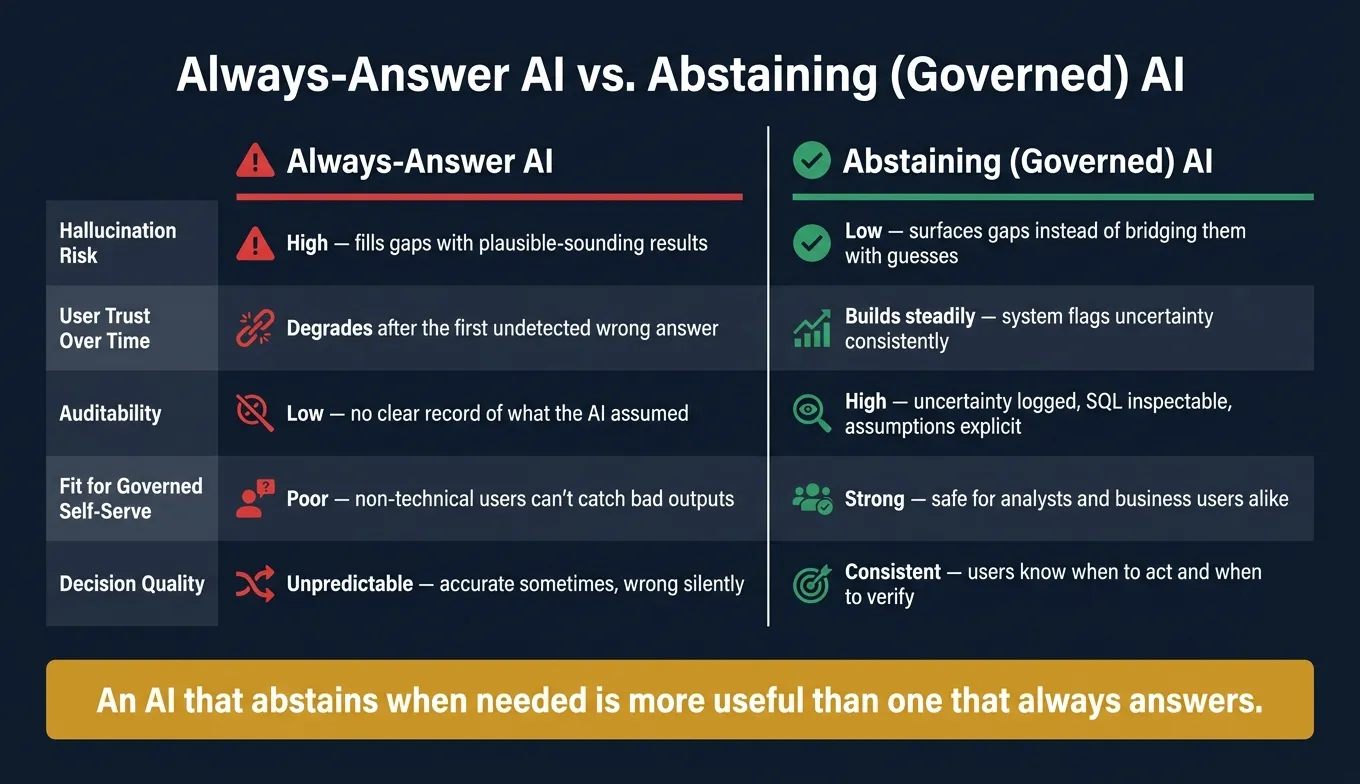 {Always-Answer AI vs. Abstaining AI: Which BI System Can You Trust?}
:::
{Always-Answer AI vs. Abstaining AI: Which BI System Can You Trust?}
:::
Knowing when not to answer matters just as much as answering well. If the system can't verify the metric, join path, context, or permissions, it should stop. Then it needs to show that uncertainty before someone acts on the result.
4 clear triggers for abstention
There are four cases where an AI analyst should pause and surface uncertainty instead of returning an answer.
Ambiguous metric definition. If a question uses a term like "active users" or "churn" and there isn't a governed definition in the semantic layer, the system should flag the ambiguity instead of silently choosing one meaning.
No verified join path. If there isn't a verified join path between the tables needed for the answer, the system should abstain instead of making up a relationship.
Outdated or unverifiable context. If a field was renamed, a view was deprecated, or a model changed, the system should show that uncertainty instead of returning a query that may not match the current warehouse state.
Restricted or partial data access. If row-level security or role-based access control limits what the user can see, the system must disclose that limit instead of returning an aggregate from a partial dataset without warning.
What the AI should say instead of guessing
Abstaining doesn't mean going silent. It should explain the gap and ask the next question. In plain terms, the system should say what's missing so the user can fix it.
| Trigger | Preferred AI Response |
|---|---|
| Ambiguous metric | I found two definitions for 'Churn.' Do you mean 'Logo Churn' (Customer Success) or 'MRR Churn' (Finance)? |
| Missing join path | I can see 'Orders' and 'Support_Tickets,' but there is no direct link between them. Should I join them via 'Customer_ID'? |
| Stale context | I can't verify this result because the 'Customer_Status' field was deprecated on 09/01/2026. Please check the 'Certified_Customers' view. |
| Low confidence | I drafted the SQL, but I can't verify whether is_internal = false belongs here. [Link to inspect SQL] |
| Restricted access | You do not have access to row-level PII. |
| Validation failure | The query failed validation. Escalating to an analyst. |
Always-answer AI vs. abstaining AI: a side-by-side comparison
This is where the difference becomes obvious. An always-answer system may look helpful at first, but it can hide bad assumptions. An abstaining system is less flashy, yet far safer when people need to trust the output.
| Dimension | Always-Answer AI | Abstaining (Governed) AI |
|---|---|---|
| Hallucination risk | High - fills gaps with plausible-sounding results | Low - surfaces gaps instead of bridging them with guesses |
| User trust over time | Degrades after the first undetected wrong answer | Builds steadily because users know the system flags uncertainty |
| Auditability | Low - no clear record of what the AI assumed | High - uncertainty is logged, SQL is inspectable, assumptions are explicit |
| Fit for governed self-serve | Poor - non-technical users can't catch bad outputs | Strong - safe for analysts and business users who can't verify raw SQL |
| Decision quality | Unpredictable - accurate sometimes, wrong silently | Consistent - users know when to act and when to verify first |
An AI that abstains when needed is more useful than one that always answers. But that only helps if the uncertainty is visible before the answer is published.
How to detect uncertainty before users act on bad numbers
Abstention only helps if the system spots doubt before the answer leaves the app. A warning after the fact doesn't do much. By then, someone may have already copied the number into a deck, sent it to a team, or made a call based on it.
Use semantic context and warehouse checks
When metric definitions live in a governed layer - whether in dbt, LookML, or a Git-backed context layer - the AI reads the approved definition instead of guessing from a column name. That cuts out a big source of silent errors.
Join validation matters just as much. Before a query runs against Snowflake, BigQuery, Redshift, or Postgres, the system should confirm that the join path exists with INFORMATION_SCHEMA checks. If the path isn't there, the system should refuse to answer or ask for clarification. Live warehouse connections also keep freshness, lineage, and access controls in place in a way CSV exports can't.
A simple setup includes three checks:
- Pre-run linting and
EXPLAIN - In-run row-count checks
- Post-run spot checks against trusted source tables
Once the semantic layer and AI are governed, the next thing to test is whether the user can inspect the SQL and diagnostics behind the answer.
Show confidence limits with inspectable SQL and query diagnostics
Even with governed context, users still need to see the query and diagnostics.
Every answer should show the SQL, row count, and query diagnostics. That metadata helps an analyst spot a problem fast. Notebook-style workflows, like Querio's reactive notebooks, make the SQL visible, editable, and tied to the chart. If something looks off, the analyst can open the cell, read the logic, and fix it.
Black-box answers can't do that. If the system hides its reasoning, a wrong number looks the same as a correct one. Then the only way to catch the issue is downstream, after a decision has already been made.
Ask follow-up questions when business language is ambiguous
When a term has no single governed meaning, stop and ask.
Business language is messy on purpose. The same word can mean different things to different teams, and that's where AI systems quietly drift into errors. In B2B SaaS, pipeline might mean total open opportunities, weighted pipeline, or only deals in stage 3 and beyond. Each definition leads to a different number. If the system runs into one of these terms without a governing definition, it should pause and ask instead of silently picking one meaning.
For example, ask whether pipeline means total open ARR or stage-weighted ARR. That one question can stop a wrong metric from spreading, and it helps build the trust self-serve analytics needs to work for non-technical users.
How to build a BI system that knows its limits
Governed context, live connections, and permission-aware answers
Detection only works if the BI system is set up to expose context, permissions, and query quality.
A trustworthy AI BI system needs three things: a governed semantic layer, live warehouse connections, and permission-aware answers. Those controls let the system check context before it responds. If even one is missing, abstention breaks down. The system either misses the fact that it lacks context, or it returns data the user should not see.
The semantic layer is where versioned metric definitions and trusted queries live. Live, read-only connections to Snowflake, BigQuery, Redshift, or Postgres keep data current. And when access controls like OAuth and RBAC are inherited at query time, the system can spot incomplete permissions and abstain instead of returning a partial or unauthorized result.
Inspectable notebooks over black-box answers
Once the system can verify data and access, the next step is visible logic.
Inspectable notebooks keep SQL, logic, and charts in one place, so users can audit or fix the answer instead of taking a black box at its word. That visibility is what makes abstention believable. When the system says it can't answer, users can see exactly which piece of context is missing or which permission is getting in the way.
The trust checklist for AI analytics
Use this checklist to judge whether an AI analyst can safely say "I don't know":
| Trust Check | What to look for |
|---|---|
| Metric governance | Definitions stored once, version-controlled, not inferred per query |
| Data freshness | Live warehouse queries, not cached extracts or CSV exports |
| Logic transparency | SQL and Python are inspectable and editable, not hidden |
| Permission awareness | User access controls inherited at query time, not bypassed |
| Abstention behavior | System refuses or asks for clarification when data or context is insufficient |
If any check fails, the system should abstain or ask for clarification.
FAQs
::: faq
How can I tell if an AI answer is safe to trust?
Trust an AI answer only when it rests on governed definitions, runs live against your warehouse, and shows the SQL or Python behind the result.
That matters for a simple reason: if you can't see the logic, you're taking the answer on faith. And that's a bad bet when the numbers shape decisions.
A dependable AI analyst should also flag ambiguity. When context is missing, it should say “I don’t know” instead of making a guess and hoping no one notices.
For high-stakes decisions, keep a human in the loop, especially for:
- PII
- complex joins
- new metric definitions
And if the tool answers vague questions without asking follow-up questions, treat it with caution. :::
::: faq
What should an AI analyst show before I use its numbers?
Before you use its numbers, an AI analyst should show the inspectable SQL or Python behind the result. That gives you a chance to check the logic, joins, filters, and time windows before you share the data or use it to make high-stakes calls.
It should also be clear about confidence, surface its assumptions, ask follow-up questions when terms are fuzzy or the data isn’t enough, and let you trace each result back to an approved, governed semantic layer. :::
::: faq
How do we reduce false answers in AI-driven BI?
Cut false answers by teaching the model to say “I don’t know” when the meaning is fuzzy or it doesn’t have the right access. Then route each answer through governed context and live warehouse execution instead of letting the model guess.
Use a semantic layer for canonical metrics and approved joins. Enforce warehouse permissions. And require SQL or Python that people can inspect.
After that, validate the work before anyone sees it:
- Run schema checks
- Use
EXPLAINdry runs - Check row counts for sanity
- Run regression tests
- Send high-risk cases to human review
That setup helps stop common failure points like wrong joins, bad filters, broken time windows, stale data, and made-up metrics. :::