Business Intelligence
dbt Metrics in 2026: What Happened and What to Use Now
Compare dbt Semantic Layer, Cube, and dbt models as replacements for deprecated dbt metrics; validate one revenue metric before cutover.

Legacy dbt metrics were deprecated in dbt Core 1.6 - not your dbt tables or views. I’d choose between 3 replacement paths based on how your users query data:
- dbt Semantic Layer: Keep metric definitions in your dbt project. MetricFlow generates SQL; managed serving provides shared query access.
- Cube: Keep dbt for transformations and use a separate layer for metric definitions, APIs, caching, and pre-aggregations.
- dbt models: Define metrics in SQL tables or views when users already query the warehouse directly.
Quick Comparison
| Option | Compatibility | Governance | Query access | Migration work |
|---|---|---|---|---|
| dbt Semantic Layer | Check warehouse, adapter, and managed serving support | dbt YAML and Git review | APIs and supported integrations | Rewrite definitions; test joins and permissions |
| Cube | Snowflake, BigQuery, Redshift, and Postgres | Separate Cube definitions and access policies | REST, GraphQL, SQL, and MDX | Rebuild definitions and configure serving |
| dbt models | Your existing dbt-supported warehouse | SQL, tests, docs, and warehouse permissions | Direct warehouse SQL | Move calculations into models; maintain time logic |
My starting point? One approved revenue metric. Preserve its formula, grain, filters, currency, and timezone. Then compare results by month, region, and customer segment, test access with consumer credentials, and get the metric owner’s approval before switching users.
1. dbt Semantic Layer powered by MetricFlow
dbt keeps metric logic alongside transformations, tests, and docs. When you replace legacy metrics, the dbt Semantic Layer keeps definitions in your existing Git-review workflow, so ownership stays with the dbt project.
Local MetricFlow and the managed dbt Semantic Layer handle different jobs. The local engine lets developers control SQL generation, but it isn’t a standalone serving layer. The managed dbt Semantic Layer adds centralized query access through APIs and dbt Cloud integrations. If BI tools need a shared serving layer, check that the managed path fits your workflow. Your choice depends on who serves metrics - not just who defines them.
Check warehouse support for SQL generation and managed serving separately, then compare Cube, Transform, and MetricFlow for access and governance. Git-reviewed definitions inside the dbt project provide governance, but you still need to validate both dbt and warehouse permissions. Test row-level restrictions using the actual serving credentials. Don’t assume the semantic layer alone enforces them.
When migrating from deprecated dbt metrics, map each calculation to its measures and metric definition. Keep time dimensions and scope filters, and define the entities needed for joins. Inspect MetricFlow’s generated SQL, then check results against your current dbt models before switching consumers. Use these checks to assess compatibility, governance, access, and migration effort.
2. Cube integrated with dbt
Unlike the dbt Semantic Layer, Cube separates metric serving from dbt. It connects to Snowflake, BigQuery, and Redshift and can use dbt transformation models as its source. Legacy dbt metrics don’t migrate automatically - you’ll need to recreate them in Cube YAML.
Define measures, dimensions, joins, and pre-aggregations in Cube YAML, keeping each metric’s calculation and filters intact. Cube Store supports pre-aggregations for faster serving, but you must build and maintain each one. The tradeoff? More setup in exchange for faster serving and support for more concurrent queries.
Cube offers REST, GraphQL, SQL, and MDX query access for BI tools, APIs, and applications. Its caching and pre-aggregations suit workloads where concurrent users and low latency matter. But not every query uses a pre-aggregation, and caching doesn’t guarantee fixed latency.
Keep ownership clear: dbt handles transformations; Cube handles metric definitions, serving settings, refreshes, and access policies. Configure Cube RBAC separately from warehouse permissions.
For this article’s revenue example, start with the same validation pattern: compare Cube’s warehouse and pre-aggregated results against dbt source models. Check that joins don’t duplicate revenue and that refreshes reflect source changes. Migration work includes rebuilding definitions, access, and serving operations.
3. Metrics in dbt models
If your team doesn’t need a separate semantic layer, dbt models offer the simplest replacement path. Use dbt marts for stable metrics queried directly in SQL. Keep calculations in versioned warehouse models - not dashboards.
On Snowflake, BigQuery, Redshift, or Postgres, consumers query reporting tables or views directly. Warehouse permissions and existing row-level policies control access. The data team owns grants, documentation, and approved downstream access. [2]
This approach replaces legacy dbt metrics with SQL definitions, rather than MetricFlow or Cube. Governance comes from Git review, dbt tests, and documentation. Document each metric’s grain, formula, time window, exclusions, and owner, along with lineage back to source tables and transformation logic. Business owners approve definitions; analytics engineers implement and test them. [2]
The tradeoff is flexibility. Adding a new dimension means changing the model, retesting it, and redeploying it. This constraint matters most during revenue migration, when the model must preserve the exact calculation rules.
For revenue, preserve the calculation, time window, filters, and exclusions. Finance should approve those rules before release; the data team should validate results against the existing definition at the same aggregation level. [1][2]
Use the same validation pattern to compare this path with the other two options.
Compare compatibility, governance, access, and migration
Use this table to decide where legacy metric logic should live: in dbt, a metrics layer vs semantic layer, or direct warehouse SQL. All three options can preserve the business calculation. What changes is who owns the definition and how users query it.
| Approach | Compatibility | Governance | Access paths | Migration effort |
|---|---|---|---|---|
| dbt Semantic Layer | Verify MetricFlow support and managed serving support separately for Snowflake, BigQuery, Redshift, and Postgres. | Definitions live in dbt YAML and are versioned in Git. | dbt APIs and supported cloud integrations. | Rewrite definitions in MetricFlow YAML, then validate joins, permissions, and consumer access. |
| Cube | Snowflake, BigQuery, Redshift, and Postgres. | Definitions and access policies live in a separate Cube project. | REST, GraphQL, SQL, and MDX. | Set up a separate project, recreate definitions, and configure caching or pre-aggregations as needed. |
| Metrics in dbt models | Every warehouse your dbt project already supports. | SQL models, Git review, and YAML documentation. | Direct warehouse SQL through BI tools or warehouse connectors. | Low effort to start, but complex time-series and period-over-period logic requires more manual model maintenance. |
Compatibility: What works with your stack?
Check the exact warehouse, adapter, and serving combination, not warehouse support alone. With dbt models, the logic stays in the warehouse your project already uses.
Governance: Who owns the metric definition?
Keep one authoritative definition with a named owner, whether it lives in dbt YAML, Cube, or SQL models. Test access restrictions with actual consumer credentials.
Query access: How do users retrieve metrics?
Match the access path to how consumers retrieve data: managed semantic access, a separate serving layer, or direct warehouse access.
Migration effort: What needs to change?
Estimate the work using your hardest metric’s joins, time windows, and exclusions. Rewriting the definition is only part of the job.
The next section uses your chosen approach to migrate and validate the revenue metric end to end.
Choose a replacement and validate revenue
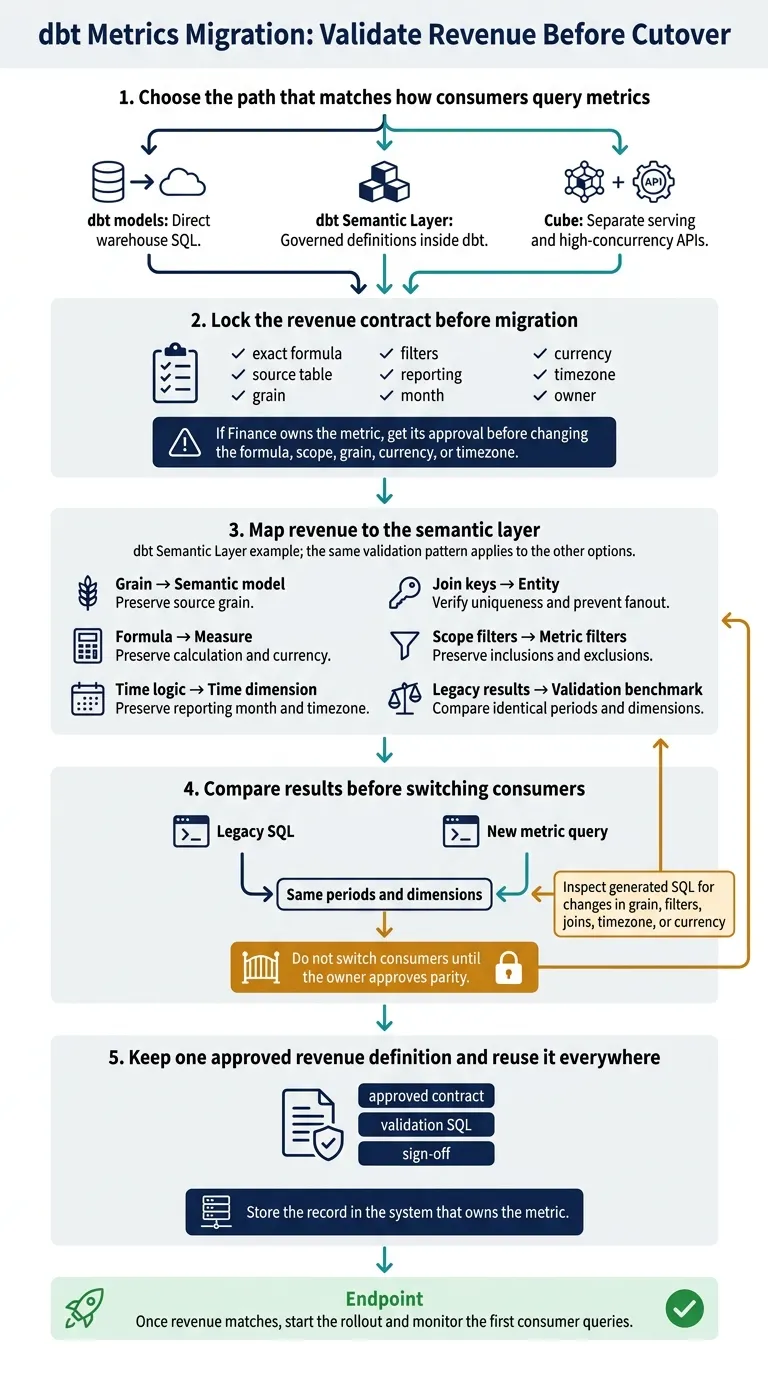
Use the comparison above to choose a path. Then validate one revenue metric from start to finish.
Choose the path that matches how consumers query metrics
Match your choice to how consumers query metrics: dbt models for direct warehouse SQL, the dbt Semantic Layer for governed definitions inside dbt, or Cube for separate serving and high-concurrency APIs.
Lock the revenue contract before migration
Document the exact formula, source table, grain, filters, reporting month, currency, timezone, and owner. If Finance owns the metric, get its approval before changing the formula, scope, grain, currency, or timezone.[1]
Map revenue to the semantic layer
This example uses the dbt Semantic Layer. The same validation pattern applies to the other options.
For the dbt Semantic Layer path, map the approved revenue contract like this:
Existing concept MetricFlow destination Check Grain Semantic model Preserve source grain Formula Measure Preserve calculation and currency Time logic Time dimension Preserve reporting month and timezone Join keys Entity Verify uniqueness and prevent fanout Scope filters Metric filters Preserve inclusions and exclusions Legacy results Validation benchmark Compare identical periods and dimensions
Compare results before switching consumers
Run the legacy SQL and the new metric query for the same periods and dimensions. Do not switch consumers until the owner approves parity.[2]
If the results differ, inspect the generated SQL for changes in grain, filters, joins, timezone, or currency.
Keep one approved revenue definition and reuse it everywhere
Store the approved contract, validation SQL, and sign-off in the system that owns the metric. Use that record as the only source of truth.
Once revenue matches, start the rollout and monitor the first consumer queries.
Next steps for replacing legacy dbt metrics
Once you’ve validated the path, turn the decision into a rollout plan. Assign an owner, map consumer access, and estimate the migration’s scope.
Choose dbt Semantic Layer for dbt-managed semantic definitions, Cube for separate serving, or dbt models for warehouse-native SQL. Plan the updates downstream consumers will need, then check the new metric against the legacy result before cutover.
If your team needs governed self-serve analytics on that stack, Querio’s context layer can document approved definitions and trusted queries. Live warehouse connections and editable SQL/Python let users inspect results - without creating a second metric formula.
Start with one business-critical metric. Define its formula, time window, scope rules, and owner. Before cutover, prove that results match by month, region, and customer segment - not just the overall total. Keep the approved contract as the source of truth in a versioned warehouse model so it stays testable as you retire the legacy implementation.
FAQs
Can we migrate dbt metrics without disrupting dashboards?
Yes - treat metric definitions as governed infrastructure. Store them in version-controlled dbt models or a semantic layer rather than embedding logic in visualization tools. That way, dashboards use a single source of truth.
To avoid disruption, document definitions in a shared glossary, review changes through Git-based pull requests, and check how each change will affect downstream systems before deployment. This keeps dashboards and AI agents aligned when the underlying logic changes.
How do we prevent revenue double-counting after migration?
Define revenue once: spell out what’s excluded, apply the correct time logic, and specify approved join paths. dbt Semantic Layer/MetricFlow outputs, dashboards, and AI queries should all use that governed definition - not recreate it in SQL.
Version the definition through Git/CI, require certification and a named owner, and use impact analysis to block changes that would put downstream reporting out of sync. Querio reads dbt's semantic_manifest.json, so it uses the MetricFlow definition instead of keeping a second copy, and in CI a renamed dbt model flags every dashboard and query that uses it before the pull request can pass. [1][2]
How should we monitor metric accuracy after cutover?
Treat metric definitions as governed infrastructure: name an owner, schedule reviews, and require approval before changes go live [1]. Keep an audit trail that records users, executed SQL or Python, accessed objects, and timestamps so you can trace disputed figures [2].
Before changing columns or business rules, use lineage to check how those changes would affect dashboards, notebooks, and AI queries [1][3]. Run dbt freshness, uniqueness, and schema consistency checks to catch breaking changes or data drift [2].