Business Intelligence
AI Reporting for SaaS: Everything You Need to Know
AI reporting turns SaaS data into real-time, self-service insights—track MRR, churn, LTV, run forecasts, and cut reporting delays.

AI reporting is transforming how SaaS businesses analyze and act on data. It simplifies decision-making by enabling teams to ask plain-English questions like, "Who are our top customers this quarter?" and get instant, accurate answers. This eliminates reliance on technical skills like SQL and reduces delays caused by traditional reporting methods.
Key takeaways:
- Faster insights: Analysis that once took weeks now happens in seconds.
- Self-service access: Non-technical teams can explore data without bottlenecks.
- Unified data: AI connects directly to tools like Snowflake or BigQuery, ensuring consistency.
- Predictive capabilities: Spot trends, risks, and opportunities proactively.
AI reporting also helps SaaS companies track vital metrics like Monthly Recurring Revenue (MRR), churn, and Customer Lifetime Value (LTV), while addressing challenges like data silos and resource constraints. By integrating AI-driven tools, businesses can save time, reduce errors, and make better decisions based on real-time data.
What Is AI Reporting for SaaS?
AI reporting blends data analysis with advanced technologies like algorithms, Large Language Models (LLMs), and Natural Language Processing (NLP) to extract insights and trends from real-time data automatically. Unlike traditional analytics tools, which often require technical expertise and long wait times, AI reporting allows users to ask questions in plain English and get instant, actionable answers.
Here’s the big difference: traditional analytics often leaves business users waiting weeks for custom reports. AI reporting flips the script by enabling self-service analytics. For example, you can simply ask, "Who are our top 10 customers by revenue this quarter?" and get clear visualizations within seconds.
This approach is already making waves. At Siemens Energy, an AI-powered chatbot unlocked access to 700,000 pages of technical documents for 25 R&D engineers - instantly. Tim Kessler, Head of Data, Models & Analytics, described it as transformative.
AI reporting doesn’t stop at answering questions. These platforms can also predict trends, spot anomalies, and create scenarios based on current data. This proactive edge helps SaaS companies identify risks, such as at-risk customers, or seize revenue opportunities before they escalate into major challenges.
How AI Reporting Works
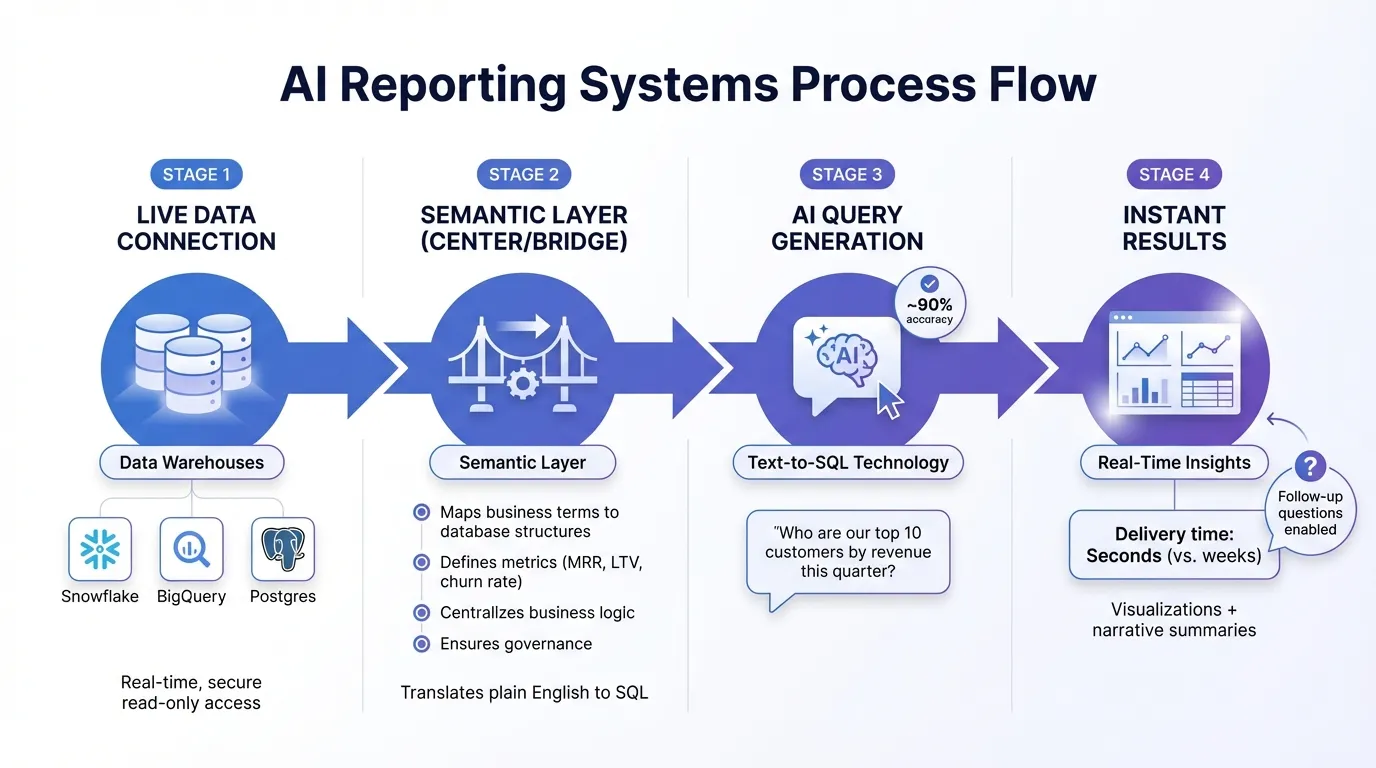
Modern AI reporting platforms rely on three main components: live data connections, semantic layers, and automated query generation. These systems connect directly to data warehouses like Snowflake, BigQuery, or Postgres, ensuring that every query pulls from accurate, up-to-date information.
The semantic layer acts as a bridge between technical database structures and everyday business language. Data teams set up metrics, relationships, and rules - mapping terms like "monthly recurring revenue" or "customer lifetime value" to the corresponding database calculations. This setup allows the AI to interpret plain-English questions and generate precise SQL queries automatically.
At the heart of this process is text-to-sql technology, which powers the conversational interface. Tools like Snowflake's Cortex Analyst achieve nearly 90% accuracy in translating natural language into database queries. This eliminates the need for manual coding, cutting analysis time from weeks to seconds. Platforms like Querio take it further by connecting directly to your data warehouse with secure, read-only credentials, while layering business context through centrally governed metrics and glossary terms.
Everything happens in real time. If a user asks, "Which features lead to the highest retention?", the AI interprets the question, generates the appropriate SQL, runs it against live data, and delivers both visualizations and narrative summaries. Users can then dig deeper by asking follow-up questions - no need to wait for new reports.
These advancements don’t just streamline processes; they deliver tangible benefits for SaaS companies.
Benefits of AI Reporting for SaaS Companies
AI reporting transforms how SaaS teams analyze and act on data by offering speed, accessibility, and accuracy. Let’s break it down:
-
Speed: Traditional data analysis can take weeks - or even months. AI reporting reduces that to minutes or seconds, enabling teams to base decisions on real-time insights rather than outdated reports.
-
Accessibility: By democratizing data access, AI removes bottlenecks. Sales teams can evaluate pipeline health without submitting help desk tickets, product managers can assess feature adoption without needing SQL expertise, and finance teams can forecast revenue without waiting on data scientists. This self-service model spreads analytics capabilities across the organization.
-
Accuracy: AI eliminates manual errors in data preparation and ensures consistency by relying on governed definitions. For instance, metrics like "churn rate" or "net revenue retention" are calculated the same way every time. Role-based access controls also ensure that users only see the data they’re authorized to view, balancing security with accessibility.
For growing SaaS companies, scalability is another major win. Traditional analytics often requires hiring additional analysts as data and user demands increase. AI reporting platforms, however, can handle rising query volumes without needing a larger team, making it easier to grow without adding complexity.
Core Features of AI Reporting Platforms
When SaaS companies consider AI reporting platforms, three key features stand out. These aren't just bells and whistles - they're what separate simple analytics tools from solutions that can truly transform how your team works. These capabilities often determine whether the platform becomes an everyday tool or just another unused dashboard.
Natural-Language Querying
Natural-language querying (NLQ) removes the technical barriers that often come with data analysis. Instead of needing to master SQL or navigate clunky dashboards, your team can type or even speak questions like, "How does our MRR growth compare to last quarter?" and get immediate, clear answers - complete with visualizations.
NLQ relies on AI to understand both the intent behind a question and its context. This means it can handle different ways of asking the same question and still deliver consistent, accurate results. Voice commands take this accessibility even further.
"Natural language processing (NLP) lets you talk to your data in plain English and get meaningful answers, no SQL or tech wizardry needed." - Chris Tottman, Editor-at-Large, SaaSGenius
The impact on business is clear. Traditional dashboards can cost around $18,000 to $20,000 to build when you factor in personnel, storage, and computing. NLQ platforms slash that setup time from weeks to hours, while also reducing the risk of manual errors in coding. Between 2024 and 2025, spending on AI-powered applications surged by over 75%, with 77.6% of IT leaders upgrading their SaaS tools specifically for AI-driven capabilities.
Beyond simplifying queries, NLQ also sets the stage for real-time insights.
Real-Time Dashboards
Real-time dashboards, directly connected to your data warehouse, ensure that every metric reflects your business's current state. For SaaS companies dealing with fast-changing numbers like daily sign-ups, churn rates, or revenue shifts, this kind of real-time visibility is crucial for spotting and addressing issues as they happen.
With drag-and-drop tools, users can quickly create customized dashboards without needing IT support. For example:
- Product managers can track feature adoption.
- Sales leaders can monitor pipeline health.
- Executives can design overviews of key performance indicators (KPIs).
This self-service approach eliminates the need for IT tickets or waiting on analysts, empowering teams to act on data independently.
Semantic Layer for Data Governance
A semantic layer acts as the backbone of your data strategy, serving as the single source of truth for your organization's data definitions and business logic. Instead of having metrics like churn rate calculated differently across teams, the semantic layer centralizes these definitions, ensuring everyone works with consistent data.
Data teams can define relationships between tables (like one-to-many or many-to-many), standardize calculation logic, and label metrics clearly. Platforms like Querio allow organizations to centralize joins, metrics, and glossary terms, ensuring that all queries pull from the same, reliable source. This version-controlled system maintains accuracy as your data warehouse expands.
The semantic layer also plays a critical role in governance and security. Role-based access controls ensure that users only see the data they're authorized to view, maintaining a balance between accessibility and security. This balance is essential for SaaS companies looking to scale their AI reporting while keeping their data secure and consistent.
SaaS Metrics to Track with AI Reporting
AI reporting has revolutionized the way SaaS companies keep tabs on their most important numbers. Instead of waiting for monthly dashboards that often flag issues too late, teams can now ask questions in plain English and get immediate insights into revenue, customer behavior, and growth trends. It also connects the dots between metrics, helping you see, for example, how a spike in churn impacts Net Revenue Retention (NRR) or how changes in Customer Acquisition Cost (CAC) affect overall profitability.
The key metrics to watch fall into two main categories: revenue health and customer health. On the revenue side, metrics like Monthly Recurring Revenue (MRR), Annual Recurring Revenue (ARR), and NRR show whether your business model is delivering results. Meanwhile, customer-focused metrics like churn rate, Lifetime Value (LTV), and CAC reveal if you're attracting and keeping the right users.
Revenue Metrics: MRR, ARR, and NRR
MRR and ARR are the cornerstones of SaaS financial planning. MRR is straightforward: add up all recurring revenue from active subscriptions in a month. For instance, if you have 200 customers each paying $50 per month, your MRR is $10,000. ARR is simply MRR multiplied by 12. AI reporting makes this process seamless by pulling data directly from ERP, billing, and CRM systems, reducing the chance of manual errors.
Net Revenue Retention (NRR) goes deeper, showing how much revenue you're gaining (or losing) from your existing customers. The formula is:
(Retained Revenue / Base Recurring Revenue) x 100.
While the math might seem simple, it gets tricky when factoring in upgrades, downgrades, and cancellations. AI tools handle these complexities, automatically tracking upsells, downgrades, and churn. An NRR above 100% is a strong indicator that your existing customers are spending more over time, signaling a solid product-market fit.
AI reporting doesn’t stop at static numbers - it enables "what-if" scenario planning. For instance, you can ask, "What happens to our ARR if we improve retention by 5%?" and instantly get projections. This feature helps leaders make faster decisions on pricing, feature development, or market expansion. AI tools also monitor for anomalies, such as sudden dips in MRR or unusual billing patterns, sending alerts before small issues escalate.
"AI-visibility-enabled revenue dashboards... blend real-time AI insights, anomaly detection, forecasting refinements, and what-if scenario planning into a single leadership-ready view." - Alex Prober, CPO, brandlight.ai
Equally important is understanding customer behavior, as it directly impacts these revenue metrics.
Customer Metrics: Churn, LTV, and CAC
Customer behavior holds the key to understanding your business’s overall health. Churn rate, for example, measures how many customers you’re losing. AI reporting takes this a step further by predicting churn, analyzing behavioral trends like reduced logins, shorter session times, or declining feature usage. This allows teams to take action, whether through personalized outreach, discounts, or additional training.
Customer Lifetime Value (LTV) estimates the total revenue a customer will bring over their relationship with your company. AI tools calculate this by analyzing past purchase data, usage trends, and retention rates. Pair this with Customer Acquisition Cost (CAC) - the total sales and marketing spend divided by the number of new customers - and you can assess profitability. A healthy LTV-to-CAC ratio is generally above 3:1, meaning you earn at least three times what you spend to acquire each customer.
Take Drift, for example. In 2024, they used AI to track cost-per-customer and discovered that certain features were driving up infrastructure expenses without delivering matching revenue. By optimizing those features, they saved $2.4 million. Similarly, Monte Carlo shifted to daily revenue tracking in 2025, moving away from unreliable monthly forecasts to better manage the unpredictable usage patterns of their AI-native product. These examples highlight how AI reporting links customer behavior to actual costs, helping identify which segments are profitable and which drain resources due to high support needs or infrastructure demands.
As more SaaS companies move toward usage-based pricing - where revenue fluctuates based on actual product use - traditional metrics like seat-based pricing become less relevant. AI reporting adapts by tracking new metrics like "usage ramp rate" and "usage volatility", providing day-by-day insights into how customers engage with your product. This level of detail ensures businesses can stay ahead in a rapidly shifting market.
How to Implement AI Reporting in Your SaaS Workflow
Bringing AI reporting into your SaaS workflow means rethinking how you access and interpret data. It’s about breaking down barriers between teams, setting clear data standards, and teaching everyone to ask the right questions using straightforward, everyday language.
Best Practices for Implementation
Start by creating a single source of truth for your data. Connect your AI reporting platform directly to your data warehouse. When teams like marketing, sales, and product rely on separate spreadsheets or outdated exports, it leads to inconsistent numbers and wasted time trying to reconcile reports.
Next, clearly define and document key metrics and terms. For instance, does an "active user" mean someone who simply logged in this month, or someone who completed a specific action? When your AI tool understands these definitions, it can deliver accurate answers - no SQL skills required from your team.
Provide tailored training for different roles. Set up access levels so executives can view high-level dashboards while analysts can dive deeper into detailed data. Train teams to query data in plain English, with examples like "What’s the churn rate for enterprise customers this quarter?" or "Show me MRR growth by region." The goal is to make data exploration intuitive and approachable.
Once your implementation is solid, focus on maintaining data governance to ensure long-term accuracy and trust in your reporting.
Maintaining Data Quality and Governance
After setting up your AI reporting, keeping your data reliable is key. Data governance ensures your reports stay accurate and trustworthy. Use automated validation rules to catch errors early - like duplicate records, missing values, or numbers outside expected ranges. For example, if your billing system shows a customer paying a negative amount, you’ll want an alert immediately, not during the monthly review.
Set up tiered permissions to control access. For instance, finance teams can focus on revenue details, while customer success teams see usage patterns and health scores. This approach protects sensitive information while reducing unnecessary noise for each group.
Documentation is another cornerstone of effective governance. Keep records of data flows, changes, and any incidents, along with how they were resolved. Here’s a quick guide to what should be documented and how often:
| Documentation Type | Required Information | Update Frequency |
|---|---|---|
| Data Privacy | Collection methods, storage, usage policies | Monthly |
| Model Validation | Testing details, accuracy, bias checks | Quarterly |
| Regulatory Alignment | Industry standards (GDPR, HIPAA), audit results | Semi-annually |
| Incident Reports | Issues, remediation steps, outcomes | As needed |
Additionally, have an incident response plan ready to go. This ensures your team knows exactly who handles investigations and what steps to take when issues arise. For example, if your AI tool flags a sudden 40% drop in daily active users, you’ll want a clear process to address the anomaly without unnecessary panic. Critical problems, like data breaches, should be addressed within an hour, while lower-priority tasks like updating documentation can wait up to 72 hours.
Use Cases for AI Reporting in SaaS
AI reporting offers practical solutions for SaaS teams, streamlining processes and improving decision-making. Here’s how companies are leveraging these tools in three key areas.
Revenue Forecasting and Scenario Planning
Traditional forecasting can be slow and riddled with inaccuracies. Did you know that 56% of organizations spend over five days creating forecasts, yet 61% of finance teams struggle with unreliable data? AI changes the game by pulling real-time data from systems like your CRM, billing platform, and ERP. It then runs predictive models to uncover patterns that might otherwise go unnoticed.
AI allows for continuous forecasting and instant "what-if" scenario analysis. For example, you can evaluate how a 10% price increase or a new enterprise sales initiative might impact your ARR. These forecasts often achieve over 95% accuracy, while also highlighting key variances.
The trend toward bottom-up forecasting is also gaining traction. Instead of applying blanket assumptions like a flat 30% growth rate, AI dives into granular data. It considers factors like seat expansions in mid-market segments, regional deal flow, and churn rates specific to customer cohorts. This approach recognizes that SMBs and enterprise accounts behave differently, particularly in ramp-up times and renewal patterns.
These advancements in forecasting open up new opportunities for proactive customer engagement.
Customer Retention Optimization
AI reporting doesn’t just improve forecasting - it also helps boost retention and revenue. Considering that acquiring a new customer costs five times more than retaining an existing one, this is a huge win. AI analyzes data such as usage patterns, support tickets, and subscription details to predict which accounts might cancel.
For example, a 20% drop in usage or a surge in support tickets can trigger automated alerts for your Customer Success team. AI can even analyze the tone of customer interactions, flagging frustrated users who may need immediate intervention. By acting on these insights, businesses have reported up to a 36% reduction in churn and a 33% boost in customer satisfaction scores.
AI also addresses passive churn, which often goes unnoticed but can account for up to 50% of total churn. Issues like expired credit cards or failed payments are automatically flagged and resolved through AI-driven renewal processes, preventing unnecessary account cancellations.
"Our clients using AI-driven playbooks cut manual churn-analysis time by 40%." - Irina Vatafu, Head of Customer Success at Custify
When combined with improved forecasting, these proactive retention strategies drive greater operational efficiency.
Cost Anomaly Detection
Identifying unusual spending manually is time-consuming and prone to errors. AI reporting simplifies this by monitoring operational expenses in real-time and flagging anomalies as soon as they exceed predefined thresholds. Whether it’s a sudden spike in cloud infrastructure costs or unexpected departmental spending, AI ensures you’re alerted immediately - long before the next budget review.
AI doesn’t stop at flagging issues. It generates detailed summaries that not only pinpoint cost variations but also forecast reorder needs or identify potential supply chain risks. This frees your team from repetitive tasks, allowing them to focus on more strategic priorities.
Conclusion
AI is transforming data analytics and reshaping how SaaS companies approach decision-making, daily operations, and long-term growth. By 2027, AI-driven decision intelligence is expected to augment or automate half of all business decisions. The impact is clear: 75% of workers say AI has improved the speed or quality of their work, and advanced users save more than 10 hours each week. These time savings and productivity boosts are redefining the SaaS landscape.
Traditional dashboards are being replaced by smarter, adaptive systems. These systems enable quicker forecasts, proactive churn management, and instant detection of cost anomalies - no need to wait days for manual analysis anymore.
Over 80% of global companies now rely on AI to improve operations, and for SaaS businesses, AI reporting provides the speed, precision, and scalability needed to stay competitive in a data-driven world. Whether you’re monitoring MRR trends, identifying customers at risk, or planning revenue for the next quarter, AI transforms your data warehouse into a responsive partner that learns and evolves with your team’s needs.
By integrating modern business intelligence tools, businesses not only streamline operations but also gain a competitive edge. Querio’s AI reporting platform brings these capabilities to life with features like natural-language querying, live connections to Snowflake, BigQuery, and Postgres, and a centralized context layer to ensure governance. This means every team - Marketing, Finance, and beyond - can access reliable insights in seconds, no SQL required. Companies using Querio have cut reporting time by up to 93.75% and saved $45,000 annually by eliminating bottlenecks and empowering non-technical teams.
Take the leap with Querio’s AI reporting to accelerate smarter decisions and fuel sustainable growth.
FAQs
How can AI-powered reporting enhance decision-making for SaaS companies?
AI-powered reporting is changing the game for SaaS companies by sifting through massive datasets and delivering real-time, actionable insights. It doesn’t just crunch numbers - it spots trends, flags anomalies, and even offers predictive insights in plain language. This makes it easier for teams to make quick, confident decisions.
By automating what used to be manual and time-consuming tasks, AI reporting removes the need for IT assistance or tedious processes. The result? SaaS companies can tackle challenges, seize opportunities, and improve performance faster. Whether it’s boosting customer retention or streamlining operations, AI ensures decisions are made without unnecessary delays.
How does AI reporting benefit non-technical teams in SaaS businesses?
AI reporting gives non-technical teams the tools to dive into data without needing a background in coding or SQL. With a user-friendly, self-service analytics experience, team members can simply type questions like "What was our churn rate last quarter?" and get instant, visual answers. This removes the need to wait for data engineers or analysts, allowing teams in marketing, sales, or support to quickly explore data, spot trends, and address challenges on their own.
It doesn’t stop there - AI reporting also takes care of time-consuming tasks like generating reports, syncing data in real-time, and flagging anomalies. Teams benefit from up-to-date dashboards and alerts, while predictive analytics provide insights into trends, such as revenue fluctuations. By managing data cleaning and ensuring precision, AI reporting offers accurate insights that help teams make quicker, smarter decisions while keeping operational costs in check.
How does AI reporting ensure data security and compliance?
AI-powered reporting tools are built to prioritize data security and governance, ensuring sensitive information stays protected. These tools actively track data movement in real time, flagging any unauthorized activities and enforcing strict policies to block unapproved access or data exports. By incorporating features like role-based permissions, encryption, and adherence to standards such as SOC 2, ISO 27001, GDPR, and HIPAA, they help maintain compliance and safeguard your data.
On top of that, machine learning adds an extra layer of protection by identifying unusual patterns - like attempts to access restricted information - and automatically blocking or redacting such queries. As user roles evolve or new data sources are integrated, permissions are adjusted dynamically, eliminating the need for manual updates. This seamless, automated system allows businesses to scale securely while ensuring AI-driven insights remain fast, secure, and compliant with U.S. regulations.