Business Intelligence
ThoughtSpot AI features natural language analytics what does it do
Type plain-English questions to get instant, transparent data insights with real-time results, inspectable SQL/Python, and consistent business metrics.

ThoughtSpot AI makes data analytics simple by allowing you to ask questions in plain English, like "What were our top-selling products last quarter?" and get instant answers. This eliminates the need for technical skills like SQL, making data accessible to everyone, not just analysts. Using advanced AI and natural language processing, ThoughtSpot converts your questions into precise queries, delivering real-time insights directly from your data warehouse.
Key Features:
- Natural Language Queries: Ask everyday questions and get actionable data insights without coding.
- Real-Time Analytics: Get up-to-date answers instantly, even for time-sensitive scenarios like sales performance during a live event.
- Transparency: Review the SQL or Python code behind every result to ensure accuracy and trust.
- Shared Context: A unified semantic layer ensures consistent metrics across all teams and reports.
- AI Assistance: Features like ThoughtSpot Sage explain data insights clearly and help users understand complex results.
Practical Applications:
- For Non-Technical Users: Empower teams to explore data independently, without relying on IT for reports.
- For Data Teams: Automate routine queries, saving time for more complex analyses.
- In Business Scenarios: Use live data for immediate decision-making, such as adjusting strategies during a promotion.
With pricing starting at $1,250 per month, ThoughtSpot AI combines ease of use with enterprise-grade security, making it a powerful tool for organizations of all sizes.
Introducing ThoughtSpot Sage: AI-Powered Analytics with GPT-3
::: @iframe https://www.youtube.com/embed/pewJbrCA15A :::
How ThoughtSpot AI Converts Plain Language into Data Insights
::: @figure 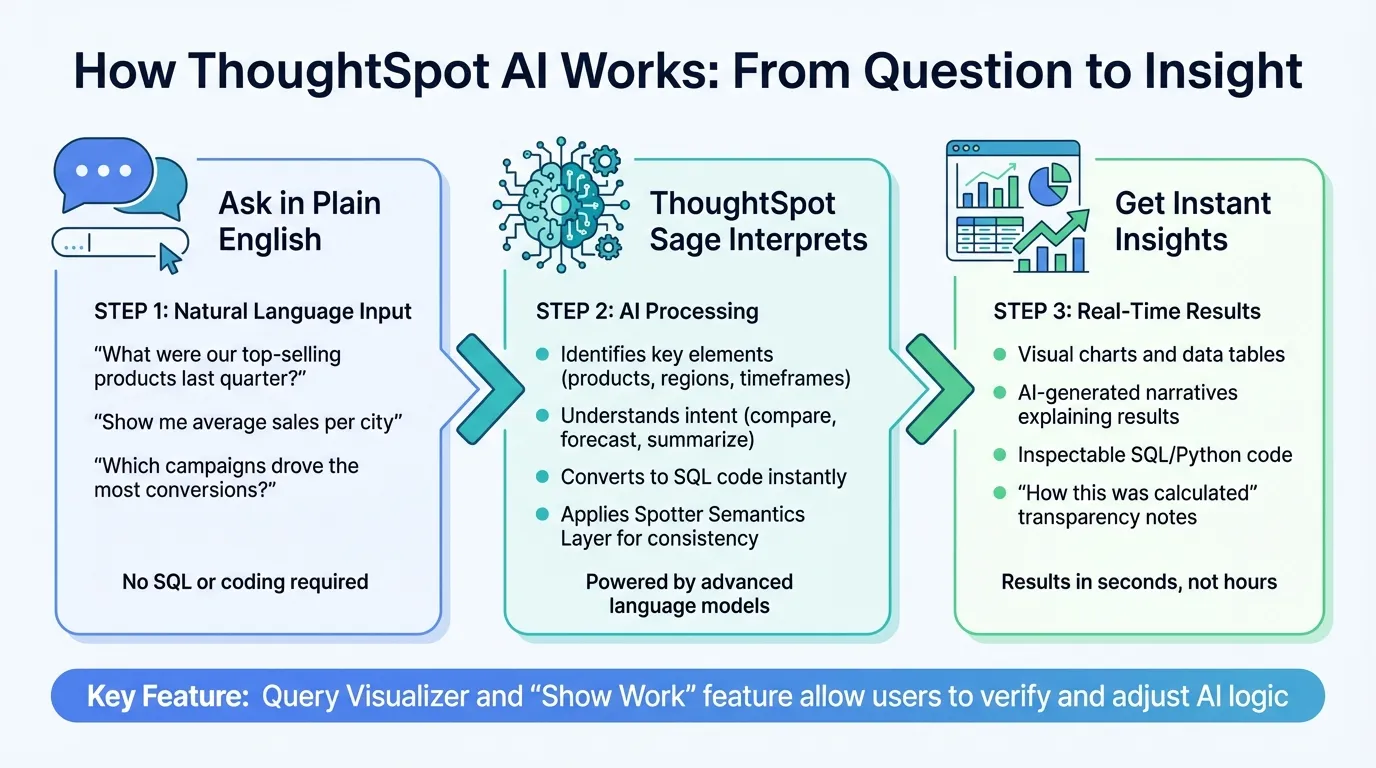 {How ThoughtSpot AI Converts Natural Language Questions into Data Insights}
:::
{How ThoughtSpot AI Converts Natural Language Questions into Data Insights}
:::
Natural Language Querying Basics
With ThoughtSpot AI, you can type simple, plain-language questions to uncover data insights - no need to wrestle with complicated SQL queries. For example, you might ask, "What are the top-performing products this quarter?" or "Show me average sales per city." Powered by ThoughtSpot Sage, the system combines cutting-edge language models with advanced search technology to interpret your question and pull precise answers directly from your data warehouse[2].
A good starting point is to request an overview of the dataset to understand its structure and available columns. You can ask questions like "What does this dataset include?" or "Which columns can I query?" This helps you figure out what kinds of insights the data can provide. ThoughtSpot AI's agent, Spotter, identifies key elements in your query (like products or regions), understands your intent (whether you're comparing, forecasting, or summarizing), and even remembers the context of previous questions. This initial setup ensures the AI can deliver accurate, context-aware responses in real time.
Real-Time Insights with AI-Generated Queries
When you submit a query in plain English, ThoughtSpot AI doesn’t rely on pre-made reports. Instead, it converts your request into SQL code, runs the query instantly, and delivers results within seconds. For those who prefer working directly in SQL, the AI Assist feature lets you use a shorthand command like --! followed by your instruction (e.g., --! total sales by rep), and the system generates the corresponding SQL code for you.
The AI also handles relative timeframes with ease. Whether you ask about "last 10 days," "this week," or "this year," it calculates the appropriate date ranges to give you up-to-date insights. Additionally, ThoughtSpot Sage creates AI-driven narratives that explain the meaning behind each visualization. This feature transforms raw numbers into clear, actionable insights, making it easier for anyone to understand the data and make informed decisions. The platform’s focus on real-time analytics ensures that insights are both timely and accessible.
Transparency and Accuracy in AI Outputs
ThoughtSpot AI prioritizes transparency in its results. Every insight includes a "how this was calculated" note, which breaks down the steps used to generate the answer. This allows users to inspect the SQL or Python code, review the applied formulas, and confirm that the results align with the underlying data.
The Query Visualizer tool provides a detailed view of the SQL logic behind each result, while the "Show Work" feature outlines how the AI interpreted your query. You can even hover over specific elements of the query to see how they were derived and make adjustments based on your expertise. This combination of transparency and user control ensures that the analytics remain both accurate and adaptable, giving you confidence in the insights delivered by ThoughtSpot AI[2].
Practical Applications of Natural Language Analytics
Simplifying Data Queries for Non-Technical Users
Imagine a marketing manager typing, "Which campaigns drove the most conversions last month?" and instantly receiving a detailed answer with charts and explanations. Or a sales representative asking, "What's my team's performance compared to last quarter?" during a client call and getting immediate insights. This is the power of natural language analytics.
With this self-service analytics approach, non-technical users can explore data without waiting on IT to generate reports. The AI translates everyday questions into precise queries, making data exploration simple and accessible. This not only saves time but also empowers employees across the organization to make informed decisions, even without technical expertise. As a bonus, team workflows become smoother and more efficient.
Faster Decision-Making for Data Teams
For data teams, natural language analytics cuts down on repetitive tasks. Analysts can quickly turn requests like "Show revenue trends by product category over the past six months" into actionable insights in minutes rather than hours. This speed frees them up to focus on more complex challenges, such as developing predictive models or uncovering strategic opportunities.
By automating routine query writing, data teams can handle more requests, meet business needs faster, and dedicate their time to high-impact projects. This shift not only boosts productivity but also enhances their value to the organization.
Use Case: Real-Time Business Intelligence
Natural language analytics shines in real-time scenarios. Picture a retail manager during a flash sale asking, "How many units have we sold in the last hour?" or "Which stores are underperforming today?" The system instantly pulls live data, delivering insights that enable immediate action.
If a promotion isn’t hitting its targets, managers can tweak pricing or marketing strategies on the spot instead of waiting for the next scheduled report. By combining natural language querying with real-time data, businesses can track performance more closely, adapt to market shifts quickly, and seize new opportunities as they arise.
How ThoughtSpot AI Maintains Trust and Consistency in Analytics
Shared Context Layer for Business Definitions
ThoughtSpot AI uses the Spotter Semantics Layer to ensure everyone works with the same definitions and logic. This AI-native semantic layer acts as a bridge between your data sources and analytics tools, standardizing metrics, dimensions, and business rules. By doing so, it prevents "metric drift", where different teams might interpret the same metric in conflicting ways [3].
At the heart of this system is a governed metrics catalog. Analysts can create custom metrics, cohorts, and formulas in one centralized space. This ensures that queries about key metrics like revenue, conversion rates, or customer lifetime value consistently use the same definitions. Francois Lopitaux, SVP of Product Management at ThoughtSpot, highlighted the importance of this approach:
"The core challenge for modern BI agents is the lack of full context needed for precise, accurate and trusted answers... That's why a robust semantic layer has always been part of ThoughtSpot's DNA" [3].
Sephora’s SVP of Engineering, Manbir Paul, shared how this strategy improved their analytics:
"Being able to enable [clients] to capture that understanding of data... helps us enrich our semantic layers based on how they look at data. That has driven a lot of value for us in understanding the business concepts behind the data" [3].
This shared layer doesn’t just define metrics - it also supports transparency in query outputs, reinforcing trust in the system.
Inspectable SQL and Python Outputs
Building on its unified definitions, ThoughtSpot AI goes a step further by generating clear, inspectable query code. Unlike many text-to-SQL tools that can produce inconsistent or unpredictable results, ThoughtSpot relies on patented search tokens and ThoughtSpot Modeling Language (TML) to create deterministic queries. This ensures that asking the same question always produces the same SQL output, removing uncertainty [3].
What makes this approach stand out is its transparency. Users can review the SQL or Python code generated by the AI to confirm that it aligns with business logic and requirements. This ability to inspect and validate the code builds confidence, ensures compliance, and creates a documented trail for decisions. Research shows that validated insights lead to 85-95% decision accuracy, compared to just 52-67% when validation is absent [5].
Consistent Metrics Across Dashboards
ThoughtSpot AI also guarantees uniform results across all analytics platforms. Whether metrics appear in a dashboard, report, or embedded tool, the results remain consistent. The system’s aggregate awareness directs queries to the most efficient table - whether detailed or pre-aggregated - without compromising accuracy [6].
This combination of shared definitions, transparent queries, and consistent outputs ensures ThoughtSpot AI delivers analytics that teams can rely on.
Conclusion
ThoughtSpot AI transforms how businesses access and use data by allowing users to ask questions in natural language. This makes analytics accessible to everyone - whether it’s a marketing manager checking campaign success or a sales leader monitoring quarterly progress. For fast-growing companies with small data teams overwhelmed by requests, this approach solves a pressing challenge.
By removing traditional reporting bottlenecks, ThoughtSpot AI empowers business users to get answers instantly through plain-English queries, bypassing IT delays. This not only speeds up decision-making but also lets data teams focus on high-value strategic projects instead of churning out repetitive reports. With 81% of organizations planning to adopt natural language search for analytics [1], this shift toward user-friendly insights is quickly becoming the norm. ThoughtSpot AI meets this demand by providing the speed and autonomy businesses need.
What sets ThoughtSpot AI apart is its focus on trust and transparency. The Spotter Semantics Layer ensures everyone uses consistent business definitions, while inspectable SQL outputs allow teams to verify how results are generated. This means metrics stay consistent across dashboards and reports, building confidence in the data. These features make ThoughtSpot AI a must-have for modern business intelligence.
With pricing starting at $1,250 per month for the Analytics Essentials plan [4] and enterprise-grade security features like SSO, MFA, and role-based access control [4], ThoughtSpot AI makes scalable and reliable analytics accessible to organizations of all sizes.
In short, ThoughtSpot AI gives businesses what they need most: faster insights, wider accessibility, and data they can trust.
FAQs
::: faq
What data sources can ThoughtSpot AI query?
ThoughtSpot AI connects to a variety of data sources, such as live data models, data managed through MCP Server, and other structured, governed sources. With this setup, users can ask questions using natural language and get immediate insights. This approach makes analytics more accessible and straightforward for everyone, whether they're tech-savvy or not. :::
::: faq
How does ThoughtSpot AI prevent wrong or inconsistent metrics?
ThoughtSpot AI ensures that metrics remain accurate and consistent by embedding core business knowledge directly into its data models. With features like AI Context, users gain access to reusable guidelines for interpreting data, which minimizes confusion and enhances clarity in decision-making. On top of that, strong governance and security protocols ensure users receive trustworthy and dependable insights. :::
::: faq
What happens if my question is ambiguous or missing context?
If your query is vague or missing context, ThoughtSpot AI's natural language analytics will do its best to interpret and deliver relevant insights. However, without more details, the accuracy of the results might be affected. To get the best outcomes, try to include specific information in your question. :::