Business Intelligence
How to Stop Answering the Same Data Question Every Week
Turn recurring data asks into one governed, validated answer—define metrics, pick delivery, monitor updates, and measure time saved.

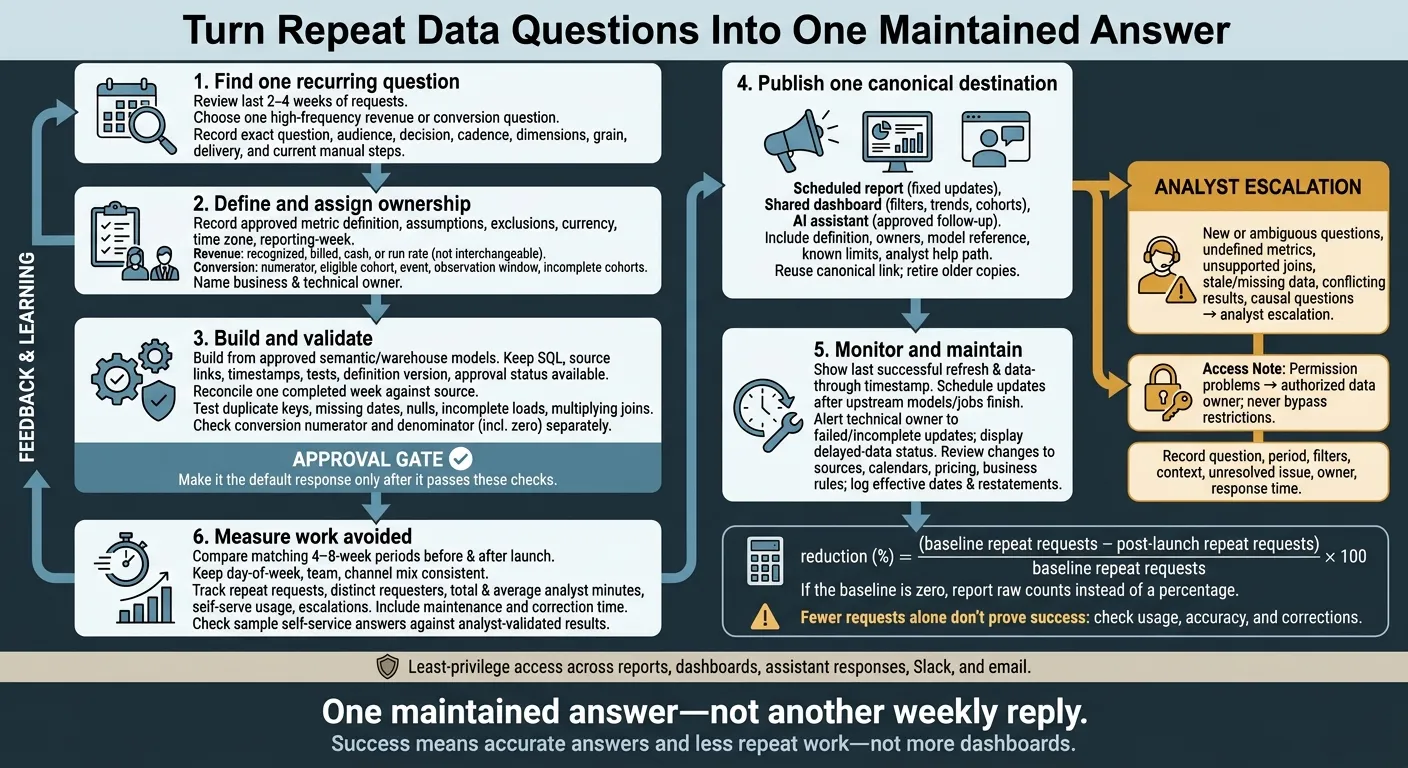
My approach: turn one repeat data question into one maintained answer - not another weekly reply. I’d review the last 2–4 weeks of requests, choose a question with a clear definition, and validate its calculation before sharing a single link.
Here’s the plan I’d follow:
- Define and check the metric. Agree on standardized revenue rules or conversion cohorts, use approved warehouse data, and assign owners.
- Choose the delivery method. Use scheduled reports for fixed updates, dashboards for filters and trends, or an AI assistant for approved follow-ups.
- Keep the answer current and access controlled. Show when the data was last updated, monitor failed updates, and send unclear questions or missing data to an analyst.
- Measure work avoided. Compare matching 4–8-week periods, counting repeat requests, analyst time, maintenance, and corrections.
The goal is one answer people can return to. I’d judge success by accurate answers and less repeat work - not by how many dashboards get published.
Define the Answer Before Automating It
Automation repeats logic; it does not validate it. Before publishing, record the business decision, approved definition, assumptions, and owner. Start with what the metric means to the business, then lock the calculation rules that support it.
Agree on Revenue and Conversion Metrics
For Monday reporting, state exactly which revenue measure you’re using. Recognized revenue follows the company’s revenue-recognition policy. Billed revenue tracks invoices issued, while cash collected tracks payments received. Recurring-revenue run rate estimates recurring revenue - it is not weekly earned revenue. Document how refunds, discounts, taxes, credits, cancellations, and one-time fees affect your chosen measure.
For weekly conversion, define the numerator, eligible trial cohort, conversion event, and observation window. Specify whether eligibility applies at the account or trial level, how you handle duplicates and cancellations, and whether you exclude immature cohorts or label them incomplete.
Record the grain, data model, exclusions, required dimensions, currency, time zone, and reporting-week boundary. Use an explicit currency format, and name the business approver, technical maintainer, and review date.
Currency format: $125,000.00.
Set rules for data freshness before delivery. A Monday 9:00 a.m. ET report needs both a source-load deadline and a visible “data through” timestamp. Decide whether late or failed loads block publication or allow a provisional answer. dbt source-freshness checks support warning and error thresholds. Assign someone to investigate failures instead of silently publishing stale results.[5][6]
With those rules in place, make the logic available for review and approval.
Keep Metric Logic Open to Review
Query governed models in Snowflake, BigQuery, Redshift, or Postgres, and reuse dbt models and tests. Keep SQL, source links, timestamps, test results, and approval status visible so reviewers can trace every number.
Require human approval, and validate joins and filters against known results. Version definition changes so users can tell a business change apart from a data error.
Choose the Right Delivery Method
Once you’ve defined the metric, choose the simplest delivery method that fits how people will use it: scheduled reports for fixed updates, dashboards for self-serve analysis, and an AI assistant for approved follow-up questions.
| Method | Best for | Strength | Limitation | Typical request |
|---|---|---|---|---|
| Scheduled report | Fixed updates | Predictable delivery with little effort for readers | Limited room for analysis; failed updates still need monitoring | Finance’s Monday revenue summary |
| Shared dashboard | Filters, trends, and cohorts | Users examine approved dimensions on their own | Unclear filters or duplicate calculations can cause confusion | Conversion by channel and signup cohort |
| AI assistant | Approved follow-ups | Natural-language access to approved metrics | Cannot safely answer beyond available data and approved logic | Revenue by region in Slack or Microsoft Teams |
| Analyst escalation | New or ambiguous questions | Human judgment for assumptions and discrepancies | Requires analyst time | Investigating whether a pricing change caused conversion to fall |
Use the table as your starting point. For edge cases, apply the rules below.
Match Reports and Dashboards to the Request
Use a scheduled report when the audience and fields stay fixed. Choose a shared dashboard when users need to compare results from different angles.
Lock filters to the approved conversion definition so the KPI stays consistent. Centralized definitions, lineage, and named owners prevent duplicate KPI logic.[9][10] Give each recurring request one maintained destination that serves multiple viewers - not a new report for every variation.
These features support the workflow. They don’t replace ownership, validation, or access control.
Route Exceptions to an Analyst
Send new metrics, unsupported joins, stale data, conflicting results, and causal questions to an analyst. A channel breakdown shows where conversion changed, not why.[7][8] Questions that require new judgment belong outside governed self-service analytics.
The assistant should refuse or route a request when required data is missing, the metric is undefined, the join is unsupported, or the user lacks access.
Make the handoff explicit: record the question, period, filters, context, unresolved issue, owner, and response time. Don’t assume a ticket is created automatically.
Apply least-privilege access across every delivery channel. Use aggregated outputs when individual records aren’t needed, and check the recipient list before scheduling delivery. A restricted field must stay restricted in a dashboard, assistant response, Slack message, or email. Send permission problems to the authorized data owner - not through a workaround that exposes the data.
With the exception path defined, turn the standard case into a maintained answer.
Checklist: Build and Maintain a Reusable Answer
Use this checklist to turn a recurring question into one maintained answer - and replace weekly manual replies.
Record, Build, and Validate the Answer
Record the request. Save the exact question in the requester’s own words so the team doesn’t start from scratch each week. Record the audience, the decision the answer supports, cadence, dimensions, expected grain, and delivery channel. Name a business owner to approve the metric’s meaning and a technical owner to maintain the pipeline. Document the manual steps so you can measure the work this answer replaces.
Build from approved models. Use the approved semantic layer or governed warehouse model with live data. Build the answer once using approved logic, then reuse it each week. Document source tables, joins, grain, filters, date boundaries, and time zone in plain language and SQL that others can review. Record the exact metric definition, FX rule, exclusions, and rounding once.
Validate before publishing. Reconcile one completed week against the source of record. Test for duplicate keys, missing dates, nulls, incomplete loads, and joins that multiply rows. For conversion rate, check the numerator and denominator separately, including what happens when the denominator is zero. Keep the query, expected results, validation date, reviewer, definition version, and approval status together. Mark the answer as certified, under review, or provisional. Make it the default response only after it passes these checks.
Publish the Answer and Monitor Updates
Once validation is complete, publish one governed version and keep it current.
Publish one canonical destination. Include a title, definition, owners, model reference, known limits, and a help path for exceptions that need an analyst. Use the canonical link in every recurring reply and retire older copies. Repeat requests should point to this version - not create another copy. Show the last successful refresh and the data-through timestamp.
Monitor the update path. Keep the answer current so colleagues don’t need to reopen the same request. Schedule updates after upstream dbt models or ingestion jobs finish, leaving time to troubleshoot before the business deadline. Alert the technical owner when updates fail or are incomplete, and display a delayed-data status. Set a response time for exceptions and a regular review cadence. Review again immediately after changes to a source, fiscal calendar, pricing, or business rule. Log the effective date and any historical restatement.
Measure Fewer Repeat Questions
Once the answer is live, check whether it reduces repeat work. Measure work avoided, not dashboard launches. Colleagues should still get accurate, current answers while analysts gain time for higher-value work.
Document the Workflow and Measure Results
Compare matching four-to-eight-week periods before and after launching the maintained answer. Keep the day-of-week mix, team mix, and request channels consistent. Define what counts as a repeat request before measuring.
Track repeat-request counts, distinct requesters, total and average analyst minutes, self-serve usage, and escalations by reason. Include maintenance and correction time so you don’t overstate savings. If usage drops or corrections increase, revisit the definition or routing.
Calculate reduction (%) = (baseline repeat requests − post-launch repeat requests) ÷ baseline repeat requests × 100. If the baseline is zero, report raw counts instead of a percentage.
Check a sample of self-service answers against analyst-validated results. Fewer requests alone don’t prove success: if usage is low or corrections increase, people may be abandoning the answer rather than using it.
To support an anonymized workflow example, document the request, channel, manual steps, reusable solution, launch date, measurement window, and results. Check whether the remaining questions involve exceptions or new investigations instead of routine retrieval. If those records don’t exist, label the example hypothetical and don’t claim an outcome.
Conclusion: Start With One Maintained Answer
Start with one high-frequency revenue or conversion question. Expand only after people reuse the answer consistently. Review definition changes, failed updates, and whether the governed answer meets the routine need. Repeat questions should drop because people trust and reuse an answer that stays up to date.
Querio supports this workflow. Metric definitions, saved queries and dashboards live as files in a git repo your team owns, and saving context or promoting a dashboard opens a pull request your reviewers approve. Answers come as SQL or Python on live warehouse data, scheduled automations deliver the weekly answer to email, or to Slack on the Core plan, and non-technical users get AI-driven self-serve analytics from the same definitions. Owners still need to approve definitions, validate data, and handle exceptions.
FAQs
Which recurring data question should we automate first?
Review requests from the past 90 days and rank them by frequency, business impact, and repeatability [1][2]. Start with routine questions that take up time and have clear decision owners, such as weekly MRR, churn by cohort, or signup volume [1][2].
Move these high-volume, stable requests into governed dashboards or AI-assisted self-serve workflows. This gives people consistent answers they can trust - and frees your team to focus on new analysis [1][3][4].
How do we get teams to trust and reuse one answer?
Move from one-off reports to shared answers with clear rules. Put metric definitions in a semantic or context layer, and specify who owns each metric, how it’s aggregated, and when its data should update. That way, dashboards, notebooks, and AI-generated queries all use the same definitions.
Make trusted assets easy to find by business domain and owner. Display the underlying SQL or Python, data lineage, and timestamps showing when the data last updated. Point users to these assets for recurring questions, and teach them to check the logic behind the answers.
When does maintaining an answer outweigh the time saved?
An answer isn’t worth reusing if keeping it accurate, up to date, and governed takes more time than answering requests as they come in. Prioritize reusable answers only when a request comes up at least three times within 30 days.
Leave one-off questions, complex judgment calls, and changing data to analysts. Weigh request frequency, complexity, metric stability, and business impact. If maintenance keeps taking more time than reuse saves, return to an analyst-led process or refine the underlying model.