Business Intelligence
How to Keep Your Semantic Layer and dbt in Sync
Align dbt and your semantic layer: map dependencies, update refs in one PR, validate metric results, and block failing releases.

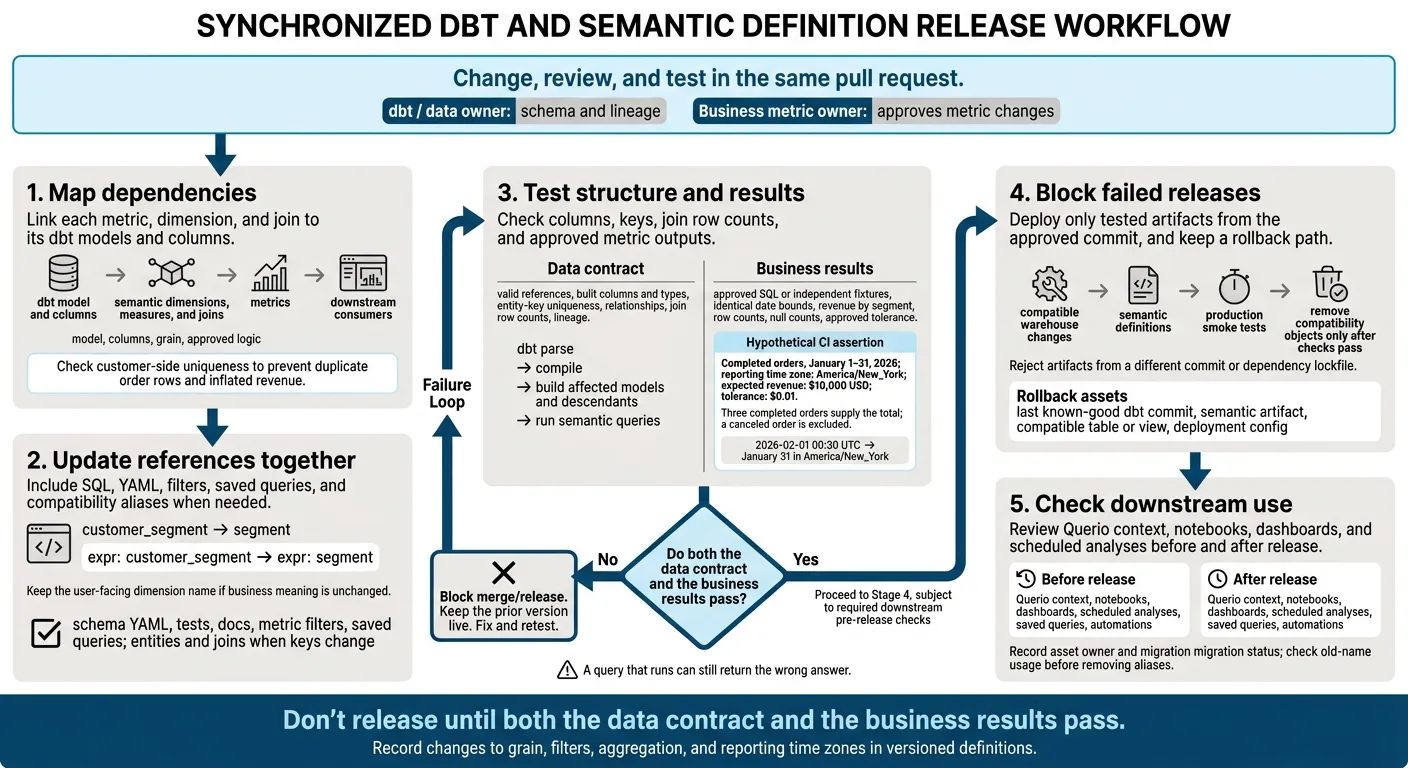
I keep dbt and semantic definitions in sync by changing, reviewing, and testing them in the same pull request. dbt owns schema and lineage; named business owners approve metric changes. A passing compile isn’t enough - I also check metric results and downstream queries.
My release checklist covers five steps:
- Map dependencies: Link each metric, dimension, and join to its dbt models and columns.
- Update references together: Include SQL, YAML, filters, saved queries, and compatibility aliases when needed.
- Test structure and results: Check columns, keys, join row counts, and approved metric outputs. For example, a test fixture could require $10,000 in revenue within $0.01 for a fixed reporting period.
- Block failed releases: Deploy only tested artifacts from the approved commit, and keep a rollback path.
- Check downstream use: Review Querio context, notebooks, dashboards, and scheduled analyses before and after release.
My rule: don’t release until both the data contract and the business results pass. A query that runs can still return the wrong answer.
Set Owners and Map Semantic Definitions to dbt
Set ownership first. Then link each semantic definition to a dbt object so schema changes and metric definitions stay in sync.
Define the Source of Truth and Review Rules
Assign a data owner for schema and lineage, and a business owner for metrics. Keep dbt SQL, YAML, and semantic definitions in the same pull request, and route reviews to the right owner.
Before making edits, check the dbt model structure, semantic YAML, and warehouse SQL behavior.
With owners in place, map each semantic object to the exact dbt model, column, or join it depends on.
Map Models, Columns, Joins, and Metrics
Document each dependency before making changes. Map each semantic object to its model, columns, grain, and approved logic. Check naming, data types, and SQL behavior on your Snowflake, BigQuery, Redshift, or Postgres warehouse connection.
Use this map to trace every metric back to a dbt artifact.
dbt or warehouse object Semantic object Purpose Example fct_ordersOrdersPrimary fact table for sales ref('fct_orders')customer_idCustomer KeyEntity uniqueness/join key dim_customers.customer_idcustomer_segmentSegmentDimension for filtering dim_customers.customer_segment = 'Enterprise'revenue_amountRevenue measureRaw measure for metrics sum(fct_orders.revenue_amount)order_to_customerJoin relationshipDefines relationship grain Many-to-one join monthly_churnMetricStandardized business KPI type: simplemetric
Grain tells you what each row represents. A customer key isn't unique in an order-level fact table. Check customer-side uniqueness before running the join to prevent duplicate order rows and inflated revenue. Also record whether segment filters use the customer's current segment or their segment at order time.
Keep this map as a checklist, and update it whenever a column, join, or metric changes.
The dbt YAML example below uses a simple metric that references a separately defined measure named revenue_amount.
version: 2
metrics:
  - name: gross_revenue
    description: "Total revenue before discounts"
    type: simple
    type_params:
      measure: revenue_amount
Update Every Dependency After a Column Rename
Update SQL, YAML, and Semantic References
Use the dependency map from the previous section to update every reference in one change set. Treat the rename as a contract change: update the downstream model and semantic expression together. If the business meaning hasn’t changed, keep the user-facing dimension name.
-- models/fct_revenue.sql
select
  customer_id,
- customer_segment,
+ segment,
  revenue,
  occurred_at
from {{ ref('stg_customers') }}
# Semantic dimension definition
dimensions:
  - name: customer_segment
    type: categorical
-   expr: customer_segment
+   expr: segment
A stale expr: customer_segment can trigger a missing-column error when the semantic query runs - even if dbt compilation passes. Update schema YAML, tests, docs, metric filters, and saved queries that reference the old column.
If you also rename the user-facing dimension, migrate its filters and group-by references. If the column serves as a key, review entities, joins, uniqueness tests, and relationship tests too.
Check Affected Models and Downstream Analyses
Use this table to choose the checks needed before release.
| Change type | Affected dbt object | Affected semantic object | Likely failure | Required check |
|---|---|---|---|---|
| Column rename | Staging model, downstream models, tests | Dimension expression, metric filter | Missing column or stale reference | Search references; parse, compile, build, and run semantic queries |
| Model replacement | ref() dependencies and exposures |
Semantic model or source mapping | Broken relation or changed lineage | Compare manifest lineage; build affected descendants |
| Key change | Primary/foreign-key columns, relationship tests | Entities and joins | Duplicate rows, fanout, or incorrect totals | Test uniqueness, relationships, and join row counts |
| Metric-logic change | Measure SQL, macros, filters | Metric definition and approved queries | Changed business result | Compare fixed-period results with approved SQL; obtain metric-owner approval |
Even a simple column rename needs the full checklist before release. Search the repository for both names, including case variants and quoted identifiers.
Then inventory the dependencies outside dbt itself. Querio keeps notebooks, dashboards, saved queries, and automations as files in Git, and in CI, renaming a dbt model flags every dashboard, query, and context file that uses it before the PR can pass. Record each asset’s owner and migration status. For a breaking rename, temporarily expose both names through an alias. Agree on a removal deadline, then check old-name usage before removing it.
Validate the Rename Before Release
After searching the repo, verify the rename in a clean environment before approving release. Run dbt parse, then compile and build the affected models and descendants. Inspect the built columns and types, run schema, uniqueness, and relationship tests, and execute semantic queries grouped by segment.
Compare approved pre-change SQL with the renamed implementation using the same fixed dataset and one-month window. Keep the date bounds identical before and after the rename. After normalizing labels, require identical revenue by segment, row counts, and null counts. Any unexplained difference should block release.
Check downstream queries outside dbt, too - compile-only validation can’t reach them. Smoke-test the analyses that depend on the change, including Querio notebooks, which analysts can open, check, and rerun.
Block Deployment When Validation Fails
Stop the release when validation fails. Fix the contract before merging.
Add a CI Validation Matrix
Use CI as the merge gate for every pull request and release. Require the mapping, rename, and validation workflow to prevent drift. Check structure - valid references and schemas - separately from meaning: whether the results match the business rules. Where supported, run dbt sl validate --select state:modified+ for affected semantic nodes.[2]
| Check | Method | Owner | Stage | Blocking condition |
|---|---|---|---|---|
| Parsing | Run dbt parse and supported semantic validation |
Analytics engineering | PR | Invalid config or semantic graph |
| Artifact currency | Build the semantic artifact from the tested commit; record SHA, versions, and timestamp | Analytics engineering | PR and release | Missing artifact or revision mismatch |
| Model compilation | Compile changed models and parents | Model owner | PR | SQL or reference failure |
| Metric query compilation | Compile representative metric queries through the supported semantic interface | Metric owner | PR | Query generation fails |
| Built-relation schemas | Build affected models in an isolated schema; inspect columns and types | Data-platform owner | PR | Missing column or incompatible type |
| Entity uniqueness | Test entity-key uniqueness at the declared grain | Model owner | PR | Duplicate key violates declared grain |
| Join fanout | Compare row counts and aggregates before and after joins; test one-to-many paths | Metric owner | PR | Unexpected row multiplication or aggregate inflation |
| Lineage | Check impacted models, semantic nodes, metrics, and saved queries | Analytics engineering | PR | Omitted or broken downstream dependency |
| Metric assertions | Compare fixtures or approved SQL with generated metric results | Metric owner | PR and release | Result exceeds approved tolerance |
| Downstream smoke tests | Run representative BI queries, saved queries, or API requests against built relations | BI or analytics owner | Pre-release | Query errors, unexpected empty results, or schema changes |
| Permissions | Use least-privilege staging credentials; test production read access separately | Data-platform owner | PR and release | Missing required access or unauthorized access |
Build affected assets in an isolated staging schema. Keep production-state comparison artifacts separate from newly generated artifacts. Reject release artifacts that come from a different commit or dependency lockfile. If the installed semantic layer lacks a validator, use its supported equivalent - don’t skip the check.
Once structural checks pass, test business logic against independent fixtures.
Test Metric Logic and Plan the Release
Include canceled records, null amounts, duplicate order lines, and reporting-boundary timestamps. Passing tests should prove more than whether a query runs.[1]
Hypothetical CI assertion: For completed orders from January 1–31, 2026, interpreted in America/New_York, revenue must equal $10,000 USD, within $0.01. Three completed orders supply the expected total; a canceled order is excluded. A boundary record at
2026-02-01 00:30 UTCmust fall on January 31 under the declared reporting time zone.[1]
If a gate fails, keep the prior version live until the fix passes every check.
Block merges when required checks fail. Report the generated SQL, observed and expected values, filters, grain, and commit SHA so the failure can be traced.
Deploy compatible warehouse changes before the semantic definitions that depend on them. Then run production smoke tests before dropping compatibility objects. For rollback, retain the last known-good dbt commit, semantic artifact, compatible table or view, and deployment config. Never fix a failed gate by broadening permissions.
Conclusion: Make Syncing a Reviewed, Tested Workflow
Close each release by checking five things: dbt owns schema and lineage, semantic mappings are explicit, changes are reviewed together, validation passes, and downstream consumers still work.
Review Querio Context and Inspect Query Logic
After merging model and semantic changes, review the governed context that supports self-serve analysis. Querio stores joins, definitions, saved queries, and Python notebooks as plain files in a git repo on GitHub that the team owns, and they can live alongside dbt code so a model change and its context go in one PR. Saving context opens a pull request, and the repo's own reviewers approve it.
Check the editable SQL and Python files for renamed columns, join keys, and metric filters. Live warehouse connections and reactive notebooks support governed self-serve analysis, but they don’t replace schema validation or dependency tests. These checks keep trusted context aligned with the dbt changes already validated in the repo.
Assign Metric Owners and Record Definition Changes
Assign one owner to each core business metric that depends on those definitions, such as revenue, retention, claims, or margin. Require that owner’s approval and record changes to grain, filters, aggregation, and reporting time zones in versioned definitions. Keep experimental analyses separate from trusted definitions.
After release, recheck affected notebooks, dashboards, and automations so metric ownership stays part of the release process - not an afterthought.
FAQs
How can we detect semantic drift between releases?
Store metric definitions and SQL as versioned code in Git alongside your dbt project, and require peer reviews. Before deployment, use automated lineage to check which downstream dashboards and AI queries a schema or model change will affect.
Keep your governed context layer in sync with warehouse metadata so AI assistants and BI tools use the same certified logic. Make AI-generated SQL available for inspection so analysts can check it against approved semantic definitions.
How should we set metric test tolerances?
Start with hand-calculated ground truth to check automated metric definitions. Focus on the five KPIs that matter most to leadership, such as revenue or churn. Add freshness SLAs, completeness thresholds, and lineage coverage rules to your dbt project to catch drift before deployment.
Review tolerances quarterly as business logic changes. Version and approve SQL or schema changes before they affect downstream dashboards or AI-generated answers.
How can we migrate definitions without disrupting dashboards?
Treat your semantic layer and dbt models as version-controlled code. Review schema changes and metric updates through pull requests before deploying them.
Keep business logic in a governed semantic layer. That way, refactoring models or renaming columns won’t change metric outputs.
Use automated schema consistency checks and data freshness tests to catch breaking changes early. Set deprecation dates for old models, giving users time to switch before you remove them.