Business Intelligence
Slack-First BI: Should Your Data Live Where Your Team Talks?
Use Slack for one-off BI questions and alerts, dashboards for recurring KPIs, and notebooks for deep analysis—always verify sources and access.

I’d use Slack for quick BI questions and alerts - not to store data. Keep your data in Snowflake, BigQuery, or Redshift, and check the query, metric definition, data timestamp, and recipient access before sharing an answer.
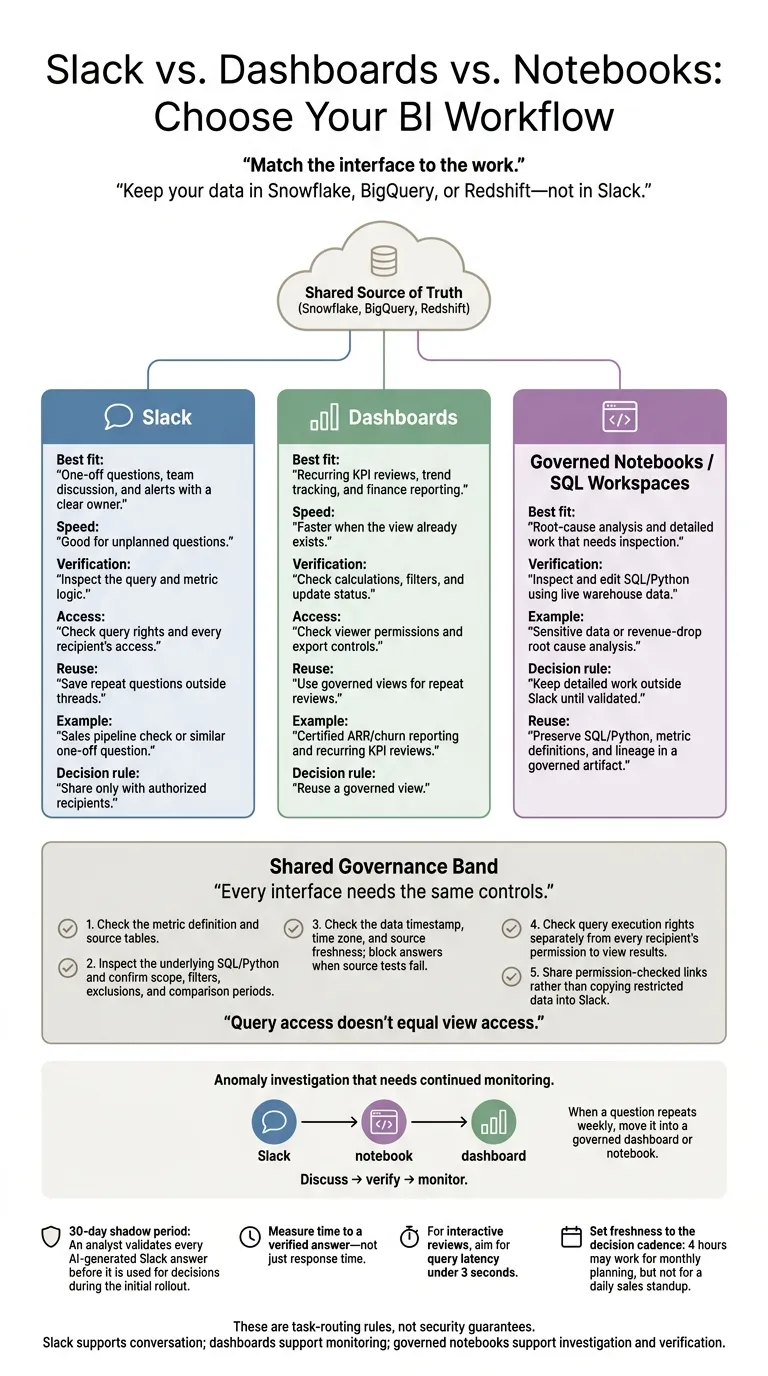
My rule: match the interface to the work.
- Slack: One-off questions, team discussion, and alerts with a clear owner.
- Dashboards: Recurring KPI reviews, trend tracking, and finance reporting.
- Notebooks or SQL workspaces: Root-cause analysis and detailed work that needs inspection.
For AI-generated answers, I’d start with 30 days of analyst review. And I’d measure time to a verified answer - not just how fast a reply appears.
Quick Comparison
| Criterion | Slack-first BI | Dashboard-first BI |
|---|---|---|
| Speed | Good for unplanned questions | Faster when the view already exists |
| Verification | Inspect the query and metric logic | Check calculations, filters, and update status |
| Access | Check query rights and every recipient’s access | Check viewer permissions and export controls |
| Reuse | Save repeat questions outside threads | Use governed views for repeat reviews |
Neither interface replaces data controls. I’d keep shared definitions, saved logic, and access checks in place whichever tool your team uses.
1. When to Use Slack-First BI
Use Slack for narrow, ad hoc reporting for questions that don’t already have an answer in a governed dashboard.[1] It’s best for fast, conversational answers - not recurring reporting.
Slack-first BI works only when metric definitions are governed. Start with Customer Success or Operations, where ad hoc questions often repeat. Certify the core metrics in a governed semantic layer before giving more people access. Then run a 30-day shadow period, with an analyst validating AI answers to refine definitions and build trust.[1] Each answer must be verifiable before it’s shared.
Before acting on a reply, inspect the underlying SQL or Python. Confirm that the query uses live warehouse data - not a stale export or cache - and block answers when source tests fail. SQL/Python that people can inspect and edit makes answers verifiable.[1] Once an answer passes validation, check who can see it.
Keep the discussion in the thread so the reasoning stays visible. But query access doesn’t equal view access: check both warehouse and channel permissions before posting.[2]
When a question repeats weekly, move it into a saved workflow in a governed dashboard or notebook instead of generating another one-off answer. Preserve the SQL, metric definition, and lineage, and use Slack to share and discuss the result. Questions that call for repeated comparisons or clearer visuals also belong in a dashboard or notebook.[3]
2. When to Use Dashboard-First BI
Slack works best for one-off questions. Dashboards work best for scheduled reviews. Use dashboard-first BI for recurring KPI reviews, trend monitoring, and finance/compliance reporting.
Certify the metric definition in the semantic layer so every dashboard follows the same KPI logic.
Set freshness to the decision cadence: 4 hours may work for monthly planning, but not for a daily sales standup.[4]
For interactive reviews, aim for query latency under 3 seconds.[4]
If a dashboard flags a problem but doesn’t explain the cause, keep it as the monitor. Move the investigation into a tool such as Querio, where the agent answers with SQL and Python in a notebook you can inspect and rerun.
Keep sensitive healthcare and finance reporting behind role-based permissions - not in Slack channels. Use Slack for collaboration, not permission management. Only authorized users should be able to view sensitive data or trigger queries against it.
Compare Speed, Verification, Access, and Reuse
Once you know the use case, compare four things: speed, verification, access, and reuse.
Task Fit and Response Time
Slack works best for unplanned questions and live discussion. Dashboards work best for recurring views and known summaries.[1] Measure time to a verified answer, not just response time. Dashboards are usually faster when the exact view already exists.
| Task | Slack-first | Dashboard-first |
|---|---|---|
| Scoped pipeline question | Fast starting point for an unplanned question | Faster if the view already exists |
| Recurring sales review | Useful for follow-up on saved results | Faster, stable review with shared definitions |
| Multiple regional or segment cuts | Useful for ad hoc follow-up | Better for side-by-side comparison |
| Anomaly response | Useful for coordinating the response | Better for seeing the surrounding trend |
A fast answer only helps if you can check it.
How to Verify Answers
For a 12% week-over-week revenue decline, verify the definition, sources, scope, and freshness, then break down the change by region, segment, or plan against the baseline.[2]
A polished chart isn't proof that the answer is correct.
| Check | Slack-first requirement | Dashboard-first requirement |
|---|---|---|
| Definition and source | Link the metric definition and source tables | Review metric logic and sources |
| Scope and freshness | Show the data timestamp, time zone, filters, exclusions, and comparison periods | Check refresh status and selected filters |
| Reproducibility | Provide inspectable SQL/Python and state limitations | Review the underlying query and calculation limits |
Once you've checked the answer, check who can see it.
Who Can Query and See Results
Query access and view access are separate controls. In Snowflake or BigQuery, test execution rights and warehouse policies separately from permission to see results posted in Slack.[2]
| Control | Slack-first implementation check | Dashboard-first implementation check |
|---|---|---|
| Execution identity | Confirm which credentials execute each query; channel membership alone must not grant warehouse access | Confirm viewer versus service-account execution |
| Row/column restrictions | Verify warehouse restrictions and authorization for every result recipient | Verify restrictions on views and exports |
| Audit and retention | Record the requester, query, and recipients; review Slack retention | Record access and query activity; review export retention |
If the question will come up again, save the logic outside the thread.
Saving Findings and Managing Maintenance
Move weekly questions into saved logic, and use Slack for discussion and exceptions.[3] Keep reusable analysis in a governed artifact - not just in Slack history.
| Maintenance issue | Slack-first control | Dashboard-first control |
|---|---|---|
| Logic preservation | Link threads to saved SQL/Python, metric definitions, and lineage | Preserve shared calculations and source lineage |
| Change accountability | Assign an artifact owner; version logic and retain review history | Assign a view owner; version calculation changes and approvals |
| Alert hygiene | Deduplicate and route alerts; define acknowledgment and escalation | Review alert thresholds and retire obsolete monitors |
Pros and Cons of Each Workflow
Slack makes asking easier; dashboards make reviewing easier. In daily Slack threads, that trade-off plays out through speed, access, and reuse. Governed definitions matter more than the interface, and every answer needs a direct link to the analysis behind it.
| Decision | Slack-first: upside and trade-off | Dashboard-first: upside and trade-off |
|---|---|---|
| Sales pipeline checks | Discussion stays next to the answer; unclear follow-ups can shift the scope | A shared view supports recurring reviews; discussion happens elsewhere |
| Revenue-drop investigations | Natural-language questions keep the thread moving; deeper analysis belongs outside Slack | Filters support planned drill-downs; unexpected questions may go beyond the view |
| Operations alerts | Routed alerts reach the responsible team; unclear ownership can leave them unanswered | A dedicated view adds context; someone still needs to review it |
| Executive reporting | Works for commentary and exceptions; less suited to sustained visual review | Better for standing KPIs; less flexible for new questions |
After choosing a workflow, validate its answers.
Make Human Review Part of the Rollout
Have an analyst validate every AI-generated Slack answer before using it to make decisions.[1]
Links should open SQL/Python that reviewers can inspect, along with the metric definition. In Querio, the governed context and metric definitions are files in a git repo your team owns, and answers come with SQL and Python you can inspect. Saving context or promoting a dashboard opens a pull request, which supports this review process.
Once an answer is validated, decide what stays in Slack and what becomes a governed artifact.
Control What Becomes Shared and Permanent
Use permission-checked links rather than copying restricted data into Slack. Give each alert an owner, and send uncertain answers to a human for review.
If the same question comes up in Slack every week, move it into a governed workflow rather than starting another thread. That leads to the final decision: match the interface to the task.
Final Verdict: Match the Interface to the Task
Compare speed, verification, access, and reuse, then choose the interface based on the task - not habit.
Use Slack for quick questions and alerts. Keep Snowflake, BigQuery, or Redshift as the source of truth, and send recurring reporting to dashboards or notebooks.
Before posting: Check recipient access, the metric definition, the as-of time, and how recently the source was updated. Withhold any answer that fails quality checks.[1][2]
| Task | Recommended interface | Decision rule |
|---|---|---|
| Sales pipeline check or similar one-off question | Slack | Share only with authorized recipients. |
| Certified ARR/churn reporting and recurring KPI reviews | Dashboard | Reuse a governed view. |
| Sensitive data or revenue-drop root cause analysis | Governed notebook or workbench | Keep detailed work outside Slack until validated. |
| Anomaly investigation that needs continued monitoring | Slack → notebook → dashboard | Discuss, verify, then monitor. |
These are task-routing rules, not security guarantees. Dashboards still need access controls, and notebooks still need governed definitions. Put those controls in place before choosing the interface.
Slack supports conversation, dashboards support long-term monitoring, and governed notebooks support verification using live warehouse data.[3]
FAQs
When can we reduce analyst review of AI answers?
A governed semantic layer can reduce analyst review by enforcing consistent metric definitions, join paths, and business logic [1][2][3]. When every answer includes SQL or Python that analysts can inspect, they can check the logic behind it instead of manually validating each output [2][3][4].
Confidence-based routing sends low-confidence or ambiguous queries to a human while handling routine, high-confidence questions automatically. That lets analysts focus on complex or uncertain cases [2][5].
How can we prevent sensitive data leaks in Slack?
Enforce security at the warehouse level, not through Slack’s interface. Use live, read-only warehouse connections rather than exporting data into Slack as static files.
Apply role-based permissions when each query runs, and make sure the integration follows existing database access policies. Keep audit logs of queries and data access. Provide SQL or Python that analysts can inspect to verify which data each answer uses.
How do we keep BI alerts from becoming noise?
Use a governed semantic layer so alerts use consistent, certified metric definitions. Trigger alerts only when metrics cross predefined thresholds that warrant attention - not for routine updates.
Make the reasoning traceable with inspectable SQL or Python so users can check the logic behind an anomaly. Send alerts to the specific Slack channels where the relevant teams work, rather than broad channels.