Business Intelligence
Looker Pricing in 2026: Why It's So Hard to Get a Number
A major BI platform's pricing remains quote-only in 2026 — costs hinge on edition, users, usage, and cloud deal terms.

You still can’t get a public Looker price in 2026. If I had to sum it up in one line, it’s this: Looker pricing depends on your edition, user mix, query usage, contract term, and Google Cloud deal terms.
Before I talk to sales, I’d treat Looker as a quote-only BI product with a few public clues, but no fixed list price. That means I can estimate some inputs on my own, but I still need sales to confirm the final platform fee, seat costs, discounts, support, and any AI-related charges.
Here’s the short version:
- Looker does not publish full pricing
- Three editions shape the starting point: Standard, Enterprise, and Embed
- User roles matter: Developer, Analyst, and Viewer
- Usage matters: query volume and data processed can change cost
- Google Cloud terms can shift the deal if I already have committed spend
- Extra costs may show up from LookML staffing, setup work, support, and warehouse compute
- Public planning ranges in the article run from about $60,000 to $180,000+ per year, depending on scope
If I’m budgeting for Looker, I should not ask only, “What’s the license cost?” I should ask, “What will this cost after staffing, setup, usage, and contract terms are added?”
A fast way to think about it:
| Area | What I can tell early | What still needs sales |
|---|---|---|
| Edition | Standard, Enterprise, or Embed | Final package price |
| Users | Rough count by role | Exact seat pricing |
| Usage | My warehouse query patterns | Final usage treatment in quote |
| Cloud deal | Whether I have GCP commitments | How much those terms change price |
| AI features | Whether I plan to use them | Extra API or feature charges |
So the main takeaway is simple: I can build a rough budget, but I can’t get a clean final number without a sales process. That’s the core reason Looker pricing still feels hard to pin down in 2026.
Why Looker pricing is still hard to pin down in 2026
Looker pricing is still quote-based in 2026 because Google shares only part of the pricing model in public, while the rest gets worked out during sales talks. In practice, pricing is sales-led and usage-based. It’s shaped by packaging, usage, and contract terms that stack on top of each other instead of one fixed rate. So the quote changes because multiple inputs affect it - not because Looker has a simple public price sheet.
Public pricing is partial, not complete
Google does show the basic shape of Looker pricing: a platform fee plus user tiers, with roles like Developer, Analyst, and Viewer. But the final numbers still aren’t public. Before talking to sales, you still can’t know the negotiated platform fee, seat pricing, discounts, or committed-spend terms [2]. The only public entry point is $300 in free credits for new customers [1].
Edition, usage, and contract terms all change the quote
Looker comes in three editions - Standard, Enterprise, and Embed - and each one starts from a different baseline [2]. From there, the quote can move based on query volume, data processed, and usage tied to Gemini features like Dashboard Agents and conversational analytics [1][2].
And that’s where a lot of teams get tripped up. The license cost is only one part of the spend. Many teams also need LookML maintenance, which adds more cost beyond the base contract [2].
Google Cloud procurement adds another layer
If your team already has a Google Cloud enterprise agreement or committed use discounts, those terms can change the commercial package in a big way [2]. And if you’re not fully on Google Cloud, extra integration and egress costs can push total cost of ownership higher before you even factor in the Looker contract itself [1].
That’s why the final number moves around so much: several deal terms, usage inputs, and setup costs all feed into the quote.
The specific inputs that change a Looker quote
Before you talk to sales, figure out which inputs change the price. In most cases, three things matter most: your deployment scope, your user mix, and how much you’ll use the platform. These are usually the first details procurement will ask for.
Platform edition and deployment scope
Edition and scope come first. Looker pricing shifts based on whether you need a standard internal analytics setup or an embedded analytics tools use case. Internal reporting and customer-facing embedded dashboards can end up in very different quote ranges. Put simply, edition and deployment scope set the starting point for the quote.
User mix: developers, analysts, and business users
Looker user types usually fall into three groups: developers, analysts, and viewers. Each one affects the quote in a different way. It helps to map this out early:
- Who writes LookML
- Who builds dashboards
- Who only views reports
A team running dbt on Snowflake or BigQuery, with dedicated analytics engineers maintaining LookML, will have a different cost profile than a team made up mostly of business viewers.
Data volume, query patterns, and contract length
Usage is often the hardest part to predict. Query volume and data processed can move the quote more than headcount [1]. Cross-cloud setups can add egress and integration costs [1]. Gemini-powered features can add usage costs at scale [1]. And contract term matters too - 12-, 24-, and 36-month agreements can come with different pricing.
| Cost Driver | What Moves the Quote |
|---|---|
| Deployment scope | Internal vs. embedded analytics changes the pricing shape |
| User mix | More developers and analysts change the license mix |
| Query volume | Usage-based scaling tied to query volume and data processed |
| Gemini features | Gemini-powered conversational features may add usage costs at scale |
| Cross-cloud setup | Non-BigQuery deployments can add egress and integration costs |
| Contract length | 12-, 24-, or 36-month terms affect the negotiated rate |
What you can estimate before talking to sales and what you cannot
::: @figure 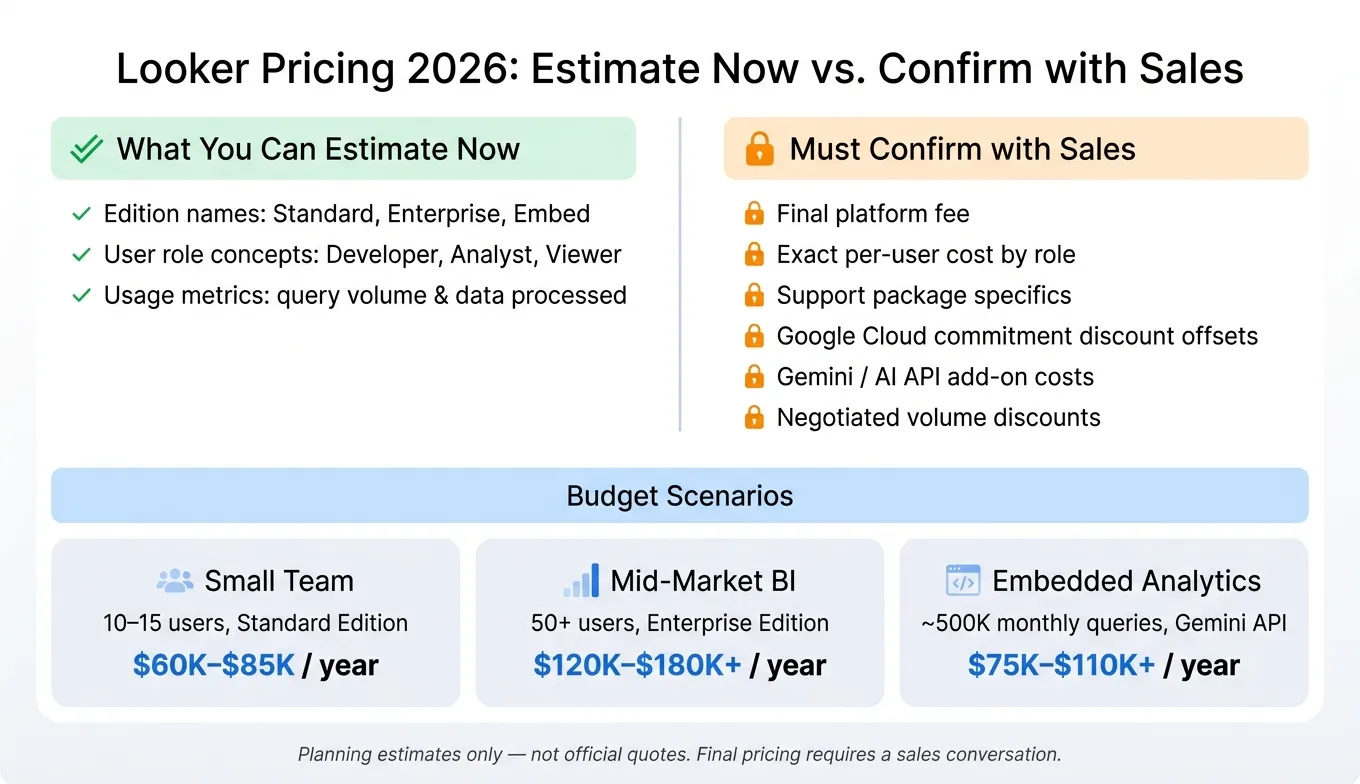 {Looker Pricing 2026: What You Can Estimate vs. What Needs Sales}
:::
{Looker Pricing 2026: What You Can Estimate vs. What Needs Sales}
:::
Public info only gets you partway. After that, the price comes down to a sales quote.
What is knowable from public sources
A few basics are out in the open. You can verify the edition names - Standard, Enterprise, and Embed - and the high-level user-role concepts: Developer, Analyst, and Viewer, or compare AI BI tools to see how these roles differ across platforms. Pricing is usage-based, tied to query volume and data processed, and new customers may get $300 in free credits for testing [1].
That said, treat those public details as a starting point, not a final budget. The actual number still depends on the items below.
What still requires a sales conversation
This is where things get murky. Looker rolls platform access, roles, usage, and contract terms into one negotiated quote. So while you can sketch a budget range, you can't pin down the full number on your own.
Here’s what still needs a sales-confirmed quote:
- The final platform fee
- Exact per-user costs by role
- Support package details
- Negotiated volume discounts
- How Google Cloud committed use discounts may offset Looker spend [1]
- Any added Gemini-powered costs, including Dashboard Agents and Conversational Analytics APIs, which may bring extra AI API charges not shown in standard tier docs [1]
The split below shows what you can estimate yourself and what still needs sales input.
| Cost Item | Estimate Now | Must Confirm with Sales |
|---|---|---|
| Edition names (Standard, Enterprise, Embed) | ✓ | |
| Platform fee | ✓ | |
| User role concepts (Developer, Analyst, Viewer) | ✓ | |
| Exact per-user cost by role | ✓ | |
| Usage metrics (query volume, data processed) | ✓ | |
| Support package specifics | ✓ | |
| Google Cloud commitment discount offsets | ✓ | |
| Gemini/AI API add-on costs | ✓ | |
| Negotiated volume discounts | ✓ |
3 hypothetical budget scenarios for planning
These examples are useful for pressure-testing your range before procurement begins. They are planning examples only - not official quotes.
Small internal analytics team: 10–15 users, one LookML developer, Standard Edition, moderate BigQuery usage: $60,000–$85,000 per year [1].
Mid-market BI program: 50+ users, two or three LookML developers, Enterprise Edition, high query volume: $120,000–$180,000+ per year [1].
Embedded analytics use case: SaaS product embedding Looker dashboards, ~500,000 monthly queries, Gemini API usage: $75,000–$110,000+ per year [1].
A simple way to sanity-check your estimate: look at your current warehouse query patterns in BigQuery or Snowflake, then use those numbers as inputs for the cost estimate and procurement checklist below.
How to estimate total cost and decide if Looker fits your budget
A procurement checklist for data leaders
Before you get on a sales call, build your own cost model. Show up with your numbers, not just the rep’s. That puts you in a much better spot when pricing starts moving around.
Use the inputs above to turn broad pricing ranges into a budget you can actually defend with finance and leadership.
Work through these questions with your data and finance teams first:
- Which edition fits your use case?
- How many users, and in which roles?
- What is your monthly query volume?
- Can Looker spend offset an existing Google Cloud commitment? [1]
- What is your LookML staffing plan? Budget for LookML training or dedicated LookML staffing.
- What support level, renewal terms, and price protection do you need?
How to match Looker's pricing structure to your team's operating model
Use the matrix below to split direct pricing inputs from procurement items that can change the total deal cost.
| Question | Cost lever |
|---|---|
| Which edition? | Platform fee |
| What user role mix? | Seat cost |
| What is your monthly query volume? | Usage-based scaling |
| Do you have a Google Cloud commitment? | Potential offset or discount |
| What support and renewal terms do you need? | Contract cost |
Looker tends to make the most sense when governance and scale matter a lot. Its LookML semantic layer helps keep metric definitions aligned across finance, product, and embedded applications [1]. That matters more than it may seem at first. If every team defines revenue, churn, or active users a little differently, reporting turns into a mess fast.
There’s also a clear fit if your team already runs deep on BigQuery and has Google Cloud commitments in place. In that setup, Looker can slot into the stack more naturally. Still, a hard-to-model price is a signal in itself. Don’t stop at license cost. Factor in implementation, staffing, and warehouse compute before you enter a sales process.
Conclusion: budget for variability, not a sticker price
Looker pricing is quote-based, edition-driven, usage-sensitive, and tied to contract terms and Google Cloud packaging. Once you have a price range, pressure-test it. Make sure the model still works after staffing and implementation costs are added in.
The practical takeaway is simple: model total cost early, separate what’s public from what needs sales confirmation, and budget for implementation, staffing, and warehouse compute - not just license cost. If your org is GCP-native, has LookML capacity, and needs governed BI architecture at scale, Looker can be a fit. If not, staffing and procurement overhead need to be part of the decision from day one.
FAQs
::: faq
What should I bring to a Looker pricing call?
Bring a clear picture of your expected scale and technical needs. Show your projected user count, the mix of standard users versus developer or admin roles, and your estimated data volume or API usage.
Also spell out whether you need embedded analytics or reporting for internal teams only. Ask for a total cost of ownership estimate at 3x your current headcount, and confirm whether you already have any Google Cloud commitments. :::
::: faq
Which Looker costs are easiest to miss?
The easiest costs to miss are the extra charges that show up beyond the base platform price and per-user fees.
Those can include dedicated LookML modeling support, staff training, and usage-based charges that climb as your data volume grows. On top of that, many teams also run into added Google Cloud costs, such as BigQuery, to help support Looker performance. :::
::: faq
When does Looker pricing become hard to predict?
Looker pricing is tough to pin down because it follows a quote-based, sales-led model rather than a public pricing page.
That means your quote can change based on things like data volume, number of users, support needs, contract length, and any Google Cloud commitment you already have. On top of that, total cost may also include implementation work and dedicated LookML support.
So if you're hoping for a fixed sticker price, you usually won't get one without speaking with sales. :::