Business Intelligence
Metabase vs Superset: Which Free BI Tool Holds Up?
Compare Metabase and Superset for self-hosted BI: setup time, SQL vs no-code, permissions, embedding, and costs.

If I had to sum it up in one line: I’d pick Metabase for fast self-serve dashboards, and I’d pick Superset for SQL-heavy teams that want more control.
Here’s the short version:
- Metabase is easier to get live.
- Superset gives analysts more SQL control.
- Metabase is better for mixed-skill teams.
- Superset fits teams with more data staff and more time for setup.
- Neither tool is “free” once you factor in hosting, setup, and staff time.
- For self-hosted Metabase, the article puts yearly infra and admin cost at $15,000–$20,000.
The article weighs the points that matter most for warehouse-based BI:
- setup time
- dashboard build speed
- SQL vs no-code use
- permissions
- embedding
- query load
- admin work
- team fit
::: @figure 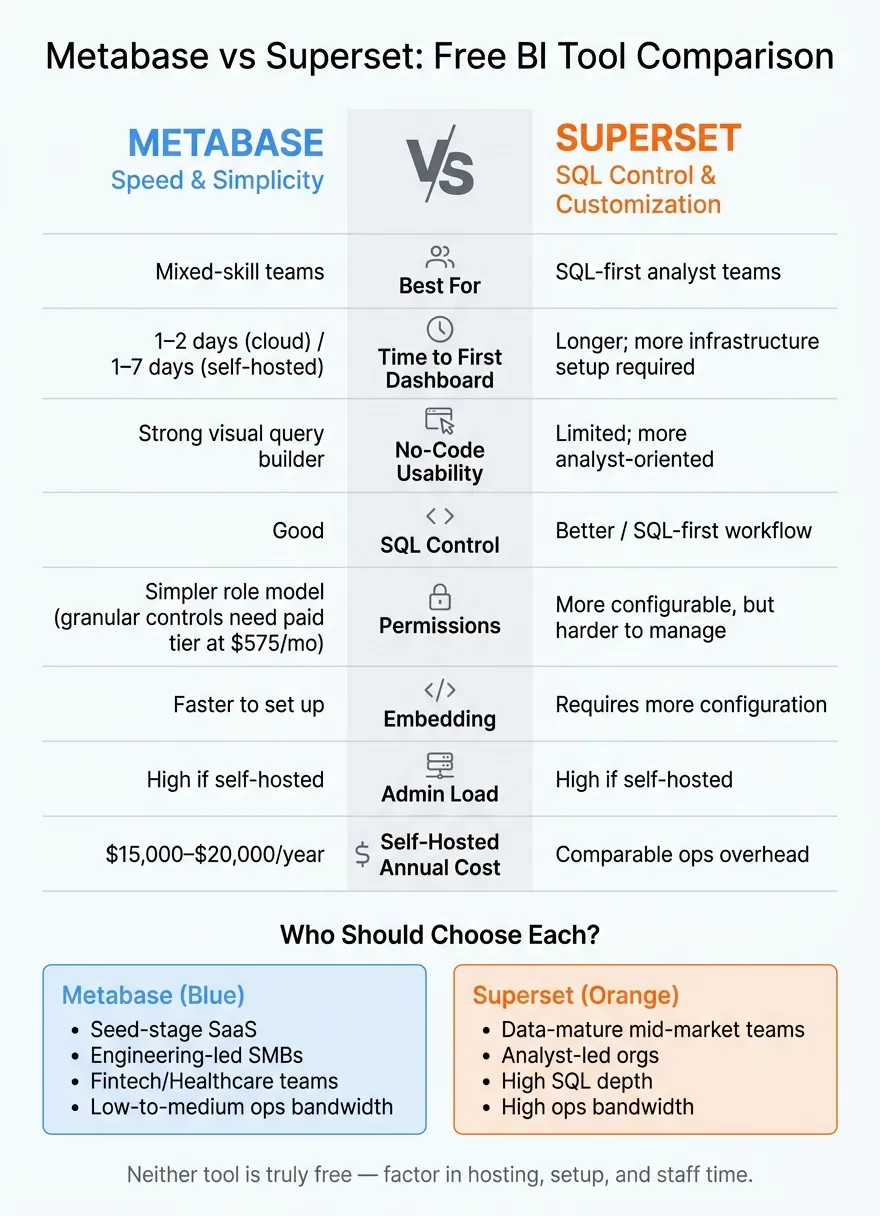 {Metabase vs Superset: Free BI Tool Comparison at a Glance}
:::
{Metabase vs Superset: Free BI Tool Comparison at a Glance}
:::
Superset + Metabase on Kubernetes | OSS BI Stack
::: @iframe https://www.youtube.com/embed/TLSfmbdllsc :::
sbb-itb-284a532
Quick Comparison
| Criteria | Metabase | Superset |
|---|---|---|
| Best for | Mixed-skill teams | SQL-first analyst teams |
| Time to first dashboard | 1–2 days on cloud; 1–7 days self-hosted | More setup before dashboard work starts |
| No-code use | Strong | Limited compared to Metabase |
| SQL control | Good | Better |
| Permissions | Simpler, but some fine-grained controls need paid tier (see role-based security best practices) | More flexible, but more work to run |
| Embedding | Easier to set up | More config needed |
| Admin load | High if self-hosted | High if self-hosted |
| Main weak spot | Governance limits in free tier | More setup and analyst dependence |
Bottom line: if you want people outside the data team to answer basic questions on their own, Metabase is the safer default. If your team already works in SQL every day and wants tighter control over charts and query logic, Superset may fit better.
I’d read this article as a choice between speed and control, not a search for one perfect winner.
Metabase vs. Superset: where they differ most
This isn’t about which tool has the longer feature list. It’s about which one gets governed analytics live with less hassle. For teams running a live warehouse, the tradeoffs usually look like this:
| Dimension | Metabase | Superset |
|---|---|---|
| Setup time to first dashboard | 1–2 days on cloud; 1–7 days self-hosted [1] | Longer; more infrastructure setup required |
| No-code usability | Strong visual query builder for non-technical users | More analyst-oriented |
| SQL workflow | SQL editor with autocomplete and snippets | SQL-first workflow for analysts |
| Permissions | Simpler role model | More configurable, but harder to manage |
| Embedding | Faster to set up | Requires more configuration |
| Maintenance burden | Docker, Postgres metadata DB, SSL, and SSO; ongoing ops work required [1] | Also needs dedicated ops support |
The bigger point is simple: these differences show up fast when a team tries to build a dashboard from scratch.
Setup time and time to first dashboard
Metabase is usually the faster route from install to a working dashboard. On a managed cloud plan, a lean team can often get its first usable dashboard live in 1–2 days. That matters when the goal is to show value fast, not just get software running.
Self-hosted Metabase takes more time, usually 1–7 days depending on the setup [1]. Even then, it’s still the simpler place to start for many teams.
Superset gives teams more control, but there’s a price for that. You’ll usually spend more time on infrastructure and setup before the first dashboard is ready.
SQL power, no-code workflows, and permissions
Metabase gives you both sides of the coin: analysts can write SQL, while non-technical users can use a visual builder. That makes it a better match when business teams need self-serve access instead of waiting on analysts for every chart or filter change.
Superset leans more toward analyst-led work. If most dashboards are going to be built in SQL anyway, that setup can make sense. Teams that want tighter control and expect analysts to do most of the building often land there.
Permissions follow the same pattern. Metabase keeps the role model simpler. Superset gives you more knobs to turn, but it can take more effort to manage.
Embedding, query performance, and maintenance
Embedded self-serve analytics is faster to get running in Metabase. Superset can do it too, but it needs more configuration.
On the self-hosted side, neither tool is low-effort once it’s in your hands. Metabase needs Docker, a Postgres metadata database, SSL, and SSO, plus steady ops work [1]. Superset also needs dedicated ops support. So no, this is not a “set it and forget it” situation with either one.
That gap tends to stand out even more when both tools are used to build the same dashboard.
Building the same dashboard in both tools
Once setup is done, the next thing that matters is simple: how fast can each tool turn warehouse tables into a dashboard people can use?
The test dashboard and warehouse setup
This test uses dbt-modeled Snowflake tables for pipeline, ARR, activation, and support data. The dashboard includes an executive KPI summary, a weekly support ticket trend, and a breakdown by customer tier.
What Metabase built faster and where Superset gave more control
Metabase is the faster route for a mixed-skill team building standard B2B SaaS metrics. A non-technical user can connect to Snowflake and use the visual query builder to pull in fields, filters, joins, and aggregations without writing SQL.
That makes a big difference in day-to-day work. If a team just wants to get common business metrics on the screen, Metabase gets there with less friction.
Superset leans the other way. It's a better fit for SQL-first analysts who want direct control over query logic and chart behavior. If you like working close to the data instead of through a visual builder, Superset gives you more room to shape the result.
Where each tool starts to break down
The weak spots start to show when the dashboard needs more governance than a small set of shared charts.
In Metabase, granular row- and column-level permissions are locked behind the Pro tier (see how to secure sensitive rows without tier-based locks), which starts at a $575/month base fee [1]. Metabase also doesn't include a code-based semantic layer like LookML. In bigger teams, that can lead to duplicate dashboards and competing metric definitions [1]. And when many users hit the system at once, concurrency can lead to inefficient queries that drive up Snowflake or BigQuery costs [1].
Superset avoids some of that stiffness, but there's a tradeoff. It tends to need more analyst support, plus more setup to keep permissions, embeds, and content tidy. At that stage, the problem isn't chart building anymore. It's governance, metric consistency, and warehouse cost control.
Those limits usually show up when the dashboard stops being personal analysis and starts becoming shared reporting.
Which tool fits which team
Use this table to match team type to tool fit. If you already know your team profile, this is the fastest way to pick.
| Team Profile | Technical Skill | Governance Needs | Ops Bandwidth | Better Fit |
|---|---|---|---|---|
| Seed-stage SaaS or ecommerce | Low to medium | Basic (collection-level) | Low | Metabase |
| Engineering-led SMB | High (SQL-heavy) | Basic to mid | High | Metabase |
| Fintech or healthcare teams with strict access-control needs | Medium | SOC 2 Type II, GDPR, CCPA; HIPAA | Low to medium | Metabase |
| Data-mature mid-market with analyst team | High (analyst-led) | Advanced, custom | High | Superset |
A simple way to think about it: start with the teams most likely to move fast, then narrow the choice based on governance needs and SQL depth.
Choose Metabase when speed and simplicity matter most
Metabase is a strong fit for teams that need fast, visual self-service for non-technical users. Its visual query builder helps stakeholders pull fields, filters, and aggregations without writing SQL. That means analysts can spend less time on routine asks and more time on harder work.
The downside shows up as teams grow. Granular row- and column-level permissions require a paid tier, and without a semantic layer, larger teams can end up with duplicate dashboards and conflicting metric definitions [1].
Choose Superset when SQL control and customization matter more
Superset makes more sense for analyst-led teams that want direct SQL control and deeper configuration. If your analytics engineering team manages dbt models and wants a BI layer that stays close to the warehouse, Superset gives them more room to work that way.
The tradeoff is extra overhead. Superset needs more analyst involvement to keep permissions and content organized, so it tends to fit data-mature teams that have the time and staff to manage it.
Conclusion: Which free BI tool holds up better in practice
After looking at setup, dashboard build speed, permissions, embedding, performance, and maintenance, one pattern keeps showing up: Metabase is the better free BI pick for lean teams that need speed. If your main goal is helping non-technical stakeholders answer their own questions without writing SQL, Metabase usually gets you there faster. Teams using Metabase's visual query builder often cut down on routine analyst requests. That makes it the safer default for lean teams with mixed skill levels.
Superset is the better free BI pick for technical teams that want SQL control. If your analysts already live in SQL and want more room to customize their work, Superset gives them that space. The tradeoff is more setup work and more maintenance over time.
Neither open source self service BI tool wins across the board. In practice, this isn't just a feature comparison. It's a choice between speed and control. It comes down to who builds, who governs, and how much ops support your team can spare.
Self-hosted "free" still comes with infrastructure and ops cost. Realistic infrastructure and ops costs for self-hosted Metabase run $15,000 to $20,000 per year [1].
For teams that need a governed layer on top of the warehouse, one option is Querio. If your team has outgrown both tools, Querio fits when you need governed self-serve, a consistent semantic layer, editable SQL/Python, and live warehouse connections. It's built for governed, warehouse-native analytics.
FAQs
::: faq
Which tool is easier for non-technical users?
Metabase is usually the easier pick for non-technical users. It leans on a visual, point-and-click query builder, so teams can build charts and dashboards without writing SQL.
Apache Superset gives you more power, but there’s a trade-off. It tends to need more technical know-how to set up, and its more advanced self-serve features can feel confusing if users don’t have that background. :::
::: faq
When does Metabase stop being enough?
Metabase starts to fall short when your team needs advanced governance, AI-first analysis, or multi-step data modeling that goes past what its visual query builder can handle.
It does a solid job for simple, repeat dashboards. But many teams run into limits once they need row-level security, certified metrics, or more complex SQL and Python workflows. At that point, a stronger warehouse-native context layer becomes important if you want reporting to stay consistent across the business. :::
::: faq
How much does self-hosting really cost?
Self-hosting Metabase doesn't cost anything for the software itself. But running it in production does.
For a setup you can rely on, plan for about $100–$130/month for servers, a managed database, and load balancers. If you want scheduled reports or alerts, add about $12/month for SMTP.
There’s also the time and upkeep that come with running it yourself. You’ll be on the hook for upgrades, backups, monitoring, SSL/certificate management, and security patching. With Metabase Cloud, that work is handled for you. :::