Business Intelligence
Julius AI vs ChatGPT Code Interpreter for Data Analysis
Compare Julius AI and ChatGPT Code Interpreter: file-focused notebooks for repeat reports vs chat-based Python for one-off analysis.

If I had to sum it up in one line: I’d pick Julius AI for repeat file analysis and ChatGPT Code Interpreter for one-off Python work.
If you upload CSVs or Excel files, build charts, clean data, and then need to rerun the same work later, Julius AI fits that job better. If you want to ask open-ended questions, test custom Python steps, and use one tool for analysis plus writing and coding, ChatGPT Code Interpreter is the better match.
Here’s the short version:
-
Julius AI works best for:
- CSV and Excel analysis
- multi-sheet workbook handling
- saved notebook-style work
- charts made for stakeholder sharing
- repeat monthly or weekly analysis
-
ChatGPT Code Interpreter works best for:
- ad hoc data analysis
- custom Python-heavy workflows
- open-ended follow-up questions
- one-time deep dives
- mixed use beyond data work
-
Both tools fall short when you need:
- live warehouse data
- fixed metric definitions
- tighter team control
- less version drift from file uploads
My main takeaway: the choice between top AI tools for data analysis is less about who can run Python and more about how you work after the first analysis. If you repeat the same workflow, notebook-based reruns matter. If you branch into many custom paths, chat-based Python can feel easier.
::: @figure 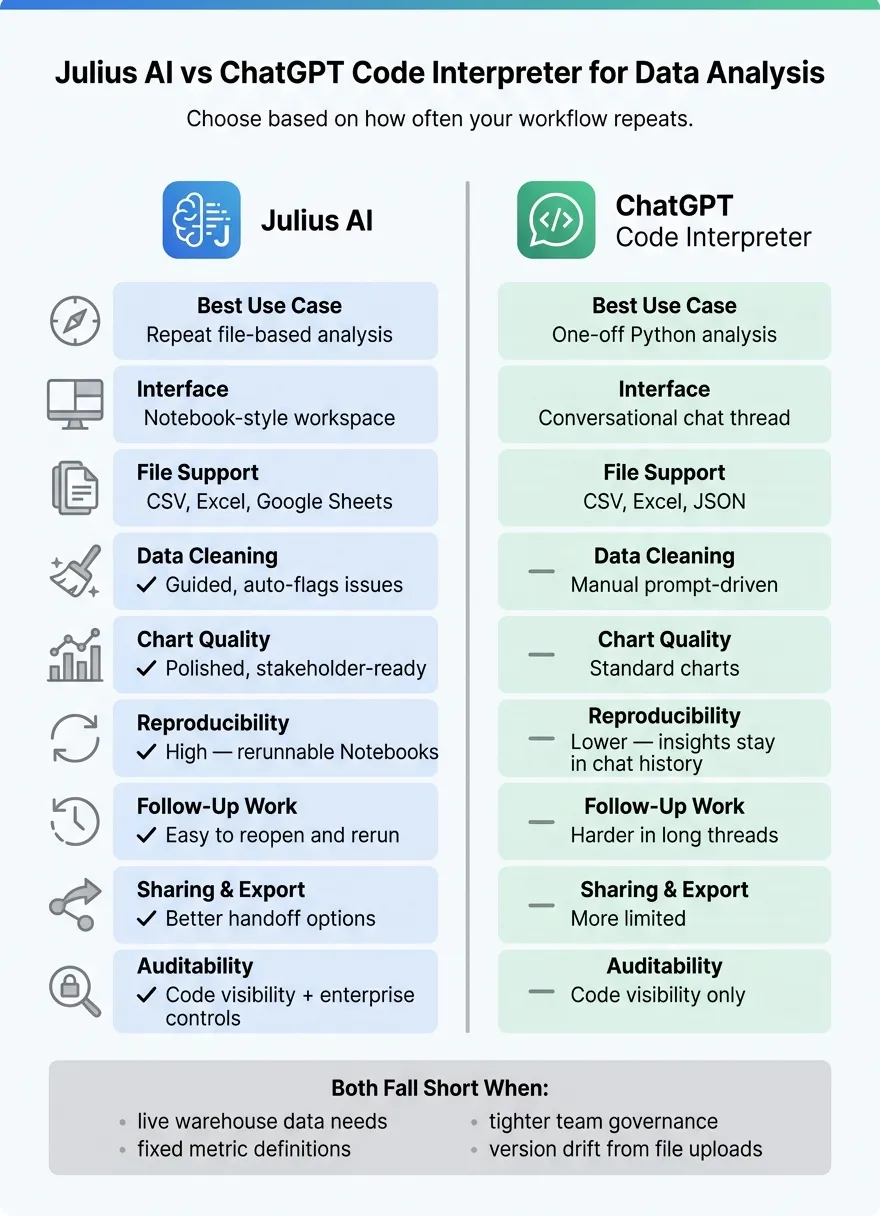 {Julius AI vs ChatGPT Code Interpreter: Side-by-Side Comparison}
:::
{Julius AI vs ChatGPT Code Interpreter: Side-by-Side Comparison}
:::
The Best AI Tool for Data Analytics
::: @iframe https://www.youtube.com/embed/xrnLCf65ZAY :::
sbb-itb-284a532
Quick Comparison
| Criteria | Julius AI | ChatGPT Code Interpreter |
|---|---|---|
| Best use case | Repeat file-based analysis | One-off Python analysis |
| Interface | Notebook-style workspace | Chat thread |
| File support | CSV, Excel, Google Sheets | CSV, Excel, JSON |
| Data cleaning | More guided | More prompt-driven |
| Charts | Better for polished output | Better for standard charts |
| Follow-up work | Easier to reopen and rerun | Harder in long threads |
| Code visibility | Visible Python | Visible Python |
| Sharing | Better handoff options | More limited |
| Best for teams with live warehouse needs | Limited | Limited |
One thing stands out across the full comparison: both data copilot tools can answer data questions, but they help in different ways once the work gets repeated, shared, or checked later.
How Julius AI and ChatGPT Code Interpreter Handle Data Analysis
The difference becomes clear in the way each tool goes from file upload to actual analysis. For teams working in Snowflake, BigQuery, Redshift, or Postgres, the main choice is pretty simple: do you want a guided workspace built around files, or do you want flexible Python inside a chat?
Julius AI: A Guided, File-First Workspace
After you upload a CSV, Excel workbook, or Google Sheets file, Julius shows a preview of the columns and keeps the table, chat, and charts together in one notebook-style workspace.[1][5]
That setup makes back-and-forth analysis feel natural. When you ask follow-up questions, Julius updates the same working area instead of sending you off into a separate thread. So if you're cleaning a dataset, checking patterns, and then building charts, the flow stays in one place.[1][2]
Julius also supports common statistical tests and time-series forecasting through natural-language prompts.[2][5]
One part that stands out is AI Notebooks. They make repeated analysis easier to rerun and edit. Code, notes, and charts stay together in one editable workspace that you can reopen, tweak, and run again on new data.[5]
ChatGPT Code Interpreter: Python Execution Inside a Conversational Interface
ChatGPT Code Interpreter works more like a standard chat thread. You upload a file, explain what you want in plain language, and the model writes and runs Python in an isolated Python environment with visible code.[1][2]
That freedom is a big plus for exploratory analysis and one-off questions. It handles custom transformations and iterative follow-up questions well, especially when you're still trying to figure out what the dataset actually has inside it.[1][6]
At a glance, the tradeoff looks like this:
| Feature | Julius AI | ChatGPT Code Interpreter |
|---|---|---|
| Interface | Notebook-style workspace | Conversational chat thread |
| File support | CSV, Excel, Google Sheets | CSV, Excel, JSON |
| Reproducibility | High - rerunnable Notebooks | Lower - insights stay in chat history |
| Python visibility | Fully transparent | Isolated environment with visible code |
These differences matter most in a very common workflow: an analyst uploads a file, cleans it, builds charts, and then comes back later with another question. In that kind of day-to-day use, the gap between a notebook-style workspace and a chat thread starts to matter a lot.
Head-to-Head: Julius AI vs ChatGPT Code Interpreter by Analyst Task
For analyst work, Julius moves faster on guided file-based tasks, while ChatGPT Code Interpreter gives you more room for flexible Python work and open-ended digging. The bigger split shows up after the first run. It’s about how each tool holds up when you need to repeat the same workflow again and again.
| Analyst Task | Julius AI | ChatGPT Code Interpreter |
|---|---|---|
| Upload experience | Fast schema detection for CSVs, Excel workbooks, and multi-tab sheets [2] | Works well, but often needs more prompting to interpret messy files [1][6] |
| Data cleaning | Flags obvious data issues and cleanup opportunities [3] | Handles cleaning with more manual prompting [1][6] |
| Python flexibility | Visible Python code for custom analysis [2] | Visible Python code in a conversational workflow [1][6] |
| Chart quality | Stronger for polished, stakeholder-ready visuals [2] | Better for standard charts [1] |
| Follow-up analysis | Saved Notebooks and custom agents help preserve schema context [2][5] | Long threads are harder to revisit cleanly [4] |
| Reproducibility | Saved Notebooks with rerunnable cells [5] | Harder to rerun cleanly on fresh data [4][6] |
| Auditability | Code visibility and enterprise controls [2] | Code visibility only [1] |
| Sharing and export | Easier stakeholder handoff [2] | More limited export options [1] |
| Best fit | Recurring reports, statistical depth, and team workflows | One-off exploration, flexible Python, and general questions |
Uploading Files and Getting to a First Analysis
Julius gets out of the gate faster. It reads column names, infers data types, and handles multi-tab spreadsheets with little setup. You can also refer to tab names directly in plain-language prompts [2].
ChatGPT Code Interpreter does fine for ad hoc analysis, but it tends to need more back-and-forth when headers are unclear or data types are messy. That’s not a dealbreaker for a one-time task. But when you’re under the gun on a client request or trying to turn around a stakeholder question fast, that extra friction starts to sting. And once you move from upload to cleanup and charting, the gap gets more noticeable.
Cleaning Data, Writing Python, and Building Charts
For data cleaning, Julius points out obvious issues and cleanup chances on its own [3]. ChatGPT can do the same work, but you usually need to ask for each step more directly. If your team is running the same cleanup flow every week on new files, that manual overhead can get old fast.
Both tools show Python code, which helps when you want to inspect what happened or tweak the analysis. Julius leans more toward guided analysis with visible code for custom work [2]. ChatGPT keeps that code inside a conversational flow, which can feel more flexible when you’re trying different angles [1][6].
On charts, Julius does a better job with polished visuals that are ready to share with stakeholders [2]. ChatGPT is a better match for standard bar and line charts [1]. So if the goal is to move from raw file to clean deck-ready visual in less time, Julius has the edge. After that, the next thing that matters is simple: can you reopen the work and run it again without rebuilding half of it?
Follow-Up Questions, Reproducibility, and Sharing Results
This is where repeat analyst work starts to separate the two tools. In Julius, your code, charts, and notes live inside a saved Notebook that you can reopen and rerun on fresh data [5]. That makes a big difference for monthly reporting or the classic “can you update this with the latest file?” follow-up.
In ChatGPT, long threads are tougher to revisit cleanly, and rerunning the same workflow on new data usually takes more manual effort [4][6]. It can still be done, but it’s less smooth when the task repeats.
For recurring reports, rerunnable notebooks cut down on rework. And when you need to hand results to non-technical stakeholders, more export options make that handoff faster [2][5].
Which Tool Fits Your Data Team's Workflow
This section links each tool to the kind of work it handles best. Once you get past the task-by-task comparison, the decision usually comes down to two things: how often the work repeats and how much governance your team needs.
Best for CSV Analysis, EDA, and Fast Business Questions
Julius AI is the stronger pick when your team often uploads Excel files or CSVs, needs stakeholder-ready charts fast, or runs the same exploratory analysis on new data every week. It’s built for recurring CSV and Excel analysis, quick EDA, and saved Notebooks. It also infers column context on its own, which cuts down setup time.
That works well when the job is familiar and repeatable. But once the analysis starts to branch into custom code paths, ChatGPT becomes the better option.
Best for Custom Analysis and Python-Heavy Work
ChatGPT Code Interpreter fits better when the analysis is less standard, the transformations get more complex, or an analyst wants to control the code path step by step. It works well for one-off exploratory questions and custom analysis that needs hands-on Python control.
The tradeoff is repeatability. Results live inside a chat thread, which makes reruns and handoffs harder [6]. For a one-time deep dive, that’s fine. For recurring analysis, it can slow things down.
When Live Warehouse Analytics Matters More Than Either Tool
If your team needs governed metrics on live warehouse data, file-based analysis starts to fall short. File uploads are session-bound, so fresh data means uploading again [3]. Julius AI does offer direct connectors to Snowflake and BigQuery on its Business tier, but the workflow is still session-based instead of warehouse-native [1][2].
For data teams running production analytics on Snowflake, BigQuery, Redshift, or Postgres, governance matters more than the upload flow. If two analysts define "revenue" in different ways across separate sessions, you can end up with answers that look confident but are wrong. A governed semantic layer - where metric definitions, joins, and trusted queries live in one central place - fixes that by keeping context the same everywhere.
Querio handles this with live warehouse connections, inspectable SQL and Python, reactive notebooks, and a governed context layer that keeps metric definitions consistent.
Conclusion: Choosing Between Julius AI and ChatGPT Code Interpreter
Julius AI is the better pick for repeatable file-based analysis, while ChatGPT Code Interpreter works better for flexible one-off tasks. That pattern stays the same across uploads, data cleaning, Python work, charts, follow-up questions, and sharing results.
For day-to-day data teams, the main deciding point is repeatability. Julius AI keeps analysis auditable and easy to hand off [2]. ChatGPT results, on the other hand, stay inside individual chat threads [6]. If your team needs to rerun the same analysis next month or explain a number to a stakeholder, that difference matters.
Both tools also hit the same wall. File uploads are fine for small, ad hoc analysis, but they don’t work well for live, production analytics where data changes every day. CSV uploads create lag, version drift, and governance gaps. That’s why live warehouse work needs a different setup.
For live warehouse analytics, Querio fits better: governed context, live warehouse connections, inspectable SQL/Python, and reactive notebooks.
FAQs
::: faq
Which tool is easier to rerun next month?
Julius AI is easier to rerun next month because it supports automated reporting and scheduled runs. That means you can keep the analysis up to date without doing the same work by hand each time.
By contrast, the cited critique of ChatGPT says it does not offer scheduled or automated reporting. So when the data changes, you have to run the analysis again yourself. :::
::: faq
When does ChatGPT Code Interpreter beat Julius AI?
ChatGPT Code Interpreter is the better pick when you want fast, general-purpose chat + code for exploratory work and you're fine with file-upload-based analysis instead of deeper, warehouse-native workflows.
It's usually the stronger option for broad AI and coding tasks, and it can handle basic charting from uploaded files. Julius, on the other hand, is better suited to more focused structured-data analysis and visualization. :::
::: faq
What should I use for live warehouse analytics?
For live warehouse analytics, use a tool that connects straight to your production data warehouse and runs governed queries there, not one that only works with uploaded files.
Julius AI supports real-time analysis and can connect to databases like Snowflake and BigQuery. But Querio is more focused on live warehouse analytics, governed semantic consistency for team dashboards, and warehouse-native querying. :::