Business Intelligence
Looker vs Lightdash: Is LookML Worth It Anymore?
Compare LookML governance vs dbt-native BI to pick based on governance, row-level access, and team size.

If I had to give the short answer: LookML is still worth it for teams with strict control needs, but most dbt-first teams will get to the same place with less work in Lightdash.
Here’s the plain-English version:
- Choose Looker if you need one locked-down semantic layer, reusable Explores, and strict row-level access.
- Choose Lightdash if your team already works in dbt and wants metrics, models, and reviews to stay in one Git-based workflow.
- The main tradeoff is simple: Looker gives you more control, while Lightdash gives you less upkeep.
- For lean analytics teams of 1–5 people, that difference can save weeks of setup and many hours of monthly fixes.
- If your warehouse is Snowflake, BigQuery, Redshift, or Postgres, either tool can work. The better pick depends more on governance needs than on the warehouse itself.
Put another way: this is not just a dashboard choice. It’s a choice about where your metric logic lives, who maintains it, and how much extra modeling your team can afford.
Looker vs Traditional BI Tools | What's Actually Different?
::: @iframe https://www.youtube.com/embed/gC7PzeUebq8 :::
sbb-itb-284a532
Quick Comparison
| Criteria | Looker | Lightdash |
|---|---|---|
| Semantic layer | LookML, separate from dbt | dbt YAML, inside the dbt project |
| Setup time | Longer | Shorter |
| Governance depth | High | Medium |
| Reuse of reporting logic | Strong | Good for dbt-based reuse |
| Row-level access | Strong | More basic |
| Maintenance | More work | Less work |
| Best fit | Regulated teams, large governance needs, GCP-heavy teams | dbt-first teams, lean analytics groups, fast-moving SaaS teams |
My take: if your team changes dbt models often, keeping BI logic next to those models can cut drift and reduce overhead. But if access rules, audit needs, and shared metric control sit at the center of your reporting stack, LookML can still justify its extra layer.
That’s the decision this article helps you make.
Where LookML still earns its keep
LookML isn't dead. For the right team, it still offers a disciplined way to centralize semantic logic at scale. The real question is simple: do you need that much control?
Governed metrics and reusable explores for standardized reporting
LookML lets teams define a metric once and use that same governed definition everywhere. That's a big reason some teams still pick Looker over dbt-native tools. With LookML Explores, you can package that logic into reusable units, so analysts can query approved definitions without rewriting SQL across dashboards and reports.
That level of control becomes even more useful when joins and access rules start getting messy.
Complex joins, semantic logic, and row-level access patterns
User attributes let you enforce row-level access rules in one place instead of repeating SQL filters across dashboards. That matters most for regulated teams running on Snowflake, BigQuery, Redshift, or Postgres, where access consistency isn't optional. It also gives teams one place to manage complex joins and business logic, which tends to matter more as the model gets bigger.
The catch? That control comes with added modeling work.
The real cost of choosing LookML
Building a full LookML semantic layer can take weeks or months. The language is proprietary, and it takes specialized modeling skills to work with it well. When dbt models change often, LookML needs updates in lockstep. For lean teams, that upkeep can wipe out the value of the governance layer if the business doesn't actually need it.
If governed semantics and access control sit at the center of your reporting setup, LookML can earn its place. If they don't, the overhead is tough to defend. That's the standard LookML has to meet. Next: where Lightdash gets there with less friction.
Why Lightdash fits modern dbt teams better
If your team already works in dbt, Lightdash skips the extra LookML layer and keeps semantic definitions in dbt YAML instead. That makes it a simpler pick when you want your BI layer to move in step with dbt, not drift off into its own system.
dbt-native modeling with less extra maintenance
Lightdash puts dbt at the center of the analytics stack. Semantic definitions live in Git alongside the rest of the project, so code reviews and tests cover the BI layer too. For analytics engineers, that means fewer places where logic can drift or get out of sync.
Faster setup and easier upkeep for lean analytics teams
For small analytics teams, especially groups of 1–5 people, Lightdash is often easier to justify. Why? Because you don’t have to maintain a second semantic layer in a proprietary language.
Keeping definitions inside the dbt project means there’s one less system to touch when models change. In practice, that shows up in two places:
- Setup time: there’s less to configure up front.
- Upkeep: changes stay closer to the dbt workflow your team already uses.
Where Lightdash falls short
Lightdash works well when governance needs are fairly straightforward. Looker still has the edge when you need more advanced reusable logic and tighter row-level access and security across many models.
Once access rules get highly complex, Lightdash can become harder to manage. That line becomes much easier to see in the comparison table below.
Looker vs Lightdash: side-by-side comparison table
::: @figure 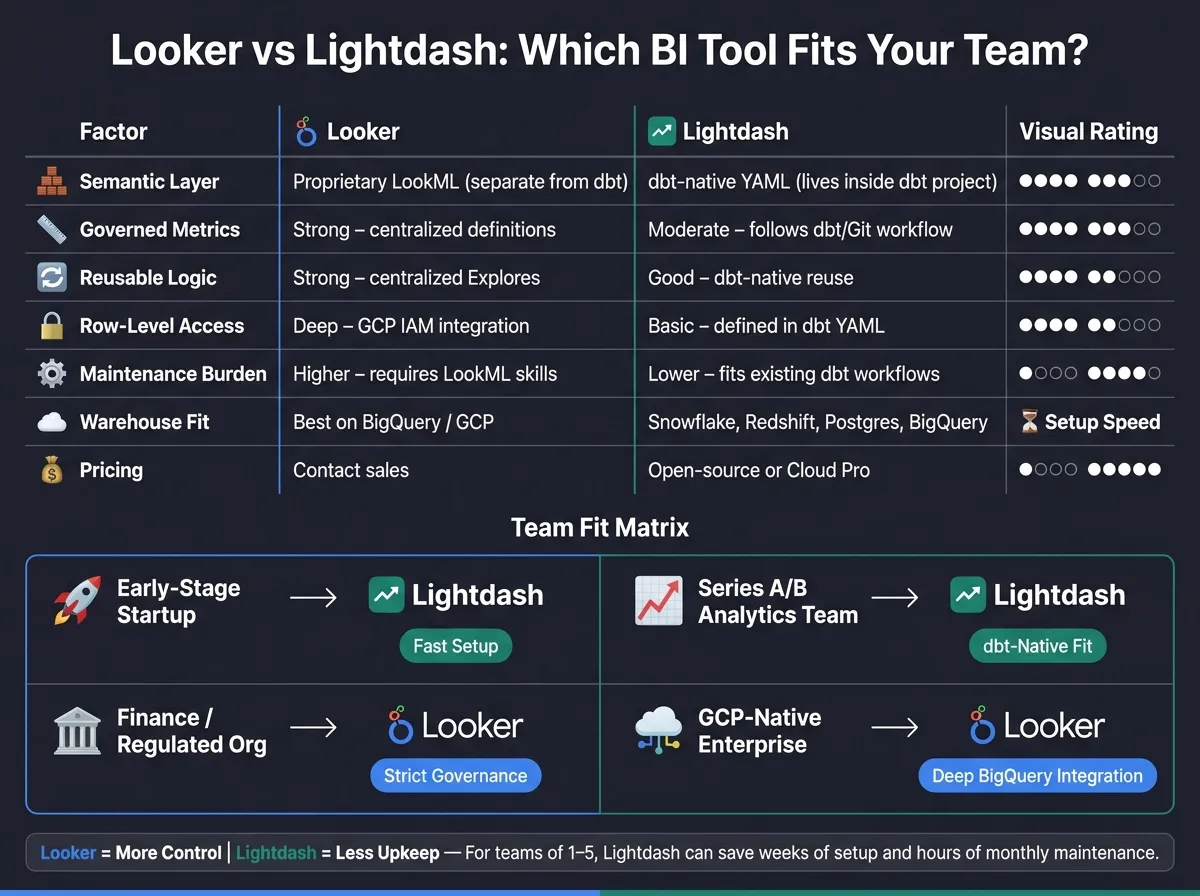 {Looker vs Lightdash: Side-by-Side Comparison for dbt Teams}
:::
{Looker vs Lightdash: Side-by-Side Comparison for dbt Teams}
:::
The main tradeoff here is governance depth vs. speed of iteration.
Looker puts semantic logic in LookML. Lightdash keeps that logic in dbt YAML and Git. Neither option wins in every case. It comes down to how much semantic logic your team needs to manage, and how often that logic changes.
| Factor | Looker | Lightdash |
|---|---|---|
| Semantic layer location and sync model | Proprietary LookML; separate from dbt, must stay in sync manually | dbt-native YAML beside dbt models; inherits dbt logic directly |
| Governed metrics | Strong; centralized LookML keeps definitions consistent | Moderate; governance follows the dbt project and Git workflow |
| Reusable reporting logic | Strong; centralized models support reusable reporting logic | Good for dbt-native reuse, follows dbt model structure and conventions |
| Row-level access | Deep governance and access controls, with strong GCP IAM integration | Defined in dbt YAML |
| Maintenance burden | Higher; usually requires dedicated LookML skills [1] | Lower; fits existing dbt and Git workflows |
| Warehouse ecosystem | Strong on BigQuery and Google Cloud | Works across Snowflake, Redshift, Postgres, and BigQuery |
| Deployment / pricing | Contact sales | Open-source or Cloud Pro |
Which tool fits your team by size, governance needs, and model complexity
Here’s the plain-English version: team fit matters as much as feature fit.
| Team type | Best fit | Why |
|---|---|---|
| Early-stage startup | Lightdash | Lower entry cost and fast setup for dbt users |
| Series A/B analytics team | Lightdash | Fits dbt workflows and avoids maintaining a separate LookML layer |
| Finance or regulated org | Looker | Auditable LookML logic, strict governance, and row-level access controls matter more than setup speed |
| GCP-native enterprise | Looker | Deep BigQuery integration, IAM alignment, and centralized semantic control via LookML [1] |
Looker asks for more modeling work up front. If your team runs on Snowflake or Redshift and isn’t GCP-first, that extra semantic layer can feel like one more system to maintain.
That’s where the split starts to show. For some teams, that extra layer brings order. For others, it just adds drag.
The contrast shows up most clearly when you build the same metric in both tools.
The same metric built in LookML and Lightdash
A simple way to judge LookML is to build the same governed metric in both tools. NRR is a good test case because it touches multiple tables, uses time-based logic, and shows up across every dashboard that depends on it.
That makes it a solid pressure test. You're not just asking, "Can this tool calculate a metric?" You're asking whether it can define that metric once, keep it consistent, and let teams reuse it without drift.
LookML example: views, measures, joins, and explores
In Looker, NRR sits inside a LookML project. You'd set up a subscriptions view for the base revenue data, a customers view, and then an Explore that joins them with the period logic built in.
# subscriptions.view.lkml
view: subscriptions {
  sql_table_name: analytics.subscriptions ;;

  dimension: customer_id {
    type: number
    sql: ${TABLE}.customer_id ;;
  }

  dimension_group: period {
    type: time
    timeframes: [month, quarter, year]
    sql: ${TABLE}.period_start ;;
  }

  measure: beginning_mrr {
    type: sum
    sql: ${TABLE}.beginning_mrr ;;
  }

  measure: ending_mrr {
    type: sum
    sql: ${TABLE}.ending_mrr ;;
  }

  measure: net_revenue_retention {
    type: number
    sql: ${ending_mrr} / NULLIF(${beginning_mrr}, 0) ;;
    value_format_name: percent_2
    description: "Ending MRR divided by beginning MRR for existing customers"
  }
}

# nrr.explore.lkml
explore: subscriptions {
  join: customers {
    type: left_outer
    sql_on: ${subscriptions.customer_id} = ${customers.id} ;;
    relationship: many_to_one
  }
}
This is the main thing LookML is selling: one governed definition, reused everywhere. Change the LookML once, and every dashboard using that measure picks up the update.
Lightdash example: dbt models, YAML, and semantic definitions
In Lightdash, the same NRR metric lives in your dbt project, next to the model that computes it.
-- models/finance/nrr.sql
with base as (
  select
    customer_id,
    date_trunc('month', period_start) as period_month,
    beginning_mrr,
    ending_mrr
  from {{ ref('subscriptions') }}
  where customer_type = 'existing'
)

select
  customer_id,
  period_month,
  beginning_mrr,
  ending_mrr,
  ending_mrr / nullif(beginning_mrr, 0) as net_revenue_retention
from base
# models/finance/nrr.yml
version: 2
models:
- name: nrr
description: "Net revenue retention for existing customers"
columns:
- name: net_revenue_retention
description: "Ending MRR divided by beginning MRR"
meta:
metrics:
net_revenue_retention:
type: number
label: "Net Revenue Retention"
format: percentThat setup keeps the metric in Git beside dbt, so updates move through the same review flow as the model itself. In other words, the metric isn't the part that changes. The big difference is how much separate modeling each tool asks you to maintain.
The tradeoff stays the same in both cases: Looker puts logic in a metrics layer vs semantic layer, but that comes with a dedicated modeling layer to manage. Lightdash keeps definitions close to dbt, but governance is less deep. Which one matters more comes down to two things: how complex your access rules are, and how often your models change.
FAQs
::: faq
When does LookML’s extra control justify the upkeep?
LookML’s extra control is worth the upkeep when you need a strictly governed single source of truth for complex metrics used across many users, dashboards, and AI agents - and you have the engineering capacity to keep it in shape.
But if your team doesn’t have dedicated LookML know-how, the upkeep can become a drag. In that case, the risk of stale derived tables often outweighs the governance upside. :::
::: faq
How hard is it to keep semantic logic in sync with dbt changes?
That’s often the hard part.
LookML and dbt live in separate modeling worlds. So when something changes, teams usually have to rebuild or recheck metric definitions, joins, filters, drill behavior, and permissions just to keep both sides in sync.
And even after the models and metrics move over, small mismatches can still creep in. That can lead to drift and extra upkeep over time.
A dbt-first approach cuts down on that work because semantic definitions start in dbt. :::
::: faq
What governance gaps should teams expect with a dbt-native setup?
Teams should expect gaps around metric consistency, especially when YAML or semantic logic isn't enforced as a shared single source of truth. That's where metric drift starts to creep in: dashboards, notebooks, and AI queries can all end up using different governed logic.
Row-level security and access rules may not carry over cleanly either, so teams often need to re-map and re-test them. And if metric logic is complex or deeply nested, some of it may need pre-computation, which can widen divergence over time. :::