Business Intelligence
Lightdash vs Metabase: Open-Source BI in 2026
Choose governance or accessibility: use Git-backed metric control for consistency, or fast self-serve BI for wider adoption.

If I had to give one short answer, it’s this: Metabase is the safer default for most teams in 2026, while Lightdash makes more sense for dbt-first teams that want metrics in Git.
Here’s the article in plain English:
- Pick Metabase if you want fast setup, self-serve dashboards, and embedded analytics
- Pick Lightdash if you want dbt-led modeling, YAML-based metrics, and Git review for metric changes
- Metabase fits mixed-skill teams better because non-technical users can build reports without SQL
- Lightdash fits analytics engineering teams better because metric logic lives with dbt models
- Metabase can be live in 1 to 2 days, and some teams report 30% to 60% fewer analyst requests within 90 days
- Both connect to warehouses like Snowflake, BigQuery, Redshift, and Postgres, but they solve different day-to-day problems
What I like about this comparison is that it does not turn into a feature dump. It keeps the focus on the part that decides most BI purchases: how your team works. If your bottleneck is metric drift and review control, Lightdash lines up better. If your bottleneck is getting more people to answer their own questions, Metabase is the better call.
::: @figure 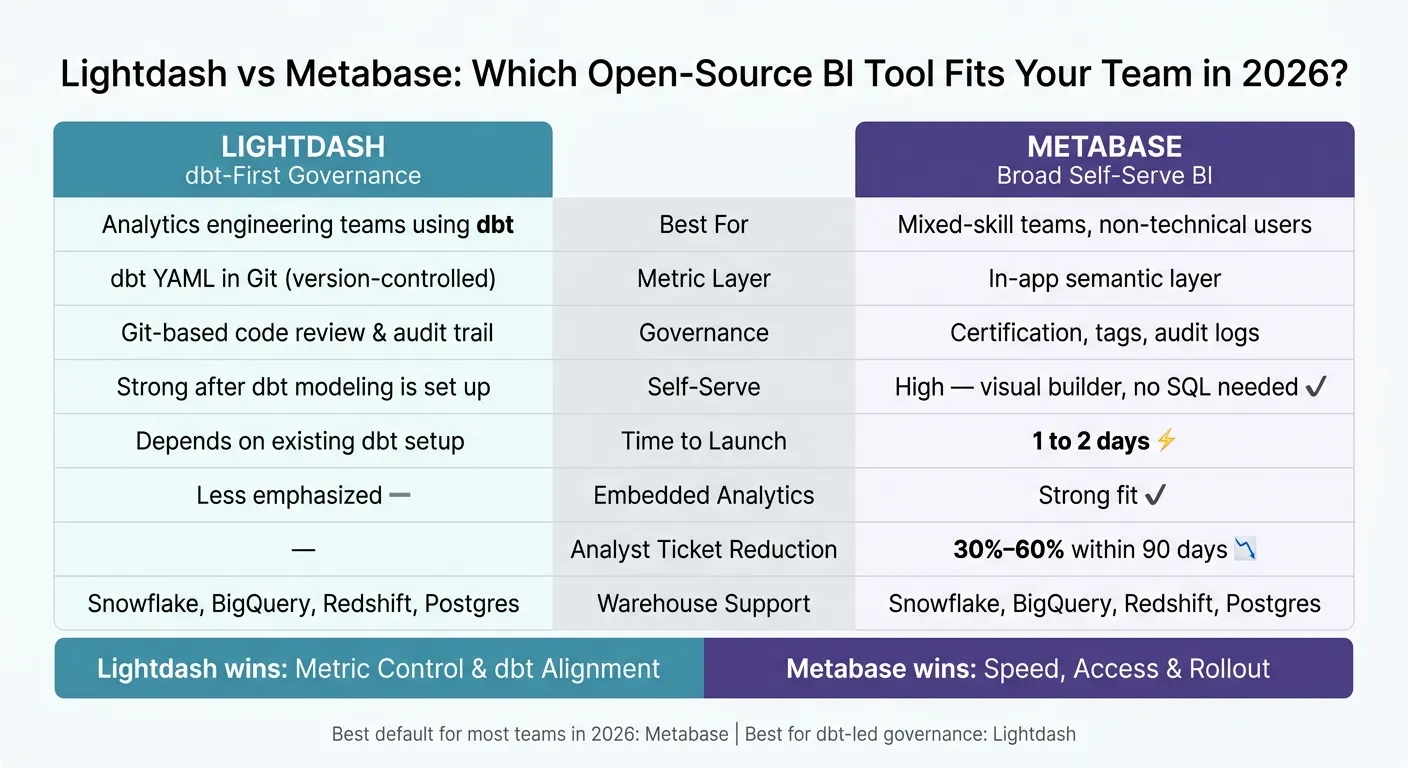 {Lightdash vs Metabase: Open-Source BI Tool Comparison 2026}
:::
{Lightdash vs Metabase: Open-Source BI Tool Comparison 2026}
:::
Metabase AI Agent Skills - Modular embedding to modular SDK
::: @iframe https://www.youtube.com/embed/JtO3Wb0uYlw :::
sbb-itb-284a532
Quick Comparison
| Criteria | Lightdash | Metabase |
|---|---|---|
| Core fit | dbt-first teams | Broad self-serve BI |
| Metric layer | dbt YAML in Git | In-app semantic layer |
| Governance style | Code review and version control | App-based curation, certification, tags |
| Self-serve use | Better after modeling is set up | Better for non-SQL users |
| SQL workflow | dbt-aligned analyst flow | SQL editor plus visual builder |
| Embedded analytics | Less emphasized here | Stronger fit |
| Time to launch | Depends on dbt setup | Often 1 to 2 days |
| Best default in 2026 | For dbt-led governance | For most open-source BI buyers |
My short take: Metabase wins on access and rollout. Lightdash wins on control and dbt alignment.
That’s the article’s core message, stripped down to what you need to know fast.
Lightdash vs Metabase at a glance
Both tools are open-source, but they’re built for different kinds of teams. Lightdash is centered on dbt. Metabase is geared toward getting people to answers fast, even if the data stack isn’t tightly standardized.
Lightdash in one paragraph
Lightdash builds its analytics layer from dbt models. Metrics, dimensions, and joins live in YAML files in Git alongside the project, so the metric layer is explicit and version-controlled. That setup makes Lightdash a strong match for analytics engineers and dbt-heavy data teams working in warehouses like Snowflake, BigQuery, Redshift, or Postgres. In plain English: it fits governed dbt workflows better than broad self-serve BI.
Metabase makes the opposite tradeoff: less modeling rigor, faster access for more users.
Metabase in one paragraph
Metabase is an open-source BI platform with a visual query builder that lets non-technical users build charts and dashboards without writing SQL. It supports 20+ official connectors, including Snowflake, BigQuery, Postgres, MySQL, and MongoDB, and cloud deployments are typically live in 1 to 2 days [1]. Its semantic layer is lighter. Teams can define canonical metrics and verify content, but they can’t model metrics in dbt YAML. Over 80,000 organizations use it, including Capital One, HuggingFace, and Linear [1].
The table below shows where those tradeoffs show up most clearly in day-to-day use.
Best fit by use case
| Use Case | Default Pick |
|---|---|
| dbt-first data team, governed metrics in Git | Lightdash |
| Broad internal BI, non-technical users | Metabase |
| Fast rollout on Postgres or MySQL | Metabase |
| BI-as-code, strict metric ownership | Lightdash |
If your team already runs dbt and governance is non-negotiable, Lightdash is the natural fit. If you need most of the company exploring data within a few weeks without a dbt project as a prerequisite, Metabase gets you there faster.
The next section breaks these differences down across modeling, dashboarding, and maintenance.
Side-by-side comparison across key decision criteria
| Criteria | Lightdash | Metabase | Best Fit |
|---|---|---|---|
| Semantic Modeling | dbt metrics defined in YAML and versioned in Git | Built-in semantic layer | Lightdash for dbt users |
| Governance | Git-based, version-controlled | Certification, tags, audit logs | Lightdash for code auditability |
| SQL Workflow | Analyst-centric, dbt-aligned | SQL editor + visual query builder | Metabase for mixed teams |
| Self-Serve | Strong when modeled in YAML | High - visual query builder, no SQL needed | Metabase for non-technical users |
| AI-Readiness | Governed metric context from dbt | Natural language to SQL | Lightdash for governed metric context; Metabase for faster natural-language queries over app-defined metrics |
| Deployment | Requires a dbt project | Standalone Docker or cloud | Metabase for fast rollout |
The table lays out the tradeoffs at a glance. In day-to-day work, those differences show up fast: how teams define metrics, who can answer questions on their own, and how much process sits behind each change.
Semantic modeling, governance, and SQL workflows
Lightdash has a clear structural edge here: its semantic definitions live in dbt YAML and Git. That means metric updates move through the same review path as code. Put simply, changes are easier to review, track, and reproduce.
For teams already deep in dbt, that setup feels natural. Analysts and data engineers can work from the same playbook instead of splitting logic across tools.
Metabase handles things differently. Its semantic layer lives inside the app, which makes setup and curation faster. The tradeoff is less code-level auditability than Lightdash. So if your team wants tight control and a Git-based workflow, Lightdash fits better. If the goal is to move fast with a mix of technical and non-technical users, Metabase has the easier path.
Self-serve dashboarding and embedded analytics
Metabase is the stronger pick for broad self-service. Its visual query builder lets business users create reports without writing SQL, and teams report a 30% to 60% reduction in analyst ticket load within 90 days [1].
That’s a big deal in practice. Instead of every simple question landing in an analyst’s queue, more people can pull answers on their own.
Metabase also moves faster during exploration. Lightdash is better when that speed has to stay inside a governed model. So the gap isn’t just about features. It’s about how much freedom you want users to have, and where you want control to live.
If embedded analytics for a customer-facing SaaS product is the requirement, Metabase is the stronger fit [1]. That’s why team makeup often matters more than a checklist of features.
AI-readiness, deployment, and maintenance burden
If assistants and analysts need to use the same metric definition, Lightdash gives you a cleaner source of truth. Its dbt YAML gives AI layers a governed, versioned source of truth. Metabase, by contrast, uses a lighter semantic layer inside the app, which is better suited to faster natural-language queries.
So the split is pretty simple. Lightdash leans toward control and consistency. Metabase leans toward speed and ease of use.
On deployment, Metabase is the lighter operational lift. Lightdash adds dbt dependency, but it fits teams that already run on dbt. For lean teams, Metabase cuts platform overhead. For teams that want more logic pushed into dbt governance, Lightdash lines up better. These tradeoffs mostly come down to team operating model, which the next section maps to specific use cases.
Which tool fits which team
The choice here comes down to how your team works day to day: dbt-led modeling or broad self-serve reporting.
Choose Lightdash if your team uses dbt as the source of truth
Pick Lightdash when dbt is your source of truth and metric changes need to go through Git reviews. If your team wants BI definitions to live in Git, Lightdash gives you a tighter workflow with a clear audit trail. Metric updates follow the same review path as the rest of your warehouse logic, which keeps things neat and easier to track.
That said, this works best when your dbt models and metrics are already in good shape. If they aren't, setup can get heavy fast.
If dbt is not yet your system of record, Metabase usually gets you to value faster, making it a strong choice for implementing self-service analytics quickly.
Choose Metabase for broad self-serve reporting and faster rollout
Pick Metabase when product, growth, and customer success teams need self-serve answers without SQL, and you want to get live in 1 to 2 days. It's a strong fit for teams that want non-technical self-serve, and the drop in analyst ticket volume often starts showing up within the first 90 days [1].
For regulated teams, check compliance documentation before you buy.
If your metric definitions must live in Git, Lightdash is usually the tighter fit.
Conclusion: The practical 2026 recommendation
Metabase is the default pick for most open-source BI buyers in 2026. It’s easier for non-technical stakeholders to use, and its embedded analytics offering is mature. Lightdash is the better fit when dbt is already your source of truth. In that setup, self-serve works well, but the results depend heavily on the quality of your dbt models and YAML.
The main tradeoff comes down to governance vs. accessibility. Lightdash does a better job when metric consistency is the top concern. Metabase makes more sense when you need faster adoption and a lower barrier for business users. In plain English: they solve different problems.
That makes the decision fairly simple. Ask what bottleneck matters most right now. If non-technical stakeholders need self-serve answers without SQL, Metabase is the faster win. If metric definitions are drifting across dashboards, Lightdash is the tighter fix.
FAQs
::: faq
Can Metabase work well without dbt?
Yes - Metabase can work well without dbt.
If you're comfortable with Metabase’s visual query builder, you can create queries that turn into SQL and run straight in your warehouse. You can also lean on Metabase’s built-in models and basic permissions to keep things organized.
That said, Metabase tends to be a better fit with dbt when you want tighter semantic modeling and more control over governed metrics. In that setup, teams often publish dbt models into Snowflake, BigQuery, or Postgres, then use Metabase on top of that layer.
So while Metabase can integrate with dbt, you don’t need dbt to get started. :::
::: faq
How much dbt maturity does Lightdash require?
Lightdash usually asks for strong dbt maturity because it’s dbt-first and, in practice, dbt-dependent. If your analytics definitions aren’t already modeled in dbt, or you’re still figuring out your modeling layer, that can create extra friction.
Teams that already use dbt as the center of analytics engineering can use dbt-managed YAML semantic definitions to run Lightdash explores and dashboards with less hassle. :::
::: faq
Which tool is easier to maintain long term?
For long-term maintenance, Metabase is usually the easier option. It runs as a single, unified application with a simple Docker or JAR setup, so there’s less admin work over time.
If you self-host it, you may still need to spend extra time on its multi-component architecture and version upgrades. Even with that, it tends to be lighter to maintain than tools that rely more on code or workflow-heavy setups. :::