Business Intelligence
top AI data analysis platforms 2026
AI-driven analytics platforms now deliver autonomous, governed insights that cut analysis time and surface root causes instantly.
AI data analysis platforms in 2026 are redefining how businesses handle analytics. These tools now deliver faster insights, automate complex tasks, and offer high accuracy, making them vital for organizations. Here's a quick look at five leading platforms:
Querio: A complete AI-native analytics solution that excels in natural language querying, root cause analysis, and live data warehouse integration. Pricing starts at $25–$50 per user/month.
Microsoft Power BI Copilot: Simplifies report creation and analysis with conversational AI and advanced governance features. Requires Power BI Premium or Fabric F64+ capacity.
Tableau Pulse: Focuses on proactive insights and real-time alerts, integrating with Salesforce Data Cloud. Pricing is around $115/user/month for Enterprise Creators.
Looker + Gemini: Offers semantic modeling for accurate AI-driven insights and integrates with Google Cloud services. Available with Looker-hosted Enterprise licenses.
ThoughtSpot: A search-first platform with instant insights and strong security. Pricing starts at $25/user/month for the Essentials plan.
Each platform has unique strengths, from Querio's transparency to ThoughtSpot's speed, catering to diverse business needs.
Quick Comparison:
Platform | Key Features | Starting Price | Deployment Options |
|---|---|---|---|
Querio | NL-to-SQL, root cause analysis, live data access | $25–$50/user/month | SaaS, self-hosted |
Power BI Copilot | Conversational AI, DAX generation | Requires Premium plan | Cloud-based |
Tableau Pulse | Real-time alerts, Salesforce integration | $115/user/month | Tableau Cloud |
Looker + Gemini | Semantic modeling, AI-powered tools | Custom pricing | Looker-hosted, Google Cloud |
ThoughtSpot | Search-first interface, SpotIQ insights | $25/user/month | Cloud, embedded, mobile |
These platforms are transforming analytics by reducing manual effort, improving accuracy, and offering advanced AI capabilities tailored for enterprise use.
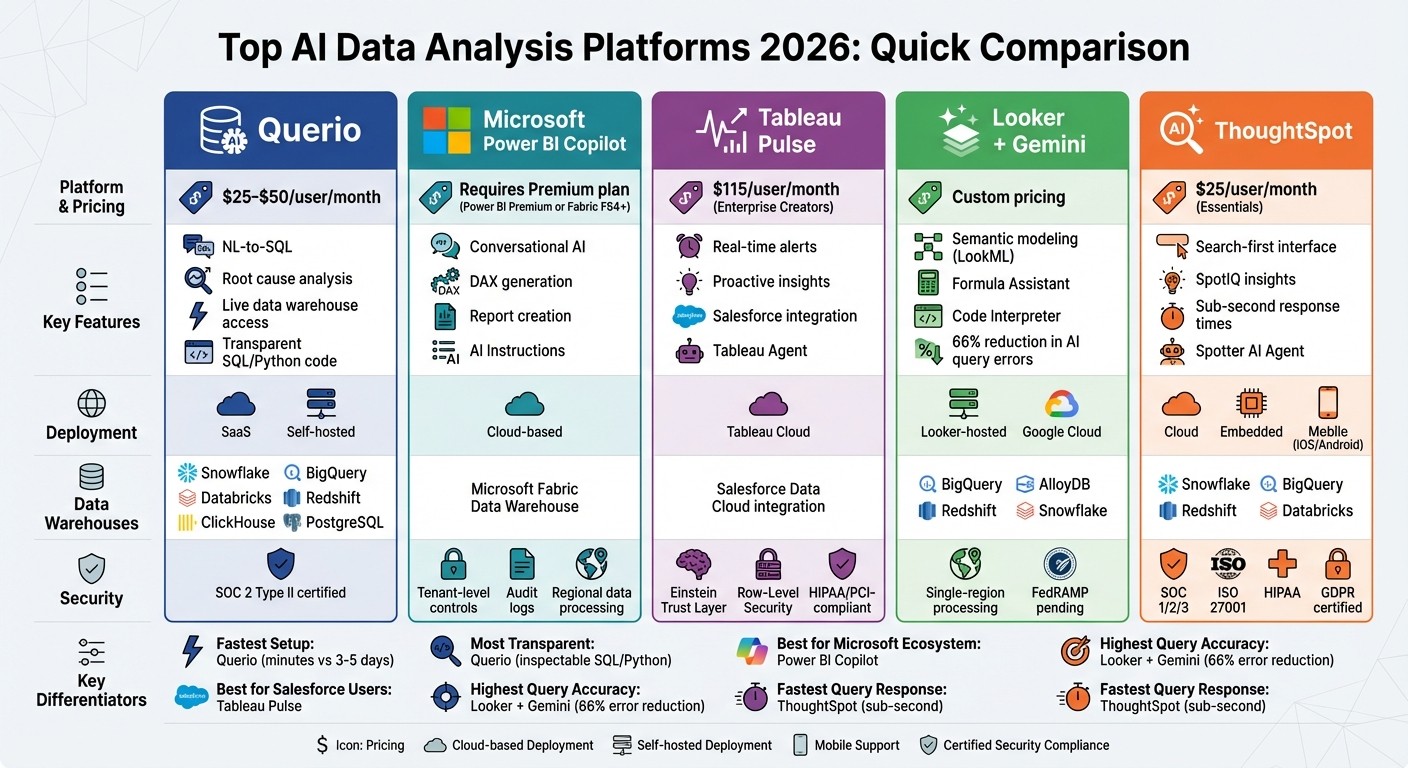
Top 5 AI Data Analysis Platforms 2026: Features, Pricing & Deployment Comparison
Best AI Tools Every Data Analyst Should Know in 2026
1. Querio
Querio stands out in the AI-driven analytics landscape of 2026 with its all-encompassing, autonomous workflow capabilities. It distinguishes itself as an AI-native analytics workspace, seamlessly blending conversational querying with advanced investigative tools. Instead of just generating charts from natural language queries, Querio delivers a full analytical workflow - from the initial question to root cause analysis and executive-level reporting.
AI Capabilities
Querio's AI engine is designed to handle various analytical tasks with precision:
Natural language to SQL (NL-to-SQL) tools: This feature translates plain English queries into precise SQL statements, making database access effortless for non-technical users.
Autonomous root cause investigation: Using machine learning-based variance decomposition, it analyzes KPI changes across massive datasets, ranking key drivers like region, product, or channel by their impact.
Proactive KPI monitoring: The system runs 24/7, detecting anomalies and generating narrative explanations within seconds.
These AI features integrate smoothly with Querio's data connectivity, ensuring consistent performance across different data environments.
Data Warehouse Integration
Querio connects directly to major data warehouses like Snowflake, BigQuery, Databricks, Amazon Redshift, ClickHouse, and PostgreSQL using encrypted, read-only credentials. This setup allows teams to work with large datasets - such as those pulled from Snowflake - without any slowdown, thanks to live connections that eliminate the need for data extracts. The platform also supports multi-source connectors, including Excel, CSV, MySQL, and Google Analytics 4, consolidating data from various sources into one unified workspace [9, 12].
A semantic YAML layer plays a critical role in ensuring consistency. This layer governs how AI interprets business terms, standardizing metric definitions across dashboards, ad-hoc queries, and embedded analytics. Data teams only need to define joins and business logic once, and these definitions are automatically applied to every AI-generated query [3].
Governance and Security
Querio prioritizes security and compliance with SOC 2 Type II certification, role-based access controls, and single sign-on integrations. Its NL-to-SQL functionality is governed, and every query is fully transparent and inspectable, with audit trails to meet strict regulatory requirements. Each AI-generated answer includes viewable SQL and Python code, ensuring users can verify the logic before acting. Finance teams, for instance, have used this feature to analyze billions of transaction rows for fraud detection, confirming the accuracy of the underlying logic beforehand [9, 11].
Scalability and Deployment Options
Built on a cloud-native architecture, Querio is designed to handle datasets ranging from millions to billions of rows. It offers flexibility through both SaaS and self-hosted deployment options, making it suitable for enterprise teams managing large-scale data environments. The platform's proactive alerting capabilities and competitive pricing - typically starting at $25–$50 per user per month - make it an appealing choice for organizations leveraging modern data warehouse technologies [9, 10, 12].
2. Microsoft Power BI Copilot

Microsoft Power BI Copilot integrates conversational AI into the process of creating reports and exploring data. It’s designed to simplify workflows by generating reports, writing DAX formulas, and enabling natural language-based data exploration - all while prioritizing speed and security [6].
AI Capabilities
Power BI Copilot takes on tasks that previously required advanced technical skills. For example, its DAX generation feature can translate plain English into complex DAX measures and calculated columns, covering scenarios like time intelligence and conditional aggregations [6]. Users can even create multi-page reports, complete with visuals, filters, and formatting, just by describing their needs in everyday language.
To handle ambiguous terms, the platform uses AI Instructions. For instance, it can define "Revenue" as "Net Revenue" or apply default filters for AI-generated responses [4]. A 2026 update significantly increased prompt limits from 500 to 10,000 characters, allowing for more detailed queries [7]. Additionally, its grounded references feature ensures responses are based on verified data sources by linking specific reports or semantic models [8]. These capabilities, paired with seamless data connectivity, make the tool highly versatile.
Data Warehouse Integration
Power BI Copilot directly integrates with the Data Warehouse workload in Microsoft Fabric, supporting SQL analytics endpoints and warehouses [9]. By leveraging table and key metadata, it generates T-SQL code without accessing raw data, which helps maintain both performance and privacy [9]. The platform also enforces Row-Level Security (RLS) and Column-Level Security (CLS) based on user permissions [11].
For better performance with large datasets, it’s recommended to use star schemas with clear, business-friendly names instead of technical abbreviations like "cust_nm" [4]. To improve efficiency, the system caches identical prompts for up to 24 hours if the underlying semantic model remains unchanged [10].
Governance and Security
Power BI Copilot includes tenant-level controls, allowing administrators to manage feature access across an organization or for specific security groups [12]. Every interaction - whether a user prompt or an AI response - is logged in Power BI audit logs, which can then be exported to tools like Microsoft Sentinel for compliance purposes. Sensitivity labels applied to datasets also extend to AI-generated outputs [5].
"Copilot in Fabric aims to augment the abilities and intelligence of human users. Copilot can't, and doesn't, aim to replace the people who today create and manage reports." – Microsoft Learn [12]
Data processing is localized to the Power BI tenant’s geographic region, primarily in U.S. and EU datacenters. Cross-region processing requires explicit administrative approval for tenants outside these areas [12]. Conversation history is stored securely within the Azure boundary for 28 days unless manually deleted [12]. These features ensure the platform meets enterprise-level security and compliance standards.
Scalability and Deployment Options
To use Power BI Copilot, organizations need Fabric F64+ or Power BI Premium P1+ capacity alongside a Power BI Pro license [6]. For centralized billing, companies can opt for a dedicated Fabric Copilot Capacity (FCC), which also prevents Copilot usage from affecting critical business processes on main capacities [10]. Whether dealing with small datasets or enterprise-scale warehouses, the platform is built to scale. However, it may take up to 24 hours for Copilot to become fully operational after purchasing or upgrading capacity [13].
3. Tableau Pulse
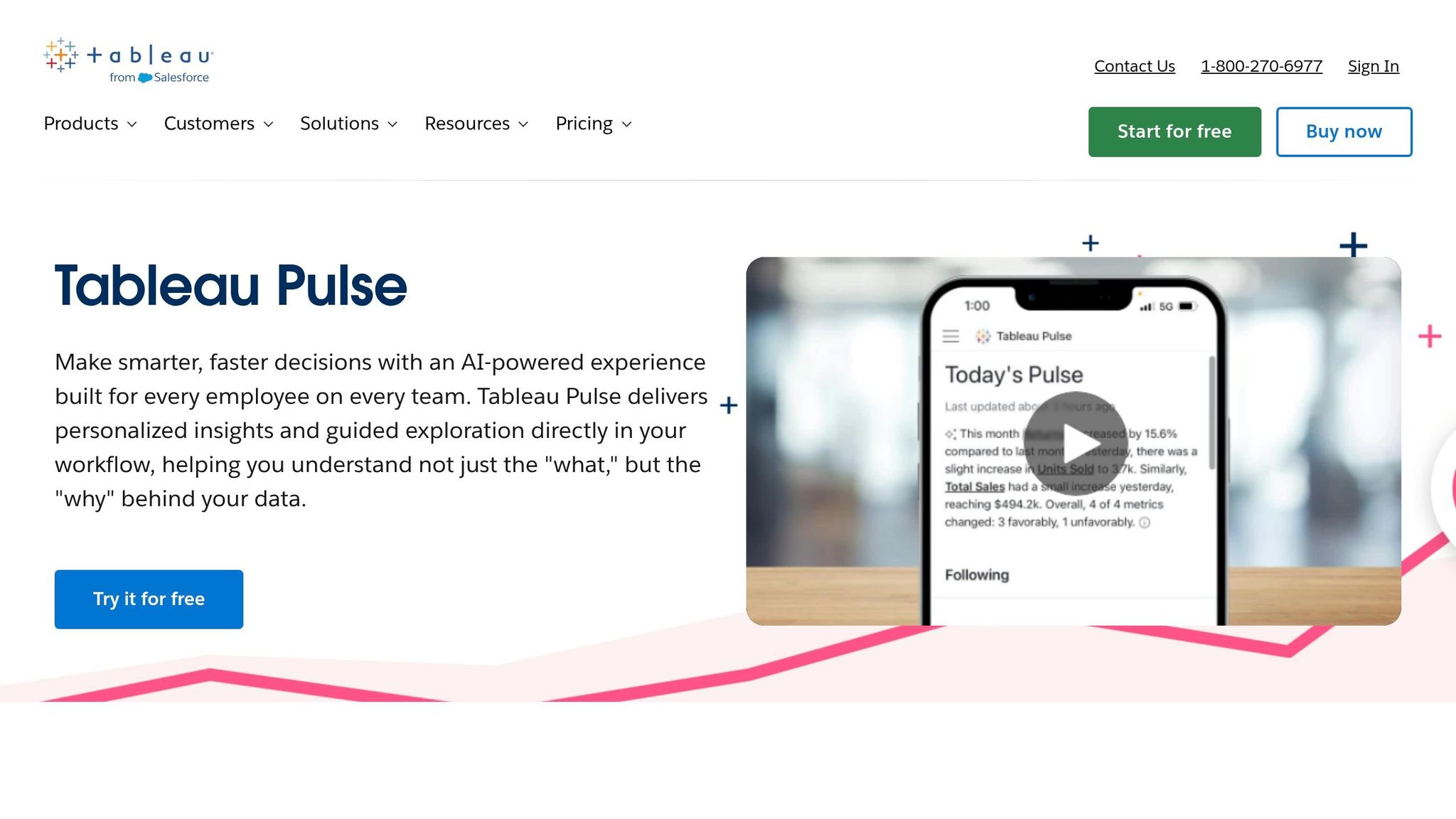
Tableau Pulse takes a proactive, insight-driven approach to business intelligence. Built on a headless BI framework, it allows organizations to define KPIs and metrics in a centralized layer. This ensures consistency across departments by delivering customized insights directly to users. This feature is especially relevant since nearly 70% of employees reportedly don't use traditional data tools to guide their decisions [14].
AI Capabilities
Tableau Pulse leverages AI to automatically detect trends, outliers, and anomalies in data. It ranks these findings by relevance and summarizes them in clear, conversational language [14]. At the heart of this functionality is Tableau Agent (formerly Einstein Copilot), a conversational assistant that enables users to create visualizations, perform calculations, and streamline data preparation using natural language prompts [15]. Impressively, the platform typically responds to AI queries within 2–3 seconds for medium-sized datasets [15].
Two standout features make proactive monitoring and root cause analysis more effective:
Inspector Skill: Monitors subscribed metrics and sends real-time alerts via Slack, email, or Microsoft Teams when significant changes occur.
Concierge Skill: Provides explanations for the key drivers behind metric shifts [14].
These tools allow teams to respond quickly to emerging trends. For example, in early 2026, Box used Tableau Pulse to track cybersecurity metrics. The platform identified anomalies in login activity and access patterns, which helped the company improve its incident response times [15].
"We now have data that's available on a daily basis that's easy to navigate, easy to query, and available on our phone. It's really changing the game." – Mauro Flores, Executive Vice President of Data Democratization, Virgin Media O2 [16]
Governance and Security
Tableau Pulse pairs its analytical capabilities with strong governance and security measures. Built on the Einstein Trust Layer, it ensures sensitive data remains masked and that interactions with generative AI adhere to established permissions [14]. The platform supports Row-Level Security (RLS), meaning users with restricted access can view metric names but will see blank data values [17]. Administrators can also control access and oversee metric creation.
For organizations with data residency requirements, Tableau Pulse uses geo-aware routing to process requests in the nearest supported region [19]. Additionally, Tableau Cloud complies with HIPAA and PCI-DSS 4.0 standards, with all communications protected by TLS 1.2 or higher [18]. Certified badges can be applied to core business metrics, signaling trusted data for decision-making [19].
Scalability and Deployment Options
Tableau Pulse is available to Tableau Cloud users with a Tableau+ license, priced at around $115 per user per month for Enterprise Creators [1]. Administrators can activate Pulse features by toggling the "Turn On AI" setting in Tableau Cloud. For environments with high data volumes, Tableau Extracts are recommended to reduce latency during AI-driven inference and natural language querying [15].
The platform also integrates seamlessly with Salesforce Data Cloud, enabling insights from unified data streams. However, its generative AI features require a connection to a Salesforce org to process requests [15].
4. Looker + Gemini
Looker + Gemini brings Google's AI into the world of business intelligence by using a semantic modeling approach. Instead of relying on direct database queries, it leverages LookML, Looker's data modeling language, to interpret business context. This allows the platform to map natural language questions to specific fields and filters. By using this semantic layer, the system reduces errors in AI-generated queries by up to 66% [21][26]. This approach highlights how AI platforms are reshaping analytics by making processes more intuitive and accurate.
AI Capabilities
Looker + Gemini provides three AI-driven tools tailored to different user needs:
LookML Assistant: This tool speeds up development by turning natural language descriptions into dimensions, measures, and parameters directly within the Looker IDE [20][21][25].
Formula Assistant: It simplifies the creation of calculated fields by converting plain English into Looker expressions [20][21][24].
Semantic Search: Unlike traditional keyword-based searches, this feature understands the conceptual meaning of queries, enabling users to find content using everyday business terms [20].
For more advanced tasks, the Code Interpreter translates natural language into Python code, enabling operations like forecasting and anomaly detection without requiring coding knowledge [21][27]. Users can connect up to five Explores at once for cross-domain analysis [22][23]. Additionally, administrators can enhance query accuracy by providing "golden queries", which are verified question-and-answer pairs that reflect common business patterns [22][23]. These tools collectively make analytics more accessible, whether for basic insights or complex analysis.
Data Warehouse Integration
The platform integrates seamlessly with multiple data sources, including Google BigQuery, AlloyDB, Amazon Redshift, Snowflake, and Databricks [22][23]. The Conversational Analytics API acts as a backend, allowing developers to embed natural language querying into custom applications while ensuring governance through the data warehouse connection. However, 38% of G2 reviewers in 2025 reported performance issues, such as slow dashboard load times and instability when working with large or complex datasets [27].
"Looker's semantic layer reduces data errors in gen AI natural language queries by as much as two thirds." – Vijay Venugopal, Director of Product Management, Google Cloud [21]
Governance and Security
All data processed through Conversational Analytics remains within the Looker instance and is confined to a single region, meeting data residency requirements [20][22]. Importantly, customer prompts and outputs are not used to train Google's generative AI models [21]. The LookML semantic layer ensures that AI-generated insights align with governed metric definitions. However, as of March 2026, organizations handling regulated workloads should note that Conversational Analytics has not yet been included in FedRAMP High or Medium compliance boundaries [20].
Scalability and Deployment Options
Gemini's features are available with Looker-hosted Enterprise or Google Cloud Core platform licenses [20][27]. Administrators must enable these features in the Admin panel [20]. For advanced analytics like forecasting, both the "Code Interpreter" and "Conversational Analytics" settings need to be manually activated [20]. In recognition of its capabilities, Google was named a Leader in the 2025 Gartner Magic Quadrant for Analytics and Business Intelligence Platforms for the second year in a row [26]. Together, these features position Looker + Gemini as a powerful tool for agile and scalable analytics in the evolving AI landscape.
5. ThoughtSpot
ThoughtSpot brings a search-first approach to data analysis, enabling business users to explore data using a familiar search bar interface - no SQL expertise required. Its Spotter AI Agent delivers insights and responds to natural language queries instantly. As of February 2026, ThoughtSpot has earned a consensus score of 8.29/10 from 384 verified reviews, reflecting strong user approval across multiple platforms [28].
AI Capabilities
The platform’s standout feature, SpotIQ, identifies anomalies and highlights insights that might otherwise go unnoticed.
"SpotIQ automatically detects anomalies and surfaces insights, significantly reducing manual analysis time" [28].
Organizations have reported impressive results, such as Novo Nordisk achieving an 88% reduction in analysis time and Regeneron cutting investigation time by 97% [3]. Even when working with billions of rows of data, ThoughtSpot delivers sub-second response times, making it an excellent fit for businesses managing large-scale datasets [28].
Data Warehouse Integration
ThoughtSpot integrates seamlessly with leading cloud data warehouses like Snowflake, BigQuery, Redshift, and Databricks. A reviewer shared:
"The integration with Snowflake is seamless. We're seeing sub-second response times on massive datasets which is impressive compared to our old legacy stack" [28].
However, users should plan for upfront data modeling work using ThoughtSpot’s Modeling Language (TML) to ensure the AI can handle complex joins and business logic effectively [28].
Governance and Security
With enterprise-grade security features, ThoughtSpot ensures robust data protection. It offers row-level access controls, data encryption, and Single Sign-On support through SAML, OAuth, and OIDC [28]. The platform holds certifications such as SOC 1/2/3, ISO 27001, HIPAA, GDPR, CCPA, and CSA STAR [28]. Multi-tenant support allows data isolation across departments or business units, while VPN and Virtual Private Cloud deployment options secure data both in transit and at rest [28].
Scalability and Deployment Options
ThoughtSpot provides flexible pricing tiers to meet diverse needs:
Essentials: $25/user/month
Pro: $50/user/month, which includes the Spotter AI Agent and a usage-based option at $0.10 per query
Enterprise: Custom pricing for unlimited users and data [28]
Deployment options include ThoughtSpot Cloud, ThoughtSpot Embedded for developers integrating analytics into custom apps, and mobile apps available for iOS and Android [28].
ThoughtSpot’s focus on instant insights, robust security, and flexibility makes it a strong choice for businesses looking to maximize their data analysis capabilities.
Strengths and Weaknesses
AI-driven platforms bring a lot to the table, but they’re not without their challenges. Many struggle with steep technical learning curves, often requiring users to master complex query languages. On top of that, some platforms fail to deliver when it comes to handling intricate analytical logic. While certain tools shine in visualization, they often lack the depth needed for true autonomous root cause analysis.
Security and governance features also differ widely across the market. Querio stands out here, offering enterprise-grade protections like SOC 2 Type II certification, row-level security, and full audit trails. This ensures every insight is fully traceable, providing peace of mind for businesses that prioritize data security and compliance [3].
Cost is another area where platforms vary greatly. Some require hefty investments in capacity to scale AI features, while others limit users with restrictive seat caps. Querio, however, keeps things simple and transparent. Its pricing is competitive, with flexible options and no seat limits or usage restrictions during the free trial.
What sets Querio apart is its combination of natural language querying with complete transparency. Every answer it generates comes with inspectable SQL and Python code, solving the black box issue. Its shared context layer ensures consistent definitions across use cases, whether it's ad-hoc analysis or embedded analytics. Plus, Querio connects directly to live warehouse data - no need for extracts - delivering insights in minutes, compared to the 3–5 business days competitors often require [1]. These features make Querio a standout choice for organizations looking for fast, transparent, and reliable insights.
Conclusion
Selecting the right AI data analysis tool in 2026 hinges on factors like your tech stack, team size, and governance requirements. Querio offers seamless integration across various infrastructures, ensuring reliable performance and user-friendly operation no matter the environment.
Querio is specifically designed for data teams that prioritize both speed and precision. Unlike other proprietary tools with rising costs, Querio connects directly to popular data warehouses like Snowflake, BigQuery, Redshift, or ClickHouse. Its pricing is straightforward - around $14,000 per year with no seat limits. This means teams gain live data access, full SQL and Python visibility, and a shared context layer that guarantees consistent metrics across dashboards, notebooks, and embedded analytics platforms.
Beyond basic Q&A, Querio digs deeper by identifying root factors with complete transparency [1]. It combines natural language queries for quick insights with a reactive notebook setup for more detailed investigations. Every insight is fully inspectable and governed, addressing the challenges of opaque "black box" systems.
Built with the future in mind, Querio's architecture merges AI-driven automation with strict governance [1][2]. For enterprises needing scalable analytics without compromising on accuracy or control, Querio delivers the speed, clarity, and oversight that modern data teams require.
FAQs
What data sources can Querio connect to?
Querio links directly to live data warehouses and works effortlessly with major databases. It provides clear visibility with support for both SQL and Python, all while maintaining strong governance over your data workflows.
How does Querio keep AI answers accurate and governed?
Querio uses a context layer to enforce business rules and metrics, ensuring AI-generated answers are both accurate and governed. By connecting directly to live data warehouses, it maintains strict security protocols, including SOC 2 Type II compliance. Additionally, it automates validation and data cleaning processes, reducing errors and delivering consistent, precise analytics you can trust.
Can Querio run on live warehouse data without extracts?
Querio links directly to live data warehouses, enabling real-time querying and analysis without requiring data extracts. This ensures your insights are always current and integrates smoothly with your existing data systems.
Related Blog Posts