Business Intelligence
data analytics AI tools list comparison 2026
Compare five leading AI-powered analytics platforms in 2026 — features, pricing, governance, and best use cases.

AI is transforming data analytics, enabling faster decisions and more efficient workflows. By 2026, 40% of new BI tools include AI features, helping businesses move beyond static dashboards to intelligent, automated insights. This article breaks down leading AI analytics platforms, highlighting their unique strengths, pricing, and best use cases.
Here’s a quick overview of the platforms covered:
- Querio: Translates natural language into SQL/Python, ideal for real-time data analysis with inspectable AI logic.
- Microsoft Power BI: Best for teams in the Microsoft ecosystem, offering natural language reporting and advanced security.
- Tableau: Known for visualizations and AI-driven metric alerts, suited for large-scale datasets.
- Domo: Automates workflows with Agent Catalyst and connects to 1,000+ data sources.
- ThoughtSpot: Excels in search-driven analytics and live data querying on platforms like Snowflake.
Quick Comparison
| Platform | Key Features | Pricing | Best For |
|---|---|---|---|
| Querio | Natural language to SQL, live data updates | Free plan; Core $2,499/mo | SaaS analytics, real-time insights |
| Power BI | DAX measures, Microsoft integration | $14–$24/user/month | Finance, sales, operations teams |
| Tableau | AI agents, predictive tools | $75–$115/user/month | Advanced data visualizations |
| Domo | Workflow automation, 1,000+ connectors | $20K–$134K/year | Mid-sized to large enterprises |
| ThoughtSpot | Search-driven, real-time cloud queries | $25–$50/user/month | Ad-hoc queries, cloud data platforms |
Each tool addresses specific needs, from real-time data querying to automating workflows. Selecting the right one depends on your business goals, tech stack, and budget. Read on for detailed insights into these platforms.
::: @figure 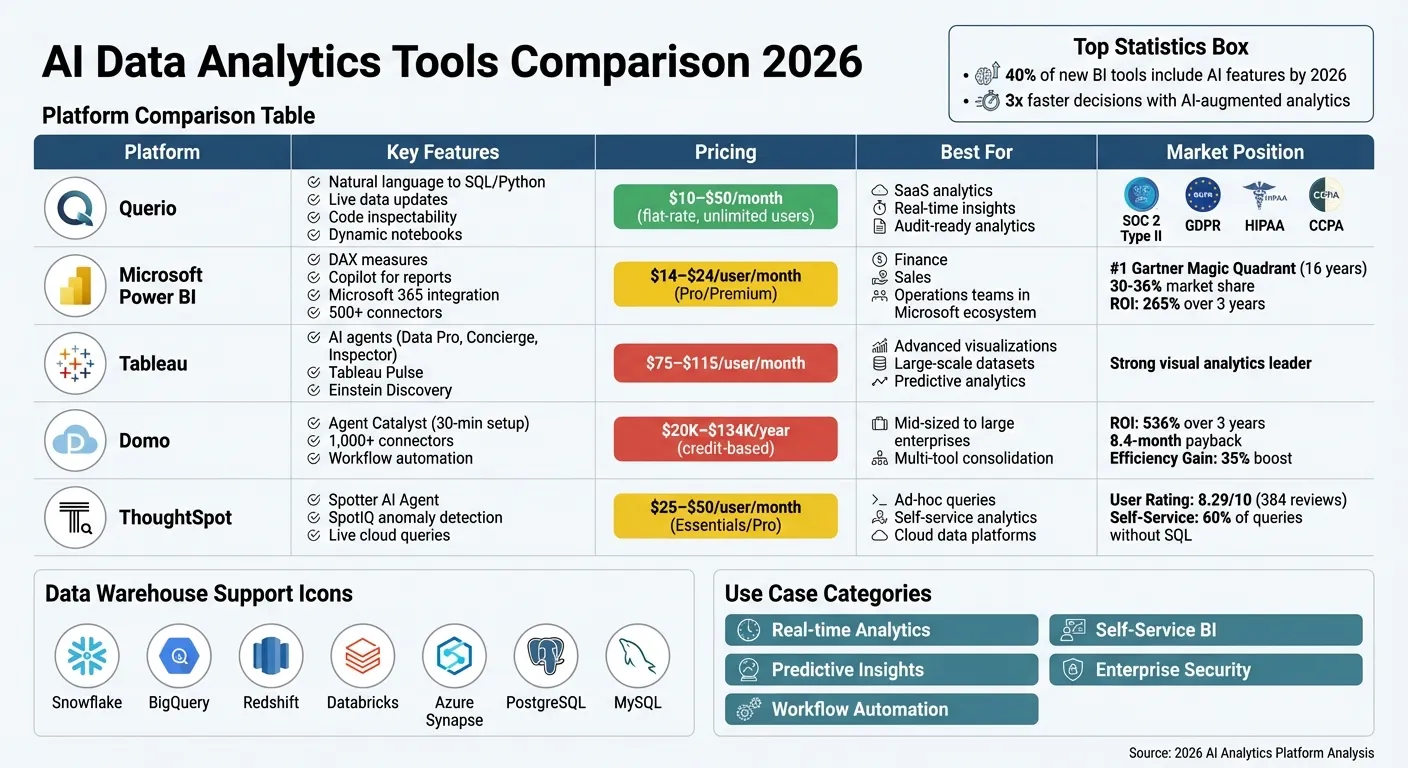 {AI Data Analytics Tools Comparison 2026: Features, Pricing & Best Use Cases}
:::
{AI Data Analytics Tools Comparison 2026: Features, Pricing & Best Use Cases}
:::
I Tested 53 AI Tools for Data Analysis - THESE 5 ARE THE BEST!
::: @iframe https://www.youtube.com/embed/RYTjU_x6fAQ :::
sbb-itb-284a532
1. Querio
Querio is an AI-driven workspace designed to translate plain-English queries into SQL and Python. It connects directly to live data warehouses like Snowflake, Google BigQuery, Amazon Redshift, ClickHouse, Motherduck, PostgreSQL, MySQL, MariaDB, and Microsoft SQL Server. By using encrypted, read-only credentials, Querio eliminates the need for ETL pipelines or duplicating data, ensuring analysts always work with the most current information instead of outdated extracts.
Core AI Features
One standout feature of Querio is its code inspectability. Every AI-generated answer includes the corresponding SQL or Python code, allowing users to review and verify the logic behind the results. This approach eliminates the "black box" problem often associated with AI tools. Querio also provides a dynamic notebook environment, where changes to the logic automatically update all related results and visualizations in real time. The platform supports multi-turn conversations, retaining context for follow-up questions, and flags anomalies or unexpected trends in live data for deeper analysis.
Data Warehouse Support
Querio's integration with major cloud platforms and relational databases ensures analysts can work directly with live, accurate data. By querying data directly from existing warehouses without relocation or duplication, the platform guarantees real-time access to up-to-date metrics.
Pricing Tiers
Querio has no per-seat pricing: unlimited users and unlimited data connections come with every plan. It has a free plan, and Core is $2,499 a month (or $25,000 a year billed annually). Each plan includes AI credits (500 a month on Free, 10,000 on Core, a custom allowance on Enterprise), and admins can set a spending cap.
Governance Capabilities
The platform includes a shared semantic layer that allows data teams to standardize joins, metrics (like MRR or churn), and business terms across all analyses and dashboards. This ensures consistency in reporting and analytics. Querio also tracks versioned logic, so when business rules are updated, all connected notebooks automatically reflect the changes. Security and compliance are prioritized with certifications such as SOC 2 Type II, GDPR, HIPAA, and CCPA, alongside role-based access controls and SSO integrations.
Best Use Cases
Querio shines in several scenarios. Its transparent AI logic and live data updates make it ideal for SaaS self-service analytics, empowering non-technical teams - like marketing or product teams - to access critical metrics without delays. It also supports embedded analytics, allowing organizations to integrate AI-powered dashboards into customer-facing applications using APIs or iframes. Additionally, Querio is a strong choice for audit-ready analytics, where every AI-generated insight is backed by inspectable code. For organizations that value transparency and real-time data accuracy, Querio offers a compelling solution.
2. Microsoft Power BI
Microsoft Power BI is a business intelligence platform designed to work seamlessly within the Microsoft ecosystem. As of 2026, it has held the top spot in the Gartner Magic Quadrant for 16 years straight and supports more than 500 data connectors [4]. Its strengths include deep integration with Microsoft 365 and Azure services, alongside robust security features. Below, we’ll explore Power BI’s standout capabilities, pricing structure, and ideal use cases.
Core AI Features
Power BI’s Copilot feature allows users to create multi-page reports using natural language prompts. It can also generate DAX measures and dynamic narratives automatically. The platform includes AI-powered visuals like:
- Key Influencers: Uses logistic regression to highlight factors driving specific outcomes.
- Decomposition Tree: Guides users through root cause analysis.
- Smart Narrative: Produces textual summaries that update dynamically as data changes.
Additionally, Power BI incorporates AutoML into its Dataflows, enabling non-technical users to develop prediction and regression models without needing to write code [5].
Data Warehouse Support
Power BI connects seamlessly with major cloud data warehouses, such as Azure Synapse, Snowflake, Google BigQuery, and Amazon Redshift. It’s also shifting toward a unified lakehouse architecture through Microsoft Fabric and OneLake, which combine data lake and warehouse functionalities into one platform [6]. Users can enhance natural language queries by defining synonyms and business terms within the linguistic schema [5].
Pricing Tiers
Power BI offers flexible pricing to cater to different needs, from individual users to enterprise-level organizations:
- Power BI Desktop: Free, but lacks sharing and cloud refresh features.
- Pro Plan: $14 per user per month.
- Premium Per User Plan: $24 per user per month.
- Enterprise Plans: Start at $262 per month.
- Advanced Copilot Features: Available for $8,396 per month.
A Forrester study found that Power BI delivers a 265% return on investment (ROI) over three years [7].
Governance Capabilities
Power BI provides advanced security measures like row-level security and Customer Lockbox, ensuring authorized access to sensitive data. These governance tools strengthen the platform’s ability to support secure, data-driven decision-making.
Best Use Cases
Power BI is particularly effective for organizations already using Microsoft tools. It’s popular among:
- Finance teams: For creating budgeting dashboards.
- Sales departments: For tracking pipeline metrics.
- Operations teams: For monitoring key performance indicators (KPIs).
The platform has received a 4.4/5 rating on major review sites [6]. However, users should note that DAX can be challenging to learn, and the Desktop application is only available for Windows [4].
3. Tableau

By 2026, Tableau introduced specialized AI agents that simplify analytics workflows. The platform now includes Tableau Next, featuring three AI agents: Data Pro for automated data preparation, Concierge for guided exploration, and Inspector for advanced alerting [1]. These agents complement Tableau Agent, a natural language interface that creates visualizations and calculations based on user queries.
Core AI Features
Tableau Pulse keeps users updated with AI-powered metric notifications sent directly to Slack or Teams. Einstein Discovery, Tableau's predictive analytics engine, integrates forecasts into dashboards, eliminating the need for data science expertise. Another key feature is Tableau Semantics, a governed semantic layer that standardizes metrics and ensures consistency, preventing "metric drift" [1]. Together, these tools enable data teams to access real-time insights and respond quickly to changes.
Data Warehouse Support
Tableau is built to handle complex, large-scale datasets with real-time analytics [9]. It supports live connections to various cloud-based services, such as AWS and BigQuery [9], allowing users to query live data without moving it. The Tableau Catalog enhances data discovery and indexing across connected sources, making it easier for teams to manage and integrate data effectively. This level of support ensures flexibility and competitive pricing options.
Pricing Tiers
Tableau provides two main licensing options:
- Standard: $75 per user per month, offering full visualization capabilities [8].
- Tableau+ (Enterprise): $115 per user per month, which includes advanced administrative tools and higher site limits [1].
Best Use Cases
Tableau is ideal for organizations seeking advanced visual analytics paired with predictive tools. Its ability to handle large datasets while maintaining real-time performance makes it a go-to choice for data teams focused on exploration and discovery rather than routine reporting. These features highlight Tableau's focus on delivering agile, cutting-edge analytics for modern data needs.
4. Domo
In 2026, Domo introduced Agent Catalyst, a no-code tool that takes analytics to the next level by enabling autonomous business processes. Tasks like staff optimization, customer support workflows, and SWOT analysis can now run with minimal human involvement. This shift toward AI powered analytics allows organizations to refine their business strategy through automated, data-driven decisions. Impressively, Agent Catalyst can set up AI agents in about 30 minutes, allowing real-time monitoring and automated responses to data changes [10][11].
Core AI Features
Agent Catalyst empowers users to create AI agents that continuously monitor data and automate workflows. It also leverages FileSets with RAG (Retrieval-Augmented Generation) to refine queries and deliver highly contextual insights. These tools are seamlessly integrated into Domo's interface, making it easy for teams to automate tasks like sales pipeline management and scheduling - no coding required [10][11][13].
Data Warehouse Support
Domo stands out for its extensive connectivity options. It supports over 1,000 pre-built cloud connectors, far surpassing competitors that typically offer around 100 [11][13]. The platform integrates with major enterprise systems like Salesforce, Snowflake, NetSuite, BigQuery, SAP, Oracle, Amazon Redshift, and Databricks. It also connects with niche tools such as Epic (for healthcare) and Yardi (for real estate) [10][11][13]. Domo's federation capabilities allow users to query multiple data sources without needing to move the data [10][11].
Pricing Tiers
Domo uses a credit-based pricing model with custom annual contracts.
- Standard Tier: Includes 1,000+ connectors and basic AI features.
- Enterprise Tier: Adds Agent Catalyst and advanced AI/ML management tools.
- Business Critical Tier: Offers HIPAA-compliant data analysis tools and dedicated support [10].
For mid-sized deployments (20–100 users), costs typically range from $20,000 to $50,000 annually. Larger enterprise contracts average around $134,000 per year. However, note that hourly data refreshes can significantly increase credit usage compared to daily updates [10][11][13].
Best Use Cases
Domo delivers tangible benefits for businesses. It boasts an average ROI of 536% over three years, with a payback period of just 8.4 months [10][12][13]. The platform is ideal for enterprises looking to consolidate multiple BI, analytics, and data integration tools into one solution [10][12]. Automation features lead to a 35% boost in efficiency [10].
A Nucleus Research case study highlighted this:
"We eliminated $120K in annual licensing fees for legacy tools and reduced our analytics team headcount needs by 2 FTEs" [13].
Users also praise how quickly Domo can connect diverse data sources - often linking 15+ sources in under two hours [10].
5. ThoughtSpot
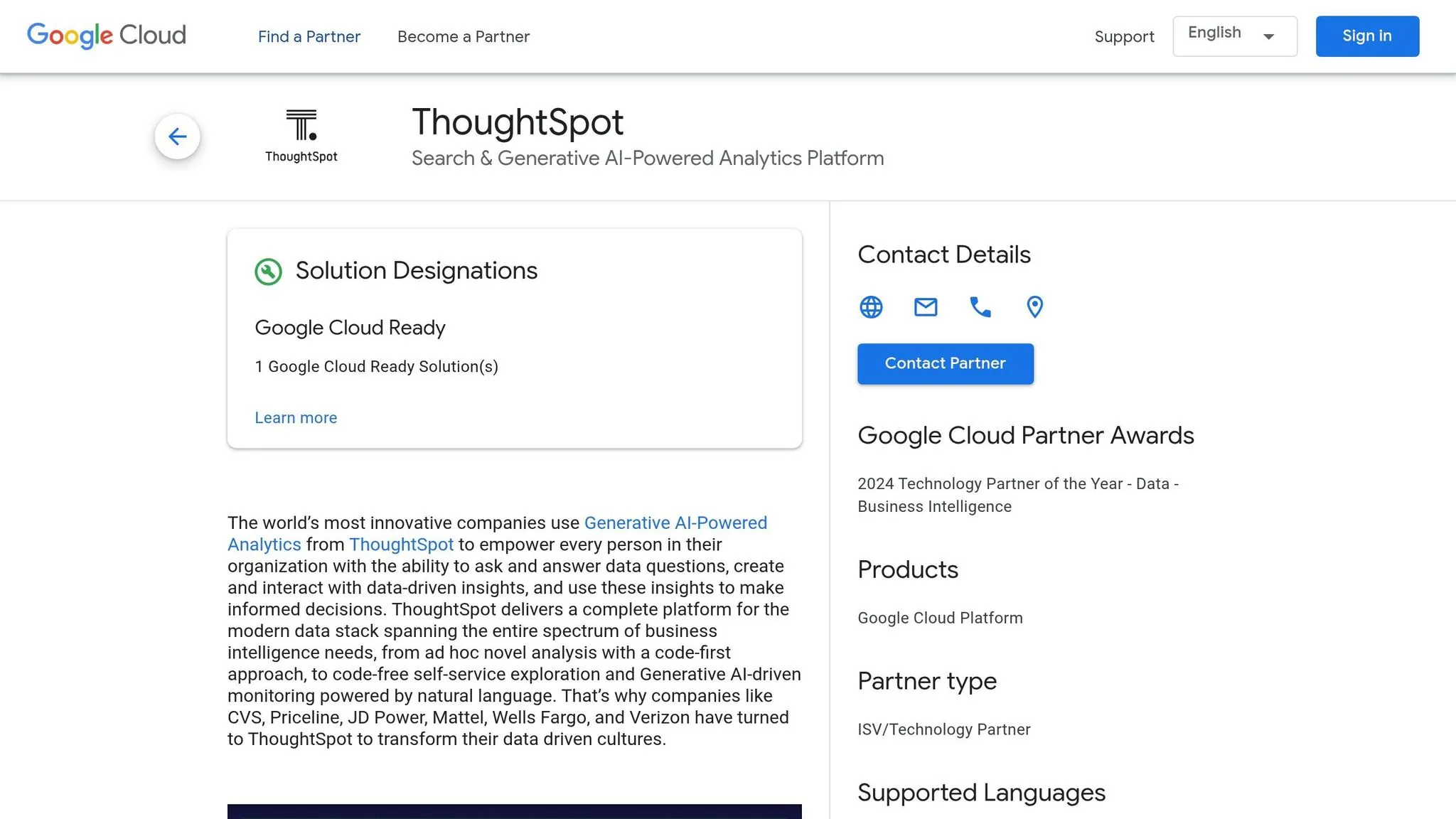
ThoughtSpot stands out with its combination of AI-driven insights and real-time data connectivity. The 2026 platform introduces agentic analytics, featuring specialized AI agents tailored for specific tasks. Key tools include SpotterViz for instant dashboard creation, SpotterModel for automated semantic modeling, and SpotterCode for AI-assisted coding. At the heart of the platform is the Spotter AI Agent, which acts as a conversational analyst, allowing users to ask questions in plain English - no SQL required [1][14][15].
Core AI Features
One of ThoughtSpot's standout tools is SpotIQ, which automatically detects anomalies and uncovers insights that might otherwise go unnoticed.
"SpotIQ is the standout feature for us. It automatically surfaces insights and anomalies we would have missed manually. It's like having an extra analyst on the team." – InsightSeeker, Capterra [14]
The platform’s natural language search enables a majority of business queries - approximately 60% - to be handled without needing SQL skills [14]. It also uses TML (ThoughtSpot Modeling Language) to predefine metadata and relationships, though this requires a considerable upfront setup effort [14][15]. These AI capabilities are further powered by its seamless real-time data connectivity.
Data Warehouse Support
ThoughtSpot integrates directly with major cloud data platforms like Snowflake, Databricks, Amazon Redshift, and Google Cloud. Thanks to its Live Cloud Data Connections, users can execute real-time queries without needing to move or duplicate data [14].
As one user shared:
"The integration with Snowflake is seamless. We're seeing sub-second response times on large datasets which is impressive compared to our old legacy stack." – DataEng_Mike, Capterra [14]
Pricing Tiers
ThoughtSpot offers flexible pricing options to cater to different team sizes and data needs:
- Essentials: $25/user/month (billed annually), supports 5–50 users and up to 25 million rows [14].
- Pro: $50/user/month (billed annually), supports 25–1,000 users, handles up to 250 million rows, and includes the Spotter AI Agent with 25 queries per user per month [14].
- Pro (Usage-Based): $0.10 per query, ideal for unpredictable workloads [14].
- Enterprise: Custom pricing for unlimited users and data, with full compliance certifications like SOC 1/2/3, HIPAA, and GDPR [14].
- Developer Tier: Free for one year, supports up to 10 users for testing embedded analytics [14].
Governance Capabilities
ThoughtSpot places a strong emphasis on governance, with certifications including SOC 1/2/3, ISO 27001, HIPAA, GDPR, and CCPA [14]. Features like row-level security, data encryption, and multi-tenant organization ensure data integrity. Administrators can use TML to centrally define joins, metrics, and business terms, promoting consistency across user searches [14].
Best Use Cases
ThoughtSpot is particularly well-suited for organizations struggling with frequent ad-hoc data requests. It empowers non-technical users to independently access the insights they need.
"ThoughtSpot has significantly reduced our 'data request' backlog. Business users are now self-serving about 60% of their own queries without needing SQL help." – BIManager_Global, G2 [14]
With a consensus rating of 8.29/10 based on 384 verified reviews as of February 2026 [14], ThoughtSpot excels in industries like retail, healthcare, and finance. However, potential users should be aware of the steep learning curve for TML setup and the platform's somewhat limited visualization customization compared to traditional BI tools [14].
Pros and Cons
Every analytics platform comes with its own set of strengths and weaknesses, catering to different technical requirements, infrastructure setups, and budget constraints. Here's a closer look at how key players stack up in terms of cost, integration, and automation features.
Microsoft Power BI is a budget-friendly option for small teams, especially those already using Microsoft's ecosystem. It integrates seamlessly with tools like Excel, Teams, and Azure, and currently holds about 30–36% of the global business intelligence market [1]. However, unlocking its advanced AI-driven Copilot features requires Fabric capacity, which costs approximately $5,000 per month. This can make the platform significantly more expensive in the long run [1].
Tableau, on the other hand, is highly regarded for its top-tier visualization tools and proactive monitoring through Tableau Pulse [16][3]. By leveraging Salesforce Data Cloud and Agentforce, it delivers AI-driven insights that users find both visually appealing and effective. However, these advanced features come at a premium, making Tableau one of the pricier options [1][17].
ThoughtSpot shines when it comes to live querying on modern cloud data platforms like Snowflake, Databricks, and BigQuery. Its SpotIQ feature automatically highlights anomalies, enabling users to address roughly 60% of business queries without needing SQL expertise [14]. That said, it requires substantial initial data modeling and doesn’t retain search context, which can be a limitation [1][17]. Pricing for ThoughtSpot varies widely depending on the scale of deployment [1].
Domo offers the flexibility of a cloud-native platform, making it a great fit for mid-sized teams. It provides broad integration across numerous data sources, but its AI capabilities, including Domo.AI and monitoring features, are still evolving [1]. Additionally, its credit-based pricing model can become costly with frequent data updates.
These tools reflect a broader trend toward autonomous analytics, which help organizations make faster and more informed decisions. Research suggests that companies using AI-augmented analytics can make decisions up to three times faster than those relying solely on traditional dashboards [2]. The market is moving away from static dashboards and toward AI agents capable of multi-step reasoning and root cause analysis [1][17]. Many leading platforms now deliver proactive insights directly through collaboration tools like Slack and Microsoft Teams, eliminating the need for users to manually extract data [2]. Choosing the right tool ultimately depends on aligning its features with your organization’s strategic goals.
Conclusion
Finding the best AI data analytics tools means aligning your infrastructure and strategy with a tool that provides clear, fast insights. This review highlights that tools offering live data connections and transparent AI logic - like Querio - are essential for modern analytics needs.
Before making a decision, consider running a two-week proof of concept with Querio using your production data. This will help confirm its ability to handle your business logic and domain-specific terminology [2]. It's also crucial to ensure the platform integrates seamlessly with your entire tech stack. Even small gaps - like missing 20% of your data sources - can lead to major blind spots that impact decision-making [2]. Testing Querio in a real-world scenario allows you to see how its flexibility and features perform with your data.
By 2027, companies using AI-augmented analytics are expected to make decisions three times faster than those relying on traditional dashboards [2]. When evaluating options, look beyond license fees to consider the total cost of ownership, including setup time, data engineering needs, and any hidden costs related to capacity [1].
For teams that value ease of use, clarity, and quick results, Querio is a standout choice. Its live connections to data warehouses and inspectable analytics - powered by SQL and Python - enable trustworthy insights at speed, equipping you with agile, forward-thinking analytics.
FAQs
::: faq
How do I run a two-week proof of concept with Querio on production data safely?
To run a two-week proof of concept (PoC) with Querio on production data securely, start by creating a controlled environment and limiting the scope of the data you'll use. Make sure access is tightly secured to prevent unauthorized usage. During the PoC, monitor all activity closely, test real-world use cases, and assess the results for both accuracy and compliance. Querio’s built-in transparency and governance tools play a key role in keeping the process secure and reducing risks. Always adhere to your organization’s data policies to ensure everything aligns with internal guidelines. :::
::: faq
What data sources and warehouses can Querio query live without ETL?
Querio allows you to query live data directly from top data warehouses such as Snowflake, BigQuery, Redshift, and ClickHouse - no ETL process required. Thanks to its warehouse-native analysis features and support for both SQL and Python, it provides smooth access to data while maintaining full transparency. :::
::: faq
How does Querio keep AI answers auditable and not a black box?
Querio prioritizes transparency by making AI answers traceable and easy to audit. It documents every step of the AI process, ensuring nothing is hidden. Insights are displayed on clear dashboards, presented in plain, straightforward language. This approach not only simplifies complex analytics but also fosters trust and accountability. :::