Business Intelligence
Best AI Data Analytics Tools for Modern Businesses
Compare three AI analytics platforms—focusing on transparency, governance, data integrations, and pricing to help businesses choose the right tool.

AI analytics tools are making it easier for businesses to turn data into decisions. Instead of relying on technical experts, these platforms allow teams to analyze data using plain-English queries and automated insights. Here’s a quick look at three popular options:
- Querio: Known for its transparency and governance, it generates SQL/Python code for every query, ensuring accuracy. It integrates directly with data warehouses like Snowflake and BigQuery and offers flexible pricing.
- Tableau with Einstein AI: Combines Salesforce’s AI with Tableau’s visualization tools. It focuses on collaboration and visual storytelling but lacks transparency in how results are generated.
- Microsoft Power BI with AI Features: Affordable and part of the Microsoft ecosystem. It uses AI to simplify report creation but requires manual data modeling and lacks visible logic.
Quick Comparison:
| Feature | Querio | Tableau with Einstein AI | Microsoft Power BI |
|---|---|---|---|
| Logic Transparency | Shows SQL/Python steps | Hidden reasoning | Templated explanations |
| Metric Reusability | Supports shared metrics | No mechanism | No mechanism |
| Data Model Generation | Automated via integration | Manual setup | Manual via Power BI Desktop |
| Cross-Platform Support | Web-based | Windows/macOS | Windows only |
| Starting Price | Free plan; Core $2,499/mo | $75/user/month (Creator) | $14/user/month (Pro) |
Each tool has its strengths depending on your business needs. Querio stands out for accuracy and governance, Tableau excels in enterprise collaboration, and Power BI is a cost-effective choice for Microsoft users.
::: @figure 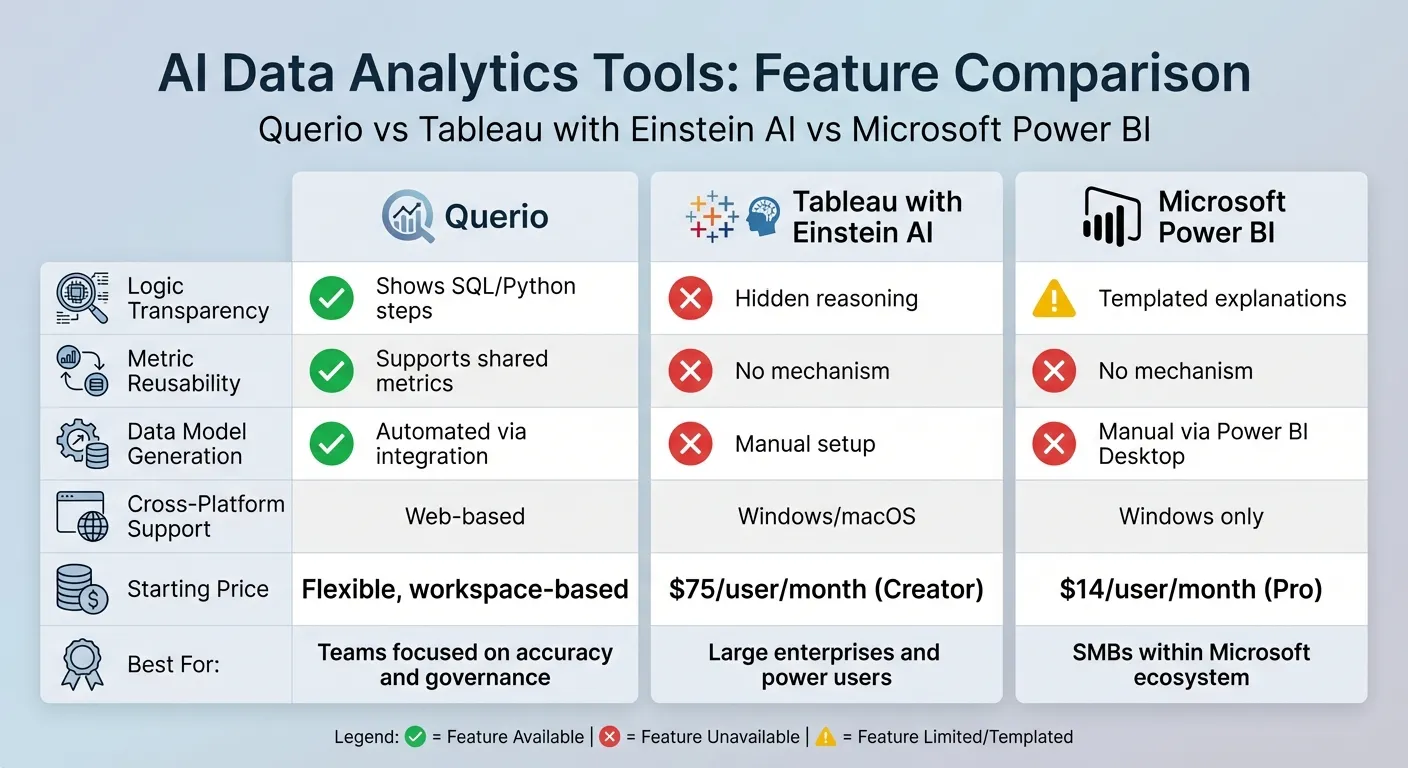 {AI Data Analytics Tools Comparison: Querio vs Tableau vs Power BI}
:::
{AI Data Analytics Tools Comparison: Querio vs Tableau vs Power BI}
:::
1. Querio
Querio is an AI-powered analytics workspace designed to connect directly to your data warehouse. It lets users ask questions in plain English and delivers precise, inspectable results in seconds. Behind the scenes, it generates SQL and Python code, ensuring every answer is based on actual data - not a mysterious black box.
AI Capabilities
At the heart of Querio is its natural language querying (NLQ) system. This feature allows teams across marketing, finance, and operations to ask questions like, "What's our monthly recurring revenue by region?" and instantly receive detailed charts and tables. Querio automatically identifies the right data columns and creates visualizations tailored to the query.
The platform's Centralized Context Layer ensures consistent answers across the organization by standardizing business logic, key metrics (like MRR or churn), and table relationships. This eliminates discrepancies, such as differing definitions of "active customer" between departments.
"What used to be a week-long process now takes minutes."
- Jennifer Leidich, Co-Founder & CEO of Mercury [1]
For technical users, Querio offers Agentic Notebooks, an integrated workspace combining AI, SQL, and Python. With these interactive notebooks, data scientists can perform advanced analyses and data science tasks without toggling between tools. Results update dynamically, streamlining workflows.
Governance and Security
Querio is built with stringent compliance standards, meeting SOC 2 Type II, GDPR, HIPAA, and CCPA requirements. This makes it a reliable choice for industries like healthcare and finance. Every query - whether initiated by a user or AI - is logged, so administrators can track data access. Additionally, Querio ensures that customer data and interactions with large language models (LLMs) are never used to train its systems, keeping proprietary business logic secure. [1]
By implementing Querio, organizations can reduce data request backlogs by up to 80% [2], allowing data teams to focus on strategic initiatives rather than repetitive queries.
"It's not just about saving time and money, it's about making data accessible."
- Enver Melih Sorkun, Co-founder & CTO of Growdash [1]
Querio's robust security features extend seamlessly to its integration capabilities.
Integration with Data Warehouses
Querio integrates effortlessly with popular data warehouses like Snowflake, BigQuery, Amazon Redshift, ClickHouse, Motherduck, and PostgreSQL. It uses secure, read-only connections with encrypted credentials, ensuring no data duplication or complex ETL processes. Queries run directly against live warehouse data, providing insights that reflect real-time business conditions. Plus, Querio avoids hidden query fees, keeping costs straightforward and predictable.
Pricing and Scalability
Querio offers a free plan, making it easy for organizations to try the platform risk-free. Its pricing has no per-seat fees and unlimited users on every plan, so it scales to fit everyone - from executives to front-line teams - without restrictive licensing limits.
2. Tableau with Einstein AI
Tableau with Einstein AI combines Salesforce's AI capabilities with Tableau's powerful data visualization tools. At the heart of this integration is Tableau Agent (formerly known as Einstein Copilot), which simplifies tasks like data preparation, creating visualizations, and performing complex calculations - all through natural language prompts [5][8]. Unlike other tools such as Querio, Tableau with Einstein AI emphasizes enhanced visual storytelling and collaborative insights.
AI Capabilities
With Tableau Agent, teams can refine filters, adjust charts, and perform follow-up actions using conversational prompts, all while keeping context intact [8]. Additionally, Tableau Catalog employs AI to generate detailed descriptions for legacy data sources, workbooks, and tables, helping to address documentation challenges [5].
Tableau Pulse delivers personalized insights directly to platforms like Slack, Microsoft Teams, and email [3][7]. Its Concierge feature dives into root cause analysis and provides actionable suggestions, while the Inspector keeps track of key metrics and sends timely alerts [3][6].
"Tableau's approach to AI is a multi-faceted strategy to simplify analysis and deliver smarter, faster, and actionable insights for everyone."
- Southard Jones, Chief Product Officer, Tableau [6]
Governance and Security
All AI-powered features are backed by Salesforce's Einstein Trust Layer, which ensures top-tier security and data privacy [4][5]. Administrators have the flexibility to enable or disable generative AI features at the site level [4][7]. For those needing custom solutions, the Model Context Protocol (MCP) offers a secure framework to connect bespoke AI agents to Tableau's analytics engine [6].
Integration with Data Warehouses
Tableau's VizQL Data Service allows custom AI agents to directly access published data sources and perform governed analyses at the data layer [6]. This functionality is supported across Tableau Cloud, Tableau Server, and Tableau Desktop, enabling teams to leverage their existing connections without the need for rebuilding infrastructure [6][7].
Pricing and Scalability
Advanced generative AI features are included in the Tableau+ Bundle, with pricing based on a combination of user-based and consumption fees. Standard editions start at $75 per Creator per month, while Enterprise editions are priced at $115 per Creator per month. Tableau+ pricing is available upon request. Scalability is structured through "Sites", which are capped at 3 for Standard, 10 for Enterprise, and 50 for Tableau+ [9].
3. Microsoft Power BI with AI Features

Microsoft Power BI incorporates AI functionality through Copilot, a generative AI assistant designed to make working with data more intuitive. Copilot helps users craft reports, create DAX calculations, and summarize data using simple natural language prompts. It’s a tool tailored for business users, report creators, and data developers, offering features like conversational analysis, narrative visual creation, and advanced DAX troubleshooting. Microsoft has held its position as a Leader in the Gartner Magic Quadrant for Analytics and Business Intelligence Platforms for an impressive 17 years straight [10][12].
AI Capabilities
Power BI’s AI-driven analytics use machine learning and natural language processing to streamline data preparation, detect trends, and produce visualizations, measure descriptions, and even full report pages automatically. For example, Lumen saved nearly 10,000 hours of manual work through automation powered by Microsoft. Jerod Ridge, Lumen’s Director of Data Engineering, shared:
"In the last year alone, we've eliminated almost 10,000 manual hours through Microsoft-powered automation. That's time we now spend creating business value." [10]
Governance and Security
Power BI integrates seamlessly with Microsoft Purview for data discovery and sensitivity labeling, offering robust governance tools. Administrators control Copilot access through security groups and tenant settings, while developers can restrict AI access to specific fields, tables, or report pages. To ensure safety, the platform includes built-in content filtering to block prompts with potentially harmful language. For organizations outside the US or France, data processing via Azure OpenAI is turned off by default unless explicitly enabled by administrators [11][13].
Integration with Data Warehouses
Power BI works directly with OneLake, Fabric Data Warehouses, and SQL databases through Microsoft Fabric, creating a unified environment for disparate data sources. With Direct Lake Mode, users can perform real-time queries without the need for traditional imports or caching, significantly reducing delays. For instance, Porsche Cup Brasil saw dramatic improvements in efficiency, cutting the time engineers needed to diagnose car issues from 30 minutes to nearly real time. This advancement has supported 75 teams in analyzing performance more effectively [12].
Pricing and Scalability
Power BI offers two main pricing tiers: Pro at $14.00 per user/month and Premium Per User (PPU) at $24.00 per user/month. However, Copilot features require paid capacity (F2/P1 or higher) and are not included in trial or standard Pro/PPU licenses [11][14]. According to a 2024 Forrester study, organizations using Microsoft Fabric have reported an impressive 379% return on investment [12].
sbb-itb-284a532
Strengths and Weaknesses
Selecting the right AI analytics platform means understanding how each tool's strengths and limitations align with your business needs. Here's a closer look at three popular options: Querio, Tableau with Einstein AI, and Microsoft Power BI.
Querio shines when it comes to transparency. It provides visible "thinking steps" for every AI-generated answer, showing the underlying SQL or Python logic. Additionally, it allows teams to promote ad-hoc queries into a shared semantic layer, ensuring consistent reuse across the organization [15].
Tableau with Einstein AI integrates seamlessly with communication tools like Slack and Microsoft Teams through Tableau Pulse, delivering proactive insights [3]. However, it falls short in transparency - it doesn’t reveal the reasoning behind its results and lacks the ability to promote AI outputs into reusable semantic assets [15].
Microsoft Power BI stands out for its affordability and integration within the Microsoft ecosystem, with Pro licenses starting at just $14 per user/month [10]. Its Copilot feature simplifies report creation using natural language prompts. However, it requires manual data modeling via Power BI Desktop and offers templated explanations that conceal its underlying logic [15].
These limitations can lead to situations where the AI makes assumptions without proper business context, often requiring data analysts to step in for corrections. The table below highlights the key features and differences among these tools:
| Feature | Querio | Tableau with Einstein AI | Microsoft Power BI (Copilot) |
|---|---|---|---|
| Logic Transparency | Visible "thinking steps" | Black box; reasoning not shown | Templated explanations with hidden logic |
| Metric Reusability | Supports promotion to semantic layer | Lacks mechanism for metric promotion | No mechanism for reusability |
| Data Model Generation | Automated via warehouse integration | Manual data modeling | Manual data modeling (using Power BI Desktop) |
| Cross-Platform Support | Web-based | Windows and macOS | Windows only |
| Starting Price | Free plan; Core $2,499/mo | $75/user/month (Creator) | $14/user/month (Pro) |
| Best For | Teams focused on accuracy and governance | Large enterprises and power users | SMBs within the Microsoft ecosystem |
Conclusion
When it comes to AI analytics tools that emphasize transparency and governance, Querio stands out as a compelling choice. With features like inspectable logic, reusable metrics, and no per-seat pricing, Querio ensures that its AI logic is verifiable. Its shared semantic layer helps maintain consistency across your organization, fostering accuracy and trust.
On the other hand, Tableau with Einstein AI caters to large enterprises tightly integrated with Salesforce, offering proactive insights. However, its approach may fall short for teams seeking more transparency and cost efficiency in their analytics solutions.
Microsoft Power BI is often praised for its affordable entry-level options within the Microsoft ecosystem. That said, achieving the seamless, self-service analytics experience that Querio provides may require additional manual setup.
What sets Querio apart is its ability to combine scalability with transparency, catering to the needs of modern businesses. As natural language interfaces and unified governance reshape the analytics landscape, tools like Querio become essential for teams prioritizing accuracy and clear AI reasoning. With Querio, organizations can make faster, more confident decisions, supported by data they can trust.
FAQs
::: faq
How does Querio protect data and ensure compliance with regulations?
Querio prioritizes data security and compliance, providing a robust system to safeguard sensitive information while adhering to regulatory requirements. By connecting directly to live data warehouses, it offers real-time insights without jeopardizing governance or data integrity.
Through role-based access controls, Querio ensures that only permitted users can view or alter sensitive data. Its design works effortlessly with existing data governance structures, enabling businesses to maintain consistent policies across all data sources. By focusing on secure and well-regulated environments, Querio empowers businesses to remain compliant and operate with assurance. :::
::: faq
What makes Querio's AI tools stand out for modern businesses?
Querio’s AI tools are built to blend advanced analytics with a focus on people, ensuring clarity and preserving business logic throughout the data analysis process. Unlike many platforms that depend on opaque, black-box automation, Querio’s AI emphasizes insights grounded in context, all while adhering to strict standards for data governance and integrity.
Thanks to natural-language querying, users can interact with their data effortlessly by posing questions in plain English. This allows for real-time insights without the need to duplicate data. Additionally, Querio integrates seamlessly with existing enterprise systems, offering a centralized governance layer to maintain security and compliance. This thoughtful mix of ease of use, transparency, and strong governance makes Querio a great choice for businesses aiming to make faster, smarter decisions with confidence. :::
::: faq
What is Querio's pricing structure for businesses of different sizes?
Querio provides a pricing model designed to cater to businesses of various sizes. There is a free plan, and Core is $2,499 a month (or $25,000 a year billed annually), with Enterprise priced on request. Every plan gives you unlimited users and access to Querio's AI-driven business intelligence platform. It's an excellent choice for teams seeking advanced analytics tools to enhance decision-making and streamline operations.
From startups to large enterprises, Querio's pricing is structured to align with your specific needs, ensuring you get the most out of your investment. :::