Business Intelligence
How to Connect ChatGPT to Your Database Without Leaking It (2026 Guide)
Route AI queries through a governed data agent with read-only roles, short-lived tokens, SQL validation, and full audit logs.

Don’t connect ChatGPT straight to your warehouse. I’d put it behind a governed data layer with read-only access, row and column controls, OAuth or short-lived tokens, SQL checks, and full audit logs.
Here’s the short version: if I let ChatGPT query Snowflake, BigQuery, Redshift, or Postgres directly, I risk exposing raw tables, sensitive fields, and logic that should stay inside my data stack. A safer setup is to route requests through a governed agent that enforces approved metrics, checks SQL before it runs, and logs the full path from prompt to result.
If I were setting this up today, I’d do these 6 things first:
- Keep ChatGPT away from direct database credentials
- Use a governed semantic layer for approved metrics and joins
- Create a dedicated read-only role scoped to approved schemas only
- Apply row-level and column-level controls before connecting anything
- Use OAuth or short-lived tokens instead of static passwords
- Log prompts, SQL, users, and result sizes so every query can be traced
A direct connection may look simpler. But it weakens control, makes incident response harder, and leaves more room for data exposure. A governed middle layer keeps access tight, keeps business logic in one place, and makes it much easier to see who asked what and what data came back.
If you want the safest default in 2026, I’d use ChatGPT → governed data agent via MCP → warehouse, not ChatGPT → warehouse.
Pick the right architecture before you connect anything
Before you connect anything, decide how access will work: direct warehouse access or a governed middleware layer. That one choice shapes what the model can see, what it can query, and what gets logged.
Direct database access vs a guarded AI data agent
Direct access is simple, but it also opens the door much wider. ChatGPT queries Snowflake, BigQuery, Redshift, or Postgres straight from the source. A guarded AI data agent adds a control layer between the model and the warehouse, so credentials stay hidden and permissions stay tightly scoped.
MCP lets agents reach approved data through a server layer instead of exposing raw database credentials. [3]
Use the table below to pick the safer default for your warehouse.
| Control | Direct ChatGPT Access | Guarded AI Data Agent |
|---|---|---|
| Credential exposure | Higher; may require static passwords | Lower; uses MCP or short-lived tokens [3] |
| RBAC / RLS / column-level controls | Limited to whatever the database role allows | Enforced through the governed layer |
| Semantic layer compatibility | None - the model rediscovers logic each time | Uses approved definitions from the governed layer |
| Audit trail | Database-only logs | Prompt-to-SQL-to-user logs [3] |
| Incident response | Hard to revoke specific AI access | Fast revocation at the middleware layer [3] |
Direct access is easier, but it also weakens governance.
Where a semantic layer and query allowlists fit
Keep approved metrics in a governed semantic layer so ChatGPT uses the same definitions your team already has in dbt, Looker, or Querio. [1]
Query allowlists inspect each generated SQL pattern before it runs. If a query looks unusual or risky, it gets blocked before it touches the warehouse. That means risky SQL is stopped without getting in the way of approved questions. [3]
Once you’ve picked the architecture, tighten access with roles, short-lived credentials, and SQL validation.
sbb-itb-284a532
How to set up secure access, step by step
::: @figure 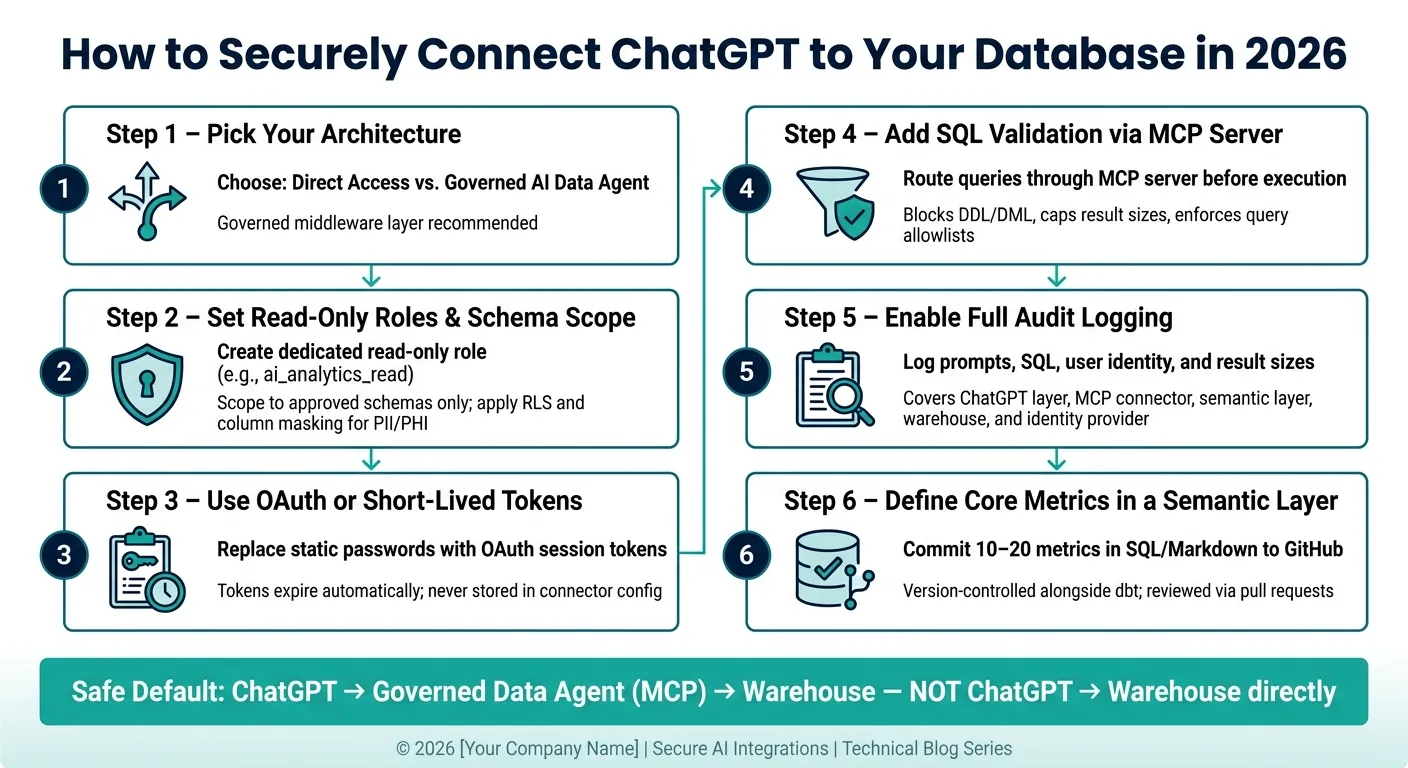 {How to Securely Connect ChatGPT to Your Database in 2026}
:::
{How to Securely Connect ChatGPT to Your Database in 2026}
:::
Once the architecture is in place, lock down access before the model sees any data.
Set read-only roles, schema scope, and row or column restrictions
Start with least privilege. Give the AI access only to approved analytics schemas and datasets.
That means using a dedicated read-only role scoped to those schemas, not broad warehouse access. If your data includes PII, PHI, or financial records, BigQuery policy tags can classify sensitive columns and limit access by role. Row-level security adds another guardrail: a user asking for regional sales data should only get rows for their own region. Use the same setup in Snowflake with native governance controls [2].
Use OAuth or short-lived credentials instead of static passwords
A static database username and password sitting in a connector config is a high-risk setup in 2026. If it leaks, those credentials stay exposed until someone rotates them by hand.
Keep long-lived credentials out of the AI layer. Here’s how the main options stack up:
| Credential Type | TTL | Storage Location | Best For |
|---|---|---|---|
| Static database user | Permanent | AI/connector config | Not recommended |
| Service account (short-lived) | Minutes to hours | Secret Manager / Vault | Background or batch tasks |
| OAuth session token | Session-based | User identity provider | User-facing queries - safest default |
For user-facing queries, OAuth tied to your identity provider is the right move. The token inherits the user’s existing permissions, expires on its own, and never sits in the connector config. For automated tasks, use a service account with short-lived tokens managed in a secrets manager [3].
Credentials limit exposure. Validation stops risky SQL before it runs.
Add a validation layer between the model and SQL execution
Even with tight roles and short-lived credentials, ChatGPT can still produce SQL that is valid but risky. Maybe it skips the semantic layer. Maybe it reaches a restricted table. That’s where a validation layer comes in.
An MCP server is a clean 2026 pattern for this job. It sits between the model and the database, exposes only approved tools like list_tables and execute_sql, and defaults to read-only access with DDL and DML blocked [3]. It should also cap result sizes and block destructive operations by default [3].
You can add query allowlists as another check. The validation layer reviews each generated query against approved patterns and blocks anything that touches restricted tables or goes outside the allowed scope. As Google Cloud Documentation notes:
"Large Language Models (LLMs) often lack domain-specific schema understanding, leading to misinterpretations of user queries." [2]
That check belongs between generated SQL and warehouse execution, with logging and alerting handling the next step.
Add governance, monitoring, and a clear audit trail
Once SQL validation is in place, the next control is an audit trail that shows who asked what and what came back. Validation blocks bad SQL and prevents hallucinations. Governance shows what ran, who ran it, and what data left the warehouse.
In plain English: you need an attributable log across the connector, warehouse, semantic layer, and identity provider.
Log prompts, SQL, users, and result sizes at each layer
Each layer records a different piece of the story. The warehouse shows SQL execution and how much data it touched. The connector shows the prompt and the prompt-to-SQL translation. Put those records together, and you can see whether ChatGPT exposed anything it shouldn't have.
| Log Source | What Is Captured | Keep | Owner |
|---|---|---|---|
| ChatGPT / App Layer | User prompts, session IDs | 30–90 days (compliance-dependent) | Security / IT Team |
| MCP Connector | Prompt-to-SQL mapping, tool calls | 1 year+ (for SOC 2 / HIPAA) | Data Engineering |
| Semantic Layer | Metric definition changes, join logic, approval history | Permanent (commit history) | Analytics Lead |
| Data Warehouse | SQL execution, row counts, bytes scanned, warehouse role | 90 days to 7 years | Data Platform Team |
| Identity Provider | User login events, OAuth token issuance | 90 days | IAM / Security Team |
The connector is the handoff point between the prompt and the SQL. It needs to keep the prompt-to-SQL mapping, because warehouse logs alone can't tell you why a query ran. You should also log row counts there so you can catch oversized result sets and mass-extraction attempts early [3].
How to handle risky queries and revoke access fast
Set alerts for:
- unusually large result sets
- attempts to access restricted schemas or columns
- repeated failed queries
- attempted DDL commands [1]
Then keep incident response simple and fast:
- Revoke the user's OAuth token right away.
- Disable the MCP route or API path to the warehouse.
- Rotate the read-only warehouse service account.
- Review connector and warehouse logs together.
The point is simple: confirm exactly what was accessed and how far the exposure went.
Use this audit and revocation layer as the baseline before connecting ChatGPT to live warehouse data.
A practical 2026 setup for ChatGPT over live warehouse data
Here’s what this looks like in practice: ChatGPT should call a data agent, not your warehouse directly. That’s the day-to-day setup behind the read-only roles, OAuth, validation, and logging controls covered earlier.
So instead of letting ChatGPT connect straight to the warehouse, you put a governed data agent in the middle. That agent holds the connection, checks permissions, validates SQL, logs activity, and returns governed results.
How Querio works as the governed layer between ChatGPT and your warehouse
Querio sits between ChatGPT and your warehouse as that governed layer. It connects to Snowflake, BigQuery, Redshift, and Postgres using live, TLS-encrypted read-only connections. There are no CSV exports and no warehouse copies. Queries run against current warehouse data.
Metric definitions, join logic, approved views, and business rules live as version-controlled SQL, Markdown, and Python in GitHub alongside dbt. Your data team can review each definition in a pull request, approve changes through normal code review, and see exactly what logic is exposed to ChatGPT at any given time. The logic stays in version-controlled files.
When ChatGPT calls Querio through MCP, the query runs under the requesting user’s OAuth-backed permissions. That means warehouse roles, RLS, and column masking apply automatically. A finance analyst and a customer support manager can ask the same question and still only see what their role allows.
Every query is inspectable and editable in a reactive notebook. You can open it, see the exact query, check which tables it touched, and review the filters that were applied.
The table below shows why this governed layer keeps credentials and permissions out of ChatGPT.
| Feature | Direct Database Access | Querio as Governed Layer |
|---|---|---|
| Credentials | Held in a connector or plugin config | Held in Querio; never exposed to ChatGPT |
| Permissions | Often a shared service account | Inherits each user's roles via OAuth/MCP |
| SQL visibility | Opaque or hard to inspect | Inspectable and editable in reactive notebooks |
| Context & metrics | Ad hoc logic or tool-specific behavior | Git-synced SQL/Markdown/Python alongside dbt |
| Audit trail | Limited linkage between prompts and execution | Prompt, SQL, user, and result size logged together |
What to roll out first this quarter
Don’t try to connect everything at once. Start with one well-understood analytics domain. analytics_sales or analytics_product are common first picks. Keep the scope tight so you can test the setup without making a mess.
- Pick one governed schema with cleaned, de-duplicated views, not raw staging tables.
- Create a read-only role such as
ai_analytics_read, scoped toSELECTon approved views only. No write access, no admin access, and no access to production schemas. - Enforce RLS and column masking for any sensitive fields in that schema before you connect anything.
- Define 10–20 core metrics in SQL and Markdown, review them with business stakeholders, and commit them to GitHub as the starting semantic layer.
- Route ChatGPT through Querio's MCP, confirm OAuth token inheritance is working, and verify that queries follow each user’s warehouse roles.
- Enable full logging for prompts, SQL, user identity, row counts, and result sizes before you expand access.
This rollout keeps the blast radius small while you check that answers are accurate, permissions work the way you expect, and the audit trail stays clean. Then you can repeat the same pattern as you add more domains.
FAQs
::: faq
When is direct database access acceptable?
Direct database access can work well for analytics when the connection is strictly read-only and points to a dedicated data warehouse or read replica, not a live production database.
That setup stays safe when you put tight controls around it. Use role-based access controls, restrict access to only the schemas or columns people need, and keep continuous query logging in place. A secure intermediary that uses read-only credentials also lets teams run near real-time queries without risking destructive changes. :::
::: faq
How do I choose what data ChatGPT can query first?
Start with the minimum data needed for the first approved use case. Define a governed metric glossary first, then grant read-only access using warehouse-native RBAC, plus row-level and column-level rules.
Roll this out table by table. Begin with one schema or a small set of tables and columns, require allowlisting, and expand only after governance and audit results confirm accuracy. :::
::: faq
What should I audit before going live?
Before you go live, audit your AI-to-warehouse path for a few non-negotiables:
- a governance baseline
- least-privilege access
- isolation from production workloads
- credential hygiene
- audit logs and alerting
Also make sure network access is allowlisted and that datasource permissions are explicitly restricted. :::