Business Intelligence
Best AI Analytics Tools for Lean Data Teams (2026)
Pick AI analytics by your team's main bottleneck: self-serve, analyst speed, dashboards, or metric governance.

If I had to sum this up in one line: lean data teams should pick based on their main bottleneck - self-serve access, analyst workload, dashboard work, or metric control.
For a 2- to 8-person data team at a 100- to 500-employee B2B SaaS company, the top options in this list split into clear roles:
- Querio for governed self-serve on live warehouse data
- ThoughtSpot for search-based BI with a modeled semantic layer
- Tableau for dashboard-heavy teams
- Power BI for Microsoft-first companies
- Hex for SQL/Python notebook work
- Looker for strict metric control through LookML
- Sigma for spreadsheet-style work on warehouse data
- AtScale for one shared metric layer across BI tools
A few numbers stand out right away:
- ThoughtSpot Pro: $50/user/month with a 25 AI-query monthly cap
- Tableau Creator Enterprise: $115/user/month
- Power BI Premium Per User: $24/user/month
- Hex Team: $75/editor/month
- Looker Standard: about $66,600/year for a 10-user setup
The short version is simple:
- If you need governed answers from plain-English questions, I’d look at Querio
- If your team works mostly in notebooks, I’d look at Hex
- If your company already runs on dashboards, I’d look at Tableau
- If your stack is Microsoft 365, I’d look at Power BI
- If your main problem is metric drift across tools, I’d look at Looker or AtScale
- If your users think in spreadsheets, I’d look at Sigma
- If you want search-first BI and can support setup work, I’d look at ThoughtSpot
::: @figure 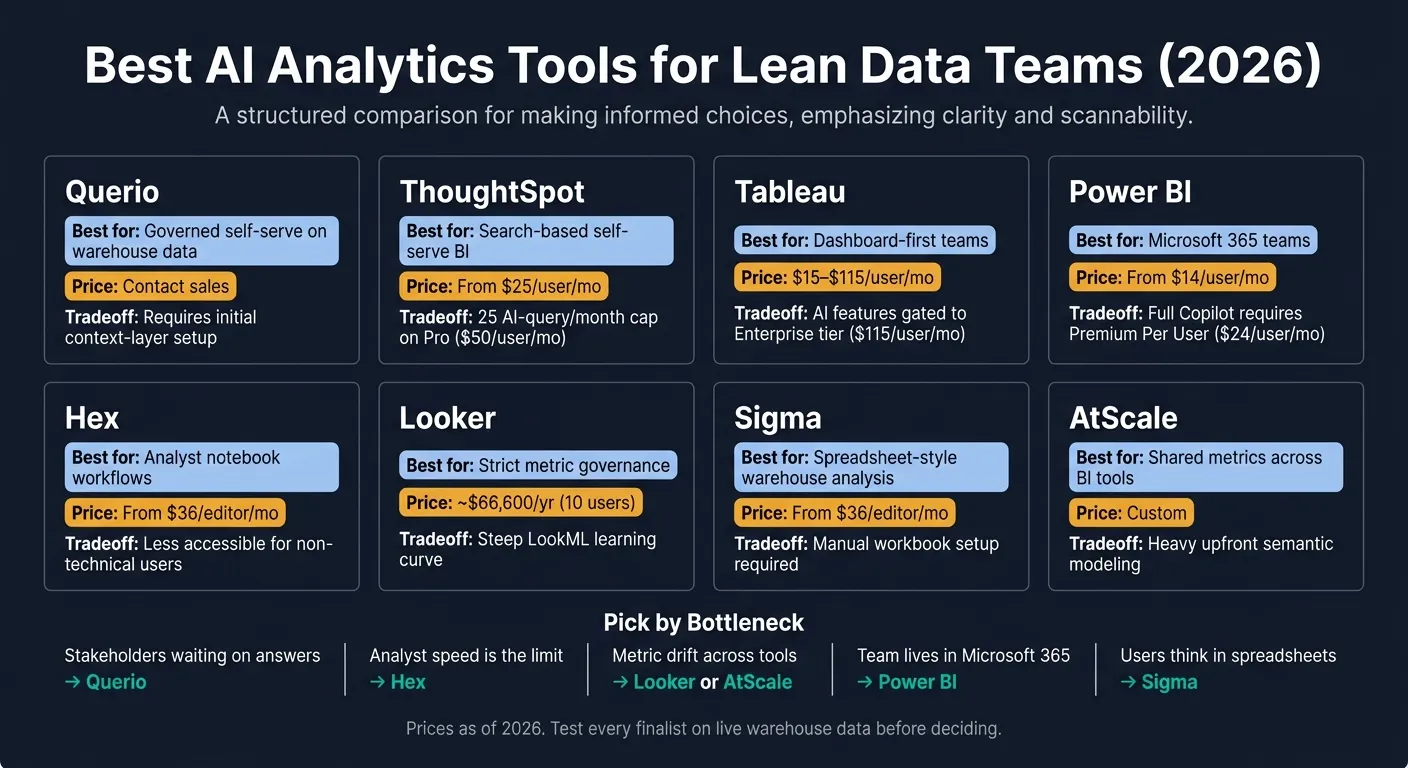 {Best AI Analytics Tools for Lean Data Teams 2026: Side-by-Side Comparison}
:::
{Best AI Analytics Tools for Lean Data Teams 2026: Side-by-Side Comparison}
:::
Quick Comparison
| Tool | Best for | Main tradeoff | Starting price |
|---|---|---|---|
| Querio | Governed self-serve on warehouse data | Setup for shared metric and semantic logic | Free plan; Core $2,499/mo |
| ThoughtSpot | Search-based self-serve BI | Semantic setup and query caps | $25/user/month |
| Tableau | Dashboard-first teams | AI sits on higher-tier plans | $15/user/month to $115/user/month |
| Power BI | Microsoft-first teams | Heavy reliance on semantic models and DAX | $14/user/month |
| Hex | Analyst notebooks with SQL/Python | Less self-serve for non-technical users | $36/editor/month |
| Looker | Tight metric control | High cost and LookML setup | About $66,600/year |
| Sigma | Spreadsheet-style warehouse analysis | Workbook and metric setup still matter | $36/editor/month |
| AtScale | Shared metrics across BI tools | High upfront model build work | Custom |
My main takeaway: the best tool here is rarely the one with the most AI features. It’s the one that cuts the delay between a question and a trusted answer without adding too much setup work for a small team.
That’s the lens I’d use for the full comparison below.
sbb-itb-284a532
1. Querio
Querio is an AI analytics workspace for data teams that want self-serve analytics without giving up control or accuracy. It connects straight to your data warehouse - Snowflake, BigQuery, Amazon Redshift, ClickHouse, or PostgreSQL - and turns plain-English questions into SQL and Python. Better yet, the output is inspectable and editable. For lean teams, that means getting answers faster while still keeping a hand on the wheel. [3]
Warehouse-native access
Querio runs queries against live data using encrypted, read-only credentials. So there’s no need for CSV exports or separate data extracts. Because the AI works from your actual schema - real tables, real columns, real relationships - it’s less likely to fall into a common AI trap: made-up columns or bad joins. [3]
Metric governance
Querio’s shared context layer lets your team define joins, metrics, and business terms once, then use that same logic across queries, notebooks, dashboards, and AI answers. That’s a big deal for lean teams. If one KPI means one thing in self-serve analysis and another thing in analyst work, chaos tends to follow. Querio is built to keep those definitions lined up. [3]
AI analytics automation
Analysts can review and edit the generated SQL or Python before anything lands in a report. That matters. You get speed from AI, but you still keep human review in the loop.
Notebooks also recalculate on their own when logic changes, which cuts down on manual SQL fixes and helps keep analysis and dashboards in sync. Dashboards and scheduled reports use that same logic too, so there’s less drift between notebook work and shared reporting. [3] For a small team handling a lot of requests, that can save a lot of back-and-forth.
Lean-team overhead
Querio helps cut tool sprawl by bringing ad hoc analysis, reporting, and embedded analytics into one workspace. It also supports embedded analytics tools through APIs and iframes, so teams can reuse the same governed logic in embedded use cases. SOC 2 Type II compliance and role-based access controls line up with common security needs for B2B SaaS teams. [3]
The main tradeoff is pretty simple: Querio is built for shared governance, not solo ad hoc SQL. [3]
2. ThoughtSpot
ThoughtSpot turns plain-English questions into charts in seconds. That makes it a strong fit for teams that want fast self-serve answers without giving people direct access to raw data.
Warehouse-native access
ThoughtSpot queries live data in Snowflake, BigQuery, Databricks, and Redshift. But there’s a catch: it needs building a semantic layer first - specifically, ThoughtSpot worksheets that define joins and column descriptions - before the results become dependable [6].
In plain terms, the speed is there only when the modeling layer is clean. If your warehouse schema is tidy, setup may take a few days. If it’s messy, expect it to stretch into several weeks [6].
Metric governance
ThoughtSpot runs on a semantic layer. The worksheet layer keeps AI-generated SQL inside set metric and access rules, so numbers like revenue and MAU stay consistent, and permissions remain in place [6] [1].
The weak spot is pretty simple. If your warehouse schema starts off messy or poorly documented, the AI can return wrong answers - and those errors can be tough to catch [5].
AI analytics automation
Spotter handles multi-step follow-up questions across large live datasets and keeps context across follow-up questions [5]. SpotIQ flags anomalies and surfaces insights automatically [7] [9].
There is a usage limit to watch. On the Pro tier, priced at $50/user/month, Spotter is capped at 25 AI queries per user per month [5].
The tradeoff is setup overhead. Lean teams often need an analytics engineer to maintain the semantic layer, and polished charts may still need manual cleanup. Pricing starts at $25/user/month for Essentials and $50/user/month for Pro, while Enterprise uses custom pricing [5].
That makes ThoughtSpot strongest for teams that want search-driven self-serve on governed models. The next tools trade some of that search speed for stronger dashboarding or notebook-based analysis.
3. Tableau with Tableau AI and Pulse
Tableau is a strong pick for teams that already spend most of their time in dashboards. That said, its AI tends to work best with modeled data, not raw warehouse tables. It also has a big user base, with 3,658 reviews on G2 as of June 2026 and a 4.4/5 rating [5].
For lean teams, Tableau usually matters most when the dashboards are already there and the goal is pretty simple: faster metric updates, alerts, and light edits.
Warehouse-native access
Tableau connects to Snowflake, BigQuery, Redshift, and Databricks through live connections, but it is warehouse-connected, not warehouse-native end to end [1][10]. In plain English, Tableau can sit on top of your warehouse, but it doesn't work like a tool built fully inside it.
When live connections drag or the data isn't modeled in a way that works well for them, Tableau can switch to extracts [10].
Metric governance
Tableau Semantics keeps Pulse tied to trusted metrics and access rules [10][4]. That's a big deal if multiple teams look at the same numbers and need one source of truth.
The catch is the setup. You need to do the modeling work up front.
AI analytics automation
Tableau Pulse is the main AI feature here. It uses Einstein AI to generate digest-style metric updates and anomaly callouts on top of Tableau assets [1]. It can also send proactive metric digests and anomaly alerts to Slack or email [5].
Tableau Agent is still in beta for Enterprise users. It can take natural-language requests to create calculations, filter data, and modify dashboards without writing a formula [5].
That sounds great, and it is. But it's still early. So today, Tableau makes the most sense for dashboard-first workflows, not raw-warehouse digging.
Lean-team operating overhead
Pulse and Agent sit behind the Enterprise tier at $115 per Creator per month [5].
| Plan | Price (per user/mo) | Key AI Features |
|---|---|---|
| Viewer (Standard) | $15 [5] | - |
| Explorer (Standard) | $42 [5] | Modify existing workbooks |
| Creator (Standard) | $75 [5] | Ask Data |
| Creator (Enterprise) | $115 [5] | Tableau Pulse, Tableau Agent (Beta) |
Tableau fits teams that already run on dashboards and can handle the modeling setup. If your team spends more time in notebooks than dashboards, the next option is Hex.
4. Microsoft Power BI with Copilot
Power BI is a strong fit for teams that already work inside Microsoft 365 every day. It slots into Teams and Excel with less friction, and that can help it get through procurement faster.
Warehouse-native access
Power BI is warehouse-connected, not warehouse-native. It supports Import, DirectQuery, and Direct Lake. Import is the lowest-cost option, but the data is less fresh. DirectQuery keeps queries live, but it can push up warehouse compute costs. Direct Lake sits in the middle and aims to balance cost and freshness [1][8].
For lean teams, that’s only part of the story. The bigger issue is whether the semantic model is kept in good shape, as hidden costs of traditional BI platforms often stem from maintenance overhead. If it isn’t, live analysis can get shaky fast.
Metric governance
Governance in Power BI runs through semantic models and DAX measures. Copilot can help write DAX from plain-English prompts, which sounds great on paper. But there’s a catch: AI-written DAX can return wrong results in edge cases [5].
That means Copilot works best when the semantic layer is already modeled well. If the base is messy, the output can be messy too.
AI analytics automation
Copilot can write DAX, summarize report pages, and build visuals from prompts [5][11]. Basic Q&A comes with Pro. Full Copilot is available in Premium Per User at $24/user/month, or through Pro plus the Copilot add-on at $44/user/month [5][7].
That ease of use is nice, but it still rides on steady model upkeep. In other words, the AI can help with the work, but it doesn’t remove the need for clean structure underneath.
Lean-team operating overhead
Power BI brings setup and maintenance work that can weigh on lean teams. Implementation often takes weeks to months, and the semantic models that Copilot depends on need steady analyst support [7]. So the overhead isn’t just about license price. It’s also about the time and people needed to keep the model in shape.
| Tier | Price (per user/mo) | AI capability |
|---|---|---|
| Power BI Pro | $14 [5] | Basic natural-language Q&A |
| Power BI Premium Per User (PPU) | $24 [5] | Full Copilot: DAX, summaries, visuals |
| Power BI Pro + Copilot add-on | $44 total [7] | Copilot access on top of Pro |
If your team lives in the Microsoft stack, Power BI makes sense. Teams that work closer to notebooks will likely need a different workflow.
5. Hex
Hex is a notebook-first analytics platform made for analysts and analytics engineers who work in SQL and Python. It connects straight to Snowflake, BigQuery, Redshift, and Postgres, so your data stays in the warehouse instead of getting copied into a separate vendor silo. It also has deep dbt integration, which means its AI can work from your actual transformation models, not just table names [1][5].
For lean teams, that matters most when analyst time is the bottleneck. If the main problem is getting analysis done faster, Hex can help. If the main problem is broad governed self-service BI for non-technical teams, it’s a less clean fit.
Warehouse-native access
Hex runs queries against your live warehouse, which makes it a strong match for lean teams that already have a proper warehouse and dbt layer in place [1][5].
Metric governance
Metric control comes from your dbt models and warehouse schemas. So Hex keeps metrics aligned only if the transformation layer is already clean and well managed.
AI analytics automation
Hex’s Magic AI and Notebook Agent can generate SQL and Python and handle multi-step analysis [12][5]. That said, you should still check first-run SQL before trusting it. Hex can misname columns when tables look alike [5].
Lean-team operating overhead
Hex is fast to get running. Warehouse connections usually take hours, not weeks [1]. But the day-to-day work still sits mostly with analysts.
Non-technical stakeholders often need analysts to build shared notebooks or apps before they can self-serve in a steady way [5][2]. So for lean teams, Hex speeds up analyst workflows, but it doesn’t remove the need for analyst involvement.
G2 reviewers give Hex a 4.5/5 rating across 394 reviews as of June 2026, and non-technical users get a weaker viewing experience than they would in BI-first tools [5].
| Hex Plan | Price | What's Included |
|---|---|---|
| Community | $0 | Up to 5 notebooks |
| Professional | $36/editor/mo | Unlimited notebooks, scheduled runs |
| Team | $75/editor/mo | Magic AI, Notebook Agent, dbt sync, GitHub sync |
| Enterprise | Custom | SSO, audit logs |
Hex is at its best when analysts own the workflow and dbt is already the source of truth. Next, Looker shifts the comparison toward governed BI.
6. Looker
Looker puts governance at the center with LookML, its version-controlled semantic layer for metrics, dimensions, and business logic. For lean teams, that setup makes the most sense when metric governance matters more than getting to a first answer fast.
Warehouse-native access
Looker queries live data directly in Snowflake, BigQuery, Redshift, and Postgres [5][8]. That said, warehouse-level permissions alone aren't enough. You still need the right Looker modeling in place for access and logic to work as expected.
Metric governance
Version-controlled LookML helps keep KPI definitions consistent across reporting and self-serve exploration [5]. That's the upside.
The catch is pretty simple: it works well only when the model is complete and kept up to date. If a team skimps on LookML work, the semantic layer ends up with gaps. And when that happens, AI answers can be wrong because the model doesn't fully reflect the business logic [5].
AI analytics automation
Gemini in Looker can generate LookML measures and dimensions from natural-language descriptions, which cuts down modeling time [5]. Looker Explore Assistant also lets developers add a custom natural-language-to-LookML interface without extra licensing [5].
So where does that leave Looker? It's a strong fit when governance comes first. If your team wants tighter control over metrics, this approach can feel worth the extra setup.
Lean-team operating overhead
LookML has a steep learning curve and needs steady upkeep. For smaller teams, that's the big tradeoff.
The Standard edition starts at about $66,600 per year for a 10-user setup. Extra Standard users cost $799 per user per year, and extra Developers cost $1,665 per user per year [5]. Gemini in Looker is usually sold as an add-on [5].
| Plan | Price | Notes |
|---|---|---|
| Standard (10 users + 2 developers) | ~$66,600/yr | Base entry point [5] |
| Additional Standard User | $799/user/yr | Read-and-explore access [5] |
| Additional Developer | $1,665/user/yr | LookML authors [5] |
| Gemini in Looker | Add-on | AI-assisted LookML generation [5] |
Looker fits teams that can support the model before opening things up for broad self-serve use. Teams that want less upfront modeling work run into a different tradeoff in the next tool.
7. Sigma
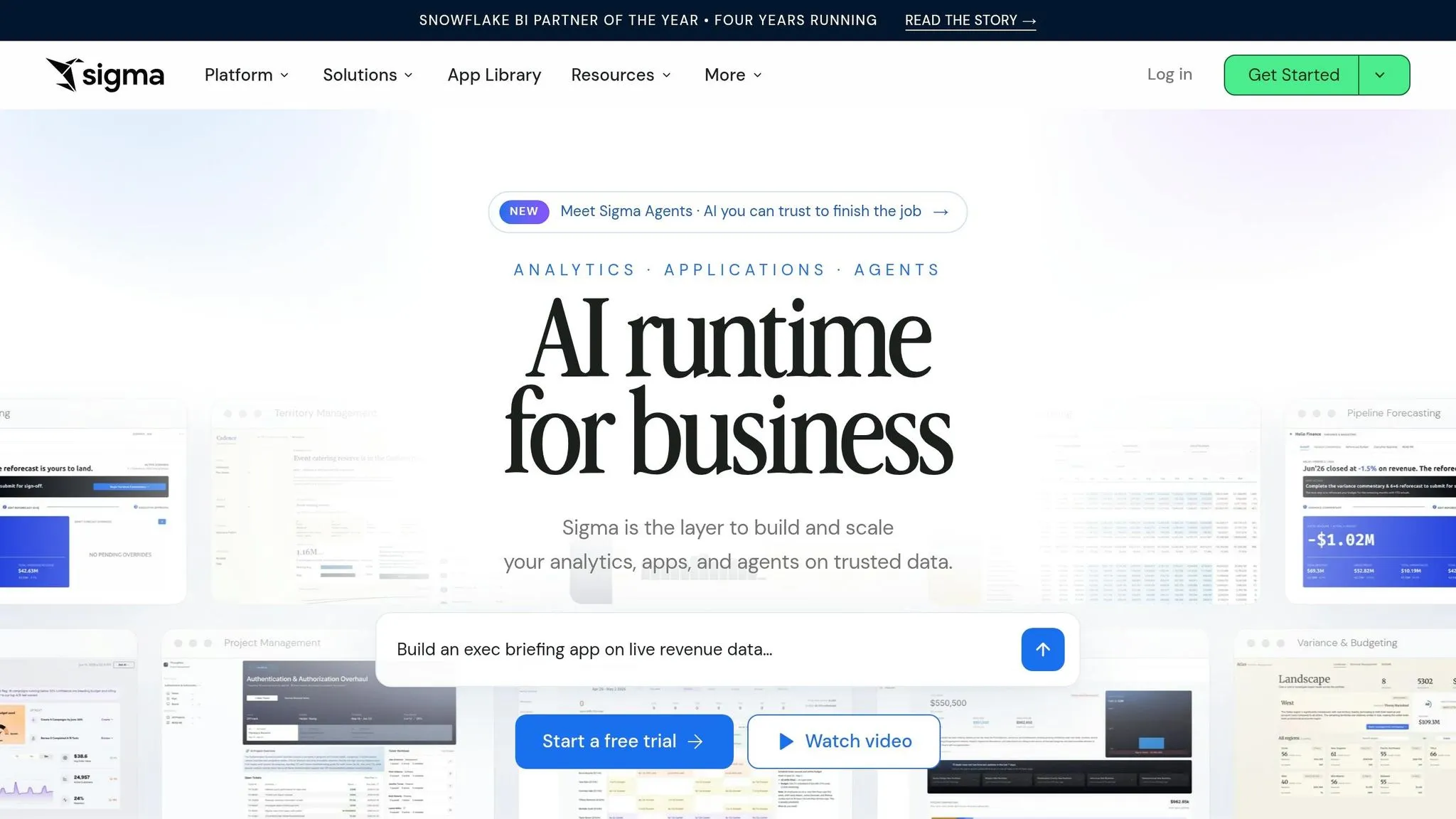
Sigma brings a spreadsheet-like interface to live warehouse data. So if your team lives in spreadsheets but your data lives in Snowflake, BigQuery, Databricks, Redshift, or Postgres, people can work with live data without exporting anything first.
That’s the main draw here: spreadsheet-first access to warehouse data. For teams with business users who want answers now, and don’t want to wait for CSV exports, Sigma can be a good fit.
Warehouse-native access
Sigma queries live data directly in Snowflake, BigQuery, Databricks, Redshift, and Postgres, while keeping warehouse permissions in place.
Metric governance
Sigma uses user-attribute row-level security, but self-serve only works well when analysts have already built the right workbooks and cleaned up metric definitions via a semantic layer. If that groundwork is missing, AI-generated answers can drift or confuse non-technical users [6].
AI analytics automation
Ask Sigma walks users through analysis step by step and shows its reasoning. It can also generate formulas and summarize text in spreadsheet columns [2].
In practice, Sigma’s AI acts more like a helper than an independent analyst. It can speed up common tasks, but it still leans on the structure your team has already set up.
Lean-team operating overhead
Setup often takes days, but analysts still need to define joins, worksheets, and column descriptions before self-serve becomes dependable [1][13].
| Feature | Sigma |
|---|---|
| Warehouse support | Snowflake, BigQuery, Databricks, Redshift, Postgres [1][8] |
| Primary UX | Spreadsheet-style [1] |
| AI depth | Assistive: formulas, summarization, SQL help [1] |
| Setup time | Days [1][13] |
| G2 rating | 4.4/5 from 557 reviews [5] |
Pricing starts at $36/editor/month for Professional and $75/editor/month for Team, with enterprise pricing available on request [2].
If your team wants tighter semantic-model control, the next option is worth a look.
8. AtScale
AtScale sits between your warehouse and your BI tools as a shared semantic layer. In plain English, it gives teams one place to define metrics across Tableau, Power BI, Excel, and other clients.
That matters because the same KPI can easily end up defined three different ways in three different reports. AtScale helps stop that drift. So it makes the most sense for lean teams that already work across several BI surfaces and need one governed metric layer. If your main issue is metric drift - not the sheer number of dashboards - this is where AtScale fits.
Warehouse-native access
AtScale connects straight to Snowflake, BigQuery, Redshift, and Databricks through a live connection model. It takes incoming SQL or MDX queries and translates them into the native dialect of the target cloud warehouse.
Metric governance
This is where AtScale stands out most. You define a metric once, and it stays consistent across every connected tool.
For teams serving users in Tableau, Power BI, and Excel at the same time, that kind of central control is tough to copy. It cuts down on the classic problem where finance, ops, and sales all swear they’re looking at the “same” number when they’re not.
AI analytics automation
AtScale provides the governed context that downstream AI tools need to answer questions in a consistent way. That helps keep answers aligned across Tableau, Power BI, Excel, and other downstream tools.
Lean-team operating overhead
There’s a catch: AtScale needs a lot of upfront modeling work before downstream tools start to gain from it. It helps most after the model is built. So if a team wants fast self-serve straight from raw warehouse data, AtScale can feel slow at the start.
| Feature | AtScale |
|---|---|
| Warehouse support | Snowflake, BigQuery, Redshift, Databricks |
| Primary UX | Semantic layer (connects to Tableau, Power BI, Excel) |
| AI depth | Context layer for downstream AI tools |
| Best for | Multi-tool metric consistency and governance |
| Setup complexity | High - requires semantic model build-out upfront |
The tradeoff is clear: deep governance versus more work to get it in place.
Pros and Cons of Each Tool
This table helps you line up each tool with your team’s main bottleneck, whether that’s fast ad hoc analysis, governed self-serve, notebook-based work, or metric consistency. Think of it as a quick way to spot the tradeoffs without digging through product pages.
| Tool | Pros | Cons | Best-Fit Team Profile | Likely Friction Points |
|---|---|---|---|---|
| Querio | Governed semantic/context layer; inspectable SQL and Python; reactive notebooks | Can feel heavier than needed for purely solo, one-off ad hoc work | Small data teams with repeat business questions and a need for governed self-serve | Initial context-layer setup; not optimized for solo exploratory work |
| ThoughtSpot | Spotter AI handles multi-step analysis; semantic layer keeps metrics and permissions consistent | High per-user cost; Pro includes a 25-query monthly cap | Mid-to-large orgs with established, clean warehouses and bigger budgets | Query caps; implementation timeline measured in weeks [1][5] |
| Tableau with Tableau AI and Pulse | Strong dashboarding and visual exploration; proactive Pulse digests | AI features like Pulse and Agent are gated to the Enterprise tier [5] | Salesforce-heavy orgs with dedicated BI developers | AI value gated behind an expensive tier; slow to answer questions that aren't already modeled |
| Power BI with Copilot | Low entry price; tight Microsoft 365 integration [5] | Most AI features depend on a clean semantic model; DAX complexity [5] | Microsoft-embedded teams with data engineers on staff | DAX learning curve; Premium Per User required for full Copilot |
| Hex | Inspect SQL and Python directly; dbt-native; 4.5/5 on G2 from 394 reviews [5] | Still depends on analysts for non-technical users [5] | Analytics engineers who live in notebooks and want AI assistance without losing control | Editor pricing adds up fast; stakeholders still can't self-serve without analyst help |
| Looker | Version-controlled semantic layer; strong warehouse-native querying | High entry cost; LookML requires dedicated engineering effort [5] | Large enterprises with strict governance needs and a full data engineering function | High entry cost; LookML learning curve is steep [5] |
| Sigma | Easy for business users already comfortable with spreadsheet logic; live warehouse queries | Spreadsheet UX is weak for multi-step analysis; manual workbook setup | Business users already comfortable with spreadsheet logic | Setup effort per workbook; not ideal for teams that need deep analytical flexibility |
| AtScale | Multi-tool metric consistency across Tableau, Power BI, and Excel | Heavy upfront semantic modeling delays value | Teams managing metric consistency across multiple BI tools simultaneously | Slow to deliver value until the model is fully built |
Use these tradeoffs to narrow your shortlist, then move to the decision criteria in the next section.
How to Choose the Right Tool for Your Team
Use the comparisons above to choose by bottleneck, not by a long feature checklist. The best pick is usually the one that clears your biggest roadblock first: governed self-serve, analyst speed, or metric consistency.
Start with the bottleneck
If stakeholders are waiting days to get one answer, put governed self-serve first. If your team’s main problem is analyst speed, go with a notebook-centric tool that keeps SQL and Python visible and easy to inspect.
When trust is the issue
When metric definitions drift across Tableau, Power BI, and spreadsheets, the problem isn’t speed. It’s trust. In that case, put a semantic layer first.
Looker is usually the best fit when governed metrics matter most, but there’s a catch: LookML can add weeks of upfront modeling [5].
Test on real warehouse data
Test every finalist on your live warehouse data, not a polished demo. Demos can make almost anything look smooth.
Tools without live schema awareness can guess wrong or invent fields. The better tools don’t bluff. They ask follow-up questions when a prompt is vague or could mean more than one thing [2][3][14].
The table below turns those checks into a short list you can scan fast.
| Scenario | Best Fit | Key Tradeoff |
|---|---|---|
| Governed self-serve for non-technical users | Querio | Requires initial context-layer setup |
| Search-driven enterprise analytics | ThoughtSpot | Higher cost; more involved implementation |
| Notebook-centric analyst workflow | Hex | Less accessible for non-technical stakeholders |
| Metric consistency across multiple BI tools | Looker | Heavy upfront semantic modeling |
| Microsoft 365-embedded teams | Power BI with Copilot | Full AI value requires Premium Per User |
| Spreadsheet-native business users | Sigma | Compute costs can scale unpredictably |
| Salesforce-heavy orgs | Tableau with Pulse | AI features are gated to higher tiers |
The FAQ below covers the edge cases that often slow down the final call.