Business Intelligence
Top 7 AI Analytics Platforms in 2026 (Tested on Real Warehouses)
Seven AI analytics platforms compared by warehouse fit, setup speed, SQL visibility, and governance for reliable metrics.

If you want the short answer: the best AI analytics tool depends less on the chatbot and more on your data model, warehouse, and security rules. In these tests across Snowflake, BigQuery, Databricks, and Redshift, the tools that held up best were the ones with clear metric definitions, visible SQL, and governance and permission controls.
Here’s the fast read:
- Querio fit data teams that want people and AI agents asking questions of live warehouses, from definitions kept in their own git repo
- ThoughtSpot fit teams that want search-led analytics across more than one warehouse
- Looker with Gemini fit teams already deep in BigQuery + LookML
- Hex fit analyst-led teams working in SQL and Python notebooks
- Snowflake Cortex fit Snowflake-only teams with a built semantic layer
- Databricks AI/BI and Genie fit Databricks-only teams using Unity Catalog
- Power BI with Copilot fit Microsoft/Fabric shops with pre-modeled datasets
The main pattern was simple: tools pointed at raw tables often gave uneven answers, while tools backed by a strong semantic layer were more likely to keep metrics stable. Setup time also split the group: cross-warehouse tools were often live in days to weeks, while native-stack tools could take weeks to months if modeling work was still missing.
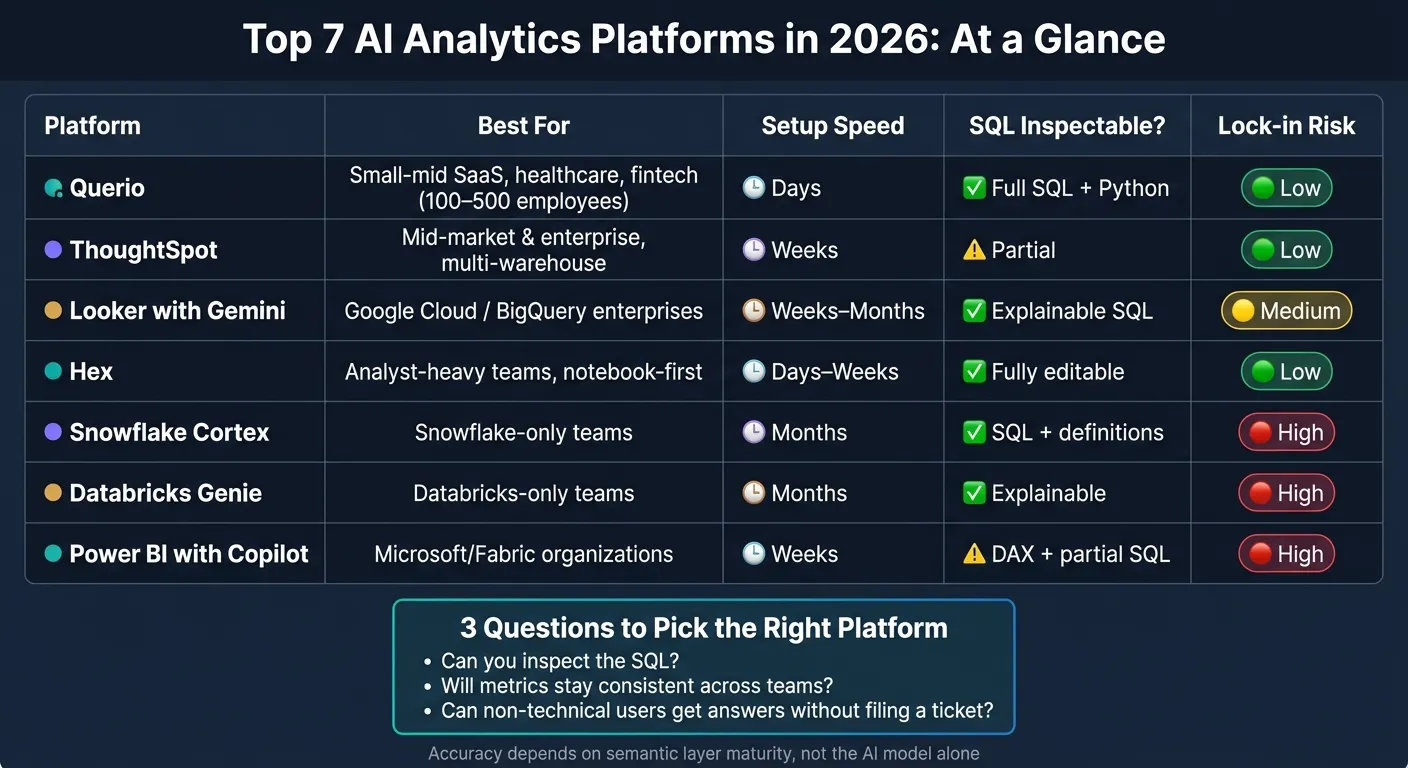
Quick Comparison
| Platform | Best For | Main Strength | Main Limitation |
|---|---|---|---|
| Querio | Data teams and their AI agents | Visible SQL/Python, with definitions in a git repo you own | Needs clear business definitions |
| ThoughtSpot | Mid-market and enterprise teams | Search-first analytics across warehouses | Worksheet setup comes first |
| Looker with Gemini | BigQuery teams using LookML | Tight metric control | Heavy LookML dependence |
| Hex | Analyst-heavy teams | Editable notebook workflow | Less suited to broad business self-serve |
| Snowflake Cortex | Snowflake-first teams | Native Snowflake security and query flow | Works best after major semantic setup |
| Databricks Genie | Databricks-first teams | Unity Catalog permissions carry over | Metadata prep matters a lot |
| Power BI with Copilot | Microsoft-standardized companies | Tight fit with Power BI and Fabric | Best on modeled Power BI data |
If I had to boil the whole piece down to three buying checks, they would be these:
- Can you inspect the SQL?
- Will metrics stay the same across teams?
- Can non-technical users get answers without filing a ticket?
That’s the lens for the rest of the article.
1. Querio
Best for: Data teams that already run a warehouse and want people and AI agents to answer questions from the same definitions, without standing up a full BI team.
Warehouse Fit
Querio connects straight to Snowflake, BigQuery, Databricks, Redshift, ClickHouse, and Postgres through live connections. Queries run on live warehouse data, so there are no exports and no copied data sitting somewhere else [4][5].
That setup helps teams move fast. In many cases, they can turn on natural-language querying across major platforms within days of connecting the warehouse [6]. And that matters, because getting connected is only half the job. The next step is making sure the SQL it writes is something your team can actually use.
SQL Accuracy
Querio gives back inspectable SQL or Python inside a reactive notebook. So if an analyst wants to check the query, tweak it, and run it again, they can do that on the spot. When the SQL changes, the charts refresh on their own.
Querio’s agent answers from the context files and metric definitions in your repo, and queries run with the user’s own permissions. That’s a big deal. It’s one thing for a tool to sound confident. It’s another for it to stay grounded in the warehouse, especially when results depend on governed definitions and user permissions.
Governance
Querio keeps context, metric definitions, saved queries, and dashboards as plain files in a GitHub repo your team owns. That means teams can review the logic in files they already know how to work with, and keep the repo if they ever leave.
The agent can propose new definitions, but saving them opens a pull request under the repo’s own reviewers, and nothing goes live until it’s merged. Per-user OAuth on Snowflake, BigQuery, and Databricks means agent-run queries inherit each user’s warehouse permissions. On the security side, Querio is SOC 2 Type II certified and HIPAA-compliant, and BAAs are available [5].
Agent Workflows
Querio works across Slack, the web app, Claude and ChatGPT through its MCP server, and Claude Code and Cursor through its CLI. If someone asks a question in Slack, Querio opens a notebook behind the scenes, and every query and agent action is logged.
It also runs automations, scheduled prompts or SQL that send findings to Slack or email before your team even logs in.
Where It Falls Short
The main trade-off is that answers are only as good as the context in the repo, so fuzzy business terms need to be defined with care.
Querio runs on top of your warehouse and assumes you already have one [4]. dbt is optional: Querio reads your MetricFlow metrics if you have them, and without dbt you define metrics in Querio and commit them to the repo.
2. ThoughtSpot
Best for: Mid-market and enterprise teams replacing legacy BI tools like Tableau or Looker and wanting a multi-warehouse, search-first analytics platform.
Warehouse Fit
ThoughtSpot connects live to Snowflake, BigQuery, Databricks, Redshift, and Postgres. That setup works well for teams that don't want analytics locked to one warehouse vendor.
But there's a catch: you can't use a connection until you build a Worksheet model first. That means mapping tables on a canvas, setting joins by hand, and choosing which columns to include before the AI can do much of anything [7].
That extra setup isn't just busywork. It has a direct effect on how well the system answers questions.
SQL Accuracy
ThoughtSpot's AI layer, Spotter, uses step-by-step reasoning and Python-based forecasting, along with companion agents for modeling, visualization, and code tasks [1][4]. But the quality of its answers depends on the semantic model behind it. ThoughtSpot says 90% or higher accuracy needs a mature, curated Worksheet [1].
If Worksheets are incomplete or messy, the output will be too. Garbage in, garbage out.
"The tool is the easy part. Trust is the hard part. Accuracy lives in your semantic layer... and the tool sits on top of that." - Valiotti Data [1]
Because the Worksheet acts as the source of truth, governance and answer quality are tightly linked.
Governance
Governance sits inside ThoughtSpot's Worksheet canvas. In plain English, if the model is clean and well managed, the answers tend to be reliable. If it isn't, problems show up fast.
Agent Workflows
ThoughtSpot is a standalone web app, so users have to log in and work inside the product. It does offer Slack integration, but it's lighter than some teams may want [2][4]. For groups that live in Slack all day, that can make adoption a bit slower.
Where It Falls Short
The biggest drawback is the upfront modeling work. Every table has to be modeled before the AI can use it, and that can create real friction for smaller teams without dedicated BI support [7].
ThoughtSpot does a good job with multi-warehouse support and enterprise search. But it asks for a lot of setup on day one, and it works best when there's already a mature semantic layer in place.
3. Looker with Gemini
Best for: Google Cloud-focused enterprise teams that already have a mature LookML semantic layer and want governed, consistent metrics across BI and embedded analytics.
Warehouse Fit
Looker connects to Snowflake, Redshift, and Postgres, but Gemini works best with BigQuery [1][3][5]. If your team is BigQuery-first, the Gemini experience tends to feel smoother and more natural. Snowflake, Redshift, and Postgres are still supported, but they don't feel as tightly connected.
That matters for a simple reason: Gemini's output depends a lot on the quality of your LookML layer.
SQL Accuracy
When the LookML model is clean and clearly set up, Gemini can produce reliable, consistent answers. If the model has gaps or weak definitions, Gemini ends up filling in those gaps on its own, and that can lead to uneven metric definitions [1][5].
Governance
Looker's biggest strength here is governance. LookML keeps one definition for core metrics across dashboards, embedded apps, and AI-generated answers [1][5].
If your team cares about everyone using the same numbers, this is a big deal. It helps cut down on the classic "why doesn't this dashboard match that report?" problem.
Agent Workflows
Gemini adds conversational analytics tools, automated visualization, and slide generation for teams that are already standardized on LookML [5].
In practice, that means teams can ask questions in plain English, turn results into charts, and move those outputs into presentation-ready slides without bouncing between a bunch of tools.
Where It Falls Short
The main downside is LookML dependence: unmapped tables make ad hoc exploration clunky [6]. If analysts want to jump straight into notebook-first analysis, this setup can feel restrictive.
4. Hex
Best for: Analyst-heavy teams that want a notebook-first workspace and prefer shipping curated data apps over chat-based self-serve.
Hex is the notebook-first pick for analyst-led teams that publish polished work instead of leaning on chat-first self-serve.
Warehouse Fit
Hex connects natively to Snowflake, BigQuery, Databricks, Redshift, and Postgres. It works straight from warehouse schemas rather than a prebuilt semantic model. That means it reads production schemas directly, with no file exports and no copied data.
SQL Accuracy
Hex Magic generates editable SQL and Python inside notebook cells. Analysts can inspect the code, tweak it, and then run it. That review step matters a lot when teams want tight control over what goes into production.
Governance
Security flows through project-level access controls and inherited warehouse roles, so the AI follows the warehouse permissions your team already has in place. Metric consistency, though, depends on the upstream semantic layer. Hex doesn't enforce one shared definition for metrics across teams on its own.
Agent Workflows
Hex Magic can scaffold full notebooks, handle multi-turn follow-up questions, and help analysts go from a raw query to a published data app without leaving the tool. In practice, distribution revolves around published apps. So instead of chatting back and forth with an agent, stakeholders usually consume the finished app.
Where It Falls Short
This analyst-first setup is also the tradeoff. Hex is built for analysts, not business users. Non-technical stakeholders will often rely on published apps, which keeps the data team involved every time a new ad hoc business question comes up.
5. Snowflake Cortex
Best for: Teams that are already all-in on Snowflake and are ready to put time into a mature semantic model before they roll out AI-driven analytics.
Snowflake Cortex Analyst is about as native as it gets. If your data already sits in Snowflake, there’s no connector to set up and no data to move around. In live tests, Cortex worked best when the semantic layer was already built out. It struggled most when teams expected solid answers straight from raw tables. That’s the tradeoff: native doesn’t mean quick to launch.
Warehouse Fit
Cortex runs queries directly inside Snowflake, so there’s no data movement. It relies on Snowflake Semantic Views, which use YAML definitions for tables, metrics, and joins. That makes it a strong match for teams built around Snowflake [1][6].
SQL Accuracy
Snowflake reports 90%+ SQL accuracy, but there’s a catch: Cortex hits that mark only when it’s working from a mature, hand-written semantic model [1][6]. Without that layer, harder questions - like funnels and retention - can fall apart fast if definitions aren’t consistent [3][8].
Governance
This is where Cortex stands out. Since it runs inside Snowflake, the permissions your team already set up - Row-Level Security, Column-Level Security, and policy tags - carry over automatically [6][5].
Agent Workflows
Snowflake says its agentic tools can help speed up semantic modeling, but Cortex still lives mostly in the Snowflake UI, not Slack [1][2]. For teams that spend a lot of their day in Slack, that can feel limiting. Cortex makes more sense for teams that want governance and analysis to stay inside Snowflake, and less sense for teams that want a lighter day-to-day flow.
Where It Falls Short
The biggest sticking point is setup. Building a mature semantic model in YAML usually takes weeks or even months, and how well Cortex works depends heavily on that upfront work [1][3]. If a team can’t build and maintain that model, results won’t stay consistent. Cortex is also tied to the Snowflake ecosystem, so it won’t work well for data teams that need cross-platform queries [1][6].
6. Databricks AI/BI and Genie
Best for: Teams already running their data stack inside Databricks and willing to spend time on metadata cleanup before rolling out self-serve analytics.
Databricks AI/BI Genie is built into the Databricks lakehouse. It queries data where it already lives and uses Unity Catalog governance out of the box. That’s a strong fit for teams that are already all-in on Databricks. But if your company uses a mixed warehouse setup, you’ll need to move data first. In practice, that means metadata quality has a huge impact on answer quality.
SQL Accuracy
Genie’s SQL accuracy depends a lot on how well your metadata is set up. It needs clear table and column descriptions, plus example queries for harder joins and time-based analysis [3]. Without that prep work, Genie can fill in the blanks on its own and return answers that vary from one prompt to the next.
Governance
This is one of Genie’s best traits. Unity Catalog policies carry over to AI-generated queries automatically, so users can ask questions in plain English without slipping past catalog permissions [1][3]. For teams in healthcare or finance, that matters a lot. It makes Genie a good option for controlled, domain-scoped self-serve analytics.
Agent Workflows
Genie works through Genie Spaces, which are scoped to specific business domains and tables. Each Genie Space tops out at about 30 tables [1]. So instead of stuffing everything into one giant space, it’s better to split domains across separate Genie Spaces. One space shouldn’t try to represent the entire warehouse.
Where It Falls Short
Genie works best for teams that can keep their metadata clean and stay fully inside Databricks. If your schema is large or spread across multiple warehouses, you’ll run into its limits pretty fast.
7. Power BI with Copilot
Best for: Teams already committed to the Microsoft ecosystem - Azure, Fabric, and Power BI - with mature semantic models in place.
Power BI Copilot adds natural-language querying on top of existing Power BI semantic models. It tends to work best for teams that already run on Fabric or Power BI. If your data is still raw or lives outside that setup, you’ll usually need more modeling before the answers are dependable.
Warehouse Fit
Power BI Copilot connects to Snowflake, BigQuery, Redshift, and Databricks. But the best results usually come after that data is shaped into a Power BI dataset.
That reliance on the model leads straight to the main quality issue: answer accuracy.
SQL Accuracy
Accuracy depends more on the semantic model than on the prompt. In plain English, if the model is messy, Copilot will be messy too. Teams should define core metrics like revenue and churn before putting Copilot in front of business users.
Governance
Governance runs through Azure Active Directory and DAX row-level security. That’s a good match for Microsoft-standardized enterprises, but it also pulls teams deeper into Fabric lock-in.
That setup affects how far teams can go with Copilot in day-to-day analysis.
Agent Workflows
Copilot is strongest in governed reporting, not open-ended exploration. Basic Copilot requires Fabric F2 or Power BI Premium P1. Full Copilot requires Fabric F64 or higher, plus Pro seats.
Where It Falls Short
Copilot stops at the semantic model. If a question isn’t represented there, it can’t build a new dataset across multiple warehouse sources. So while it fits structured BI well, it’s less suited for exploratory analysis.
Head-to-Head Results: Where Each Platform Wins and Falls Short
This section boils the comparison down to three buyer questions: where the data lives, how fast the team can get live, and whether governance needs to happen by default.
The main split isn’t which model sounds smartest. It’s which platform holds up in a live warehouse and gives answers people can trust. Across all seven tools, native-stack products tend to work best when both data and metadata already sit inside one ecosystem. Cross-warehouse tools give up some tight native integration in exchange for support across more warehouse setups.
Table 1: Warehouse Coverage and Setup Speed
| Platform | Warehouse Coverage | Setup Speed | Connection Type |
|---|---|---|---|
| Querio | Snowflake, BigQuery, Redshift, Postgres | Days | Live, read-only |
| ThoughtSpot | Snowflake, BigQuery, Redshift, Databricks | Weeks | Live / Federated |
| Looker with Gemini | BigQuery, Google Cloud ecosystem | Weeks–Months | Semantic layer (LookML) |
| Hex | Snowflake, BigQuery, Redshift, Databricks | Days–Weeks | Notebook / Live |
| Snowflake Cortex | Snowflake only | Months (if migrating) | Native |
| Databricks Genie | Databricks only | Months (if migrating) | Native (Unity Catalog) |
| Power BI with Copilot | Microsoft Fabric, SQL Server | Weeks | Native / DirectQuery |
Setup speed mostly follows migration effort. Native tools feel fast only if the warehouse and metadata are already set up. If that groundwork is missing, things slow down fast. And that matters, because unfinished metadata drags down every AI answer that comes after it.
Table 2: SQL Accuracy and Agent Behavior
| Platform | Accuracy Basis | SQL Inspectable? | Agent Behavior |
|---|---|---|---|
| Querio | Context and metric files in your git repo, over live data | Full SQL shown and editable | Chat-first, multi-turn; also via MCP and CLI |
| ThoughtSpot | Search-based retrieval | Partial SQL visibility | Multi-step reasoning, Python forecasting |
| Looker with Gemini | LookML semantic layer | Explainable SQL and definitions | Consistent metric-first Q&A |
| Hex | Schema-first / dbt integration | Fully editable SQL and Python | Analyst-centric notebook agent |
| Snowflake Cortex | Semantic Views (YAML) | Shows SQL and definitions | NL-to-SQL on Semantic Views |
| Databricks Genie | Unity Catalog metadata | Explainable answers | NL-to-SQL; ~30-table limit per Space |
| Power BI with Copilot | Power BI semantic models | DAX shown; partial SQL visibility | Generates DAX and report pages |
Accuracy comes from the semantic layer, not the model alone. That’s the part many teams learn the hard way. If you point AI at raw tables without a governed semantic layer, answers drift. Metrics change. Definitions clash. Trust drops.
Once answer quality depends on metadata, governance becomes the deciding factor. It’s what separates a slick demo from something business users can rely on day to day.
Table 3: Governance and Deployment Fit
| Platform | Governance Model | Lock-in Risk | Best Fit |
|---|---|---|---|
| Querio | Role-based / warehouse-inherited | Low | Data teams and their AI agents, multi-warehouse |
| ThoughtSpot | Enterprise RLS, column security | Low | Cross-warehouse, mid-to-large orgs |
| Looker with Gemini | Centralized LookML policies | Medium | Google Cloud enterprises |
| Hex | Project-level / warehouse-inherited | Low | Analyst-heavy teams |
| Snowflake Cortex | Native Snowflake RBAC | High | Snowflake-only shops |
| Databricks Genie | Unity Catalog (automatic) | High | Databricks-only shops |
| Power BI with Copilot | Fabric / Azure AD | High | Microsoft-committed organizations |
Native tools inherit security automatically, which is a big plus for teams that want tight control with less manual setup. The tradeoff is more lock-in. Cross-warehouse tools give you more room to work across systems, but you may need to do more upfront work to keep governance clean and metrics steady.
Choose native tools when all data lives in one ecosystem and governance needs to be automatic. Choose cross-warehouse tools - Querio for governed self-serve with live connections, inspectable SQL/Python, and definitions in a git repo you own - when multiple systems, mixed teams, and metric consistency matter more.
Pros and Cons
Every platform has a sweet spot. And every platform has a point where it starts to fight you.
Here’s the short version: what each one does well, where it falls short, and who it fits best.
| Platform | Pros | Cons | Best For |
|---|---|---|---|
| Querio | Low setup friction on live warehouses; full SQL and Python visible and editable; SOC 2 Type II and HIPAA compliance [1][3][5]; no per-seat pricing, free plan, Core $2,499/mo | Needs an owned context layer before answers stay consistent | Data teams that want one set of metric definitions for every question |
| ThoughtSpot | Multi-warehouse; advanced reasoning with Python forecasting; 4.6/5 on Gartner Peer Insights from 408 reviews [5] | You can’t save a connection without first building a data model and joins [7]; starts at $1,250/month [2][5] | Large enterprises that want search-first analytics across multiple warehouses |
| Looker with Gemini | Consistent metric answers via LookML; strong governance for Google Cloud teams | Needs LookML skill and a lot of upfront modeling; tightly tied to BigQuery | Google Cloud enterprises with a mature LookML layer |
| Hex | Notebook-style analysis; fully editable SQL and Python | Not self-serve for non-technical users; $36–$75 per editor/month [2] | Analyst-heavy teams that live in notebooks |
| Snowflake Cortex | 90%+ SQL accuracy with a mature semantic model [1][3]; automatic Snowflake RBAC | Snowflake-only; accuracy depends on YAML Semantic Views built upfront [1][3] | Snowflake-native regulated teams with a semantic model already in place |
| Databricks Genie | Unity Catalog governance automatic; included with Databricks | Manual metadata curation required; roughly 30-table limit per Genie Space [1][3] | Databricks shops doing domain-scoped analysis |
| Power BI with Copilot | Deep Microsoft Fabric integration | Full Copilot needs Fabric F64, about $6,400/month [1]; limited to pre-modeled data | Microsoft-standardized enterprises |
Use this summary to line up platform fit with your warehouse, governance needs, and your team’s skill level.
Conclusion
There’s no one-size-fits-all winner here. The right pick depends on where your data lives, how much modeling work your team can support, and who actually needs to use the tool day to day.
In practice, the choice came down to three things: semantic maturity, governance, and setup burden.
Querio works well for data teams that need governed self-serve analytics on top of live warehouse data, with definitions in a git repo the team owns. ThoughtSpot suits teams that want search-led self-serve BI across major warehouses. Hex is a strong fit for analyst teams working in SQL and Python notebooks.
The native-stack tools only come out ahead when your warehouse and metadata already sit inside the same ecosystem. Snowflake Cortex makes sense for Snowflake-native teams with a mature semantic model; Snowflake says it can reach 90%+ accuracy in that setup [1]. Databricks AI/BI Genie fits Databricks teams that want Unity Catalog governance by default. Power BI with Copilot fits Microsoft-standardized teams; full Copilot requires Fabric F64 plus Pro seats.
A simple way to pressure-test the choice is to ask:
- Can I see and edit the SQL?
- Will my metrics stay consistent across teams?
- Can non-technical colleagues use this without filing a ticket?
That’s the test that matters: live warehouse access, reliable metrics, and low-friction use for non-technical teams. Start with the semantic layer, then pick the platform that lines up with your warehouse and governance model.
FAQs
How much semantic modeling do we need before rollout?
For most enterprise AI analytics platforms, plan for 1 to 3 weeks of semantic modeling before rollout.
Some tools let teams start with schema-first exploration. That can help early on. But if you want consistent metrics and SQL you can trust, you still need a governed semantic layer.
This upfront work helps prevent metric drift, where users end up seeing conflicting numbers for the same query.
In more complex enterprise environments, setup can stretch to 4 to 9 weeks.
What should we test first on our own warehouse?
Start with a governed semantic layer. That gives your team one shared place for metrics, joins, and business terms, so people aren’t working from different definitions.
Then test five to ten real, ambiguous business questions against your own warehouse. Don’t keep it abstract. Use the kinds of questions people actually ask in Slack, meetings, or dashboards.
Grade the responses by category, such as:
- Syntax accuracy
- Result correctness
- A governance check, like confirming a user without permission can’t access sensitive data
This kind of test shows two things at once: whether the system can produce valid queries, and whether it respects the rules your team has set.
How can we verify AI-generated answers before business users rely on them?
Move past vendor benchmarks and test the tool against your own business questions and your own data.
That means checking the AI’s output side by side with what you already trust, like your current dashboards or manual SQL queries. Look at the answers, but also look under the hood: the SQL it wrote and the definitions behind each metric. If those don’t line up, that’s a red flag.
Before rollout, require inspectable SQL and governed metric definitions. Also make sure the tool applies row-level security and access controls correctly for different user roles.