Business Intelligence
7 Best AI Data Agents for Your Warehouse (2026)
Compare seven warehouse AI agents by governance, semantic layer, permissions, answer quality, and team fit.

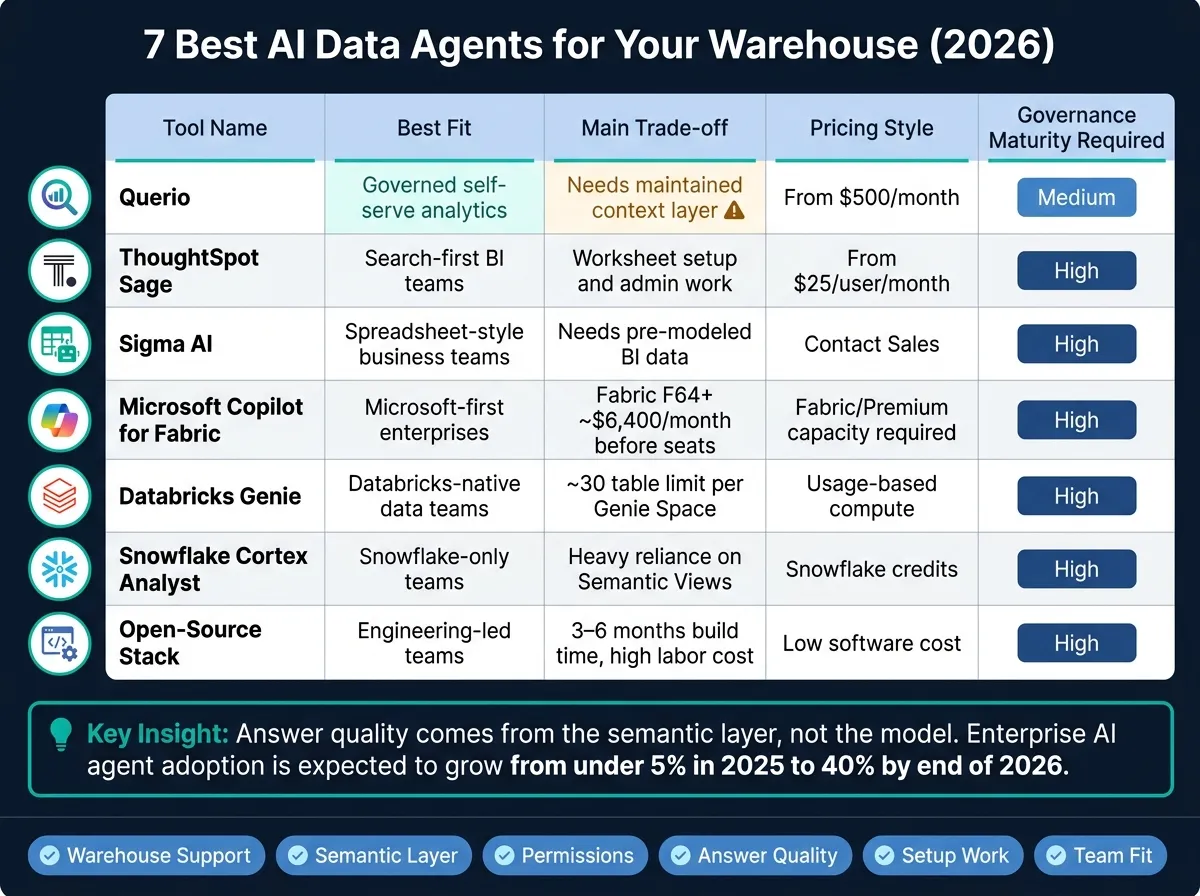
If you want an AI agent for warehouse data in 2026, the main question is simple: Does it run on live, governed warehouse data, or does it just guess from loose tables and files? The seven top picks here are Querio, ThoughtSpot Sage, Sigma AI, Microsoft Copilot for Fabric, Databricks Genie, Snowflake Cortex Analyst, and an open-source stack.
I’d narrow the choice this way:
- Pick Querio if I want governed self-serve with inspectable SQL and Python, and definitions kept in my own git repo
- Pick ThoughtSpot Sage if my team already works in a search-first BI setup
- Pick Sigma AI if users live in spreadsheet-style analysis
- Pick Microsoft Copilot for Fabric if my company is deep in Microsoft Fabric, Power BI, and Azure
- Pick Databricks Genie if my data stack is already in Databricks + Unity Catalog
- Pick Snowflake Cortex Analyst if I’m all-in on Snowflake and already have a clean semantic model
- Pick an open-source stack if my team wants control and can spend 3–6 months building and maintaining it
The article’s core point is clear: answer quality comes more from the semantic layer than from the model itself. That matters because enterprise AI agent use is expected to move from under 5% in 2025 to 40% by the end of 2026. So I’d judge these tools on six things: warehouse support, semantic layer, permissions, answer quality, setup work, and fit by team type.
Quick Comparison
| Tool | Best fit | Main trade-off | Pricing style |
|---|---|---|---|
| Querio | Governed self-serve | Needs a maintained context layer | Free plan; Core $2,499/mo |
| ThoughtSpot Sage | Search-led BI teams | Worksheet setup and admin work | From $25/user/month |
| Sigma AI | Spreadsheet-first business teams | Needs pre-modeled BI data | Contact sales |
| Microsoft Copilot for Fabric | Microsoft-first enterprises | High Fabric capacity cost | Fabric/Premium capacity required |
| Databricks Genie | Databricks-native teams | Domain setup and space limits | Usage-based compute |
| Snowflake Cortex Analyst | Snowflake-only teams | Heavy reliance on Semantic Views | Snowflake credits |
| Open-source stack | Engineering-led teams | High build and maintenance load | Low software cost, high labor cost |
If I were choosing fast, I’d start with the warehouse I already use, then check whether the tool supports governed metrics, read-only access, and inspectable logic. That cuts out a lot of noise and gets me to the short list fast.
1. Querio
Best for: Governed self-serve analytics
Querio runs queries on live data in Snowflake, BigQuery, Redshift, ClickHouse, PostgreSQL, MySQL, and more, with no CSV exports or copied datasets. You ask in plain English, in the app or in Slack, and the agent answers with SQL and Python in a reactive notebook you can open, check and rerun. Charts update when the logic changes.
That setup matters. You can see how the answer was produced instead of taking it on faith.
Querio keeps its context (joins, metrics, saved queries and business terms) as plain files in a git repo your team owns, which can be the same repo as your dbt project. The agent proposes what it learns as a pull request, and your reviewers decide what gets merged. So if your company keeps joins and metrics in a governed semantic layer, Querio makes a lot of sense. The same definitions back every answer in the app, in Slack, and in Claude, ChatGPT, Claude Code or Cursor through Querio's MCP server and CLI.
On permissions, an agent sees only what its user sees. On Snowflake, BigQuery and Databricks, queries run as the person through per-user OAuth, so warehouse access rules apply. Querio adds roles on top and logs every query and agent action. In plain English: teams can do self-serve analytics without losing track of who saw what and how an answer was generated.
Pricing starts with a free plan. Every plan has unlimited users and data connections. Core costs $2,499/month, or $2,099/month billed annually ($25,000 a year), and includes 10,000 AI credits a month. Enterprise pricing is custom for single-tenant, on-prem or specialized deployments. The next tools go after the same goals in different ways: speed, semantic depth, and warehouse fit.
2. ThoughtSpot Sage
Best for: Search-first BI teams with pre-modeled data
If your metric layer is already set, ThoughtSpot Sage can act like a fast search layer on top of it. It connects live to Snowflake, BigQuery, Amazon Redshift, Databricks, and PostgreSQL, and queries your warehouse directly instead of working from a copied dataset. It also connects to Snowflake Cortex through MCP, which extends Snowflake-native AI without changing the search interface. [2]
That setup works best when Worksheets are clean and tightly managed. Sage uses ThoughtSpot Worksheets as its semantic layer, so business definitions tie back to those Worksheets. Governance also carries over from the warehouse through RBAC and row-level security. When the semantic layer is mature, accuracy tends to be strong. When the modeling is loose, Sage can still return the wrong answer. [2]
One nice touch: Sage shows its reasoning, and it includes forecasting for more advanced analysis. But there’s a catch. Teams need to define and standardize Worksheets before business users start leaning on the agent. If they don’t, the same metric can end up being calculated in different ways for different users.
| Feature | ThoughtSpot Sage Detail |
|---|---|
| Warehouse Connections | Snowflake, BigQuery, Redshift, Databricks, PostgreSQL |
| Semantic Layer | ThoughtSpot Worksheets |
| Governance | Inherits warehouse RBAC and RLS |
| Pricing | Essentials from $25/user/month; Pro from $50/user/month; Enterprise custom, often five- or six-figure annual [5] |
Sage is a strong fit for teams that already keep a governed semantic layer in place and want search-driven analysis on top of governed metrics.
3. Sigma AI
Best for: Business teams with a pre-modeled BI layer who want a spreadsheet-style interface
Sigma brings AI into a spreadsheet-style BI workflow, which makes it feel familiar for many business users. Teams can build formulas, explore datasets, and ask questions without leaving that spreadsheet-like setup. Sigma also connects live to your warehouse - Snowflake, BigQuery, and Redshift - so it queries data directly instead of relying on copied datasets. That setup makes it a strong choice for business users who want governed analysis in a format they already know.
Access control uses user-attribute-based RLS, so admins can split access by team or region. That said, there’s a tradeoff: someone still has to keep those roles up to date. Sigma also takes a semantic-layer-first approach. In plain English, admins need to define datasets, joins, and metrics before AI answers become reliable. So if your BI layer is already in good shape, rollout can go much more smoothly. If not, setup may take more work.
| Feature | Sigma AI Detail |
|---|---|
| Primary Interface | Spreadsheet-style UI and dashboards |
| Semantic Layer | Semantic-layer-first; requires pre-defined datasets and metrics |
| Governance | User-attribute-based Row-Level Security (RLS) |
| SQL Transparency | Formula-centric, limited SQL visibility |
| Ambiguity Handling | Spreadsheet-style follow-up questions |
| Pricing | Contact Sales [2] |
Sigma fits best for teams that already use a BI platform as the main place for data exploration and want embedded analytics for business users. It’s a heavier setup for teams that don’t yet have a mature semantic layer.
The next option moves from spreadsheet-native BI to a Microsoft-native warehouse stack.
4. Microsoft Copilot for Fabric
Best for: Microsoft-committed enterprises already standardized on Azure, Power BI, and Office 365
If your team already runs deep in the Microsoft stack, the next step is Fabric-native AI. Microsoft Copilot for Fabric sits on top of Power BI semantic models in Microsoft Fabric and answers business questions using data from Fabric Data Warehouse and Lakehouse sources.
There’s one catch: the quality of those answers depends a lot on how mature your Power BI semantic model already is. If that layer is well built, Copilot can be useful fast. If not, the rollout can feel slow and the output may fall short.
Governance comes from Fabric and Power BI, including:
- Row-level security
- Sensitivity labels
- Workspace permissions
Copilot doesn’t have a separate SKU. You need paid Fabric capacity (F2+) or Power BI Premium P1+ to use it. Power BI Pro and Premium Per User aren’t enough. Microsoft also says full functionality requires F64 [5][1][2].
| Feature | Microsoft Copilot for Fabric Detail |
|---|---|
| Warehouse Connections | Fabric Data Warehouse, Lakehouse |
| Semantic Layer | Power BI semantic model |
| Governance | Row-level security, sensitivity labels, workspace permissions |
| Capacity Requirement | Fabric F2+ or Power BI Premium P1+; full functionality requires F64 [5][1][2] |
| Best Fit | Microsoft-first teams with mature Power BI semantic models and Fabric capacity |
This makes the most sense for Microsoft-first teams that already have both pieces in place: mature Power BI semantic models and Fabric capacity. Without them, expect a slower rollout and a higher bill.
Next: Databricks Genie, for teams built on Databricks.
5. Databricks Genie / AI Assistant
Best for: Databricks-native data teams with governed metadata
If your warehouse already runs in Databricks, Genie is usually the first AI layer worth looking at. It connects to Databricks SQL Warehouses and Delta tables, and Unity Catalog handles permissions and lineage. That makes Genie a strong fit when domain-based self-serve needs to happen right on top of live warehouse data.
There is a catch: setup takes work. Databricks relies on manual metadata curation to keep answers on track, including table descriptions, column descriptions, and business definitions [1]. In plain English, your team has to spell things out inside each Genie Space. That often means adding descriptions, sample queries, and business definitions like "active user" or "churn".
Genie is built around domain-based Spaces, not one giant warehouse-wide layer. Databricks recommends keeping each Space to about 30 tables to help accuracy hold up [2]. So the better move is to use Genie by domain instead of pointing it at everything at once. It also runs on usage-based compute, so costs can climb as more people start using it.
| Feature | Databricks Genie Detail |
|---|---|
| Warehouse Connections | Databricks SQL Warehouses, Delta tables |
| Governance Layer | Unity Catalog (metadata, permissions, lineage) |
| Metadata Setup | Manual curation of descriptions, instructions, and example queries [1] |
| Table Limit | About 30 tables per Genie Space [2] |
| SQL Inspectability | Users can inspect generated SQL |
| Pricing Model | Usage-based Databricks compute |
| Best Fit | Databricks-first, engineering-led teams with mature Unity Catalog |
For teams that already live deep inside Unity Catalog, Genie makes sense when governance and metadata cleanup are already part of the day-to-day work. Next up is the Snowflake option for teams that want that same warehouse-first approach inside Snowflake.
6. Snowflake Cortex Analyst
Best for: Snowflake-first teams with a well-governed semantic model
Cortex Analyst runs inside Snowflake, which means data stays in the warehouse. That matters for teams that care a lot about control and access. It also uses your current role-based access controls, row-level security, and column-level security.
Its upside comes down to the same two things that shape every warehouse agent in this group: governed metadata and clean permissioning. Cortex Analyst works best when teams already keep business logic in Snowflake metadata instead of scattering it across ad hoc queries.
Accuracy depends heavily on the semantic model. Cortex Analyst works from Semantic Views, not raw tables. Before rollout, teams need to define metrics, synonyms, and join logic in YAML. Snowflake reports 90%+ accuracy when that semantic model is mature [1][2]. If you point it at raw, unmodeled tables, answers can get inconsistent [1][2].
| Feature | Snowflake Cortex Analyst |
|---|---|
| Warehouse Connection | Native Snowflake only |
| Semantic Layer | YAML-based Semantic Views |
| Governance | Native RBAC, RLS, CLS |
| Accuracy Benchmark | 90%+ with a mature semantic model [1][2] |
| Pricing Model | Snowflake credits |
| Usage history | CORTEX_ANALYST_USAGE_HISTORY |
| Best Fit | Snowflake-first teams with governed, well-modeled data |
If your team already has a mature semantic model in Snowflake, Cortex Analyst can be a strong match. If that layer is still a work in progress, expect to spend more time in YAML. And if you want tighter control over modeling and query execution, the next option leans more toward a build-it-yourself open-source setup.
7. Open-Source Warehouse Agent Stack (dbt + Postgres/SQL Agent)
Best for: Engineering-led teams that want full control and are willing to build and maintain the stack themselves
If your team wants full control, you can build a warehouse agent yourself. A common setup uses dbt for semantics and a Python SQL agent connected to Snowflake, BigQuery, Redshift, or Postgres through SQLAlchemy or MCP. The upside is control. The downside is that your team owns the whole thing.
Here’s the key idea: accuracy comes from the semantic model, not the agent. If you ground the agent in mature dbt models with documented YAML definitions, text-to-sql accuracy can hit 90% or more [1][2]. Without that layer, even a strong agent can drift fast.
Once the semantic layer is in place, governance becomes the next day-to-day burden. It doesn’t just happen on its own.
Governance is manual. You need to set up read-only database roles and scoped access yourself. MCP is a common way to give the agent permissioned access without exposing raw credentials [4]. In plain English, the stack works only when dbt, permissions, and query validation stay in sync.
| Factor | Open-Source Stack Reality |
|---|---|
| Warehouse support | Any: Snowflake, BigQuery, Redshift, Postgres |
| Semantic layer | dbt / MetricFlow - you build and maintain it |
| Governance | Manual: scoped DB roles, MCP, audit logs |
| Accuracy | High if grounded in dbt; inconsistent against raw tables |
| Setup effort | High - typically 3–6 months to production-ready [3] |
| Software cost | Low (open-source); high in engineering labor |
| Best fit | Teams with strong Python and data engineering capacity |
The trade-off is pretty straightforward: software spend is low, but ownership costs can pile up fast. Your team has to own the reasoning loop, keep YAML and dbt models aligned as the schema changes, and deal with every edge case the LLM gets wrong.
Next, weigh the trade-offs across all seven options: control, effort, accuracy, and maintenance.
Pros, Cons, and Trade-offs for Each Tool
No tool wins in every case. The best pick comes down to your warehouse, your governance setup, and how much your team wants to build in-house.
| Tool | Strongest Pro | Biggest Limitation | Best-Fit Buyer | Not Ideal If... |
|---|---|---|---|---|
| Querio | Owned governed context layer; inspectable SQL/Python | Needs ongoing context maintenance | Data leaders at B2B SaaS, healthcare, and finance companies with a live warehouse | You want a tool that works without a context layer |
| ThoughtSpot Sage | Strong cross-warehouse support and business-user self-serve at scale | More admin overhead | Teams already invested in ThoughtSpot | You need a simpler, lower-admin setup |
| Sigma AI | Spreadsheet-style interface on live warehouse data | Requires a mature BI layer before AI answers are reliable | Business teams with a pre-modeled BI layer | Your semantic layer isn't production-ready |
| Microsoft Copilot for Fabric | Deep Microsoft ecosystem integration | Requires Fabric F64+, roughly $6,400/month before seats [2] | Large enterprises committed to Azure and Power BI | You're mid-market or not ready for high platform cost |
| Databricks Genie / AI Assistant | Native Unity Catalog governance | About 30 tables per Genie Space [2] | Data engineering teams already running Databricks | You need broad cross-domain querying without managing multiple spaces |
| Snowflake Cortex Analyst | 90%+ accuracy with a mature semantic model [1][2] | Depends heavily on well-maintained Semantic Views | Snowflake-first teams invested in semantic modeling | Your semantic model isn't production-ready yet |
| Open-Source Warehouse Agent Stack (dbt + Postgres/SQL Agent) | Full control across major warehouses | High engineering effort; manual governance | Engineering-led teams with strong Python and data engineering capacity | You need fast deployment or lack bandwidth to maintain it |
The main divide is pretty simple: some tools plug into an existing governed warehouse, while others push your team to build more of the stack yourself.
If your team already works off a live warehouse, the big question is whether the agent can operate from governed metrics and permissioned data. That’s where trust starts. In practice, accuracy comes from the semantic layer, not just the model.
Cost also splits the field. Fabric can get expensive fast, with capacity starting around $6,400/month before seats [2]. Open-source options move that cost somewhere else: into engineering time, upkeep, and manual governance.
Next: choose the best fit by team type, warehouse stack, and governance maturity.
Which AI Data Agent Should You Choose in 2026?
In 2026, the best AI data agent comes down to two things: your warehouse setup and how mature your governance in self-service analytics is.
If you want governed self-serve analytics on a live warehouse, go with Querio. If your team is deep in Snowflake and cares most about metric governance, Snowflake Cortex Analyst is the better fit. For search-led BI, pick ThoughtSpot Sage. If your team works best in a spreadsheet-style analytics setup, Sigma AI makes sense. For Databricks-heavy teams, Databricks Genie fits that workflow. If you're all-in on Microsoft, Microsoft Copilot for Fabric is the natural match. And if you want full internal control, an open-source stack gives you that.
Once the trade-offs are clear, the next move is simple: match the agent to the warehouse stack and day-to-day workflow you already use.
| Your Priority | Best Fit |
|---|---|
| Fastest to deploy | Querio |
| Strongest Snowflake governance | Snowflake Cortex Analyst |
| Search-led self-serve | ThoughtSpot Sage |
| Spreadsheet-style BI | Sigma AI |
| Databricks-native workflows | Databricks Genie |
| Microsoft Fabric environments | Microsoft Copilot for Fabric |
| Full internal control | Open-source stack |
Start small. Use governed metrics, read-only access, and a narrow domain first. Then check answers against your own business questions, not vendor benchmarks. That's the filter that helps you cut down the shortlist before you test any tool on live warehouse questions.
FAQs
How do I know if my semantic layer is mature enough for an AI agent?
Your semantic layer is mature enough when your business metrics, join logic, and terminology all live in one governed place and mean the same thing every time.
A good gut check: your team no longer has to rework common metrics like revenue or active users for each new request.
That gives the AI a dependable base to work from, cuts the risk of mismatched results, and makes it much easier to audit the generated SQL against pre-defined, certified definitions.
What’s the safest way to pilot an AI data agent on live warehouse data?
Start with strict governance guardrails before connecting to production. Use read-only access by default, and limit access to only the tables and columns the agent needs.
Then test it with a set of real business questions on a representative warehouse slice. Check answer accuracy, look for made-up logic or broken joins, and make sure every query is logged and the generated SQL can be inspected.
When does it make sense to build an open-source stack in-house?
Building an open-source AI data stack in-house makes sense when your team needs full control over the pipeline or has technical needs that managed tools just don’t handle well. That often comes up for developer teams building custom agents with frameworks like LangChain or LangGraph.
The tradeoff is pretty simple: you take on the setup work and the long-term upkeep. If speed, reliability, or standardized governance matter most, managed solutions usually come with lower ownership costs and a faster path to value.