Business Intelligence
Warehouse-Native AI Analytics vs Lakehouse BI: Which Fits Your Stack?
Warehouse-native analytics gives faster, governed BI; lakehouse BI fits teams needing one platform for BI, engineering, and ML.

If your team already runs on Snowflake, BigQuery, Redshift, or Postgres, I’d usually pick warehouse-native AI analytics. If your stack is built around Databricks, Delta Lake, or Iceberg, I’d lean lakehouse BI.
Here’s the short answer: this choice is about where your data lives, how your team works, and how much setup work you want to carry. In most cases, warehouse-native BI is the simpler path for teams that want governed reporting, steady dashboard speed, and one shared metric layer. Lakehouse BI fits teams that want BI, data engineering, and ML on one platform, even if that means more setup and more compute tuning.
What I’d look at first:
- Architecture: warehouse-first vs lakehouse-first
- Performance: dashboard and ad hoc SQL speed
- Metric control: one shared definition for KPIs like MRR and churn
- AI analysis: whether AI answers stay tied to governed metrics
- Cost: more predictable spend vs more variable compute bills
- Team fit: analyst-led BI vs engineer-heavy Databricks stacks
About 100–500-employee SaaS teams will often get to value faster with the warehouse route because it adds fewer moving parts. But if BI, streaming, notebooks, and ML all need the same data layer, lakehouse BI may fit better.
Quick Comparison
| Criteria | Warehouse-Native AI Analytics | Lakehouse BI |
|---|---|---|
| Best match | Snowflake, BigQuery, Redshift, Postgres | Databricks, Delta Lake, Apache Iceberg |
| Main use | Governed self-serve BI on live warehouse data | BI + engineering + ML on one platform |
| Query pattern | Strong for dashboards and interactive SQL | Strong for batch and large-scale workloads |
| Metric consistency | Easier with one semantic layer | Takes more setup across tools |
| AI answers | More stable when tied to shared metrics | Can drift if metric logic lives in many places |
| Cost pattern | Usually easier to budget in U.S. dollars | Storage is cheap, compute is less predictable |
| Setup work | Low to medium | Medium to high |
My takeaway: if you want trusted answers on live warehouse data, start with warehouse-native AI analytics. If you need one data platform for BI, engineering, and ML, lakehouse BI is the better fit.
::: @figure 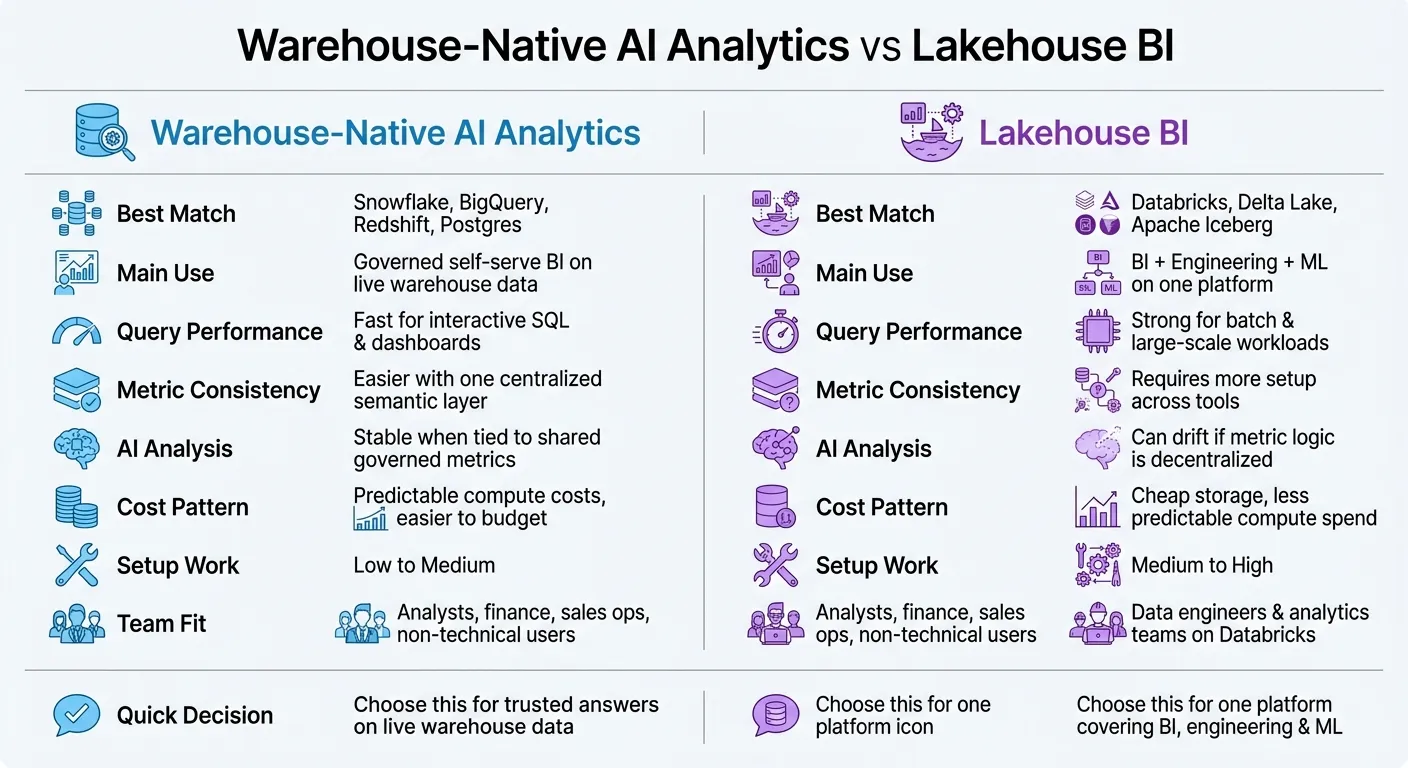 {Warehouse-Native AI Analytics vs Lakehouse BI: Side-by-Side Comparison}
:::
{Warehouse-Native AI Analytics vs Lakehouse BI: Side-by-Side Comparison}
:::
Warehouse vs. Lakehouse for your Silver layer (the honest H2H)
::: @iframe https://www.youtube.com/embed/QfBU0FYWOmU :::
sbb-itb-284a532
How the Two Approaches Differ at the Architecture Level
Architecture shapes both the amount of engineering work involved and how steady your metrics stay over time.
"The core architectural trade-off is simple: A data warehouse offers rigid reliability at the cost of upfront structuring. A data lake provides maximum flexibility but shifts the burden of data validation and interpretation to the point of analysis." - Querio [2]
Warehouse stacks: structured analytics first
In a warehouse-native stack, teams clean, model, and structure data before analysts start querying it. That means transformation logic - often handled in dbt - has already run, and the data sits in curated marts inside Snowflake, BigQuery, or Redshift.
The upside is pretty clear: analysts work from data that's already shaped for reporting. That makes performance more predictable and metric governance simpler, especially for numbers like MRR and churn where consistency matters a lot.
Snowflake uses virtual warehouses that can scale automatically. BigQuery runs serverless and scales instantly. For lean teams, that keeps BI easier to manage without a lot of infrastructure overhead. This setup tends to matter most when analysts need fast, trusted dashboards and don't want to spend much time on platform upkeep.
Lakehouse stacks: one platform for BI and broader data workloads
A lakehouse stack stores data in open formats - Delta Lake, Apache Iceberg, or Apache Hudi - on object storage like S3 or GCS. The big appeal is that it brings BI, machine learning, and streaming together on the same platform.
That can be a good fit for teams already set up around Databricks and sharing data across BI, ML, and streaming use cases. Instead of splitting work across separate systems, they keep it in one place.
But there's a catch. Databricks clusters need more setup and tuning than Snowflake or BigQuery. As the team gets bigger, compute tuning and governance usually ask for more engineering time too. So the upside is consolidation, while the trade-off is extra platform work.
Where implementation complexity tends to appear
For a lean B2B SaaS data team, this complexity gap can be hard to ignore.
Warehouse BI setup is mostly about modeling data well in dbt and then connecting a BI layer. Lakehouse setup adds more moving parts, including:
- managing open table format metadata
- configuring cluster autoscaling
- designing governance policies so the environment doesn't turn into an untrusted, hard-to-govern environment [2]
That difference shows up fast in day-to-day work. A warehouse stack usually asks, "Did we model this right?" A lakehouse stack often asks that too, but then adds, "Did we configure the platform right as well?"
Those architectural choices set up the tradeoffs around performance, governance, cost, and team fit that come next.
Side-by-Side Comparison: Performance, Governance, AI Analysis, Cost, and Team Fit
For B2B SaaS teams, the core choice is pretty simple: do you need faster governed BI, or do you need a broader BI-and-ML platform? That difference shows up fast in dashboards, metric definitions, and ad hoc analysis.
| Dimension | Warehouse-Native AI (Snowflake, BigQuery, Redshift) | Lakehouse BI (Databricks) |
|---|---|---|
| How data is prepared | Modeled data is prepared before users query it | Raw and modeled data can coexist |
| Query performance | Very fast for interactive SQL and dashboards | Strong for batch processing and large-scale workloads; performance depends more on cluster configuration |
| Semantic consistency | Centralized through dbt MetricFlow, LookML, or a shared semantic layer | Catalog-based; keeping metric definitions consistent across notebooks and BI tools takes more configuration |
| AI-assisted analysis | Works best when AI is tied to governed metric definitions | Can work well, but AI answers can drift if governed definitions are not maintained centrally |
| Cost model | More predictable compute costs | Cheap storage, but compute spend is less predictable |
| Implementation complexity | Low to moderate; centralized modeling keeps the stack simpler | Moderate to high; cluster management, metadata, and governance add ongoing overhead |
| Primary team fit | Analysts, finance, sales ops, and non-technical users needing fast, trusted answers | Data engineers and analytics teams already standardized on Databricks |
Query performance and concurrency for dashboards and ad hoc analysis
For dashboarding and ad hoc work, warehouse engines are usually the steadier pick. They’re built for interactive SQL and dashboard use, so they tend to handle repeated queries and concurrent users with less tuning.
Lakehouse systems do well with batch processing and large-scale workloads. But when people start asking, “Why is this dashboard slow today and fine tomorrow?” the answer often comes back to cluster setup. That means speed can vary more based on configuration.
Semantic consistency and governed metrics across tools
This is where the biggest gap tends to show up: governance.
In a warehouse-native stack, teams often define metrics once in dbt MetricFlow, LookML, or a shared semantic layer. From there, they reuse those same definitions across BI and analysis. That makes it easier to keep everyone looking at the same number.
In a lakehouse stack, you can get that same consistency. It just usually takes more setup to keep notebooks, BI layers, and AI-generated queries lined up. If that work slips, teams can end up with small differences in metric logic - and those small differences can turn into big arguments.
Cost and operational overhead in U.S. dollar terms
Storage is only one part of the bill.
Lakehouse platforms can take advantage of cheap object storage, which sounds great on paper. But compute spend is less predictable, so estimating a monthly bill in U.S. dollars often takes more hands-on tracking.
Warehouse platforms are usually easier to budget for because compute maps more directly to usage. For teams that want fewer surprises at the end of the month, that matters a lot.
Use these tradeoffs to map your current stack to the decision framework below.
Which Approach Fits Your Stack? A Decision Framework for B2B SaaS Teams
Pick warehouse-native AI analytics when governed self-serve reporting on live warehouse data is the main goal. Go with lakehouse BI when BI needs to sit next to engineering and ML on the same platform.
Choose warehouse-native AI analytics when self-serve BI is the priority
The clearest signal is a flood of repeat analysis requests. Your analysts keep getting the same questions from sales, finance, and customer success every week. Warehouse-native AI analytics helps cut that backlog without forcing a platform move.
That makes it the shorter path for teams trying to improve self-serve reporting on a live warehouse. Instead of rerouting your whole stack, you reduce the wait for answers where the data already lives.
"Self-serve doesn't just mean 'analysts building dashboards, faster.' It's gaining direct access to trusted data faster." - Brian Waligorski, Lead Data Engineer, The Philadelphia Inquirer [1]
Choose lakehouse BI when your platform is already built on Databricks
The decision changes if the same data platform also needs to handle ML and engineering work. In that case, the lakehouse route often makes more sense.
Choose it when BI, engineering, and ML all need to share the same governed tables. The catch is pretty simple: semantic consistency and governance take more setup, especially once non-technical users start asking questions in plain English.
How Querio fits into both paths without duplicating logic
If you want one governed analytics layer without duplicating logic, the next step is figuring out where that layer should sit. Querio connects straight to Snowflake, BigQuery, Redshift, ClickHouse, and PostgreSQL. No CSV exports. No duplicated data.
Its governed semantic layer lets teams define metrics like MRR or churn once. Those definitions then carry across every AI-generated answer, editable notebook, and dashboard. Each answer also includes inspectable, editable SQL and Python, so analysts can check the logic and change it when needed instead of rebuilding it somewhere else.
Use the matrix below to match your stack to the shortest path.
| Scenario | Best Fit |
|---|---|
| Already on Snowflake/BigQuery, SQL-heavy team, need faster self-serve | Warehouse-native AI analytics |
| Already on Databricks, ML + BI in one platform, BI and engineering share governed tables | Lakehouse BI |
| Either path, but need governed metrics and inspectable AI answers without duplicating logic | Querio as the analytics workspace layer |
Conclusion: Match the Model to Your Team's Real Analytics Work
The choice comes down to two things: where your data already lives and whether your team needs governed BI on a live warehouse or a single BI-and-ML platform.
That split shows up most clearly in day-to-day workload. For most 100–500-employee SaaS teams, the warehouse path is the lower-friction place to start because it adds less day-to-day work and keeps governance simpler from the start.
More platform work often means spend is harder to predict. Warehouse-native approaches are usually easier to budget, while lakehouse platforms often need more hands-on compute management.
The real test is whether metrics stay consistent as people move between dashboards and AI answers. Most teams use both. So metric and semantic layer definitions need to be set once and reused in both places. If not, small logic gaps can snowball into bigger fights over the numbers.
If your main goal is trusted answers on live warehouse data, warehouse-native AI analytics is the shorter path.
FAQs
::: faq
How do I know if my team is warehouse-first or lakehouse-first?
Your team is warehouse-first when it depends on one structured data warehouse as the source of truth for cleaned data, trusted metrics, and business logic. The main goal is live, governed querying with no data movement, plus self-serve access to shared definitions in one place.
Your team is lakehouse-first when it needs one platform for both raw data analysis and structured reporting. That usually includes machine learning work on large, unstructured files, along with BI reporting powered by transactional metadata layers. :::
::: faq
When is lakehouse BI worth the extra setup?
Lakehouse BI is worth the extra setup when you need one system for both analytics and machine learning instead of juggling separate platforms.
It also makes sense if you want to cut down on data silos by pairing the scale of a data lake with the reliability people expect from a warehouse, including ACID transactions and schema enforcement. For growing teams, that upfront work can make pipelines simpler, keep data fresher, and help you avoid technical debt later on. :::
::: faq
How can we keep AI answers aligned with KPI definitions?
Use a governed semantic layer as the single source of truth for metric logic, joins, and business terms. That way, AI, dashboards, and manual reports all calculate KPIs the same way instead of drifting apart.
To keep everyone on the same page, connect the AI straight to that layer, show the SQL or Python behind each answer, enforce data quality checks, and have analysts review outputs during rollout. :::