Business Intelligence
Embedded Analytics Vendor Selection Guide
Selecting the right embedded analytics vendor matters: prioritize integration, security, AI features, transparent pricing, and measurable goals to ensure value.

Choosing the right embedded analytics vendor is critical for delivering data-driven insights directly within your software. This guide simplifies the selection process by breaking down key considerations:
- What is Embedded Analytics? Integrating analytics tools (dashboards, reports, visualizations) directly into your application for seamless user experiences.
- Why It Matters: Over half of organizations demand analytics in their software. Without it, users may turn to external tools, reducing your product’s value.
- Trends to Watch: AI-driven features like natural-language querying and governed semantic layers are shaping the future of embedded analytics.
- Key Requirements: Clearly define business goals, differentiate internal vs. customer-facing needs, and prioritize technical capabilities like real-time data access, security, and AI features.
- Vendor Evaluation: Focus on technical fit, security, performance, and cost transparency. Build a weighted scoring model to objectively compare options.
Next Steps: Define your goals, involve stakeholders, and test vendors through proofs of concept to ensure the chosen solution meets your needs.
Webinar: The Ultimate Guide to Embedded Analytics
::: @iframe https://www.youtube.com/embed/ZwepEJJ6nNg :::
Defining Your Embedded Analytics Requirements
Before diving into vendor evaluations, it's essential to define your analytics objectives. Whether you're aiming to uncover insights faster, empower users, or improve customer retention, these goals will guide every decision along the way.
Identifying Business Goals
To align analytics with measurable outcomes, focus on making data accessible and easy to use. When data access is intuitive and self-service, decision-making speeds up significantly. For instance, enabling employees to independently access insights eliminates the need to wait for IT teams to generate reports. This approach can transform how quickly businesses act on data. A recent study shows that 91% of business leaders believe democratizing data and analytics is critical to their software's success. If you're developing a SaaS product, offering self-service analytics not only keeps customers engaged but also strengthens their loyalty. Operational efficiency is another key factor - automating data preparation tasks allows technical teams to focus on strategic projects. By clarifying your objectives, you'll better understand the differences between internal analytics needs and customer-facing use cases.
Internal vs. Customer-Facing Use Cases
The analytics requirements for internal teams differ greatly from those for customer-facing dashboards. Customer-facing analytics often require seamless integration, custom branding, and strong security to create a native experience that feels like a natural extension of your product. These solutions frequently involve monetizing data, so they need scalable licensing models to accommodate fluctuating user demand. On the other hand, internal analytics focus on operational reporting and delivering real-time insights tailored to specific roles. For example, finance teams may need entirely different dashboards compared to sales or operations teams. Understanding these distinctions ensures you prioritize the features that matter most and avoid paying for unnecessary capabilities. Once your business and usage goals are clear, you can refine your technical requirements to ensure smooth integration and advanced AI functionality.
Technical Requirements: Data Architecture and AI Features
Your technical criteria should begin with embedded analytics architecture. It's crucial to have real-time access to data by connecting effortlessly to cloud, on-premise, and third-party sources. AI-powered features are now a must-have. Tools like natural-language querying let users ask questions in plain English, removing the need for SQL expertise. Predictive analytics and machine learning capabilities can uncover trends and help forecast future outcomes. Security is equally important - 29% of cybersecurity breaches stem from third-party vendors, with the average breach costing around $4.88 million. Look for features like data encryption (both in transit and at rest) and user or row-level security to ensure that individuals can only access the data they're authorized to see. When assessing self-service analytics, ask vendors for proof of their capabilities, as many overstate these features. This diligence will ensure you choose a solution that meets your needs without compromise.
Evaluating Embedded Analytics Vendors
Once you've outlined your requirements, the next step is to evaluate vendors using well-defined criteria. Your focus should be on technical capabilities, security measures, and performance benchmarks that directly influence your analytics experience. This ensures that the solution aligns with your business and technical needs.
Technical Evaluation Criteria
Start by examining the integration architecture. Look for vendors that use SDKs and APIs rather than iframes, as this allows analytics to blend seamlessly into your application. The solution should connect effortlessly to all your data sources - whether they're on-premises, cloud-based, or third-party systems - without requiring you to replicate or move data.
Consider the AI-driven features the vendor offers, such as natural-language querying and a strong semantic layer. A semantic layer is especially important because it enables data teams to define joins, metrics, and business glossary terms once and apply them consistently across all users. Understanding how semantic layers in business intelligence function can help you evaluate a vendor's data governance capabilities. Pay attention to developer tools as well - ensure the vendor provides clear APIs, comprehensive documentation, and customization options to help your team embed analytics and adapt the solution to your workflows. Alongside these functionalities, security and operational performance should be non-negotiable.
Security, Compliance, and Reliability
Security breaches can lead to substantial financial and reputational damage. At a minimum, your vendor should have SOC 2 Type II certification and offer a clear uptime SLA (aim for 99.9% as a standard). Encryption both in transit and at rest is essential, as is granular access control through mechanisms like RBAC and row-level security for multi-tenant SaaS.
"Safeguarding sensitive data and maintaining compliance with industry regulations are paramount considerations when evaluating an embedded analytics vendor." - Reveal BI
Ensure the platform supports Single Sign-On (SSO) protocols such as SAML 2.0, OpenID Connect, and Azure Active Directory. If your organization deals with sensitive data - such as PII, HIPAA-protected information, or financial records - ask how the vendor’s architecture aligns with your security policies. Request specific examples of how they implement RBAC and tenant-based security, and verify compliance with regulations like GDPR. Documentation detailing these practices is a must.
Performance and Scalability
The ability to scale is crucial for a solution that grows with your business. Ask vendors how they handle increasing data volumes and user demands. Query performance is another key factor - insights should be delivered quickly without overloading production databases. Request performance metrics under load to gauge reliability.
The deployment model also plays a significant role in scalability. Container-based deployments on Windows or Linux often scale more efficiently than traditional server clusters. Dig into the vendor's licensing structure - whether it’s based on users, data volume, or dashboard calls - and be on the lookout for hidden costs that could undermine the solution’s value. Finally, confirm that the platform can manage your monthly data generation without compromising performance.
sbb-itb-284a532
Commercial and Operational Considerations
After the technical evaluation, it’s time to dive into the commercial and operational factors that ensure your deployment is not only effective but also sustainable and cost-efficient. These aspects - like pricing transparency, implementation speed, and vendor support - directly affect your budget, timeline, and how well the solution adapts as your business scales.
Pricing Models and Cost Transparency
Vendors often structure their pricing based on metrics like the number of users, dashboard calls, or applications. For smaller deployments, seat licenses might be an option, while concurrent licenses can help larger organizations manage costs by allowing multiple users to share accounts.
Unpredictable pricing can throw financial planning into chaos. As Jeff Hainsworth, Senior Solutions Architect at Dundas Data Visualization, explains:
"Licensing is a soft requirement rather than a pure technical problem, but a poor licensing model can completely derail your plan for an embedded application."
To avoid surprises, ask vendors detailed questions about their pricing structure. Do they charge based on users, data volume, or dashboard calls? Are there additional cloud usage fees or hidden costs as your user base expands?
"A transparent and predictable pricing model is essential for organizations that are looking to scale, drive business growth, and maximize the value derived from their data assets without compromising financial stability." - Reveal BI
Vendors with flat-rate pricing or clearly defined cost structures are often a safer bet. Make sure to challenge vendors on how their solution scales with your business without triggering proportional cost increases. Hidden fees can quickly erode the value of what might otherwise seem like a strong solution.
But pricing is just one piece of the puzzle. Implementation speed and vendor support are equally critical.
Implementation and Time-to-Value
The time it takes to deploy analytics and start seeing results can make or break your project’s momentum. Research indicates that 53% of organizations report their users need IT assistance to perform analyses, creating bottlenecks that slow down insights. By 2026, over two-thirds of line-of-business workers are expected to have instant access to cross-functional analytics embedded directly into their workflows.
Ease of embedding plays a major role here. Look for pre-built widgets, JavaScript integration, and thorough documentation that simplify deployment. Avoid platforms that depend heavily on iframes, as they often introduce security risks and integration headaches. Ask vendors about deployment options - whether they support cloud-based, on-premise, or containerized setups that align with your embedded analytics architecture.
Self-service analytics capabilities are a game-changer. When end-users can independently create and customize dashboards with drag-and-drop tools, you eliminate IT bottlenecks and accelerate insights. Vendors offering APIs for management functions can also reduce ongoing maintenance efforts. Additionally, solutions that streamline or eliminate time-consuming data prep steps allow your team to focus on analysis rather than wrestling with data.
Vendor Support and Partnership
A vendor’s support doesn’t stop with the initial sale - it’s a partnership that should extend through every phase, from Proof of Concept (PoC) to integration and beyond. Strong documentation, including guides, tutorials, and API references, is a must.
"Choosing the right embedded analytics vendor is about more than the tool's features. It is also about the support it offers. Ensuring that the vendor offers robust assistance is crucial, particularly during the Proof of Concept (PoC) phases." - Reveal BI
Ask if you’ll have direct access to technical experts and active developer communities that can speed up troubleshooting. Understand the vendor’s customer support policies, including their response times for post-deployment issues. Transparency about their product roadmap is equally important - you need to know how their platform will evolve and whether it aligns with your future goals.
Finally, verify the vendor’s experience with businesses like yours. Their track record and alignment with your organization’s approach to data and customer success can make all the difference in ensuring a smooth, successful partnership.
Creating a Vendor Selection Framework
::: @figure 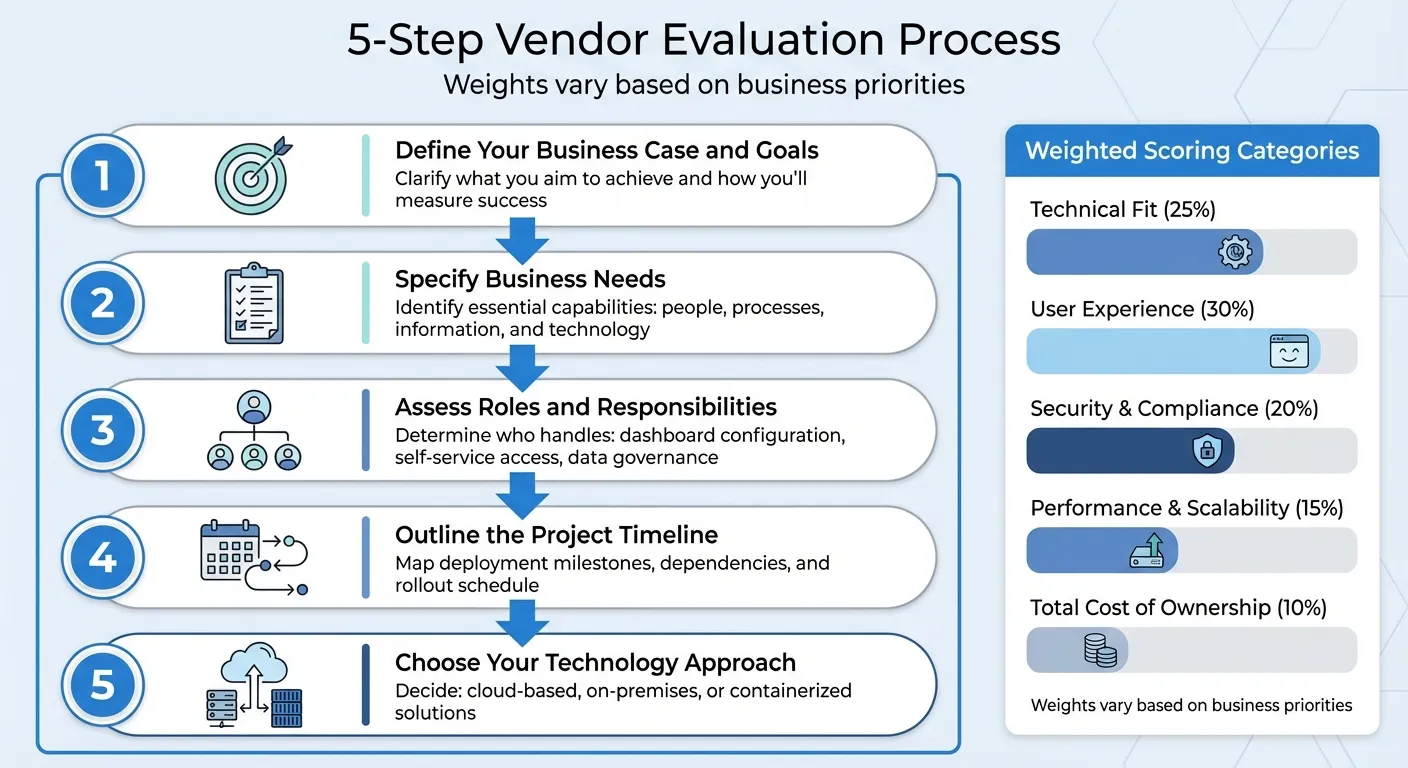 {5-Step Embedded Analytics Vendor Evaluation Framework}
:::
{5-Step Embedded Analytics Vendor Evaluation Framework}
:::
Once you've gathered the technical, security, and commercial details, the next step is to evaluate vendors using a structured framework. A systematic approach takes the guesswork out of the process, helping you make decisions based on what matters most to your business. Below, you'll find guidance on building a weighted scoring model and a step-by-step process to streamline your evaluation.
Building a Weighted Scoring Model
Start by organizing your evaluation into clear categories: technical fit, user experience, security and compliance, performance and scalability, and total cost of ownership. Assign a weight to each category based on your business needs. For example:
- If you're creating SaaS products for non-technical users, you might prioritize user experience (30%), followed by technical fit (25%), security (20%), scalability (15%), and cost (10%).
- On the other hand, a company serving enterprise clients with strict compliance requirements might prioritize security (35%) and place less emphasis on cost (5%).
Within each category, break things down further. For instance, under technical fit, you could evaluate:
- Data source compatibility (40% of the category's score)
- API flexibility (30%)
- Integration methods (30%)
Score each vendor on a consistent scale - such as 1 to 5 or 1 to 10 - and multiply those scores by the assigned weights. This approach transforms subjective opinions into measurable data, making comparisons more objective and actionable.
Step-by-Step Evaluation Process
Here’s a five-step process to guide your evaluation:
-
Define Your Business Case and Goals
Clarify what you aim to achieve and how you'll measure success. This ensures your evaluation stays focused on outcomes that matter. -
Specify Business Needs
Identify the essential capabilities your teams require, considering people, processes, information, and technology. -
Assess Roles and Responsibilities
Determine who will handle key tasks, such as configuring dashboards, accessing data via self-service tools, and managing data governance. -
Outline the Project Timeline
Map out deployment milestones, dependencies, and the overall rollout schedule to align vendor capabilities with your timelines. -
Choose Your Technology Approach
Decide whether you'll use cloud-based, on-premises, or containerized solutions, and ensure your choice integrates seamlessly with your existing infrastructure.
This structured process ensures that vendors are evaluated against real-world requirements, helping you make informed decisions.
Using Querio as a Reference Example
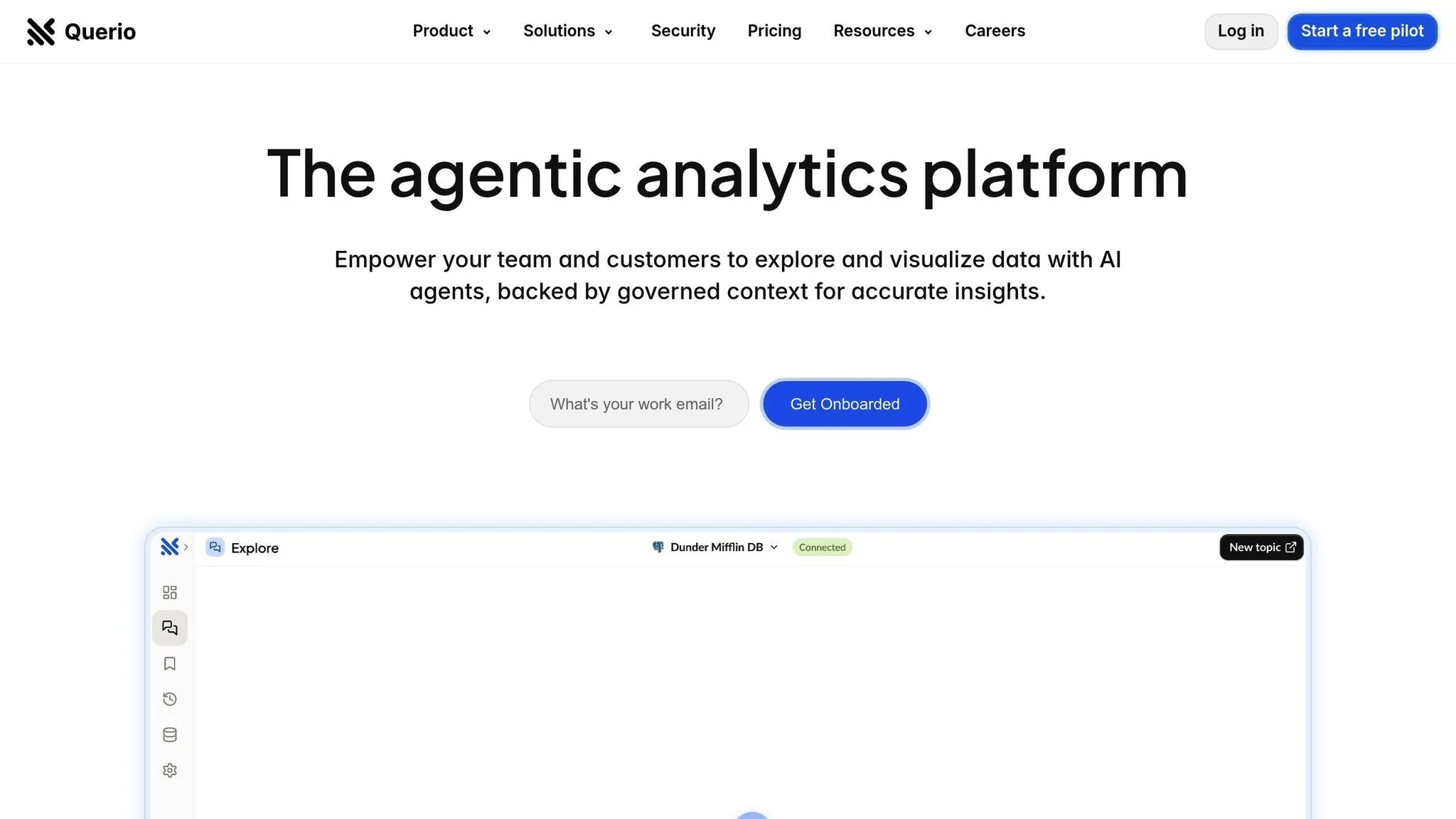
Querio offers a practical example of an AI-native platform designed for SaaS use cases. It connects directly to databases like Snowflake, BigQuery, and Postgres without duplicating data. Users can ask questions in plain English and get instant, accurate charts. For deeper analysis, Querio includes a custom Python notebook environment.
The platform's semantic layer allows teams to define table joins, metrics, and terms once, ensuring consistent queries across the board. This reduces reliance on IT while maintaining data accuracy. With features like unlimited viewer users, drag-and-drop dashboards for KPI tracking, and SOC 2 Type II compliance with a 99.9% uptime SLA, Querio is a strong example of a solution that balances self-service capabilities with governance. For businesses aiming for quick implementation and ease of use without compromising data integrity, Querio sets a clear benchmark for vendor evaluation.
Conclusion and Final Recommendations
Choosing the right embedded analytics vendor is all about finding a solution that aligns with your business goals while meeting your technical requirements. The best vendors strike a balance between offering customization and scalability, all while maintaining clear and predictable pricing. Your choice should not only meet your current needs but also adapt as your business grows. Here’s a summary of the key points to keep in mind.
Key Takeaways
A strong embedded analytics platform offers flexibility, scalability, and robust security. Look for a solution that integrates seamlessly with your branding and user experience. Features like white-label customization and flexible APIs are crucial for ensuring the platform evolves alongside your product.
Scalability is equally critical. The platform should handle growing data volumes and increasing user demands without compromising performance or leading to unplanned expenses. A transparent pricing model helps you avoid budget surprises down the road.
Vendor support is another vital factor. Comprehensive documentation, clear API references, and access to technical experts can make the difference between a smooth rollout and endless troubleshooting. A vendor with a history of responsive support and a collaborative approach can become a true partner in your success.
With these factors in mind, here’s how to move forward.
Next Steps
Start by documenting your requirements and using a weighted scoring model to prioritize key factors like user experience, security, cost, and technical fit. Bring together stakeholders from product, engineering, finance, and data teams to evaluate vendors based on your specific needs.
Narrow your options down to three to five vendors and conduct proofs of concept. Testing the platforms with real-world scenarios can uncover potential integration challenges, performance issues, or usability concerns that may not be apparent in demos.
Form a cross-functional team - including data specialists, product managers, and application developers - to oversee the evaluation, implementation, and ongoing maintenance. With the right processes in place, your analytics platform will consistently deliver value and support your business as it grows.
FAQs
::: faq
How can I make sure an embedded analytics vendor aligns with my business goals?
To make sure the vendor matches your business objectives, evaluate how well they can meet the specific demands of your industry. Look for solutions that can adapt to your business size and needs, and ensure they prioritize security and compliance. It's also important to ask about their platform's self-service features and how seamlessly it can integrate with your current systems.
Take the time to explore case studies, customer reviews, and success stories to verify they have experience working with companies like yours. Don’t forget to ask about their support options and future plans to confirm they can keep up with your organization’s changing requirements. :::
::: faq
What essential security features should you consider when choosing an embedded analytics vendor?
When choosing an embedded analytics vendor, the security of your data should be a top priority. Make sure the vendor offers key security measures like role-based access control (RBAC) to manage who can access what, data encryption both during storage and while it's being transmitted, and support for secure authentication methods, such as APIs with strong authorization protocols.
It’s equally important to check that the vendor adheres to industry standards like GDPR or SOC 2. They should also provide tools for data governance, ensuring you have control over sensitive information at all times. These features not only protect your business intelligence but also help establish trust with your users. :::
::: faq
What should I look for to ensure an embedded analytics solution can scale with my business?
To determine if a solution is scalable, look at its ability to manage larger data volumes and accommodate more users without losing speed or efficiency. Pay attention to whether the system maintains steady performance as your demands grow and whether the costs stay manageable as you scale up.
It's also important to ensure the platform works well with your current setup and can adjust to meet future needs. A truly scalable system should expand alongside your business, keeping operations running smoothly and supporting your growth over time. :::