Business Intelligence
TextQL vs Querio: Two Takes on the AI Data Analyst
Compare TextQL and Querio for warehouse analytics: SQL visibility, permissions, metric ownership, outputs, and setup trade-offs.

If you need a short answer: TextQL fits teams that want AI on top of the tools they already use. Querio fits teams that want warehouse-first analysis with visible SQL, visible Python, and team-owned logic stored next to dbt.
I’d use this comparison to judge five things before I buy either tool:
- How prompts turn into SQL
- Whether permissions hold up across every surface
- Where metric definitions live
- What the output looks like
- How much setup and upkeep the team takes on in the first 90 days
This matters most for teams already running a warehouse like Snowflake, BigQuery, Redshift, or Postgres. In that setup, a plain-language answer is not enough. You also need to check the SQL, confirm the metric logic, and share the result without another back-and-forth in Slack.
Quick Comparison
::: @figure 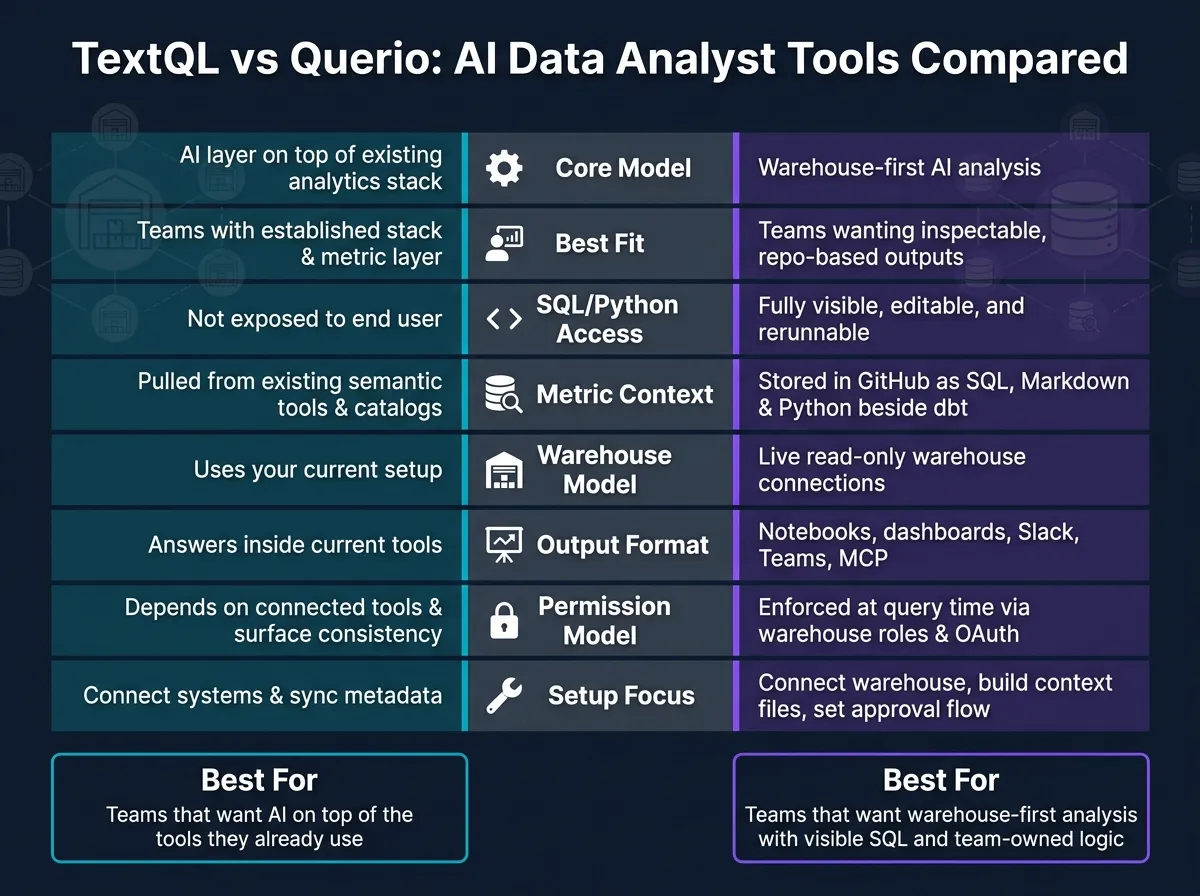 {TextQL vs Querio: AI Data Analyst Tools Compared}
:::
{TextQL vs Querio: AI Data Analyst Tools Compared}
:::
| Criteria | TextQL | Querio |
|---|---|---|
| Core model | AI layer on top of an existing analytics stack | AI analysis built around the warehouse |
| Best fit | Teams with a set stack and set metric layer | Teams that want inspectable outputs and repo-based context |
| SQL/Python access | Not spelled out in the article | Visible, editable, and rerunnable |
| Metric context | Pulled from current semantic tools, dashboards, and catalogs | Stored in GitHub as SQL, Markdown, and Python beside dbt |
| Warehouse model | Uses your current setup | Live read-only warehouse connections |
| Output | Answers inside current tools | Notebooks, dashboards, Slack, Teams, and MCP |
| Permissions | Depends on connected tools and how access carries across them | Enforced at query time from warehouse roles |
| Setup focus | Connect systems and sync metadata | Connect warehouse, build context files, set approval flow |
My read: this is less about chat quality and more about control. If you want AI to sit on top of your stack, TextQL lines up with that. If you want every answer tied back to inspectable logic in the warehouse, Querio is the tighter fit.
TextQL vs Querio: side-by-side overview
Here’s how the two approaches differ once a prompt turns into a warehouse answer.
The table below compares the points that matter most to data teams.
| Dimension | TextQL | Querio |
|---|---|---|
| Primary interaction model | Conversational AI layer over an existing stack | Conversational AI plus a reactive notebook |
| SQL and Python visibility | Not detailed here | Full visibility; SQL and Python are inspectable and editable |
| Semantic context ownership | Tied to existing catalogs and dashboards | Stored as plain SQL, Markdown, and Python files in GitHub alongside dbt |
| Warehouse access | Connects to your existing warehouse | Live, read-only encrypted connections to Snowflake, BigQuery, Redshift, Postgres, and others |
| Output format | Answers delivered in existing tools and workflows | Reactive notebooks, dashboards, Slack, Teams, and MCP |
Where TextQL fits best
TextQL works well for teams that already have an established analytics stack, such as Looker or ThoughtSpot dashboards, a data catalog, and defined metrics. It adds a conversational layer so people can ask questions in plain English without leaving the tools they already use.
That setup works best when the team already has a strong metrics layer in place.
Where Querio fits best
Querio is built for teams that want a warehouse-native workflow instead of a downstream layer. Context lives as versioned files in the same GitHub repo as your dbt project, and every answer is produced as real, editable SQL and Python inside a reactive notebook.
In plain terms, you can inspect the output, edit it, and keep it close to the rest of your analytics work. That makes Querio a good fit for governed self-serve analytics with inspectable outputs. Next, the churn example shows how that difference appears in the generated output.
Tracing one business question from prompt to answer
Use the same question for both tools: "What caused the month-over-month increase in churn among mid-market customers?" The point is simple: do both tools interpret churn, mid-market, and the comparison period the same way? Those three inputs tie straight back to the buyer criteria already covered: SQL traceability, semantic context, and whether the output is ready to share with a stakeholder.
How TextQL handles the churn question
TextQL maps the prompt to the right fields, uses existing semantic or dashboard definitions, and returns a chart with source links. If your metrics layer already defines churn the right way, the answer should stay in line with that definition.
What matters here is auditability. Can you open the SQL? Can you check the join logic? Can you confirm the comparison period? And if the definition is off, can you fix it fast?
Querio approaches the same question in a different way because the definitions are locked in before SQL gets written.
How Querio handles the churn question
Querio starts with a Context Layer: team-approved SQL, Markdown, and Python files stored in GitHub next to dbt. Before it writes SQL, the agent checks those files to confirm how churn is calculated, how mid-market is defined, and which tables in Snowflake, BigQuery, Redshift, or Postgres hold the data.
The output appears in a reactive notebook. Every SQL step is visible and editable. Change one cell, and the charts update on their own. If a finance leader challenges the churn rate, you can trace it back to the exact filter and join behind the number.
What to look at in the generated output
Once the first answer shows up, the real test begins. Is the output auditable as-is, or does someone need to clean it up first? Focus on three checks:
- Did the tool use the right metric definition? A tool that writes SQL straight against raw tables can return a churn number that looks fine but doesn’t match the agreed definition. Querio’s context layer helps keep the approved definition consistent across analyses.
- Can you trace every step? With Querio, the SQL is right there - inspectable, editable, and rerunnable. If a join looks off or a filter is missing, an analyst can fix it in the notebook without switching tools.
- How much work stands between the output and a stakeholder review? As Valiotti Data put it:
"A text-to-SQL tool that writes plausible SQL against raw tables is a productivity toy. A tool that writes correct SQL against governed metrics is infrastructure." [1]
That gap shapes whether a leader can act on the result right away or send it back for validation. The next section uses that difference to compare permissions, semantic context, and maintenance.
Permissions, semantic context, and maintenance over time
Long-term fit shows up after go-live, when finance, ops, and leadership use the tool every day. Once the SQL is inspectable, the next issue is simple: who can run it, who owns the definitions, and what happens to those rules over time?
That’s where consistency starts to matter. A churn question is only useful if the same definition still works the next time someone runs it.
Data access and permission enforcement
TextQL relies on your current semantic layer and catalog definitions to apply access logic. Buyers should check that row- and column-level security works the same way across every connected surface, including Slack, Teams, and API access.
Querio uses live, read-only warehouse connections with no exports to Snowflake, BigQuery, Redshift, Postgres, and other warehouses. Role-based access control is enforced at query time. When someone asks a question through MCP, OAuth passes through that user’s warehouse permissions.
Semantic context ownership
TextQL works with what you already have: current semantic layers, dashboard definitions, and catalog metadata. That can be a good fit if your metadata is well maintained and you want minimal disruption to current tooling.
Querio’s Context Layer keeps joins, metrics, and trusted queries in version-controlled SQL, Markdown, and Python files alongside dbt. A team member must approve and commit changes. That means the context stays version-controlled and team-owned. If you leave, the files go with you.
The gap here isn’t just about where an answer comes from. It’s about who controls the rules behind that answer.
| Dimension | TextQL | Querio |
|---|---|---|
| Context location | Existing semantic layers, dashboards, and catalog definitions | GitHub repo with SQL, Markdown, and Python, alongside dbt |
| Who owns the definitions | Data team or analysts managing existing metadata | Data team, with human approval in GitHub |
| Permission model | Verify row and column security across every connected surface | Role-based access control at query time; OAuth passes through user permissions |
| Maintenance pattern | Metadata sync and semantic alignment over time | Approved context files build up over time in the repo |
| Portability | Tied to the systems you already maintain | Files stay with you and work with other agents |
Setup effort and the first 90 days
TextQL’s setup is mostly about connecting your current systems, syncing metadata, and making sure the tool reads your catalogs the right way.
Querio’s setup starts with connecting your warehouse, writing the first context files, and setting up the GitHub workflow and approval rules for reusable definitions. That takes more work up front. But by month three, the team is working from a growing library of approved business logic instead of figuring out the schema out again in every session.
That’s usually what decides how fast a team can deliver answers stakeholders will accept without rework.
How to choose based on your team and delivery needs
Once setup and upkeep are clear, the next step is simpler: how does your team want to get answers and trust them every day?
Choose TextQL if your team wants conversational access inside the analytics stack it already knows. Choose Querio if you want governed, inspectable analytics where prompts turn into inspectable notebooks and reusable dashboards. At that point, the choice is less about flashy output and more about workflow control, who owns the context, and how answers get in front of stakeholders.
Getting results to stakeholders
With TextQL, answers stay inside the analytics workflow your team already uses. With Querio, a Slack question can turn into a notebook, then a dashboard or scheduled report, all backed by live warehouse data and the same permissions.
That’s the big split. The answer itself matters, of course. But what often matters more is how cleanly that answer moves from a prompt to something a stakeholder can actually use.
The easiest way to see this is to test both tools with the same warehouse user and the same business question. Same data. Same limits. Same ask.
An evaluation checklist for your warehouse
Run both tools on the same business question, semantic layer definitions, and restricted user account. Use that same warehouse question to check traceability, permissions, semantic consistency, ambiguity handling, and delivery surfaces.
| Evaluation Criteria | What to Look For |
|---|---|
| SQL transparency | Can you open, edit, and re-run the generated SQL or Python? |
| Metric consistency | Does the tool use the same dbt or semantic definitions as the rest of the team? |
| Permission behavior | Does a restricted user see only what their warehouse role allows on every surface? |
| Handling ambiguity | Does the tool ask a clarifying question, or does it guess and return a plausible-looking wrong answer? |
| Delivery surfaces | Does it deliver to Slack, Teams, or AI assistants like Claude via MCP with an audit trail? |
| Metric change handling | When a metric changes in dbt, does the tool stay aligned with your governed context without a manual rebuild? |
If this test mirrors how your team works, the choice usually gets pretty clear.
Conclusion: pick the workflow you want to run
Choose TextQL when you want conversational access on top of an existing stack. Choose Querio when you want governed, inspectable analytics that build over time in the warehouse.
The real question is simple: which workflow will your team still trust in month three?
FAQs
::: faq
How much SQL can I actually inspect?
Querio writes plain SQL and Python for every answer. You can inspect the code, edit it, and run it again right inside the platform’s reactive notebooks.
Each AI-generated insight appears as code you can check before you share it, so you’re not stuck trusting a black box. You can follow the logic, review joins, and confirm filters against your governed semantic layer. :::
::: faq
What setup work should I expect in the first 90 days?
In the first 90 days, the main job usually isn't software installation. It's building a governed context layer.
Querio is cloud-based, so setup begins with credential-based connections to your warehouse, such as Snowflake, BigQuery, or Redshift.
From there, most of the work happens in your GitHub repo alongside dbt. That includes defining table relationships, business metrics, and shared terminology, then checking common or hard business questions against your schema.
So while connections can be set up in days, production-ready use often takes 1 to 3 months. :::
::: faq
How do permissions hold up in Slack or Teams?
In Slack and Microsoft Teams, permissions run through OAuth. That means each agent query uses the individual user’s own access rights.
So the agent doesn’t behave like a shared service account. And users don’t end up seeing data they aren’t allowed to view.
When someone asks a question, the system checks that user’s credentials against the warehouse. The same governance rules stay in place across each surface.
Before rollout, teams can test the setup with a deliberately restricted account. That’s a simple way to confirm the agent only returns what that user is allowed to access. :::