Business Intelligence
Fabi vs Hex vs Querio: AI Notebooks Compared
Pick the AI notebook that matches your workflow: fast reporting, collaborative analysis, or governed self-serve on live data.

If I had to cut this down to one answer: Hex fits analyst teams that work together in SQL and Python, Fabi fits AI-led reporting and dashboards, and Querio fits teams that want governed self-serve on live warehouse data.
I’m looking at 3 tools, 4 test workflows, and the warehouse setups most U.S. teams use: Snowflake, BigQuery, Redshift, and Postgres. The main question is simple: how do you want people to work with data every day?
Here’s the short version:
- Fabi works best for fast reporting, dashboards, and repeat business updates
- Hex works best for shared notebook analysis with SQL, Python, and review flow
- Querio works best for teams that want inspectable AI output, GitHub-linked logic, and live warehouse queries
- The article compares each tool across:
- ad hoc analysis
- recurring reporting
- self-serve follow-up questions
- agent-led anomaly checks
One pricing fact stands out: Querio has a free plan, and its Core plan is $2,499/month, or $25,000 a year billed annually, with unlimited users on every plan and guided onboarding on Core. For buyers in the 100–500 employee range, that changes the cost discussion fast.
::: @figure 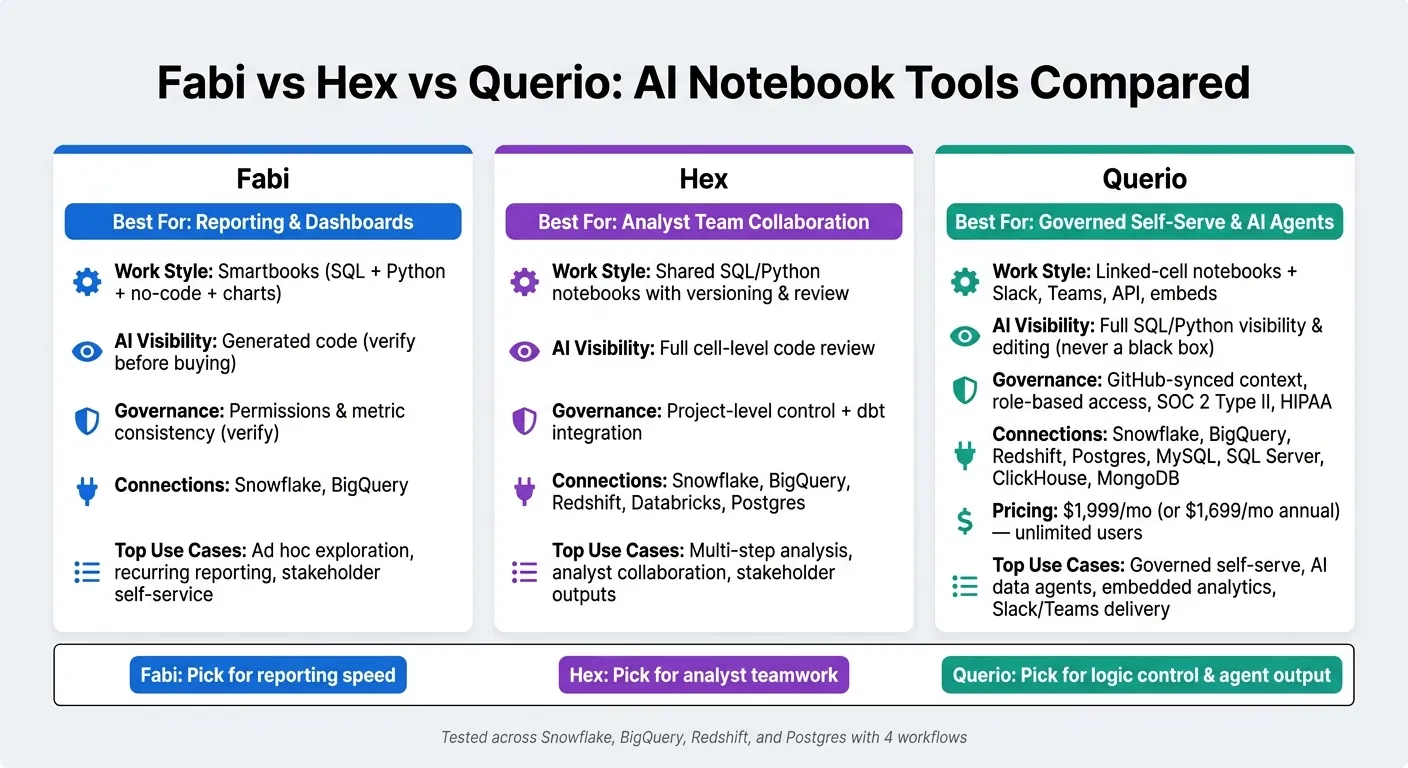 {Fabi vs Hex vs Querio: AI Notebook Tools Compared at a Glance}
:::
{Fabi vs Hex vs Querio: AI Notebook Tools Compared at a Glance}
:::
Quick Comparison
| Tool | Best for | Main work style | AI visibility | Governance focus | Data connections |
|---|---|---|---|---|---|
| Fabi | Reporting and dashboards | Smartbooks with SQL, Python, charts, and no-code blocks | Generated code should be checked before buying | Permissions and metric consistency need review | Snowflake, BigQuery |
| Hex | Team notebook analysis | Shared SQL/Python notebooks with versioning and review | Cell-level code review | Project-level control with dbt tie-in | Snowflake, BigQuery, Redshift, Databricks, Postgres |
| Querio | Governed self-serve and AI agents | Linked-cell notebooks plus Slack, Teams, API, and embeds | Full SQL/Python visibility and editing | GitHub-synced context next to dbt, role-based access, SOC 2 Type II, HIPAA | Snowflake, BigQuery, Redshift, Postgres, MySQL, SQL Server, ClickHouse, MongoDB |
If you want the shortest read possible, I’d put it this way: pick Fabi for reporting speed, Hex for analyst teamwork, and Querio for control over logic, metrics, and agent output. The rest of the piece helps you match that choice to your team, risk level, and workflow.
Fabi: AI-first Smartbooks for analysis, dashboards, and reporting
Fabi puts SQL, Python, no-code analysis, charts, dashboards, and scheduled reporting into one place called Smartbooks. The focus is simple: go from analysis to a finished report fast. Its Analyst Agent can help generate queries, visuals, and automated delivery. And because it connects straight to Snowflake and BigQuery, teams can get started without a heavy migration.
Fabi leans more toward fast reporting workflows than deep notebook collaboration. That matters if your team spends a lot of time answering business questions, building charts, and sending recurring updates.
Where Fabi is strongest
Fabi stands out in exploratory analysis and ad hoc reporting. Analysts can move from SQL to Python to charts to publishing without bouncing between tools. That kind of flow can save a lot of friction.
The Analyst Agent is most useful for ad hoc analysis and self-service reporting. It turns plain-English questions into warehouse queries, which can make it easier for teams to get answers without writing every query from scratch.
"Fabi is a gamechanger for any organization that spends time on exploratory analysis & ad-hoc reporting. It makes supporting the business with data so much more efficient." - Gary Sahota, Co-founder, Tether Data
Built-in scheduled automations and dashboard publishing also make Fabi a good match for recurring reporting. If your team sends the same weekly or monthly updates again and again, that can be a big plus.
What to verify before buying Fabi
Before buying, check how much control your team has over AI-generated SQL and Python. You’ll want to make sure both are fully inspectable and editable.
Schema quality also matters a lot. Clear column names and table descriptions can make query output much more accurate. If the underlying data model is messy, even a strong AI layer can struggle.
It’s also worth checking how shared reports handle permissions and definitions across users. A report that looks fine for one person but breaks access rules for another can turn into a headache fast.
Fabi at a glance
| Dimension | Fabi |
|---|---|
| Workspace | Smartbooks combining SQL, Python, no-code analysis, charts, and dashboards |
| Copilot | Analyst Agent for natural language queries, analysis generation, and automation |
| Dashboarding | Built directly from Smartbooks; shareable and embeddable |
| Automations | Scheduled reports and delivery built in |
| Connectivity | Direct warehouse connections, including Snowflake and BigQuery |
| Governance | Verify SQL/Python inspectability, permissions, and metric consistency before buying |
| Best-fit use cases | Ad hoc exploration, recurring business reporting, stakeholder self-service |
Fabi is a strong fit for reporting-first workflows. The next platform moves more toward deeper collaborative SQL and Python notebooks.
Hex: collaborative SQL and Python notebooks for deep analysis
Hex is built around collaborative SQL and Python notebooks for analyst-led deep analysis. In practice, that means analysts can work in one place and switch between SQL, Python, and no-code cells as they move through a multi-step workflow - from early exploration to charts and stakeholder-ready outputs.
Where Hex is strongest
Hex stands out in team analysis work. Its shared, versioned notebooks and Threads keep conversation tied to the work itself, which is a good match for projects with multiple analysts. Magic AI can help write and debug code, and the cell-by-cell diff view lets analysts accept or reject changes before those changes go live.
Hex also connects with dbt models, which can help teams keep metrics aligned across projects.
On the data side, Hex connects directly to Snowflake, BigQuery, Redshift, Databricks, and Postgres. Analysts can also turn notebooks into interactive Data Apps and schedule recurring runs.
That makes Hex a strong fit for multi-step ad hoc analysis and analyst-owned recurring reporting. If your team does deep, notebook-based work and wants a smoother review process, Hex is the clearest match here.
What to verify before buying Hex
Before buying, look closely at governance. Hex leans on versioning and notebook-level review, so it's worth asking how metric definitions stay consistent across projects. You should also check how far self-serve analytics goes beyond the Data App layer.
Hex at a glance
| Dimension | Hex |
|---|---|
| Workspace | Collaborative SQL, Python, and no-code notebooks |
| Copilot | Magic AI and Notebook Agent with cell-by-cell diff review |
| Dashboarding | Published as interactive Data Apps for stakeholders |
| Automations | Scheduled notebook runs for recurring workflows |
| Connectivity | Snowflake, BigQuery, Redshift, Databricks, Postgres |
| Governance | Project-level versioning, cell-level review, and dbt integration |
| Best-fit use cases | Multi-step analysis, analyst collaboration, stakeholder outputs |
Next, compare that analyst-centric model with a more governed, self-serve approach.
Querio: governed notebooks for analysts, business users, and AI agents
Querio moves the focus beyond the notebook itself and puts the governed context behind each answer front and center. The idea is simple: self-serve analytics works better when analysts, business users, and AI agents all rely on the same shared context layer.
Where Querio is strongest
Every answer runs live against your warehouse. There are no CSV exports or extracts in the middle. Metric definitions, joins, and trusted queries live as SQL, Markdown, and Python files in GitHub alongside dbt. The agent can suggest changes, but your team still approves them. That shared context stays the same across the app, Slack, Microsoft Teams, Claude via MCP, the API, and embedded dashboards.
The notebook is built around linked cells, so charts update on their own when the SQL changes. You can also open any AI-generated answer and see the exact SQL or Python it produced, then edit it yourself. That level of visibility matters. It connects straight to governance because teams can review and edit AI output before it turns into a shared answer.
Querio also includes an automation layer for scheduled investigations. You can set up a prompt-driven investigation, like a daily revenue health check, and have it run before your team even logs in. It can spot anomalies, look into root causes, and send findings to Slack or email. The agent chooses what to dig into based on what it finds. In practice, that means the product can surface issues before someone starts clicking through dashboards.
Querio fits teams that want governed self-serve, AI agents, and embedded analytics in one place.
What to verify before buying Querio
Querio connects to Snowflake, BigQuery, Redshift, Postgres, MySQL, Microsoft SQL Server, ClickHouse, and MongoDB. Still, it’s smart to confirm that your exact connector is supported before you commit, especially if your setup is a bit unusual.
If your team depends on advanced Python workflows, make sure Querio’s Python runtime matches what you need. The platform is built around analytics-grade SQL and Python, so the fit matters.
For embedded analytics, review the white-labeling options and embedded analytics security and row-level security behavior against your customer-facing needs. If your company works under HIPAA, Querio signs BAAs and has SOC 2 Type II certification, plus annual third-party penetration tests. Even so, you’ll want to check the details with their team. Self-hosting and custom deployment are available in the Enterprise tier, so if your security policy calls for physical data separation, bring that up early.
If you’re a 100–500-employee company planning a rollout, ask about onboarding. The Core plan costs $2,499/month, or $25,000 a year billed annually, and includes a guided 4-week pilot plus unlimited users. That can matter a lot if you want analysts and business stakeholders on the same platform without dragging the process into a long IT rollout.
Querio at a glance
| Dimension | Querio |
|---|---|
| Workspace | Linked-cell notebook with connected cells; charts update automatically when SQL changes |
| Copilot | Analytics-native agent writing real, inspectable SQL and Python - editable, never a black box |
| Dashboarding | Built directly from notebooks; layout is code; schedulable, shareable, and embeddable |
| Automations | Prompt-driven scheduled investigations with anomaly detection delivered to Slack or email |
| Connectivity | Snowflake, BigQuery, Redshift, Postgres, MySQL, Microsoft SQL Server, ClickHouse, MongoDB - live, no extracts |
| Governance | GitHub-synced context layer next to dbt; role-based access; SOC 2 Type II; HIPAA |
| Best-fit use cases | Governed self-serve, AI data agents, recurring business reporting, and analytics across Slack, Teams, the app, and embedded surfaces |
Side-by-side buyer guidance: workflow comparison, decision matrix, and conclusion
Side-by-side workflow comparison
Once you look at the three platforms side by side, the choice usually comes down to how your team works day to day.
At a high level, the split is pretty clear: Fabi is built for fast analyst throughput, Hex leans toward collaborative notebook work, and Querio is built for governed self-serve on live warehouse data.
| Workflow | Fabi | Hex | Querio |
|---|---|---|---|
| SQL exploration | AI-assisted Smartbooks | Collaborative notebooks | Linked-cell notebooks |
| Dashboarding | Built from Smartbooks | Data Apps | Built from notebooks; layout is code |
| Recurring reporting | Published reports | Curated Data Apps | Scheduled automations to Slack or email |
| AI output visibility | Visible generated code | Full cell-level visibility | Full SQL/Python visibility |
| Governance/context | Internal platform | Project-level / dbt | GitHub-synced governed context layer |
| Collaboration | Shared Smartbooks | Versioning and review | Governed context layer; role-based access control |
| Warehouse connectivity | Warehouse connections, APIs, and files | Warehouse-native notebooks with dbt integration | Live warehouse connections to Snowflake, BigQuery, Redshift, and Postgres |
| Agent-assisted investigation | Notebook-based AI | Magic AI / Notebook Agent | Scheduled investigations from prompts, MCP, API, Slack, Teams |
Querio stands out for one main reason: its governed context layer. Metrics, joins, and trusted queries live as SQL, Markdown, and Python in GitHub right alongside dbt. That setup gives teams a clear place to manage logic instead of letting it drift across notebooks, dashboards, and chat threads.
Which platform fits which team
That workflow split lines up pretty neatly with team type and operating risk.
| Team profile | Best fit | Why |
|---|---|---|
| Small data team with a growing request queue | Querio | Slack/Teams bots and scheduled investigations cut down manual answering while keeping access governed |
| SaaS product team doing frequent ad hoc analysis | Hex | Collaborative notebooks with project-level versioning fit iterative, analyst-led work |
| Healthcare team with HIPAA requirements | Querio | SOC 2 Type II, HIPAA compliance, BAAs, and optional self-hosting fit regulated workflows |
| Finance team needing auditability | Querio or Hex | Querio's GitHub-synced governed context and inspectable SQL keep logic reviewable; Hex's versioning and review flow also help |
| Team moving from dashboards to governed AI agents | Querio | MCP, API, embedded delivery, and scheduled investigations fit a governed, agent-first workflow |
| Analysts who want fast AI-assisted reporting | Fabi | Smartbooks are built for analyst throughput and published reports |
This is where the choice gets practical. If your team spends most of its time answering repeat questions from Slack or Teams, Querio starts to make a lot of sense. If analysts want a shared workspace for back-and-forth analysis, Hex feels more natural. And if speed is the main goal for AI-assisted reporting, Fabi is the straightforward pick.
Conclusion: how to pick the right tool
Fabi is the best fit for fast AI-assisted reporting and dashboarding.
Hex is the best fit for collaborative notebook analysis with dbt in the workflow.
Querio is the best fit when consistent metrics, inspectable AI output, and live warehouse data need to stay tied together across analysts, business users, and agents.
If your team needs governed self-serve, auditability, and an AI assistant that can work against a live warehouse without losing control of the logic, Querio is the clearest fit.
FAQs
::: faq
Which tool is easiest to roll out for a 100–500-person company?
Querio is usually the easiest option to roll out for a 100–500-person company. It connects straight to your existing data warehouse - like Snowflake, BigQuery, or Redshift - without ETL, data replication, or heavy upfront modeling.
Its shared context layer also syncs with your GitHub repository. That helps keep metrics consistent in a governed, inspectable setup, while cutting down the work required from lean data teams. :::
::: faq
How much technical setup is needed before AI answers are reliable?
Reliable AI analytics comes down to three things: a live warehouse connection, a governed context layer for metric definitions, and a clear way to review generated code.
Querio keeps setup light by connecting straight to Snowflake, BigQuery, or Redshift, with no ETL or replication in the middle. The main lift is the context layer. That means defining joins and metrics in your GitHub repository so the system has the right frame of reference. On top of that, inspectable SQL and Python make it much easier to check answers and see how they were produced. :::
::: faq
What should I validate in a proof of concept before choosing a tool?
Focus on three things: data integrity, governance, and portability.
Start with a simple test: does the AI answer real business questions correctly? It should give accurate answers when the data supports them and clearly refuse when it doesn’t. If it tries to guess, that’s a problem.
Then look under the hood. Review the SQL or Python behind key business questions. You want to see whether the logic is sound, not just whether the output looks right. A dashboard can look polished and still be wrong.
Next, check how metric updates move through the system. If a definition changes, that change should show up the same way across dashboards, reports, and AI assistants. If one team sees one number and another sees something else, confusion follows fast.
Portability matters too. Ask how business definitions can be exported if you leave the platform. That includes the rules, logic, and metric definitions your team depends on every day. If you can’t take that work with you, you may end up more locked in than you expected. :::