Business Intelligence
Hex to Querio: Notebook Migration Guide
Treat notebooks as governed workflows: inventory assets, port SQL, rebuild code, validate results, and enforce access.

If you want a Hex notebook to work in Querio, don’t move it cell by cell. Move it as a workflow. I’d keep the SQL and shared logic, rebuild Python with clear inputs and outputs, remake filters and dashboards, reset schedules and alerts, and then run both tools side by side until the numbers match.
Here’s the short version:
- I’d inventory every Hex project first
- I’d sort each asset into copy, refactor, rebuild, move to dbt, automate, or retire
- I’d rebuild in this order: SQL → Python → dashboards/parameters → schedules
- I’d validate row counts, totals, filters, time zones, and KPI definitions
- I’d check permissions, Slack/email delivery, and rollback rules before go-live
A missed time zone, filter default, or metric rule can change results by 1% to 5% or more in weekly reporting. That’s why the goal is not syntax match. The goal is result match.
If I were doing this migration, I’d treat Hex as the source for logic and use Querio as the place to automate workflow optimization by rebuilding governed analysis on top of live warehouse data.
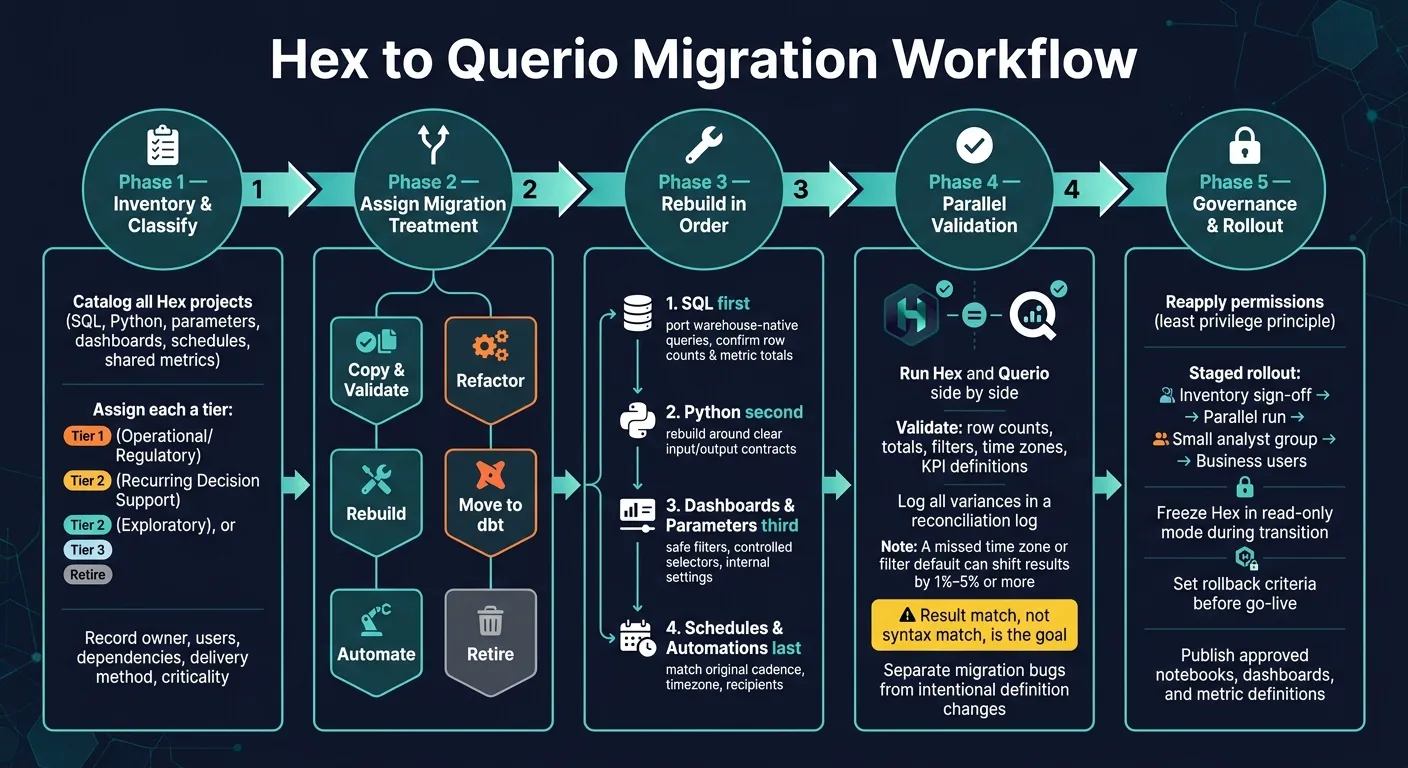
Migration scope: inventory your Hex project and prepare Querio
Treat this phase as the control point for the migration. Start by mapping every live Hex project: what it does, who uses it, how often it runs, and what happens to the business if it breaks.
Catalog SQL, Python, parameters, dashboards, schedules, and shared metrics
Before you rebuild anything, create a migration register for every Hex project. This is your working map for the whole move.
For each project, record the project name and URL, business purpose, owner, technical owner, primary users, department, criticality, last-used date, run frequency, delivery channel, source warehouse, referenced schemas and tables, upstream pipelines, downstream consumers, permissions, sensitivity classification, and a migration decision. Add links to the Hex project, published app, published URL, documentation, Git repository, dashboards, and alerts.
You also need to record certified metric definitions and the business rules behind them. If a notebook powers a KPI like revenue, churn, or bookings, lock down that definition before you rebuild. If you skip that step, metric drift can slip into Querio.
The migration decision is the field that matters most. Use four tiers:
- Tier 1 for operational or regulatory workflows
- Tier 2 for recurring decision support
- Tier 3 for exploratory work
- Retire for unused or replaced notebooks
That structure helps you keep trusted workflows and skip dead weight. For example, a notebook that hasn't run in six months, has no named owner, and duplicates a certified dashboard is a strong retire-only candidate. Before deletion, confirm retirement with stakeholders, archive a copy, and log the retirement reason.
Make sure you also capture the non-SQL logic that affects execution and outputs. That includes Python package versions, execution order, input/output contracts, credentials, and external API calls. Document each input control from end to end: its name, type, default value, allowed values, and the exact SQL expressions or chart elements it changes.
Schedules and notifications matter too. They're not just setup details; they're part of the workflow. Record timezone, cadence, recipients, delivery channel, and failure behavior. A week-to-date bookings report that fails without warning isn't just a system issue. It's a business issue.
| Asset | What to record | Migration decision |
|---|---|---|
| SQL cells | Schema, tables, joins, date logic, warehouse dialect | Copy or refactor |
| Python cells | Packages, versions, inputs/outputs, side effects, external API calls | Rebuild, move to dbt, or retire |
| Input controls | Name, type, default, allowed values, dependent cells | Rebuild with the same analytical contract |
| Dashboards & apps | Charts, filters, layout, published URL, audience | Recreate active views; retire redundant ones |
| Schedules & alerts | Cadence, timezone, recipients, delivery channel, failure behavior | Reconfigure after result parity is confirmed |
This register becomes the source of truth for what you copy, refactor, rebuild, automate, or retire.
Once the register is done, use it to set warehouse access and define the security scope.
Confirm live warehouse access, Git-backed context, and security requirements
Set up Querio before you import any logic. Querio connects straight to Snowflake, BigQuery, Amazon Redshift, or PostgreSQL with encrypted, read-only credentials. No extracts. No CSV round-trips.
Record the warehouse-specific connection details that Querio needs for Snowflake or Redshift read-only access.
Next, verify that the Querio credential can reach every schema and table used by your Tier 1 and Tier 2 projects before you rebuild anything. After that, sync your dbt models and docs into the GitHub repo that backs Querio's context layer. That gives you version control for joins, certified metric definitions, and trusted queries alongside your current dbt project. It also lets Querio reuse the same trusted definitions across notebooks, dashboards, and AI responses.
Then confirm workspace roles, approved Python execution policies, and any regulated-data requirements. Querio is SOC 2 Type II certified and signs BAAs for HIPAA-covered workflows, so bring in your security team early if PHI or financial data is in scope.
Here’s a simple readiness test: choose one project that looks like your normal workload. It should be a recurring SQL-plus-Python workflow with at least one parameter and a published output. Then confirm six things:
- ownership
- users
- dependencies
- exposed data
- delivery method
- parallel validation
If you can't confirm all six, your register still has gaps.
With the inventory and access in place, the next step is to map each Hex asset to its Querio equivalent.
Hex to Querio feature mapping and migration decisions
Use your inventory to decide what should be copied, what needs refactoring, what has to be rebuilt, and what should be retired in Querio. Bring over portable SQL, rebuild reactive workflow pieces, and move shared logic into governed context.
Side-by-side mapping: notebooks, cells, parameters, dashboards, schedules, and permissions
The table below maps each Hex artifact to its Querio match and the default migration treatment. Use it with your migration register so each item gets a treatment before rebuilding.
| Hex capability | Querio workflow | Migration treatment |
|---|---|---|
| Notebook or project | Querio reactive notebook | Copy the analytical outline, then validate dependencies and execution order |
| SQL cell | SQL cell in a reactive notebook | Copy warehouse-native SQL; refactor hard-coded or duplicated logic |
| Python cell | Python cell connected to upstream results | Copy reusable analysis; refactor code that depends on Hex-specific state or ordering |
| Cell dependencies | Reactive cell links | Rebuild dependency links - preserve logical lineage, not just visual cell order |
| Input parameter | Governed notebook parameter | Rebuild with an explicit name, data type, default, allowed values, and owner |
| Published app | Querio dashboard or notebook-based board | Rebuild layout and interaction behavior rather than copying presentation code |
| Scheduled run | Querio automation | Recreate the schedule, recipients, prompts, and failure handling |
| Scheduled notification | Querio Slack or email delivery | Automate and validate recipient lists, message content, links, formatting, and failure escalation |
| Shared metric or join | Governed semantic context | Refactor into version-controlled definitions that stay consistent across notebooks and dashboards |
| Project permissions | Querio workspace, repository, notebook, and dashboard permissions | Reapply using least privilege; test each access group before go-live |
| Comments and documentation | Notebook narrative, Markdown, and Git-backed context | Copy useful explanations and remove obsolete implementation notes |
Focus on migration treatment, not product labels.
Once the artifact mapping is clear, pick the right treatment for each item.
Decision table: copy, refactor, rebuild, move to dbt, automate, or retire
Assign treatment based on the workflow's purpose and how well it transfers.
| Treatment | Use when | Example |
|---|---|---|
| Copy and validate | Logic is portable and warehouse-native, but output, dependencies, or permissions may differ | A standard SQL query using joins and date filters on Snowflake or BigQuery |
| Refactor | The result matters, but the implementation is duplicated or tightly coupled to Hex | Customer segmentation logic embedded in multiple notebooks |
| Rebuild | The user experience or dependency model doesn't transfer directly | A published app with interactive controls, custom layout, and conditional charts |
| Move to dbt | The transformation is shared, production-critical, or upstream of many analyses | A daily customer lifetime value model or canonical orders table |
| Automate | The workflow produces a recurring report, alert, or investigation | A Monday morning KPI report delivered to Slack or email |
| Retire | No active owner, no recent use, or no business-critical output | - |
In most active production workflows, rebuild and automate tend to deliver the most value. On the other hand, most exploratory notebooks with no active owner or business-critical use should land in retire.
If the same metric logic shows up in multiple notebooks, move it into dbt. That gives Querio's context layer one shared definition to reuse across notebooks, dashboards, and AI responses.
Use these decisions to rebuild the workflow in Querio, starting with SQL and shared definitions. Then rebuild in this order:
- SQL first
- Then Python
- Then dashboards and automations
Rebuild the workflow in Querio: notebooks, dashboards, parameters, and automations
Rebuild in this order: SQL, Python, dashboards and parameters, then automations. Start with the items you marked copy, refactor, rebuild, move to dbt, or automate in the feature map.
Port SQL first, then rebuild Python around a clear analytical contract
Before you write a single cell in Querio, define the rebuild spec for the notebook you're moving over. Spell out the business goal, source tables, output grain, join keys, filters, metric formulas, reporting-period boundaries, and time zone.
For a weekly revenue notebook, that could mean: one row per customer per ISO week; orders joined to customers on customer_id; canceled orders left out; revenue based on settled order amounts in USD; reporting closes at 11:59 p.m. Eastern Time.
That spec is your anchor. It gives you one clear reference for every choice that comes next. Once it's in place, swap any CSV uploads or file extracts from the original Hex notebook for live warehouse tables or dbt models in Querio. Then check row counts and metric totals for the same reporting period before you touch Python.
Only rebuild Python after you confirm SQL parity. Keep Python focused on the work SQL doesn't handle cleanly, like statistical analysis, chart prep, or explanation. Be explicit about the SQL result schema - column names, types, and grain - so downstream Python cells don't break when the SQL changes.
If you see the same transformation logic repeated across notebooks, don't rebuild it over and over. Move that logic into a dbt model and pull the shared definition from Querio's context layer instead.
Once SQL and Python match the source logic, shift to dashboard layout and parameter behavior.
Rebuild dashboard logic and parameterized analysis in reactive notebooks
Build dashboards from the validated notebook query, and reuse that query across charts. That's the simplest way to keep numbers lined up.
When you translate Hex inputs into Querio parameters, sort each one into a clear bucket:
- Safe filters - date range, region, product category - can be shown to end users.
- Controlled selectors - metric name, business unit, scenario - should come from an approved list, not open text fields.
- Internal settings - warehouse schema names, internal thresholds, security predicates - should never show up as user-facing controls.
Reactive dependencies recalculate on their own when a parameter changes, so you don't need to manage cell order by hand.
For date parameters, use a fixed default like "previous complete ISO week" instead of "last 7 days." That small choice matters. "Last 7 days" can pull in partial-day results based on the run time, which makes validation messy and turns reconciliation into a headache.
After the notebook and dashboard are stable, set up delivery and alerts.
Set up schedules, Slack or email delivery, and anomaly-aware automations
Turn each scheduled Hex run into a Querio automation by matching the original cadence and time zone exactly. Before you switch it on, assign an owner and define what success and failure look like.
For delivery, Querio automations can send results to Slack or email. When a Slack automation runs, Querio spins up a real notebook. That means the work stays in an inspectable notebook instead of disappearing into a chat thread.
For anomaly detection, be specific enough that someone can act on the result. Include the metric, threshold, comparison window, and expected output. For example:
if weekly gross margin falls more than 3 percentage points below the trailing eight-week average, identify the top product and region contributors and send the findings to Finance Slack.
Specific thresholds help cut down on noisy alerts. And if an automation generates SQL or Python, treat that output as reviewable work. An analyst should check joins, filters, and metric definitions before anything goes live.
Use the same rebuild spec in parallel validation before you publish.
Validation, governance, and rollout
Validate results in parallel and reconcile shared business metrics
Use the rebuild spec and metric contract from the migration step as your baseline for reconciliation. Then run Hex and Querio side by side for an agreed period. That window should include normal business days, weekends, month-end activity, late-arriving data, and at least one scheduled refresh cycle.
Start at the lowest useful grain, then roll up to dashboard totals. That makes problems easier to spot. If a metric doesn’t match, trace the query, joins, filters, grain, time zone, and post-processing code. Record the root cause and the final decision in a reconciliation log. Don’t call the migration done until every meaningful variance is either fixed or clearly accepted by the metric owner.
It also helps to separate planned definition changes from migration bugs. If Querio changes a metric definition - for example, excluding canceled orders from revenue - log that as a governed business decision, not a failed reconciliation.
For each shared KPI, document:
- Canonical name
- Business meaning
- Logic source
- Grain
- Supported dimensions
- Inclusion rules
- Time zone
- Calendar
- Owners
- Freshness
- Approval status
Move shared metric logic that gets reused into version-controlled models. That way, every notebook, dashboard, and automation pulls from the same definition instead of drifting over time.
Reapply access controls and publish trusted context for self-serve use
Once metric parity is confirmed, verify access with real users and service accounts before expanding the rollout. Reapply permissions across warehouse objects, Querio roles, notebooks, dashboards, schedules, recipients, and automation credentials. Check both workspace-level authorization and the underlying warehouse access before release.
Test with real personas, not just admin accounts. That includes the analyst, business stakeholder, executive viewer, restricted contractor, and service account. Make sure scheduled jobs use the right credential. Also check that notifications don’t leak sensitive query results into Slack, Teams, email, or other delivery channels. Querio uses OAuth for MCP access, so agent queries inherit each user’s warehouse permissions instead of running through a shared service account.
Rollout should happen in stages, not all at once. Finish the inventory and metric sign-off first. Then run both environments in parallel. After that, release Querio to a small analyst group, fix any discrepancies or permission issues, and only then publish approved notebooks and automations to selected business users.
Freeze the Hex project during this period. Keep it available in read-only mode so any differences can be tied to the migration instead of live edits happening in both tools at once. Transfer ownership and schedules only after the agreed success criteria are met.
For self-serve users, publish only approved notebooks, dashboards, queries, joins, and metric definitions. Add a short "How to use this analysis" note to each asset. Cover the metric definitions, supported filters, refresh timing, owner, and escalation path. Assign both an owner and a review date to every published definition. Unowned governed context goes stale fast, especially when AI or self-serve users rely on it.
Set rollback criteria before launch. That can include metric variance beyond tolerance, failed schedules, access exposure, slow queries, or broken parameters. Assign a rollback owner, then schedule a post-launch review after the first full reporting cycle to confirm the migration still holds up under production conditions.
FAQs
How long does a typical migration take?
A typical migration to Querio usually starts with a 2–3 week pilot, then moves into a broader 90-day transition plan.
For a five-person data team, a realistic first pass takes about 4 weeks:
- 1 week to gather existing questions
- 2 weeks for definition workshops and encoding
- 1 week to set access rules and publish
That timeline gives the team enough room to get the basics in place without dragging the work out. It’s a solid first step: short enough to keep momentum, but long enough to do the setup well.
Which workflows should move to dbt first?
Move high-value, shared business logic into dbt first. That gives you trusted metrics before you shift more analytics work into Querio.
Put golden metrics like MRR, ARR, churn, and ARPU in dbt so definitions, rollup rules, and filters stay consistent.
Start with:
- cleaned warehouse models
- core business logic
- access control
Then sync those models into Querio’s context layer for governed, reliable self-serve analytics.
What usually causes metric mismatches after migration?
Metric mismatches after migration usually come down to a few familiar problems: inconsistent business logic, scattered definitions, or hidden assumptions buried in legacy code.
When teams define metrics inside individual notebooks instead of a central layer, the same KPI often gets calculated in different ways. One team may use a different filter. Another may join tables differently. Someone else may change the denominator without meaning to. The result? Numbers that should match but don’t.
You can also run into gaps from transformation mismatches, filters applied the wrong way, or errors in base measures. Querio handles this with a governed, versioned context layer that standardizes metrics, joins, and business rules.