Business Intelligence
How to Run Python Data Analysis from Claude (Beyond Code Interpreter)
Run governed Python analysis on live warehouse data using MCP, semantic models, RBAC, and inspectable notebooks.

If you want Claude to analyze live warehouse data, not just a CSV upload, you need a governed tool stack around it. That means read-only warehouse access, an MCP tool layer, a trusted metric or semantic layer such as dbt or Looker, and a Python runtime that logs the SQL, code, charts, and user activity.
Here’s the short version:
- I can use Claude with Snowflake, BigQuery, Redshift, or Postgres
- I need Claude to work through MCP tools, not direct free-form code execution
- I should point Claude at approved models, not raw source tables
- I need RBAC, row-level security, masking, audit logs, and time/row limits
- I can run Python in the warehouse, a notebook workspace, or an external service
- The best first use case is one repeatable workflow like churn, ARR, margin, or close reporting
- A good early target is 30%–50% fewer ad hoc requests within 60 days
Unlike Code Interpreter, this setup works on current production data and keeps the work tied to the same metric logic each time. That matters when people are using the output in board decks, finance review, healthcare reporting, or product planning.
Quick comparison
| Setup | Data source | Controls | Metric consistency | Best use |
|---|---|---|---|---|
| Code Interpreter | Uploaded files | Low | Low | Small one-off file analysis |
| Direct warehouse tools | Live warehouse queries | Medium | Low | Analyst-led SQL and Python work |
| Governed analytics workspace | Live approved models | High | High | Team reporting and regulated use cases |
My takeaway: Code Interpreter is fine for small static files. But if I need live data, repeatable results, and a clear audit trail, I should use Claude with governed warehouse tools and an inspectable Python workflow.
Below, the article walks through the stack, the workflow, the guardrails, and a 30-day rollout path.
Set up the stack Claude needs to run governed Python analysis
Core components: warehouse, read-only roles, semantic context, and execution
Claude needs four things to do this well: a warehouse, governed access, semantic context, and a Python runtime. The point isn’t just getting Python to run. The point is making sure every query, transform, and chart stays tied to governed warehouse data.
That setup lets Claude query approved models, run only allowed SQL, and pass the results into Python without stepping outside approved access paths.
| Component | Requirement | Implementation Detail |
|---|---|---|
| Warehouse | Read-only access | Snowflake, BigQuery, Redshift, or Postgres |
| Auth | Least-privilege auth | OAuth-backed access or key-pair auth; row-level security by tenant_id; column masking on PHI |
| Gateway | MCP server | Exposes list_tables, describe_table, run_sql |
| Context | Semantic layer | Trusted dbt models or a governed analytics workspace like Querio |
| Execution | Python runtime | Warehouse-native, notebook workspace, or external Python service |
| Security | Governance | SOC 2, HIPAA/BAA, audit logs, RLS, column masking |
For healthcare and finance teams, audit logs and a BAA are mandatory. Use key-pair auth for service users, and grant future SELECT on governed schemas.
How Claude connects through MCP and tool calls
Claude doesn’t query your warehouse directly. It uses the Model Context Protocol (MCP), an open standard from Anthropic, to call structured tools that do the work behind the scenes: schema discovery, SQL execution, and Python cell execution.
That matters because Claude works through a sequence of tool calls instead of generating free-form code that runs unchecked. It’s a much tighter setup.
Authentication runs through OAuth-backed access connected to your identity provider, such as Okta or Azure AD. When a user authorizes a session, Claude’s tool calls run under that user’s access token. So the calls inherit the user’s warehouse role, row-level security, and masking policies. No shared secrets live in prompts or on developer machines.
Snowflake’s managed MCP server supports this pattern natively, and dbt’s Semantic Layer MCP server gives OAuth-scoped access to governed metrics and models.[1][2] If you route everything through a governed analytics workspace, you also get centralized audit logs that show who ran what, against which models, and when.
Where Python should run: in-warehouse, notebook workspace, or external service
Once access is governed, the next choice is where Python should run.
Warehouse-native Python - like Snowpark in Snowflake - keeps compute inside the warehouse boundary. Data doesn’t move, and RBAC plus RLS still apply by default. The trade-off is a smaller package set. If your team needs specialized statsmodels setups or custom visualization code, you may run into workarounds.[3]
Governed notebook workspaces, such as Querio, give teams a broader package set, including pandas, statsmodels, seaborn, and scikit-learn, while still enforcing enterprise SSO, audit logs, and approved package lists. BigQuery’s notebook integration also lets teams move straight from SQL results into Python for deeper analysis.[4]
External Python services offer the most flexibility, but they also put more on your plate. You have to manage environment drift, dependency pinning, secrets handling, and audit logging yourself. This setup makes sense only when your needs go past what warehouse-native or notebook-based execution can support.
Pick the runtime that fits your control needs. The analysis flow stays the same: query trusted models, run inspectable Python, and send charts and findings back into Claude.
Build the end-to-end workflow: query data, run Python, create charts, return results to Claude
With governed access in place, Claude can run analysis in five repeatable steps: discover, query, analyze, visualize, return. Each handoff has logged inputs and outputs, so teams can see what went in, what came out, and how the result was produced.
| Step | Tool Call / Action | Input | Output |
|---|---|---|---|
| 1. Discovery | list_tables, describe_table |
Schema name, database | Table/model metadata |
| 2. Query | run_sql or governed API |
Model reference + filters | Result set + inspectable SQL |
| 3. Analyze | Python execution | SQL result + analysis template | pandas/statsmodels objects |
| 4. Visualize | Chart generation | Analysis objects | Altair/matplotlib artifacts |
| 5. Return | Structured payload | All previous outputs | Interpretation + notebook link |
Pull warehouse data from approved models into the analysis
For ARR bridges, churn cohorts, or month-end close, Claude should query an approved model, not raw billing tables, event logs, or patient records.
For recurring SaaS metrics like MRR and churn, the tool maps the request to an approved model and applies fixed filters. So if a stakeholder asks Claude to show monthly MRR and churn for U.S. SMB customers over the last 12 months, the tool turns that request into inspectable SQL against the trusted model:
SELECT
  month,
  segment,
  SUM(mrr_usd)           AS mrr_usd,
  SUM(churned_customers) AS churned_customers
FROM analytics.fct_mrr_monthly
WHERE segment = 'US_SMB'
  AND month >= DATEADD(month, -12, CURRENT_DATE())
GROUP BY month, segment
ORDER BY month;
The tool also enforces a bounded time window, monthly aggregation, and row limits. That keeps the output to a clean summary set instead of an uncontrolled dump. Claude gets the exact SQL back, and the notebook logs it too, so an analyst can review it line by line.
Run pandas or statsmodels analysis with inspectable code
Once the query result lands in the Python runtime, the analysis step runs from a pre-defined template. In a SaaS revenue workflow, a linear regression in statsmodels might test whether MRR growth predicts churn:
import statsmodels.api as sm

X = df[["mrr_usd", "month_index"]]
y = df["churned_customers"]
X = sm.add_constant(X)
model = sm.OLS(y, X).fit()
The tool schema for this step uses structured inputs like model_reference, date_range, analysis_type, and filters. That means the same template can run again next month with just a parameter change. No need to rebuild the whole thing.
The full Python script is saved in a version-controlled notebook cell. Analysts can open it, change the regression target, swap the segment filter, and rerun the workflow. That’s what makes the process repeatable instead of turning it into a one-time answer.
Generate charts and send findings back into Claude
Charts are built in the same Python environment using Altair/Vega-Lite for interactive output or matplotlib for static plots. Here’s what a monthly MRR line chart in Altair looks like:
import altair as alt

chart = alt.Chart(df).mark_line().encode(
    x="month:T",
    y="mrr_usd:Q",
    color="segment:N"
).properties(title="Monthly MRR by Segment")
In a reactive notebook like Querio's, that chart is tied directly to the SQL cell above it. Change the date range or segment filter in the query, and the chart updates automatically. No manual rerun needed.
The last step is to return a structured payload with the summary, a six-month sample table, chart artifacts, and a notebook link. For example, the payload might say MRR grew from $95,000 in 10/2025 to $125,000 in 09/2026, with churn stabilizing below 3% per month. From there, Claude can handle follow-up questions, like whether to break the result down by plan tier, while reusing the same AI agent workflow for self-service analytics.
Choose the right setup and add production guardrails
::: @figure 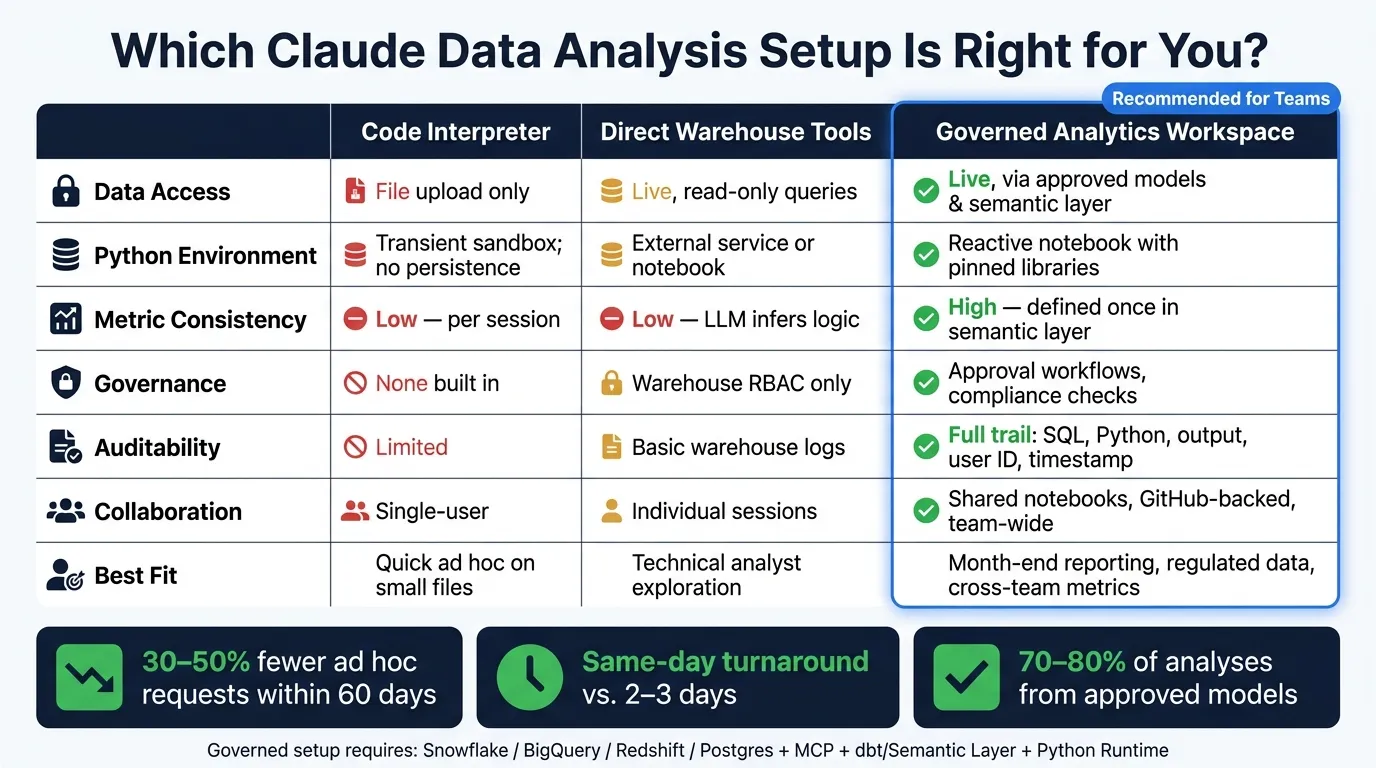 {Code Interpreter vs. Governed Analytics Workspace: Claude Data Analysis Comparison}
:::
{Code Interpreter vs. Governed Analytics Workspace: Claude Data Analysis Comparison}
:::
Comparison table: Code Interpreter vs. direct warehouse tools vs. a governed analytics workspace
Pick the lightest setup that still keeps production data safe, metric definitions steady, and work easy to trace.
| Code Interpreter | Direct Warehouse Tools | Governed Analytics Workspace | |
|---|---|---|---|
| Data access | File upload only; disconnected from production | Live, read-only queries via role accounts | Live, mediated through approved models and semantic layer |
| Python environment | Transient sandbox; no persistence | External service or notebook attached to warehouse | Reactive notebook with pinned libraries and dependency management |
| Metric consistency | Low - defined per session | Low - LLM infers logic each time | High - defined once in the semantic layer |
| Governance | None built in | Warehouse RBAC and query controls only | Approval workflows, change control, compliance checks |
| Auditability | Limited; hard to reproduce at scale | Basic warehouse logs | Full trail: request, SQL, Python, output, user ID, timestamp |
| Collaboration | Mostly single-user | Individual sessions | Shared notebooks, GitHub-backed context, team-wide access |
| Best fit | Quick ad hoc work on small, non-sensitive files | Technical analyst exploration on live data | Month-end reporting, regulated data, cross-team metrics |
Code Interpreter has its place. It works well for quick ad hoc analysis on small files.
The trouble starts when the work touches official metrics, regulated data, or decisions other teams will use. That’s where access controls, approvals, and query limits stop being “nice to have” and start doing the heavy lifting.
Permissions, approvals, and limits for healthcare, finance, and SaaS teams
For regulated teams, the starting point is simple: read-only roles, scoped schemas, and clear approval paths.
Every warehouse Claude touches should use a dedicated service identity scoped to specific schemas, not the whole database. In Snowflake, that means USAGE on the warehouse, database, and schema, plus SELECT on current and future tables - nothing else. In BigQuery, the service account needs Job User at the project level and Data Viewer at the dataset level.
For healthcare teams, Claude should only see de-identified analytics views such as analytics_claims or analytics_encounters - never raw EHR tables. If exact dates aren’t needed, cut them down to month-level. Add column-level masking so fields like SSNs and full addresses are blocked by default. And if someone wants Claude to use a new metric definition, like a readmission KPI, that metric should pass clinical data governance review first.
For finance teams, the approval loop needs to be even tighter. Any SQL change or Python transformation used in official U.S. dollar reporting should be reviewed and signed off before Claude can depend on it. Month-end close workflows should enforce MM/DD/YYYY date handling in core financial views and limit schema access to GAAP-compliant revenue and ledger models only.
SaaS product teams usually have more room to move with event and telemetry data. Even so, PII like emails and IP addresses should stay locked to specific roles. It also helps to set rate limits and concurrency caps so infrastructure doesn’t get slammed. A practical range is 10,000–50,000 row limits and 60–120 second timeouts. That keeps runaway queries in check and helps control cost.
These guardrails matter most when the metric layer stays steady and easy to review.
How Querio fits: governed context, live connections, and inspectable notebooks
Production work tends to break when metric logic lives in one analyst’s head or in a pile of one-off scripts.
Querio keeps metric definitions, joins, and approved SQL/Python in GitHub, so Claude works from governed context instead of ad hoc prompts. The agent can suggest new definitions, but only a logged-in human can approve and commit them.
Live, read-only connections to Snowflake, BigQuery, Redshift, ClickHouse, and Postgres mean no CSV exports and no data duplication. Every answer shows the exact SQL and Python behind it, so a reviewer can inspect, edit, and rerun the work. Reactive notebooks keep charts tied to source queries, which is handy in practice: change the filter, and the chart updates automatically.
OAuth ties each query to the requesting user’s warehouse permissions and audit trail. That shifts Claude from a chat interface into a governed analysis layer a team can use in production.
With permissions and context in place, the next move is a controlled first workflow and a simple success metric.
Roll out a first production workflow and measure whether it works
A 30-day rollout plan for the first governed Claude analysis flow
With the warehouse, permissions, and execution layer in place, the next move is picking the first workflow.
Start with one recurring workflow that’s slow, manual, or inconsistent. Good options include weekly pipeline quality, monthly margin reporting, or daily patient operations monitoring like ED wait times and bed occupancy.
Keep this first rollout narrow. The goal is to prove end-to-end value before you widen the scope.
| Phase | Days | Focus |
|---|---|---|
| Scope and design | 1–7 | Pick one use case, define 1–2 trusted metrics, identify the warehouse schema, document access rules |
| Connect tools | 8–14 | Set up read-only warehouse roles, expose one SQL tool and one Python tool |
| Build and test | 15–21 | Run the end-to-end flow on last month's data, validate results with stakeholders, apply the limits already defined |
| Pilot and formalize | 22–30 | Route real requests through Claude, capture gaps, publish a documented workflow with notebook storage and version history |
By day 30, ship one repeatable governed flow. Keep the scope tight, and don’t pile on a second use case until the first one runs cleanly for two straight weeks.
What to measure after launch
Once the flow is live, measure business impact, not just whether the tools are wired up.
Track these four things after launch:
- Ad hoc request volume: Count Slack or ticket requests to the data team for the supported use case. If the workflow is doing its job, these should drop by 30–50% within the first 60 days.
- Time from question to reproducible answer: For supported metrics, aim for same-day turnaround instead of 2–3 days.
- Share of analyses that use approved models: Track how much analysis pulls from the semantic layer instead of raw tables. For recurring reports, aim for 70–80%.
- Auditability: Make sure every run logs SQL, Python, output, user ID, and timestamp.
Numbers only tell part of the story. You also need direct feedback from business stakeholders. Ask a simple question: do they trust the numbers enough to put them in leadership decks without a manual check? That’s the clearest sign the workflow is doing what it should.
Conclusion: when this approach is better than Code Interpreter alone
Code Interpreter is fine for exploratory analysis on small static files.
It starts to fail when the work needs to reflect current warehouse data, use the same metric definitions each time, or produce results another team will use to make decisions. If your team works with business data in Snowflake, BigQuery, Redshift, or Postgres, a governed analysis layer is the better path: one scoped use case, two trusted metrics, and a controlled execution environment.
That setup turns Claude from a chat interface into a tool the whole team can depend on.
FAQs
::: faq
How do I connect Claude to my warehouse safely?
Use an MCP server as a secure go-between instead of handing Claude direct database credentials. That gives you tighter control over access, including read-only permissions, row-level security, and schema restrictions.
For stronger governance, send requests through Querio’s semantic layer so Claude works with approved metrics and joins. It also helps to use a dedicated least-privilege service account, short-lived tokens or OAuth, limited tools, query limits, and audit logging. :::
::: faq
Where should Python run for governed analysis?
For governed analysis, Python should run in a warehouse-native, governed setup between your AI assistant and your data warehouse, not in a sandboxed code interpreter.
A governed layer like Querio can connect to Snowflake, BigQuery, Redshift, or Postgres using live, read-only credentials.
That keeps Python tied to approved metrics, join logic, and business rules. It also applies the requesting user’s OAuth-based permissions automatically.
The results remain inspectable and editable in a reactive notebook, including the exact SQL and Python used. :::
::: faq
What should I launch first with this setup?
Start with one familiar analytics area, such as analytics_sales or analytics_product, so the scope stays tight. Define 10–20 core metrics in SQL and Markdown, review them with stakeholders, and commit them to GitHub as your semantic layer.
Use a read-only service account with least-privilege access, enforce row-level security and column masking, and route requests through a governed MCP layer so queries remain inspectable, auditable, and consistent. :::