Business Intelligence
How to Build a Slack Bot That Answers Data Questions
Build a secure Slack bot that turns questions into SELECT-only SQL, enforces read-only access, and returns formatted answers.

You can build a working Slack data bot in one evening if you keep the setup small: Slack app, app runtime, read-only warehouse access, and a governed metrics or semantic layer.
Here’s the short version:
- I connect a Slack slash command or
@mentionto a small app. - I send the user’s question to a data agent that turns plain English into
SELECT-only SQL. - I run that query against Snowflake, BigQuery, Redshift, or Postgres.
- I send back a short answer, a small table, and the SQL or notebook link.
- I keep data access under control with read-only roles, row limits, approved tables, and user-to-role mapping.
The main point is simple: the bot should answer live questions without skipping data controls. That means no raw-table free-for-all, no write access, no made-up numbers, and no giant Slack dumps.
A good v1 should do these things well:
- Answer common questions like sales by region, MRR by plan, top customers, and monthly expenses
- Format replies in Slack with U.S. dates like 09/17/2026, currency like $12,345.67, and percentages like 12.4%
- Ask a follow-up when a question is unclear
- Let analysts inspect the SQL behind each answer
- Respect warehouse permissions for each Slack user
If I had to boil the article down even more, it comes to three decisions:
- Pick the stack: Slack + Python/Node/serverless + warehouse + context layer
- Pick the data path: direct raw-schema SQL or governed metrics through dbt/Querio
- Pick the guardrails: read-only access, role mapping, approved models,
LIMIT 100, and Slack-friendly output
A governed setup takes a bit more work up front, but it cuts down metric drift, bad joins, and access mistakes. That matters a lot when teams argue about numbers or work with finance or healthcare data.
| Choice | Fastest path | Safer path |
|---|---|---|
| SQL source | Raw schema | Governed context layer |
| Access model | Shared bot account | Per-user role mapping |
| Output | Text only | Text + table + SQL/notebook |
| Good for | Early internal testing | Team use with audit needs |
Bottom line: I’d ship a bot that answers a small set of live data questions, uses warehouse rules already in place, and shows its work every time.
Building an LLM powered Analytics Slack Bot @ Twitch
::: @iframe https://www.youtube.com/embed/9fUcnuDrwYU :::
Pick your architecture and guardrails before you start
::: @figure 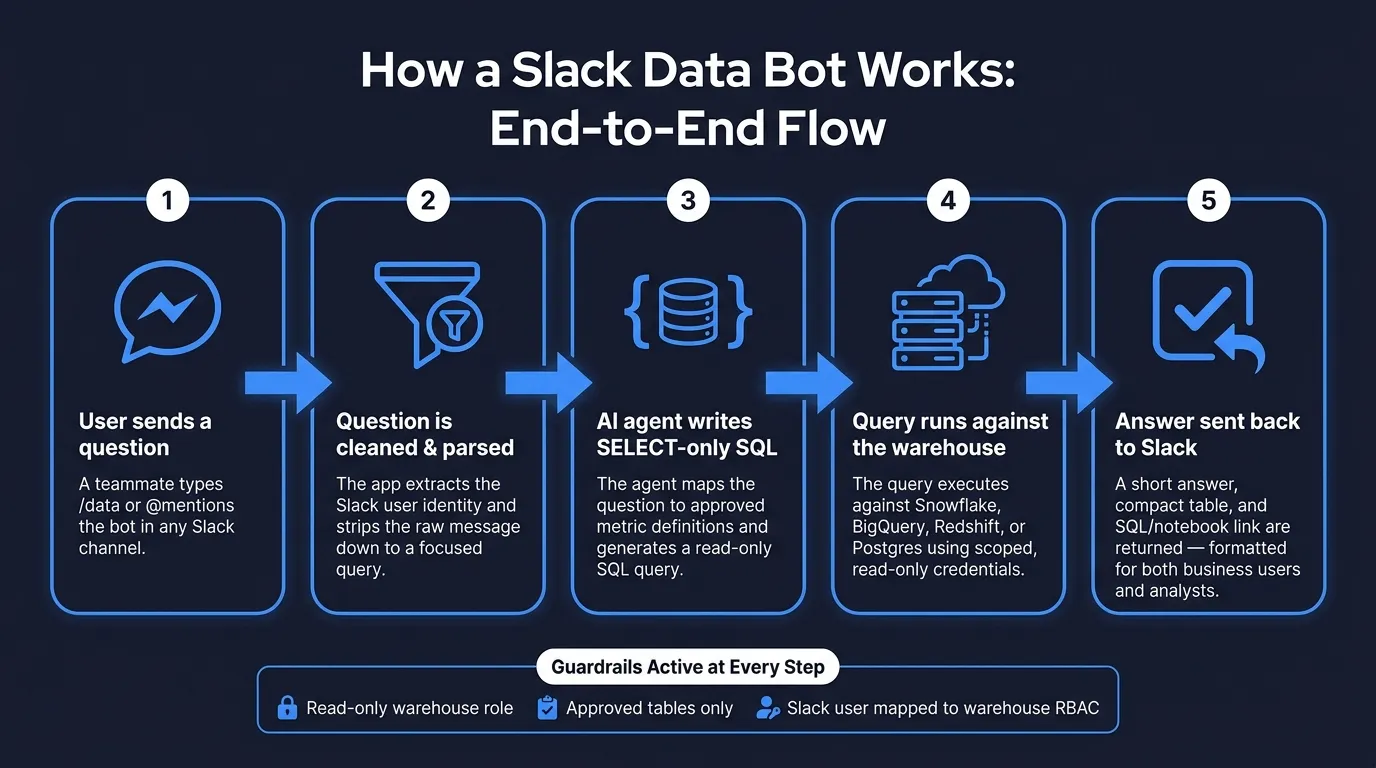 {How a Slack Data Bot Works: End-to-End Flow}
:::
{How a Slack Data Bot Works: End-to-End Flow}
:::
A teammate types /data what were yesterday's sales by region? in Slack. That request hits your app’s HTTPS endpoint, where your runtime pulls out the question and the Slack user identity. From there, an AI data agent reads your schema and metric definitions, writes a read-only SELECT statement, runs it against your warehouse, and sends the result back to Slack.
That core loop stays the same across Snowflake, BigQuery, Redshift, and Postgres:
- Slack event
- Parsing
- SQL generation
- Warehouse execution
- Response
Once you’ve mapped that flow, pick the simplest stack that still keeps governance in place. For a one-evening build, the aim is simple: a live bot with enough guardrails that you can trust what it says.
The minimum stack: Slack, app runtime, warehouse, context layer
You only need four parts for a working first version.
A Slack app with a /data slash command that sends requests to your endpoint. A lightweight app runtime, such as FastAPI or Flask in Python, Express in Node.js, or a serverless function on AWS Lambda or Google Cloud Functions. Read-only warehouse credentials scoped to a curated schema or a set of dbt models - not raw tables packed with PII. And a governed context layer stored in GitHub next to dbt, so the AI agent knows what your metrics mean in plain terms.
Direct warehouse bot vs. governed context layer: a comparison
The big choice comes down to this: should the AI agent write SQL straight from raw table and column names, or should it work from a governed set of pre-defined metrics and entities? Both can work. The right fit depends on how much risk your team can live with.
| Dimension | Direct SQL (Raw Schema) | Governed Context Layer (dbt / Querio) |
|---|---|---|
| Metric consistency | AI reads column names, so "revenue" may be calculated differently from one question to the next | Metrics like total_sales_usd are defined once and reused the same way every time |
| SQL transparency | SQL is logged, but the logic may change from run to run | SQL and definitions live in Git, and each query can be inspected and reviewed |
| Setup effort | Fast - add a connection string and let the app inspect the schema | A bit more setup - you need to create or reuse semantic definitions |
| Governance and auditability | You’ll need manual guardrails; this fits internal, exploratory use where some inconsistency is okay | Works with dbt and Git pull request workflows; a better fit for finance, healthcare, and other regulated settings |
A direct bot makes sense as a starting point when your team is small, your schema is clean, and you can manually review early output. But once people start arguing over metrics like revenue, active users, or conversion rate - or you work in a regulated setting - a governed context layer starts to earn its keep fast.
If shared metrics matter, go with the governed path. The next section shows how to wire Slack permissions and warehouse access.
Why Querio fits this pattern
Querio connects straight to Snowflake, BigQuery, Redshift, and Postgres with live, read-only, encrypted credentials. Its context layer stores metric definitions, joins, and trusted queries as plain SQL, Markdown, and Python files synced to GitHub in the same repo as your dbt project. That means definitions stay under version control and move through your normal code review flow.
Every answer the agent produces is inspectable SQL or Python. It’s not a black box. And when a Slack question gets complex enough to need more than a short reply, Querio can support the answer with a reactive notebook. Analysts can see the exact query, edit it, and share it.
Next, connect Slack permissions to read-only warehouse access and user mapping.
Set up the Slack app, permissions, and warehouse access
This is where the Slack-to-warehouse request flow gets its guardrails.
Create the Slack app and grant only the scopes you need
Go to api.slack.com/apps and click Create New App, then choose From an app manifest. A manifest helps you keep the app setup version-controlled and repeatable.
Give the app only the scopes it needs: app_mentions:read, chat:write, and commands. Add more only when the bot has a clear job that calls for them.
For a first build, use Socket Mode. Once you have a public endpoint, move to the Events API.
Load SLACK_BOT_TOKEN, SLACK_APP_TOKEN, and SLACK_SIGNING_SECRET from environment variables. Before you wire up data access, return a simple health-check message so you know the app is alive and responding.
Connect read-only warehouse credentials
Create a dedicated bot role with the smallest set of privileges needed to read curated data. In Snowflake, that looks like this:
CREATE ROLE data_bot_readonly;
GRANT USAGE ON WAREHOUSE analytics_wh TO ROLE data_bot_readonly;
GRANT USAGE ON DATABASE analytics TO ROLE data_bot_readonly;
GRANT USAGE ON SCHEMA analytics.marts TO ROLE data_bot_readonly;
GRANT SELECT ON ALL TABLES IN SCHEMA analytics.marts TO ROLE data_bot_readonly;
Use a dedicated read-only service account on curated marts or dbt models, not raw or staging tables. The same idea applies in BigQuery, Redshift, and Postgres.
Run each query at request time under a named service account so your warehouse logs show who asked what and when. That paper trail matters a lot in healthcare and finance reviews.
Once the bot can read curated data safely, response formatting is the last layer.
Map Slack users to governed data access
A shared read-only service account is the fastest way to get started. The catch is simple: every Slack user sees the same data, no matter their role.
A better setup maps Slack user IDs to warehouse roles through your current identity system, then applies that role to each request.
The cleaner pattern ties Slack identity directly to warehouse RBAC. Store a mapping between Slack user IDs and warehouse roles, then route each request through the governed context layer with that role applied.
For teams using Querio, this works through per-user permission inheritance: agent queries run with each user's data permissions, not a shared admin credential. Row-level security defined in Snowflake or BigQuery passes through on its own. So if a user is limited to US West data in the warehouse, the Slack bot respects that filter too. That means the bot starts from a governed default, not a wide-open one.
With identity and permissions in place, the next step is turning each question into safe SQL and a Slack-friendly answer.
Handle questions and format answers for Slack
Once access controls are set, the bot can turn each Slack message into an auto-generated SQL answer people can use without worrying about loose data handling.
Turn natural language into safe, governed SQL
Start by cleaning up the Slack message. Remove the mention, tighten the wording, and pass a focused question to the model. From there, map the metric to an approved definition, resolve time in the company’s reporting time zone, and map dimensions to the right governed columns.
Before anything runs, apply hard guardrails. The query should be SELECT-only, use only approved tables, and stay within a row limit. If the question is too vague - "How did we do last quarter?" with no KPI named - the bot shouldn’t fill in the blanks. It should ask one short clarifying question and wait.
| Question Component | What the Bot Should Do |
|---|---|
| Metric (sales) | Map to an approved definition, such as Net Revenue excluding refunds |
| Time (yesterday) | Resolve to a specific date range in the company's reporting time zone |
| Dimension (by region) | Map to the canonical sales_region column in your governed tables |
| Permissions | Apply the user's warehouse role or RBAC/OAuth scope before execution |
Once the query is safe, the bot needs to present the result in a way that works for two different readers: the business user who wants the answer fast, and the analyst who wants enough detail to trust it.
Format the response for both business users and analysts
The best Slack answers follow a simple pattern: lead with the answer, then show the support underneath. That sounds small, but it changes how people use the output. If the first line is clear, the business user gets what they need in seconds. If the detail sits right below it, the analyst can check the logic without digging.
Stick to U.S. formatting every time. Use currency like $12,345.67, dates like 09/17/2026, percentages rounded to one decimal like 12.4%, and commas for thousands. Keep labels short so the message fits Slack’s layout and doesn’t force people to scroll sideways.
A response to a question like "What were yesterday's sales by region?" might look like this:
Yesterday's sales totaled $X,XXX.XX across all regions.
Region Sales East $X,XXX.XX West $X,XXX.XX Central $X,XXX.XX Backed by the live warehouse query. Open notebook ↗
Plain text, table, chart, or notebook link: when to use each
The format should match the job. A single KPI doesn’t need a table. A trend usually shouldn’t be squeezed into plain text.
| Response Style | Best For | Example |
|---|---|---|
| Plain text | Single-number KPI checks | Yesterday's total sales were $X,XXX.XX. |
| Compact table | Grouped breakdowns | Sales by region, churn by plan, pipeline by owner |
| Chart (line/bar) | Trends and comparisons | MRR week-over-week for the past 12 weeks |
| Notebook link | Analyst audit or follow-up investigation | Full SQL, Python, and editable logic in Querio |
Use a chart when the shape of the trend matters more than the exact numbers. Keep it simple, and don’t cram in more categories than someone can scan in a Slack message.
Use a notebook link when people need to inspect the work or dig deeper. In Querio, the SQL behind every Slack answer is inspectable and editable, which matters in healthcare and finance settings where teams need to show their work, not just hand over an answer.
The next step is to test the questions teams ask every day and tighten the places where the bot can still fail.
Test real question types, handle failures, and define done
Test the questions teams actually ask
Once formatting works, test the bot with the same Slack questions your team asks on a normal workday. Demo prompts aren't enough. You want to see how the bot handles the messy, ordinary stuff people ask without thinking twice.
These four prompts cover the main SQL patterns a production bot needs:
| Question | SQL Pattern | Key Tables |
|---|---|---|
| What were yesterday's sales by region? | Date filter + GROUP BY aggregation |
fct_orders joined to dim_region |
| Show MRR by plan for the last 6 months | Time-window filter + metric calculation + grouping | fct_subscriptions grouped by plan_name and DATE_TRUNC('month', billing_date) |
| Who were our top 10 customers by lifetime value? | Aggregation + ORDER BY + LIMIT 10 |
fct_orders or fct_revenue joined to dim_customers |
| What were total operating expenses last month? | Category filter + monthly time window + SUM |
GL or expenses fact table filtered to the prior calendar month |
For each question, compare the bot's SQL to a reference query written by an analyst. Then check that the numbers match the warehouse source of truth in Snowflake, BigQuery, or Redshift. After that, look at the Slack reply itself. Can a non-technical teammate read it and get the point right away?
It's also smart to test a few edge cases:
- A day with zero sales
- A month that's still in progress
- An ambiguous last-quarter question, to see whether the bot treats it as a calendar quarter or a fiscal quarter
That last one matters more than people think. A bot can return a clean answer and still be wrong if it picked the wrong time frame.
Common failure modes and how to reduce them
Most Slack data bots don't break on demo questions. They break on live questions, especially when users ask follow-ups.
Evaluations of AI analytics bots show that hallucinated comparisons are one of the most common failures. A bot might mention an industry average, for example, even when no comparison data was connected at all. That's why the safest setup is simple: compute the numbers in SQL, and let the model explain the result.
These are the failure modes that tend to show up after launch:
| Failure Mode | How It Surfaces | Mitigation |
|---|---|---|
| Hallucinated columns | SQL error at runtime, or silently wrong results | Restrict the agent to a governed context layer with only approved tables and fields |
| Incorrect joins | Inflated or mismatched numbers | Encode join paths in dbt models or Querio's context layer; never let the bot guess foreign keys |
| Ambiguous time windows | Last month returns different numbers on different days | Define named time filters in dbt or Querio; prompt the bot to ask when the window is unclear |
| Metric-definition drift | MRR or LTV numbers that look plausible but aren't governed | Centralize metric logic by stitching LLMs and data together with dbt metrics or Querio's semantic layer; the bot references those objects, not raw tables |
| Access violations | Permission errors, or worse - exposed sensitive data | Read-only credentials + SELECT-only enforcement + Slack identity mapped to warehouse role |
| Oversized result sets | Slack channel flooded with thousands of rows | Enforce LIMIT 100 at the query layer; summarize in Slack and link to a notebook for full detail |
In Querio, each Slack response links to an inspectable, editable notebook. That gives analysts in healthcare or finance a direct way to verify the logic without digging through logs.
What a usable first version looks like
A usable first version doesn't need to answer everything. It needs to answer a small set of common questions well, again and again.
That usually means having:
- A working Slack app
- Read-only warehouse credentials
- Slack identities mapped to governed data access
- A semantic context layer that defines core metrics
SELECT-only SQL generation- Clean Slack formatting with U.S. number and currency standards
Success is pretty plain. A teammate asks a real question in Slack, the bot returns an answer people can trust, and an analyst can open the linked notebook to inspect or edit the SQL if something looks off.
And if the data isn't there, the bot should say that plainly instead of making up a number. That's done: trusted answer, inspectable SQL, no invented data.
FAQs
::: faq
How long does it take to build a usable Slack data bot?
You can build a functional Slack data bot in a single evening if you keep the first version tight and read-only. For a prototype, the setup work - Slack app installation, authentication, and warehouse setup - usually takes 30 to 60 minutes.
A full pilot usually takes about one week because that’s where the less flashy work shows up. Before you go live, define 10 to 20 core metrics, map them to clean warehouse views, and lock down read-only access roles. That extra prep helps the bot return numbers people can trust instead of sending everyone on a wild goose chase. :::
::: faq
Should I query raw tables or use a governed metric layer?
Use a governed metric layer instead of querying raw tables directly. Going straight to raw tables sounds simple, but it often leads to wrong answers fast. Joins get messy, grain doesn’t line up, and business logic can fall apart in subtle ways.
A governed semantic layer gives you one source of truth for metrics like ARR or churn. That means your team and the AI agent work from the same definitions, which leads to more consistent answers people can rely on. :::
::: faq
How do I keep a Slack data bot secure and trustworthy?
Use least-privilege access, governed metric definitions, and inspectable logic.
Set up a dedicated read-only service user for Snowflake, BigQuery, or Postgres. Limit that account to only the schemas you need. Don’t reuse human credentials, and don’t grant write access.
Route Slack requests through a governed semantic layer so metrics like revenue or churn stay consistent. Keep generated SQL inspectable and editable. Pair that with audit logs and row- or column-level security so answers stay appropriate, auditable, and trusted. :::