Business Intelligence
How to Use AI in Looker (and When to Move On)
Explains when Looker AI suffices for governed dashboards and when to adopt cross‑warehouse, permission‑aware analytics outside the BI tool.
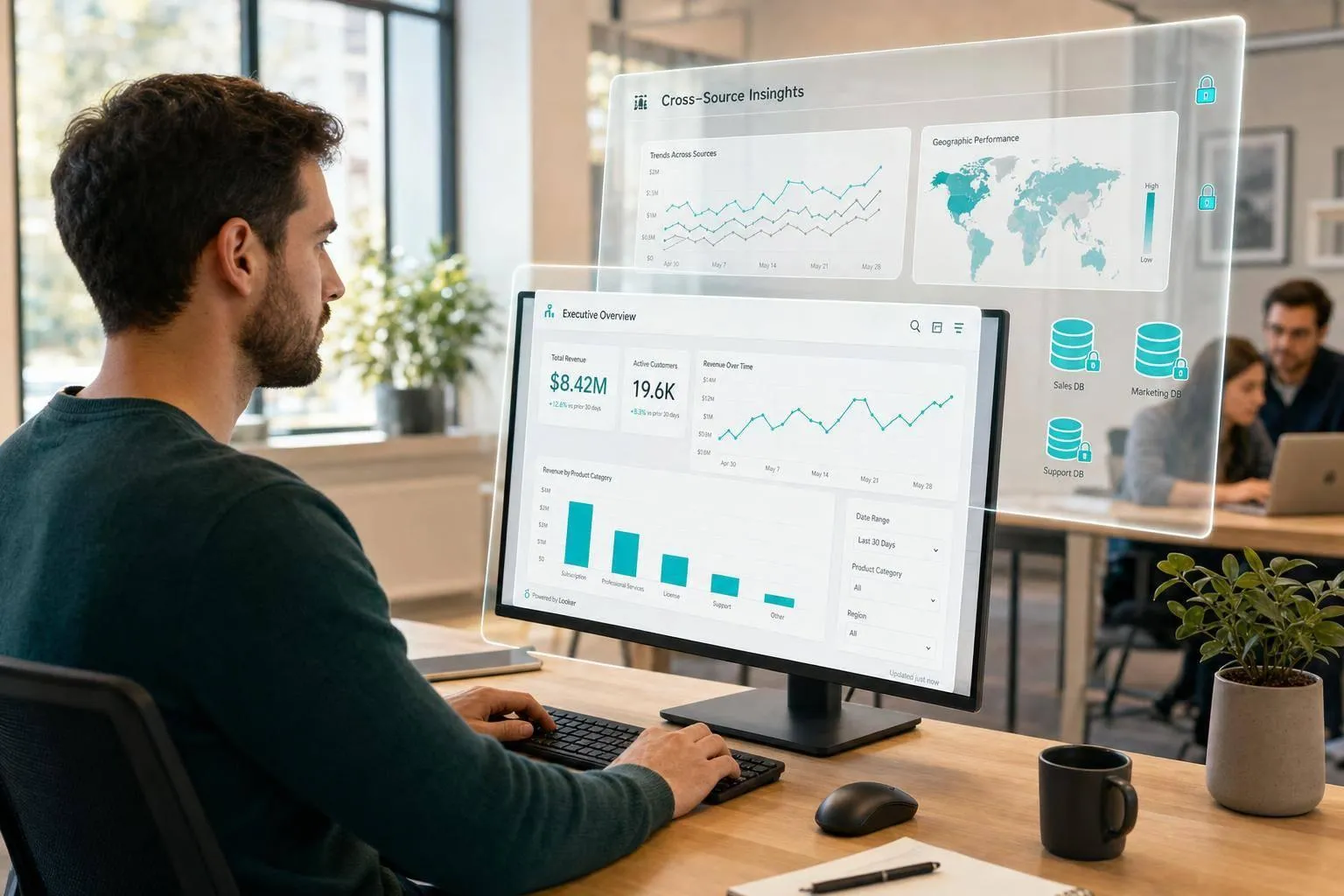
If your team works inside clean LookML, AI in Looker can help with questions, dashboard follow-ups, chart edits, anomaly checks, and forecast support. But if you need cross-warehouse analysis, Slack or Teams answers, or user-level access rules outside Looker, you’ll hit the edge of what it can do.
Here’s the short version:
- I’d use Looker AI when metrics are already defined in LookML and people mostly work in Explores and dashboards
- I’d be careful with outputs when labels, joins, grain, or filters are messy
- I’d stay in Looker for natural-language BI, dashboard chat, LookML drafts, chart changes, and result explanations
- I’d look past Looker when work spans Snowflake + BigQuery + SaaS tools, or when users want answers in Slack, Teams, notebooks, or APIs
- I’d also move past Looker when my team needs repeatable investigations or user-based permissions to carry across systems
A simple rule: if the dashboard is the destination, Looker AI may be enough. If the job needs chat across tools, code review, or multi-step agent work, it may be time to use something beyond Looker.
| Need | Best fit |
|---|---|
| Governed BI questions in Looker | Looker AI |
| Dashboard follow-up questions | Looker AI |
| LookML and formula drafting | Looker AI |
| Cross-warehouse reasoning | Beyond Looker |
| Slack or Teams answers | Beyond Looker |
| Inspectable SQL/Python workflows | Beyond Looker |
| Permission-aware answers across surfaces | Beyond Looker |
For mid-size teams with 2–6 analysts, this decision often comes down to workload and stack sprawl. If ad hoc work is eating 30%–40%+ of analyst time, and requests now span more than one data system, Looker AI may help at the surface level without fixing the workflow itself.
Below, I break down where Looker AI fits, where it starts to strain, and how to tell when to keep it, extend it, or replace part of the setup.
Looker Conversational Analytics – The intelligent evolution of BI
::: @iframe https://www.youtube.com/embed/9_akO0Q9Z3k :::
Which AI features in Looker actually matter for analytics teams
For analytics teams, a few Looker AI features stand out. They all hinge on one thing: clean LookML. The features that tend to matter most fit into three areas: chat, assistants, and advanced analytics.
Conversational Analytics and dashboard chat
Conversational Analytics and dashboard chat let people ask plain-English questions against approved Explores and get answers backed by queries, without writing SQL. So if someone is reviewing an ARR dashboard and wants to ask a follow-up question, they can do that right inside Looker instead of comparing Looker to other tools.
There’s a catch, though. The AI can only work with the fields and metrics already defined in LookML. If a metric doesn’t exist there, Looker can’t use it. And if labels or descriptions are messy or unclear, the answers can come back vague, partial, or just hard to trust.
Conversational Analytics requires Looker 25.0 and the gemini_in_looker plus access_data permissions.
Explore, visualization, and LookML assistants
Looker also includes assistants for both analysis and model work.
- The Explore Assistant helps users choose fields and filters.
- The Visualization Assistant updates chart types, axes, and formatting.
- The LookML Assistant drafts dimensions, measures, or views from plain English.
That’s useful when the data model lives in Snowflake, BigQuery, Redshift, or Postgres and analysts want to move faster without rewriting SQL every time.
The LookML Assistant and Visualization Assistant require Looker 25.2. They also need develop for LookML work and can_override_vis_config for Visualization changes.
Even then, a human review still matters. This is especially true for joins, metric grain, and filter logic. A suggestion can look fine at first glance and still lead to bad numbers. That’s the kind of mistake that slips through quietly.
Advanced Analytics for anomalies, forecasting, and explanations
Looker’s Code Interpreter runs inside Looker and is available in Looker 25.8. It’s currently in Trusted Tester and requires gemini_in_looker to be enabled.
You can use it for anomaly detection, forecasting, and statistical explanations. In practice, these tools work best when the metric logic is already defined in LookML. If that layer is sloppy, the output can go off the rails fast.
Across all of these features, the rule is the same: clean up LookML before turning on AI. Labels, descriptions, and metric definitions do a lot of heavy lifting because the AI reads that metadata to figure out business context. If the metadata is off, the AI can sound sure of itself while giving the wrong answer. Next, see how to use these features in day-to-day analysis.
How to use AI in Looker for day-to-day analytics work
Start by turning on Gemini in Looker and enabling only the features your team will actually use. Then assign the right Looker roles and permissions so people can access the AI tools that fit their work. After that, keep Looker AI inside governed Explores and dashboards instead of treating it like a separate chat tool.
Ask natural-language questions against governed Explores
Open a trusted business area like Revenue, Claims, or Sales Pipeline. Then click Start a conversation and ask your question in plain business language. This works best when the Explore already uses your trusted metric definitions.[1][5][6]
For example, a SaaS team might ask for month-over-month net expansion revenue for U.S. customers in Q3 2026. Looker’s AI can pick the right dimensions, measures, and filters. Still, don’t take the first answer at face value. Check the fields, filters, date range, and metric definition before you share anything. Then tighten the prompt, like filtering to accounts with at least $125,000 in expansion revenue and comparing Q2 vs. Q3 2026.[7][1]
Use AI to speed up dashboard exploration and chart edits
From a user-defined dashboard, click Chat with this dashboard to ask follow-up questions and get breakdowns by segment or region.[2][8][9] If a result looks good but you want to know what’s under the hood, use How was this calculated? to inspect the logic before trusting it.
You can also ask for chart changes in plain language. Say you want a stacked bar, a line chart, or a 3-month moving average, and the Visualization Assistant updates the chart.[3][7]
Use chat when you want to dig into the data. Use Formula Assistant and LookML Assistant when it’s time to turn that logic into something more formal.
Generate calculations, LookML, and anomaly explanations with care
When a result looks off, AI can help draft an explanation. That can save time, but you still need to verify the metric before acting on it.
Use Formula Assistant and LookML Assistant to draft calculations and model logic. Then review field references, aggregation, and date logic before saving anything. For anomaly detection and forecasting, compare the output against a trusted dashboard before sharing it with others.[2][3][7]
When Looker AI is enough, and when it is not
::: @figure 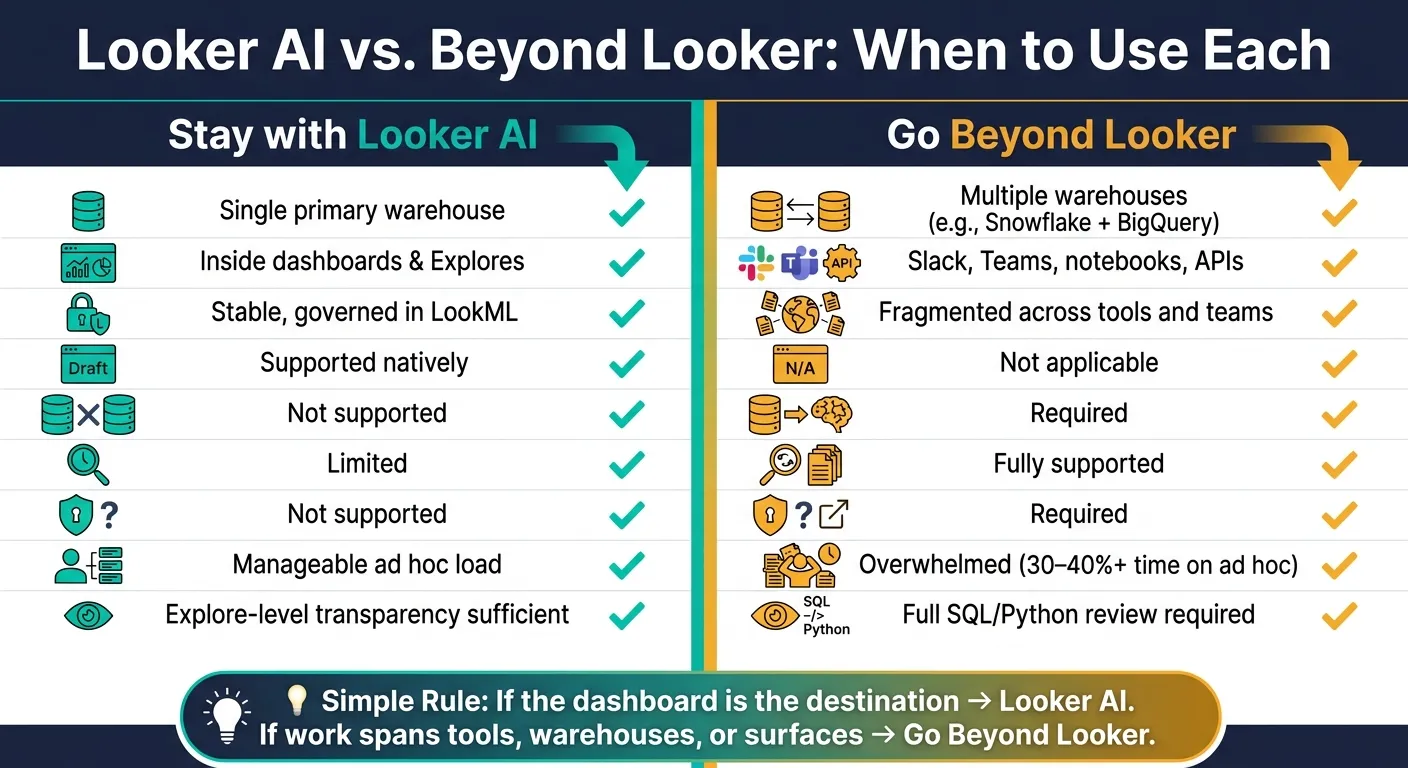 {Looker AI vs. Beyond Looker: When to Use Each for Analytics}
:::
{Looker AI vs. Beyond Looker: When to Use Each for Analytics}
:::
After using Looker AI for questions, dashboard exploration, and anomaly checks, the next issue is scope. This is where day-to-day use turns into a bigger decision: keep Looker as-is, extend it, or shift parts of the workflow somewhere else.
Looker AI is enough when your team works in one governed Looker setup, uses one main warehouse, and stays inside dashboards and Explores. Once questions start crossing tools, warehouses, or user surfaces, the fit gets weaker.
Stay with Looker when your semantic layer and workflows already live there
Looker AI works best when your team has standardized on LookML, most questions hit one warehouse, and users mainly work in dashboards and Explores inside Looker. In that kind of setup, Looker AI speeds up self-serve analysis without adding extra integration work.
Say your executives schedule reports in Looker, analysts drill into Explores, and the data team manages metrics through LookML version control. In that case, the built-in AI is usually enough.[6][10][16][17] If those conditions match your setup, it makes sense to keep Looker AI in the flow and use the next section's criteria to decide if you need more.
Go beyond Looker when questions cross tools, warehouses, or user surfaces
The limits tend to show up fast once the data stack is more fragmented.
Finance might need to combine billing data in Snowflake with product usage events in BigQuery in one question. Looker can connect to more than one database, but its AI still works inside configured Explores and connections. It does not act like one smooth cross-warehouse reasoning layer.[4][13][14]
The same issue shows up on the user side. A VP of Sales asking about pipeline coverage and logo retention by segment in Slack expects an answer right there in the thread, not a prompt to go open Looker. And analysts running repeatable investigations, like detecting a conversion drop, segmenting affected cohorts, comparing past patterns, and drafting a summary, usually need an orchestrated workflow rather than a one-off dashboard chat.[15]
Go beyond Looker when governance must follow the user everywhere
Looker’s security model is solid inside its own app, often relying on semantic layers in business intelligence to maintain consistency. Conversational Analytics respects existing Explore permissions, and sharing an agent does not grant access to underlying data.[1][11]
But that governance does not automatically travel with the user into Slack, Microsoft Teams, or an external AI assistant. If a manager asks about regional revenue in Slack, the answer still needs to follow Looker’s row- and column-level rules without forcing that manager to open Looker.
That’s where a permission-aware agent matters. It ties each response to the user’s identity, logs requests, and enforces masking rules across surfaces.[11][12][15] Looker by itself does not cover that cross-surface model.
Use the matrix below as the fastest way to decide.
| Scenario | Looker AI is enough | Go beyond Looker |
|---|---|---|
| Single warehouse, stable LookML semantic layer | Yes | No |
| Questions inside dashboards and Explores | Yes | No |
| LookML drafting and summaries | Yes | No |
| Billing in Snowflake + product usage in BigQuery | No | Yes |
| Questions in Slack or Teams | No | Yes |
| Repeatable investigations | No | Yes |
| Permission-aware answers outside Looker | No | Yes |
How to decide your next step: keep Looker, extend it, or replace parts of it
Once you know where Looker AI works well, the next job is simple: figure out whether your team still fits inside that setup.
Decision criteria for data leaders at 100–500-employee companies
Use these six signals to make the call:
- Semantic consistency - Are your main metrics already stable in LookML, or do teams still debate the numbers?
- Analyst bandwidth - Is your 2–6-person data team spending 30%–40% or more of its time handling ad hoc requests?[1]
- System sprawl - Do you work from one main warehouse, or is data split across Snowflake, BigQuery, operational databases, and SaaS tools?
- Warehouse access - Do finance, data science, or operations need hard joins and custom logic that LookML doesn’t expose?
- Inspectability - Do stakeholders or auditors need to review, edit, and version the actual SQL or Python behind an answer?
- Request volume - Is incoming demand growing faster than your team can handle it?
| Criterion | Keep Looker AI | Move beyond Looker |
|---|---|---|
| Metric definitions | Stable, governed in LookML | Fragmented across tools and teams |
| Analyst bandwidth | Manageable | Overwhelmed by ad hoc requests |
| Data systems | One primary warehouse | Multiple warehouses or SaaS sources |
| Inspectability need | Explore-level transparency is enough | Full SQL/Python review required |
| Delivery surfaces | Looker UI is the destination | Slack, Teams, notebooks, APIs also needed |
| Governance portability | Looker permissions are sufficient within Looker | Governance must follow users across surfaces |
A clear pattern tends to show up fast. If your metrics are settled, your warehouse setup is fairly clean, and people mostly consume answers inside Looker, staying there makes sense.
But things change when teams want answers in Slack, need cross-system analysis, or ask to inspect the code behind the result. That’s where a BI interface starts to feel a bit tight.
Where Querio fits for governed, warehouse-native, agent-first analytics
When those signals point past a single BI interface, the next step is often a modern data stack layer that keeps logic open for review. Querio stores joins, metrics, and definitions in versioned SQL, Markdown, and Python synced with dbt and GitHub. That means governed logic stays inspectable outside the BI layer.
Each answer runs as editable SQL and Python in a reactive notebook. At the same time, non-technical users can self-serve through chat in Slack, Teams, or through MCP inside Claude and other AI assistants. OAuth makes each query inherit the user’s actual data permissions.
In practice, that means Looker doesn’t have to disappear. It can still sit in the stack as the visualization layer, while Querio handles work that goes past the BI interface, like cross-warehouse questions, automated investigations, and permission-aware answers in chat.
A simple rule for deciding when to move on
Use AI in Looker when the question is still a governed BI question and the dashboard is the destination. Move past Looker when analytics need to span warehouses, reach users across multiple surfaces, run as automated agent workflows, or show inspectable logic outside the BI tool.
FAQs
::: faq
How clean does our LookML need to be before using Looker AI?
To get good results from Looker AI, your LookML needs to be mature, current, and clearly defined. Looker’s AI leans on that semantic layer. So if a metric, join, or schema relationship is missing, reliability drops.
You don’t need a perfect setup on day one. But you should define the key metrics leadership reviews most often. Before deployment, run the LookML Validator to catch logical errors and keep governed definitions as the source of truth. :::
::: faq
What are the first signs that Looker AI is no longer enough?
Looker AI starts to fall short when your data needs move past a single-warehouse setup, or when keeping LookML up to date takes more effort than the control it gives you.
A few common signs tend to show up:
- You need chat across multiple warehouses, not just one.
- You want automated investigations that go past simple dashboard exploration.
- You need a governed context layer that stays the same across different tools.
Another pain point is dbt churn. If your dbt models change often, the extra work to keep LookML in sync can lead to metric drift. :::
::: faq
Can Looker AI handle governed answers outside the Looker app?
No. Looker’s AI tools, including Gemini-powered Conversational Analytics, work inside the Looker platform and its LookML semantic layer.
That setup matters. Governance, access controls, and metric definitions are all tied to Looker itself. So while Looker can give governed answers within the app, it can’t natively deliver those same governed answers outside it.
If your team needs consistent metrics and security across external workflows, you’ll usually need to bring in outside tools. :::