Business Intelligence
How to Query Postgres with Natural Language (AI SQL)
AI SQL works for Postgres only with live schema, read-only access, governed metrics, and pre-run SQL checks.

Yes - you can ask Postgres questions in plain English, but the output is only as good as the setup behind it. From what I see, the article’s core point is simple: if I want AI SQL to work on Postgres, I need read-only access, live schema context, saved metric definitions, and SQL checks before use.
Here’s the short version:
- I can turn questions like “Show monthly revenue by plan for the last 12 months” into SQL without writing it by hand.
- The setup matters more than the prompt. Without schema details, joins, and metric rules, the numbers can be wrong.
- The article points to 85%–95% accuracy for standard business queries when models have the right context.
- Postgres can trip models up with things like JSONB, time zones, and multi-table joins.
- Safe use starts with a read-only role, a 5-second statement timeout, and checks like
EXPLAINbefore large queries run. - Terms like MRR, active customer, and churn should be defined once and reused, not guessed each time.
- I should always inspect the SQL, joins, filters, and aggregation before sharing results.
If I had to boil the whole piece down to one idea, it would be this: AI SQL is useful for Postgres when it sits on top of governed logic instead of making a new guess on every question.
A quick side-by-side view makes that clear:
| Area | Basic chat-to-SQL | Governed AI SQL |
|---|---|---|
| Metric logic | Re-guessed each time | Reused from saved definitions |
| SQL visibility | Sometimes hidden | Visible and editable |
| Data access | Mixed | Live, encrypted, read-only |
| Query safety | Higher risk | Timeouts, row caps, review checks |
| Answer consistency | Can vary | More stable after approval |
So if I’m reading this article for the answer up front, that’s it: natural language querying on Postgres works best when AI reads live schema, follows approved business logic, and runs inside tight database guardrails.
How to set up a natural-language-to-SQL workflow on Postgres
Getting natural-language querying on Postgres right takes more than plugging in an LLM and hoping for the best. The work you do before anyone asks that first question shapes whether the answers are dependable or quietly off.
Connect live Postgres data with the right permissions
Start with a dedicated read-only database role that can only access the tables the AI should use. A common setup looks like this:
CREATE ROLE ai_query LOGIN PASSWORD 'password';
REVOKE ALL ON ALL TABLES IN SCHEMA public FROM ai_query;
GRANT USAGE ON SCHEMA public TO ai_query;
GRANT SELECT ON public.table_name TO ai_query;
ALTER ROLE ai_query SET statement_timeout = '5s';
ALTER ROLE ai_query SET default_transaction_read_only = on;
That short statement_timeout helps stop runaway queries and messy joins from eating up Postgres resources [1][6]. You also want a live read-only connection, so the AI works with current Postgres data instead of a stale copy sitting somewhere else. Querio connects straight to your live Postgres instance, which means the SQL runs against current data every time. Querio's agent answers with SQL and Python in a notebook your analysts can open, check, and rerun.
Once access is locked down, the next step is giving the model the schema details and business meaning it needs to answer well.
Register schemas, joins, and business definitions
The AI needs to understand your schema in plain terms. That means more than table names. It needs to know how tables relate to each other. Use information_schema or pg_catalog to expose your join graph: primary keys, foreign keys, column types, and nullability [1][3].
The join graph decides which tables the model connects. If it doesn't know that orders joins to customers on customer_id, it may guess from similar column names. That's where things can go sideways fast. One wrong join path can blow up a metric and make the output look fine at first glance [1]. When you register those relationships on purpose, you take that guesswork off the table.
You also need to spell out what columns mean in business terms. For example, a column named amount_cents might include negative values for refunds, and the AI needs that note. A status field should include sample values, so business filters map to the right codes [6]. This extra context ties plain-English questions to the right tables, joins, and filters. It's how revenue, churn, and customer count questions stay lined up with the same definitions each time.
Add a governed context layer before opening access to business users
Schema metadata helps the AI write the SQL. A governed context layer helps it use the right metric logic.
Terms like "active customer" usually don't live in a single column. They're often based on a shared filter expression that finance, product, or ops teams have already agreed on. If two analysts ask the same question and get different numbers because the AI interpreted that term differently each time, trust disappears fast.
Define terms like MRR, churn, active user, and expansion once, then reuse them across every query.
In Querio, this happens through context files in a git repo your team owns. Data teams define the logic one time, and that logic carries across ad-hoc questions, notebooks, dashboards, and the Claude or Cursor agents that use Querio's MCP server and CLI. Saving context opens a pull request, so your reviewers approve it. So when a business user asks a question, the AI isn't inventing a new meaning on the fly. It's applying the version your team already checked and approved, not a one-off interpretation.
Query Postgres in plain English: concrete business examples
These examples show what it looks like when a plain-English question turns into SQL against live Postgres data. The flow stays the same each time: start with the business question, map the right joins and filters, apply the metric logic, then check the output. Here, that process shows up across revenue, customer value, and churn.
Example: monthly revenue by plan for the last 12 months
A revenue analyst asks: "Show monthly revenue by plan for the last 12 months." The AI reads the schema, figures out the joins and filters, writes SQL, and checks it [1][2]:
SELECT
  DATE_TRUNC('month', s.period_start) AS month,
  p.name AS plan_tier,
  SUM(s.amount) AS monthly_revenue
FROM subscriptions s
JOIN plans p ON s.plan_id = p.id
WHERE s.status = 'active'
  AND s.period_start >= CURRENT_DATE - INTERVAL '12 months'
GROUP BY 1, 2
ORDER BY 1 DESC;
DATE_TRUNC('month', ...) groups rows into calendar months, so the 12-month window keeps moving forward without manual edits [1][5][7]. The join between subscriptions and plans uses the foreign key instead of making a guess based on similar column names. That matters, because one bad join can throw off revenue numbers fast [1].
This same setup also works when the metric comes from business rules, not just from a single column.
Example: top customers by expansion, LTV, or usage
Ask: "Who are our top customers by expansion revenue this quarter?" That sounds simple, but the hard part is the phrase expansion revenue. You need to define it once, then use that same logic again for LTV and usage rankings. That's where a saved metric definition helps. When business terms are tied to the right tables and columns in a clear way, teams get the same answer each time instead of three slightly different versions of it [1][3].
Example: churn trends from status changes and event history
Churn gets trickier. It's usually not sitting in one neat table waiting for you. A question like "How has monthly churn trended over the past 6 months?" often depends on status changes over time, not a single row. In practice, that usually means using LAG() to compare a customer's current status to a prior one, DATE_TRUNC('month', ...) to roll results up by month, and clear filters so you're counting actual churn events instead of rows that were already inactive [1][2].
One common mistake is double counting after joining event history to customer-level tables [1]. For customer-level metrics, COUNT(DISTINCT customer_id) helps stop that problem. That's the kind of rule you want baked into shared logic, not left to memory. And if analysts need to fine-tune the churn definition, the SQL should stay visible and editable.
These answers still need SQL review before teams rely on them.
How to validate AI-generated SQL before teams rely on it
Once AI writes the SQL, the job isn't done. You still need to prove the query is safe and correct before anyone uses the output. A query can run without errors and still give the wrong answer. That's the trap: AI-generated SQL can produce neat, polished-looking results that are still off, which is why validation isn't optional.
Check the SQL, joins, filters, and aggregations
Start by checking whether the AI matched each business term to the right table, join path, date range, and aggregation. This is where things often go sideways. A bad join can inflate metrics by 7x and still execute just fine [1]. That's a big problem if nobody spots it.
Also look at null handling. Small choices in count logic can change denominators and shift the final metric. If you already have a trusted dbt model or a dashboard for the same metric, compare the AI output directly to that known result before sharing anything with stakeholders. That side-by-side check tells you whether the AI followed the same metric logic your team already signed off on.
Add database guardrails
Before running a query against a large Postgres table, put it through EXPLAIN first. That helps catch full-table scans before they hit your warehouse [4]. If a query crosses a set row-estimate limit, block it or send it for review [6].
Cost checks are only part of the picture. You also want hard limits at the database role level:
- Set
default_transaction_read_only = onso AI-generated queries can't modify data - Apply a
statement_timeoutof 5 seconds to stop runaway queries from tying up Postgres resources [4][6] - Confirm the AI uses stored categorical values instead of guessed labels when filtering categorical columns [1]
One more thing: when a query has been checked and approved, save it as approved logic instead of asking the AI to rebuild it every time.
Ungoverned chat-to-SQL vs. governed warehouse-native AI analytics: a comparison
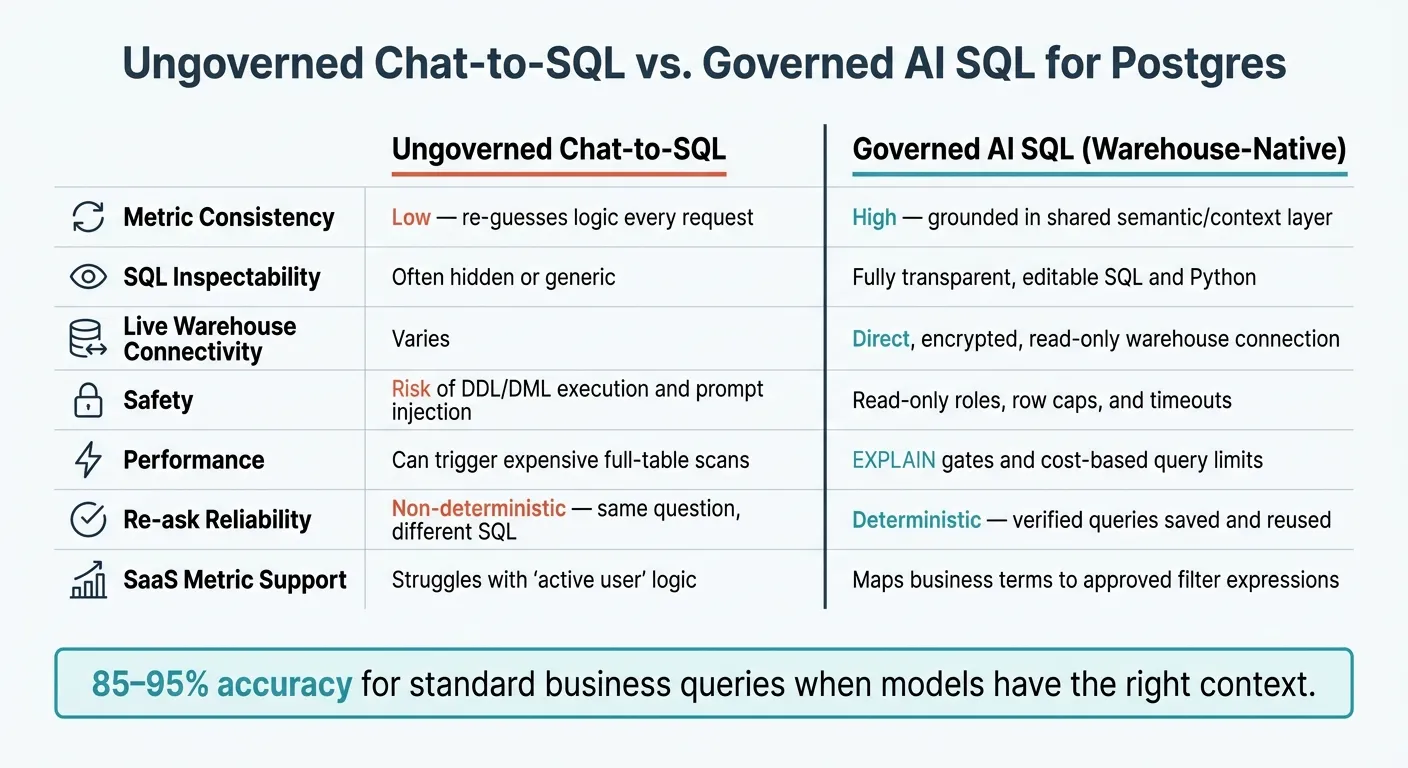
These checks are what separate ad hoc chat-to-SQL from a workflow teams can trust. The difference becomes obvious in production, where governed SQL stays steady and auditable. Here's what that looks like in practice.
| Feature | Ungoverned chat-to-SQL | Governed Warehouse-Native AI (e.g., Querio) |
|---|---|---|
| Metric consistency | Low - re-guesses logic every request | High - grounded in a semantic layer that understands your business |
| SQL inspectability | Often hidden or generic | Fully transparent, editable SQL and Python |
| Live warehouse connectivity | Varies | Direct connection to live warehouse data |
| Safety | Risk of DDL/DML execution and prompt injection | Notebooks run in a sandbox with no internet access, and an agent sees only what its user may see |
| Performance | Can trigger expensive full-table scans | Queries run on live warehouse data |
| Re-ask reliability | Non-deterministic - same question, different SQL | Saved queries and metrics live in your git repo and are reused by name |
| SaaS metric support | Struggles with "active user" logic | Maps business terms to approved filter expressions |
The gap here isn't about product labels. It's about whether people can trust the output day after day. Teams need consistent metrics, SQL they can inspect, read-only execution, and approved queries they can reuse. Without that, trust slips fast. If a business user asks the same revenue question on Monday and again on Wednesday and gets two slightly different answers, confidence drops almost right away. A governed layer fixes that by defining joins, metric logic, and business terms once, then applying them the same way every time.
Conclusion: what good AI SQL looks like for Postgres teams
Natural language querying on Postgres works when AI is tied to live schema, governed definitions, inspectable SQL, and validation. With that setup, models like Claude and GPT-4 can produce SQL that teams can trust for standard business questions.
Key takeaways for data leaders and analysts
In practice, good AI SQL for Postgres comes down to five traits. Those same rules help keep monthly revenue, expansion, and churn queries aligned.
- Define governed metrics before opening access. Business terms like "active customer" or "expansion revenue" need a context layer before anyone starts using the query interface.
- Connect live Postgres data with read-only permissions. A direct connection gives the AI the actual column names, data types, and foreign key relationships.
- Show and reuse editable SQL. If users can't see what ran, they can't check the result.
- Validate with EXPLAIN, row caps, and timeouts. That's the line between a nice demo and something a data team can depend on.
- Save approved logic and reuse it. Once a query is checked and approved, teams should get that same logic back instead of a new model guess [1].
The payoff is faster analysis without giving up governance. Analysts and business users can move faster with self-serve access, while the data team still keeps metric logic under control.
FAQs
How accurate is AI-generated SQL on Postgres?
AI-generated SQL on PostgreSQL can work very well when the model has strong schema context and a solid semantic layer. In many setups, modern models hit 85% to 95% accuracy on standard queries.
What moves the needle most isn't just the model itself. It's the pipeline around it. The steadiest systems define terms like revenue the same way every time, then check syntax, joins, and schema alignment before anything runs.
What setup does Postgres need for natural-language querying?
Set up PostgreSQL with security and schema context first.
Start by creating a sandboxed read-only role that can connect to the database, use only the schemas it needs, and read only the tables it should see. Keep it on a short leash: no writes, no DDL, no broad grants.
A simple setup looks like this:
-- Create a dedicated login role
CREATE ROLE ai_readonly
WITH LOGIN
PASSWORD 'REPLACE_WITH_STRONG_PASSWORD'
NOSUPERUSER
NOCREATEDB
NOCREATEROLE
NOINHERIT;

-- Allow connection to only the target database
GRANT CONNECT ON DATABASE your_database TO ai_readonly;

-- Limit schema access
GRANT USAGE ON SCHEMA public TO ai_readonly;
-- Repeat for other allowed schemas only
-- GRANT USAGE ON SCHEMA analytics TO ai_readonly;

-- Grant read access only to approved tables
GRANT SELECT ON TABLE public.customers TO ai_readonly;
GRANT SELECT ON TABLE public.orders TO ai_readonly;
GRANT SELECT ON TABLE public.order_items TO ai_readonly;

-- Optional: apply to all current tables in an allowed schema
-- GRANT SELECT ON ALL TABLES IN SCHEMA public TO ai_readonly;

-- Prevent accidental writes at the role level
ALTER ROLE ai_readonly SET default_transaction_read_only = on;

-- Set hard time limits
ALTER ROLE ai_readonly SET statement_timeout = '15s';
ALTER ROLE ai_readonly SET lock_timeout = '2s';
ALTER ROLE ai_readonly SET idle_in_transaction_session_timeout = '5s';
You should also avoid granting access to whole schemas unless you mean it. If the AI only needs three tables, grant those three tables. That’s the safer move.
For encrypted access, require SSL/TLS on the PostgreSQL connection. In practice, that means using a connection string like this:
postgresql://ai_readonly:REPLACE_WITH_STRONG_PASSWORD@db.example.com:5432/your_database?sslmode=requireIf you manage pg_hba.conf, lock it down there too:
hostssl your_database ai_readonly 203.0.113.10/32 scram-sha-256That does two useful things:
- forces an encrypted connection with
hostssl - limits access to a known IP address
If you want to be stricter, use client certs and keep sslmode=verify-full.
Then give the AI schema context up front so it doesn’t have to guess. That context should include:
- schema names
- table names
- column names and data types
- primary keys
- foreign key links between tables
You can pull that from PostgreSQL with read-only metadata queries like these.
Tables and columns
SELECT
  c.table_schema,
  c.table_name,
  c.column_name,
  c.data_type,
  c.is_nullable,
  c.column_default
FROM information_schema.columns c
WHERE c.table_schema IN ('public')
ORDER BY c.table_schema, c.table_name, c.ordinal_position;
Primary keys
SELECT
  tc.table_schema,
  tc.table_name,
  kcu.column_name
FROM information_schema.table_constraints tc
JOIN information_schema.key_column_usage kcu
  ON tc.constraint_name = kcu.constraint_name
 AND tc.table_schema = kcu.table_schema
WHERE tc.constraint_type = 'PRIMARY KEY'
  AND tc.table_schema IN ('public')
ORDER BY tc.table_schema, tc.table_name, kcu.ordinal_position;
Foreign keys
SELECT
  tc.table_schema,
  tc.table_name,
  kcu.column_name,
  ccu.table_schema AS foreign_table_schema,
  ccu.table_name AS foreign_table_name,
  ccu.column_name AS foreign_column_name
FROM information_schema.table_constraints tc
JOIN information_schema.key_column_usage kcu
  ON tc.constraint_name = kcu.constraint_name
 AND tc.table_schema = kcu.table_schema
JOIN information_schema.constraint_column_usage ccu
  ON ccu.constraint_name = tc.constraint_name
 AND ccu.table_schema = tc.table_schema
WHERE tc.constraint_type = 'FOREIGN KEY'
  AND tc.table_schema IN ('public')
ORDER BY tc.table_schema, tc.table_name, kcu.column_name;
From there, pass the AI a compact schema summary. For example:
Schema:
public
Table:customers
idbigint, PKcreated_attimestamp with time zoneTable:
orders
idbigint, PKcustomer_idbigint, FK ->customers.idorder_datedatetotal_amountnumeric(10,2)Table:
order_items
idbigint, PKorder_idbigint, FK ->orders.idskutextquantityinteger
That kind of context helps a lot. It cuts down bad joins, made-up columns, and slow trial-and-error queries.
A few extra guardrails are worth adding:
- Revoke default access you don’t want.
- Keep this role separate from app roles.
- Rotate the password on a schedule.
- Log queries for review.
- Put the AI behind a proxy or approval layer if the data is sensitive.
If you want to tighten privileges further, revoke public access first and then grant only what’s needed:
REVOKE ALL ON SCHEMA public FROM PUBLIC;
REVOKE ALL ON ALL TABLES IN SCHEMA public FROM PUBLIC;
Then re-grant only the minimum for ai_readonly.
The end result should be simple: encrypted read-only access, strict timeouts, narrow schema permissions, and clear schema metadata before the AI runs a single query.
How should I verify AI-generated SQL before trusting the results?
Use a human-in-the-loop workflow. Give the AI a governed semantic layer and clear schema context first. Then review the SQL it writes before you run it, so you can check the logic and make edits if needed.
It also helps to lean on built-in syntax checks and schema validation. Those guardrails can catch issues like wrong column names or bad joins before they turn into a mess.
For high-stakes analysis, save verified outputs as reusable skills.