Business Intelligence
How to Query ClickHouse with AI
AI speeds ClickHouse query drafting but requires visible SQL, schema checks, and governed metrics to be trustworthy.

You can use AI to query ClickHouse in plain English - but the answer is only safe to use if you can inspect the SQL, match it to your schema, and check it against your metric rules.
I’d sum the article up like this: AI can cut analysis time from 30–45 minutes to about 5 minutes in some cases, and ClickHouse says its internal assistant now handles about 70% of internal analytics use cases. But that only works when I ask a clear question, the tool uses live warehouse metadata, and I verify the query before I share the result.
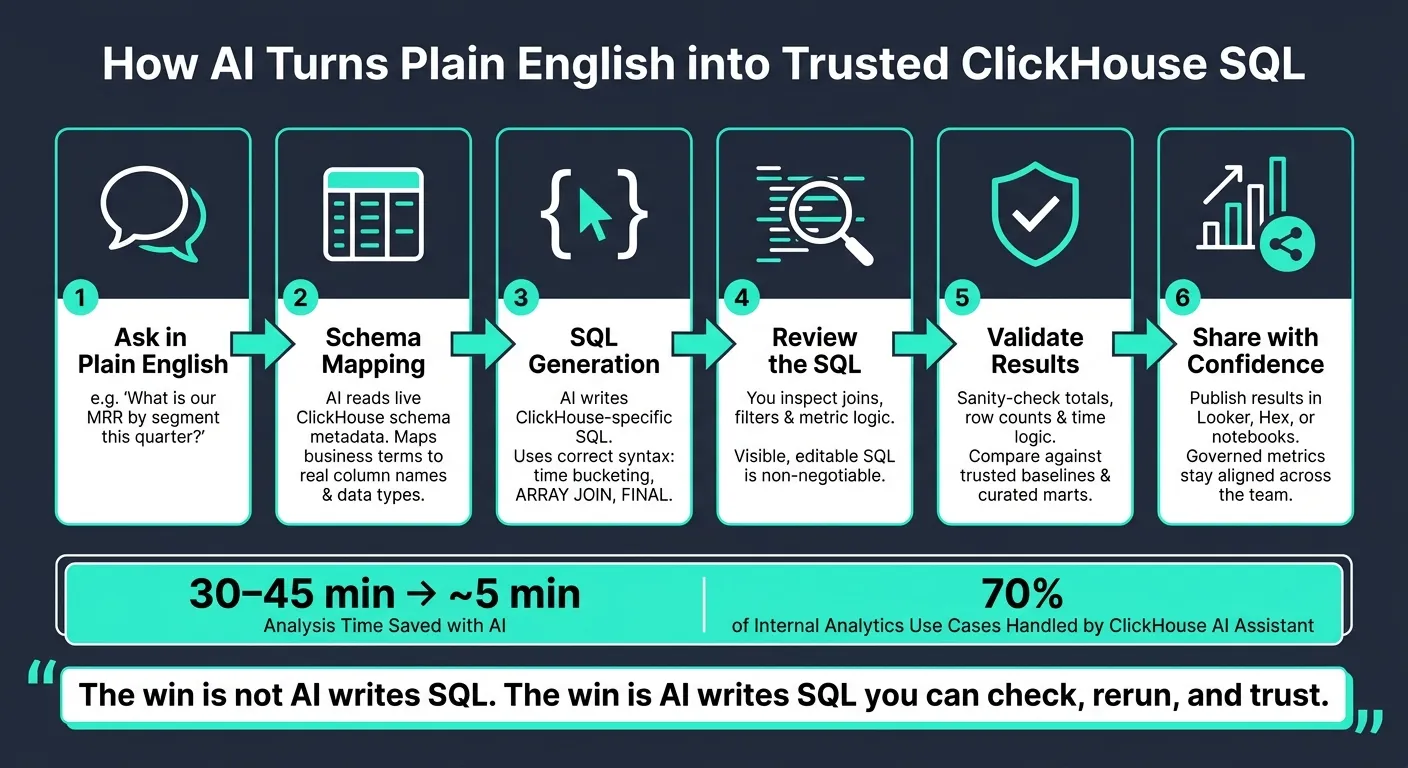
Here’s the core idea in simple terms:
- I ask a business question in plain English
- The AI maps that question to my ClickHouse schema
- It writes ClickHouse SQL using the right syntax
- I review the SQL, joins, filters, and metric logic
- I sanity-check totals, row counts, and time logic
- Then I decide which interface fits my team: CLI, Cloud assistant, notebooks, or a governed workspace
A few points matter most:
- Prompt structure drives query quality
- Visible SQL matters more than polished output
- Metric definitions must come from a shared source
- Live warehouse access beats static exports
- Validation is the step that makes results safe to use
If I had to give the shortest version possible, it would be this: AI is good at speeding up the first draft of a ClickHouse query. It is not a substitute for schema checks, metric rules, or result validation.
Quick comparison
| Option | SQL visible | Shared metric rules | Live warehouse | Best fit |
|---|---|---|---|---|
| ClickHouse CLI | Yes | Low | Yes | Solo technical users |
| ClickHouse Assistant | Yes | Medium | Yes | Cloud users in the console |
| Notebooks | Yes | Medium | Yes | Analysts doing iterative work |
| Governed workspace | Yes | High | Yes | Business teams that need review and consistency |
| Querio | Yes | Very high | Yes | Teams that want one shared context for all users |
So when I read this article, the main takeaway is clear: the win is not “AI writes SQL.” The win is “AI writes SQL that I can check, rerun, and trust against my warehouse rules.”
What AI querying in ClickHouse actually does
AI querying turns a business question into ClickHouse SQL. The result is only as good as the system’s ability to map business terms to the logic in your warehouse.
How a plain-English question becomes ClickHouse SQL
It starts with schema inspection. The AI reads live schema metadata so it can anchor the answer to actual column names and data types instead of making them up [2][5]. After that, it maps business language to technical logic. A term like MRR or active sessions may need a definition from your semantic layer, not a raw column name [1].
Next, it writes ClickHouse SQL with ClickHouse-specific syntax like time bucketing, ARRAY JOIN, or FINAL. If the model doesn’t know ClickHouse well, it can produce SQL that looks right but gives the wrong answer. That’s why visible, editable SQL matters. Without it, you can’t check the joins, filters, or metric logic. That context-aware translation layer is also why prompt structure has such a big effect on accuracy.
Where Querio fits in this workflow
Querio connects straight to your live ClickHouse instance. When you ask a question, in the app or in Slack, it uses context your data team keeps as plain files in a git repo you own: joins, metric formulas, and business definitions. So when the AI sees MRR, it can use the governed metric instead of guessing from a raw column [1]. Each answer is SQL and Python in a notebook your analysts can open, check, and rerun. Changes to that context go through pull requests. To give Claude or Cursor direct access, see how to set up the ClickHouse MCP server with limits the agent can't turn off.
At that point, prompt design becomes the main driver of accuracy.
How to write questions that produce valid ClickHouse SQL
AI-generated ClickHouse SQL only works when your prompt gives enough context. Otherwise, the model fills in the gaps with its own guess, and that guess may not match how your warehouse works.
The examples below show how to make that context plain.
Prompt structure: metric, time range, grain, filter, output
Use this order in your prompt: metric, time range, grain, filter, output.
| Component | Purpose | B2B SaaS Example |
|---|---|---|
| Metric | Defines the calculation logic | "Monthly Recurring Revenue (MRR)" |
| Time Range | Sets the WHERE clause boundaries |
"For the last 12 months" |
| Grain | Determines the GROUP BY function |
"Grouped by month" |
| Filter | Excludes noise or irrelevant data | "Exclude refunded transactions and internal accounts" |
| Output | Defines dimensions and ordering | "Break down by industry, order by revenue descending" |
Here’s what that looks like in practice: "Calculate total MRR for the last 12 months, grouped by month and customer segment, excluding all internal and trial accounts." That gives the model the time frame, grain, and filtering rules it needs to write a more accurate query.
The same structure works for revenue, conversion, and segment analysis.
"Include as much useful context as possible in your question. Be specific about: Time periods or date ranges, the type of analysis you want (averages, totals, rankings, etc.), and any filtering criteria." - ClickHouse Docs [2]
3 business questions AI should handle well
Revenue trends, trial-to-paid conversion, and top segments tend to work well when you define the metric and filters up front.
Revenue trends by month: "Calculate total MRR for the last 12 months, grouped by month and customer segment, excluding internal and trial accounts." [1]
Trial-to-paid conversion: "Calculate the trial-to-paid conversion rate for users who triggered 'trial_start' followed by 'payment_success' in Q1 2026." [1]
Top segments by ARR: "Show the top 10 customer segments by ARR for Q1 2026, broken down by industry, excluding accounts below $10,000 ARR." [1]
Prompt mistakes that produce wrong answers
Vague prompts often lead to misleading SQL. If you ask for "top customers by ARR" or "growth in the last 90 days", the model still has to guess what those terms mean in your business.
"Data without context is useless, and this is exponentially true for LLMs." - Dmitry Pavlov, ClickHouse [4]
Be plain about the timezone and the exact timestamp column, such as created_at or updated_at. If you skip either one, daily or monthly rollups can shift dates or use the wrong column.
When the prompt is specific, the SQL gets much closer to what you need. Even then, check it against your schema and metric definitions before you share the result.
How to verify AI-generated SQL before sharing results
Even if a query runs, it can still be wrong. So before you share results in Looker, Hex, or a notebook, check the SQL against your schema and your metric definitions. Good prompts help. Validation is what makes the answer safe to share.
Check the SQL against your schema and metric definitions
Start with the basics: is the query using the right ClickHouse tables, and do the column names exist? AI tools often invent columns that sound right but aren't in your schema. If your AI tool has a live schema check, confirm that it read the current tables and columns before it wrote the SQL.
Use your dbt models or semantic layer as the source of truth. Don't rely on the model's best guess from raw column names. If a field stores codes, spell out the mapping. A model can't know what 1, 2, or 3 mean just by looking at them.
Then look at the joins. A bad join can multiply rows and inflate totals without throwing any clear error. That's why the SQL needs to stay readable, editable, and rerunnable. If you can't inspect it, you can't spot broken joins or shaky metric logic before the result goes out.
Once the SQL lines up with your schema and metric definitions, move on to the output itself.
Sanity-check totals, row counts, and time logic
A query can be valid SQL and still be analytically off. Compare the result to a baseline you trust, like a curated mart. If the AI-generated query gives you a meaningfully different number, something is off. Maybe it's a duplicated join. Maybe a filter is missing. Maybe the metric logic drifted.
Also check the time logic. Make sure the query uses:
- An explicit date range
- The right timestamp column
- Explicit timezone handling
It also helps to test the query on a small date range first, or add LIMIT to get a quick look. That's a simple way to catch nulls, duplicates, and the wrong distinct key before you spend time on a full run.
For user and funnel metrics, confirm that the query uses COUNT(DISTINCT user_id) or the right unique identifier for that metric.
Once the SQL clears those checks, you can compare the interfaces that show it.
AI query interfaces for ClickHouse: a practical comparison
Once the SQL is verified, the next step is picking the interface your team can use again without drifting away from agreed metrics. After validation, choose the option that best keeps governed metrics intact, leaves SQL open for review, and works against live warehouse data. The goal is simple: use the lightest tool that still keeps answers lined up.
Comparison table: governance, inspectability, live data, and collaboration
| Interface | Setup | SQL Transparency | Metric Governance | Direct Warehouse Connection | Best For |
|---|---|---|---|---|---|
Native ClickHouse CLI (?? prefix) |
Minutes - just an API key | High - shows thinking steps and final SQL | Low - schema discovery only | Yes | Developers and DBAs doing quick exploration |
| ClickHouse Assistant (Cloud console) | Instant - built into the console | High - editable SQL in the editor | Medium - customizable with AGENTS.md |
Yes | Cloud users who need help with SQL or docs Q&A |
| Notebook workflows | Medium - requires connector setup | High - fully editable code | Medium - depends on analyst discipline | Yes | Analysts doing iterative, visual data work |
| Governed self-serve workspace | Medium - connection setup | High - validated queries | High - validation space | Yes | Non-technical stakeholders and business teams |
| Governed workspaces (Querio) | High - semantic layer setup | High - inspectable and editable SQL/Python | Very high - shared semantic context layer | Yes - direct warehouse connection | Organizations requiring strict metric alignment |
The native ClickHouse CLI is fast for individual developers and DBAs. But it's still a one-person workflow, with no shared metric layer. That means two analysts can end up writing different SQL for the same revenue question.
ClickHouse Assistant in the Cloud console adds more control for teams. Its AGENTS.md file lets you define business logic such as what "revenue" or "churn" means for your team [1].
Notebook workflows work well for iterative analysis and chart-heavy work. The tradeoff is simple: metric consistency comes down to team habits.
When Querio fits this workflow
The main question isn't just speed. It's whether the interface keeps the metric definitions set earlier. Querio fits best when the bigger issue is making sure every person who asks a question gets the same answer.
That's the governed self-serve problem. A business user, an analyst, and a dashboard should all pull from the same definition of "qualified pipeline" or "30-day retention." Querio's context lives in a git repo, and saving a change to it opens a pull request. So every query uses the same definitions, including the ones no data engineer had time to review.
What sets Querio apart here is inspectable SQL/Python plus reactive notebooks. Querio shows the SQL and Python behind each answer, so teams can inspect the logic and reuse it later. Claude, ChatGPT, Claude Code and Cursor can work from the same definitions through Querio's MCP server and CLI. On ClickHouse, queries run through a service account plus Querio's permission policies, so an agent sees only what its user may see. For data teams at B2B SaaS companies already running ClickHouse, and trying to give non-technical stakeholders access without piling up tickets, that mix of transparency and governance is where Querio earns its place in the stack.
Conclusion: Faster ClickHouse answers without losing control
AI can turn a plain-English ClickHouse question into SQL fast. But speed alone doesn't help much. The answer only matters when the prompt is specific and the SQL is checked against your schema and metric definitions.
Once that SQL is confirmed, the next step is scale. And that part needs care.
"An AI-ready warehouse isn't just about adding a chatbot on top of your warehouse. It's about meeting the requirements of conversational analytics with the core tenets of data warehousing." - Amy Chen, ClickHouse [3]
That’s why warehouse-native AI needs to follow the same modeling rules as the rest of the analytics stack. The teams that get the most from it treat AI querying as a governed workflow: specific prompts, curated data, and benchmark checks. Those habits keep revenue, churn, and retention queries aligned across the team, so AI output becomes numbers people can rely on.
For teams that want to open access to analysts and business users, a shared semantic layer - whether that’s an AGENTS.md file or Querio's context files in git - helps keep everyone working from the same metric definitions for revenue, active sessions, and churn. That’s how self-serve analytics stays fast without drifting away from agreed definitions.
Live warehouse connections, inspectable SQL, and governed metric definitions turn AI speed into answers you can count on.
FAQs
How accurate is AI-generated ClickHouse SQL?
AI-generated ClickHouse SQL can be a big help for exploratory analysis. It gets you from question to draft query fast.
That said, treat the output like a first pass, not a finished answer. A human still needs to review it.
AI can look at schema details like tables, column types, and sample values and then write SQL that fits ClickHouse. That's useful. But it can still get tripped up by warehouse designs that are hard to read or metric definitions that aren't crystal clear.
If you want results you can trust, set some guardrails:
- Use a governed semantic layer
- Expose only curated data marts
- Give clear instructions for complex metrics
Those steps make it much easier for the model to produce SQL that matches how your business actually defines the data.
What should I validate before trusting the results?
Before you trust AI-generated results, check the SQL, your business definitions, and the guardrails you use in ClickHouse.
Start with the metric logic. Make sure the query uses your canonical metric definitions, not just raw columns pulled straight from a table. That sounds small, but it can change the answer in a big way.
Then look at the query shape. It should include the right filters and a LIMIT so you don't trigger a full table scan when you don't need one. In ClickHouse, that kind of slip can hit both speed and cost fast.
You’ll also want to confirm the query follows role-based access controls and resource limits. That helps protect data, keeps usage in bounds, and cuts down the risk of someone getting answers they shouldn’t see.
When do I need a semantic layer for AI queries?
You need a semantic layer when you need consistent business definitions so AI queries don't spit out conflicting or inaccurate metrics.
It gives the model a governed set of business rules, calculations, and terms. So instead of guessing from messy raw tables, it works from a shared source of truth.
That matters most for metrics like revenue, retention, and session counts, where even a small definition gap can throw off the numbers.