Business Intelligence
Databricks Genie Pricing Explained (and How to Get AI/BI for Less)
AI tools add LLM fees plus SQL warehouse compute; costs spike with oversized or idle warehouses. Right-size, auto-stop, and curate data.
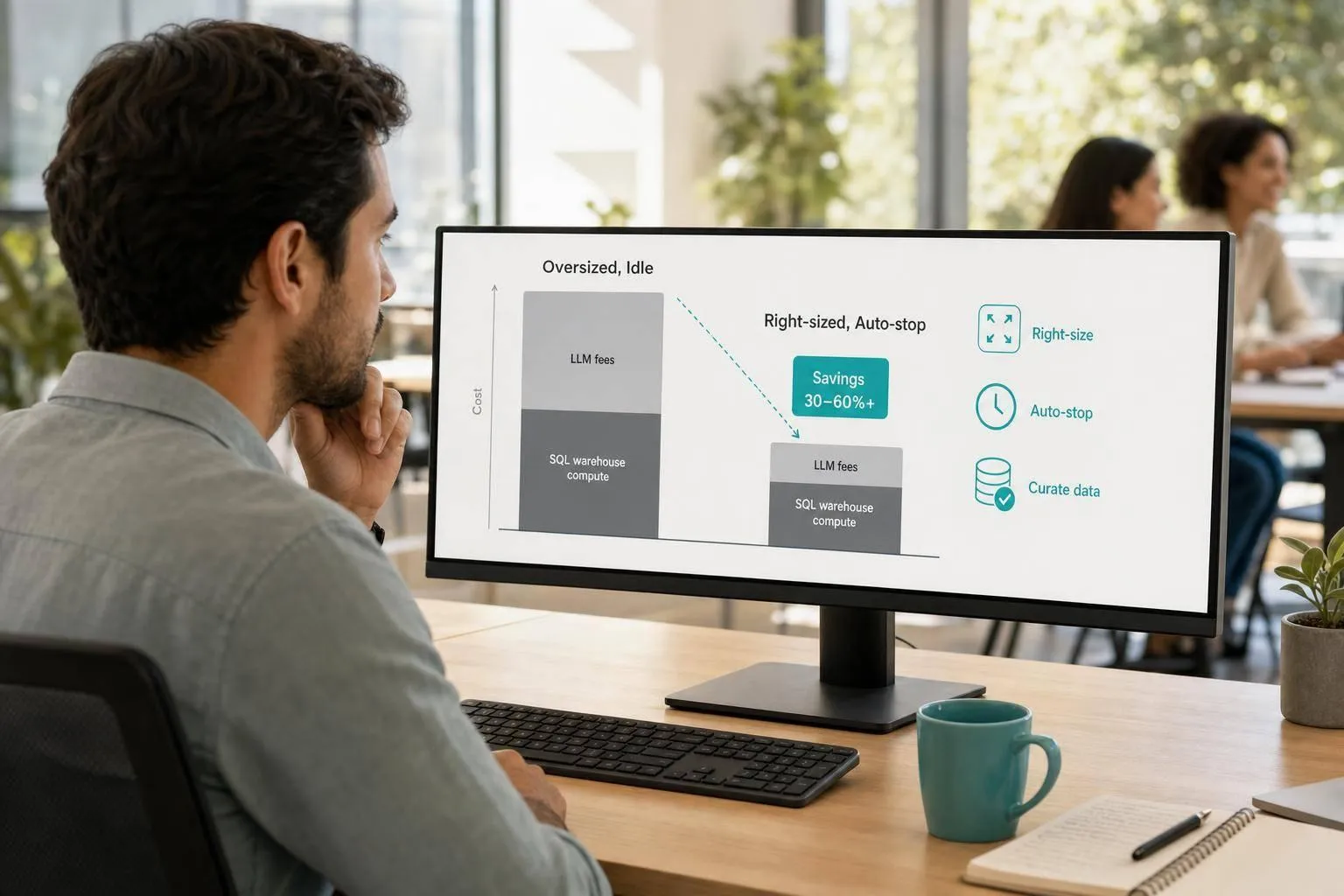
Databricks Genie is not just an AI fee. It is an AI fee plus SQL warehouse spend. That is the main thing I’d want to know before I budget for it.
If I boil this down to the few facts that matter most, it looks like this:
- Each named user gets 150 free DBUs per month, worth about $10.50 in US East
- That free tier does not cover warehouse compute
- Warehouse cost often matters more than question count
- An X-Small warehouse runs at 4 DBUs/hour
- A Small warehouse runs at 12 DBUs/hour
- Serverless SQL list price is about $0.70 per DBU
- Raw tables can push Genie into full-table scans and retries
- Gold-layer views, short auto-stop settings, and budget caps can cut waste
So if you want the short answer: Genie gets expensive when the warehouse is too large, stays on too long, or points at messy data. And if I were trying to lower spend with a budget-friendly stack, I’d start with warehouse sizing, 5-minute auto-stop, Gold-layer views, and usage caps.
This article also compares Genie with Querio, Snowflake Cortex, ThoughtSpot, and Looker so you can see how each pricing model shifts cost between software fees, seats, and compute.
Quick Comparison
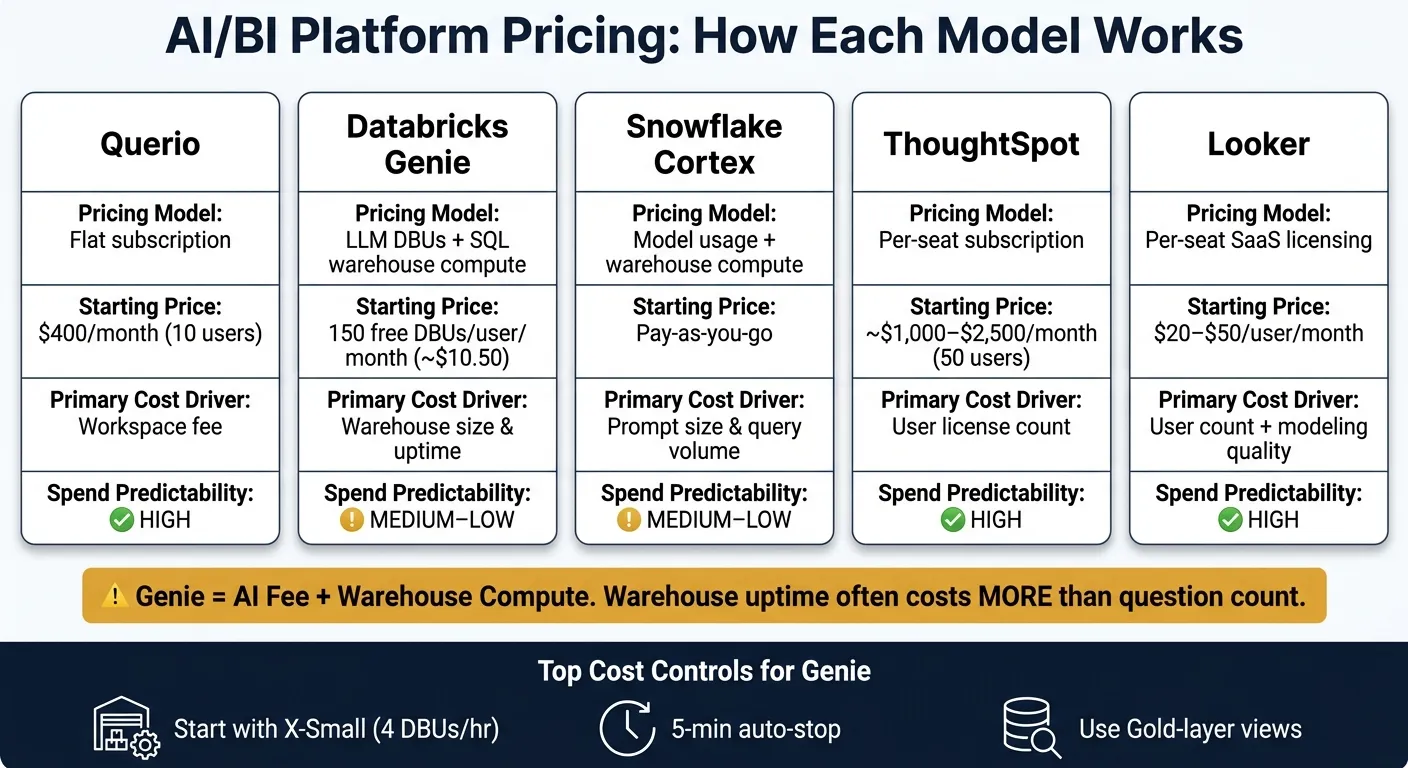
| Platform | Pricing model | Main cost driver | Cost visibility |
|---|---|---|---|
| Querio | Free plan; Core $2,499/month with 10,000 AI credits, then per credit | Plan fee + AI credits past the allowance + your warehouse spend | High |
| Databricks Genie | LLM DBUs + SQL warehouse compute | Warehouse size, uptime, data modeling | Medium to low |
| Snowflake Cortex | Model usage + warehouse compute | Prompt size, query volume, warehouse activity | Medium to low |
| ThoughtSpot | Per-seat pricing | User count, plus AI add-ons | High |
| Looker | Per-seat pricing, often $20–$50/user/month | User count + modeling work underneath | High |
If I were choosing between them, I’d focus less on sticker price and more on how the bill grows as usage grows.
1. Querio
Querio keeps AI/BI costs easy to plan. Each plan includes a monthly allowance of AI credits, admins can set a spending cap, and warehouse compute continues on the platform you already use.
Pricing Model
Querio has no per-seat pricing: unlimited users on every plan. It has a free plan with 500 AI credits a month, and Core is $2,499/month (or $25,000 a year billed annually) with 10,000 AI credits a month. One credit is one AI model call, and extra credits are $0.50 each on Free and $0.25 on Core. Usage shows as it happens, and admins can set alerts and a spending cap, so no meter runs unnoticed in the background.
Cost Drivers
Your direct software cost comes from the plan fee plus any AI credits past the included allowance. Dashboard refreshes, automations and running SQL or Python use no credits. Warehouse compute is billed separately through Snowflake, BigQuery, Redshift, ClickHouse, or PostgreSQL.
Cost-Control Options
Querio’s governed semantic/context layer helps teams set joins, metrics, and business terms once, then reuse them across AI-generated answers, notebooks, dashboards, and scheduled reports. In plain English, that cuts down on duplicate metrics, one-off SQL rewrites, and analyst cleanup work.
Role-based access controls and SSO integrations help manage who can see what without shutting down self-serve access. That can reduce the flood of ad hoc requests that often leads to unplanned warehouse costs.
| Factor | Querio |
|---|---|
| Pricing structure | Plan fee with included AI credits |
| Starting price | Free plan; Core $2,499/month |
| Unlimited users | Yes, on every plan |
| Warehouse compute | Billed separately by your warehouse provider |
| Usage-based metering | Per AI credit past the included allowance |
| Spend predictability | High - fixed plan fee, live usage and spending caps |
That setup, with a cap on AI spend, becomes more important as usage and query volume climb.
2. Databricks Genie
Databricks Genie charges for two things: the AI layer and SQL warehouse compute. So your total cost comes from both DBUs and how long the warehouse stays up.
Pricing Model
The AI layer handles the work of turning user questions into SQL and then returning answers. Each named user gets 150 free DBUs per month, which is worth about $10.50 in the US East region. After that, usage is billed pay-as-you-go [1][5].
Service principals don't get any free monthly allowance. They're billed for all usage from the start [2].
In most cases, though, the larger bill comes from warehouse compute, not the AI layer. That’s why warehouse size and table design usually have more impact on spend than the number of questions users ask.
Put simply: warehouse uptime tends to matter more than question count.
Cost Drivers
Warehouse size is the fastest way to change cost. An X-Small warehouse runs at 4 DBUs/hour, while a Small runs at 12 DBUs/hour [4]. So if you're running simple lookups on a Medium or Large warehouse, costs can pile up fast.
The data layer matters too. If Genie runs against raw Silver-layer tables instead of curated Gold-layer views, it can trigger extra SQL retries and full table scans across 100-million-row datasets [4]. That kind of setup gets expensive fast. Gold-layer views usually answer faster and cost less than raw tables.
Cost-Control Options
Account admins can use the databricks-product: genie resource tag in the Unity AI Gateway to set budget thresholds and block usage once a limit is hit [2][3].
| Control | What It Targets | Recommended Action |
|---|---|---|
| Warehouse size | SQL compute | Start with a Serverless X-Small warehouse; scale up only if queuing appears [4] |
| Auto-stop setting | SQL compute (idle time) | Set auto-stop to 5 minutes; Serverless restarts in 2–6 seconds [4] |
| Data layer | SQL compute | Use Gold-layer aggregate views, not raw Silver-layer tables [4] |
| Budget thresholds | LLM usage | Set per-user limits via Unity AI Gateway and enable "Block usage" [2][3] |
| Metadata quality | SQL compute | Add column comments and metric definitions to reduce bad SQL rewrites [4] |
These controls help, but the biggest savings usually come from using smaller warehouses and keeping the semantic layer clean.
One more thing: the UI limit is 20 questions per minute, and the API limit is 5 per minute [4]. That can matter if you're planning broad self-serve access using warehouse-native data analysis tools.
3. Snowflake Cortex
Snowflake Cortex is easy to get up and running. The catch is cost: AI/BI spend can climb fast when model calls and warehouse usage start growing at the same time.
Pricing Model
Snowflake Cortex AI/BI spend comes from two buckets: model calls and warehouse compute. That split can make total cost harder to predict, especially when AI queries start blending into normal Snowflake usage.
Cost Drivers
Cortex spend tends to rise fastest when both query volume and prompt length go up. If you send broad schema context or long chat history, token usage increases. On top of that, warehouse execution and model usage are billed as separate cost components [1][4], so each one can grow on its own as self-serve usage expands.
Cost-Control Options
The biggest lever is prompt design. A team that keeps prompts short and reuses existing warehouse patterns will usually spend much less than a team that sends large schema context and heavy self-serve query volume through the same account.
A few moves help right away:
- Keep system prompts tight
- Limit schema context to only the metadata that matters when you build self-serve analytics
- Track AI-driven warehouse usage separately from general analytics
| Control | What It Targets | Recommended Action |
|---|---|---|
| Prompt length | LLM token usage | Trim schema context and pass only relevant metadata |
| Query volume | LLM usage | Limit broad self-service analytics where appropriate |
| Warehouse usage | Execution compute | Track AI-driven warehouse activity separately from general analytics |
Cortex is much easier to forecast when AI queries stay small, focused, and separate from broader warehouse workloads. In practice, that puts most of the pressure on prompt discipline and warehouse monitoring before moving to the next platform.
4. ThoughtSpot
ThoughtSpot is priced more like a seat-based SaaS product than a compute-metered platform like Databricks Genie. In plain English, you pay for access by user instead of paying based on compute and LLM activity.
Pricing Model
ThoughtSpot is usually sold as a per-seat subscription. At 50 users, seat costs are roughly $1,000 to $2,500 per month.
Cost Drivers
If you're comparing it with Genie's variable spend, here's the big split: ThoughtSpot costs go up with seats, not query volume. The main lever is user count. Each added licensed user pushes the bill higher. AI add-ons can also bring separate usage-based charges.
Spend Predictability
Seat-based billing is easier to forecast because costs change only when license counts change. That makes life simpler for finance teams. The downside? Unused seats still cost money.
Cost-Control Options
Two simple moves help keep spend in check:
- Audit seats on a regular basis
- Limit AI analytics solutions for the users who actually need them
| Factor | ThoughtSpot | Databricks Genie |
|---|---|---|
| Pricing model | Per user per month | Compute (DBUs) + LLM usage |
| Cost at low usage | Same as high usage | Lower |
| Primary cost lever | User license count | Query volume and warehouse sizing |
That kind of predictability can make budgeting easier, but the next tradeoff comes from how governed BI layers shape warehouse-native analytics costs. Understanding what is a data warehouse and how it interacts with BI tools is key to managing these expenses.
5. Looker
If you're aiming for seat-based pricing, Looker fits that model. The trade-off is simple: your warehouse still needs solid modeling behind the scenes. Compared with Databricks Genie, Looker is easier to budget for because the core fee is based on seats, not query volume or warehouse uptime.
Pricing Model
Looker is often priced at $20 to $50 per user per month [4]. In plain English, the main platform fee is tied to how many people have access, not how many queries they run.
Cost Drivers
The biggest cost lever is user count. That makes Looker easier to plan for than Databricks Genie.
But there's a catch. Seat-based pricing doesn't erase the work needed to keep your warehouse clean and well modeled. If metadata is messy or models are weak, costs can creep up downstream. Teams spend more time fixing reporting issues, analytics work gets less efficient, and AI-powered queries are more likely to underperform.
Spend Predictability
On the software side, Looker is fairly predictable because licensing is seat-based. The less predictable part sits underneath it: messy metadata and weak modeling can still add analytics overhead.
Cost-Control Options
The best way to keep spend in check is pretty practical:
- Match seats to actual user demand
- Keep metadata clean and models well curated so people work from structured data
| Factor | Looker | Databricks Genie |
|---|---|---|
| Pricing model | Per-user SaaS licensing | Usage-based pricing |
| Platform cost predictability | High | Lower |
| Primary cost lever | User count | Usage volume and warehouse sizing |
| Modeling quality | Impacts downstream analytics efficiency | Impacts SQL retry rate and compute spend |
Looker keeps license spend predictable, but total analytics cost still climbs as user count grows and modeling quality slips.
Where Databricks Genie Gets Expensive and How to Cut Costs
Genie costs stack up from three places: warehouse uptime, warehouse size, and AI usage. As of 2026, Serverless SQL list price is about $0.70 per DBU [4]. So before you tweak prompts or lock down access, look at warehouse sizing first.
The easiest way to burn money is simple: pick a warehouse that's too big. A Small warehouse can often handle 20–30 active users because AI-driven queries tend to come in bursts, not in a steady stream [4]. At list price, running a Small warehouse for 4 hours a day lands at about $672/month, or around $7 per user for a 100-person team [4].
The other big budget drain is poor data modeling. If Genie points straight at raw Silver tables with millions of rows, you can end up with full table scans and the same joins running over and over [4]. That adds up fast. Gold-layer metric views help trim scans and avoid repeated recalculation for common KPIs. And if table and column descriptions are missing in Unity Catalog, the LLM has to guess how tables connect, then retry when it gets things wrong. More retries means more compute spend [4].
If you're trying to cut costs fast, focus on a few practical moves:
- Use smaller warehouses
- Set short auto-stop windows, like 5 minutes on Serverless, which can restart in 2–6 seconds [4]
- Build Gold-layer views for common KPIs
- Use Unity AI Gateway budgets with "Block usage" turned on so LLM spend stops automatically at your limit [2][3]
That’s where the biggest savings tend to show up: fewer scans, less idle time, and fewer cases of runaway usage.
These levers can make Genie much cheaper. But cost predictability still comes down to one more thing: whether you chat with Snowflake, BigQuery, or Redshift using a usage-based or fixed-fee BI layer.
Pros and Cons by Platform
The main difference comes down to where your money goes: seats, compute, or governance.
This quick summary shows how each platform shifts cost, whether that’s a fixed subscription, per-seat licensing, or usage-based compute.
| Platform | Strengths | Cost Risks | Best-Fit Team Profile |
|---|---|---|---|
| Querio | Free plan; Core $2,499/month with 10,000 AI credits; unlimited users on every plan; editable SQL/Python; live connections to Snowflake, BigQuery, Redshift, and PostgreSQL | You need a real warehouse and well-defined metrics to get the most out of self-serve analytics; AI usage past the included credits is billed per credit | Teams that want predictable spend with spending caps, and governed self-serve on top of an existing warehouse |
| Databricks Genie | 150 free DBUs of LLM usage per named user each month [1][5]; Unity Catalog governance [4] | Warehouse uptime is billed separately from LLM usage, so idle compute keeps burning DBUs until auto-stop kicks in; raw or unmodeled data can lead to expensive scans [4] | Teams already on Databricks with curated Gold-layer data and strong Unity Catalog metadata |
| ThoughtSpot | Mature BI workflows; predictable per-seat pricing | Per-seat costs pile up whether people use the tool or not; AI add-ons may come with separate usage-based charges | Larger enterprises that prefer per-seat pricing and can absorb higher fixed BI spend |
| Looker | Mature BI workflows; predictable per-seat pricing | Per-seat licensing runs $20–$50 per user per month before usage even starts [4]; downstream analytics costs go up when metadata and models are weak | Teams that want seat-based cost predictability and maintain strong LookML modeling discipline |
So the next step isn’t asking which tool looks cheapest on its own. It’s asking which cost model lines up with your warehouse setup, team size, and governance workload.
Conclusion
The real issue is simple: can your warehouse design keep compute spend under control?
Genie charges in two parts. You pay monthly DBU allowances for the AI layer, and you also pay separate SQL warehouse compute. Total cost then depends on a few things: model adoption, question volume, query complexity, and warehouse size.
The biggest savings come from managing both cost buckets at the same time. That usually means:
- Right-sizing the warehouse
- Setting auto-stop aggressively
- Pointing Genie at curated Gold-layer metric views
- Keeping metadata complete so the LLM writes clean SQL on the first try
That’s why Genie tends to fit teams that already run a tight ship on warehouse usage. Put bluntly, Genie is not "free AI". It’s an AI-plus-compute bill that tends to work best for teams already standardized on Databricks and Unity Catalog.
FAQs
How do I estimate my total Genie cost?
Estimate total Databricks Genie cost from two parts: compute and LLM usage.
You pay for the SQL warehouse that runs Genie-generated queries, based on DBU consumption while the warehouse is active. That means cost starts with the warehouse itself, not just the prompts people type into Genie.
To cut idle spend, use serverless warehouses with aggressive auto-stop settings. If a warehouse sits there doing nothing, you're still paying while it's active, so short auto-stop windows can save money.
Genie also uses pay-as-you-go LLM pricing. Each user gets 150 DBUs free per month, and any usage above that is billed in DBUs.
When does warehouse spend overtake AI usage?
Warehouse spend usually passes AI usage once query volume and query complexity go beyond Genie’s monthly free allowance of 150 DBUs for LLM interactions.
Here’s the key idea: Genie turns natural language into SQL, and that SQL runs on a SQL warehouse. So in most cases, the main ongoing cost is compute, not the AI layer itself.
Even when AI usage stays inside the free limit, total spend can climb fast if you’re dealing with:
- an oversized warehouse
- aggressive auto-stop settings
- inefficient queries across large datasets
That’s why a setup can look cheap on the AI side but still get expensive once warehouse compute starts doing the heavy lifting.
What setup mistakes make Genie expensive?
Genie gets expensive mostly because of poor data modeling and weak compute control - not just because people run a lot of queries.
The usual problems are pretty simple:
- Missing metadata, which makes Genie work harder than it should
- Pointing Genie at raw or unoptimized data instead of clear, well-defined Silver-layer views
- Using oversized SQL Warehouses for basic lookups
If you want to cut surprise costs, focus on the setup first. Use aggressive auto-stop settings, and give Genie its own dedicated, right-sized warehouses for its workloads.