Business Intelligence
Beyond the Lakehouse: AI Analytics That Works on Any Warehouse
Run governed AI analytics on live warehouse data—no lakehouse rebuild. Use dbt and a shared semantic layer for consistent, inspectable SQL.
You do not need a lakehouse rebuild to start using AI on warehouse data. If your team already runs on Snowflake, BigQuery, Redshift, Databricks SQL, or Postgres, you can use AI for natural-language questions, metric analysis, and SQL generation on live data.
Here’s the short version:
Most 100–500-person B2B SaaS teams already have the core setup
AI analytics works best when it runs on live warehouse data
dbt + a shared metric layer help keep answers consistent
Read-only access and existing RBAC help keep control in place
Lakehouse-first projects often add time, cost, and extra data work
In plain English: if your team wants answers to questions like “Why did MRR growth slow?” or “What’s NRR by segment?”, the goal is not a new data stack. The goal is a setup that gives the same answer every time, with SQL people can review.
A few numbers make the case clear:
Target team size: 100–500 employees
Core workflows: 3
natural-language to SQL
metric slicing
AI notebooks
Data copies needed: 0
New warehouse platforms needed: 0
What matters most is simple:
Keep data where it is
Query it live
Use shared metric definitions
Let analysts inspect the SQL
Keep access tied to current warehouse rules
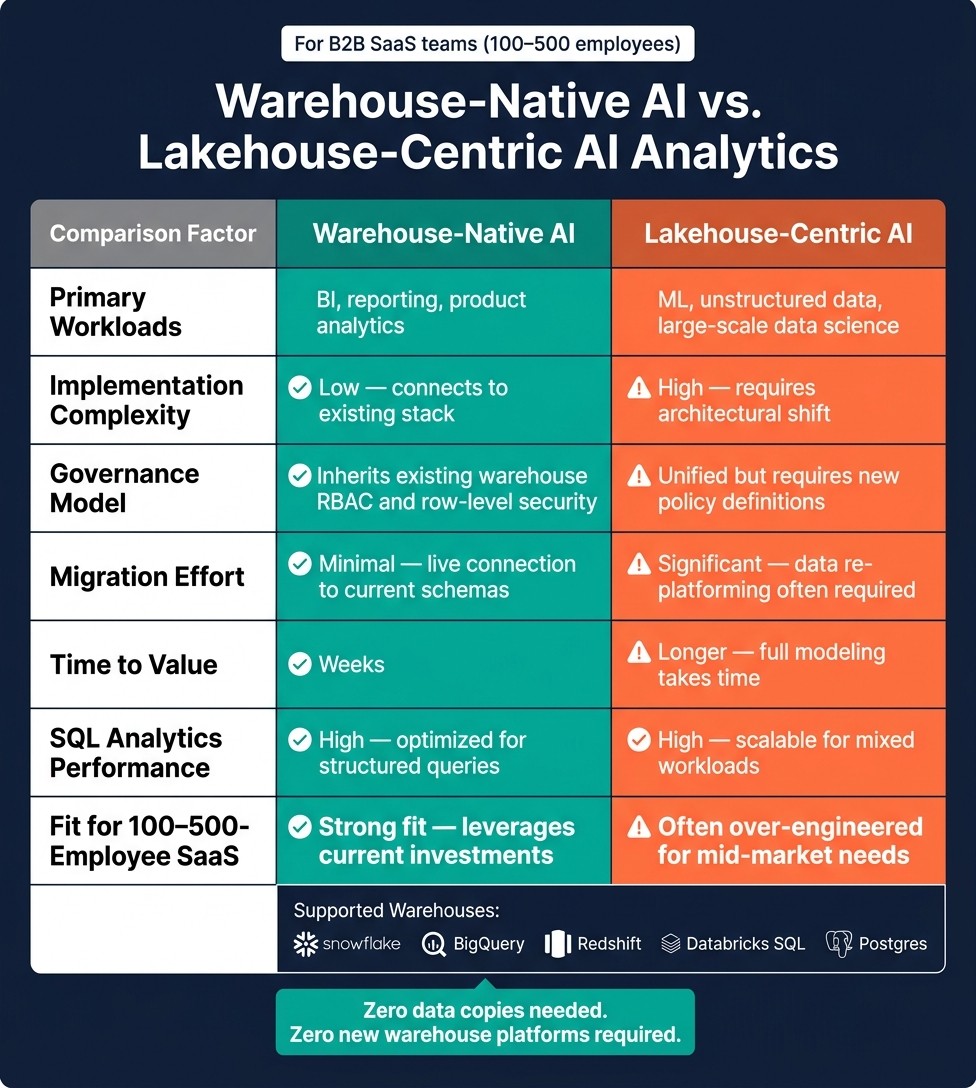
Warehouse-Native AI vs. Lakehouse-Centric AI Analytics for SaaS Teams
AI-Powered Data Warehousing on Databricks SQL

Quick comparison
Approach | Best for | Setup effort | Data movement | Governance path | Time to value |
|---|---|---|---|---|---|
BI, reporting, product analytics | Lower | None | Uses current warehouse controls | Weeks | |
Lakehouse-centric AI | ML, mixed data workloads, data science pipelines | Higher | Often required | New policy work across a new layer | Longer |
If I boil the article down to one point, it’s this: for most SaaS teams, AI analytics should sit on top of the warehouse you already use - not force a platform change first.
Why warehouse-native AI fits most SaaS teams better than a lakehouse-first approach
For most 100–500-employee B2B SaaS companies, the day-to-day analytics work is pretty straightforward. Teams need to track revenue, product usage, and churn, and they need answers without waiting on analysts every time a new question comes up. That work is structured, SQL-heavy, and usually well served by the data warehouse already in place.
A lakehouse starts to make more sense when the job is different - like training ML models on unstructured data or running large data science pipelines. That’s a separate use case from what most SaaS data teams are trying to handle right now. For the more common BI and product analytics workload, a warehouse-native stack is enough.
The bigger issue with a lakehouse-first move is timing. If you adopt Delta Lake or Apache Iceberg, redo ingestion pipelines, and reset governance across a new storage layer, it can take a while before the team sees better analytics. Warehouse-native AI works differently. It sits on top of the systems you already use. So the main question isn’t whether your warehouse can handle AI analytics. It’s how to connect to it cleanly.
Where data warehouses already meet AI analytics requirements
Modern cloud warehouses already check the boxes for AI analytics without forcing an architecture change. Snowflake, BigQuery, Redshift, and Databricks SQL all provide fast SQL for joins and aggregations. Postgres also works well for operational analytics and smaller-scale SaaS workloads.
These systems already support the access controls data teams care about. Snowflake, BigQuery, Redshift, and Databricks SQL support role-based access control (RBAC), schema- and table-level privileges, and row-level security. If an AI tool connects in read-only mode, it can inherit those same access rules automatically. Audit logs also stay in the same place your security team already watches.
dbt helps tie the whole setup together. Since dbt supports Snowflake, BigQuery, Redshift, Databricks, and Postgres, dbt models can give AI the business context it needs to produce governed SQL.
Lakehouse-centric vs. warehouse-native AI analytics: a side-by-side comparison
Both approaches have valid uses. Here, the comparison is about fit for SaaS BI and reporting. The tradeoff is pretty simple: move to a new platform for mixed workloads, or keep BI and product analytics on the warehouse you already run.
Warehouse-Native AI | Lakehouse-Centric AI | |
|---|---|---|
Primary workloads | BI, reporting, product analytics | ML, unstructured data, large-scale data science |
Implementation complexity | Low - connects to existing stack | High - requires architectural shift |
Governance model | Inherits existing warehouse RBAC and row-level security | Unified but requires new policy definitions |
Migration effort | Minimal - live connection to current schemas | Significant - data re-platforming often required |
Time to value | Weeks | Longer - full modeling takes time |
SQL analytics performance | High - optimized for structured queries | High - scalable for mixed workloads |
Fit for 100–500-employee SaaS | Strong fit - leverages current investments | Often over-engineered for mid-market needs |
The stack you need to run AI analytics on any warehouse
You don’t need to rip out your current setup to run AI analytics. In most cases, you need four layers working together: your warehouse, dbt for modeling, a context layer for business logic, and live warehouse connections. The real issue isn’t whether AI can work with your warehouse. It’s which layers keep answers steady from one query to the next.
Core components: warehouse, dbt, semantic layer, and live connections
The base layer is your warehouse. On top of that, dbt manages transformation and modeling. It takes raw tables and turns them into documented models that AI can query with less guesswork.
The third layer is a context layer: a shared place for metric definitions and joins. You define business logic once so each query pulls from the same source of truth. The fourth piece is a live connection to the warehouse.
When these layers are in place, the context layer becomes the main control point for every query.
Why the context layer is the control point
Without shared definitions, metrics like ARR, NRR, and active customers can drift across queries. Two analysts can ask the same question - "What's our ARR this quarter?" - and end up with two different answers because the SQL behind each one defines ARR in a different way. A shared context layer fixes that by setting the logic once: which tables join together, how filters work, and what counts as active MRR.
This gets even more important when AI is writing SQL. A governed context layer makes table relationships explicit instead of leaving them to inference, which means the SQL is verifiable and editable [1]. Querio's context layer stores metric definitions, join paths, and business terms so every answer uses the same governed logic. The SQL is inspectable and editable, ensuring transparency in how the AI interprets your business logic.
Snowflake, BigQuery, Redshift, Databricks SQL, and Postgres: how they compare for AI analytics
Each warehouse supports AI analytics a bit differently. For text-to-SQL workflows and governed self-serve use, the differences usually come down to SQL maturity, metadata support, and the kind of workloads your team already runs.
Warehouse | SQL Maturity | AI/Text-to-SQL Fit | Common SaaS Use Case |
|---|---|---|---|
Snowflake | High | Excellent (strong metadata and schema support) | General-purpose SaaS analytics and data sharing |
BigQuery | High | Excellent (serverless and strong with nested data) | Marketing analytics and high-scale event data |
Redshift | High | Good (standard SQL, mature) | Large-scale enterprise BI and legacy migrations |
Databricks SQL | High | Excellent (Unity Catalog for governance) | Unified AI, ML, and BI workloads |
Postgres | High | Good (extensible, widely supported) | Operational analytics and early-stage SaaS |
For most SaaS teams with 100 to 500 employees, Snowflake and BigQuery are common starting points. Their metadata and schema structure usually mean less manual setup for governed self-serve BI. Databricks SQL makes sense for teams already running ML next to BI. Redshift and Postgres are solid picks for teams that already have money, data, and workflows tied up in those systems.
That stack is what makes governed text-to-SQL, metric exploration, and reactive notebooks work day to day. Once the stack is in place, the next move is using it for governed natural-language queries and metric exploration.
3 warehouse-agnostic AI analytics workflows teams can use now
Once your warehouse, dbt, and context layer are set up, teams can start using AI in three practical ways. The nice part is that each workflow works across Snowflake, BigQuery, Redshift, and Postgres without forcing you to change metric definitions.
Natural-language questions that compile to governed SQL
Say a business user asks why MRR growth slowed this quarter. The system can turn that question into governed SQL and run it against live warehouse data, on the warehouse you already use, without a lakehouse rebuild.
What makes this work is the governed context layer that sits between the question and the warehouse. If that layer defines MRR, maps the right joins, and applies the right filter logic, the SQL that gets generated is predictable and repeatable.
And that part matters. Analysts don’t just want an answer. They want inspectable SQL so they can check joins, spot issues, and fix problems fast. That’s why natural-language querying is often the fastest route from a business question to a governed answer.
Metric exploration for business users without redefining logic
This workflow shines when teams want self-serve access without letting definitions drift.
If conversion rate, activation by segment, or ticket resolution time are defined once in a shared layer, a product manager can ask for the 30-day activation rate for enterprise accounts that signed up in the latest quarter and get a consistent answer. The logic is already locked in, so the system isn’t making up a new definition on the fly.
That same shared logic keeps metric exploration aligned across product, GTM, and ops. People can slice, compare, and dig into segments without reopening old debates about what a metric means.
Natural language, semantic metric exploration, and AI notebooks: how they compare
Each workflow fits a different kind of user and a different kind of question. Here’s where each one tends to work best.
Workflow | Best For | Speed to Answer | Governance Strength | Depth of Analysis | Best-Fit Use Case |
|---|---|---|---|---|---|
Natural-language querying | Business users, executives | Very fast | High (governed SQL) | Moderate | Quick metric lookups, one-off questions |
Governed metric exploration | Product, GTM, ops teams | Fast | Very high (predefined logic) | Moderate | Segment slicing, cohort comparisons |
AI notebooks (SQL + Python) | Analysts, data teams | Slower (iterative) | High (inspectable, editable) | Deep | Root-cause analysis, multi-step investigation |
AI notebooks are the right fit when the first answer leads to three more questions. An analyst might start by asking what NRR is this quarter, then drill into churn by customer tier, run a cohort retention query, and add a Python visualization, all against the same live warehouse connection.
Because the notebook reruns against live data, it stays in sync as the underlying model changes. That helps keep results aligned as the analysis goes deeper.
The next step is making those workflows secure, reliable, and consistent across warehouses.
How to make cross-warehouse AI analytics reliable, secure, and useful
Once the workflows are in place, two things decide whether people keep trusting them: fresh data and governed logic.
Use live warehouse access instead of extracts and CSV handoffs
Stale data is one of the fastest ways to lose trust in self-serve analytics. If people keep seeing old numbers, they stop relying on the system.
That’s why live, read-only warehouse connections matter. They keep answers current and preserve the permissions you already have in place. Querio connects to live warehouse data with encrypted, read-only credentials, so teams can keep access simple without exporting data or duplicating it.
Set governance rules before a broad self-serve rollout
Fresh data keeps answers current. Governance keeps answers consistent.
If you roll out self-serve analytics before governance is set, metric definitions start to drift and trust fades. The main controls are pretty simple:
Decide who owns each metric definition
Set how changes to shared logic get reviewed before they go live
Define which users or agents can access which data
Access should be limited by role and policy. Approved definitions, joins, and filters need to stay aligned with the same business logic used in query generation. And for AI-generated SQL, every query should be inspectable and editable so analysts can check joins, filters, and business logic before sharing results more broadly.
A useful governance baseline before any broad rollout:
Governance Area | What to Define Before Launch |
|---|---|
Metric ownership | Who approves changes to shared definitions in the context layer |
Access scope | Which users or agents can query which systems and datasets |
Human approval | When a workflow must escalate to a person before acting |
Auditability | How queries and outputs are traced back to source logic |
With those controls in place, self-serve analytics stays reliable across warehouses.
Conclusion: the practical path beyond the lakehouse
Most B2B SaaS teams don’t need a lakehouse-specific architecture to get real value from AI analytics. The data is already in the warehouse. What matters is pairing live connections with governed logic so natural-language querying, metric exploration, and AI notebooks stay consistent and trustworthy.
The practical path forward is governed, live access on the warehouse you already run.
FAQs
Do we need dbt to make AI analytics work well?
No. You do not need dbt to make AI analytics work well.
You can get reliable, governed results from a centralized semantic layer inside your AI analytics platform.
dbt can help organize and transform data. But platforms like Querio give teams a shared context layer where they can define business logic, joins, and metrics in one place. That means AI queries follow verified rules without needing a separate transformation tool or moving data.
How much setup is needed before teams can use this on live warehouse data?
Initial prototyping on live warehouse data usually takes 30 to 60 minutes. Getting that same setup ready for production takes longer.
The usual flow is pretty simple:
Set up a secure, read-only connection to Snowflake, BigQuery, or Redshift
Link a semantic layer such as dbt so business terms and metrics stay clear
Configure SSO and role-based permissions so access lines up with warehouse policies
When does a lakehouse make more sense than a warehouse-native approach?
A lakehouse makes more sense when your organization needs one environment for both structured, governed SQL reporting and more flexible analytics. That includes cases where you want to store raw, unstructured data without modeling it first.
Data warehouses are best for consistent, KPI-driven reporting and predictable SQL access. Lakehouses are more useful when your team has broader analytics needs across different data formats and processing speeds.
Related Blog Posts
Beyond the Lakehouse: AI Analytics That Works on Any Warehouse
What Is AI/BI? How AI Is Reshaping Business Intelligence Dashboards
Warehouse-Native AI Analytics vs Lakehouse BI: Which Fits Your Stack?
Related reading