Business Intelligence
Best Tools for AI Driven Data Analysis
Compare four AI analytics platforms—covering natural language queries, live data access, code transparency, governance, and pricing.
Business intelligence is evolving, with AI tools now offering predictive insights and real-time recommendations. This shift helps teams make faster, data-driven decisions, boosting productivity by 43% and improving forecasting accuracy by up to 28%. Here's a breakdown of four leading AI analytics platforms:
Querio: Focuses on transparency and live data access, allowing users to query data in plain English with full SQL/Python visibility. Pricing starts at $14,000 annually with no per-user fees.
Tableau with AI: Offers conversational analytics and automated insights but lacks transparency in AI outputs. Starts at $75 per user/month for creators.
DataRobot: Excels in predictive modeling and AI lifecycle management but is less suited for real-time queries. Enterprise pricing available on request.
Microsoft Power BI with Copilot: Integrates AI within the Microsoft ecosystem, generating DAX queries and summaries. Requires Premium plans starting at $30 per user/month.
Quick Comparison
Feature | Querio | Tableau with AI | Power BI with Copilot | DataRobot |
|---|---|---|---|---|
Natural Language | Yes (SQL-backed) | Yes (limited) | Yes (DAX generation) | Yes (predictive focus) |
Live Data Support | Direct warehouse | Hybrid (live/extracts) | Limited (DirectQuery) | Batch & real-time |
Code Visibility | Full (SQL/Python) | Limited | Partial (DAX view) | High (model-based) |
Governance | Centralized layer | Metadata catalog | Compliance tools | |
Pricing | $14,000+/year | $15–$75/user/month | $30+/user/month | Enterprise-only |
Querio stands out for its simplicity, live data access, and transparent pricing, making it a strong option for teams prioritizing clarity and control.
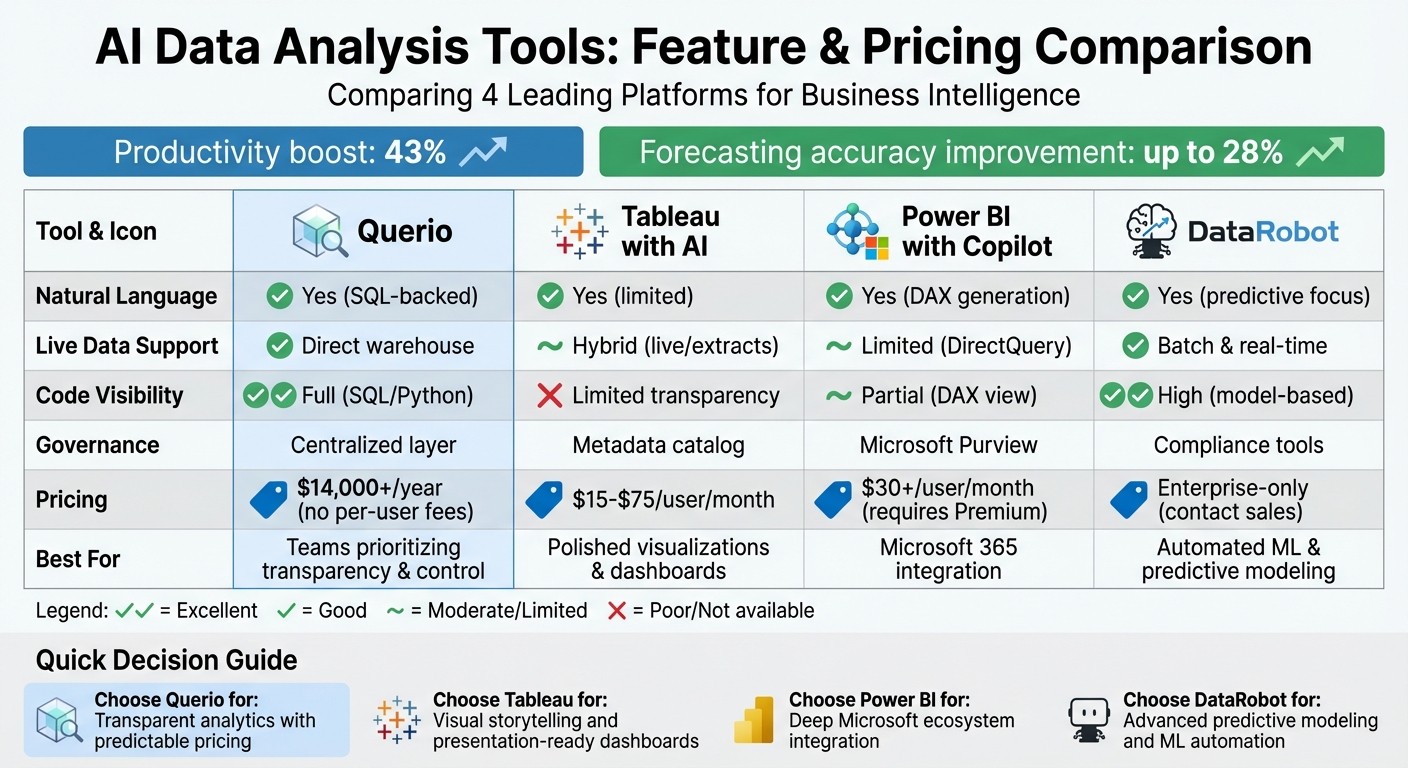
AI Data Analysis Tools Comparison: Features, Pricing & Capabilities
Best AI Tools Every Data Analyst Should Know in 2026
1. Querio
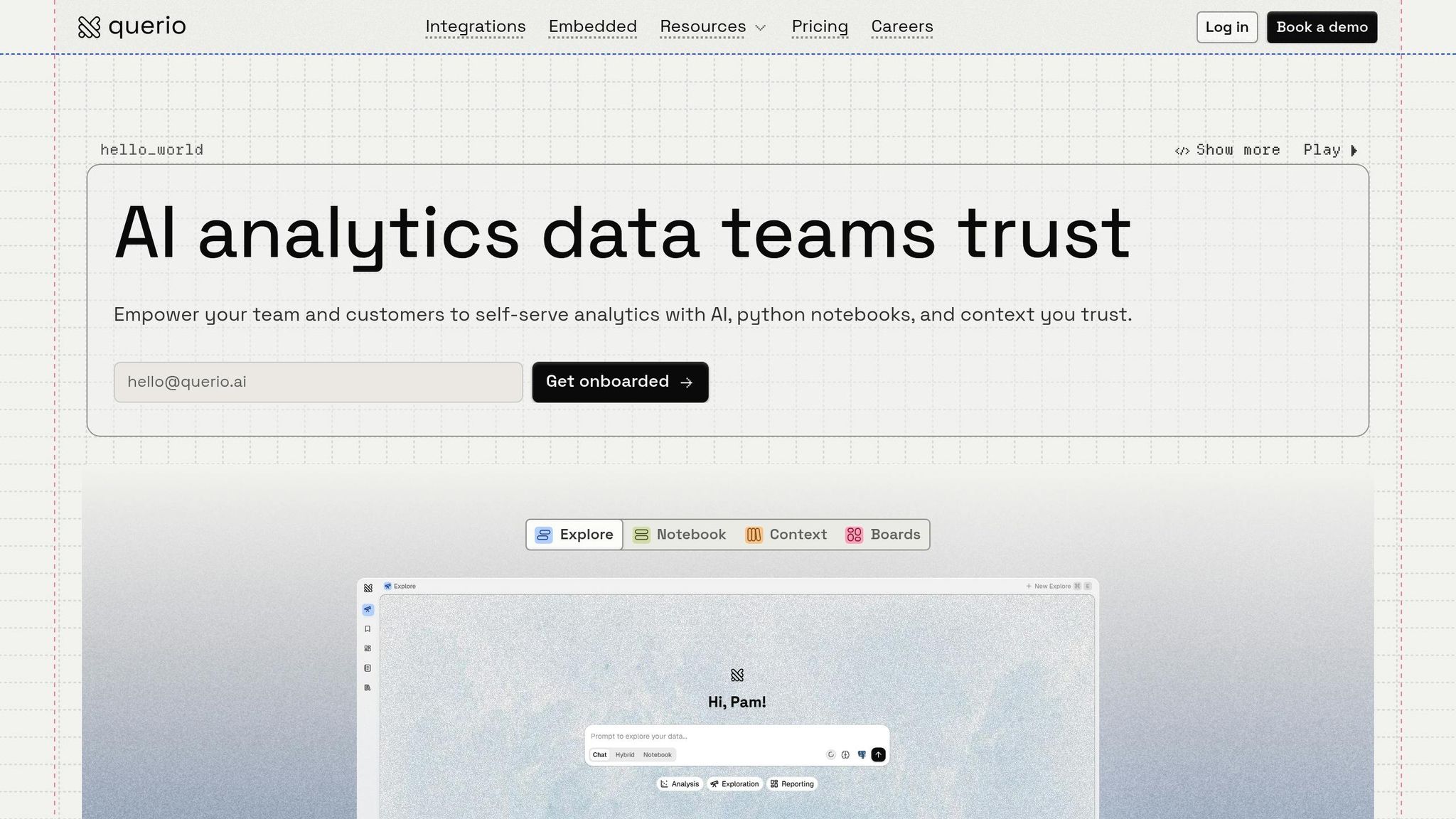
Querio is designed to make analytics straightforward and accurate. By connecting directly to your data warehouse - whether it’s Snowflake, BigQuery, Amazon Redshift, ClickHouse, or PostgreSQL - it allows users to ask questions in plain English. What makes Querio stand out is its commitment to transparency: every answer is backed by SQL or Python code that you can inspect. This combination of accessibility and visibility makes Querio an essential modern business intelligence and data warehousing tool.
Natural Language Analysis & Code Visibility
Querio transforms natural language queries, like "What were our top-performing products last month?", into SQL instantly. But it doesn’t stop there - it also shows you the code behind the results. This transparency ensures you’re not relying on a "black-box" AI but instead have full visibility into how conclusions are reached.
Each chart, dashboard, or AI-generated answer includes the underlying SQL or Python code for review. If something seems off - like a forecast or a metric - you can dive into the logic behind it. This feature is especially valuable for data teams who might need to refine queries or troubleshoot results, while non-technical users benefit from quick, easy-to-understand answers.
Real-Time Data Access
Querio works directly with your data warehouse in real time, using encrypted, read-only credentials. This means no duplicated data or outdated snapshots - dashboards and queries always reflect the most current information. Whether you're tracking KPIs or analyzing trends, you’re working with live, up-to-date data. This real-time capability pairs perfectly with Querio's transparency, ensuring insights are both timely and reliable.
Governance and Security Features
Querio goes beyond analytics by prioritizing data security and integrity. With a semantic layer, data teams can define joins, metrics, and business terms in advance. For example, when someone asks, "What’s our monthly recurring revenue?", Querio uses the official definition your team has set, avoiding inconsistent calculations.
The platform is SOC 2 Type II certified, supports role-based access controls, and integrates with standard SSO providers. For organizations with stricter requirements, Querio can even be deployed on your own infrastructure, giving you full control over your data environment.
Pricing and Deployment Options
Querio offers a free trial without limitations on usage or seats, making it easy to test the platform. Pricing is flexible and workspace-based, with a money-back guarantee. Querio positions itself as a premium yet competitively priced solution, with deployment options that include both cloud-hosted and self-hosted setups to meet various security and compliance needs.
2. Tableau with AI Integrations
Tableau's AI features are designed to turn raw data into actionable insights, much like other tools in this space. By leveraging Tableau Agent (formerly Einstein Copilot) and Tableau Pulse, Tableau integrates AI capabilities using Salesforce's Einstein Trust Layer. These tools enable users to visualize data, perform calculations, and analyze metrics through conversational interactions. However, one limitation is that the AI does not disclose the reasoning behind its outputs.
Natural Language Analytics
With Tableau Agent, users can create charts and prepare data simply by having a conversation with the tool. Meanwhile, Tableau Pulse generates natural language summaries of metric changes and automatically identifies trends. These insights can be delivered directly to platforms like Slack or Microsoft Teams, keeping teams up-to-date without the hassle of switching apps.
Tableau also introduces "agentic analytics" with features like the Concierge skill, which helps with root cause analysis, and the Inspector skill, which proactively monitors key performance indicators (KPIs). Southard Jones, Chief Product Officer at Tableau, explains:
"Tableau's approach to AI is a multi-faceted strategy to simplify analysis and deliver smarter, faster, and actionable insights for everyone" [5].
While these features are powerful, they require manual activation by administrators since they are disabled by default. Additionally, their effectiveness improves significantly when data fields are described in detail and enriched with metadata. Beyond analytics, Tableau prioritizes security to ensure data integrity.
Governance and Security
The Einstein Trust Layer incorporates features like PII masking, toxicity detection, and strict zero data retention policies. Tableau guarantees that customer data is deleted immediately after AI processing, thanks to agreements with LLM providers such as Azure OpenAI [7]. For organizations using Tableau Server (version 2025.3 or later), there's also the option to connect directly to a private LLM provider using custom API keys. This ensures that sensitive data remains secure and within organizational boundaries.
Pricing and Deployment
Access to advanced AI tools, including Tableau Agent, is limited to the Tableau+ premium offering [4]. Standard Tableau pricing begins at $75 per user per month, while Enterprise plans cost $115 per user per month [1]. Additional licenses for specific features range from $15 to $35 per user per month. Tableau supports over 1,000 data source connectors, but one downside is the lack of transparency in its AI processes - users must rely on the output without visibility into the underlying logic.
3. DataRobot
DataRobot provides a platform designed to manage the entire AI lifecycle. Its workflow is divided into three main components: Workbench for building and testing models, Registry for version control and compliance tracking, and Console for real-time monitoring [10]. This structured approach helps deliver accurate, actionable insights quickly. With automation at its core, the platform supports more than 40 modeling techniques across nine problem types, including anomaly detection and time series forecasting [10]. Tom Thomas, Vice President of Data Strategy at FordDirect, highlights the platform's efficiency:
"DataRobot helps us deploy AI solutions to market in half the time we used to do it before and easily manage the entire AI journey." [8]
The platform's natural language analytics capabilities are particularly noteworthy in today's fast-paced data environments.
Natural Language Analytics
DataRobot simplifies interaction with data through natural language querying, using its NextGen UI and "Talk to my Data Agent" application templates [10]. This feature enables users to interact conversationally while seamlessly handling both predictive tasks (like regression and classification) and generative AI tasks involving large language models (LLMs) or vector databases.
Code Inspectability
For those who prefer a hands-on coding approach, DataRobot offers full access through its Python client and REST API [10]. Users can toggle between graphical interfaces and code-based workflows. The platform also supports "Composable ML", allowing users to create custom Python or R blueprints tailored to their specific needs [10][12].
Governance and Security
DataRobot prioritizes governance and security, often managed through semantic layers, alongside its analytics capabilities. The Registry automatically generates compliance documentation and audit trails, which are essential for regulatory validation. It also includes dedicated tools for monitoring bias and fairness in training data [10][12]. Deployment options are flexible, ranging from managed SaaS to VPC and self-managed setups [8][10][11]. Thibaut Joncquez, Director of Data Science at Turo, emphasizes the platform's integration and ease of use:
"Nothing else out there is as integrated, easy-to-use, standardized, and all-in-one as DataRobot. DataRobot provided us with a structured framework to ensure everybody has the same standard." [8]
Pricing and Deployment
DataRobot offers a 14-day free trial, which includes access to hosted notebooks and pre-built AI agents [13]. For enterprise solutions, pricing is available upon request [9][13]. The platform has earned a 4.7/5 rating on Gartner Peer Insights, with 90% of users recommending it [8]. A standout success story involves a global energy company achieving a $200 million ROI by leveraging over 600 AI use cases on the platform [9].
4. Microsoft Power BI with Copilot
Microsoft Power BI with Copilot brings AI-driven analytics directly into the Power BI platform, though users often compare Power BI and Querio to find the best fit for their workflow. This feature taps into the growing demand for AI-driven business intelligence for predictive and actionable insights, offering users a chat-based interface to search data, ask questions, and create visuals - all in plain English [16][17]. Copilot also enhances Q&A functionality by automatically generating synonyms for data entities and provides narrative summaries of reports, pages, or visuals to help users interpret complex data more easily [15][18].
Natural Language Analytics
Copilot offers three distinct chat modes: standalone, report-pane, and app-scoped [16][17]. It allows users to create Data Analysis Expression (DAX) queries for custom calculations like year-over-year growth or advanced ratios not predefined in the data model [17]. The tool supports DirectQuery and Direct Lake models, though it currently doesn't work with real-time streaming models or live connections to Analysis Services [17][18]. Depending on the data source, manual enablement might be necessary. These features are complemented by Copilot's transparent code verification process, ensuring clarity in the analytics workflow.
Code Inspectability
To maintain trust in AI outputs, Copilot includes a "How Copilot arrived at this" dropdown. This feature reveals the fields, measures, and filters used in generating results [17]. Users can inspect and refine DAX queries directly in the DAX query view, enabling them to validate outputs before making data-driven decisions. This transparency ensures that users remain in control of their analytics while benefiting from AI assistance.
Governance and Security
Copilot adheres to strict governance protocols by respecting user permissions and only accessing data that each individual is authorized to view [14]. Administrators can set tenant-level AI controls, including specifying data processing regions [2]. Organizations can roll out Copilot access incrementally using security groups, ensuring that only trained users or select departments use these AI tools [6]. Built-in safeguards automatically block prompts containing harmful or inappropriate language [6]. Additionally, complete conversation logs can be exported via the show_chat_history command, aiding compliance and review processes [19].
Pricing and Deployment
Using Copilot requires either a paid Fabric Capacity (F2+) or Power BI Premium (P1+) subscription, as Pro or PPU licenses are not eligible [16]. Costs are calculated based on token consumption, measured in Capacity Units (CUs), and can be tracked via the Microsoft Fabric Capacity Metrics app [16]. Note that capacity changes may take up to 24 hours to take effect [16]. For cost efficiency, organizations can opt for Fabric Capacity Reservations, which offer savings of up to 40.5% compared to pay-as-you-go pricing [20][21].
Strengths and Weaknesses
Querio stands out as a platform that prioritizes transparency, ease of use, and predictable pricing, making it a strong competitor in the AI data analysis landscape. Its standout features include live data access, full code transparency, and straightforward pricing models. By directly connecting to data warehouses and using plain-English queries, Querio ensures teams can access real-time insights with complete SQL and Python code visibility , showing how AI-powered analytics transforms decision-making - eliminating the guesswork often caused by hidden logic. Its annual pricing starts at US$14,000+, with no per-user fees, providing a cost-effective solution for growing teams. For those seeking actionable insights with clarity and simplicity, Querio delivers a compelling option.
Competitors at a Glance
Tableau with AI integrations: Known for polished visualizations, Tableau's "Ask Data" feature helps users create presentation-ready dashboards. However, its drag-and-drop builder can feel complex for infrequent users. Pricing is tiered, ranging from US$15 per user per month (viewers) to US$75 per user per month (creators) [1][3].
DataRobot: Designed for automated machine learning, this platform excels at predictive tasks like churn forecasting. However, it lacks the flexibility for real-time, ad hoc queries. Pricing is enterprise-only and requires direct sales contact [1].
Microsoft Power BI with Copilot: A strong performer within the Microsoft 365 ecosystem, Power BI's Copilot feature generates DAX formulas with about 80% accuracy, though manual adjustments are often needed for the remaining 20% [1]. Pricing includes US$14 per user per month for the Pro tier, with an additional US$30 per user per month for Copilot [1]. It also benefits from Microsoft Purview, which provides enterprise-grade governance controls [22].
Feature Comparison Table
Feature | Querio | Tableau with AI integrations | Power BI with Copilot | DataRobot |
|---|---|---|---|---|
Natural Language | Native plain-English SQL agent | "Ask Data" feature | Copilot chat/DAX generation | Less intuitive for ad hoc insights |
Live Data Support | Direct read-only (e.g., Snowflake) | Hybrid (live & extracts) | Fabric/DirectQuery | Batch & real-time API |
Code Inspectability | Full SQL and Python visibility | Limited transparency | Explains visuals and DAX | High (model explainability) |
Governance | Centralized context layer | Tableau Catalog/metadata | Microsoft Purview/Fabric | Bias and compliance audits |
Cost Efficiency | Predictable annual plans (US$14,000+) | Tiered per-user (US$15–US$75) | Per-user plus capacity fees | Custom enterprise pricing |
Why Querio Leads the Pack
Querio's warehouse-native data analysis tools, transparent analytics, and stable pricing set it apart in a crowded field. While competitors like Tableau, DataRobot, and Power BI excel in specific areas - such as visualizations, machine learning, or integration within ecosystems - they often come with complexities, hidden costs, or limitations in flexibility. Querio simplifies the process, empowering analytics teams to work directly with live data while maintaining full visibility and control, making it an ideal choice for organizations prioritizing clarity and efficiency.
Conclusion
A successful analytics platform must prioritize simplicity, transparency, and reliable governance. Selecting the right AI-powered tool hinges on your team’s technical skills, your current data infrastructure, and finding the right balance between AI-driven self-service access and governance. As Abhinav Pandey, Founder of Anomaly AI, aptly states:
"The 'best' data analysis tool isn't the one with the most features - it's the one your team will actually use" [3].
Querio sets itself apart for teams that value self-service analytics without compromising governance. It offers direct access to data, transparent code, and straightforward pricing - eliminating hidden costs and streamlining workflows. Users can pose questions in plain English, review the generated SQL and Python, and ensure consistent definitions across analyses. This keeps operations accurate and under control.
With features like warehouse-native connectivity, full code visibility, and predictable pricing, Querio simplifies implementing self-service analytics while delivering clarity and efficiency. By empowering non-technical users and maintaining oversight for data teams, Querio removes the usual hurdles and hidden expenses tied to other platforms. For companies leveraging modern data warehouses and requiring precise insights with strong governance, Querio stands out as the go-to solution. It’s a platform designed to grow with your business, offering clear, efficient, and dependable analytics.
FAQs
How does Querio keep AI answers accurate?
Querio prioritizes the accuracy of its AI-generated answers by leveraging advanced AI models built for detailed data interpretation. It combines cutting-edge natural language processing and machine learning techniques with thorough validation processes. By continuously refining its systems, Querio ensures its responses remain reliable and relevant. This commitment helps reduce errors and meet industry expectations for delivering high-quality, actionable insights.
Can Querio query my warehouse in real time?
Querio allows you to query your data warehouse in real time, delivering dynamic analysis and actionable insights. This means your analytics stay current, empowering you to make informed, data-driven decisions when it matters most.
What security and compliance does Querio support?
When it comes to Querio's security and compliance features, specific details aren't outlined in the available information. To ensure the platform aligns with your organization's needs, it's best to reach out directly to Querio or review their official documentation for accurate and detailed insights.
Related Blog Posts