Business Intelligence
Metabase Pricing: How Much Does Metabase Cost?
Compare free self-hosted and paid cloud BI plans, features, support levels, and extra costs to find the right option for your team.

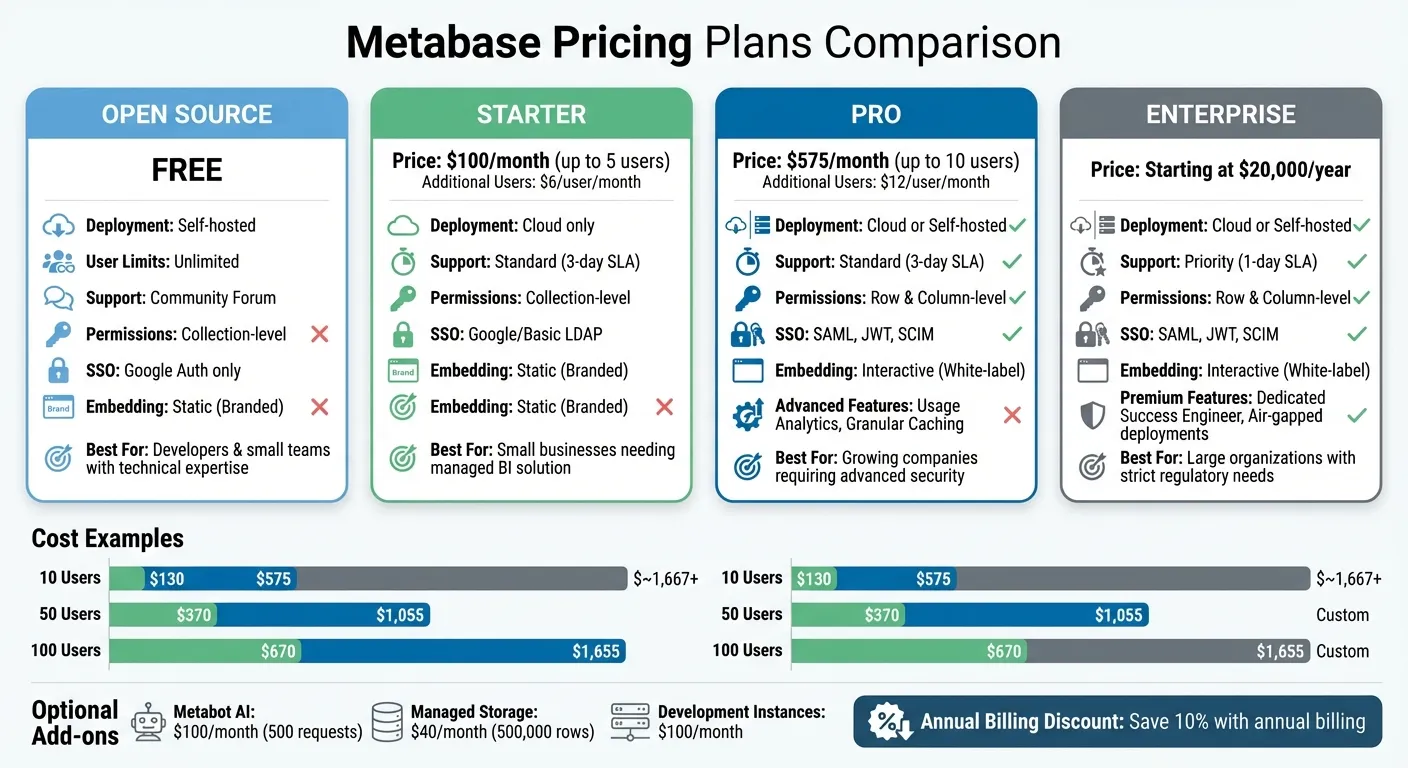
Metabase offers four pricing plans: Open Source (Free), Starter ($100/month), Pro ($575/month), and Enterprise (starting at $20,000/year). The Open Source plan is free but requires self-hosting and technical expertise, while the Starter plan, ideal for small teams, includes managed cloud hosting. The Pro plan adds advanced features like row-level permissions and SSO, catering to growing businesses. For large organizations, the Enterprise plan provides priority support and custom solutions.
Key considerations:
- Open Source: Free, self-hosted, no advanced features.
- Starter: $100/month for up to 5 users, cloud-hosted, basic permissions.
- Pro: $575/month for up to 10 users, advanced security, and embedding.
- Enterprise: Starts at $20,000/year, tailored for large-scale needs.
Costs increase with user count, especially for embedded analytics. For example, 1,000 monthly active users on the Pro plan can cost over $124,000 annually. Additional fees for optional services like Metabot AI or managed storage may apply. Choose based on team size, deployment preferences, and feature needs, or compare Metabase with other tools to find the best fit.
Metabase Pricing Plans Overview
Let’s dive deeper into how Metabase structures its pricing tiers to match different business needs. Metabase offers four pricing options, each designed for specific deployment strategies and user requirements.
- Open Source Plan: This is completely free and self-hosted, making it perfect for teams that prefer to manage their own infrastructure.
- Starter Plan: Priced at $100 per month for up to 5 users, this cloud-only option is managed entirely by Metabase, covering server maintenance and updates.
- Pro Plan: At $575 per month for up to 10 users, this tier offers the flexibility of either cloud-hosted or self-hosted deployment.
- Enterprise Plan: Starting at $20,000 per year, this plan is tailored to large-scale needs, offering custom pricing, priority support, and the choice of deployment type.
The key difference between cloud-hosted and self-hosted lies in infrastructure management. Cloud-hosted plans include automatic updates, backups, and monitoring, while self-hosted deployments require you to handle these tasks independently.
Features Included in Each Plan
Every plan includes essential tools for data visualization, such as dashboards, charts, and reports. However, advanced features are reserved for higher tiers:
- Open Source and Starter Plans: Include basic collection-level permissions and Google authentication.
- Pro and Enterprise Plans: Unlock row-level and column-level permissions, SAML/JWT/LDAP authentication, and full white-labeling to remove "Powered by Metabase" branding.
Support varies across tiers:
- Open Source: Community forums only.
- Starter and Pro: Official support via email and Slack.
- Enterprise: Priority support with faster response times.
Optional add-ons include Metabot AI (starting at $100 per month for 500 requests) and Managed Storage (starting at $40 per month for 500,000 rows). Pro and Enterprise users also gain access to advanced features like granular caching controls and enhanced embedding options.
Best Use Cases for Each Plan
Each plan is suited to specific scenarios:
- Open Source Plan: Ideal for developers and small teams with technical expertise who want a low-cost way to prototype their data stack.
- Starter Plan: Perfect for small businesses needing a hassle-free, managed BI solution. Best for teams with fewer than 20 users and no need for advanced permissions or SSO.
- Pro Plan: Designed for growing companies that require role-based data segregation, white-labeled analytics, or SSO authentication for compliance.
- Enterprise Plan: Tailored for large organizations needing priority support, dedicated engineers, and help with complex procurement processes. This plan is a strong fit for companies with hundreds of users or strict regulatory needs, such as air-gapped environments.
Metabase Plans: Costs and Features
Understanding the breakdown of Metabase's plans is essential for choosing the right fit for your business intelligence (BI) needs. Here's what each plan offers in terms of costs and features.
Open Source Plan (Free)
The Open Source plan is completely free and supports unlimited users. However, you'll need to manage your own servers and handle all maintenance. While it’s a great option for small teams experimenting with their data stack, it comes with some clear limitations:
- No SSO authentication beyond Google.
- No row or column-level permissions.
- No interactive embedding features.
- Support is limited to community forums, meaning you'll need internal technical expertise for troubleshooting.
This plan is ideal for smaller teams working on prototypes but falls short for businesses needing enterprise-grade security or advanced data segregation.
Starter Plan
The Starter plan is priced at $100 per month and is available only as a cloud-hosted option. Metabase takes care of server maintenance, backups, and updates, making it a hassle-free choice for small businesses.
Key features include:
- 3-day support SLA via email and Slack.
- Collection-level permissions.
- Google authentication.
- Metabase-branded exports.
While it covers basic BI needs, it doesn’t include advanced features like role-based data access or compliance tools such as SAML authentication. This plan works best for businesses with straightforward BI requirements.
Pro Plan
The Pro plan starts at $575 per month for up to 10 users and offers a significant upgrade in functionality and security. It’s available as either a cloud-hosted or self-hosted option, giving you flexibility in deployment.
Features include:
- Row and column-level permissions.
- SAML, JWT, and LDAP authentication.
- Full white-labeling to remove Metabase branding.
- Interactive embedding.
- Granular caching controls.
- Serialization for managing staging and production environments.
Support remains at a 3-day SLA, provided via email and Slack. This plan is well-suited for growing organizations that require enhanced security, compliance features, and multi-tenant data architectures.
Enterprise Plan
The Enterprise plan starts at $20,000 per year, with pricing tailored to your specific needs. Designed for large-scale operations, it offers premium support and advanced deployment options.
Highlights include:
- Priority support with a 1-day SLA.
- Dedicated success engineers.
- Assistance with custom deployment configurations.
- Optional air-gapped deployments (available at an extra cost).
This tier is built for organizations with strict regulatory requirements or high-security needs. It can accommodate hundreds or even thousands of users, making it ideal for mission-critical BI operations that demand reliable, high-touch support.
Extra Costs to Consider
When planning your Metabase deployment, and understanding what Metabase is for your specific use case, it's important to factor in expenses beyond the basic subscription fees. These additional costs will depend on whether you choose a cloud-hosted or self-hosted setup, as well as any extras you might need.
Cloud vs. Self-Hosted Costs
If you go the self-hosting route, you'll need to budget for infrastructure expenses that are typically included in Metabase's cloud plans. Running a production-ready environment can cost around $100–$130 per month, covering essentials like reliable servers, managed databases, and load balancers. On top of that, setting up an SMTP server for sending scheduled reports and alerts will tack on another $12 per month.
Self-hosting also comes with ongoing maintenance responsibilities. Your team will need to manage upgrades, backups, monitoring, SSL certificates, and security audits - tasks that are automated in the Metabase Cloud. If your business lacks dedicated DevOps staff, this could mean allocating significant internal resources and dealing with potential downtime during updates.
On the other hand, cloud-hosted plans bundle server costs, backups, SSL certificates, and SMTP services into a single subscription fee. This provides predictable monthly expenses and eliminates the need for in-house maintenance. However, you trade off some control over your deployment environment. Weighing these additional costs against the subscription fees is crucial when planning your budget.
Billing Options and Discounts
Metabase offers both monthly and annual billing options across its paid plans. Opting for annual billing can save you 10% compared to paying month-to-month. For instance, the Starter plan costs $100 per month or $1,080 annually (which works out to $90 per month), while the Pro plan is $575 monthly or $6,210 per year.
Another perk is prorated user billing. If you add team members partway through your billing cycle, you'll only be charged for the remaining days in that cycle. Similarly, deactivating users results in a prorated credit. This flexibility is especially useful for growing teams that need to scale without worrying about syncing user additions with billing periods.
Keep in mind that optional add-ons can increase your overall costs. For example, Metabot AI costs $100 per month for 500 natural language queries, built-in storage is $40 per month for 500,000 rows, and development instances add $100 per month. These extras apply regardless of which base plan you choose, so it's worth considering them as part of your total budget.
Metabase Pricing Plans Comparison
Deciding on the best Metabase plan depends on factors like your team size, how you want to deploy, and your security needs. The Open Source option is ideal for internal analytics if you have DevOps resources to handle self-hosting. For smaller teams looking for a managed cloud service, the Starter plan is a good fit. If your needs include features like interactive embedding or row-level security, the Pro plan is the way to go. For organizations that need priority support or custom deployment options, the Enterprise plan is designed to meet those requirements.
Features Comparison Table
| Feature | Open Source | Starter | Pro | Enterprise |
|---|---|---|---|---|
| Deployment | Self-hosted | Cloud | Cloud or Self-hosted | Cloud or Self-hosted |
| Support Tier | Community Forum | Standard (3-day SLA) | Standard (3-day SLA) | Priority (1-day SLA) |
| User Limits | Unlimited | Per-user pricing | Per-user pricing | Custom/Negotiated |
| Embedding | Static (Branded) | Static (Branded) | Interactive (White-label) | Interactive (White-label) |
| Permissions | Collection-level | Collection-level | Row & Column-level | Row & Column-level |
| SSO | Google Auth | Google/Basic LDAP | SAML, JWT, SCIM | SAML, JWT, SCIM |
| Admin Tools | Basic | Basic | Usage Analytics | Dedicated Success Engineer |
The Starter plan offers basic features but lacks the advanced tools found in the Pro plan, like white-label embedding, row/column-level permissions, and SAML/JWT authentication. The Enterprise plan takes it further by including priority support with a 1-day SLA and access to a dedicated success engineer who can assist with your specific setup.
Cost Examples by Team Size
To give you a clearer picture of costs, here's a breakdown of estimated monthly expenses for different team sizes. The Starter plan includes 5 users in its base fee, while the Pro plan starts with 10 users.
| Team Size | Starter Plan | Pro Plan | Enterprise Plan |
|---|---|---|---|
| 10 Users | $130 | $575 | ~$1,667+ |
| 50 Users | $370 | $1,055 | Custom |
| 100 Users | $670 | $1,655 | Custom |
For a team of 10, the Starter plan costs $130 per month, which includes a $100 base fee and $6 per additional user (beyond the 5 included). The Pro plan, on the other hand, costs $575 and covers all 10 users in its base price. As team size grows, the cost gap narrows. For 50 users, the Starter plan is $370, compared to $1,055 for Pro. At 100 users, the Starter plan rises to $670, while Pro reaches $1,655. At this scale, Enterprise pricing, which often includes volume discounts, becomes a more appealing option for large teams.
Conclusion
Metabase offers pricing options that cater to a wide range of organizations, from startups to large enterprises. The Open Source plan is ideal for teams with solid DevOps expertise who need only basic features. For smaller teams looking for a managed solution without the hassle of maintaining infrastructure, the Starter plan, priced at $100 per month, includes cloud hosting and expert support. If your team requires advanced capabilities like white-label embedding, row-level permissions, or SSO, the Pro plan at $575 per month is a better fit.
However, it’s important to consider how costs scale as your user base grows. For instance, the Starter plan charges an additional $6 per user after the first 5 users, while the Pro plan adds $12 per user beyond the initial 10. This per-seat pricing for embedded analytics tools can significantly increase expenses as your audience expands. For example, a SaaS application with 1,000 monthly active users could see annual costs surpass $124,000 on the Pro plan [1].
For organizations requiring top-tier support, the Enterprise plan starts at $20,000 per year. This option includes features like a 1-day SLA for priority support and access to a dedicated success engineer. At higher scales, negotiated pricing often incorporates volume discounts to help manage the base cost.
Key Takeaways
Selecting the right Metabase plan depends on both your current requirements and future growth. The Open Source plan is great for testing with minimal expense, while the Starter plan offers a straightforward managed cloud solution. The Pro plan is tailored for teams needing advanced security and embedding features, and the Enterprise plan is designed for organizations that demand high-level support and scalability. Be mindful of how your user base - especially for embedded analytics - will expand over time, as this can significantly affect your overall costs.
FAQs
When should I choose Starter vs. Pro?
If you're a small team or just starting out, the Starter plan is a great fit. It offers basic self-service analytics, perfect for initial deployment and straightforward data needs.
On the other hand, if your organization is expanding and requires more advanced tools, better scalability, and top-tier support, the Pro plan is the way to go. It's designed to handle growing data demands and provide enterprise-level capabilities.
How does per-user pricing scale as my team grows?
When it comes to Metabase, the cost per user scales in a straightforward way as your team grows. The pricing varies between $6 and $12 per user per month, depending on the plan you choose. For instance, the Starter plan costs $6 per user per month, while the Pro plan comes in at $12 per user per month. This predictable pricing structure makes budgeting for an expanding team much simpler.
What extra costs should I budget for beyond the plan price?
When evaluating the plan price, it's also important to account for potential extra costs. These might include per-user fees, enterprise licensing charges, or expenses for advanced features like embedding capabilities or large-scale deployments. Depending on your specific usage and needs, these additional costs can have a big impact on your overall budget.