Business Intelligence
Top 6 AI Tools for Google Analytics 4 (That Make GA4 Bearable)
Compare six AI tools for GA4 and learn when to use GA4-only vs warehouse-native tools for cross-source analysis.

If GA4 slows your team down, the fix is simple: pick a tool based on where your data lives. If your GA4 data stays inside Google, Google’s own AI tools are the easiest place to start. If your team joins GA4 with CRM, billing, or product data, a warehouse-layer tool like Querio makes more sense.
Here’s the short version:
- Querio: best for warehouse-based GA4 analysis with SQL visibility, notebooks, access controls, and definitions kept in your own git repo
- GA4 Native AI: best for teams already in BigQuery and Google Cloud
- Anomaly AI: best for alerts on traffic and conversion changes
- Gentle: not enough public proof to judge for GA4 work
- AskGAAI: looks limited to simple GA4 Q&A, with thin public docs
- GA4.so: best for fast GA4-only summaries, reports, and anomaly flags
The article’s core point is straightforward: the split is not about flashy features. It’s about SQL vs. AI-driven workflow. Some teams need plain-English answers from GA4 alone. Others need to join GA4 with sales and revenue data and show the SQL behind the answer. That one difference changes which tool fits.
A few facts stand out:
- The list covers 6 tools
- Only a few have clear public details on governance, warehouse support, and anomaly alerts
- 2 tools - Gentle and AskGAAI - have gaps in public documentation for production use
- The strongest divide is between GA4-only tools and warehouse-based tools
Quick Comparison
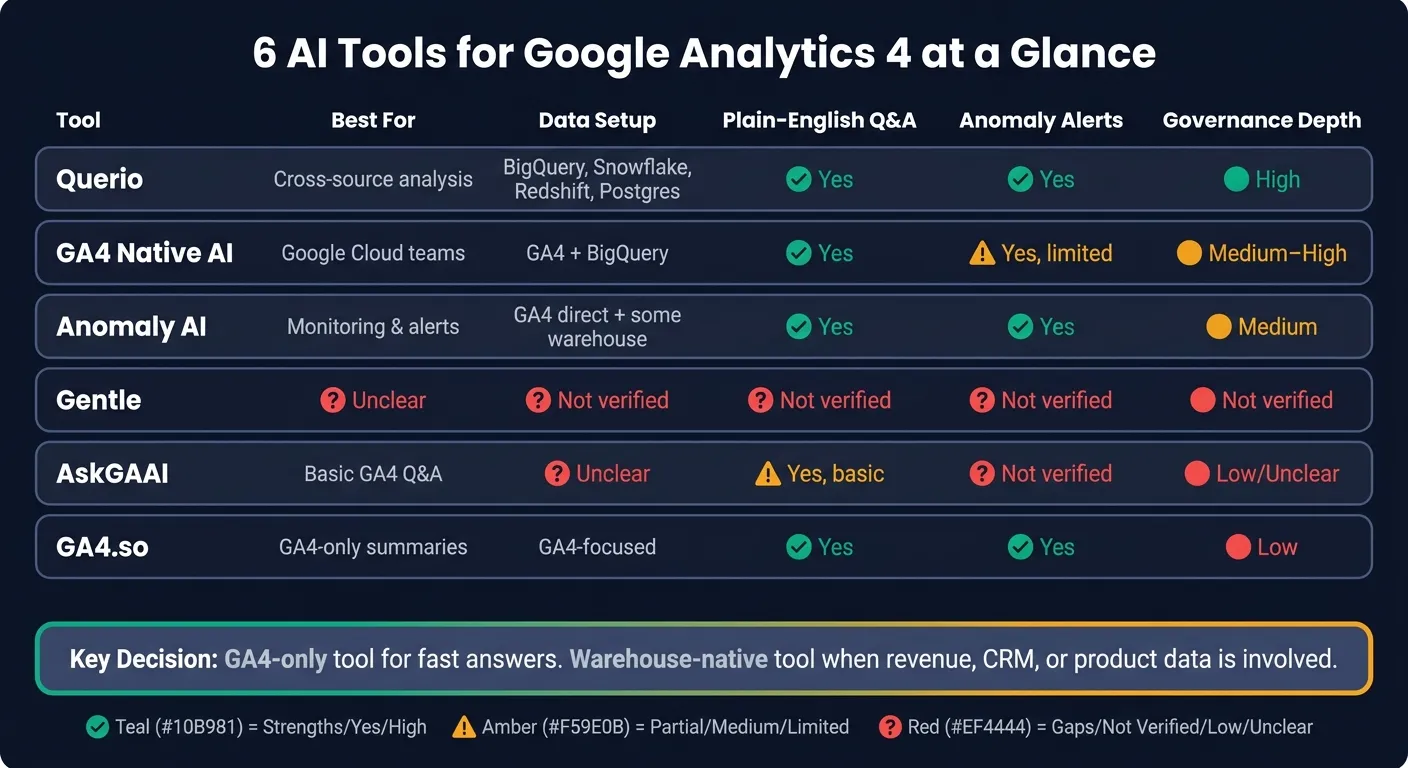
| Tool | Best for | Data setup | Plain-English Q&A | Anomaly alerts | Governance depth |
|---|---|---|---|---|---|
| Querio | Cross-source analysis | BigQuery, Snowflake, Redshift, Postgres, more | Yes | Yes | High |
| GA4 Native AI | Google Cloud teams | GA4 + BigQuery | Yes | Yes, limited explanation | Medium to high |
| Anomaly AI | Monitoring | GA4 direct, plus some warehouse paths | Yes | Yes | Medium |
| Gentle | Unclear | Not verified | Not verified | Not verified | Not verified |
| AskGAAI | Basic GA4 questions | Unclear | Yes, basic | Not verified | Low/unclear |
| GA4.so | GA4-only summaries | GA4-focused | Yes | Yes | Low |
So if I were to reduce the whole piece to one sentence, it would be this: use a GA4-only tool for fast answers, and use a warehouse-layer tool when the question touches revenue, customers, or product data.
1. Querio
Querio is git-native analytics for data teams and their AI agents. It sits on top of your warehouse (BigQuery, Snowflake, Redshift, ClickHouse, or Postgres), and people ask questions in plain English while its AI agent answers with real SQL and Python. Teams get governed self-serve analysis without waiting on someone to write every query by hand, and every answer works from the same definitions.
GA4 Data Access
If your GA4 data already lives in the warehouse, analyzing it is pretty straightforward. You can look at GA4 events next to CRM, billing, and product data in one place.
That means you can answer questions that GA4 alone can't handle well. Say you want to find which traffic sources bring in higher-LTV customers. You can join GA4 session data with revenue data and see it directly. Querio fits best when GA4 needs to sit beside revenue and product data, not just traffic data.
Natural-Language Analysis
Every answer comes with inspectable SQL or Python inside a reactive notebook. So if someone asks in Slack why organic traffic dropped last Tuesday, Querio can query live warehouse data and return a chart right in the thread [1][2].
That matters for trust. Data teams can check exactly what ran, which is a big deal when GA4 numbers need to stand up to scrutiny. Querio also keeps its context, metric definitions, and saved queries as plain files in a GitHub repo your team owns, and changes go through pull requests your reviewers approve. That helps keep terms like sessions consistent across users [5].
Anomaly Detection, Reporting, and Governance
Querio's automations run a prompt or SQL on whatever schedule you set and send the results to Slack or email. If conversion rate breaks overnight or traffic drops out of nowhere, the team sees it before anyone logs in.
Any result can become a dashboard, and promoting one for the team opens a pull request. Claude, ChatGPT, Claude Code, and Cursor can do the same work through Querio's MCP server and CLI, and they see only what their user may see. On the access side, role-based access control and SOC 2 Type II compliance [10] let non-technical stakeholders self-serve without seeing data they shouldn't access.
There is a trade-off, though. Querio works best when your GA4 pipeline already runs through a warehouse setup with tools like Fivetran and dbt. So this tends to fit teams that already route GA4 through that kind of stack.
2. Google Analytics 4 Native AI and Analytics Advisor
Google’s native AI sits right inside GA4 and BigQuery, which is handy for teams already working in the Google stack. You don’t need another platform, plugin, or setup step to get started. In GA4, Analytics Advisor surfaces automated insights. In BigQuery, Gemini helps write SQL, finish code, and explain what a query is doing.
GA4 Data Access
This native AI becomes much more useful when your GA4 data is exported to BigQuery. Once the data is there, Gemini in BigQuery can help with SQL generation, code completion, and query explanation. Google’s Data Insights Agent is built to understand intent, generate SQL, retrieve data, and return insights through a conversational interface [4].
The main tradeoff is scope. GA4’s native AI only works with data inside Google’s ecosystem. So if you want to connect GA4 with CRM or billing data, that analysis still needs to happen after those sources are loaded into BigQuery [7]. Put simply: if your answers live inside Google Cloud, this setup works well. If you need warehouse-level context across systems, you’ll hit the edges pretty fast.
Natural-Language Analysis
For day-to-day GA4 questions, the big win is speed. It can handle simple comparisons without much friction. But once you move into root-cause analysis, the cracks start to show, especially when the answer depends on joins across multiple systems.
Accuracy also gets better when the AI is grounded in a mature semantic layer like LookML or dbt. Without governed metric definitions, it may re-derive metrics in different ways across queries. That’s how you end up with different numbers for the same question [9].
Anomaly Detection
GA4’s automated insights can flag metric changes on their own, which helps teams spot movement without building custom alerts. That makes it useful for monitoring. It does not do the harder part, though: explaining the business reasons behind the change.
Reporting and Governance
Gemini in BigQuery follows BigQuery security controls such as column-level policy tags and row-level security. For regulated teams, it’s smart to review data-region and Assured Workloads requirements before rolling it out more broadly. That makes it a strong option for fast, governed GA4 checks inside Google Cloud, but a weaker fit for analysis that needs to span multiple systems.
3. Anomaly AI
Anomaly AI is built for teams that care more about alerts than ad hoc digging. It keeps an eye on GA4 all the time and spots shifts in traffic and conversions on its own. That means marketing teams spend less time clicking through dashboards and more time dealing with what changed.
GA4 Data Access
Anomaly AI connects straight to GA4. It can also work through warehouse-exported data in BigQuery or Snowflake, which keeps things light for teams that already keep analytics data in a warehouse.
Natural-Language Analysis
You can ask plain-English questions like which campaigns drove the most sessions last month or why mobile conversions dropped this week. That helps with follow-up questions, but the main draw here is automatic alerting.
Anomaly Detection
This is where the tool stands out. Anomaly AI watches GA4 metrics all the time and flags unusual changes in traffic, conversions, or engagement. So instead of finding a problem during a weekly review, your team can spot it earlier and respond sooner.
Its limits matter too. Deep root-cause work across many data sources isn’t what this tool is built for. It works best for alerts and quick checks, not multi-source analysis.
For teams that want more hands-on investigation, the next tool leans more toward analyst-led workflows.
4. Gentle
Verified sources don't document Gentle's GA4 connection, how AI is transforming data analytics through natural-language analysis, anomaly detection, and governance. So there isn't enough here to judge it with confidence for a GA4 workflow.
For that reason, it's best to treat Gentle as unverified until its GA4 behavior is documented. And for teams that need dependable reporting, exploration, and alerts in production, unverified tools are a risky bet.
The next tool is easier to assess because its GA4 use case is clearly defined.
5. AskGAAI
AskGAAI is tough to place in a warehouse-native GA4 stack because its documentation doesn't clearly show how it connects to GA4 data. The sources available don't spell out its GA4 connection method or BigQuery export support, so its role in warehouse analysis is still murky. For teams that rely on Snowflake, BigQuery, Redshift, or dbt-backed workflows, that's a problem.
Natural-Language Analysis
AskGAAI seems geared toward basic plain-English GA4 questions. But the available sources don't confirm deeper diagnostic work or funnel analysis.
Anomaly Detection
There is no verified documentation for anomaly detection or proactive alerts in AskGAAI. So if your team needs traffic-spike or conversion-drop monitoring, it shouldn't depend on this tool for that job.
Reporting and Governance
Scheduled reporting, audit trails, and access controls are not documented. That limits AskGAAI for teams that need governed self-service BI analysis.
So, at this point, AskGAAI looks like a basic Q&A layer at best, not a verified option for governed GA4 reporting. The next tool is easier to assess because its GA4 behavior is documented more clearly.
6. GA4.so
GA4.so is a tool built just for Google Analytics 4. Its main angle is natural-language data access and automated analysis [3][8].
That narrow focus is helpful if your team mainly lives in GA4 and wants answers fast. But there’s a tradeoff. GA4.so is GA4-focused, and warehouse-native integration is not documented. So if your team needs GA4 data sitting in BigQuery next to CRM or billing data, this setup can feel limiting.
In plain terms: GA4.so is better for fast GA4 lookups than for analysis across your whole warehouse. It fits best when teams want quicker answers from GA4 without dealing with a warehouse workflow.
Natural-Language Analysis
The main workflow is simple. You ask plain-English questions, and the tool returns charts and summaries fast [3][8].
That makes it easy for marketers and analysts who don’t want to dig through reports every time they need a number or trend.
Anomaly Detection
GA4.so flags anomalies like sudden traffic drops or conversion shifts and surfaces those findings automatically [3].
That’s useful for teams that don’t want to babysit dashboards all day. If something moves in a way that looks off, the tool brings it forward instead of making you hunt for it.
Reporting and Governance
GA4.so supports automated reports and shareable outputs [3][8], which makes it a good fit for lightweight marketing reporting.
At the same time, it does not document a semantic layer, editable SQL, or warehouse governance. So it’s a better match for quick GA4 summaries than for company-wide metric management. That difference matters in the side-by-side comparison below.
Side-by-Side Comparison: Where Each Tool Wins
This table helps split the field into three buckets: warehouse-native analysis, Google-native analysis, and lightweight GA4 monitoring.
At a glance, the main trade-offs come down to warehouse access, explainability, and governance.
| Tool | What stands out | Best fit |
|---|---|---|
| Querio | Live warehouse connections plus inspectable SQL/Python in reactive notebooks, with governed context synced through GitHub and dbt | Data teams that want warehouse-native, natural language analysis for GA4 without CSV exports |
| GA4 Native AI | Gemini in BigQuery works best when metric definitions are already governed in LookML or dbt [6][9] | Teams already standardized on Google Cloud |
| Anomaly AI | Continuous GA4 monitoring with automatic alerting on traffic and conversion shifts | Teams that prioritize proactive alerts over ad hoc investigation |
| Gentle | GA4 connection and feature scope are not publicly documented | Public documentation is insufficient for a production recommendation |
| AskGAAI | Basic plain-English GA4 questions, without verified support for anomaly detection or governance | Public documentation is insufficient for a production recommendation |
| GA4.so | Fast natural-language GA4 lookups with automated anomaly flagging and shareable reports | Marketing teams that need quick GA4 summaries without a warehouse workflow |
Gentle and AskGAAI have the same issue: their public docs don't explain warehouse integration, anomaly detection, or access controls in enough detail for production use.
The next section turns these trade-offs into a simple pros-and-cons view.
Pros and Cons
These are the trade-offs that start to matter once feature lists stop telling you much.
The table below turns the shortlist into practical choices.
| Tool | Pros | Cons | Best For |
|---|---|---|---|
| Querio | Live connections to BigQuery, Snowflake, Redshift, and Postgres; inspectable SQL/Python in reactive notebooks; governed context layer synced to GitHub alongside dbt; no extracts or data duplication; SOC 2 Type II | Requires a pre-existing data warehouse; no built-in ingestion or transformation layer | Data teams at B2B SaaS, healthcare, or finance companies that need governed, warehouse-native GA4 analysis alongside other business data |
| Google Analytics 4 Native AI | Deep BigQuery integration; best when LookML already defines metrics; Google Cloud security controls | Requires significant upfront LookML investment; limited to Google Cloud | Teams already standardized on Google Cloud and BigQuery |
| Anomaly AI | Continuous GA4 monitoring; automatic alerting on traffic and conversion shifts | Narrower scope - focused on monitoring, not deep exploratory analysis | Growth and ops teams that prioritize real-time alerts over ad hoc investigation |
| Gentle | No public GA4 workflow is documented | Not recommended for production GA4 work until documentation is available | - |
| AskGAAI | Quick setup for basic GA4 questions | No documented audit trail or inspectable SQL | Solo marketers or small teams that want quick, ad hoc GA4 answers |
| GA4.so | Fast natural-language GA4 lookups; useful for quick summaries | Limited to GA4 data only; no cross-source analysis; governance depth is low | Marketing teams that don't use a warehouse workflow |
The biggest split comes down to cross-source analysis. GA4.so and AskGAAI are set up for standalone GA4 questions. Warehouse-native tools, on the other hand, can join GA4 with CRM and revenue data.
That gap matters more than it sounds. Looking at traffic in isolation is one thing, but AI analytics solutions help bridge the gap. Tying sessions and conversions back to pipeline, bookings, or customer value is where many teams get the answers they care about.
And for teams where auditability matters - finance, healthcare, or any company that has to defend its numbers - inspectable SQL isn't optional. It's the difference between “the tool said so” and showing exactly how the number was produced.
The next section turns these trade-offs into a final recommendation.
Conclusion
The choice comes down to workflow, not a long checklist of features.
If all you need is fast answers from GA4, a GA4-only tool will do the job. But if your team needs to look at GA4 next to CRM, revenue, or product data, a warehouse-native tool makes more sense.
For teams already using Google Cloud, GA4 Native AI is the logical place to start. For data teams working in BigQuery, Snowflake, Redshift, or Postgres, Querio is the governed warehouse-native option.
Pick the tool that fits your data stack: GA4-only for quick marketing answers, and warehouse-native for governed analysis across systems.
FAQs
How do I know if I need a GA4-only tool or a warehouse-based one?
Use a GA4-only tool if most of your analysis happens inside GA4 and you haven’t yet brought event, product, and finance metrics into one place with the same definitions.
Choose a warehouse-based tool when your questions pull from more than one source, like Snowflake, BigQuery, Redshift, HubSpot, or Salesforce. It’s the better fit when you need governed metrics, live warehouse queries instead of CSV exports, and SQL your team can inspect and audit together.
What should I check before connecting GA4 data to an AI tool?
Check three things first: metric definitions, data architecture, and security.
Start with your metrics. Terms like revenue and churn need one shared meaning across the business. If marketing, finance, and product all use different definitions, your reports will turn into a mess fast. A governed semantic layer or dbt can help keep those definitions in one place.
Next, look at the data setup. Make sure GA4 data is exported to your warehouse, such as BigQuery or Snowflake. Then check whether the tool gives you row-level security, lineage, and SQL or Python that you can inspect for yourself. If you can't see how the numbers were produced, that's a red flag.
Last, don't judge the tool by a polished demo alone. Test it on your own production data. And don't stop at basic prompts or simple charts. Run complex queries, push on edge cases, and see how it holds up when things get messy.
Can these tools explain why conversions changed, not just flag the change?
Yes. The most advanced conversational analytics tools are built to explain why a metric changed, not just point out that it moved.
Basic query tools give you the number. More advanced AI analysts dig into dimensions, segments, and time periods to figure out what drove the change. Tools like DataGPT and ThoughtSpot are built to surface those patterns and give narrative explanations.