Business Intelligence
Basedash vs Metabase: Lightweight BI Tools Compared
Compare managed AI-assisted BI with open-source self-hosted analytics for features, costs, security, and deployment tradeoffs.

I’d choose Basedash for managed, AI-assisted reporting and Metabase for open-source self-hosting and deployment control. Before buying, I’d test both with the same queries, dashboards, and restricted user accounts.
For 45 users, the article estimates Basedash Enterprise at $24,000–$36,000 per year, versus $11,940 for Metabase Pro. Those figures aren’t the whole bill: AI usage, database compute, and staff time also count.
Quick Comparison
| What I’d compare | Basedash | Metabase |
|---|---|---|
| Setup and hosting | Managed service; self-hosting requires Enterprise | Managed Cloud or free, self-hosted Open Source |
| Queries and AI | Plain-English questions and editable SQL | Visual query builder, SQL editor, and Metabot |
| Dashboards and sharing | Check sharing options; embedding requires Enterprise | Collections, scheduled reports, and embedding |
| Permissions | SSO and SCIM require Enterprise | Pro adds SSO and row- and column-level permissions |
| Total cost | Confirm Enterprise pricing, AI credits, and overages | Include subscription fees or self-hosting costs, plus AI charges |
My deciding test? A two-week pilot using your approved metrics. I’d check query accuracy, access rules, and upkeep - not just how the dashboards look. Get pricing and security requirements confirmed in writing.
Basedash: Managed BI and AI-Assisted Analysis
Data Connections and Dashboard Setup
First, check whether Basedash connects to Snowflake, BigQuery, Redshift, or Postgres under your existing network rules.
During a trial, measure the time from entering credentials to opening a dashboard that a business user can access. Include approved metrics, permissions, and data checks in that test.
With the connection in place, test whether business users can get answers without help from an analyst.
Natural-Language Queries, SQL Editing, and Charts
Basedash lets users ask questions in plain English and review the generated SQL before publishing results. Analysts get a full SQL editor with autocomplete, version history, and collaboration tools to refine AI-generated queries.[2]
Check that an analyst can inspect, edit, and rerun the SQL before publishing a result. Then ask follow-up questions to see whether the tool keeps the intended filters and metric definitions intact.
Access Controls, Hosting, and Pricing
Get written confirmation of the list price, included users, AI usage, overage rates, hosting options, and governance controls.
Use those details as the baseline for comparing Basedash with Metabase, where cloud and self-hosted deployment options affect both cost and setup.
Metabase: SQL Tools and Deployment Options
Metabase trades lower software costs and more deployment control for more work on your team’s side.
Cloud Setup and Self-Hosting
Metabase offers a free, self-hosted Open Source edition and managed Cloud tiers. Every tier connects to Snowflake, BigQuery, Redshift, and Postgres. With self-hosting, your team handles installation, drivers, upgrades, backups, monitoring, and patches. Cloud takes care of those tasks.[1]
Visual Queries, SQL Editing, and Metabot
The visual query builder lets business users filter and summarize data without writing SQL. Analysts can write queries in the SQL editor and save questions. Metabot is available on every plan, adding natural-language queries and SQL help. Pro also includes semantic models, metrics, and sandboxing.[1]
Dashboard Sharing, Permissions, and Pricing
Collections keep saved questions and dashboards organized. Subscriptions deliver reports on a schedule, while embedding lets you put analytics inside another app.
For SSO and granular permissions, look at Pro or Enterprise. Both include SAML SSO and row- and column-level permissions. Starter supports only email-and-password login. Enterprise adds audit logging for teams that need to track activity.[1]
The pricing decision goes beyond the monthly bill: who handles hosting, security, and upkeep?
| Plan | Starting price | Main tradeoff |
|---|---|---|
| Open Source | $0 license fee | Your team handles infrastructure and operations |
| Starter Cloud | $100/month, including 5 users; $6/month per additional user | Managed hosting without advanced data sandboxing |
| Pro Cloud | $575/month, including 10 users; $12/month per additional user | SSO and granular data permissions |
| Enterprise | Custom quotes starting at $20,000/year | Audit logging and negotiated terms |
Basedash vs Metabase: Features and Total Cost
::: @figure 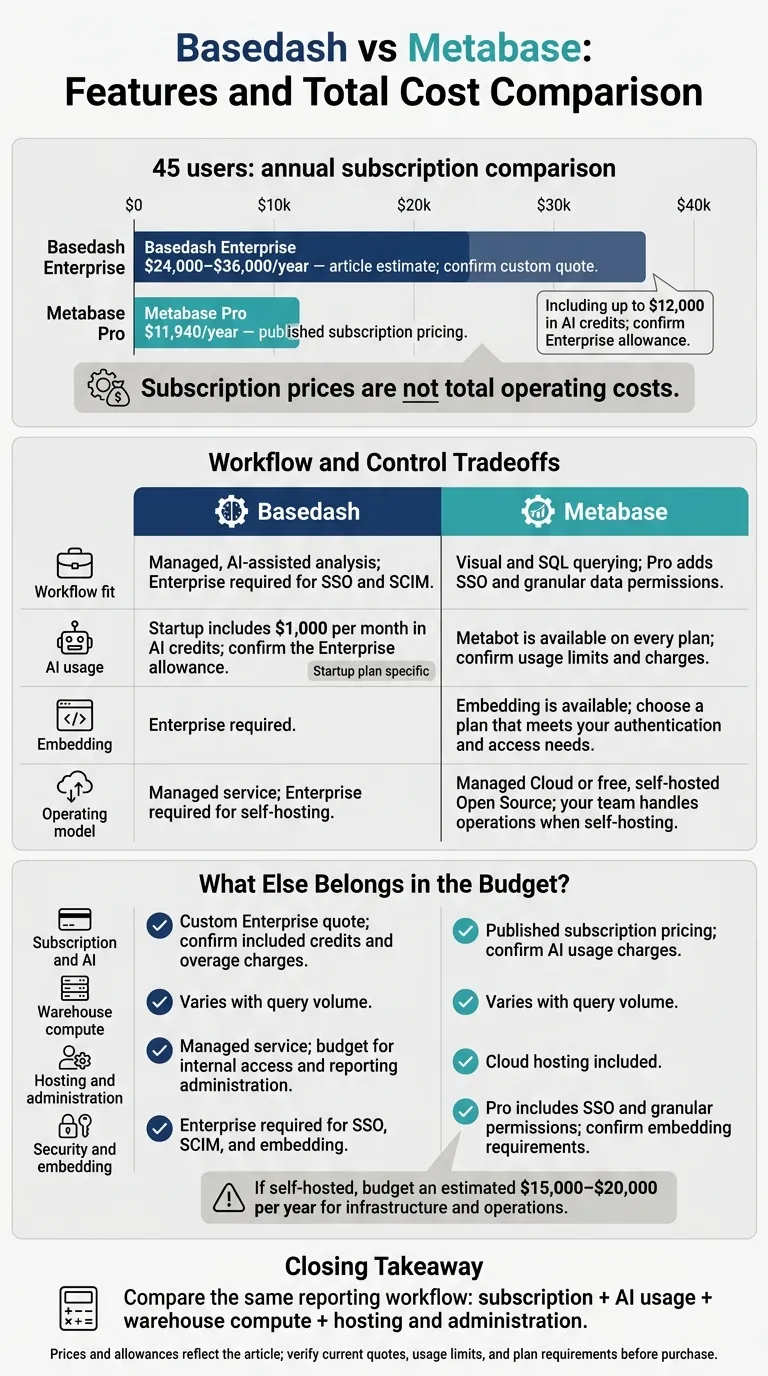 {Basedash vs Metabase: Features and Annual Costs}
:::
{Basedash vs Metabase: Features and Annual Costs}
:::
Compare governance, deployment, and total cost for the same reporting workflow - not just subscription prices. The main tradeoff is managed setup versus self-hosting and control.
| Decision point | Basedash | Metabase |
|---|---|---|
| Workflow fit | Managed, AI-assisted analysis; Enterprise required for SSO and SCIM | Visual and SQL querying; Pro adds SSO and granular data permissions[1] |
| AI usage | Startup includes $1,000 per month in AI credits; confirm the Enterprise allowance[1] | Metabot is available on every plan; confirm usage limits and charges[1] |
| Embedding | Enterprise required | Embedding is available; choose a plan that meets your authentication and access needs |
| Operating model | Managed service; Enterprise required for self-hosting | Managed Cloud or free, self-hosted open source BI tools; your team handles operations when self-hosting[1] |
These differences shape both how your team works and what you’ll pay to run each option.
Compare Subscription, AI, and Running Costs
For a 45-user team, Basedash Enterprise is estimated at $24,000–$36,000 per year, including up to $12,000 in AI credits. Metabase Pro costs $11,940 per year.[1] Confirm the Enterprise credit allowance in your quote.
| Cost component | Basedash | Metabase Pro |
|---|---|---|
| Subscription and AI | Custom Enterprise quote; confirm included credits and overage charges | Published subscription pricing; confirm AI usage charges |
| Warehouse compute | Varies with query volume | Varies with query volume |
| Hosting and administration | Managed service; budget for internal access and reporting administration | Cloud hosting included; if self-hosted, budget an estimated $15,000–$20,000 per year for infrastructure and operations[1] |
| Security and embedding | Enterprise required for SSO, SCIM, and embedding | Pro includes SSO and granular permissions; confirm how to build an embedded BI stack[1] |
To compare the price gap, factor in AI usage, warehouse compute, and who handles hosting and administration. Self-hosting gives your team control, but it also puts infrastructure and operations in your budget.
Conclusion: Choose Based on Your Team's Needs
Choose Basedash for managed, AI-assisted workflows. Choose Metabase when open-source deployment and infrastructure control matter more. Neither fits every team. Check plan requirements, then use a two-week pilot to decide.
Match Requirements to the Right Tool
Match the tool to how your team works - not just its feature list.
| Requirement | Better-supported fit | Caveat |
|---|---|---|
| SQL-forward data analysis tools | Metabase | Basedash also offers editable SQL; test how analysts review and reuse it. |
| Security and governance | Basedash for managed controls; Metabase for self-hosted control and plan-based permissions | Verify SSO and row-level restrictions before purchase. |
Test these tradeoffs in a two-week pilot using your production metrics. Compare query accuracy against approved queries, check that permissions hold for restricted users, and track administration effort.
For regulated teams, self-hosting is a deployment option - not proof of compliance. Confirm network isolation, authentication, audit requirements, and any AI service dependencies. Before buying, get a written quote covering subscription fees, AI usage, and operating costs, and check it against your team’s control needs, governance requirements, and operations budget.
FAQs
::: faq
How can we validate AI answers against our approved metrics?
Use a governed semantic or context layer with centrally defined KPIs and dimensions. This keeps AI answers tied to approved metric definitions instead of made-up calculation logic [1][2].
In Querio, a curated context layer keeps business logic governed and reusable [3][4][6]. Analysts can inspect and edit generated SQL or Python in reactive notebooks to check how each metric was calculated [5][4]. :::
::: faq
How should we test permissions for sensitive data?
Log in as a restricted user and ask the AI for all customers. Check that the returned row count matches expectations. This tests whether row-level security (RLS) applies and the AI follows access controls [1].
For Metabase or Basedash, check whether the AI uses a semantic layer to keep metrics consistent [1]. Also confirm that service accounts have read-only permissions in the underlying warehouse, such as Snowflake, BigQuery, or Redshift [2]. :::
::: faq
How can we estimate costs as query volume grows?
Separate platform fees from warehouse consumption. Basedash charges a flat platform fee that includes AI credits, then bills for usage beyond those credits [1][2].
Metabase’s open-source edition is free, but infrastructure, maintenance, and engineering time typically cost $15,000–$20,000 per year [4][5]. As query volume grows, model query patterns and concurrency alongside subscription or maintenance costs. Inefficient queries can drive up Snowflake or BigQuery bills [2][4][5]. :::