Business Intelligence
When Copilot Goes Down: BI Reliability in the AI Era
Plan non-AI fallbacks, human reviews, and warehouse-native overrides so BI keeps delivering trusted numbers when copilots fail.

If AI stops, your BI team still needs a way to get the right numbers. My takeaway is simple: keep non-AI query paths, put human checks on high-risk outputs, and make sure manual fixes stay inside warehouse permissions.
Here’s the short version:
- AI failure is not just a full outage
- Slow answers, wrong SQL, metric drift, and made-up values can all break trust
- A semantic layer cuts risk in a big way: one cited stat shows multi-hop join accuracy moving from 51.2% to 100%
- High-risk work like board reporting, ARR dashboards, compliance reporting, and incident reviews needs a backup path every time
- Manual overrides must keep row-level security and role-based access in place
- A simple outage playbook for the first 30 minutes can keep reporting on while AI is down
What I like most in this piece is the core idea: visible errors are safer than believable wrong answers. That’s the standard BI teams should build around.
This article then walks through the stack you need: trusted semantic queries, live warehouse fallback, review points, trust labels, and a failover process.
Reliability Patterns for AI-Powered Apps in Azure AI Foundry
::: @iframe https://www.youtube.com/embed/PwCl6F1867o :::
Design fallback paths before the copilot fails
Build the fallback before the outage hits. When something breaks, analysts shouldn't have to piece joins back together while the clock is ticking. They should be able to open a tested query and keep moving. The goal now is simple: make that fallback fast enough that people will use it without hesitation.
Use semantic-layer queries and trusted views as your primary backup
Your default backup should be the data stack you already trust: pre-approved dbt models, governed metrics, saved queries, and warehouse views. That gives analysts a path that stays steady when AI is down.
Research backs this up. Multi-hop join accuracy for AI goes from 51.2% to 100% when a semantic layer is in place [2]. In an outage, that difference stops being a nice extra and becomes the path that keeps work going.
"With text-to-SQL, failure looks like a plausible but incorrect answer. With the Semantic Layer, failure looks like an error message." - dbt Labs [2]
That distinction matters. An error message can be fixed. A believable but wrong number that ends up in a board deck can do real damage. Using the semantic layer also keeps reporting tied to the same metric definitions even when AI is offline.
Keep a warehouse-native manual path open for analysts
Saved queries help, but they aren't enough on their own. Analysts also need a place where they can write, inspect, and edit SQL or Python directly against the live warehouse. Not a CSV export. Not a dead-end copy. A live path where they can check a shaky answer without jumping between tools.
Querio's reactive notebooks do this by keeping every AI answer as inspectable SQL and Python on the live warehouse. Analysts can edit it, rerun it, and verify results without leaving the workflow.
Decide which workflows must work without AI
Not every workflow needs the same level of backup. Some can wait. Others can't. Sort them by outage impact and answer risk, then decide where a non-AI path is mandatory.
| Workflow | AI Failure Risk | Non-AI Path Required? |
|---|---|---|
| Board and executive reporting | High - wrong numbers reach leadership | Yes, always |
| Revenue and ARR dashboards | High - directly tied to financial decisions | Yes, always |
| Healthcare or finance compliance reporting | Critical - regulatory exposure | Yes, always |
| Incident investigation | High - speed and accuracy both matter | Yes, with live warehouse access |
| Weekly operational metrics | Medium - delays are costly but recoverable | Recommended |
| Ad hoc exploration | Low - slower recovery is acceptable | Optional |
Write down which workflows need to recover first before an outage happens. Then add review checkpoints and permission-safe overrides for the ones that can't afford AI error.
Add human review and permission-safe overrides
Offline failures are easy to work around. Wrong answers are not. Once the fallback path is live, put review gates in place for outputs that simply can't be wrong.
Set review checkpoints where wrong answers are most costly
Not every AI-generated result needs a human sign-off. But some absolutely do. Power BI Copilot scored 4.4/10 on financial modeling accuracy versus 6.4/10 for a junior analyst [1], so executive, customer-facing, or regulated outputs should be reviewed before they reach the wrong hands.
The riskiest moments are usually easy to spot: changing a join in a dbt model, refreshing an executive dashboard, or sending a customer-facing report. That's where a plausible-but-wrong answer can do the most damage.
For metric changes, send approvals through a GitHub pull request against the governed semantic layer - the same repo where your dbt project lives. For dashboard changes before executive distribution, require a named analyst to check the output against a trusted reference query before the scheduled send. And make sure there's a clear approval trail.
Run manual overrides without breaking row-level security or role-based access controls
When an analyst needs to replace an AI-generated query with a corrected one, the override has to stay inside the same permission boundary as the original query. In healthcare and finance, this is NON-NEGOTIABLE. A workaround that bypasses row-level security in Snowflake, BigQuery, or Redshift doesn't just fix one problem. It can create a compliance issue on top of the outage.
The safest path is to keep overrides warehouse-native. An analyst edits the SQL directly - fixing a wrong filter, correcting a dialect error, or removing an exposed PII column - and the corrected query runs under the same credentials and role as the original. In Querio, every AI answer stays as inspectable, editable SQL and Python on a live warehouse connection, so analysts can correct results without exporting data.
Use the table below as the operating rulebook for common failure modes.
| Failure Mode | Detection Signal | Reviewer | Override Action | Recovery Step |
|---|---|---|---|---|
| Metric drift | Result doesn't match trusted reference | Finance / metric owner | Replace with approved semantic formula | Update governed semantic layer definition |
| Fan/chasm trap | Unexpectedly high row counts | Data analyst | Edit SQL to add pre-aggregation | Add join constraints to governed semantic layer |
| Wrong filter | Data includes test or internal accounts | Domain expert | Manually add WHERE clause filters |
Update business glossary rules |
| Dialect error | Warehouse syntax error or EXPLAIN failure |
SQL developer | Correct warehouse-specific functions | Update dialect-aware linting rules |
| PII exposure | Sensitive columns appear in SELECT |
Security / DPO | Remove columns; enforce masking | Update warehouse-level masking policy |
Tag outputs by trust level
After review and override, label the result so downstream users know its status. Tag outputs as Trusted, Experimental, or Team-specific so people can see what has been signed off, what is still exploratory, and what should stay local to one team.
In Querio, dashboards can be tagged by trust level, so governed self-serve stays visible at the point of use. A finance analyst opening a board-facing report can tell at a glance whether the numbers have been signed off or are still provisional.
Run an outage playbook for AI-assisted BI
::: @figure 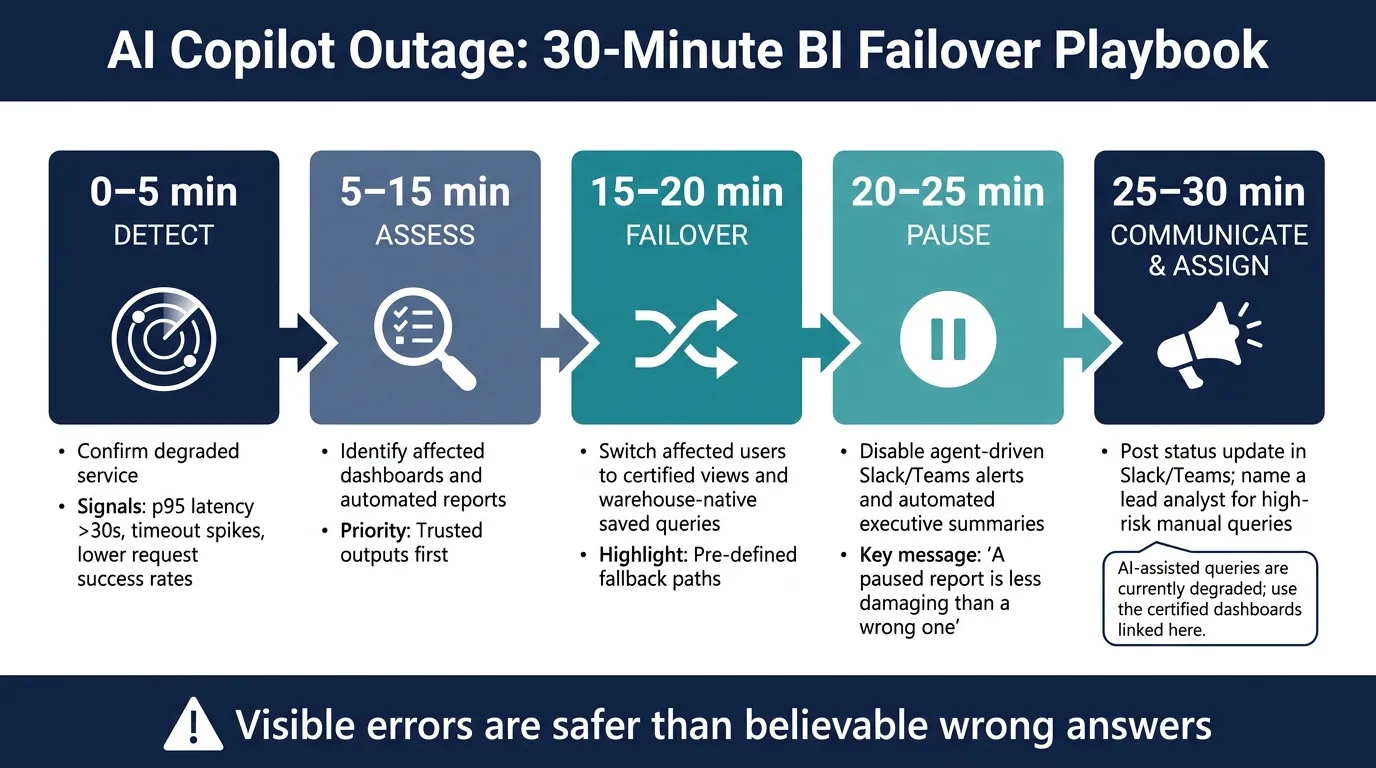 {AI Copilot Outage Playbook: First 30 Minutes BI Failover Checklist}
:::
{AI Copilot Outage Playbook: First 30 Minutes BI Failover Checklist}
:::
Once trust levels and manual overrides are set, you need one more thing: an outage playbook that keeps BI work moving when the copilot breaks.
This is the operating model from the first alert through the post-incident review. It builds on the same certified views, trust-level tags, and permission-safe overrides you already have in place.
Monitor availability, latency, quality, and spend
You can't react to a failure if you don't spot it early. These four signal groups cover the whole stack, from the AI layer down to warehouse execution.
| Metric Category | Core Signals to Track | Monitoring Method |
|---|---|---|
| Availability | Request success rate, auth errors | System logs / API monitoring |
| Latency | p95 response time >30s, timeout rate | Warehouse observability or API logs |
| Correctness | Hallucination rate, semantic drift, malformed SQL, wrong joins | Golden-set regression, dbt tests, query logs |
| Spend | Warehouse compute, scan volume | EXPLAIN dry runs / usage thresholds |
A simple check works well here: ask the same question three times. If the answers change, that's a drift signal.
Then pair that with dbt tests against your governed metric definitions. That helps catch semantic drift before it lands in a dashboard. In Querio, every answer is inspectable SQL and Python on a live warehouse connection, so analysts can diff the current output against a trusted reference query without exporting anything.
The first 30 minutes: a step-by-step failover checklist
Use this sequence the moment Copilot starts to degrade. In the first 30 minutes, the job is to stabilize service, not fix the root cause.
- 0–5 min (Detect): Confirm degraded service. Check for p95 latency above 30 seconds, timeout spikes, or lower request success rates.
- 5–15 min (Assess): Identify which dashboards and automated reports are affected. Prioritize Trusted outputs first.
- 15–20 min (Failover): Switch affected users to pre-defined certified views and warehouse-native saved queries.
- 20–25 min (Pause): Disable agent-driven Slack and Teams alerts and any automated executive summaries. A paused report is far less damaging than a wrong one.
- 25–30 min (Communicate & Assign): Post a status update in Slack or Teams. Name a lead analyst responsible for reviewing any high-risk queries that must proceed manually during the outage.
Keep that status update short and factual:
"AI-assisted queries are currently degraded; use the certified dashboards linked here."
That one message can stop a wave of ad hoc requests and keep the data team focused on the workflows that matter most.
Once service is stable, compare the fallback result with the AI result and close any gap.
Use post-incident reviews to close gaps in the stack
When the copilot is back online, don't just shrug and move on. An outage shows you where the fallback path is thin.
Compare the AI result with the fallback result. If the answers differ, fix the gap. That might mean updating the semantic layer definition in your dbt project or adding a dbt test that would have caught the drift on its own.
Each finding from the review should go in two places:
- The runbook
- The governed context layer
That gives the next on-call analyst a clearer path. It also gives the agent less room to repeat the same mistake. In Querio, context lives as version-controlled SQL, Markdown, and Python in the dbt repo. That approval trail means your post-incident learning builds over time.
Conclusion: Build BI so a copilot failure does not take trust down with it
A copilot failure doesn't have to turn into a crisis. If your BI stack is built with failure in mind, trust can hold up. The key is simple: treat AI as a layer on top of governed warehouse workflows, not as the system of record.
These safeguards work together as one setup: semantic-layer definitions, warehouse-native fallback queries, human review, trust tags, and an outage playbook. Each one covers a different kind of failure. Some help during full model outages. Others catch SQL that looks right but isn't. That way, work can keep moving even when the agent can't.
The day-to-day rule is pretty clear: use AI where it saves time, like drafting exploratory queries, helping with ad hoc questions, and speeding up investigations. But keep every dashboard, scheduled report, and executive-facing number tied to governed, inspectable workflows that do not rely on the copilot being up and running. Here's the part that matters most: visible errors stop bad numbers; plausible errors do not.
In Querio, that means every answer is produced as inspectable SQL and Python on a live warehouse connection. Context stays version-controlled in GitHub with your dbt project. Dashboards also include trust-level tags. So if the agent goes down, analysts still have a clear path forward, without a black box and without CSV exports.
FAQs
::: faq
How do we decide which BI workflows need a non-AI backup?
Decide based on risk, complexity, and the consequences of the output. If a workflow affects money, faces customers, falls under rules, or touches sensitive data, add a non-AI fallback or a human review step.
Put escape hatches first for high-impact metrics, complex logic, sensitive data, and unstable environments. Use dbt tests, schema validation, and EXPLAIN to catch risky AI output and send it to manual review.
:::
::: faq
What should a 30-minute BI outage playbook include?
A 30-minute BI outage playbook should focus on continuity and trust in three areas: communication, fallback procedures, and verification.
Start by assigning an incident owner, listing the affected dashboards, and confirming the cause. That keeps the response clear and avoids people talking past each other.
Then move to predefined manual overrides or non-AI fallback paths. This can include pre-validated queries or direct warehouse access in Snowflake or BigQuery using inspectable SQL/Python. The point is simple: if the main BI layer is down, teams still need a way to get numbers they can check.
Finally, verify the last known-good output, check data freshness, notify dashboard users, and document the incident. That last step matters more than it seems. People can handle a short outage. What shakes confidence is silence or unclear data. :::
::: faq
How can analysts fix AI-generated queries without breaking access controls?
Use a governed, warehouse-native setup that keeps SQL generation separate from SQL execution. Run the AI as the authenticated user, not a shared admin role, so existing row-level security and column masking still apply.
Then check generated SQL against metadata, schema constraints, and business rules before execution. If a query is ambiguous, references disallowed objects, or falls outside verified semantic definitions, block it and route it to an analyst through an inspectable, editable SQL interface. :::