Business Intelligence
Vanna AI vs Querio: DIY vs Managed Text-to-SQL
Compare owning a DIY Text-to-SQL stack versus a managed platform: costs, setup, permissions, maintenance, and testing.

I’d choose Vanna AI to build and own the application, or Querio to avoid maintaining the app layer. For teams at companies with 100–500 employees, the choice depends on engineering capacity - not just subscription price.
The article’s 12-month planning estimates are $47,400–$96,000 for Vanna AI and $30,000–$35,000 for Querio, based on 10 users and three connections. These are budget assumptions, not measured costs.
| Criterion | Vanna AI | Querio |
|---|---|---|
| Setup and connections | Your team configures and deploys; check version-specific connector support | Managed setup with live Snowflake, BigQuery, Redshift, and Postgres connections |
| Business context | Your team updates retrieval material | Approved SQL, Markdown, and Python files synced with GitHub |
| Output review | SQL review workflow built by your team | Editable SQL and Python notebooks with charts |
| Permissions | Your team implements and tests access controls | Platform roles and warehouse permissions still need setup and testing |
| Maintenance | Your team owns the app and infrastructure | Vendor owns platform upkeep |
| Customization | More control over models and application behavior | Work within supported notebooks, MCP, and API options |
| Costs | Free license; hosting, model usage, and engineering costs remain | Subscription plus context setup, warehouse usage, and possible AI overages |
My next step would be to test both with the same dataset, questions, metric definitions, and restricted roles. I’d score Text-to-SQL accuracy and access enforcement separately, then record correction time.
No measured test results are supplied in the article. Neither option removes your responsibility for business definitions, warehouse access, or checking answers before use.
::: @figure 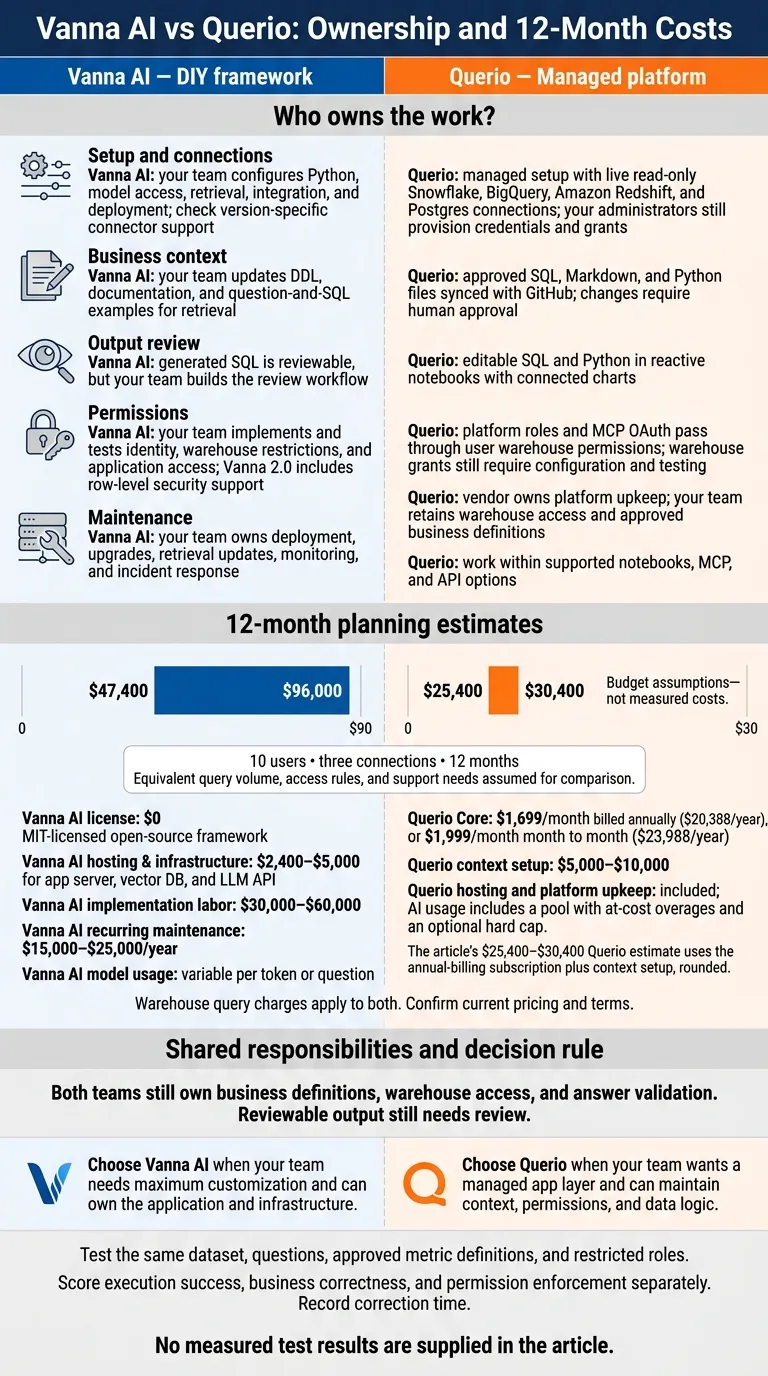 {Vanna AI vs Querio: Ownership and 12-Month Costs}
:::
{Vanna AI vs Querio: Ownership and 12-Month Costs}
:::
Vanna AI - Query & Chat with Your SQL Databases in Natural Language - Part-1
::: @iframe https://www.youtube.com/embed/VRNPeis0tA4 :::
Vanna AI vs Querio: Side-by-Side Comparison
The main difference is who owns the work: setup, business context, permissions, and maintenance. Here’s how those responsibilities split between the two platforms.
| Area | Vanna AI: DIY framework | Querio: managed platform |
|---|---|---|
| Setup | Configure Python, model access, retrieval, and integration. | Connect the warehouse, set up users, and define business context in GitHub-synced files. |
| Database connections | Check connector support for your chosen version. Your team handles integration and deployment. | Built-in live read-only connections to Snowflake, BigQuery, Amazon Redshift, and Postgres. |
| Business context | Keep DDL, documentation, and question-and-SQL examples up to date for retrieval. | Store approved definitions, joins, and queries in GitHub-synced SQL, Markdown, and Python files. |
| Inspectable output | Review generated SQL, but build the review workflow yourself. | Edit SQL and Python in reactive notebooks with connected charts. |
| Permissions | Configure and enforce identity, warehouse restrictions, and application access. Vanna 2.0 includes row-level security support.[3] | Role-based access control; MCP OAuth passes through each user’s warehouse permissions. Warehouse grants still need configuration. |
| Maintenance | Your team handles deployment, upgrades, retrieval updates, monitoring, and incident response. | Querio maintains the platform. Your team maintains warehouse access and approved business definitions. |
| Customization | More control over models, retrieval, and application behavior - and responsibility for the engineering work. | Configure context and use notebooks, MCP, or API within the platform’s supported boundaries. |
Setup and Database Connections
With Vanna, check text-to-SQL tool comparisons and connector support in the version you plan to deploy. That includes support for your Snowflake, BigQuery, Redshift, or Postgres warehouse.
Querio provides live connections, but your administrators still need to provision credentials and grants. Setup is typically quick; production access still depends on your warehouse access policies.
After connecting the warehouse, you’ll need to set up business context and decide how people will review the output.
Business Context and Inspectable SQL
Vanna’s retrieval set needs updating whenever schemas or business definitions change. Querio keeps approved context in SQL, Markdown, and Python files in GitHub, often alongside a dbt project. Changes require human approval.
Querio’s reactive notebooks let analysts edit SQL or Python and see connected charts update. But reviewable output still needs review: check joins, filters, grain, and date logic before trusting an answer. The context layer also matters when permissions and maintenance duties need to stay explicit.
Permissions and Maintenance Responsibilities
Vanna 2.0’s security support does not replace your own enforcement testing.[3] For either approach, production readiness means assigning clear ownership of read-only roles, table restrictions, query limits, access logs, and schema changes.
With Querio, verify how application roles and MCP OAuth permissions map to warehouse access. Querio states that it has SOC 2 Type II compliance, supports HIPAA requirements, and signs BAAs. Your team still owns warehouse governance; Querio maintains the platform.
Documented Test: Same Dataset, Same Questions
Once setup and governance are in place, test both systems with the same frozen dataset and identical inputs. Publish the SQL, outputs, and permission outcomes. The goal is to check whether a team gets accurate answers within approved access rules. Track setup and correction time to measure the work involved.
Dataset and Test Setup
Use one labeled synthetic B2B SaaS dataset in Snowflake or Postgres containing customers, subscriptions, invoices, and product events. Record the dataset script, warehouse engine version, row counts, date range, join keys, dbt transformations, metric definitions, warehouse roles, and query limits.
Give both systems the same approved context files. Log setup hours, software versions, exposed model settings, context snapshots, and configuration differences. Clearly mark any settings that aren't available. Use the recorded definitions to write the test questions below.
Metric and Access Test Questions
Choose a small set of shared business questions that check metric correctness, ambiguous definitions, duplicate results from joins, and restricted-data access. Use identical prompts, one time zone, and one date window across both systems. Include requests for missing data and a restricted table.
For each question, record validated answers and access outcomes. Save every attempt's SQL, errors, clarification requests, manual edits, and correction time.
Results, Corrections, and Audit Trails
No observed results were supplied for this section. The register below defines checks, not findings. Use it to record each attempt for both systems, including correctness, access outcomes, corrections, time, and artifacts. Each artifact record should contain the prompt, configuration snapshot, generated SQL, and execution log or notebook output.
Score execution success, business correctness, and permission enforcement separately.
| Question | Evidence to record for Vanna AI and Querio |
|---|---|
| Monthly revenue | Agreement with the approved revenue definition and validated total |
| Active customer definition check | Correct application of the approved customer definition |
| Revenue by customer segment | Correct joins, grouping, and segment totals |
| Join duplication / ambiguous-definition check | No duplicated totals; clarification when definitions are ambiguous |
| Period comparison | Consistent date boundaries and correct comparison |
| Missing-data request | Missing information identified without inventing an answer |
| Restricted-table request | Access denied when the test role lacks permission |
Check metric definitions, date boundaries, permission enforcement, missing-data handling, and SQL visibility. A query that runs can still return the wrong answer. Denying a restricted query can be the correct outcome.
Keep first-pass, corrected, and rerun results separate. Rerun selected questions with unchanged context, then repeat them after approved context changes. Publish findings only for the recorded dataset and configurations.
Total Cost and Production Readiness
Costs Beyond Subscription Fees
Once setup and governance are in place, budget for 12 months of production use - not just the subscription. Vanna AI’s free license leaves hosting, model usage, implementation, and maintenance to your team. Querio’s managed workspace includes hosting, unlimited users, unlimited data connections, guided onboarding, and 10,000 AI credits a month on Core, with $0.25 per extra credit and an optional spending cap. A lower sticker price may not mean lower costs if your team also has to build authentication, monitoring, and support.
Compare 12 months of equivalent service using 10 users, three data connections, and the same query volume, access rules, and support needs. Core is listed at $2,499/month on a month-to-month plan ($29,988/year) or $2,099/month billed annually ($25,000/year). Confirm current terms before approving the budget.
| Cost category | Vanna AI: DIY deployment | Querio: managed Core workspace |
|---|---|---|
| Vendor fees | $0 license fee (MIT-licensed open-source framework) | $2,499/month month to month ($29,988/year) or $2,099/month billed annually ($25,000/year) |
| Hosting & infrastructure | $2,400–$5,000 for app server, vector DB, and LLM API | Included |
| Model usage | Variable per token or question | 10,000 AI credits a month included; $0.25 per extra credit and optional spending cap |
| Warehouse compute | Warehouse query charges apply | Warehouse query charges apply |
| Implementation labor | $30,000–$60,000 for UI, authentication, and connectors | $5,000–$10,000 for context setup |
| Recurring maintenance | $15,000–$25,000/year for engineering ownership and updates | Platform upkeep included |
| Security review | Audit custom code, credentials, and access controls | Less vendor review work; configuration and contracts still need review |
| Monitoring | Failure detection, incident response, and dependency updates | Vendor covers platform uptime; your team still owns data quality and answer validation |
| User support | Onboarding, troubleshooting, and escalation | Internal onboarding and metric support |
Under these assumptions, the 12-month planning estimate for a 10-user team is roughly $47,400–$96,000 for Vanna AI and $30,000–$35,000 for Querio.
Customization Needs and Team Capacity
The budget is only part of the decision. Use Vanna AI if your team can own releases, security fixes, failed-query handling, and support. Its low license cost helps only if your team has the capacity to take on that work.
Use Querio when you want governed self-service BI, editable SQL/Python, and warehouse-native analytics without maintaining the application layer. Your team still owns business definitions, warehouse permissions, and approval of context changes. Budget for those responsibilities rather than assuming all maintenance is included.
Match your delivery workflow to what your team can support. Before approving the budget, confirm that the plan covers the delivery channels and automations you need. Decide which workflows your team will maintain itself and which will use the platform’s built-in delivery paths.
Conclusion: Choose What Your Team Can Maintain
Choose Vanna AI for maximum customization if your team can own the application. Choose Querio for a governed, warehouse-native platform without owning the app layer. Either way, your team still owns metric definitions, access rules, and answer validation.
Use a checklist for evaluating Text-to-SQL models to test both systems before deciding. Use the same warehouse questions, approved metrics, and restricted roles. Check answers against expected results, inspect the SQL, and record how long corrections take. A passing demo isn’t enough.
Before rollout, assign three owners: one for business context and SQL validation, one for permissions, and one for production support. With Vanna AI, also assign engineering ownership for the application and infrastructure. With Querio, distinguish vendor platform issues from your team’s data-logic issues so each goes to the right owner.
FAQs
::: faq
How can we tell if Querio is production-ready?
Check four areas in your environment:
- Governance: SOC 2 Type II security and tamper-evident audit trails.
- Reliability: A 99.9% uptime SLA and deployment in days.
- Warehouse correctness: Live, read-only Snowflake/BigQuery/Redshift/Postgres connections, with SQL/Python you can inspect and edit.
- Metric consistency: A governed context/semantic layer where only logged-in users can approve and commit metric or join changes. Validate it with an evaluation set built from your real questions. [1][2][3][4] :::
::: faq
How should we approve metric changes in Querio?
Manage metric changes in Querio’s governed context layer - the single source of truth for business logic, joins, and terminology. Analysts should audit this layer regularly to keep definitions up to date and in line with business requirements.
For high-stakes metrics or executive reporting, follow a formal review process. Before publishing results to shared boards, analysts should review the underlying SQL, Python, and logic in the notebook-style interface. :::
::: faq
How can we estimate Querio’s total cost as usage grows?
Add up your subscription, add-ons, and deployment costs. Querio has a free plan, and Core costs $25,000 a year billed annually, which includes unlimited seats. Data connections and dashboards are included on every plan.
Every plan includes AI credits: 500 a month on Free and 10,000 on Core. Extra credits cost $0.50 each on Free and $0.25 each on Core, and admins can set alerts and a spending cap. On-premises deployment is an Enterprise add-on, priced on request. :::