Business Intelligence
top ai embedded analytis tools 2026
A practical comparison of Querio, Snowflake Cortex AI, and Snowflake AI/BI—covering AI features, data warehouse integration, governance, and scalability.

AI-embedded analytics tools are reshaping how businesses handle data by integrating AI directly into platforms, enabling real-time insights and automation. This article reviews three leading tools - Querio, Snowflake Cortex AI, and Snowflake AI/BI - focusing on features like natural language querying, integration with data warehouses, and security. Here's a quick summary:
- Querio: Simplifies analytics with plain-English querying, Python notebooks, and a semantic layer for consistent metrics. It offers a free plan with no per-seat pricing and robust APIs for scalable, secure multi-tenant setups.
- Snowflake Cortex AI: Leverages advanced language models for SQL generation, unstructured data search, and machine learning. Its seamless integration with Snowflake ensures real-time, secure analytics.
- Snowflake AI/BI: Combines natural language querying, multimodal analysis, and strong governance tools for enterprise-scale analytics.
::: @figure 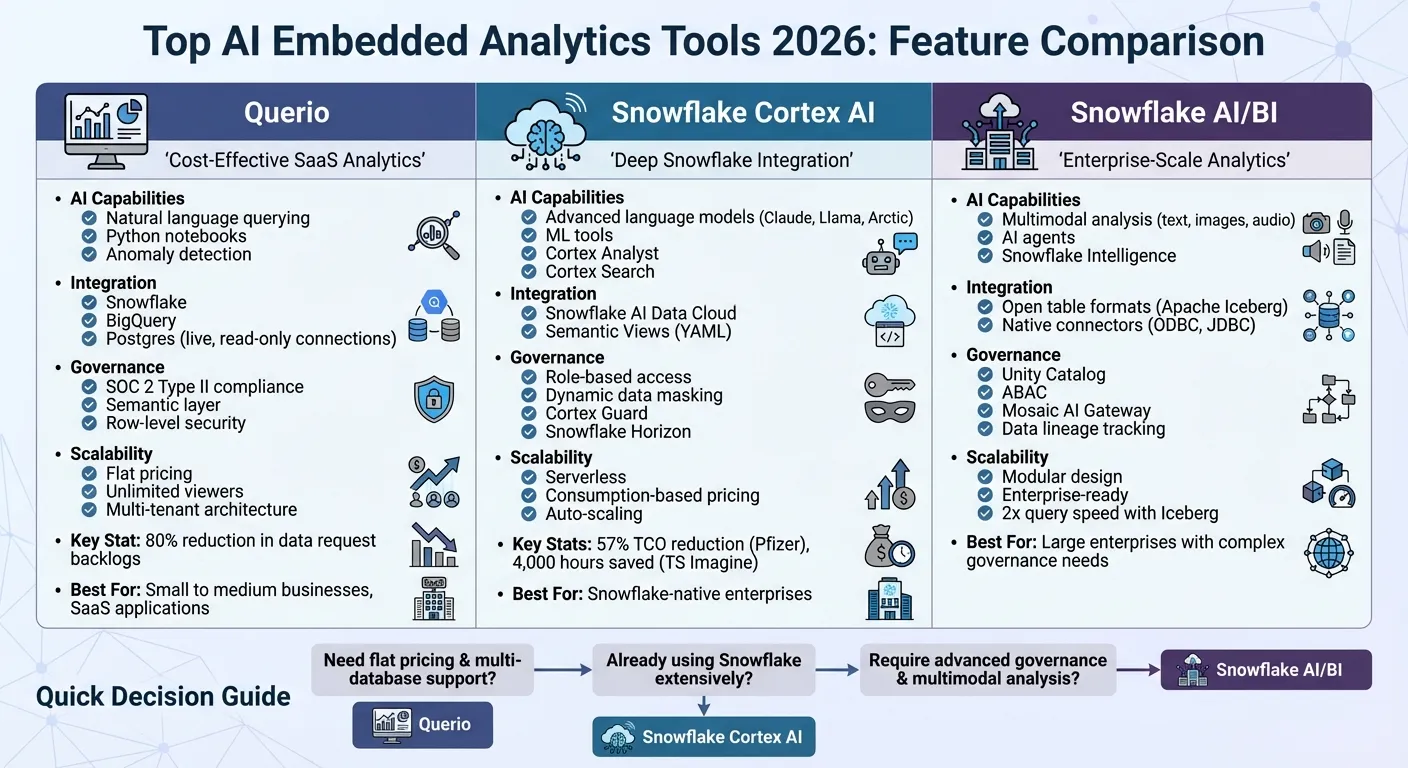 {AI Embedded Analytics Tools Comparison 2026: Querio vs Snowflake Cortex AI vs Snowflake AI/BI}
:::
{AI Embedded Analytics Tools Comparison 2026: Querio vs Snowflake Cortex AI vs Snowflake AI/BI}
:::
The Best Embedded Analytics Strategy Isn’t Just Build or Buy
::: @iframe https://www.youtube.com/embed/eAOv6BJfPiM :::
Quick Comparison
| Feature | Querio | Snowflake Cortex AI | Snowflake AI/BI |
|---|---|---|---|
| AI Capabilities | Natural language querying, Python notebooks | Advanced language models, ML tools | Multimodal analysis, AI agents |
| Integration | Snowflake, BigQuery, Postgres | Snowflake AI Data Cloud | Snowflake with open table formats |
| Governance | SOC 2, semantic layers | Role-based access, Cortex Guard | Unity Catalog, ABAC |
| Scalability | No per-seat pricing, multi-tenant | Serverless, consumption-based | Modular, enterprise-ready |
Each tool suits different needs - Querio for cost-effective SaaS analytics, Cortex AI for deep Snowflake integration, and AI/BI for comprehensive enterprise analytics.
1. Querio
AI Capabilities
Querio takes plain-English questions and turns them into SQL or Python queries, making it possible to run live data queries without writing a single line of code. Each query generates code that users can inspect, review, and tweak as needed. The platform also features AI-powered Python notebooks for iterative analysis and anomaly detection to highlight unexpected trends. This transparency not only ensures accuracy but also speeds up workflows - companies using Querio have reported an 80% reduction in data request backlogs for engineering teams [4].
With its natural language interface, Querio can handle complex questions like, "What caused our churn spike last quarter?" The platform applies predefined business logic from the semantic layer, allowing non-technical users to get consistent, reliable answers without needing analyst intervention.
Integration with Data Warehouses
Querio integrates directly with Snowflake, BigQuery, and Postgres, using encrypted, read-only credentials. There’s no need for data duplication - the platform queries your data warehouse in real time, removing the hassle of manual exports or batch updates. This live connection ensures you always have up-to-date insights, which is especially helpful for managing sudden changes like inventory shortages or pricing adjustments.
The semantic layer is a game-changer for data teams. It allows them to define joins, key metrics like MRR or churn, and business terms once, ensuring consistent definitions across all queries. Businesses can get started quickly by connecting their warehouse and using iFrames for deployment, then scale up with APIs for more customized experiences, including dynamic filters tailored to specific user roles. All of this ties into Querio's governance features, ensuring secure and reliable analytics.
Governance and Security
Querio prioritizes security with SOC 2 Type II compliance, enterprise-grade access controls, and row-level security. The semantic layer enforces standardized business logic across departments, eliminating discrepancies in metrics. Analytics can even be embedded into customer-facing applications while maintaining full control over data access. All connections use encrypted credentials, and the read-only access model ensures that warehouse data stays secure during analysis.
Scalability
Designed for enterprise needs, Querio leverages the compute power of your existing data warehouse. It supports both internal analytics teams and large-scale use cases, such as embedded analytics architecture for thousands of end users querying data simultaneously in multi-tenant SaaS applications. This scalability makes it a reliable choice for businesses of all sizes.
2. Snowflake Cortex AI
AI Capabilities
Snowflake Cortex AI taps into the power of advanced language models to deliver insights directly within your data environment. By integrating models like Anthropic Claude, Meta Llama, and Snowflake Arctic, this managed service simplifies the way businesses interact with data [5][8]. With Cortex Analyst, users can turn natural language questions into SQL queries using a conversational AI data analyst chatbot, while Cortex Search manages unstructured data using a RAG (Retrieval-Augmented Generation) engine [5][7]. For example, a business user could ask, "What drove our revenue growth last month?" and quickly get a detailed answer.
Cortex AI Functions come with pre-built SQL tools for tasks like sentiment analysis, summarization, translation, and forecasting, removing the need for complicated coding [5][7]. Snowpark ML allows data scientists to build, train, and deploy machine learning models directly in Snowflake [6][8]. Penske Logistics, for instance, developed an AI summarization model in under 15 days. As Vishwa Ram, their VP, explained:
"The game-changer in Snowflake Cortex AI is its simplicity and ease of implementation. Our data already sits in Snowflake, so we can make use of the LLMs without needing to use anything external" [8].
At Siemens Energy, Cortex AI helped summarize over 700,000 pages of documents, giving 25 R&D engineers instant access to decades of historical insights. Tim Kessler, Head of Data, emphasized how this streamlined their operations [7]. These examples highlight how Cortex AI transforms data into actionable insights with real-time, secure, and scalable analytics.
Integration with Data Warehouses
Cortex AI works seamlessly with the Snowflake AI Data Cloud, running SQL queries on scalable virtual warehouses [9]. It uses Semantic Views - lightweight YAML files that define business metrics and relationships - to ensure consistent answers across all tools, whether it's an AI agent, a BI platform, or direct SQL queries [7]. This setup eliminates the need for data extracts, enabling real-time insights from live data. For example, Glenn Walker, CDO at Luminate, implemented AI agents to process over 3.5TB of data daily, resulting in a 334% faster workflow for analyzing over a trillion data points [5]. Additionally, the platform's Standard Warehouse Generation 2 delivers twice the speed for core analytics workloads compared to earlier versions [6].
Governance and Security
Snowflake Cortex AI prioritizes data security with role-based access, dynamic data masking, and continuous monitoring through its Snowflake Horizon framework [5][8]. Cortex Guard adds another layer of protection by filtering LLM outputs, ensuring compliance and preventing harmful content [8]. Importantly, customer data remains within Snowflake's governed environment and is never used to train the base AI models [11]. Companies like Pfizer have seen tangible benefits, cutting their Total Cost of Ownership by 57% after migrating to Snowflake [6]. Similarly, TS Imagine saved 4,000 hours of manual effort and reduced costs by 30% in their financial operations [5][8].
Scalability
Snowflake's serverless architecture automatically scales its AI functions to meet demand, with a consumption-based pricing model that charges only for the compute and AI services used [5][8]. Widely embraced by Forbes Global 2000 companies, the platform supports enterprise-scale deployments across industries, ensuring it can handle even the most complex workloads [7].
sbb-itb-284a532
3. Snowflake AI/BI

AI Capabilities
Snowflake AI/BI takes advantage of its unified enterprise AI agent, Snowflake Intelligence, to make querying both structured and unstructured data more intuitive. By using natural language, users can get instant answers, visualizations, and even analyze multiple data formats like text, images, and audio - all directly within SQL. The Cortex Analyst tool ensures accurate text-to-SQL query tools conversions, while Cortex Search provides a managed retrieval-augmented generation engine to explore unstructured documents more effectively. Additionally, Cortex Agents simplify workflows by automating data retrieval and synthesis from various sources. This combination of natural language processing and multimodal analysis sets Snowflake AI/BI apart, making it a strong tool for integrated analytics workflows. Other platforms like Querio also offer a specialized AI BI engine to streamline these processes.
Integration with Data Warehouses
As an AI Data Cloud, Snowflake supports open table formats like Apache Iceberg, which can double query speeds [6]. Its Semantic Views ensure consistent metrics across BI tools and SQL queries, reducing discrepancies and improving reliability. With native connectors like ODBC and JDBC, Snowflake easily integrates into existing analytics workflows, making it a seamless addition to enterprise systems.
Governance and Security
Snowflake AI/BI places a strong emphasis on data integrity and security, offering centralized controls to align security across its portfolio. The Unity Catalog enables organizations to manage metrics, track data lineage, and control permissions across all data and AI assets [10]. To enhance oversight, the Mosaic AI Gateway governs and monitors generative AI models by providing features like permissioning, rate limiting, and payload logging, which support detailed auditing [12]. Attribute-Based Access Control (ABAC) further strengthens security by enforcing granular access controls to meet compliance requirements.
Comparison: Strengths and Weaknesses
Let's break down the key strengths and trade-offs of each platform to see how they stack up. Each one caters to specific analytics needs, offering distinct benefits based on the use case.
Querio stands out with developer-friendly features like robust APIs, iFrames, SDKs, and no per-seat pricing[1]. Its AI-driven natural language querying and cross-database joins make it a great fit for multi-tenant architectures, especially when working with data warehouses like BigQuery or Snowflake. Plus, its SOC 2 Type II compliance and semantic layer ensure consistent, secure embedded experiences.
Tool B shines for teams deeply integrated into the Microsoft ecosystem. Its native Azure integration, advanced DAX calculations, and the Copilot AI feature make report creation faster and easier for Microsoft users[2][3]. However, its limited multi-tenancy can make integration tricky outside Azure environments.
Tool C is all about scalability and advanced analytics. It offers machine learning capabilities for trend and outlier detection, along with modular SDKs that allow tailored embedding and flexible data source integration. Its row- and column-level security supports strong multi-tenancy, though achieving optimal performance often requires some customization.
Here’s a side-by-side look at their key features:
| Feature | Querio | Tool B | Tool C |
|---|---|---|---|
| AI Capabilities | Natural language querying, AI Python notebooks, context-aware engine | Copilot AI, DAX calculations | ML-driven trend and outlier detection; predictive modeling |
| Data Warehouse Integration | Live, read-only connections to Snowflake, BigQuery, and Postgres | Strong integration within the Microsoft ecosystem | Flexible integration with support for numerous data sources |
| Governance | Semantic layer, SOC 2 Type II compliance, row-level security | Row-level security with limited multi-tenancy | Row- and column-level security, strong multi-tenancy |
| Scalability | Unlimited viewers on every plan, no per-seat pricing and spending caps on AI credits | Scales effectively in Microsoft environments - with rising costs as usage increases | Highly scalable with a modular design, though often requiring extra customization |
For SaaS applications that need self-service analytics, Querio’s modular design and no per-seat pricing provide plenty of flexibility[1]. Tool B works best for enterprises already committed to Microsoft tools, while Tool C is ideal for teams ready to tap into its advanced machine learning features and handle the associated customization.
Conclusion
Choosing the right AI-embedded analytics tool comes down to understanding your organization's specific needs. The tools we've reviewed cater to a wide range of users, from small teams to global enterprises handling massive amounts of data.
One key factor in this decision is the cost structure. For small to medium businesses, affordability often takes center stage. Querio stands out with a free plan and no per-seat pricing, which allows unlimited viewers to access dashboards and reports without piling on extra costs. This approach has made a significant difference for companies like Wolt, which cut data preparation time by 80% thanks to a more efficient analytics setup[1][6].
For larger enterprises, features like advanced security and scalability are non-negotiable. Developer-friendly tools also play a critical role in ensuring smooth integration into existing systems. Companies with complex governance needs require strong security measures, such as SOC 2 Type II compliance and row-level security. Querio addresses these demands while offering hybrid deployment options and comprehensive data protection. In fact, consumption-based pricing models have enabled some enterprises to reduce total ownership costs by more than 50%, alongside notable gains in data processing speeds[6].
Querio's embedding capabilities are another highlight, helping technical teams create seamless, multi-tenant SaaS analytics applications. This makes it an excellent choice for organizations aiming to build customer-facing analytics experiences.
AI-embedded analytics tools are no longer optional - they're crucial for modern businesses. Many users of business intelligence tools report significantly better decision-making as a result[13][14]. The ideal tool for your organization will depend on factors like team size, infrastructure, and security requirements. Querio's mix of no per-seat pricing, powerful APIs, and enterprise-grade security makes it a strong option for organizations seeking a cost-effective, scalable, and developer-friendly analytics solution that integrates effortlessly with modern data warehouses.
FAQs
::: faq
What are the main advantages of using Querio for AI-embedded analytics?
Querio’s AI-powered analytics platform delivers real-time insights by letting users ask questions in plain English and instantly receive visualized answers - right within the applications they already use. No need for complex coding or juggling multiple tools. This streamlined approach helps teams make decisions up to 5x faster compared to traditional methods. In fact, organizations using Querio have seen operational efficiency improve by as much as 75%.
With Querio, non-technical users can securely perform their own analyses, reducing reliance on IT teams. Features like built-in data governance and row-level security ensure that data remains protected. Querio also integrates smoothly with leading data warehouses like Snowflake, BigQuery, and Postgres, offering scalability for growing businesses. Plus, its straightforward pricing model takes the guesswork out of budgeting, making it an affordable choice for U.S. companies. By adopting Querio, teams can simplify workflows, cut costs, and boost productivity - all while maintaining top-notch security and accuracy. :::
::: faq
How does Snowflake Cortex AI improve data security and governance?
Snowflake Cortex AI boosts data security by keeping generative AI workloads securely within Snowflake's platform. This ensures that sensitive data stays protected, reducing the risk of exposure outside the system.
To enhance governance, it includes built-in controls such as role-based access, audit logging, and cost-management tools. These features allow organizations to enforce usage policies, monitor activities, and maintain compliance, all while making the most of AI-driven insights. :::
::: faq
Why is Snowflake AI/BI ideal for large-scale enterprise analytics?
Snowflake’s AI-driven business intelligence platform is built to handle enterprise-scale analytics by blending a cloud-native data warehouse with advanced features like large language model (LLM)-based SQL generation and conversational tools. This setup lets users query massive datasets using natural language, while the platform takes care of optimizing complex queries in the background.
The platform supports various data types - structured, semi-structured, and unstructured - without needing to transfer data between systems. Its architecture is designed for scalability, accommodating thousands of users and managing petabyte-scale workloads. By separating compute and storage resources, it ensures cost efficiency. These capabilities help businesses turn diverse data into actionable insights swiftly and reliably, all while maintaining strong governance and adaptability. :::