Business Intelligence
Best AI BI Tools for SaaS Companies
Side-by-side look at four AI BI tools for SaaS, comparing AI features, governance, real-time insights, and pricing to help you choose the right platform.

SaaS companies handle large volumes of data daily - from user behavior to revenue trends. The challenge lies in quickly converting this data into actionable insights to reduce churn, boost growth, and make informed decisions. AI-powered BI tools solve this by automating data analysis, enabling real-time monitoring, and delivering insights through natural language queries.
Here’s a breakdown of four top AI BI tools for SaaS companies:
- Querio: Excels in real-time data queries, governance, and SaaS-specific metrics like churn prediction. Offers transparent pricing but requires setup by data teams.
- Tableau: Known for customizable visualizations and AI tools like Tableau Pulse. Integrates well with collaboration platforms but has a steep learning curve and rising costs.
- Looker: Strong on consistent metrics via its semantic layer and Google Cloud integration. Ideal for advanced users but demands LookML expertise and higher budgets.
- ThoughtSpot: User-friendly with plain English queries and embedded analytics capabilities. Scales well but depends on clean data and costs increase with usage.
Quick Comparison
| Tool | Strengths | Weaknesses |
|---|---|---|
| Querio | Real-time queries, strong governance | Requires setup, higher cost |
| Tableau | Customizable visuals, AI alerts | Steep learning curve, expensive as you scale |
| Looker | Consistent metrics, Google Cloud integration | Requires LookML skills, costly for enterprises |
| ThoughtSpot | Intuitive search, embedded analytics | Needs clean data, pricing grows with scale |
Each tool caters to different needs. Querio is great for real-time insights; Tableau for teams needing rich visuals; Looker for those in the Google ecosystem; and ThoughtSpot for ease of use and embedded analytics.
Choose based on your team’s technical skills, budget, and growth stage.
::: @figure 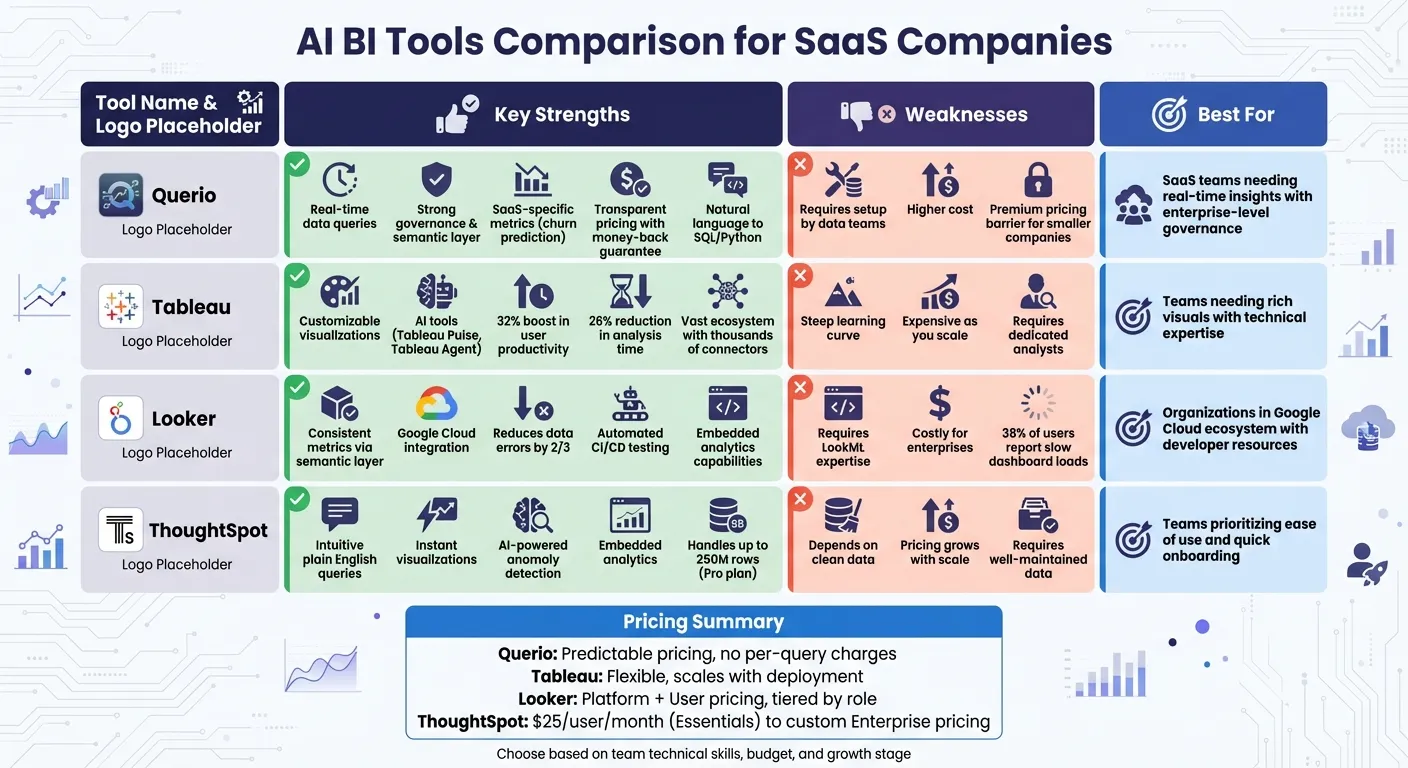 {AI BI Tools Comparison for SaaS Companies: Features, Strengths and Weaknesses}
:::
{AI BI Tools Comparison for SaaS Companies: Features, Strengths and Weaknesses}
:::
1. Querio
AI and Automation Capabilities
Querio simplifies the way SaaS companies interact with their data by translating plain English questions - like "Which customer segments have the highest churn risk this quarter?" - into executable SQL or Python code. This code runs directly against your data warehouse, ensuring fast and accurate results. Unlike traditional black-box AI tools, Querio lets you inspect the generated queries, giving you full visibility and control over the process. The platform also operates within a shared context layer, where your data team can define metrics once and ensure every automated insight aligns with those definitions. This eliminates the need for lengthy waits for custom reports and keeps everyone on the same page.
Governance and Trust
Querio's semantic layer ensures consistency across all metrics by serving as a single source of truth. Your data team can define key calculations - like monthly recurring revenue (MRR), customer lifetime value (CLV), or net revenue retention - just once, and those definitions are applied across all queries, dashboards, and embedded analytics. This approach prevents discrepancies in how metrics are calculated by different teams. Querio integrates seamlessly with your existing data warehouse (Snowflake, BigQuery, or Postgres) using read-only encrypted credentials, keeping your raw data secure. Plus, the platform is SOC 2 Type II compliant, meeting strict security standards for handling sensitive customer and revenue data.
Tailored for SaaS Operations
Querio is built with SaaS-specific needs in mind, offering tools for real-time monitoring of key performance indicators (KPIs). You can create dashboards to track live metrics like daily active users, subscription upgrades, or support ticket volumes, all while maintaining streamlined workflows. The notebook-based analytics environment enables product and growth teams to quickly analyze customer segmentation, predict churn, or forecast revenue - without waiting on data engineers. For customer-facing applications, the embedded analytics tools lets you reuse governed logic to create usage dashboards or white-label reporting tools directly within your product.
Pricing Approach
Querio stands out with its straightforward pricing model that includes a money-back guarantee. By avoiding per-query charges, the platform ensures predictable costs, even as your team scales. This is especially important for fast-growing SaaS companies, where traditional BI tools can become prohibitively expensive as user numbers or query volumes increase. Querio’s pricing reflects its focus on empowering business teams with self-service analytics while minimizing the need for additional data engineering resources. This pragmatic approach provides a strong foundation for SaaS companies looking to scale effectively.
2. Tableau with AI Capabilities
AI and Automation Features
Tableau's AI tools take dashboards to the next level by turning them into dynamic sources of insights. Take Tableau Pulse, for instance - it sends out personalized KPI updates along with natural language explanations for metric changes. Then there's Tableau Agent (formerly known as Tableau GPT), a conversational assistant that not only generates visualizations but also handles data prep using plain English commands. Tools like the Inspector and Concierge Skills keep an eye on critical metrics, sending alerts for changes and uncovering the reasons behind anomalies. These features have made a noticeable impact, with organizations reporting a 32% boost in user productivity and a 26% reduction in analysis time [2]. Adam Mico from Moderna sums it up well:
"We're genuinely captivated by Tableau Pulse's potential. It delivers straightforward and digestible insights for business users in their flow of work, enabling faster and more informed decision making" [2].
Governance and Data Security
With the Agentforce Trust Layer, Tableau ensures that AI insights are both secure and transparent. The platform respects row- and column-level security rules, so users only see data they're allowed to access. Unlike opaque "black-box" AI systems, Tableau focuses on deterministic analysis - every AI-generated insight is backed by clear citations and sources. The Data Index further enhances this by grounding AI responses in your business's specific context. For example, when terms like "churn rate" or "net revenue retention" come up, Tableau uses your team's definitions, thanks to field metadata and descriptions.
Tailored for SaaS Applications
Tableau Business Science uses AI to develop predictive models for tasks like churn risk and sales forecasting methodologies, cutting the time needed by up to 30% [2][1]. Meanwhile, Tableau Pulse integrates seamlessly with collaboration tools like Slack, Microsoft Teams, and email, so teams can stay on top of critical metrics without constantly switching dashboards. Whether it's customer segmentation or tracking subscription upgrades, Tableau Agent simplifies the process by creating visualizations from plain prompts and even suggesting follow-up questions for deeper insights.
Pricing Overview
Tableau's AI features, including Agent and Pulse, are part of the Tableau Cloud package. Costs are flexible and scale with your deployment size [3]. Coming up, we’ll take a closer look at how Looker approaches AI-powered business intelligence for SaaS organizations.
3. Looker
AI and Automation Capabilities
Looker's Gemini suite offers several AI-driven tools designed to simplify data analysis for SaaS teams. For instance, the Conversational Analytics feature allows users to ask questions in plain English and receive answers without needing to write SQL queries. The Visualization Assistant can instantly create charts based on text prompts, while the Formula Assistant helps generate calculated fields on the spot. For more advanced tasks, the Code Interpreter translates natural language into Python, enabling tasks like forecasting and anomaly detection - no coding required.
At the heart of Looker’s AI functionality is the LookML Semantic Layer, which centralizes metric definitions to ensure AI models remain consistent with your company’s data standards. Vijay Venugopal, Director of Product Management at Google Cloud, highlights its impact: "Looker's semantic layer reduces data errors in gen AI natural language queries by as much as two thirds" [7]. Additional tools like the LookML Code Assistant streamline development by suggesting dimensions and measures based on plain language inputs. Meanwhile, Automated Slide Generation can transform reports into Google Slides presentations with AI-generated summaries, making it a handy tool for quarterly business reviews. This combination of features strengthens both AI capabilities and data governance.
Governance and Trust
Looker’s in-database architecture ensures your data stays within your cloud warehouse - whether that’s BigQuery or another platform - giving you control over data residency and security. The LookML Semantic Layer acts as a single source of truth, where business rules and metrics are centrally defined and managed through Git version control. This setup eliminates the risk of different teams using inconsistent metrics, such as churn rate or monthly recurring revenue.
Following its acquisition of Spectacles.dev, Looker now includes automated CI/CD testing, which validates SQL and LookML changes before they go live. This process helps catch potential errors early, maintaining data accuracy and trust across your organization. However, some users have noted performance issues; 38% of G2 reviewers reported slow dashboard load times, especially when working with large datasets [8].
Fit for SaaS-Specific Use Cases
With its secure architecture and tailored features, Looker is well-suited for the unique needs of SaaS companies. For example, the Code Interpreter handles complex statistical tasks like churn prediction and revenue forecasting using natural language inputs. The platform also supports embedded analytics through its Embed edition, enabling SaaS businesses to white-label and integrate data products directly into their own applications. This feature opens up opportunities for data monetization by creating new revenue streams.
Looker also addresses operational challenges like cloud cost management. Its tools help SaaS firms operating in multi-cloud or hybrid environments track spending and identify inefficiencies. For marketing teams, Looker facilitates first-party data activation by creating custom audience segments and exporting them to platforms like Google Analytics for targeted campaigns. Peter Bailis, VP of Engineering at Google Cloud, emphasizes its broader capabilities: "Modern organizations require more than just accurate insights; they need AI to uncover hidden patterns, predict trends, and drive intelligent action" [6].
Pricing Overview
Looker’s pricing is divided into Platform Pricing (which covers the instance) and User Pricing (tiered by role). The Standard Edition is designed for smaller teams with fewer than 50 users and includes one production instance, 10 standard users, and 2 developer users. The Enterprise Edition adds features like enhanced security and higher API limits. For external analytics, the Embed Edition supports up to 500,000 query-based API calls per month, making it ideal for scaling customer-facing analytics in SaaS operations [4]. This flexible pricing model caters to the needs of growing businesses.
4. ThoughtSpot
AI and Automation Capabilities
ThoughtSpot stands out in the world of AI-powered BI for SaaS by combining an intuitive search experience with powerful predictive tools. With its AI-driven search, users can ask data-related questions in plain English and receive instant, visualization-ready results. The platform not only understands the context of queries but also generates visualizations automatically. For SaaS teams monitoring key metrics like customer lifetime value or monthly active users, this means quicker access to insights - no need to wait for data analysts to step in.
Another standout feature is its built-in anomaly detection, which flags significant changes in data. These alerts can help SaaS companies identify and address potential issues before they start affecting revenue. Additionally, ThoughtSpot's AI creates predictive models to help forecast trends, whether it’s seasonal subscription fluctuations or opportunities for revenue growth through upselling or expansion.
Fit for SaaS-Specific Use Cases
ThoughtSpot effectively addresses common challenges in SaaS analytics with embedded analytics capabilities. These allow businesses to seamlessly integrate dashboards into their own platforms, making it a great fit for SaaS companies that want to offer analytics as part of their customer-facing tools. The Embedded plan offers flexible pricing, aligning well with different go-to-market strategies, which is especially useful for scaling product analytics.
By connecting to major data warehouses like Snowflake and BigQuery, ThoughtSpot enables real-time analysis of critical metrics, such as subscription trends, cohort behaviors, and revenue forecasting. Its Pro plan can handle up to 250 million rows of data, making it a robust choice for SaaS companies managing growing datasets. These features make ThoughtSpot a valuable resource for scaling analytics and driving smarter decision-making.
Pricing Overview
ThoughtSpot offers tiered pricing designed to grow with your needs while maintaining budget predictability:
- The Developer plan is free for one year, supports up to 10 users, and accommodates 25 million rows, making it perfect for trial use.
- The Essentials plan starts at $25 per user per month (or $1,250 monthly) for teams ranging from 5 to 50 users.
- The Pro plan provides flexibility with two options: $0.10 per query or $50 per user per month. It supports 25 to 1,000 users and up to 250 million rows.
- For larger enterprises, the Enterprise plan offers custom pricing with unlimited users and data capacity.
This pricing structure ensures that ThoughtSpot can meet the needs of both small teams and large-scale operations.
sbb-itb-284a532
My recommended analytics stack for early-stage SaaS businesses
::: @iframe https://www.youtube.com/embed/fESYLyB3RkA :::
Pros and Cons
Choosing the right AI BI tool for your SaaS company often boils down to balancing your technical skills, budget, and analytics needs. Here's a breakdown of the strengths and weaknesses of the tools covered:
Querio stands out for its live, direct warehouse queries and strong governance, making it perfect for real-time SaaS metrics without creating duplicate data. Its AI-powered natural language interface makes data accessible to non-technical users. On the downside, its premium pricing can be a hurdle for smaller companies, and setting it up requires your data team to configure an AI semantic layer for SaaS.
Tableau is known for its rich, customizable visualizations and a well-established ecosystem featuring thousands of pre-built connectors and community resources. However, its steep learning curve can be challenging for smaller teams without dedicated analysts, and the cost grows as your team expands.
Looker brings consistency to SaaS metrics like MRR and churn rate through its semantic layer approach compared to traditional models. Google Cloud describes this as turning "raw data into a language that both downstream users and LLMs can understand" [5]. While this ensures reliable metrics, creating and maintaining LookML models demands specialized expertise, and its high enterprise costs make it less accessible for startups.
ThoughtSpot excels with its user-friendly search interface, allowing instant visualizations from plain English queries. Its AI-driven insights and AI-driven anomaly detection helps teams identify trends without needing an analyst. The catch? It depends on clean, well-maintained data, and pricing increases as your team scales.
| Tool | Pros | Cons |
|---|---|---|
| Querio | Live warehouse queries, strong AI features | High cost, setup requires data expertise |
| Tableau | Customizable visualizations, vast ecosystem | Steep learning curve, rising costs |
| Looker | Consistent metrics, semantic-layer governance | Requires LookML skills, expensive |
| ThoughtSpot | Intuitive querying, AI-powered insights | Needs clean data, pricing grows with scale |
This table highlights the core trade-offs, helping you weigh your options based on your team's needs and resources.
Conclusion
Choosing the right AI BI tool for your SaaS company boils down to matching the platform's strengths with your team’s needs. If your priorities include precise analytics, strong data governance, and an intuitive AI-powered interface, Querio stands out. Its live warehouse connections and natural language capabilities make it a go-to option for SaaS teams seeking enterprise-level governance without sacrificing speed.
Breaking it down further: Tableau is ideal if your team requires highly customizable visualizations and has the expertise to handle its complexity. Looker works best for organizations already embedded in the Google Cloud ecosystem, offering consistent metrics but requiring developers familiar with LookML. For teams focused on simplicity and quick onboarding, ThoughtSpot delivers with its user-friendly interface and search-based analytics. These distinctions highlight how factors like company size and technical maturity influence the right choice.
Depending on where your organization stands, the ideal tool will vary. Early-stage startups with tight budgets might lean toward ThoughtSpot for its ease of use, while scaling companies often prefer solutions like Querio that balance governance with advanced AI features. Larger enterprises with complex reporting needs and dedicated data teams may benefit from Tableau or Looker, thanks to their robust ecosystems. Keep in mind, platforms with steep learning curves can slow down teams lacking dedicated data experts. Budget is another key consideration - costs typically rise as your team grows, so plan for future headcount when estimating expenses.
Ultimately, the best AI BI tool is one that fits seamlessly into your current workflow and grows with your business. Test each platform using real data and gather feedback from your team before making a final decision.
FAQs
::: faq
How does Querio protect data and ensure compliance for SaaS companies?
Querio places a strong emphasis on data security and governance, tailoring its approach to address the specific challenges faced by SaaS companies. With advanced encryption protocols, strict access controls, and adherence to key regulations like GDPR and CCPA, Querio ensures your data stays protected and private.
On top of that, Querio provides essential tools like audit trails and role-based permissions, giving SaaS businesses the ability to maintain full transparency and control over their data. These features not only help meet regulatory obligations but also build trust with customers by demonstrating a commitment to safeguarding their information. :::
::: faq
What should SaaS companies consider when selecting an AI-powered BI tool?
When selecting an AI-powered business intelligence tool for your SaaS company, it's crucial to evaluate its AI capabilities and how seamlessly it integrates with your current systems. Prioritize features like natural language queries, real-time dashboards, and automated insights. These can streamline tasks such as predicting customer churn, forecasting revenue, or segmenting your customer base. Make sure the tool supports a variety of data sources, enabling it to consolidate fragmented data from platforms like CRMs, billing systems, and product analytics tools.
You should also consider usability, scalability, and cost. Choose self-service analytics tools that allow teams to operate independently without relying heavily on technical support. Look for strong data governance features to safeguard sensitive customer data and ensure compliance with regulations. Additionally, review the pricing structure and deployment options to ensure they fit your budget and growth plans. A well-rounded tool that combines robust functionality, user-friendliness, and the ability to grow with your business will enable your SaaS company to make smarter, quicker decisions. :::
::: faq
Does ThoughtSpot offer flexible pricing for growing SaaS companies?
When it comes to ThoughtSpot's pricing, exact details aren’t readily available. That said, ThoughtSpot is recognized for providing scalable solutions that adapt to a business's evolving needs. This likely means their pricing approach is flexible and designed to accommodate growth. To get a clearer picture of costs and how their offerings align with your company’s objectives, it’s a good idea to reach out to ThoughtSpot directly. :::