Business Intelligence
Text-to-SQL Agent: Which Guard Stops a DELETE?
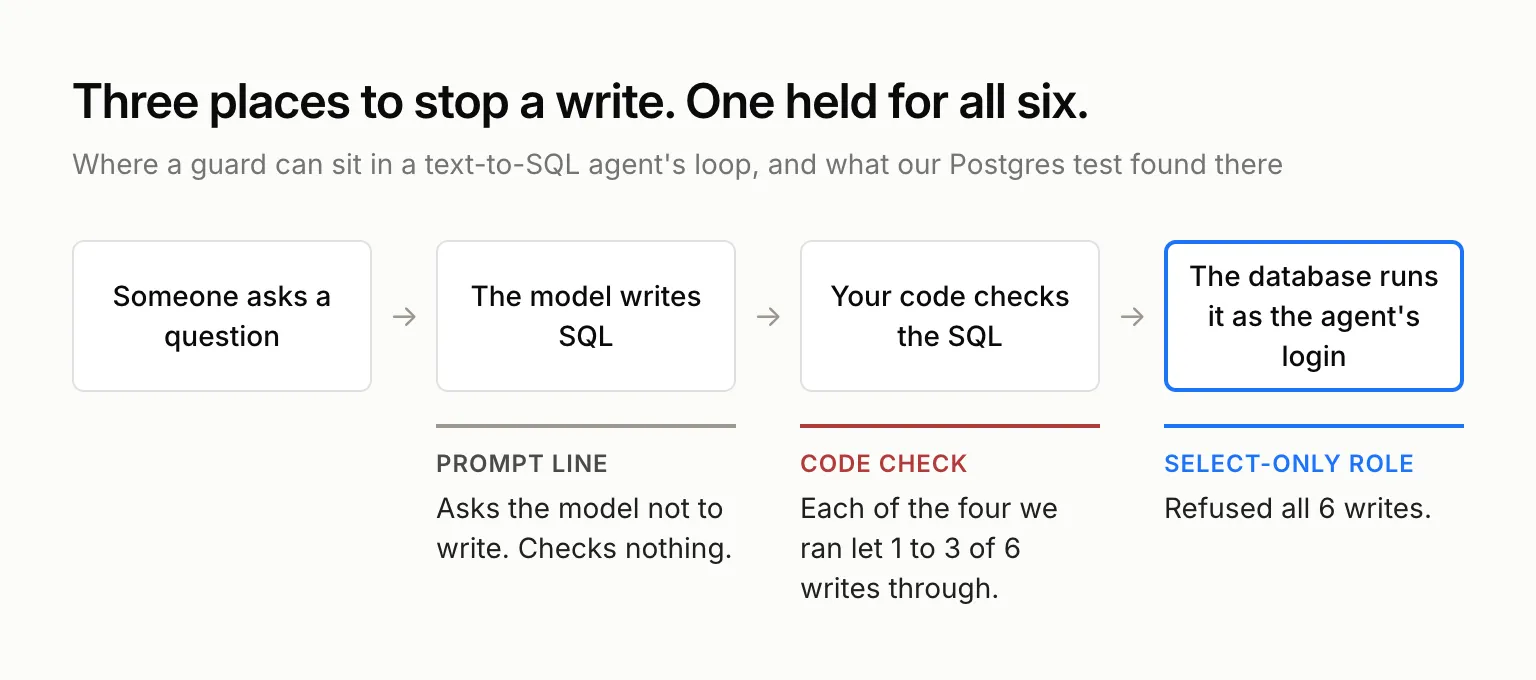
We ran six write statements past the four checks people put in text-to-SQL agents, on a real Postgres database. Each code check let at least one through. A role that can only SELECT refused all six.
 Javier BonillaCo-founder & CTO
A text-to-SQL agent is a model in a loop: it reads your schema, writes SQL, runs it, reads the result or the error, and answers your question in words. Whatever SQL the model writes, the agent runs. We put six write statements past the four checks builders add to these agents, on a real Postgres database. Each check in code let at least one write through. A role that can only SELECT refused all six.
So the guard belongs in the database. A prompt line asks the model nicely, and a code check reads the SQL and guesses what it will do. The database decides what the agent's login is allowed to do.
What is a text-to-SQL agent?
Whatever framework it's built on, the loop is the same. The agent lists the tables, pulls the columns it needs, writes a query, runs it, and on an error feeds the message back to the model and tries again, usually up to three times. If you want the loop itself, our text-to-SQL explainer and the LangChain SQL agent walkthrough cover it.
A guard can sit in three places on that loop: in the prompt, in a check on the generated SQL before it runs, or in the database role the agent logs in as.
Can a text-to-SQL agent delete your data?
Yes, if its login can. The reference builds people start from leave that to you. LangChain's LangGraph SQL agent tutorial and its text-to-sql-agent repo guard writes with one prompt line: "DO NOT make any DML statements (INSERT, UPDATE, DELETE, DROP etc.) to the database." AWS's Bedrock sample says its tool runs "arbitrary SQL statements" and connects as the database's admin user. To be fair to all three, they're tutorials, and LangChain says so: its tools "are not intended to be secure or used in production."
When we called LangChain's sql_db_query tool directly on a SQLite file, it ran DELETE and DROP TABLE and committed both. Once a write is in the SQL, whether from the model's own mistake, an instruction someone planted in a row the agent read, or a user who pasted SQL into the chat, the prompt has already done all it can.
So builders add a check in code: a list of banned keywords, or a parser that only lets a SELECT through. We tested four of them.
Which guard stops a text-to-SQL agent's writes?
We ran every statement below against a 10-row orders table on PostgreSQL 18.6, each on a fresh copy, through four code checks and two database logins. The first check was the nine-keyword blocklist from a Medium tutorial for a "production-grade" text-to-SQL agent (INSERT, UPDATE, DELETE, DROP, TRUNCATE, ALTER, CREATE, GRANT, REVOKE, checked against every token). The second matched the same list against every word in the text. The other two used sqlglot: one allowed exactly one statement whose top node is a SELECT, and one walked the whole parsed statement for any write. The first login owned the table, like an agent that logs in as the app's own database user. The second could only SELECT and had read-only transactions on by default.
| SQL the agent runs | Keyword blocklist (tokens) | Keyword blocklist (words) | One SELECT | Whole parsed statement | SELECT-only role |
|---|---|---|---|---|---|
DELETE FROM orders WHERE id = 1 |
Blocked | Blocked | Blocked | Blocked | Refused |
WITH gone AS (DELETE ... RETURNING *) SELECT count(*) FROM gone |
Blocked | Blocked | Let through: 10 rows to 2 | Blocked | Refused |
SELECT 1; DELETE FROM orders |
Blocked | Blocked | Blocked | Blocked | Refused |
DO $$ BEGIN DELETE FROM orders; END $$ |
Let through: 10 rows to 0 | Blocked | Blocked | Blocked | Refused |
DO $$ BEGIN EXECUTE 'DEL' || 'ETE FROM orders'; END $$ |
Let through: 10 rows to 0 | Let through: 10 rows to 0 | Blocked | Blocked | Refused |
SELECT purge_test_orders() (a function that deletes) |
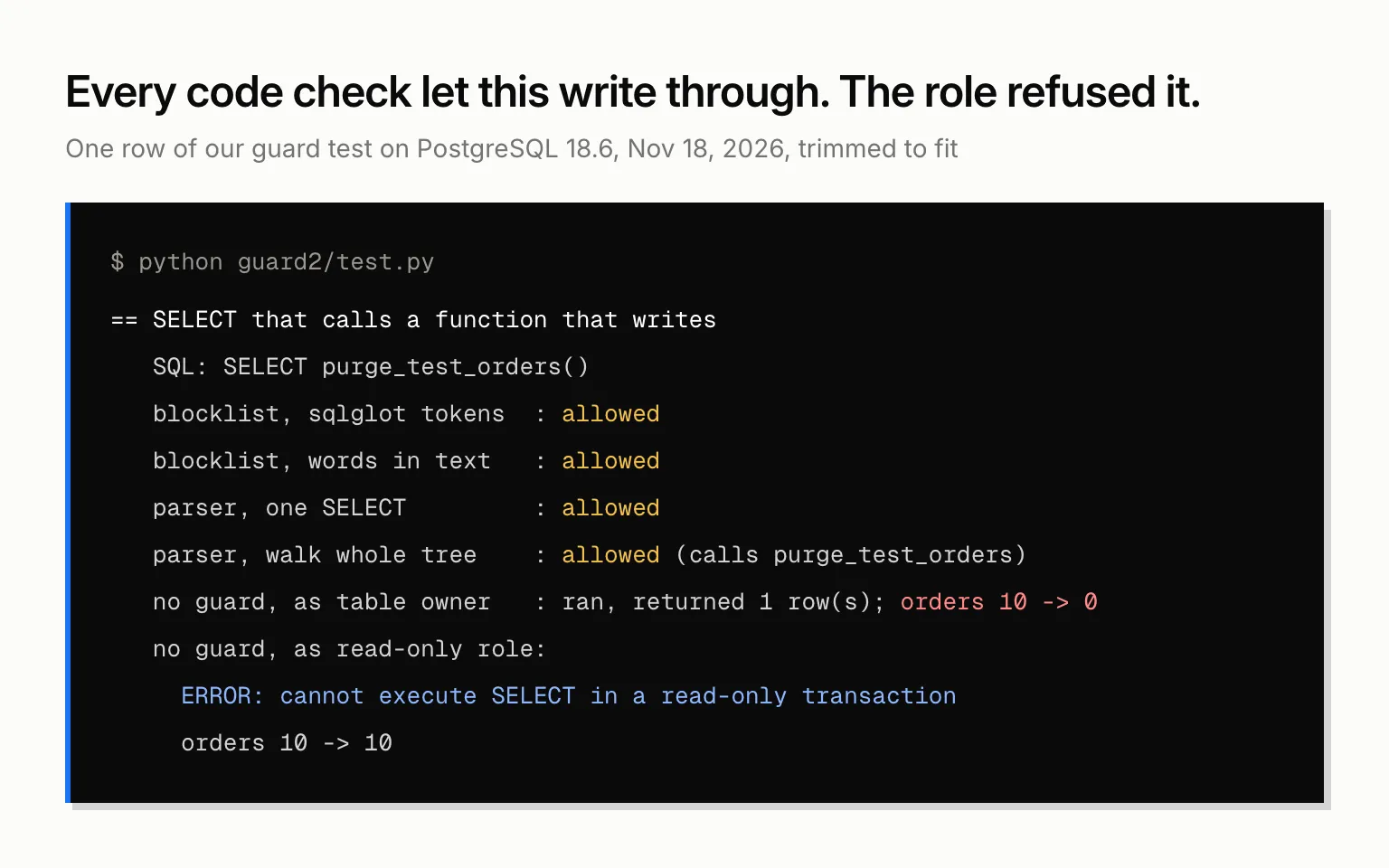
Let through: 10 rows to 0 | Let through: 10 rows to 0 | Let through: 10 rows to 0 | Let through: 10 rows to 0 | Refused |
A real question: ... WHERE note = 'customer asked us to delete their card' |
Answered | Refused | Answered | Answered | Answered |
The token blocklist never sees the DO block's body, because sqlglot reads everything between the $$ marks as one string. The tutorial that ships this list also validates the SQL with sqlglot before running it. In our test, sqlglot parsed the DO block as a generic command and raised no error. Matching words in the raw text catches that one, but it misses a verb split across two strings, and it refused a harmless question because a customer's note said "delete".
The one-SELECT check fails on Postgres's data-modifying CTEs. The statement starts with WITH, ends in a SELECT, and deletes eight rows on the way.
Checking the whole parsed statement caught every write that was spelled out in the SQL. It can't see what a function does inside. SELECT purge_test_orders() is a plain SELECT to any parser, and it emptied the table. The SELECT-only role refused it with "cannot execute SELECT in a read-only transaction", the same error it gave the CTE.
How to make a text-to-SQL agent read-only
Give the agent its own login that can only read, and never let it own the tables it queries. On Postgres, that's a few lines (PostgreSQL 18):
CREATE ROLE sql_agent LOGIN PASSWORD '...';
GRANT USAGE ON SCHEMA public TO sql_agent;
GRANT SELECT ON ALL TABLES IN SCHEMA public TO sql_agent;
ALTER ROLE sql_agent SET default_transaction_read_only = on;
ALTER ROLE sql_agent SET statement_timeout = '30s';
The grant does more of the work than the read-only setting. The setting is only a default, and a session can turn it off. When our read-only role ran SET default_transaction_read_only = off and then a DELETE, Postgres answered "permission denied for table orders". The grant held.
One thing in our test got past the role too: SELECT pg_terminate_backend(pid) on the role's own sessions. Postgres lets a role end its own connections, so the read-only agent ended another open session of the same role. Give each agent a role that nothing else logs in as, and the worst it can do there is cut off its own queries.
On BigQuery the same idea is the Data Viewer and Job User roles plus a maximum bytes billed cap on each query. Our guide to connecting BigQuery to Claude has the setup.
Keep a code check too, the kind that checks the whole parsed statement. It turns a write into a clear error before the database sees it, which helps the agent retry with a SELECT. Just don't rely on it alone.
Read-only is where you start
A read-only agent can still read everything its role can read, for everyone who asks it. If the sales team and the finance team both ask through one login, they both see what that login sees. Running each query as the person asking is its own setup, covered in our guide to per-user permissions for AI agents. And if one shared login carries row-level security on top, the agent's own SQL can switch whose rows it sees.
It also still has to guess what your words mean. Google Cloud's text-to-SQL team uses "What are the best-selling shoes?" as the example: most orders, or most revenue? A model "tends to try to give you an answer, and when the question is ambiguous, can be prone to hallucinating." That one is fixed with agreed definitions the agent reads, usually a semantic layer.
Build a text-to-SQL agent or use Querio?
To run a homemade agent for a whole company, you add the read-only role, a statement check, a login per person or per team, definitions it reads, and a log of every query it ran. Daniel Merighi, our founding operator, described where that ends up: "You've started building a makeshift context layer," and "There is still no way to audit how answers were derived."
Or put Querio between your agent and the warehouse, and most of that list is done. Connect Claude, ChatGPT or your own agent through Querio's MCP server, or Claude Code and Cursor through the CLI. Both come on every plan, Free included. The agent runs SQL as the signed-in user. On Snowflake, BigQuery and Databricks, that's per-user OAuth, so the warehouse's own access rules apply. On Postgres, Redshift and ClickHouse, Querio connects with a service account and applies its own access policies on top. Give that account a SELECT-only role like the one above.
Metrics can come from your dbt project's semantic_manifest.json, so the agent asks for revenue by name instead of writing its own. When the agent proposes new context, a person saves it, and saving opens a pull request on your repo. Every query and agent action is logged, and audit export is on Enterprise. The Free plan is $0 with unlimited users and 500 AI credits a month.