Business Intelligence
Metabase Pricing: Open Source vs Cloud Costs
Compare Metabase self-hosted vs Cloud total costs—license, hosting, backups, and labor—to see which saves money long term.
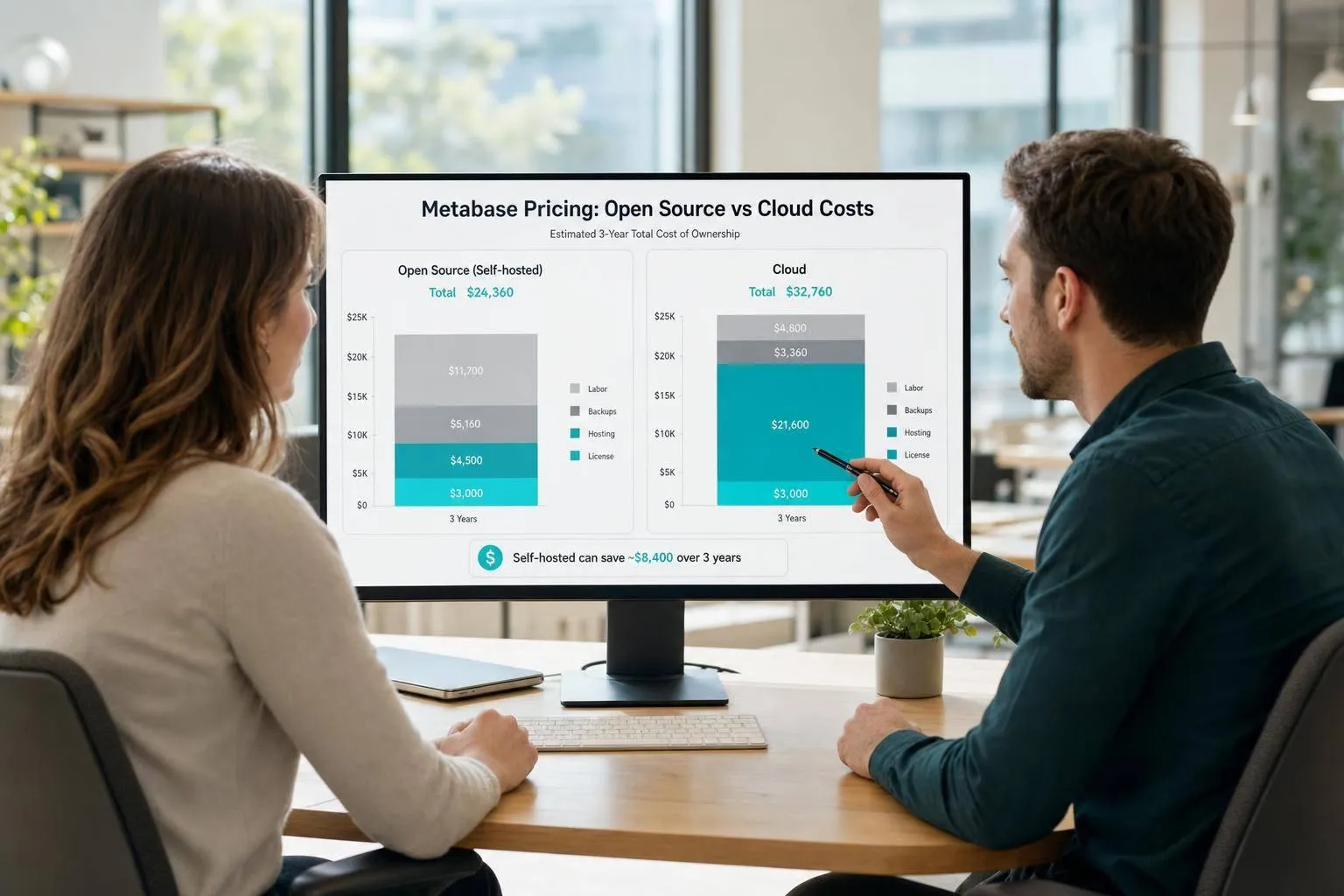
If I price my team’s time honestly, Metabase Cloud is often cheaper to run than self-hosting. Open source starts at $0 for the license, but Cloud starts at $100/month and includes hosting, backups, updates, and security work that my team would otherwise handle.
Here’s the short version:
- Open source costs less upfront
- Cloud often costs less over time
- The big difference is labor, not software fees
- Self-hosting fits teams that already run their own stack
- Cloud fits teams that want to spend less time on BI upkeep
- For regulated companies, policy and hosting rules can matter more than price
I’d look at these cost areas first (or compare Querio vs Metabase for a broader look at features and pricing):
- License fees
- Hosting and compute
- Backups and recovery
- Security and access control
- Setup, upgrades, and troubleshooting
- Team size and growth
A few numbers make the tradeoff clear:
- Startup: self-hosted about $190–$850/month vs. Cloud about $140–$450/month
- Mid-market: self-hosted about $1,500–$7,000/month vs. Cloud about $1,400–$7,100/month
- Regulated enterprise: self-hosted about $7,500–$25,000/month vs. Cloud about $6,800–$25,400/month
Bottom line: if I ignore labor, open source looks cheaper. If I include engineer or analyst hours at $80–$180/hour, Cloud can match or beat self-hosting fast.
A tour of Metabase: self-hosting | Webinar recording
::: @iframe https://www.youtube.com/embed/QuesoJLBkrE :::
Quick Comparison
| Category | Open Source (Self-Hosted) | Metabase Cloud |
|---|---|---|
| Starting price | $0 license | $100/month |
| Hosting | I pay for it | Included |
| Backups | I handle them | Included |
| Updates | I do them manually | Included |
| Security setup | I own it | Mostly handled by Metabase |
If you're new to the platform, check out our detailed guide on what Metabase is and who it's for. | Best fit | Teams that want control | Teams that want less admin work |
So when I compare Metabase pricing, I wouldn’t ask only, “Which one has the lower sticker price?” I’d ask, “What will this cost me each month in time, infra, and support?”
Open source vs. Cloud: how each pricing model works
Metabase pricing comes in two forms: self-hosted open source and Cloud. Open source moves the cost to your infrastructure and your team’s time. Cloud moves it to a subscription with managed operations. So the key issue isn’t the sticker price. It’s what costs less to run day to day.
That gap shows up in total cost of ownership: license fee, infrastructure, and labor.
What open source self-hosting includes and leaves out
The software license is $0. While the core is free, teams often compare Metabase AI and Querio when looking for more advanced automation features. Everything around it is paid for by your team.
That means you cover hosting, storage, networking, monitoring, backups, incident response, security configuration, and maintenance. You also need a plan for the Metabase application database, which stores your dashboards and saved questions, because backup planning falls on you.
Upgrades are manual too. If you want to move to a new Metabase version, your team needs to update the container or application package and run migrations. For analytics teams without a dedicated DevOps function, that ownership becomes the main cost. It doesn’t show up on the license line, but it does show up in total cost of ownership.
What Metabase Cloud bundles into the subscription
Metabase Cloud wraps hosting, routine upgrades, backups, and managed operations into one recurring fee. Cloud plans are Starter ($100/month for 5 users, plus $6 per additional user), Pro ($575/month for 10 users, plus $12 per additional user), and Enterprise (from $20,000/year).
Setup takes minutes, not hours. For a small analytics team, that can make a big difference.
The tradeoff is control. With Cloud, you have less say over where your dashboards, questions, and permissions live. Cloud cuts admin work, but it also means Metabase manages the environment. That matters if your team has data residency or compliance rules to meet.
| Responsibility | Open Source (Self-Hosted) | Metabase Cloud |
|---|---|---|
| Software license | $0 | Included in subscription |
| Hosting & compute | Paid by your team (AWS, GCP, or on-prem) | Included |
| Upgrades | Manual (container or application package) | Automatic |
| Backups | Customer-managed | Managed by Metabase |
| SSL/TLS and security settings | Customer-managed | Managed by Metabase |
| Setup time | 1–4 hours | Under 5 minutes |
The tradeoff is simple: open source moves cost from your invoice to your team’s time, while Cloud moves cost from your team’s time to your invoice. Which one is harder on your budget depends on how much operational work your team can take on.
Next, those responsibilities turn into dollar ranges.
What each option actually costs
Open source self-hosted cost breakdown
The $0 license is real. But that’s only a tiny piece of the total cost.
To run Metabase Open Source well, you still need a Docker container or a cloud instance like AWS EC2, plus a production-ready PostgreSQL or MySQL database for Metabase’s internal data [1]. On top of that, your team spends engineering time on operations, maintenance, and incident response.
And that’s where the math starts to shift.
As uptime goals get tighter, and audit and access-control needs grow, labor costs climb too. A setup that looks cheap on paper can get expensive once your team is the one handling the day-to-day work.
That picture changes fast when those jobs move into a managed subscription.
Metabase Cloud cost breakdown
Metabase Cloud rolls hosting, backups, and patching into one subscription.
The Starter plan costs $100/month for 5 users, plus $6 per additional user, and higher tiers scale by seats and features [1]. Instead of staffing most of that operational work in-house, you’re paying Metabase to handle it.
In practice, your internal work usually drops to:
- User provisioning
- Source connection
That lighter workload can make Cloud the lower-cost option once labor is part of the equation. The table below breaks those costs out line by line.
Side-by-side cost comparison table
| Cost Category | Open Source (Self-Hosted) | Metabase Cloud | Lower Cost in Most Cases |
|---|---|---|---|
| Software fee | $0 | Starter from $100/month; higher tiers scale by seats and features | Open Source |
| Hosting & compute | Your infrastructure cost | Bundled in the subscription | Cloud |
| Maintenance labor | High | Low | Cloud |
| Security & backups | Manual setup and ownership | Managed by vendor | Cloud |
| Scaling | Manual optimization | Managed / elastic | Cloud |
The pattern is pretty clear: open source wins on the invoice, while Cloud wins on labor and day-to-day simplicity.
For warehouse-native teams, the gap usually isn’t licensing. It’s the time and effort behind keeping everything running.
Those costs also shift a lot by company size, which is why the next section looks at startup, mid-market, and enterprise cases.
Cost scenarios for three company stages
::: @figure 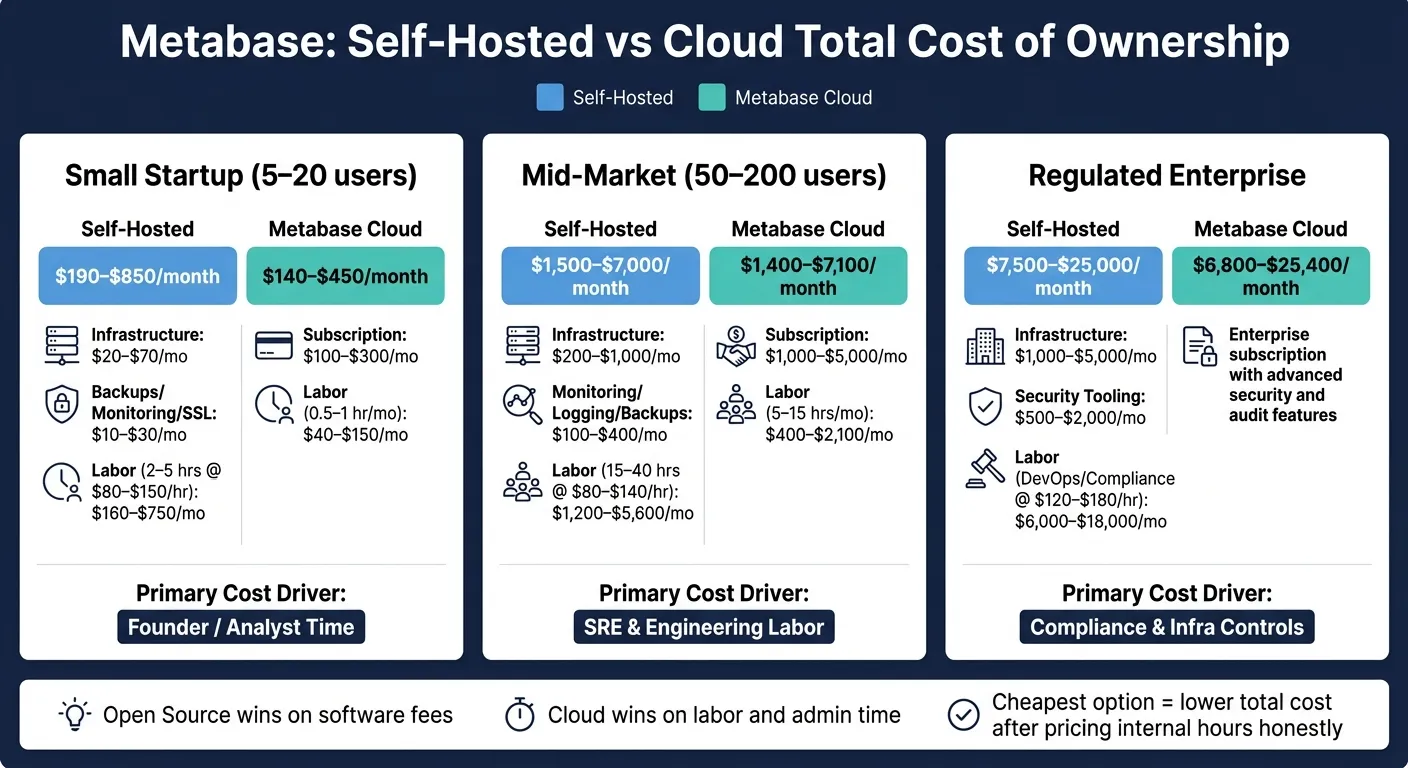 {Metabase Open Source vs Cloud: Total Cost of Ownership by Company Size}
:::
{Metabase Open Source vs Cloud: Total Cost of Ownership by Company Size}
:::
These examples show how the same pricing model shifts once team size changes and governance gets heavier.
Small startup: lowest upfront spend vs. fastest deployment
For a 5–20 person SaaS team, self-hosting can look dirt cheap at first glance. The license is free, and infrastructure usually lands around $20–$70/month, plus another $10–$30/month for backups, monitoring, and SSL.
But that’s not the whole bill, as the hidden costs of traditional BI platforms often extend beyond the sticker price.
Once you put a dollar value on founder or analyst time, the math changes fast. At 2–5 hours/month priced at $80–$150/hour, you’re adding $160–$750/month in labor. That puts self-hosted TCO at $190–$850/month ($2,300–$10,200/year).
Cloud changes that picture. A subscription for a team this size usually runs $100–$300/month, with admin work dropping to about 0.5–1 hour/month, or $40–$150/month in labor. That brings Cloud TCO to $140–$450/month ($1,700–$5,400/year).
So yes, self-hosting can still win on pure cash outlay. But that only holds if founder time is treated like it costs $0.
As the team gets bigger, infrastructure stops being the main issue. Admin hours become the thing that moves the total.
Mid-market company: when labor costs start to dominate
At 100–500 employees, labor starts to run the show. Licensing matters, sure, but it’s no longer the main line item.
Picture a B2B SaaS company using Snowflake or BigQuery and dbt, with 50–200 Metabase users spread across product, ops, and finance. At that point, dashboards aren’t just nice to have. They’re part of day-to-day work.
Self-hosting at this size needs more muscle behind it: $200–$1,000/month for infrastructure, plus $100–$400/month for monitoring, logging, and backups. Still, the biggest cost is people. If DevOps and analytics engineers spend 15–40 hours/month at blended U.S. rates of $80–$140/hour, labor alone lands at $1,200–$5,600/month. That pushes self-hosted TCO to $1,500–$7,000/month ($18,000–$84,000/year).
Metabase Cloud at this stage usually falls between $1,000–$5,000/month in subscription fees. Internal admin work drops to 5–15 hours/month, which puts Cloud TCO at $1,400–$7,100/month ($16,800–$85,200/year).
The totals are close. That’s the tricky part. On paper, neither side runs away with it. In practice, though, the time saved with Cloud can be used for work the business actually cares about, like building models in dbt or working through the request queue, instead of babysitting the BI layer.
At regulated companies, the spreadsheet often stops being the main deciding factor.
Regulated enterprise: when self-hosting is worth the extra cost
In regulated enterprises, compliance rules often decide the deployment model before anyone finishes the cost comparison.
HIPAA, SOX, and internal policy can require private networking, customer-managed encryption, SIEM integration, and tested disaster recovery. In that setup, self-hosting usually means $1,000–$5,000/month in infrastructure, plus $500–$2,000/month for security tooling. Add DevOps, compliance, and data platform labor at enterprise rates of $120–$180/hour, and labor adds $6,000–$18,000/month. Self-hosted TCO lands at $7,500–$25,000/month [2][3].
Metabase Cloud in a compliant setup ranges from $6,800–$25,400/month at enterprise tiers with advanced security and audit features [2][4].
When regulated organizations pick self-hosting, it’s often not because it’s cheaper. It’s because data residency rules, private connectivity needs, or internal change management processes make Cloud a non-starter from an ops and policy standpoint.
| Scenario | Self-Hosted TCO (Monthly) | Cloud TCO (Monthly) | Primary Cost Driver |
|---|---|---|---|
| Small startup (5–15 users) | $190–$850 | $140–$450 | Founder/analyst time |
| Mid-market (50–200 users) | $1,500–$7,000 | $1,400–$7,100 | SRE and engineering labor |
| Regulated enterprise | $7,500–$25,000 | $6,800–$25,400 | Compliance and infra controls |
Which option is cheaper, and how to decide
The cheaper option is the one with the lower total cost after you price internal time honestly. Once you factor in the cost ranges above, the choice usually comes down to one simple tradeoff: do you want to spend money on infrastructure or staff time?
Choose self-hosted open source when infrastructure control outweighs admin time
If your team already runs Airflow, dbt, or Kafka in AWS, GCP, or Azure, self-hosting is much easier to absorb. In that setup, adding Metabase to a modern analytics stack is usually incremental work, not a brand-new ops project.
This path also makes sense when data residency, private networking, or strict compliance rules make SaaS approval slow or uncertain. In cases like that, open source is a valid option.
The catch is pretty simple: this tradeoff works best when your team already owns the operational stack.
Choose Cloud when cutting operational burden is worth the subscription fee
If your data team is mostly analysts and analytics engineers working in Snowflake, BigQuery, or Redshift, their time is often better spent building models and answering requests than patching servers. That’s where Cloud tends to make more sense.
At $100–$150/hour, just 8–10 hours per month of maintenance adds $800–$1,500 in internal labor cost. In many cases, that’s more than the gap in subscription price. Cloud also cuts down the maintenance load by handling updates, monitoring, and security patches.
So if BI upkeep keeps pulling your team away from actual analytics work, Cloud is usually the cleaner choice.
Conclusion: the cheapest option depends on whose time you are spending
Open source cuts software fees. Cloud cuts admin work. The lower-cost option is the one that stays cheaper after you include internal labor.
FAQs
::: faq
What does self-hosting usually require?
Self-hosting Metabase means you run the whole setup yourself.
That includes the server, a Postgres metadata database, Docker, SSL certificates, and SMTP for alerts.
And the work doesn't stop after setup. You also need to handle upgrades, monitoring, backups, and security patching.
The software itself is free. But a production-ready setup usually costs $100–$130 per month in cloud infrastructure, plus ongoing engineering time. :::
::: faq
When does Cloud become cheaper than open source?
Cloud gets cheaper when your in-house cost to run infrastructure, handle security, and keep everything maintained is higher than the monthly subscription fee.
Open source doesn’t come with a license fee. But once you self-host it in production, the math changes. You’re often looking at $100–$130/month for infrastructure, plus $15,000–$20,000/year in engineering time.
For growing teams, Cloud can cost less overall because it takes that work off your plate. You’re not just paying for software - you’re cutting down the time spent on upkeep and making your monthly costs easier to plan for. :::
::: faq
How should I estimate labor costs for Metabase?
Estimate labor costs for self-hosted Metabase by budgeting for steady engineering time, not just software fees. The open-source version is free to download, but a production-ready setup often adds $15,000–$20,000 per year in infrastructure and admin costs.
That extra spend usually comes from the work needed to keep the system up and running day after day. Think upgrades, security patching, SSL certificate management, backups, and monitoring. None of that is a one-time task.
And here's the part teams sometimes miss: if you don't have dedicated DevOps support, that work usually lands on data engineers or analysts instead. So even when the software itself is free, the staffing cost can sneak up on you. :::