Business Intelligence
iFrame vs API vs MCP: Three Ways to Embed Analytics
Compare iFrame, API, and MCP methods for embedding analytics—trade-offs in setup, UI control, permissions, latency, and maintenance.

My rule: use iFrames for dashboards, APIs for native product charts, and MCP for assistant-led analysis. I’d choose based on what your users need - and how much code your team can own.
Here’s the short version:
- iFrame: Embed a hosted dashboard with less front-end work, but fewer options for layout and interaction.
- API: Build charts and workflows inside your app, with more UI control and more code to maintain.
- MCP: Let an assistant call analytics tools for questions and follow-ups. It still needs approved metric definitions and server-side permission checks.
Quick Comparison
| Factor | iFrame | API | MCP |
|---|---|---|---|
| Best fit | Recurring reports | In-app analytics | Conversational analysis |
| Setup work | Dashboard and embed code | Endpoints and custom UI | Tool setup and metric context |
| UI control | Limited | High | Client-dependent |
| Permissions | Check dashboard and data access | Check every request | Check every tool call |
| Response time includes | Page load and query | Request and chart rendering | Model processing, tools, and query |
| Maintenance | Dashboards and embed sessions | Endpoints, access rules, and UI | Tools, definitions, and context |
| Follow-ups | Preset drilldowns | App-built paths | Assistant-led questions |
| Audit trail | Embed and query logs | App and query logs | Tool calls, queries, and results, if logged |
I’d test all three with the same eight-quarter revenue-retention task, using matching data and access rules. Measure setup hours, median and p95 response time, answer accuracy, and work needed after a metric changes - not just launch speed.
The interface should change, not the numbers or who can see them. MCP alone does not supply those controls. Querio’s role is to connect warehouse data, shared business definitions, and reviewable SQL/Python across these workflows.
::: @figure 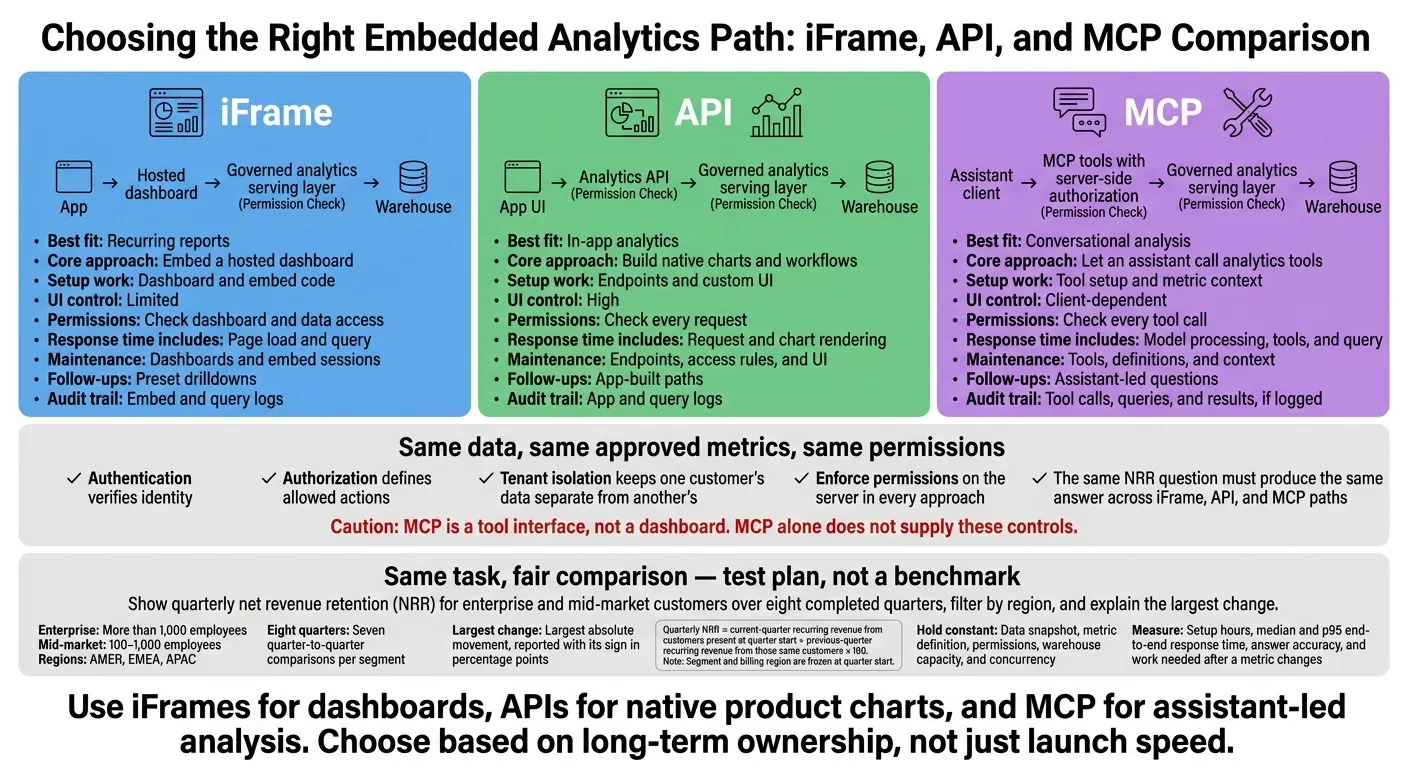 {iFrame vs API vs MCP: Choose Your Analytics Interface}
:::
{iFrame vs API vs MCP: Choose Your Analytics Interface}
:::
REST API to MCP Server with Azure API Management | Hands-On Demo
::: @iframe https://www.youtube.com/embed/1reWkJgmYgg :::
How iFrames, APIs, and MCP Work
Authentication verifies identity; authorization defines allowed actions; multi-tenant isolation keeps one customer’s data separate from another’s. These are three separate requirements. A valid login or signed token doesn’t prove tenant-level access. The same revenue-retention task works differently on each surface because each path puts control in a different layer.
iFrames: Embed a Dashboard
An iFrame loads a hosted dashboard through an embed URL, often using signed sessions or JWTs. Tenant filtering belongs in the serving layer, not the embed URL. Configure Content Security Policy (CSP) to allow the intended embedding relationship, and use a responsive container.
Embedding cuts front-end work, but the hosted interface limits styling and navigation. Product teams that need full UI control can move from embedded dashboards to APIs.
APIs: Build Native Analytics Interfaces
Data APIs return rows; metrics APIs expose predefined KPIs. Your app handles rendering, access control, caching, timeouts, and audit logs. A warehouse such as Snowflake, BigQuery, Redshift, or Postgres can sit behind the serving layer.
Definitions maintained in dbt help standardize calculations, but they don’t replace the secure serving layer. A shared metrics layer keeps metric definitions consistent across charts and assistant queries. For conversational interactions, MCP moves the query into an assistant workflow.
MCP: Connect Assistants to Analytics Tools
MCP is a tool interface, not a dashboard. An MCP server exposes tools with schemas that describe their inputs. A client such as Claude then calls those tools. The integration needs user consent, permission checks, and read-only limits. An open-ended question shouldn’t give a user open-ended tool access.
OAuth-backed access can tie assistant requests to the requesting user’s permissions instead of a shared service account. The assistant can request the same governed metric definition used in dashboard and API views. SQL or Python that analysts can review shows the underlying work.
MCP doesn’t provide these controls on its own. In Querio’s MCP workflow, the server enforces business permissions, and the client displays the result.
Compare the Same Revenue-Retention Task
Use one task across all three paths: show quarterly net revenue retention (NRR) for enterprise and mid-market customers over eight completed quarters, filter by region, and explain the largest change. Keep the data snapshot, metric definition, permissions, and warehouse settings identical. This lets you compare setup effort, UI control, permissions, and follow-up analysis without changing the task.
Define quarterly NRR as current-quarter recurring revenue from customers present at quarter start ÷ previous-quarter recurring revenue from those same customers × 100. Segment customers by employee count only: enterprise means more than 1,000 employees; mid-market means 100–1,000. Freeze each customer’s segment and billing region at quarter start. Map regions through dim_geography to AMER, EMEA, or APAC.
For the selected region, compare each quarter with the previous quarter for both segments. Eight quarters produce seven comparisons per segment. Find the largest change by absolute value, but report its signed movement in percentage points. The task stays fixed; only the surface changes.
Complete the Task Through Each Surface
iFrame: Select a region, read the two segment series, and use dashboard drilldowns to explain the largest move.
API: Send a request with the required permissions for NRR by quarter and segment, including the region filter. Render native charts and use app logic to explain the move.
MCP: Ask for NRR by quarter and segment in the selected region, plus an explanation of the largest move. The assistant calls analytics tools and handles follow-up questions about revenue drivers.
All three paths need the same revenue detail - not just NRR totals.
The quality of the explanation depends on the available context and implementation, not the protocol. Check each answer against the defined calculation. It should identify the quarter, segment, signed movement, and supporting revenue components. If the data shows a change but doesn’t explain its driver, the answer should say so rather than invent a cause. These shared checks make setup, latency, and maintenance comparable across the three paths.
Measure Setup, Response Time, and Maintenance
Treat this as a test plan, not a benchmark. Record initial engineering hours separately from maintenance work. Hold warehouse capacity and concurrency constant while testing the same workflow.
Report median and p95 latency, timing the complete answer - not just the query. Apply the same follow-up and correctness checks to every surface, using the measurement frame below.
| Measure | iFrame | API | MCP |
|---|---|---|---|
| Engineering hours | Time to build the dashboard and embed code | Time to build custom endpoints and UI components | Time to map semantic definitions and configure MCP |
| Maintained components | Dashboard UI, filters, embed tokens | API code, auth logic, custom chart code | semantic layer, MCP server |
| End-to-end latency | Page load + dashboard query time | API roundtrip + native render time | LLM reasoning + tool call + query time |
| New-question effort | High: requires a dashboard redesign | High: requires new API/UI development | Low: update semantic context/metadata |
| Follow-up completion | Limited to predefined drilldowns | Requires specific app-logic paths | Native conversational follow-ups |
| Audit records | Warehouse query history | Application-level API logs | Full trace: Prompt → SQL → Result |
Decision Table: iFrame vs API vs MCP
The same revenue-retention workflow helps show where each surface fits. Use this table to match your choice to your users, workflow, and team capacity.
The table assumes you already have a ready-made dashboard, an authenticated application, or an assistant interface. Assess embedded analytics architecture and security separately from front-end effort. Read the matrix as a map of tradeoffs, not a feature list.
| Decision factor | iFrame | API | MCP |
|---|---|---|---|
| Best fit | Ready-made dashboard for recurring reporting | Native charts in product workflows | Assistant-led, multistep analysis |
| Front-end effort | Low | High | Moderate |
| UI control | Limited: theme/layout only | High: full layout and state control | Low visual control; strong conversational control |
| Interaction depth | Limited to frame events | Deep: workflow actions and state | Multistep: reasoning and drill-down |
| Authentication and integration | Embed tokens and sandboxing | App-managed auth, RBAC, and session handling | OAuth-backed user consent plus server-side tool auth |
| Permission enforcement | Server-side checks on content and data | Server-side checks on every request | Server-side checks on every tool call; model instructions are not access controls |
| Warehouse and semantic context | Dashboard queries use approved definitions | Endpoints use approved definitions | Approved definitions and enough context to select them correctly |
| Auditability | Basic: embed tokens and origin logs | Variable: depends on logging | High: inspectable SQL/Python |
| Maintenance burden | Low: vendor-managed features | High: team owns code and versioning | Moderate: metric and context upkeep |
| Main limitations | Responsiveness and scrolling issues | High engineering maintenance | Requires semantic layer mapping |
Choose Based on User Needs and Team Capacity
Choose iFrames for ready-made dashboards, APIs for analytics that work like native product features, and MCP for assistant-led investigation. Front-end work is only part of the estimate. Tenant identity, permission mapping, and warehouse access can still take a lot of work.
Enforce permissions on the server in every approach. Tie requests to verified user and tenant identities, then check authorization before returning data.
Share Metric Definitions Across Surfaces
Once you choose a surface, lock the metric layer. All three surfaces should use the same approved definitions. The same NRR question must produce the same answer across iFrame, API, and MCP paths.
Sharing a Snowflake, BigQuery, Redshift, or Postgres warehouse doesn't guarantee consistent results. Separate queries can still use different joins, exclusions, or date rules. Querio’s governed semantic/context layer addresses this problem, while inspectable SQL/Python lets teams review the calculation. End-to-end observability helps catch drift or pipeline issues before they reach dashboards or AI responses.[2]
Conclusion: Match the Approach to the Workflow
After comparing setup effort, latency, and maintenance, choose the approach that fits your workflow. Use iFrames for recurring reporting, APIs for native product analytics, and MCP for assistant-led investigation.
Test the same revenue-retention workflow on each surface. Confirm that users with permission get matching results and users without permission cannot access restricted data. Measure setup time, latency, and the maintenance required when a metric definition changes. Choose based on long-term ownership, not just launch speed. The implementation path matters as much as the interface.
How Querio Supports All 3 Approaches
All three approaches depend on governed definitions and warehouse-native access. Querio connects directly to live Snowflake, BigQuery, and Postgres warehouses. Its inspectable, editable SQL/Python and reactive notebooks support governed self-serve without CSV exports.
Keep human-approved SQL, Markdown, and Python context files synced with GitHub alongside dbt models. Review definition changes before releasing them to users.
For MCP, map business logic in a semantic layer first. Use OAuth-based authentication so the assistant acts on the user’s behalf, and enforce permissions on the server. MCP is an access layer, not a metric-definition system.
FAQs
::: faq
Can we combine iFrames, APIs, and MCP in one product?
Yes. iFrames, APIs, and MCP work together, with each serving a different purpose. Use iFrames for standard dashboards, APIs or SDKs for custom charts that feel native to your product, and MCP for an AI assistant that answers natural language questions using governed analytics.
Connect all three to a shared, governed semantic layer, such as one synced with dbt. This keeps metrics and business logic consistent and applies the same warehouse-level permissions. :::
::: faq
How can we test tenant isolation across all three approaches?
In a non-production sandbox with real multi-tenant data, check that requests are scoped to the user or organization ID and that Row-Level Security (RLS) filters data based on the authenticated identity.
For iFrames and APIs, use short-lived, backend-signed tokens that contain tenant IDs. Test whether swapping IDs or changing parameters lets someone access another tenant’s data. Those attempts must be rejected.
For MCP, verify that OAuth applies the user’s warehouse permissions to prevent cross-tenant access. :::
::: faq
How do we prevent metric drift when definitions change?
Use a governed semantic or context layer to keep business logic in one place [1][2][3]. Define joins, metrics, and business terms once in version-controlled SQL, Markdown, or Python files, synced to GitHub alongside your dbt project.
This gives AI-generated queries and dashboards the same verified definitions to work from. Without that shared layer, AI may infer logic from raw schema, producing inconsistent results across sessions or users [4][5][2][3]. :::