Business Intelligence
How to Add AI Insights to Your App
Connect your data warehouse, build a semantic layer, and embed AI-driven analytics into your app for secure, governed, real-time insights.
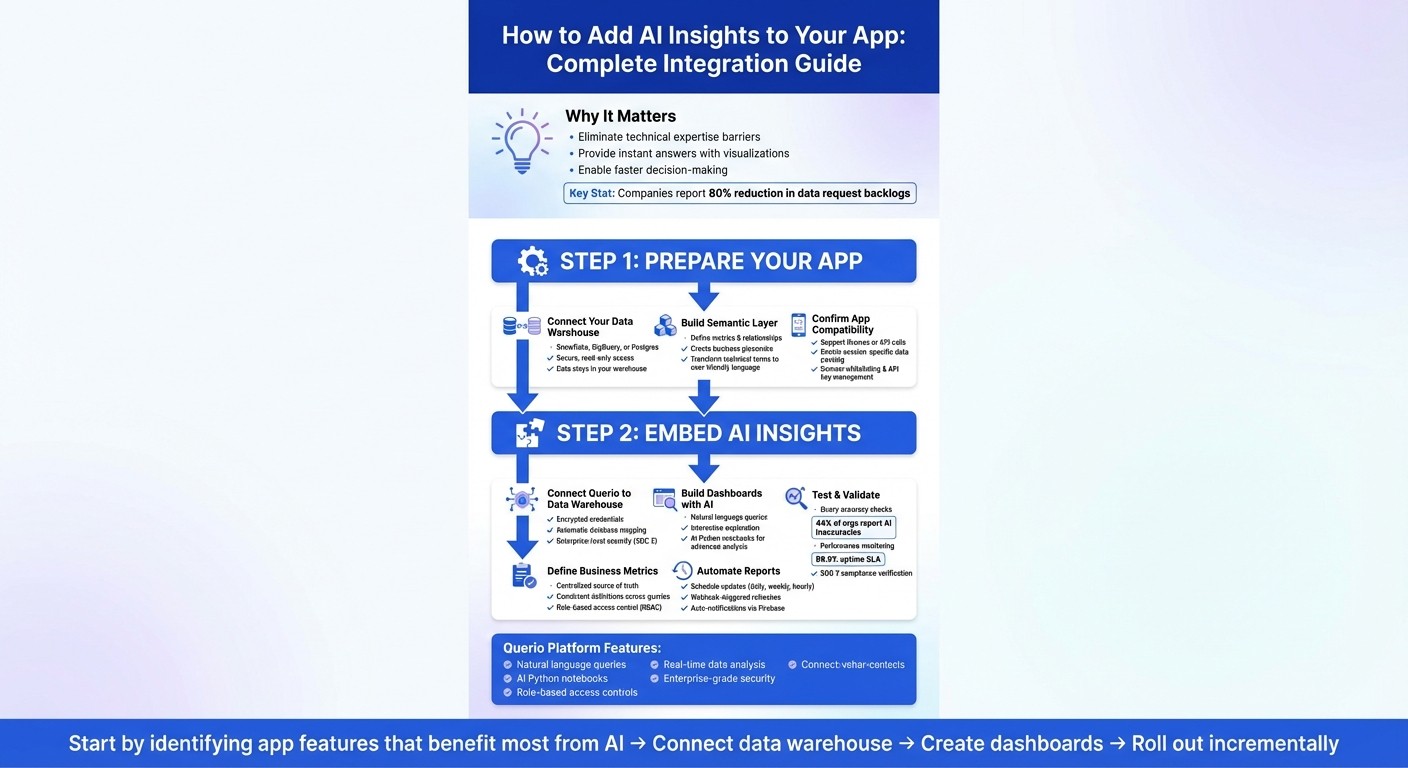
AI insights can transform your app by delivering real-time data analysis directly to users, helping them make faster and smarter decisions. This guide explains how to integrate AI analytics using Querio, a platform that connects to your data warehouse and embeds insights seamlessly into your app. Here's the process in a nutshell:
Why It Matters: AI insights eliminate the need for technical expertise, providing instant answers with visualizations. This saves time and empowers users to act quickly.
Setup Steps:
Connect Your Data Warehouse: Use secure, read-only access to link systems like Snowflake or BigQuery.
Build a Semantic Layer: Define metrics and relationships to simplify data queries for users.
Embed Analytics: Use APIs or iframes to integrate insights into your app’s interface.
Features Querio Offers:
Natural language queries for easy data exploration.
AI Python notebooks for deeper analysis.
Role-based access controls for secure data governance.
Testing and Optimization: Validate query accuracy, test performance, and ensure compliance with standards like SOC 2.
How to Integrate AI Insights Into Your App: 3-Step Process
Reveal's AI-powered Embedded Analytics in Action
Preparing Your App for AI Integration
Getting your app ready for AI integration involves ensuring your data sources, definitions, and user interface are aligned to handle AI-driven insights. Here's how to get started: connect your data warehouse, build a semantic layer, and confirm your app can display analytics seamlessly.
Connect Your Data Warehouse
Querio integrates with your data warehouse using secure, read-only access. Whether you're using Snowflake, BigQuery, or Postgres, rest assured your data stays within your warehouse.
For Snowflake users, you'll need to provide your Account ID (Organization + Account Name), Warehouse, Database, Schema, and Table. To maintain security, create a dedicated service account with minimal permissions and assign only what's absolutely necessary.
Build Your Semantic Layer in Querio
After connecting your data warehouse, the next step is setting up a semantic layer. This involves defining table relationships, creating calculated metrics, and developing business glossaries to simplify technical terms into user-friendly language.
For instance, instead of displaying something like "rev_usd_q4", users will see "Q4 Revenue" accompanied by a clear definition. This layer ensures that when users ask questions in natural language, Querio knows exactly how to retrieve and compute the right answer. It also establishes governance rules that automatically apply across all queries and dashboards, eliminating the need to redefine metrics for every new report.
Confirm App Compatibility
With your data connected and semantic layer built, verify that your app supports embedding analytics smoothly. This includes ensuring compatibility with iframes or API calls, the ability to pass session-specific data (like User IDs or emails), and domain whitelisting with secure API key management. Additionally, your app should support protocols like window.postMessage and window.addEventListener for efficient data exchange, enabling real-time AI-driven insights.
Testing early for cross-domain issues is essential to avoid browser security blocks that could disrupt the integration process.
Component | Technical Requirement | Purpose |
|---|---|---|
Embedding | APIs, Iframes, or Theme Tokens | Embeds analytics directly into the app UI |
Governance | Role-Based Access Control (RBAC) | Ensures users only access authorized data |
Once these steps are complete, you're ready to embed AI-powered embedded analytics into your app.
How to Embed AI Insights Using Querio
With your data linked and the semantic layer ready, Querio makes it easy to embed AI-driven analytics directly into your app. The process boils down to three key steps: securely connecting your data, building analytics with AI, and embedding those insights seamlessly. Here’s how to make it happen.
Step 1: Connect Querio to Your Data Warehouse
Querio integrates directly with your data warehouse - whether it's Snowflake, BigQuery, or Postgres - using encrypted credentials. This setup uses your existing data infrastructure, so there’s no need for additional configuration. Plus, your data stays in your warehouse, ensuring you retain control over security and compliance.
Once connected, Querio automatically maps your database structure, creating a reliable framework for queries. This mapping is guided by the semantic layer you’ve set up, ensuring consistency across analytics. From day one, Querio adheres to enterprise-level security standards, giving you peace of mind.
Step 2: Build Dashboards and Queries with AI
After connecting your data, you can dive into creating analytics using natural language queries. Simply type your questions, and Querio generates precise charts and visualizations.
The platform also supports interactive exploration, so you can ask follow-up questions or drill deeper into the details without starting over. If you uncover insights worth keeping, use the pin feature to save queries onto a dashboard, known as a Board. For more advanced analysis, Querio offers AI-powered Python notebooks, giving data scientists the tools to perform deeper, code-driven work - all while staying within the same governed data environment.
Once your dashboards are ready, you can move on to embedding them directly into your app.
Step 3: Embed Analytics into Your App
Querio takes an API-first approach to embedding analytics. With Headlines APIs and theme tokens, you can customize charts and tables to match your app’s design, ensuring the analytics feel like a natural part of your interface - not just an add-on.
You’ll generate secure embed codes through iframes or API calls to display live analytics. Thanks to the secure connection and governed data setup, the embedding process maintains consistency and control. You can also implement granular access controls, tailoring the data visibility to user permissions. For instance, executives might see company-wide metrics, while individual users view account-specific insights.
As Enver Melih Sorkun, Co-founder & CTO of Growdash, puts it:
"It's not just about saving time and money, it's about making data accessible."
Customizing and Governing AI Insights
Embedding AI insights is just the first step. To truly make them work for your business, you need to ensure they align with your specific logic and stay secure. Querio helps you do this with its semantic layer and access controls, transforming raw analytics into actionable, well-governed insights.
Define Business Metrics and Manage Access
The semantic layer serves as your centralized source of truth. Instead of allowing different teams to interpret terms like "active customer" or "monthly revenue" in their own way, Querio lets you define these metrics once and for all. For example, you could define Customer Lifetime Value as total purchases minus refunds. These definitions are applied consistently across all queries, ensuring everyone works with the same understanding.
Access controls complement the semantic layer by managing who sees what data. With role-based permissions, you can tailor access so each team only views data relevant to their responsibilities. For instance, the marketing team might focus on campaign performance and abandoned cart rates, while finance accesses comprehensive revenue details. This approach not only enforces security but also ensures compliance by limiting data exposure to only what's necessary.
Once your metrics and permissions are in place, the next step is keeping everything current with automated updates.
Automate Reports and Updates
To ensure insights remain fresh, Querio allows you to automate report updates. You can schedule updates for specific queries or dashboards, aligning them with your team's workflow. Whether it’s daily updates at 6:00 AM Eastern Time, weekly refreshes on Mondays, or hourly updates for fast-moving data like user behavior, Querio’s cron-based scheduling makes it easy to stay on top of things.
For operational metrics, daily updates might suffice, while real-time data could require hourly or webhook-triggered updates. Once updated, embedded dashboards or APIs refresh automatically, and notifications can be sent through tools like Firebase. Your team could receive alerts like "New revenue forecast available" without lifting a finger. This turns static dashboards into dynamic tools, enabling faster and smarter decision-making.
Testing and Optimizing AI Performance
Once AI insights are integrated, it's essential to confirm they work as intended - accurately, efficiently, and securely. Testing isn't a one-and-done task; it’s an ongoing process to ensure your analytics stay dependable as your data scales and your user base grows. Querio’s infrastructure includes built-in performance guarantees and compliance standards, but you still need to verify everything functions well within your unique environment. Here's how to ensure your system performs as expected.
Validate Query Accuracy and Speed
Start by running AI queries on datasets with known outcomes to confirm their accuracy. For example, if you've defined "monthly revenue" in your metrics or semantic layer, check that the AI calculates it consistently across different time periods and user groups. Multi-stage validation is key here - 44% of organizations report inaccuracies in AI outputs, so cross-referencing results with your business logic is critical.
Speed is just as important as accuracy. Users notice delays, especially during peak loads. Simulate high-traffic scenarios to measure query response times and identify bottlenecks. Even with Querio’s 99.9% uptime SLA, any query taking longer than 3–4 seconds could frustrate users. Use real-time monitoring tools to track latency and adjust your data warehouse’s indexing or caching strategies to maintain smooth performance.
Ensure SOC 2 Compliance
Embedded analytics security and compliance are non-negotiable when integrating insights. Querio comes with SOC 2 Type II certification, which means its controls have been audited over several months to meet stringent standards for security, availability, and confidentiality. However, it’s still up to you to ensure your implementation aligns with best practices. Perform a gap analysis to review access controls, permissions, and encryption protocols.
SOC 2 compliance revolves around five pillars: Security, Availability, Processing Integrity, Confidentiality, and Privacy. Check that your embedded analytics adhere to these principles. For instance, ensure role-based permissions are consistently applied, and sensitive data isn’t exposed via shared dashboards. Document configurations quarterly, including details on testing, accuracy checks, and any measures taken to address bias.
Improve Insights with AI Feedback
AI thrives on feedback. Querio’s system evolves by learning from user interactions, gradually refining its understanding of your business needs. Flag any unexpected results and provide corrective input to improve future performance. Set up a human-in-the-loop process where analysts periodically review AI outputs to catch edge cases the model might overlook.
Monitor metrics like precision, recall, and F1 score to evaluate how well the AI separates valuable insights from irrelevant data. Create a feedback loop where users can rate the relevance of generated reports, and use that input to refine your semantic layer definitions. Context is crucial - adding glossary terms, business rules, and historical corrections helps the AI produce insights that truly support decision-making.
Conclusion
Incorporating AI insights into your app isn't just a technical upgrade - it reshapes how users interact with data and how your business operates. By linking your data warehouse to Querio, creating a semantic layer with clear business definitions, and embedding analytics directly into your app, you unlock real-time intelligence. This step-by-step process - from preparation to embedding and ongoing refinement - ensures your AI insights stay accurate, secure, and effective as your app grows. The result? A smoother, more impactful user experience.
And the benefits are tangible. Companies using Querio have reported cutting data request backlogs by as much as 80%, allowing technical teams to shift their focus from routine queries to strategic projects. Faster decision-making translates into more personalized and engaging user experiences, powered by predictive analytics and tailored recommendations.
With AI managing repetitive analysis tasks, operations naturally become more efficient. Querio's enterprise-grade security standards build trust as your app scales, while role-based access controls and governance frameworks ensure data integrity at every stage of growth.
Ready to put this into action? Start by identifying the app features that would benefit most from AI. Connect your data warehouse, create initial dashboards to test your approach, and roll out features incrementally, using user feedback and performance metrics to guide the process. Keep an eye on engagement rates, query response times, and user satisfaction to gauge ROI and refine your strategy.
This cycle of continuous improvement mirrors the structured approach we've discussed. Integrating AI is more than a one-time effort - it's a strategic investment. As your semantic layer matures and AI sharpens its insights, your operations become leaner and more effective. This ongoing evolution not only boosts performance but also strengthens your competitive edge, ensuring your app stays ahead as AI technology advances.
FAQs
How can I keep my data secure when adding AI insights to my app?
To ensure your data stays protected when integrating AI insights, start by choosing a platform that emphasizes security. Look for features such as encryption for data both in transit and at rest, role-based access controls, and compliance with certifications like SOC 2 Type II. It’s also crucial that the platform aligns with GDPR and CCPA requirements by offering tools for consent tracking, query logging, and the ability to anonymize or delete personal data when necessary.
Before diving into data processing, take time to clean and standardize your data. For sensitive information, consider applying techniques like tokenization or hashing. When using AI models, secure them with API keys that grant only the minimum access needed. To further reduce risks, design your data pipelines using serverless or event-driven architectures, which limit exposure and allow for continuous monitoring of unusual activity.
A layered security approach is key. Combine solutions like network firewalls, encryption managed by reliable cloud providers, and multi-factor authentication to control access effectively. Regular audits of your AI models and their training data can help ensure accuracy and reliability. By following these steps, you can integrate AI into your applications securely while maintaining high performance and dependable insights.
How can I customize AI insights to meet my business goals?
To make AI insights work effectively for your business, start by pinpointing your goals and defining success metrics - whether that's tracking revenue in U.S. dollars ($) or analyzing product performance across different regions. Make sure your data is accessible, well-organized, and ready for real-time analysis. Tools like Querio’s natural-language querying or AI notebooks can help extract insights, and you can fine-tune the AI model with industry-specific examples to better align with your business needs.
You can integrate these insights directly into your app, ensuring outputs follow U.S. formats - like displaying dates as "Month DD, YYYY" and formatting numbers with commas (e.g., 1,234,567). It’s important to regularly validate the results, keep an eye on performance, and adjust your setup as your business grows or shifts. By blending AI capabilities with human expertise, you’ll create actionable insights that lead to smarter, more confident decision-making.
How can I evaluate the impact of AI insights in my app?
To measure the impact of AI insights in your app, start by setting clear key performance indicators (KPIs) that match your objectives. Some common KPIs include prediction accuracy, time saved when compared to manual processes, user adoption rates (like the number of AI-generated queries per user), and business outcomes such as higher revenue, lower costs, or better conversion rates.
Next, establish feedback loops to monitor and refine the system regularly. Collect user input (e.g., thumbs-up or thumbs-down on recommendations), analyze follow-up actions, and compare actual results with your expectations. This data can help you spot trends, such as faster response times or more efficient decision-making.
Finally, tie these metrics to measurable business outcomes. For instance, if AI-driven recommendations boost monthly sales by $15,000 or cut support tickets by 20%, these results clearly show a return on investment. By focusing on metrics like speed, accuracy, user adoption, and financial impact, you’ll gain a well-rounded view of how AI is improving your app.
Related Blog Posts