Business Intelligence
Conversational BI Platforms: The 2026 Buyer's Guide
Choose conversational BI that runs on your warehouse, keeps governed metrics, shows editable SQL, and enforces security and refusal controls.

If I were buying a conversational BI platform in 2026, I’d keep the shortlist simple: pick the tool that works on my warehouse, keeps metric definitions fixed, shows the SQL, and respects access rules.
That’s the whole game.
A plain-English demo is not enough. If a platform can answer “What’s our net revenue retention by cohort this quarter?” but can’t show the logic, handle dbt models, or stop bad answers when confidence is low, I’d rule it out.
Here’s what I’d check first:
- Live warehouse access to Snowflake, BigQuery, Redshift, or Postgres
- Governed metrics tied to dbt models and lineage
- Visible SQL that analysts can inspect and edit
- Low-confidence refusal behavior instead of polished wrong answers
- SSO, RBAC, and zero data retention options
- Notebook and workflow support for repeat analysis
- Fit with tools like Looker or Hex instead of forcing a full replacement
In simple terms, this guide says one thing: the best conversational BI platform is not the one with the flashiest AI chat. It’s the one your team can use every week without breaking metric consistency.
A few facts stand out:
- The article centers on 4 main fit checks: warehouse access, governance depth, SQL visibility, and workflow fit
- It groups the market into 4 platform types: BI suites, search-first analytics, notebook workspaces, and governed conversational BI
- It recommends a pass/fail POC based on your own warehouse, your own metrics, and your own business questions
Conversational BI Revolution. Why Governance and Security Must evolve for AI Success
::: @iframe https://www.youtube.com/embed/3_y7dCWc9Rk :::
sbb-itb-284a532
Quick Comparison
| Platform type | Best for | Main upside | Main risk |
|---|---|---|---|
| BI suites | KPI review and fixed reporting | Strong control for set reports | Weak for follow-up questions |
| Search-first analytics | Business users who want self-serve search | Plain-English access | Metric meaning can drift if governance is thin |
| Notebook workspaces | Analysts and power users | Deep analysis with code | Less suited for broad self-serve use |
| Governed conversational BI | SaaS teams with ad hoc demand | Self-serve answers with governed logic | Needs a strong semantic layer to work well |
If I had to sum up the buying advice in one line, it would be this: test each vendor with live data, fixed metric definitions, and messy team questions - not polished sample demos.
How conversational BI differs from dashboards and chat-over-SQL
What a conversational BI platform actually does
A conversational BI platform lets someone ask a plain-English question - for example, "What's our net revenue retention by cohort this quarter?" - and get an answer from live warehouse data, with visible, editable SQL so teams can check the logic.
That part matters. If the answer comes from model-made guesses instead of a governed semantic layer, things can go sideways fast. A strong platform ties answers to governed definitions, not loose prompt interpretation.
Metric definitions can come from dbt models and related business logic, with traceable definitions and lineage. That gives non-technical users a self-serve path without turning metrics into the Wild West. Data teams still keep control over meaning and consistency.
How it differs from traditional BI dashboards
Traditional BI dashboards are built for scheduled KPI review and fixed charts. They do that job well.
Conversational BI does a different job. It's built for question-driven exploration and live warehouse-native execution. So instead of waiting for someone to build a new dashboard, a user can ask a follow-up in plain English and work straight from the warehouse.
| Feature | Traditional BI Dashboards | 2026 Conversational BI |
|---|---|---|
| Primary interface | Pre-built charts and grids | Plain-English questions and follow-ups |
| Logic layer | Static semantic layer | Governed semantic layer and visible SQL |
| Data access | Scheduled KPI review | Live warehouse queries |
| Reliability | High, fixed logic | Guardrails and deterministic parsing |
| User autonomy | Limited to filters | Guided self-serve |
Those are the differences that matter in the evaluation checklist below. Once you see that line clearly, the buying checklist gets much easier to use.
How it differs from simple chat-over-SQL tools
Chat-over-SQL tools can help with quick exploration, but they often stop at one-off query generation. And that's where trouble starts. Without a shared semantic layer, the SQL can feel opaque, and the meaning of a metric can shift from one prompt to the next.
Strong platforms handle this better. They make the SQL inspectable and tie answers to governed metric definitions. Those guardrails are the next thing to evaluate.
The 2026 evaluation checklist: capabilities that matter most
Now that the differences are on the table, use this checklist to stress-test any platform. The outcomes that matter most are simple: metrics you can trust, AI use that won't create risk, and self-serve answers that still hold up once they're used in production.
Warehouse-native architecture, semantic layer quality, and metrics governance
Use this checklist to tell whether a platform is ready for production, not just polished enough for a demo.
Start with direct warehouse access. If a vendor needs CSV exports, copied data, or some extra storage layer in the middle, that's a red flag. Live access helps keep data current and locked down.
The semantic layer is what keeps metric meaning steady across teams. A strong one connects straight to your dbt models, so it inherits the definitions and lineage your data team already manages. A weak one leaves the AI guessing based on column names. That's usually where metric arguments begin.
Governance goes past metric definitions. It also covers who can change those definitions, when they can do it, and what approval path is required. Good platforms can suggest metric updates, but they still need a human review step before anything goes live.
SQL transparency, permissioning, and hallucination controls
Every answer should show its logic. Generated logic should be tagged as extracted or inferred so users can tell what came straight from the source and what the platform had to resolve on its own. In practice, that line matters a lot.
Your security review should include:
- SSO
- RBAC
- Zero data retention options
If those controls are missing, compliance risk goes up fast. You also want a direct answer on data retention and model training. No vague language. No hand-waving.
Strong platforms fail closed when confidence is low. They check SQL against your schema before returning results. Weak platforms do the opposite: they give polished, high-confidence answers even when the data is missing or unclear. That's the kind of silent failure that burns trust in a hurry.
Notebook workflows, BI integration, and deployment fit
A platform that only handles one-off questions won't do much for repeatable analyst work or recurring stakeholder asks. The bigger test is whether it fits how analysts actually work day to day.
That usually means reactive notebooks where people can iterate on AI-generated SQL or Python, while still keeping the work auditable. Analysts need room to dig, tweak, and rerun. A query box alone won't get them very far.
Integration fit matters just as much. If your team already uses Looker or Hex, the platform should work with those tools instead of trying to rip them out. And if your team has already put time and money into a semantic layer in dbt, dbt compatibility isn't optional.
Score each capability against your current warehouse, semantic layer, and security model.
| Evaluation Criterion | What Good Looks Like | Warning Signs | Why It Matters |
|---|---|---|---|
| Warehouse connection | Live warehouse access; supports Snowflake, BigQuery, Redshift, Postgres | Requires CSV export or vendor-side data copy | Keeps data fresh and secure |
| Semantic layer | Tied to dbt models; governed metric definitions; lineage visible | AI infers metrics from column names | Prevents metric disputes across teams |
| SQL transparency | Visible, editable, tagged as extracted or inferred | Black-box output with no audit trail | Analysts can validate and fix logic |
| Permissioning | SSO, RBAC, and zero data retention options | Full warehouse access granted to all users | Matches existing security posture; reduces compliance risk |
| Answer controls | Refusal behavior for low-confidence answers; schema validation before output | High-confidence answers for ambiguous or missing data | Builds stakeholder trust; prevents silent failures |
| Notebook & workflow support | Reactive notebooks and iterative analysis | Query-only interface with no iteration | Supports recurring workflows |
| BI & dbt integration | Works alongside Looker or Hex; reads dbt models natively | Requires replacing existing BI stack entirely | Protects existing investments; reduces migration risk |
These criteria make it much easier to compare platform categories side by side.
Platform categories and where Querio fits
::: @figure 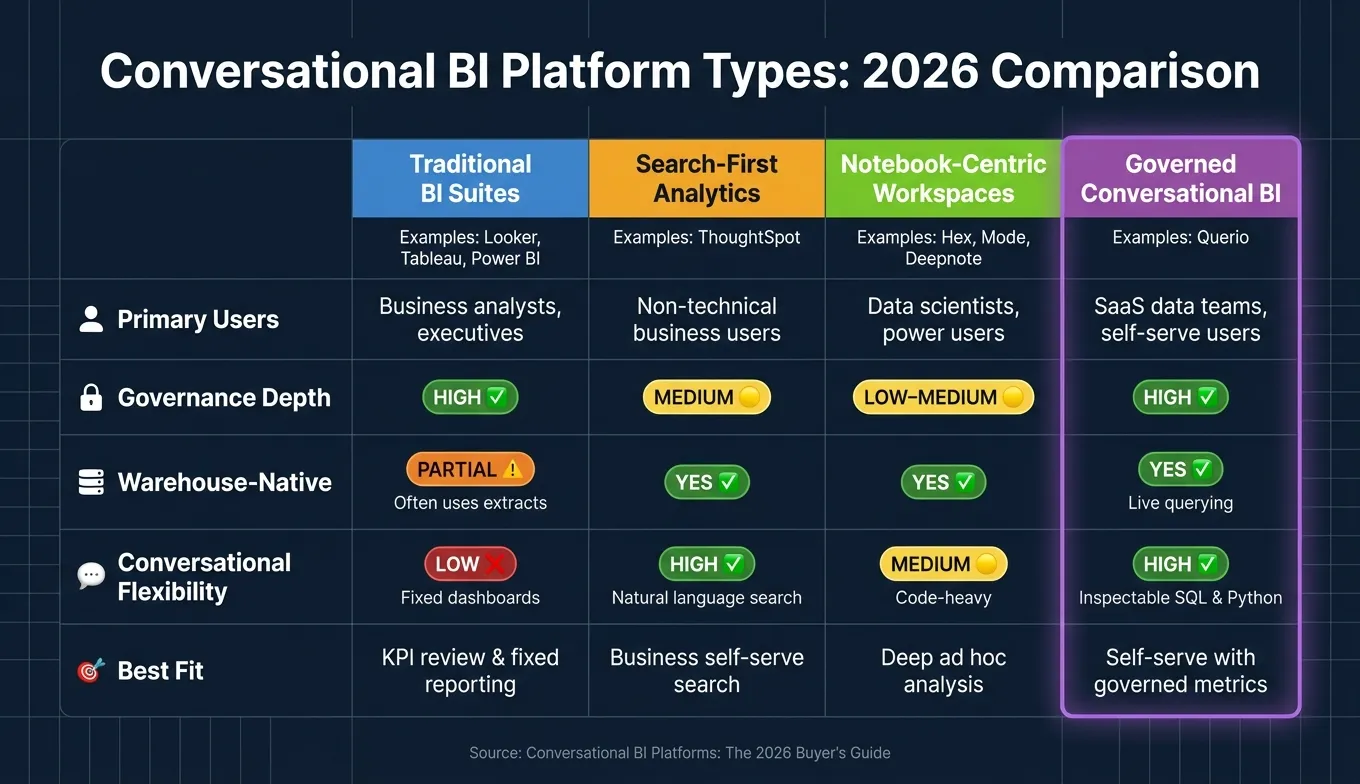 {Conversational BI Platform Types Compared: 2026 Buyer's Guide}
:::
{Conversational BI Platform Types Compared: 2026 Buyer's Guide}
:::
Traditional BI suites, search-first analytics, and notebook-centric workspaces
Once your checklist is in place, these categories help narrow the field. The idea is simple: match each platform type to your warehouse setup, governance needs, and day-to-day workflow.
| Category | Named Examples | Primary Users | Governance Depth | Warehouse-Native | Conversational Flexibility |
|---|---|---|---|---|---|
| Traditional BI Suites | Looker, Tableau, Power BI | Business analysts, executives | High | Partial - often depends on extracts or modeled datasets | Low - rigid dashboards and fixed reports |
| Search-First Analytics | ThoughtSpot | Non-technical business users | Medium | Yes | High - natural language search |
| Notebook-Centric Workspaces | Hex, Mode, Deepnote | Data scientists, power users | Low to medium | Yes | Medium - code-heavy |
| Governed Conversational BI | Querio | SaaS data teams, self-serve users | High | Yes - live querying | High - inspectable SQL and Python |
Category labels help, but day-to-day fit is what matters when people start using the tool every week.
What the right conversational BI fit looks like for growing SaaS teams
Conversational BI tends to fit best at companies that already have a real warehouse in place - Snowflake, BigQuery, Redshift, or Postgres - and a small data team that keeps getting pulled into a growing stream of ad hoc questions.
That setup is common in SaaS. Stakeholders want answers fast, but they’re not going to write SQL on their own. So the better way to judge fit is to go back to the four decision factors from the checklist: warehouse-native access, governance depth, SQL transparency, and workflow fit. Those four points usually make the right category pretty clear.
For teams that already use dbt, the decision gets even narrower. You want a platform that works with your current dbt models and keeps those definitions intact, not one that rebuilds metric logic in a separate system. Otherwise, you end up with two versions of the same metric, and that’s where things get messy.
Where Querio fits: governed self-serve with live warehouse data
For teams that want governed self-serve on live warehouse data, Querio fits that lane. It connects directly to Snowflake, BigQuery, Redshift, or Postgres, and the answers show the SQL or Python behind them.
Joins, business definitions, and metric logic are set once in the governed semantic layer, then reused across ad hoc questions, reactive notebooks, dashboards, scheduled reports, and embedded analytics. That gives non-technical users a self-serve path without leaving the data team to clean up definition drift later.
If security is a concern, Querio supports SSO and role-based access controls, with optional self-hosted deployment.
That fit makes sense for teams that want self-serve answers while keeping control over definitions and access.
How to run the buying process and make a final decision
Define use cases, stakeholders, and non-negotiables
Once you know the platform category, turn the buying process into a simple pass/fail test.
Start by writing down the exact questions your team needs answered every week. That step matters more than it sounds. Real business questions show fast whether a platform can handle the logic your team already uses and trusts.
Then map out who will use those answers:
- Data team - governance and semantic layer quality
- Data leaders - production safety and guardrails
- IT / Security - permissions and compliance
- Finance and executives - metric consistency and self-serve usage
Each group will test for a different kind of risk. That’s why the non-negotiables need to be set before vendor calls and demos start.
Lock in these requirements up front:
- live warehouse access
- a governed semantic layer
- SQL transparency
- permissions
For enterprise teams, SSO, SOC 2 Type II, and ZDR should also be mandatory. If a vendor misses even one non-negotiable, cut it from the list.
The point here is simple: you’re buying for reliable production use, not a polished demo.
Run a proof of concept with real questions and real metric definitions
Once you have a shortlist, test it using your own warehouse, your own metric definitions, and your own questions.
Sample-data demos won’t tell you much. They often look smooth because they skip the messy parts. A better approach is to use a small set of questions that already create friction inside the business, then score every platform against the same criteria each time.
Test the easy cases and the awkward ones. You want to see what happens when the platform stays within policy, and what happens when it doesn’t. A good system should know when to answer and when to escalate to a human.
| POC Evaluation Criteria | Requirement | Pass Signal | Stakeholder |
|---|---|---|---|
| Warehouse Access | Live SQL introspection | Deterministic schema parsing with no guessed logic | Data Team |
| Governance | Semantic layer quality | Every relationship tagged as "EXTRACTED" or "INFERRED" | Data Team |
| Safety | Production guardrails | System escalates to human when query goes outside policy | Data Leader / Ops |
| Security | Data privacy | Zero Data Retention (ZDR) and SSO support | IT / Security |
| Performance | Reasoning depth | Handles multi-step questions without losing context | Executive / Product |
Require every answer to show its reasoning path. It should also label what was extracted and what was inferred. If that line stays blurry, trust gets blurry too.
Conclusion: how to make a safe, trusted platform decision in 2026
Choose the platform that runs on your warehouse, keeps governed metric definitions intact, exposes SQL, and passes your POC using real questions.
The right fit is the one that keeps self-serve answers trusted and governed on live warehouse data.
FAQs
::: faq
How do I tell if a semantic layer is truly governed?
A semantic layer is governed when it acts as the central source of truth for business logic and keeps metric definitions consistent across queries.
Look for:
- Dynamic role- and column-level security
- Full lineage and transparency
- A centrally managed business glossary
- Definitions grounded in sources like dbt or LookML, not LLM guesses
- Inspectable SQL and Python so teams can verify the logic :::
::: faq
What should I test in a real conversational BI POC?
Run a 30-day POC using your own data, not a polished vendor demo. That’s the only way to see how the platform behaves in the situations that matter to your team.
During the test, check whether it gives accurate, consistent answers even when you change the wording of the prompt. It should also show inspectable SQL that runs in your warehouse, so your team can see what’s happening under the hood instead of taking the output on faith.
You’ll also want to verify governance and how it handles unclear requests. The platform should respect your current permissions, ask clarifying questions when a prompt is vague, and hold up in multi-turn workflows using questions your team has already validated. :::
::: faq
When should a team choose conversational BI over dashboards?
Use conversational BI when teams need answers to ad hoc questions without piling more work onto the data team, want to dig into data before building formal dashboards, or need routine reporting digests delivered in tools like Slack.
Dashboards work best for consistent, regularly tracked KPIs. Conversational BI is a better fit for unexpected questions and multi-step investigation. It helps people move past preset dashboard filters and get to the why behind trends or anomalies. :::