Business Intelligence
How to Connect ChatGPT to Snowflake: 3 Methods Compared
Choose speed, control, or governance: three ways to connect an LLM to a data warehouse, trading setup time for consistency and auditability.

If you want the short answer: use a direct connector for testing, middleware for custom control, and governed agent access for self-serve analytics with tighter rules.
I’d group the 3 options like this:
- Direct SQL / connector: fastest to set up, but results can drift when the model guesses joins or metric logic
- API / middleware: gives you more control over auth, filters, and app flows, but your team has to build and maintain it
- MCP / agent-style governed access: sits in the middle on setup time and gives stronger audit trails, role-based access, and more stable metric logic
The article compares them on the points that matter most in Snowflake:
- Setup time
- Permissions
- Security and warehouse policies
- Reliability
- Metric consistency
- Maintenance
- Auditability
- Best-fit workflow
One key stat stands out: Snowflake Cortex Analyst reports 90%+ accuracy when it uses a semantic model. That helps explain why raw table access often works for testing, but not as well for shared reporting.
::: @figure 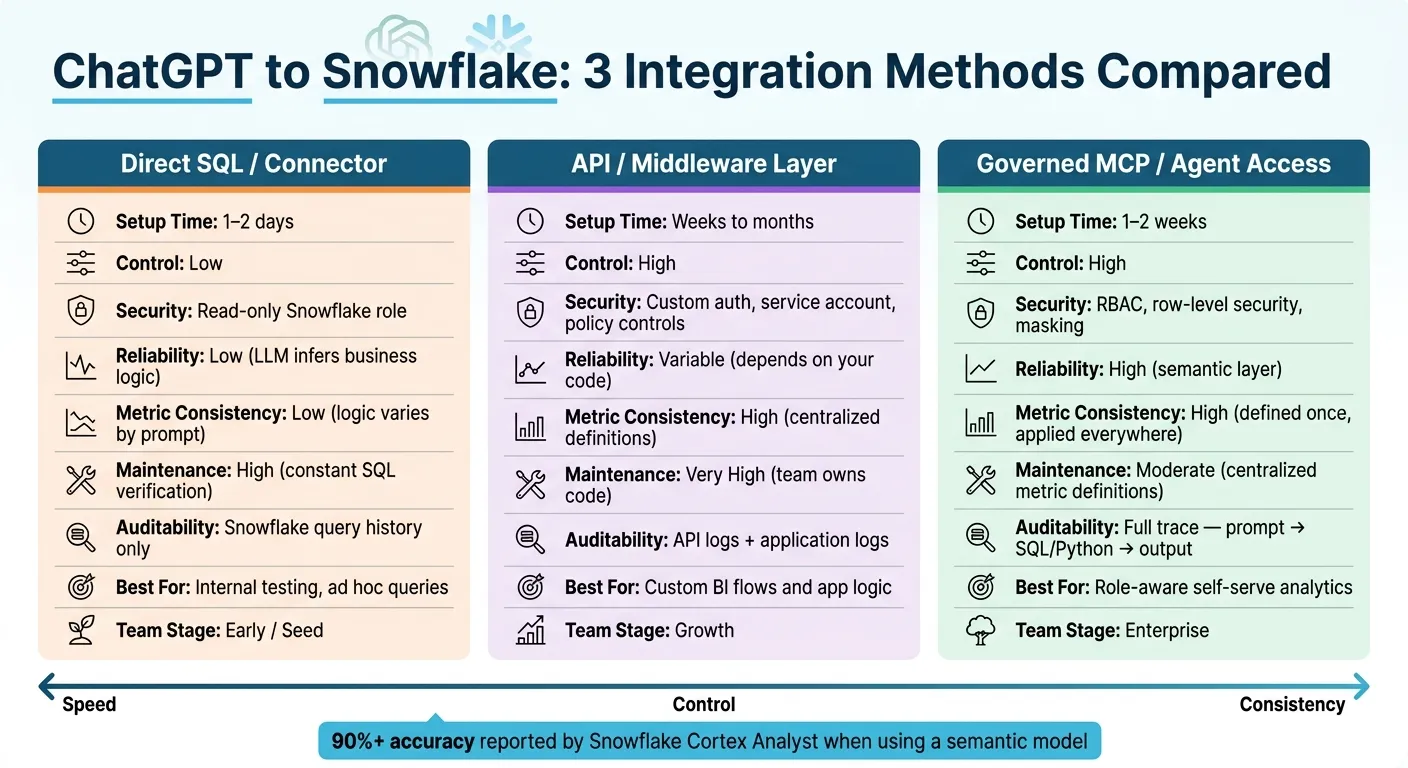 {ChatGPT + Snowflake: 3 Integration Methods Compared}
:::
{ChatGPT + Snowflake: 3 Integration Methods Compared}
:::
Integrate ChatGPT with Snowflake Managed MCP Server
::: @iframe https://www.youtube.com/embed/DxKAxjYaAtI :::
Quick Comparison
| Method | Setup | Control | Reliability | Maintenance | Best For |
|---|---|---|---|---|---|
| Direct SQL / Connector | 1–2 days | Low | Low | High | Internal testing, ad hoc queries |
| API / Middleware | Weeks to months | High | Medium to high | Very high | Custom BI flows and app logic |
| Governed MCP / Agent | 1–2 weeks | High | High | Moderate | Role-aware self-serve analytics |
Here’s the core idea in plain English: speed, control, and consistency pull in different directions. I’d use the direct path when I need answers fast, middleware when I need custom behavior, and governed agent access when I need people across the company to ask data questions without losing track of permissions and role-based security or metric rules.
That framing makes the rest of the article easier to read.
Side-by-Side Comparison of All 3 Methods
In day-to-day use, these three options differ most on the points data teams care about when running production workloads in Snowflake.
| Criterion | Direct SQL / Connector | API / Middleware Layer | MCP / Agent-Style (Governed) |
|---|---|---|---|
| Setup Effort | Low - typically 1–2 days | High - weeks to months | Moderate - 1–2 weeks |
| Security & Permissions | Read-only Snowflake role | Custom auth, service account, and policy controls | RBAC, row-level security, masking |
| Reliability | Low - LLM infers business logic | Variable - depends on your code | High - logic defined in a semantic layer |
| Maintenance Burden | High - constant SQL verification needed | Very high - your team owns the code | Low - centralized metric definitions |
| Auditability | Snowflake query history only | API logs plus application logs | Inspectable, editable SQL in the UI |
| Best Fit | Quick table queries and ad hoc summaries | Custom workflow logic and app integrations | Role-aware self-serve analytics |
The core tradeoff comes down to speed vs. control. Direct connectors are the fastest to get running. Middleware gives you more room to shape behavior around your app or workflow. Governed agent access gives you more consistency and easier review. Direct connectors let you see query history, while governed layers show the SQL so a person can check it before moving forward.
What Each Comparison Criterion Means in Practice
Setup effort is simply the time it takes to get to a working connection. A direct connector can often be set up in 1–2 days. An API or middleware layer may take weeks to months because your team has to build and maintain the integration logic. A governed MCP or agent-style setup usually lands in the 1–2 week range, since you first need to map semantic definitions.
Security and permissions comes down to how tightly access can be controlled. Snowflake RBAC is the starting point. Row-level security and masking make it easier to support self-serve access across teams, especially in healthcare and finance, where not everyone should see the same data.
Metric consistency is where LLM-driven setups can wobble a bit. They often infer logic from schema names and column descriptions. That sounds fine - until the same business term means one thing in one table and something else in another. At that point, results can drift. A semantic layer fixes that by defining a metric once and applying that same logic everywhere.
Inspectability means a person can review and edit the SQL before trusting the answer. That matters more than it may seem at first glance. If a result looks off, being able to inspect the SQL is often the fastest way to spot the problem.
Next, match each method to the team stage, governance needs, and workflow it fits best.
Method 1: Direct SQL or Database Connector
A direct connector lets ChatGPT turn a prompt into SQL, run that query in Snowflake, and then sum up the result. It's the fastest way to get a proof of concept off the ground, which is why a lot of teams start here for internal testing.
Setup and Permissions for Direct Connectors
Use a read-only Snowflake role, and scope it ONLY to the schemas ChatGPT should query.
The big risk is access that's too broad. If that role grows beyond what it should see, the setup can expose sensitive data or open a security gap.
Where Direct Connectors Work and Where They Fall Short
Direct connectors work well for schema exploration, ad hoc SQL, and quick summaries of warehouse data during internal testing.
The trouble starts when business logic needs to stay consistent. LLMs often guess business logic from schema names and column patterns, and those guesses can miss the mark. The model might choose the wrong table, like customer_legacy instead of customer_mart. Joins are another weak spot. A one-to-many join without pre-aggregation can double-count revenue.
Snowflake Cortex Analyst reports 90% or higher accuracy when grounded in a semantic model [1]. That’s a pretty clear sign that raw table access by itself doesn’t give teams the consistency they need.
For one-off internal exploration, those tradeoffs are usually fine. But for production reporting or shared dashboards, the lack of explicit metric logic makes the direct approach too fragile. When teams need tighter control over logic, permissions, and app behavior, they usually add an API or middleware layer.
Method 2: API or Middleware Layer
When a direct connector is too open for production, teams often put an AI query layer or middleware layer between ChatGPT and Snowflake.
Here’s how it works: ChatGPT sends a prompt to that layer, the layer turns it into SQL, queries Snowflake, and sends back structured results. It’s a common setup for governed warehouse access. And when direct SQL feels too loose for querying tables, summarizing results, and applying role-based access the same way every time, this is usually the next step.
Put simply, middleware sits in the middle when direct SQL isn’t tight enough for production use.
Why Teams Add an API Between ChatGPT and Snowflake
The main reason is control.
An API layer gives teams a place to enforce allowed queries, row-level filters, audit logs, and scoped analytics endpoints. That directly fixes the weak spots that can make direct connectors shaky in production: inconsistent logic, broad access, and poor auditability.
Instead of letting every prompt hit the warehouse in a wide-open way, teams can define rules up front and keep query behavior on a shorter leash.
Tradeoffs: More Control, More Code to Maintain
The downside is pretty straightforward: more engineering work.
Teams have to build and maintain auth, query logic, and the layer itself. They also need to keep it aligned with warehouse logic and metric definitions. That can turn into real upkeep, especially as data models change.
The table below shows the main tradeoff: more control in exchange for more engineering.
| Feature | Direct Connector | API / Middleware Layer |
|---|---|---|
| Setup Complexity | Low (fast first setup) | Moderate to high (requires engineering) |
| Control | Limited to warehouse roles | High (custom logic, logging, filtering) |
| Engineering Overhead | Low (turnkey) | High (requires custom code/maintenance) |
| Metric Consistency | Low (logic can vary by prompt and session) | High (centralized metric definitions) |
| Security | Basic (warehouse roles only) | Advanced (centralized checks, row filtering) |
| Reliability | Variable (can mis-handle joins and double-count) | High (uses governed metric definitions and pre-verified queries) |
| Maintenance | Low | High (team owns code and auth flows) |
If you want governed access without writing as much custom code, the next method is the agent-style option.
Method 3: MCP or Agent-Style Setup with Governed Access
This setup makes sense for teams that want ChatGPT to query live Snowflake data under tighter control. Instead of relying on a broad shared service account or building a custom API layer from scratch, an MCP-style setup sends each query through a governed layer that enforces user identity, role-based access, and session limits.
That makes it a stronger option for production analytics than a direct connector. And that’s the main point here: the biggest difference isn’t query generation. It’s how access gets controlled.
How Governed Access Changes the Risk Profile
The biggest change is identity. With OAuth-based authentication, the AI assistant acts on behalf of a specific user instead of using a shared credential. Snowflake supports OAuth and External OAuth, and admins can set AGENT_RESTRICTED_SESSION_SCOPE to limit what the agent can do. That’s the core security shift compared with direct connectors and middleware.[2][3]
For finance, healthcare, and B2B SaaS teams, this matters a lot. The assistant stays inside approved access boundaries, so users only see data their role already permits.
Auditability is the other big win. Every interaction - prompt, SQL or Python, tables touched, and output - can be logged and tied back to the user. That full traceability is what separates governed agent access from the looser direct connector path.[4][5]
Governed context matters too. Instead of figuring out schema logic from scratch every session, the assistant can reuse trusted metric definitions, canonical joins, semantic layer logic, data dictionaries, dbt models, and business rules. So terms like “active customer,” “net revenue,” or “bookings” stay consistent across users and sessions.
Where Querio Fits for Snowflake-Connected AI Analytics
Querio fits this model as a governed, warehouse-native analytics layer. It connects straight to Snowflake for live querying, with no CSV exports or duplicated data, and every answer is returned as inspectable SQL or Python in a notebook. You can open an answer, see exactly what the agent did, edit the logic if needed, and run it again.
Its context lives as SQL, Markdown, and Python files synced to GitHub in the same repo as your dbt project. When the agent learns something useful, it can suggest a reusable definition or join pattern, and a human decides what gets saved. Over time, that makes context easier to reuse and keeps ownership with your team.
For non-technical users, Querio can send answers in Slack or Microsoft Teams. Someone can ask, “What changed in weekly active customers last month?” and get a governed answer based on approved warehouse logic without writing SQL. In Slack, the bot spins up a real notebook behind the scenes, so there’s still a full audit trail. That’s a big reason this approach works for shared analytics, not just one-off questions.
Here’s how governed MCP-style access compares with a custom API or middleware layer:
| Feature | API / Middleware Layer | Governed MCP-Style Access (e.g., Querio) |
|---|---|---|
| Authentication | Custom auth and routing; team-defined enforcement | OAuth per user; inherits Snowflake RBAC |
| Governance Alignment | Team owns policy enforcement | Uses existing warehouse policies |
| Auditability | Depends on what the team logs | Full trace: prompt → SQL/Python → output |
| SQL Inspectability | Depends on implementation | Fully inspectable and editable in UI |
| Context Reuse | Often manual or session-based | Synced with GitHub and dbt models |
| Self-Serve Readiness | Often limited to technical users | Governed and usable for non-technical users |
| Maintenance | High; team owns code, auth, and logging | Moderate; permissions and context still need upkeep |
From here, the key question is simple: does your team need governed self-serve analytics, or are you building a custom application workflow?
Before this goes into production, you still need to define permissions, semantic context, logging, and the user experience. But for teams that need consistent metrics, auditable queries, and self-serve access, this pattern is often the better path.
Which Method Fits Your Team
Recommended Method by Use Case and Team Stage
Use the comparison above to match each method to your team’s stage and how you work day to day. The main things to weigh are setup effort, governance, reliability, and maintenance.
| Team Stage | Recommended Method | Primary Goal |
|---|---|---|
| Early / Seed | Direct Connector | Fast internal testing and pilots |
| Growth | API / Middleware | Production BI and custom internal apps |
| Enterprise | Governed MCP / Agent | Governed self-serve analytics with consistent metrics |
For early-stage teams, a direct connector is usually the simplest path. It works well for pilots and internal testing when speed matters most. The catch is pretty simple: your metric logic lives in the prompt instead of a shared definition, which can get messy as more people start using it.
For growth-stage teams, an API or middleware layer gives your team more control for production BI and custom internal apps. That said, you’re also signing up to own the code, uptime, and auth. That work adds up, so it’s worth making that choice on purpose.
For established teams already using Snowflake and dbt, a governed MCP or agent-style setup makes the most sense when auditability and metric consistency matter. If your team is already standardizing metric logic in dbt, this approach helps keep access and definitions in sync. Querio fits well here because it pairs a governed semantic layer with live warehouse connections and inspectable, editable SQL or Python in a notebook, so answers stay inspectable and editable.
FAQs
::: faq
How do I choose the right method for my team?
Choose based on your current stack, the rules you need to follow, and how much setup work your team can take on.
If you run on a single platform, native solutions usually mean the least architectural overhead. They’re simpler to set up and easier to manage.
If you need the same metrics across multiple warehouses, a governed MCP-style layer like Querio can give you one place to define and manage them.
No matter which route you take, put consistency, transparency, and governance first. That includes inherited RBAC and row-level security, so people see the right data and know where it came from. :::
::: faq
When is a direct connector no longer enough?
A direct connector usually works fine at the start. It’s fast, simple, and useful for testing ideas.
But once you move from casual experiments to reporting that people depend on, that setup starts to crack. Raw text-to-SQL can write queries, sure. What it often can’t do is keep business logic steady for metrics like revenue or churn.
A few warning signs tend to show up at that point:
- Metric drift starts creeping in, where the same metric shows different numbers in different places
- Security rules get tighter, and audit needs become harder to ignore
- AI-generated SQL starts using the wrong joins or pulling from stale tables
- Teams need one source of truth across dashboards, notebooks, and AI agents
That’s usually when a direct connector stops being enough. :::
::: faq
What do I need before using governed agent access?
You need a solid security baseline so the AI operates inside your current data rules.
That usually includes:
- a dedicated read-only role limited to approved schemas
- a governed semantic layer for metrics, business logic, and joins
- row- and column-level security in Snowflake
- OAuth or short-lived service tokens for inherited permissions and audit trails
This setup keeps access controlled, definitions consistent, and queries in line with existing permissions. :::