Business Intelligence
Athena MCP Server: The Flag AWS's Sample Config Gets Wrong
AWS's Athena MCP server returns no rows by default, and its setup samples turn on writes. The flag and workgroup lock a read-only agent needs.
 Javier BonillaCo-founder & CTO
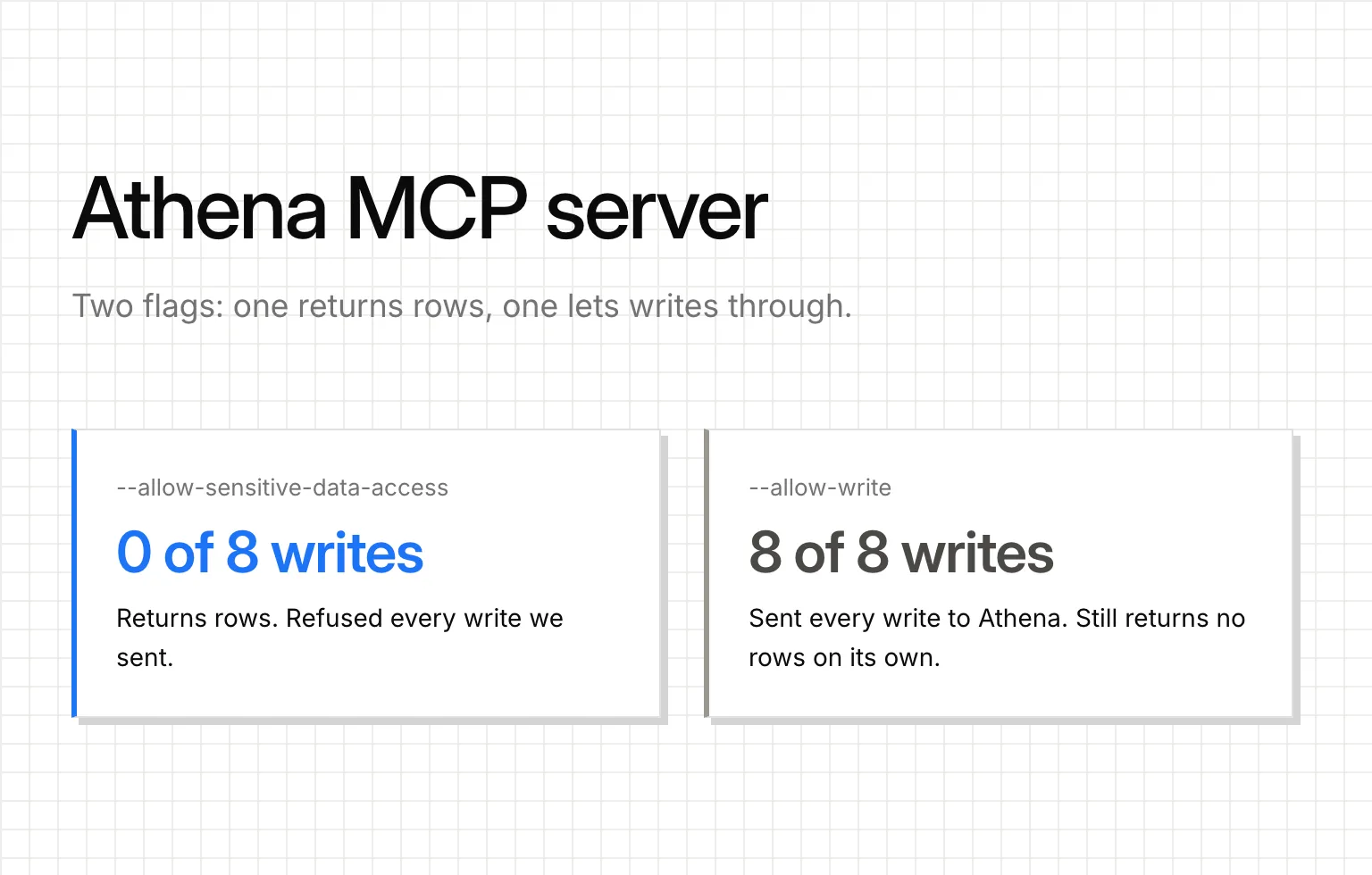
The setup samples in AWS's docs for its Athena MCP server turn on --allow-write. Copy the setup sample and you get an agent that can send DROP TABLE to Amazon Athena (not athenahealth) and can't tell you what's in a table. Use --allow-sensitive-data-access on its own instead, and lock the agent into one workgroup with a data limit.
The Athena MCP example in AWS's docs, flag by flag
AWS's server is the one to run. The AWS Data Processing MCP Server is official, covers Glue and EMR as well as Athena, and it's the only one of the three Athena servers Google ranks that tells a read from a write. The trouble is the flag AWS shows you next to it.
This is the Kiro setup sample from the awslabs docs for the AWS Data Processing MCP Server. The Cursor sample passes the same arguments. We tested it on server 0.2.3:
{
  "mcpServers": {
    "aws.dp-mcp": {
      "command": "uvx",
      "args": [
        "awslabs.aws-dataprocessing-mcp-server@latest",
        "--allow-write"
      ],
      "env": {
        "FASTMCP_LOG_LEVEL": "ERROR",
        "AWS_REGION": "us-east-1"
      }
    }
  }
}
AWS says its Cursor sample shows "enabling mutating actions by adding the --allow-write flag." The reference example further down the same page adds --allow-sensitive-data-access too, so it returns rows and allows writes. No example on the page passes the second flag alone.
No flags: the query starts, the rows never come back
With no flags, the server refused DROP TABLE, INSERT, CTAS, UNLOAD, MSCK REPAIR TABLE and ALTER TABLE, each with the same message: "Operation start-query-execution contains write operations and is not allowed without write access. Detected query type: DROP" (the type changes with the statement). It started SELECT 1 and a WITH query without complaint.
Then it wouldn't hand back the result: "Operation get-query-results returns customer query data and requires --allow-sensitive-data-access flag". An agent in this mode can start a query and never see what it returned, so it can't answer a question.
The read-only check reads your SQL as text. It strips comments, refuses the query if a write word appears anywhere in it, and allows only statements that start with SELECT, WITH, SHOW, DESCRIBE, DESC, EXPLAIN or ANALYZE. So SELECT replace('abc','a','b') was refused, because REPLACE is on its list of write words. It refuses too much rather than too little, which is the right way to fail.
--allow-sensitive-data-access: rows, and still no writes
This flag opens get-query-results, and the rows came back. It doesn't touch the write check, though. Every write got the same refusal as before.
It does let the agent choose where results are written in S3. Without the flag, the server refuses an agent's own output location: "Query results must use the workgroup default output location." With it, s3://other-bucket/x/ went to Athena unchanged.
It still refuses stop-query-execution ("Operation stop-query-execution is not allowed without write access"). The agent can't cancel its own query, so only Athena's data limit (below) stops one that scans too much.
--allow-write: every write goes through
With --allow-write, all 8 write statements we sent went to Athena: the six above plus select 1; drop table sales and /* x */ DROP TABLE sales. On its own, it still doesn't return rows.
The Athena MCP server config to use
Here's the same block from the awslabs docs with --allow-sensitive-data-access in place of --allow-write, an AWS profile made for the agent, and the server pinned to 0.2.3, the version we ran:
{
  "mcpServers": {
    "aws.dp-mcp": {
      "command": "uvx",
      "args": [
        "awslabs.aws-dataprocessing-mcp-server@0.2.3",
        "--allow-sensitive-data-access"
      ],
      "env": {
        "AWS_PROFILE": "athena-agent",
        "AWS_REGION": "us-east-1"
      }
    }
  }
}
The server has no workgroup setting, so name the agent's workgroup in its instructions. If you haven't added an MCP server to a client before, our step-by-step guide to connecting Claude to a warehouse over MCP covers the client side.
How we ran it: on November 11, 2026, our own script called each server's tools over stdio, so no model picked the queries. It talked to a local mock of the Athena API, not to AWS: "sent" means the server called StartQueryExecution, and there were no real results or bills.
The workgroup the agent picks for itself
Instructions are a request, not a lock. The server sends whatever workgroup name the agent gives it: we passed any-workgroup-the-agent-names, and it reached StartQueryExecution as written. None of the three servers limits how much data a query scans, either, and data scanned is what Athena bills for: AWS's own pricing example uses $5 per TB, with a 10 MB minimum per query. So the cap goes on a workgroup in Athena, and it holds only if the agent's AWS role can't run queries anywhere else.
That takes three settings:
- A workgroup for the agent with a per-query data usage control. In the Athena console, open the workgroup, then the Execution controls tab, then Data scanned limit. Athena cancels any query that scans more than the limit, and the smallest limit is 10 MB. A canceled query is still billed for what it scanned before it stopped, so set the limit at the largest scan you're willing to pay for.
- "Override client-side settings" turned on. It's off by default. With it on, the workgroup's settings for the results location, bucket owner and encryption win over whatever the client sends, so results land in the workgroup's bucket even when the agent asks for
s3://other-bucket/. - An IAM policy that allows queries in that workgroup only. Athena treats a workgroup as an IAM resource, so a policy can name it by its ARN.
Here's AWS's example policy for running queries in a specified workgroup, cut to the calls a read-only agent needs, for a workgroup named athena-agent:
{
  "Version": "2012-10-17",
  "Statement": [
    {
      "Effect": "Allow",
      "Action": [
        "athena:ListWorkGroups",
        "athena:ListDataCatalogs",
        "athena:ListDatabases",
        "athena:GetDatabase",
        "athena:ListTableMetadata",
        "athena:GetTableMetadata"
      ],
      "Resource": "*"
    },
    {
      "Effect": "Allow",
      "Action": [
        "athena:StartQueryExecution",
        "athena:GetQueryExecution",
        "athena:GetQueryResults",
        "athena:StopQueryExecution"
      ],
      "Resource": "arn:aws:athena:us-east-1:123456789012:workgroup/athena-agent"
    }
  ]
}
AWS's page recommends adding the primary workgroup as well, so people can keep running queries if their own workgroup is deleted or disabled. Leave it out for an agent: that fallback lets it run queries outside the workgroup you capped.
This policy covers Athena's own calls, not the Glue Data Catalog or the S3 buckets under your tables. Keep the role read-only there too, the same way we give a Redshift agent its own read-only user in how to connect Claude to Redshift the safe way. If you also run BigQuery, here's how to cap what a BigQuery agent scans.
If you already run a community Athena MCP server
We ran the other two servers that rank for "athena mcp" through the same script, with the same 8 writes.
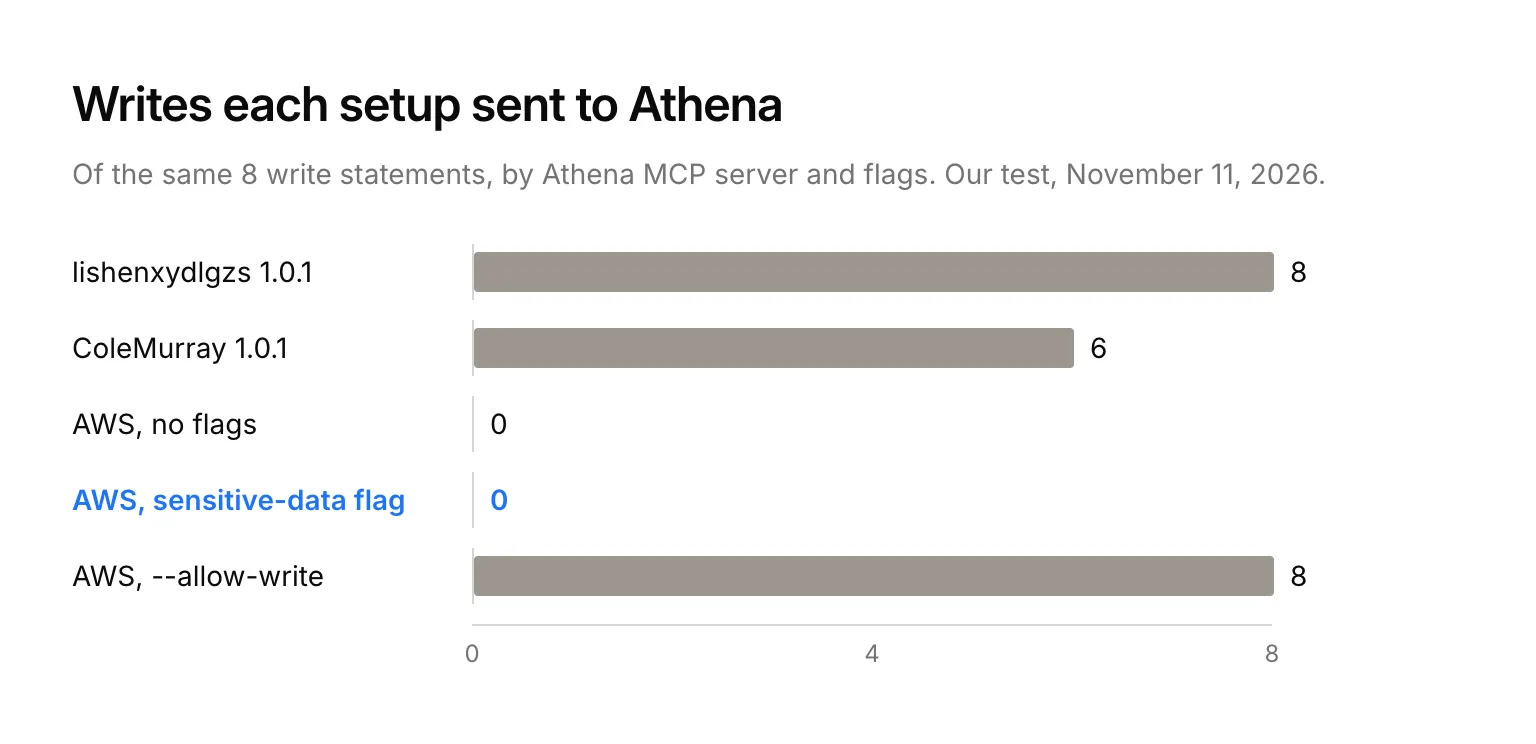
| Server | Of our 8 writes, sent to Athena | What it refused | Who sets the workgroup |
|---|---|---|---|
| ColeMurray aws-athena-mcp 1.0.1 (PyPI) | 6 | select 1; drop table sales, /* x */ DROP TABLE sales, and reads that touch information_schema or contain a -- comment |
You, in ATHENA_WORKGROUP |
| lishenxydlgzs aws-athena-mcp 1.0.1 (npm) | 8 | Nothing | You, in ATHENA_WORKGROUP |
ColeMurray's server checks for injection patterns, not for writes. A write word only trips its check after a semicolon, so a bare DROP TABLE sales went through. lishenxydlgzs's server passes every query straight to Athena: all 18 statements we sent went through, reads included. Its 1.0.1 build on npm also always skips the first row of a result as if it were a header, so the result of anything other than a SELECT loses its first real row.
Both read the workgroup from an environment variable, so point ATHENA_WORKGROUP at the capped workgroup and the agent can't switch it. Neither stops a plain DROP TABLE, so your real write guard is the agent's IAM role, read-only on Glue and S3. It was the same story with MySQL MCP servers, where the database user's grants did the real work.
Keep the AWS keys out of the agent
Every setup above puts an AWS profile on the laptop that runs the agent. We built Querio so the agent never holds those credentials. Amazon Athena is one of Querio's integrations: you connect it once in Querio, and the credentials go in a browser form, never in tool arguments or an agent conversation.
Claude and ChatGPT reach Athena through Querio's MCP server, and Claude Code and Cursor through its CLI. Each person signs in with their own Querio account, and the agent searches your team's context and runs SQL and saved queries as that Querio user. Your metric definitions live as files in your team's git repo, so every agent reads the same ones. Querio's MCP server is on every plan, Free included.