Business Intelligence
Domo Pricing in 2026: How Credits Work, With the Math
Domo has no price list. What each credit pays for, how refresh schedules move the bill, and one setup priced daily, hourly and every 15 minutes.
 Javier BonillaCo-founder & CTO
Domo doesn't publish prices. You buy a pool of credits, and storing data, refreshing tables, running dataflows and using AI draw it down, while users cost nothing. Vendr's buyers paid a median $50,000 a year. And Domo bills table refreshes, so a table refreshed hourly costs 10 times what a daily one does.
How much does Domo cost?
Domo's pricing page offers two things: a 30-day free trial with no credit card, and "Custom Pricing" behind a demo booking. No free plan is listed.
What you sign is a Service Order with a credit allowance and a contract rate, the dollar price of one credit. Domo says your cost per credit drops as you commit to a bigger pool or a longer term, and it doesn't publish the rate at any size.
The closest thing to a public number comes from buyers. Vendr's marketplace shows a median of $50,000 a year across 91 Domo purchases, with deals running from $10,920 to $175,245. Your number depends on how many credits your setup burns. You can work that out before the first sales call.
What uses Domo credits?
Domo's Consumption Supplemental Terms, last updated October 7, 2026, are the rate card. These are the lines that move a bill:
| What you do in Domo | Credits |
|---|---|
| Store data in Domo | 1 per million rows a month (counted on the month's third-lowest day) |
| Store virtual rows (Views, Fusion) | 1 per two million rows a month |
| Load or refresh a table (connector, upload, API, workbench) | 1 per table created or updated |
| Write data back to another system | 1 per table written |
| Run a Magic ETL, Redshift or MySQL dataflow | 1 per output table created or updated |
| Run a dataflow with Data Science, R or Python tiles | 2 per output table |
| Run an Adrenaline dataflow | 3 per output table |
| Start a workflow, or complete one of its tasks | 0.04 each |
| Train or retrain an AutoML model | 1 per run |
| Domo AI Pro, AI chat included | 0.01 per operation, plus token credits |
| Give an outside customer their own instance (Domo Everywhere) | 3.2877 a day per account, about 100 a month |
Row counts barely matter for loads. Bringing in 1,000 rows or 100,000 rows costs one credit per table that job builds or refreshes. And the bill doesn't move with the number of cards, dashboards or apps.
One more limit sits in the Service Order next to your credits: a yearly number of card loads. Every time anyone opens, refreshes, drills into or filters a card, embedded ones included, that counts against it.
How does refresh frequency change a Domo bill?
Every refresh of a table costs credits, but Domo caps what one table can bill in a day. The cap comes in steps:
| Refreshes of one table in a day | Credits billed that day | Schedules in this step |
|---|---|---|
| 1 to 9 | 1 per refresh | Daily, every 3 hours |
| 10 to 24 | 10 | Every 2 hours, hourly |
| 25 to 39 | 15 | Every 45 minutes |
| 40 to 96 | 20 | Every 30 minutes, every 15 minutes |
| 97 or more | 25 | Every 5 minutes |
Rows are counted too, but generously: nothing extra until a day's updates pass 25 million rows, then 1 credit per 25 million rows above that limit. The caps cover loaded tables, dataflow output tables and tables written back alike.
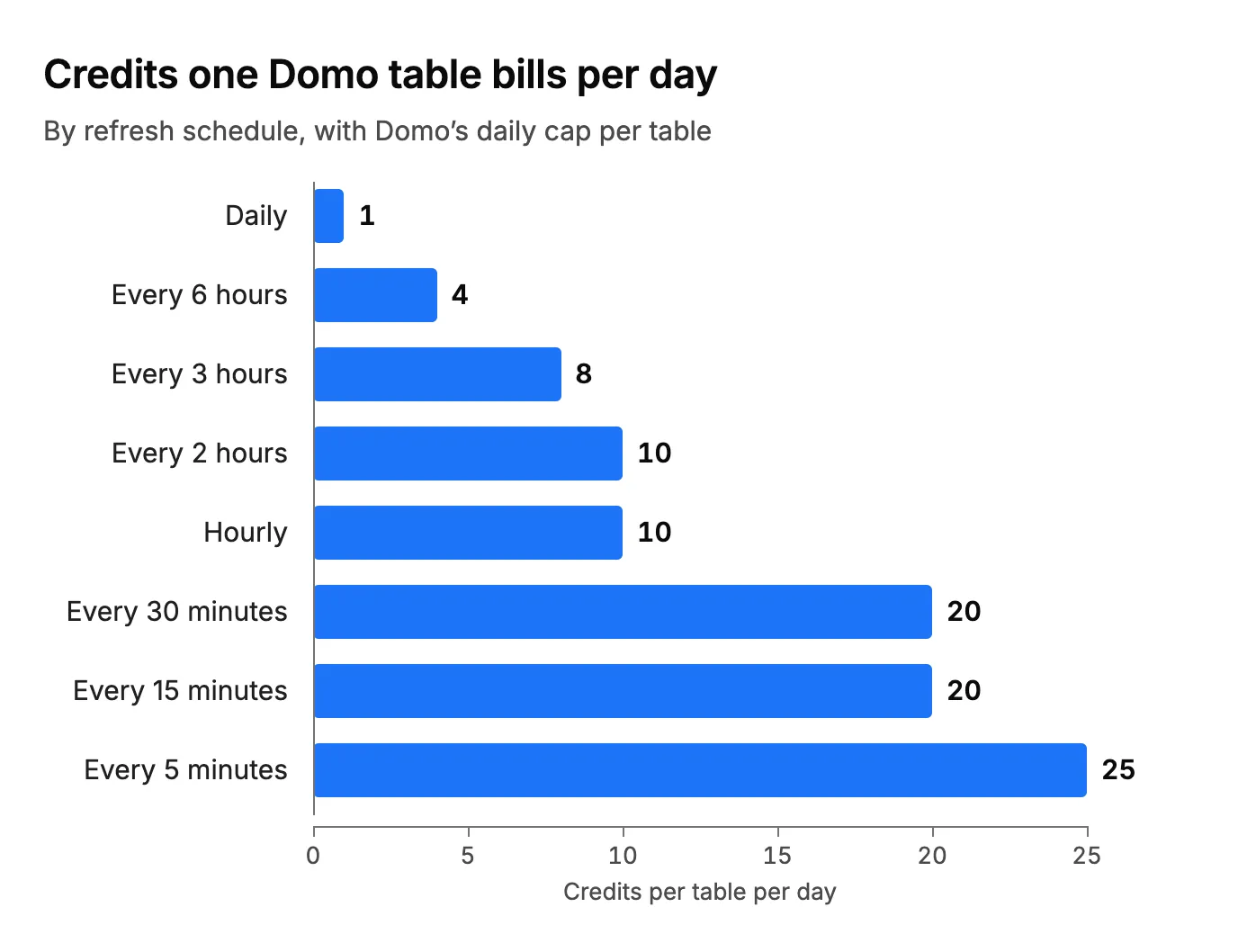
Here's what the steps mean for your schedule:
- If a table refreshes 10 times a day, hourly costs nothing more. Ten refreshes and 24 bill the same 10 credits.
- Every 30 minutes costs the same as every 15. Both land in the 40-to-96 step, at 20 credits a day. If you're paying for half-hourly, take the 15 minutes.
- Avoid 25 to 39 refreshes a day. That's 15 credits for little more freshness than hourly gives you at 10.
Here's an ordinary setup: 30 tables synced from tools like Salesforce, HubSpot and Stripe, 10 Magic ETL dataflows that each write one output table, and 80 million rows stored in Domo, with each day's updates under 25 million rows. That's 40 tables refreshing, and storage at 80 credits a month, or 960 a year.
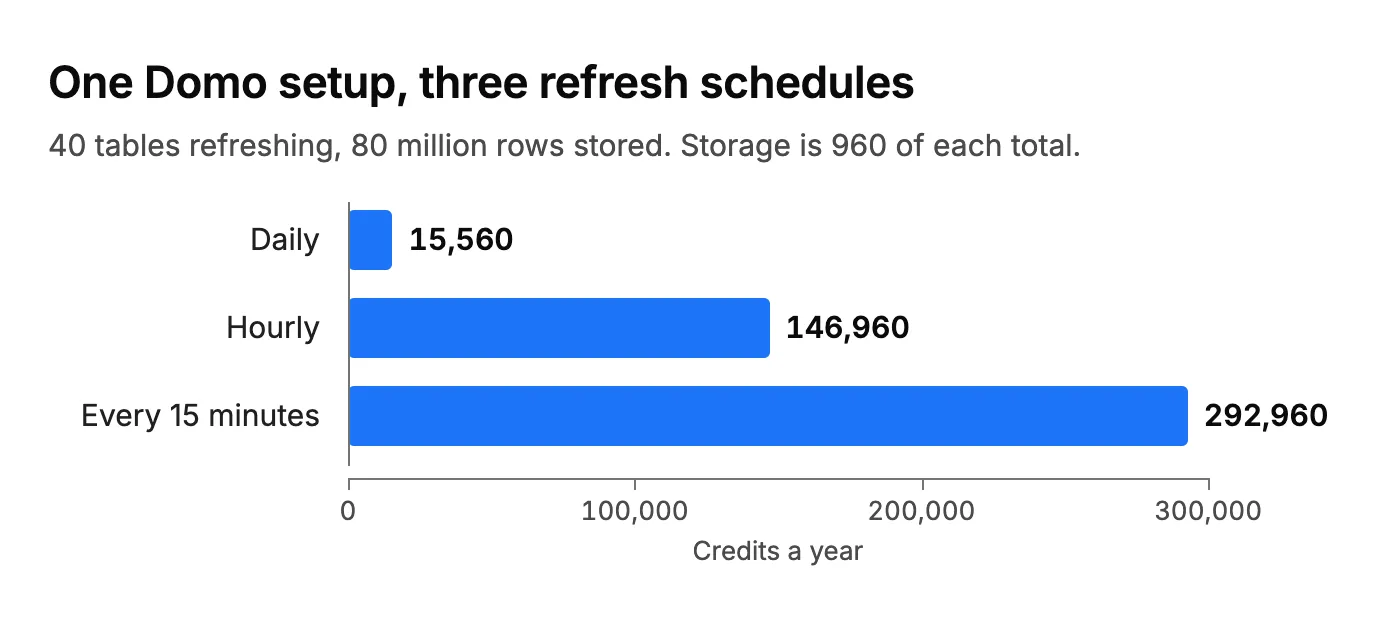
- Daily: 40 tables × 1 credit × 365 days = 14,600, plus 960 for storage. 15,560 credits a year.
- Hourly: 40 × 10 × 365 = 146,000, plus 960. 146,960 credits a year.
- Every 15 minutes: 40 × 20 × 365 = 292,000, plus 960. 292,960 credits a year.
Same data, same users, same dashboards. Going from daily to hourly multiplies the bill by almost 10, and every 15 minutes doubles it again. Storage barely registers. To price your own setup, look up each table's daily credits in the steps above, add them up and multiply by 365, then add 12 credits for every million rows you keep in Domo.
If your tables already live in a warehouse Domo doesn't manage, like Snowflake, BigQuery or Databricks, Domo charges nothing for storing that data. Dataflows that write output tables still bill per output table.
How much does Domo AI cost?
Since November 1, 2026, AI chat is part of Domo AI Pro, which bills 0.01 credits per operation. Until October 31, each chat request cost 0.2 credits, and that older rate is still what most guides quote.
On top of the per-operation charge, AI Pro bills token credits when you use a model Domo hosts: the model's dollar price per million tokens divided by your contract rate. Domo lists GPT-4o input at $3.25 per million tokens, for example. Bring your own model and those token credits go away.
To turn any of this into dollars, you need your contract rate.
Did Progress change Domo's pricing?
Not yet. Progress Software completed its purchase of Domo's AI and data platform business on September 22, 2026. The consumption terms were updated on October 7, after the sale, and kept the credit model.
And if Progress does change the rate card, you'll see it at renewal: price changes to the terms "take effect upon renewal of your current term or execution of a new Service Order."
What should you settle before you sign or renew?
Renewal is where credit pricing has hurt people. In 2024 a mid-market manufacturer posted that its "contract with domo is going up 2.5x with their new credit pricing model" after almost five years on Domo. Before you sign:
- Get your contract rate in writing, for this term and the next. It turns every credit above into dollars.
- Decide which tables really need hourly, and price the rest at daily with the steps above.
- Ask for the card-load number in your Service Order, and estimate yours from how many people open dashboards each day.
- Ask what happens when you run out, and whether unused credits roll over.
- Check AI separately. Count the AI chat and agent use you expect, and decide whether you'll bring your own model.
How does Querio price the same work?
Our prices are on the pricing page: the Free plan is $0, and Core is $2,499 a month, or $25,000 billed every year. Both come with unlimited users and unlimited data connections.
Like Domo, we meter usage in credits. A Querio credit is one call to an AI model. Free includes 500 a month, Core 10,000, and extra credits are $0.50 each on Free and $0.25 on Core. Admins can set alerts and a spending cap.
What a credit pays for is where the two split:
| Querio | Domo | |
|---|---|---|
| Dashboard refreshes | No credits | 1 per table refreshed, capped per day |
| Storing data | No credits: it stays in your warehouse or database | 1 per million rows a month in Domo |
| Running SQL and Python | Not metered | Dataflows: 1 to 3 per output table |
| Automations | No credits | 0.04 per workflow start and per task |
| AI questions | 1 credit per model call | 0.01 per operation, plus token credits |
Querio connects to the warehouse or database you already run, from Snowflake, BigQuery and Redshift to Postgres and MySQL. So in Querio, a dashboard refreshing every 15 minutes uses no Querio credits.
If you're weighing a move off Domo, our Querio vs Domo comparison covers what you'd have to move.
FAQ
Who competes with Domo?
Querio does, for data teams who want their metrics and dashboards kept as files in a git repo they own, with a price they can read.
How do I check my Domo credit balance?
Open the Credit Utilization admin page in Domo. It shows used credits, your credit balance, your subscription details and your rate card. For trends, use the Credit Usage DomoStats report, which updates daily.
Do failed Domo jobs use credits?
No. Domo's pricing page says failed processes never trigger charges, so a dataflow that errors out doesn't bill its output tables.