Business Intelligence
MySQL MCP Server: Which One to Use, Tested on MySQL 8.4
A read-only user that could run one stored procedure deleted 10 rows through a top MySQL MCP server. Which server to use, and the settings that let an agent past.
 Javier BonillaCo-founder & CTO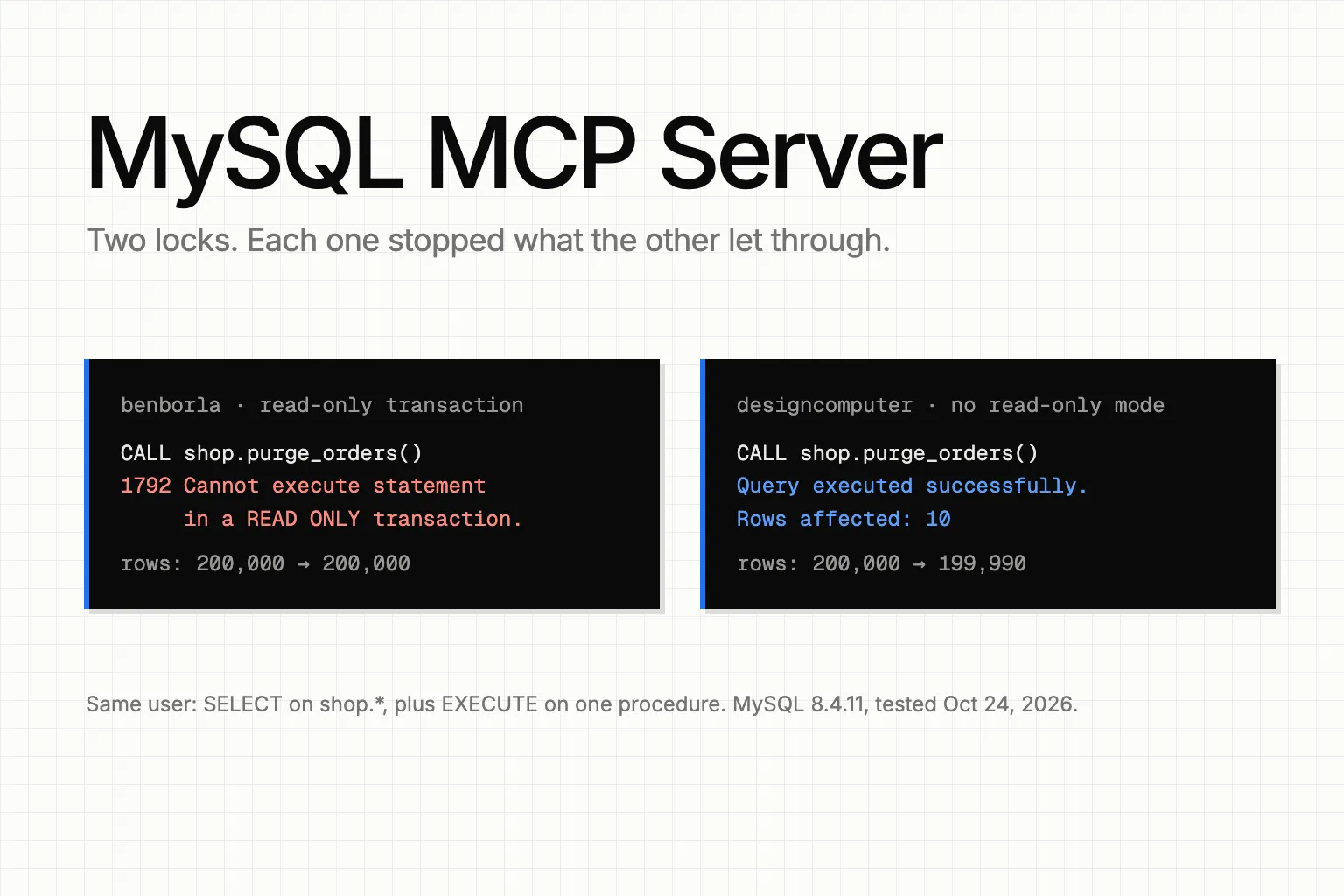
Use benborla's mcp-server-mysql and leave its read-only transaction on. In our test on MySQL 8.4, a user with read access plus EXECUTE on one stored procedure deleted 10 rows through designcomputer's server, the other one in Google's top three. benborla's transaction stopped the same call. And give the agent's MySQL user read access and nothing else.
Both servers handled plain writes well. benborla's default refused every plain INSERT, UPDATE, DELETE and DROP we sent, with both of our test users. designcomputer has no read-only mode, but a user with only SELECT got "command denied" from MySQL on every write. Every write that got through needed a privilege beyond SELECT or a setting switched off.
benborla vs designcomputer: what each server stopped
These are the statements where the two servers, or the two users, gave different answers. "All privileges" is a user with ALL on the database. "SELECT only" is a user with SELECT and nothing else, except where the row says it also had EXECUTE on the procedure.
| Statement | benborla, all privileges | benborla, SELECT only | designcomputer, all privileges | designcomputer, SELECT only |
|---|---|---|---|---|
| Plain INSERT, UPDATE, DELETE, DROP TABLE | Refused by the server | Refused by the server | Ran | Denied by MySQL (1142) |
/*!80000 DELETE ... */ |
Passed the server's check, stopped by the read-only transaction (1792) | Denied (1142) | Ran, 1 row deleted | Denied (1142) |
REPLACE INTO |
Stopped by the transaction (1792) | Denied (1142) | Ran, 2 rows affected | Denied (1142) |
RENAME TABLE |
Stopped by the transaction (1792) | Stopped by the transaction (1792) | Ran | Denied (1142) |
CALL a procedure that deletes rows |
Stopped by the transaction (1792) | With EXECUTE: stopped by the transaction (1792) | Ran, 10 rows deleted | With EXECUTE: ran, 10 rows deleted |
We ran this on October 24, 2026, with MySQL Community Server 8.4.11, @benborla29/mcp-server-mysql 2.0.9 from npm and mysql-mcp-server 0.4.4 from PyPI, against a 200,000-row orders table. A script called each server's tools over stdio, the way Claude Code does, so no model chose the queries. The servers leave MySQL's error numbers out of their messages. We got the codes by running the same statements as the same users outside the servers, and the messages matched.
benborla checks a query twice. First it parses the SQL and refuses INSERT, UPDATE, DELETE and schema changes unless you turn on its ALLOW flags. Then it runs everything else inside a READ ONLY transaction and rolls it back. The parser missed three statements: a DELETE inside a MySQL version comment, REPLACE INTO and RENAME TABLE. The transaction caught all three. With the all-privileges user, it was the only thing between the agent and the data.
designcomputer checks one thing: that you sent a single statement. Its execute_sql tool describes itself as for "SELECT, DML (INSERT/UPDATE/DELETE), SHOW, DESCRIBE". Everything else is up to the MySQL user. It also returns MySQL errors with isError: false, so a client sees a refused write as an ordinary answer.
Where an agent gets past a MySQL MCP server
In the order you'd meet them while setting one up.
The flag that turns the transaction off
benborla has a setting called MYSQL_DISABLE_READ_ONLY_TRANSACTIONS, and its docs mark it with a warning sign. We set it to true and left the write flags off. The version-comment DELETE, the REPLACE and the CALL came back as successes, with 1, 2 and 10 rows affected. The server then rolled them back, so the rows survived. The RENAME TABLE didn't roll back: shop.scratch became shop.scratch2 and stayed that way. The tool still described itself as "(READ-ONLY)" the whole time.
Leave that flag unset.
One EXECUTE grant
The 10-row delete came from a stored procedure. Our root user created shop.purge_orders() with SQL SECURITY DEFINER, so it runs with its creator's privileges, not the caller's. We gave the SELECT-only user EXECUTE on that one procedure. Through designcomputer, CALL shop.purge_orders() returned "Query executed successfully. Rows affected: 10", and the table went from 200,000 rows to 199,990. Without the EXECUTE grant, both servers got error 1370 and nothing changed.
So the agent's user gets SELECT on the data and no other privilege, in MySQL 8.4's CREATE USER and GRANT syntax:
CREATE USER 'agent'@'%' IDENTIFIED BY 'a-strong-password';
GRANT SELECT ON shop.* TO 'agent'@'%';
SHOW GRANTS FOR 'agent'@'%';
SHOW GRANTS should list USAGE and SELECT and nothing else. For SSL, host limits and query logging on that user, see how to let AI query MySQL without write access.
A time limit the query can override
As root we ran SET GLOBAL max_execution_time = 1000. A two-second join through either server then stopped at about one second with error 3024, "maximum statement execution time exceeded". Then we added an optimizer hint, SELECT /*+ MAX_EXECUTION_TIME(600000) */ ..., and the same join ran for 2.2 seconds on both servers, with the SELECT-only user. A hint of 0 didn't lift the limit; a large number did.
On benborla, a plain SET SESSION max_execution_time = 0 in one tool call also lifted the limit for later calls. The server keeps its MySQL connections in a pool, and the session setting stayed on the connection. designcomputer opens a new connection for each call, so there the SET changed nothing after that call. Changing the global value itself needs the SUPER or SYSTEM_VARIABLES_ADMIN privilege (error 1227), which the agent didn't have.
We found no MySQL setting that stops the hint. Treat max_execution_time as a default, not a cap, and if a slow agent query would hurt production, point the agent at a replica. On MariaDB the setting is max_statement_time, in seconds.
A query quota that counts statements, not tool calls
MySQL can cap an account's queries per hour. We set MAX_QUERIES_PER_HOUR 30 on the agent's user. It held: the agent got error 1226, "User 'agent' has exceeded the 'max_questions' resource (current value: 30)", and its ALTER USER attempts failed on both servers.
But it ran out after six tool calls. MySQL's general log showed 5 statements per call from benborla (the query plus four for the read-only transaction) and 4 per call from designcomputer (the query plus three session settings on each new connection). Size the quota in statements, about five for every call you want to allow.
No row cap, and two settings that do nothing
SELECT * FROM shop.orders returned all 200,000 rows through both servers: 27.6 MB of JSON from benborla and 7.8 MB of text from designcomputer. Neither server limits rows. Tell the agent to use LIMIT, or give it views that return the rows it needs.
benborla's configuration docs list MYSQL_QUERY_TIMEOUT (30,000 ms) and MYSQL_RATE_LIMIT (100 queries a minute). No file in the published 2.0.9 package reads either one, so setting them changes nothing.
Is there an official MySQL MCP server?
Not for community MySQL, as far as we found. Oracle's MCP repository has a mysql-mcp-server, but it supports HeatWave and MySQL AI and describes itself as "not intended for production use but as a proof of concept". MariaDB publishes its own server, read-only by default according to its README. AWS Labs has one for Aurora and RDS, and its README says the read-only mode "is a best-effort SQL-text safeguard, not a security boundary." We read these three from their docs and didn't test them.
How to connect Claude Code to a MySQL MCP server
Here's benborla with the agent's user, added with Claude Code's claude mcp add (variable names as the 2.0.9 package reads them):
claude mcp add --env MYSQL_HOST=127.0.0.1 --env MYSQL_PORT=3306 \
  --env MYSQL_USER=agent --env MYSQL_PASS='a-strong-password' \
  --env MYSQL_DB=shop --transport stdio mysql \
  -- npx -y @benborla29/mcp-server-mysql@2.0.9
Keep --transport stdio between the last --env and the server name: Claude Code's docs say the CLI rejects a name that comes straight after --env. And mind the names: Google's AI Overview for "mysql mcp server" shows MYSQL_PASSWORD and MYSQL_DATABASE in its benborla setup, but those are designcomputer's. benborla wants MYSQL_PASS and MYSQL_DB.
If your agent groups by day, add --env MYSQL_DATE_STRINGS=true. Without it, benborla returned our DATETIME values as UTC timestamps: a stored 00:02:37 came back as 06:02:37.000Z on a machine six hours behind UTC on that date.
designcomputer, run the way we ran it (variable names from its README):
claude mcp add --env MYSQL_HOST=127.0.0.1 --env MYSQL_PORT=3306 \
  --env MYSQL_USER=agent --env MYSQL_PASSWORD='a-strong-password' \
  --env MYSQL_DATABASE=shop --transport stdio mysql \
  -- uvx --from mysql-mcp-server==0.4.4 mysql_mcp_server
Run claude mcp list to see it connected. Then ask the agent to count your orders, and to delete one. The first should come back with a number, the second with an error. For the same setup on other warehouses, see our guide to connecting Claude to a data warehouse over MCP, and for ClickHouse's own version of these limits, our ClickHouse MCP server test.
Both servers hand every agent your raw tables, and each agent writes its own SQL. Ask two of them for last month's revenue and you get two queries, sometimes two numbers. That's the part we built Querio for. You define each metric once, and every agent reads that one definition through Querio's MCP server, on every plan, Free included. You give Querio the SELECT-only user above, and it never returns the stored credentials, so no agent gets a MySQL password of its own.