Business Intelligence
How Do You Export Sigma Metrics and Workbooks Into dbt?
What each Sigma metric, Lookup, window column and security rule became when we moved a Sigma data model and workbook into dbt with unshackle.
 Javier BonillaCo-founder & CTO
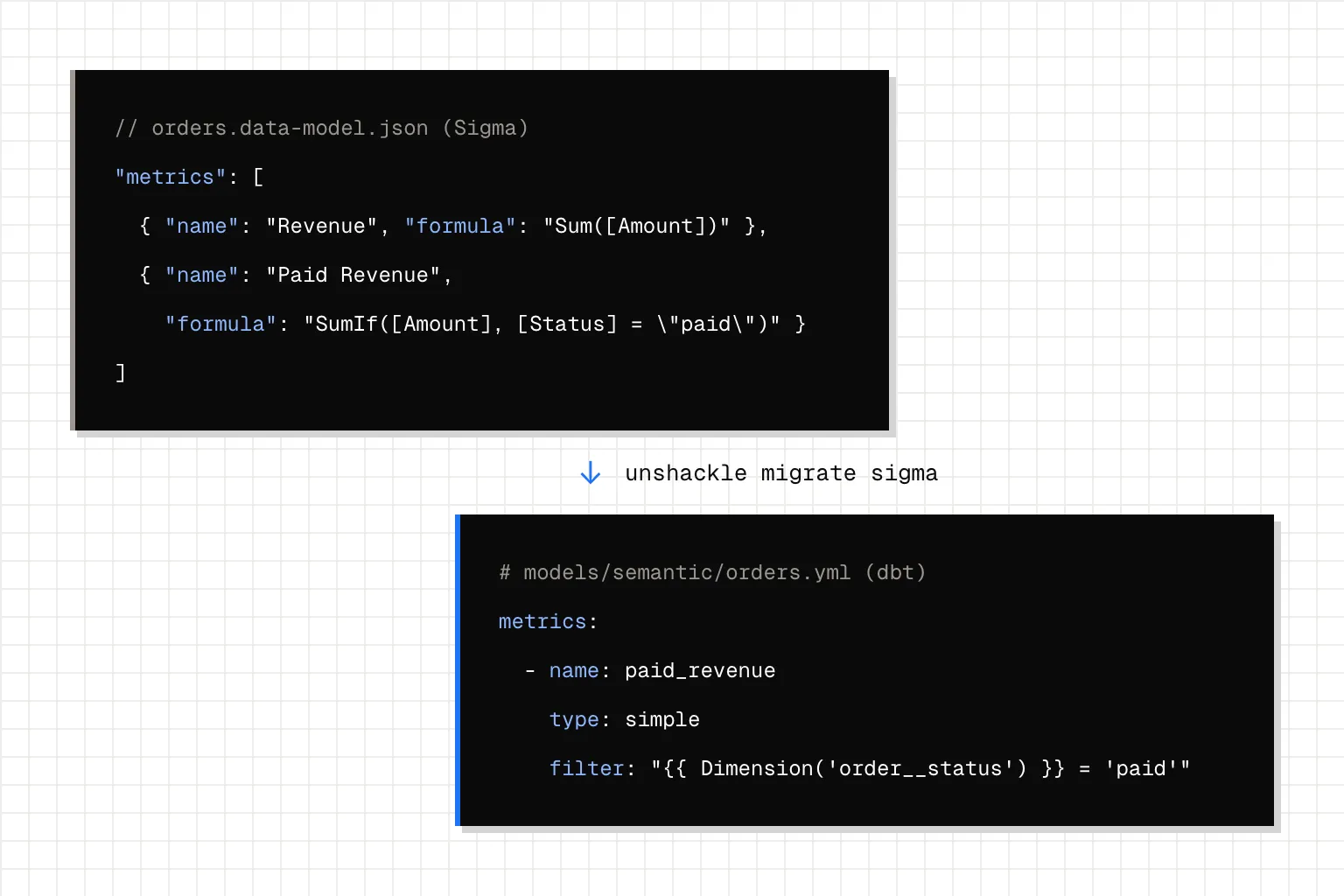
Sigma now exports data models and workbooks as code, but it's Sigma's own YAML, written for Sigma. Put the metrics in dbt instead, and every tool and agent that reads dbt's semantic manifest gets them too. That's how Sigma's own data team works: its semantic objects are "defined and version-controlled directly in SQL and Jinja" in dbt, then compiled into Sigma data models, Snowflake semantic views and Cortex agents. To move your model there, read it through Sigma's API and write MetricFlow YAML.
We did that with unshackle 0.2.0, the free, open-source CLI we built at Querio for moving BI tools into Git, released on November 11, 2026. It talked to a local mock of Sigma's REST API serving a retail data model and workbook we wrote, not to a Sigma account. We checked the numbers in dbt-core 1.12.6 and MetricFlow 0.213 on DuckDB.
Can you export Sigma data models and workbooks as code?
Yes, in Sigma's own format. A data model's code representation comes out of GET /v2/dataModels/{id}/spec as JSON or YAML. Since November 10, 2026, workbooks and reports as code are generally available too: "Pull a workbook or report down as YAML, commit it to Git, review the diff in a pull request." A native Git integration "is coming next, starting with data models." Our Sigma comparison covers how pushing a model back from that spec works.
Sigma's YAML or dbt? It comes down to who reads the metrics:
- Only Sigma reads them, and Sigma stays. Keep Sigma's YAML in Git. It's less work than a move.
- You're leaving Sigma, or agents and other tools need the same numbers. Put the metrics in dbt.
- You keep Sigma and run dbt Cloud. Put them in dbt. Sigma reads dbt metrics in workbooks through its dbt Semantic Layer integration.
- You keep Sigma on dbt Core. Sigma won't get the metrics: "The dbt Semantic Layer is not available for dbt Core integrations." Your Sigma users stay on Sigma's copy of each metric while everything else reads dbt's. Plan to keep two definitions in sync, or move to dbt Cloud.
How do you move a Sigma data model into dbt?
unshackle reads Sigma through its REST API only, and its README rates Sigma support "Early". You need client credentials created as or for an Admin (Administration > Developer access > Create new) and your Sigma cloud's API host, which Developer access shows. Then run it inside your dbt project:
pip install unshackle
export SIGMA_API_URL=https://aws-api.sigmacomputing.com
export SIGMA_CLIENT_ID=your-client-id
export SIGMA_CLIENT_SECRET=your-client-secret
cd your-dbt-project
unshackle check sigma
unshackle migrate sigma
Ours exited cleanly with "6 of 6 tiles in 1 dashboards have SQL". It writes MetricFlow YAML and Ossie semantic models to models/semantic/, policies to policies/, and the workbook as a Jupyter notebook. Here's what our data model became:
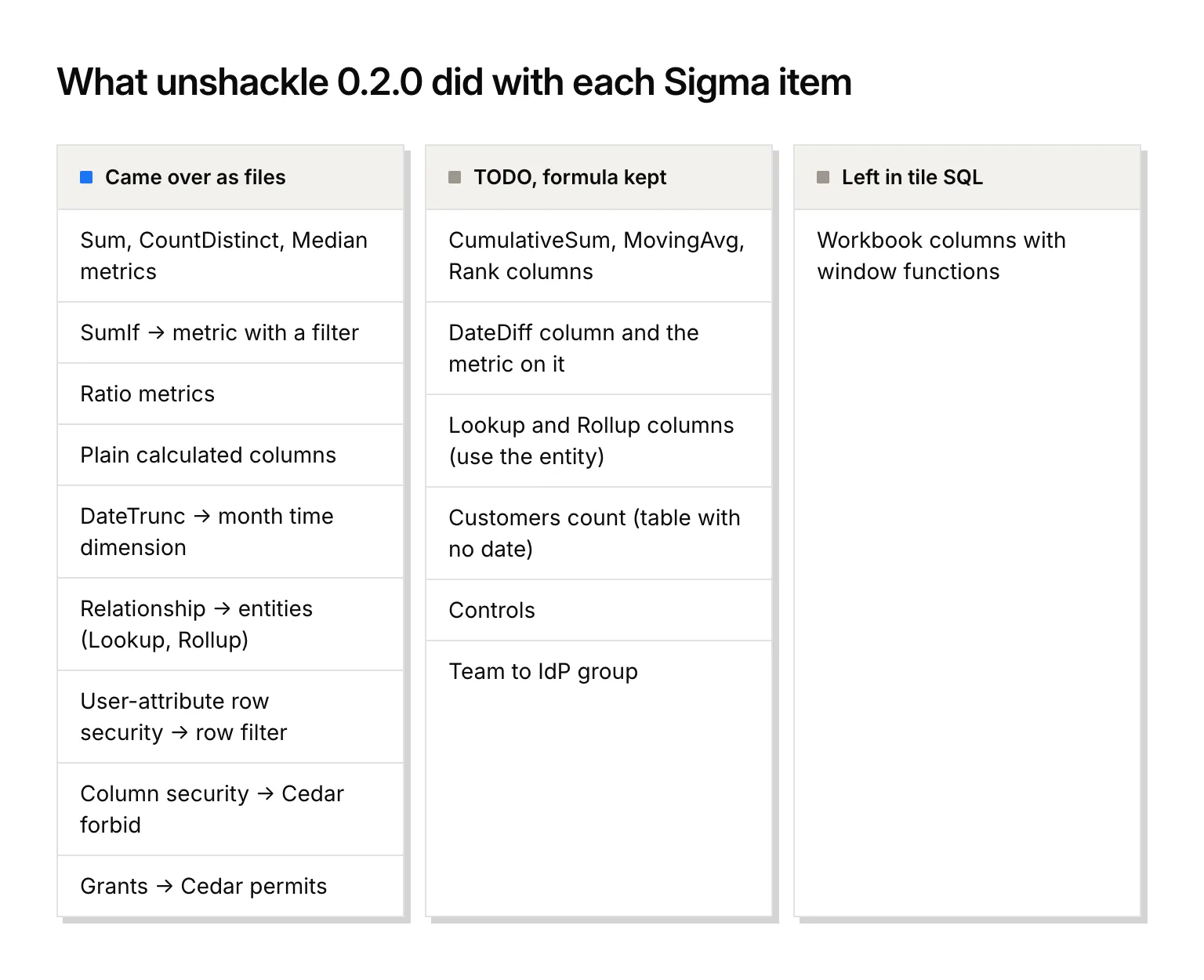
| In our Sigma data model | What unshackle wrote |
|---|---|
Revenue Sum, Orders CountDistinct, Median Order |
A measure and a simple metric each |
Paid Revenue SumIf([Amount], [Status] = "paid") |
A simple metric with filter: '{{ Dimension(''order__status'') }} = ''paid''' |
Average Order Value [Revenue] / [Orders], Discount Rate |
Ratio metrics, plus a sum_discount helper metric for the discount |
Customers CountDistinct([Customer Id]) on the customers table |
A TODO: that table has no date column, so MetricFlow has no time dimension for it |
Net Amount [Amount] - [Discount] and other plain calculated columns |
Dimensions with SQL, like expr: amount_usd - discount |
Order Month DateTrunc("month", [Created At]) |
A time dimension at month grain |
| The orders to customers relationship | Entities, so customer__name and customer__segment work as group-bys |
Row security [Region] = CurrentUserAttributeText("region") |
A row filter, predicate: region = {{ user.region }}, with no TODO |
| Column security on Discount, Finance only | A Cedar forbid on the column for anyone outside Group "Finance" |
| 4 workbook grants | 5 Cedar permits |
Check each sensitive column in Sigma, and add the rule yourself if no forbid was written.
Two setup steps, both explained in our LookML guide, stood between those files and working metrics:
- Pick a default date. Our orders table has three, and unshackle picks one only when there's exactly one, so the first run had 0 metrics live in MetricFlow. We wrote 2 lines (
defaults:andagg_time_dimension: created_at) and uncommented the blocks unshackle had generated. 6 of the 7 metrics on our orders table went live. The seventh waits on a DateDiff, below. - Add a time spine. unshackle doesn't write one, and
dbt parserefuses the metrics without it. Ours is 9 lines.
After that, dbt parse and mf validate-configs passed with 0 errors. We queried the 7 live metrics (our 6 plus the helper) by region, customer segment and year, and 21 of 21 results matched plain Python over the same CSVs. Revenue by region came to 1,310 for AMER, 2,900 for APAC and 3,500 for EMEA both ways.
From here, Querio reads the dbt project's semantic manifest as it is and keeps no second copy. Paid Revenue is the same number in Querio, in Slack and in any agent connected through Querio's MCP server, which is on every plan, Free included.
What happens to Sigma Lookup, Rollup and window columns?
None of these can be a Sigma metric: "Metric formulas do not support window functions or join functions." CumulativeSum, MovingAvg and Rank are window functions, and Lookup and Rollup are join functions. So they have to live in calculated columns. That's where we kept them, along with a DateDiff.
Lookup and Rollup cost us nothing. Both came back as TODOs that say what to do: "use the joined model's dimension via its entity". The relationship had already become entities. Our Lookup pulled each order's customer name, which is customer__name. Our Rollup summed each customer's orders, which is revenue by customer__name, and it matched Python for all six customers. We wrote 0 lines and deleted the two TODO blocks.
Window columns come back as a choice. Each of the three became a commented stub, formula kept:
# TODO(unshackle): dimension orders.cumulative_amount: Sigma column formula not translated (window function: compute it in the tile SQL) [sigma] CumulativeSum([Amount])
#   dimensions:
#   - name: cumulative_amount
#     type: categorical
#     label: Cumulative Amount
Our workbook also had a Running Revenue table with a CumulativeSum column. Its tile kept its SQL, a sum(...) over (...) window we wrote for the mock, and ran on DuckDB, ending at 7,710, our total revenue. On a real account the tile carries what Sigma generates, plus the same TODO we got: "add a cumulative/derived metric or a window in this SQL if it should live in the semantic layer".
So you decide per column: leave it in the tile, or make it a metric, which dbt can hold and a Sigma metric can't. We'd make a metric of any running total people quote in more than one place, and leave a rank of single orders in SQL. Our ThoughtSpot guide shows how to build a running-total metric that gets month totals right.
DateDiff doesn't convert, and neither does any metric built on it. Days To Ship came back as "function datediff() has no deterministic SQL translation", and Avg Days To Ship, which averages it, stayed a TODO. Write it yourself in your warehouse's SQL. On DuckDB that's an 8-line measure and metric:
  - name: days_to_ship
    agg: average
    expr: date_diff('day', created_at, shipped_at)

- name: avg_days_to_ship
  label: Avg Days To Ship
  type: simple
  type_params:
    measure: days_to_ship
Average days to ship came out at 1.86 for AMER, 3.33 for APAC and 1.57 for EMEA, the same as Python.
What happens to Sigma controls and team grants?
Controls come over as filters that filter nothing yet. Our Region (EMEA) and Order date (last 12 months) controls became notebook filters with those defaults, tied to no SQL. Each tile's SQL holds the value as a literal, with a TODO like the extracted SQL has the control's value at extract time baked in - replace that literal with :region. Until you swap each literal for the named bind, the Revenue by Region tile shows EMEA only, whatever the filter says.
Controls only come over through Sigma's workbook code representation (includeContents=true), a public beta since September 16, 2026. When it fails or comes back empty, unshackle rebuilds a thinner notebook with no layout and no controls at all.
Grants keep their teams but lose one permission level. Our 4 grants became 5 Cedar permits: edit became view plus edit, view stayed view, the grant to one member became a permit for that user, and explore became view, because "the policy model has no separate level". If your Sales team used explore to build its own analysis, decide what it gets now. Each team permit carries a TODO: "Sigma team; confirm it matches an IdP group of the same name".
FAQ
How much is left to do after unshackle runs?
unshackle todo lists every open item with its file and line: 37 on our first run, 26 after we set the default date and uncommented the generated blocks. Many show up twice, once in the MetricFlow file and once in the Ossie file, and an item you've finished counts until you delete its commented block.
How do you check the numbers against your own Sigma account?
Against Sigma's own SQL. unshackle keeps a raw copy of the SQL Sigma generates for each element, and unshackle verify runs the migrated SQL on your warehouse and compares the results with the cases you set up from it. Our Metabase guide shows how to write those cases. Before any of it, set your warehouse type under [datasources.warehouse] in unshackle.toml, or the semantic expressions get labelled ANSI SQL.