Business Intelligence
What Is an AI Harness? Why the Model Isn't the Product
The model drafts answers; the AI harness is the product that enforces data access, semantics, approvals, and audit for trusted analytics.
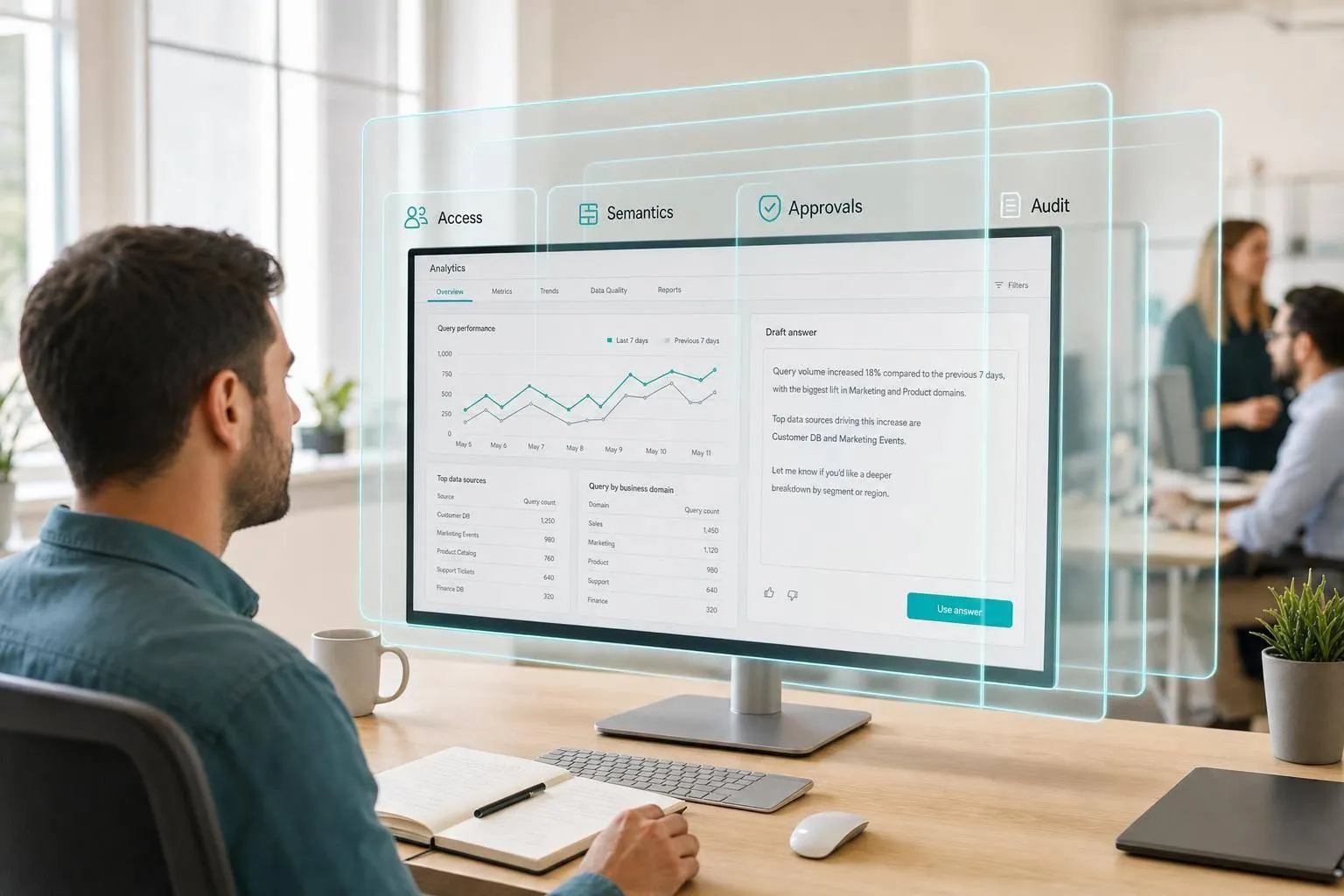
If you only judge an AI analytics tool by the model name, you're looking at the wrong layer. I’d focus on the software around the model, because that’s what decides whether SQL is safe to run, tied to the right data, and logged for review.
Here’s the short version:
- The model writes and reasons
- The harness connects, checks, runs, and logs
- The product value sits in data access, context, approvals, evals, and guardrails
- Without that layer, AI stays stuck in pilot mode
- 56% of leaders said genAI projects take 6–18 months to move from intake to production
Put simply: the model can draft an answer, but the harness decides whether that answer should touch your warehouse at all.
If I were sizing up an AI analytics tool for Snowflake, BigQuery, Redshift, or Postgres, I’d ask:
- Does it use live warehouse access instead of CSV exports?
- Does it follow my RBAC, row-level security, and masking rules?
- Does it read dbt models, metric definitions, and join logic?
- Can I inspect and edit the SQL or Python behind each answer?
- Does it support dry runs, linting, refusal rules, approvals, and audit logs?
- Does it map each session to a real user via SSO?
A plain way to think about it: the model is the brain, but the harness is the system that generates insights while keeping the work tied to your data, your rules, and your review process.
| Layer | Main job |
|---|---|
| Model | Turns a question into SQL, analysis steps, or plain-English output |
| Harness | Connects to data, checks permissions, validates queries, applies business definitions, and records what happened |
So when I read this piece, the main takeaway is clear: switching from Claude to GPT usually won’t fix bad analytics output. In most cases, the fix is better schema grounding, metric control, query checks, and review flows around the model.
That’s the lens I’d use for the rest of the article.
What Belongs in the Harness for Analytics
Tool calling, connectors, and execution layers
For analytics, the harness starts with warehouse connectors and execution control.
Connectors handle the nuts and bolts: auth, connection pooling, timeouts, and row limits. On top of them sit MCP servers or other tool servers. These expose controlled tools the model can call, like run_sql, fetch_schema, list_tables, inspect_job_status, and even notebook cell execution.
Here’s the basic flow: the model creates a structured tool call, the harness checks it, routes it to the right warehouse or notebook engine, retries if there’s a temporary failure, and sends a structured response back to the model. Credentials and raw data never enter the model's context[2][3]. The model only works from the schema, rows, and execution stats it gets back.
The same setup works for notebooks too. If an analyst runs a Python cell in Hex, Jupyter, or Databricks, the harness submits the cell, tracks the run status, collects outputs, and logs artifacts. That’s the part that turns a multi-step analysis into something repeatable instead of a one-off chat that vanishes the moment the window closes.
Execution is only one side of the harness. The other side is meaning.
Context, semantics, and trusted business definitions
Without shared definitions, the model can go off the rails fast. It might double-count revenue. It might define “active user” in a way that clashes with what the product team uses. The answer isn’t swapping in a different model. The answer is a governed definitions layer inside the harness.
That layer includes:
- dbt models and their lineage
- Central metric definitions like MRR and churn rate
- Canonical join graphs that avoid fan-out and many-to-many join traps
- Human-written docs that note caveats like “this table is only refreshed nightly” or “this metric excludes internal test accounts”
When this context is synced to GitHub alongside the dbt project, updates go through the same review and CI process the data team already uses. An analyst changes a definition once, and the AI uses that same definition across dashboards and notebooks. The model reads definitions; it doesn’t own them.
The harness should expose this context through queryable tools like get_metric_definition and get_join_recommendations, not by stuffing all of it into one static prompt. That keeps the model focused on the right context at the right time.
Once definitions are governed, the next step is making sure access stays under control.
Permissions, approvals, evals, and guardrails
Governance in an AI harness comes down to a few control points: identity, validation, approvals, and audit logs. Every AI session should map to a real user through SSO, such as Okta, Azure AD, or Google Workspace. And the harness should connect to the warehouse with that user’s existing roles, not a catch-all service account with broad access. If a finance analyst can’t query the HR schema on their own, the AI shouldn’t do it for them either[1].
These controls only work if they work together.
| Guardrail | What It Catches | How |
|---|---|---|
| Schema grounding | Invented tables or columns | Check against INFORMATION_SCHEMA |
| SQL linting | Dialect errors | SQLFluff or dialect-aware parsers |
| Dry run | Invalid query plans | Native EXPLAIN command |
| Semantic layer check | Metric or KPI drift | Reference dbt/MetricFlow definitions |
| Refusal rules | Missing data or definitions | Block execution, surface clear error |
| Audit trail | Untracked data access | Log user, SQL, model version, result metadata |
Approval flows cover the write side. If a user asks the AI to publish a metric or a shared query, the harness should create a proposed spec, send it to the right reviewers - analytics engineering, finance, compliance - and publish only after sign-off, with versioning and a changelog.
For healthcare and finance teams, this isn’t optional. It’s the mechanism that keeps AI-generated logic inside regulated change processes instead of letting it slip into production without review.
What is an AI harness? I build one live in less than 30 minutes
::: @iframe https://www.youtube.com/embed/ofS-4RRw9zw :::
AI Harness vs. Model: What Each Layer Actually Does
::: @figure 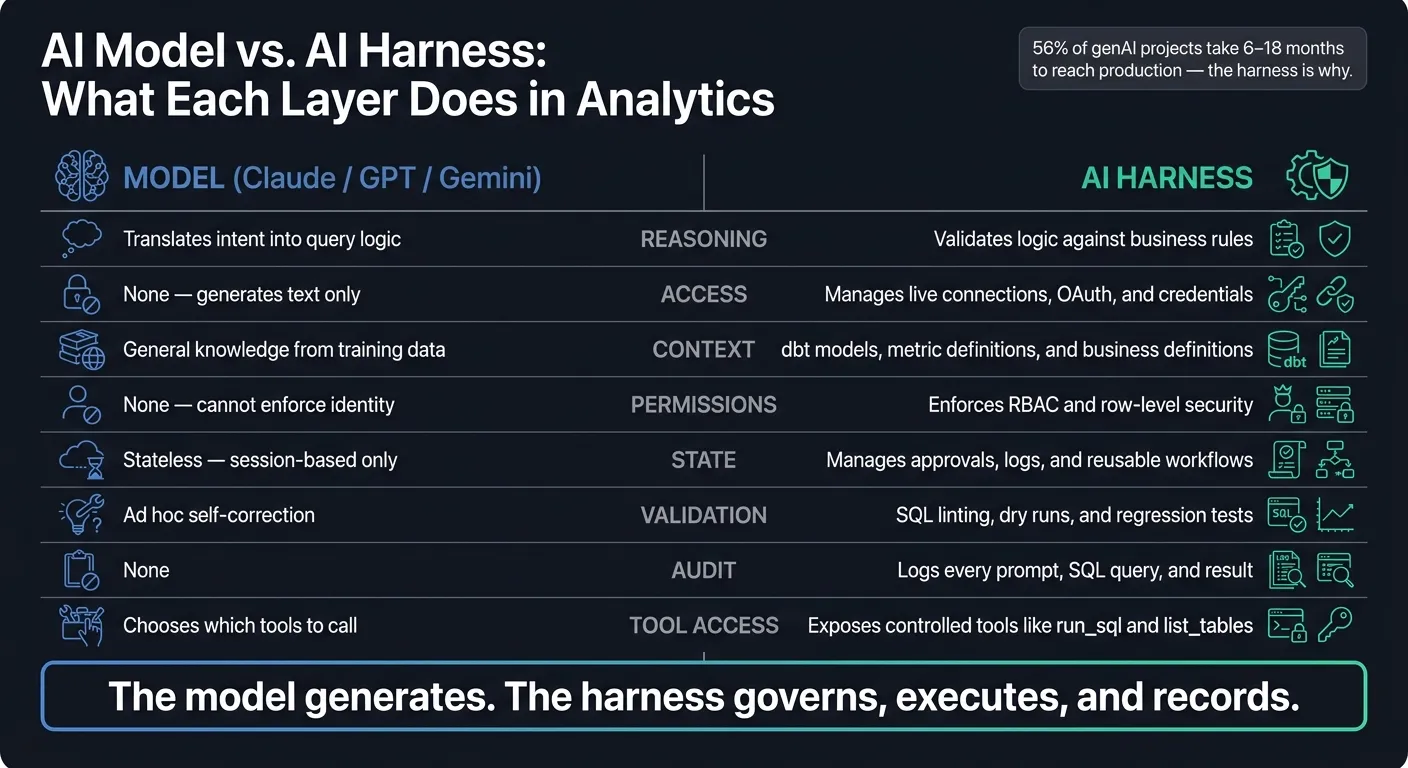 {AI Model vs. AI Harness: What Each Layer Does in Analytics}
:::
{AI Model vs. AI Harness: What Each Layer Does in Analytics}
:::
Where the model adds value
The model - whether that's Claude, GPT-4, or Gemini - is the reasoning engine. It takes your question, turns it into query logic, sums up results in plain English, and adjusts when the first pass misses the mark.
But here's the catch: the model is not the system integration layer. On its own, it doesn't connect to Snowflake, BigQuery, Redshift, or Postgres. It also can't enforce business definitions or user permissions.
Where the harness creates production value
The harness is what turns model output into something a data team can trust. It adds governance-first access, context, control, and audit logs. That means it can manage workflow state across sessions, send high-risk queries to human reviewers, and log every prompt, SQL statement, and result for audit. You can see this split most clearly in a live warehouse setup.
In practice, switching from Claude to GPT rarely fixes a broken analytics workflow. The model usually isn't the part that's failing. If the AI is double-counting revenue or joining the wrong tables, the fix is almost always in the harness: better metric definitions, schema grounding, and business context, not a different model.
Comparison table: model responsibilities vs. harness responsibilities
| Category | Model (Claude / GPT / Gemini) | AI Harness |
|---|---|---|
| Reasoning | Translates intent into query logic | Validates logic against business rules |
| Access | None - generates text only | Manages live connections, OAuth, and credentials |
| Context | General knowledge from training data | dbt models, metric definitions, and business definitions |
| Permissions | None - cannot enforce identity on its own | Enforces RBAC and row-level security |
| State | Stateless - session-based only | Manages approvals, logs, and reusable workflows |
| Validation | Ad hoc self-correction | SQL linting, dry runs, and regression tests |
| Audit | None | Logs every prompt, SQL query, and result |
| Tool access | Chooses which tools to call | Exposes controlled tools like run_sql and list_tables |
The model generates. The harness governs, executes, and records. Next, look at what a good harness looks like in a warehouse-native BI setup.
What a Good AI Harness Looks Like in a Warehouse-Native BI Setup
Once the model’s job is clear, the next step is figuring out what the harness needs to do in an actual warehouse workflow. In a warehouse-native BI setup, it should plug into live data, keep the logic open to inspection, and reuse shared definitions the team already trusts.
Live warehouse access instead of CSV exports
When data leaves the warehouse as an exported file, three things usually fall apart: lineage, permissions, and freshness. Warehouse-level row security and column masking stop applying, so sensitive fields like customer email addresses, transaction amounts, or PHI can end up in the wrong hands. On top of that, it becomes hard to trace which tables and transformations produced the export. And when a metric looks wrong, root-cause analysis turns into a slog.
A harness with live, read-only connections to Snowflake, BigQuery, Redshift, ClickHouse, or Postgres avoids that mess. Queries run straight against governed schemas, permissions are enforced at query time, and the same SQL can be run again later and checked against earlier results.
Here’s the clearest way to see the gap:
| CSV/Export Workflow | Warehouse-Native Harness | |
|---|---|---|
| Data freshness | Stale (point-in-time export) | Live (direct warehouse access) |
| Security | Broken (files leave the warehouse) | Governed (warehouse-enforced RLS/masking) |
| Lineage | Lost at export | Preserved in query references |
| Repeatability | Hard to reproduce | Re-runnable, version-controlled |
Inspectable SQL and Python, not black-box answers
If an analyst asks how revenue by product line trended last quarter, a good harness should return a chart and the SQL behind it. That includes the exact joins to dim_product, the date filters, and the revenue measure definition. From there, the analyst can open the query, switch gross revenue to net, exclude a certain SKU, or add a regional filter.
This matters just as much for teamwork as it does for debugging. If a business stakeholder pushes back on a number, the analyst can point to the logic itself instead of trying to defend a black-box answer. It also makes normal engineering work possible:
- Code review
- Pull requests
- Unit tests on key transformations
Interactive notebooks help a lot here. When charts refresh as SQL changes and cells stay connected, the whole process feels smooth instead of awkward.
That level of visibility turns answers into shared analytic work instead of private model output.
Shared context and self-serve that improve over time
The same idea carries over to shared context. A shared context layer is what separates a harness that gets better from one that forgets everything between sessions. It stores approved metric definitions, canonical joins between key tables, dbt model metadata, pre-approved queries, and policy rules. In many teams, all of that sits in Git and often in the same repository as the dbt project.
As analysts tighten queries and fix business logic, those changes can be proposed back into the context layer and reviewed before they’re committed. A good harness also logs prompts, queries, performance metrics, and failures so the team can improve tools, guardrails, and schemas over time. The context lives in version-controlled SQL, Markdown, and Python that people can inspect and reuse.
That’s what makes self-serve dependable. Users are not asking the model to invent revenue logic on the fly. They’re using an approved definition the data team already owns.
Buyer-Builder Checklist and Conclusion
Checklist for evaluating an AI analytics harness
Before you commit to any AI analytics setup, check the harness - not just the model. That’s how you tell the difference between a slick demo and something your team can use in the warehouse every day.
- Does it query the warehouse directly and inherit existing RBAC, row-level security, and column masking at query time?
- Test it with a simple prompt: ask a user without access to query salary data. Does it refuse?
On semantic context:
- Does it read your dbt models, metric definitions, or semantic layer, or is it guessing your business logic from scratch?
- If you update a metric definition in dbt, does the harness pick up that change on its own?
On transparency and auditability:
- Can analysts see, edit, and re-run the exact SQL or Python behind every answer?
- Are there audit logs that show who asked what, which query ran, and what result came back?
- Does the system include approval flows for high-risk actions, such as PHI queries or bulk exports?
- When data is unavailable or out of scope, does it say that plainly instead of inventing a number?
Checklist for building one internally or with a platform
If a setup clears that first checklist, the next step is deciding whether to build the harness yourself or buy one that already works with your stack. For a 1–5 person data team, this usually comes down to time-to-value, maintenance, governance, and engineering bandwidth.
If you're building, start small and practical. Use live, read-only connectors. Set canonical definitions for your 5–10 most important KPIs, like ARR, MRR, and churn. And run SQL dry runs with EXPLAIN so you can catch expensive scans before they touch the warehouse.
If you're buying, look closely at where the platform gets its context. It should pull from the sources you already use - dbt, your metrics layer, and your Git repo - instead of making a separate silo. Also check that Slack or Teams questions connect back to durable, inspectable artifacts, like saved queries, notebook cells, or dashboards. For sensitive operations, approval flows should be configurable in the harness itself, not taped on later.
| Component | Day 1 Need | Why It Matters Now |
|---|---|---|
| Live warehouse connectors | Critical | Stale exports break lineage and permissions |
| Semantic context (dbt/metrics layer) | Critical | Without it, the model guesses metric logic every session |
| Runtime permission inheritance | Critical | Protects PII and satisfies compliance requirements |
| SQL dry runs / basic evals | High | Catches broken syntax before it reaches production |
| Audit logs | High | Required for compliance and incident investigation |
| Approval flows for high-risk queries | Conditional | Essential for exec-facing or sensitive data queries |
Conclusion: the harness is the product surface
A strong harness turns a model into a BI product people can use. A weak one leaves you with a smarter chat box.
The model does the reasoning. The harness decides whether that reasoning reaches your data in a way that is correct, safe, and repeatable. That’s the part people often miss. Two teams can use different models - Claude on one side, GPT on the other - and still end up with trusted, governed analytics if both teams run on the same mature harness. On the flip side, a team can aim a strong model at CSV exports with no semantic layer and no guardrails and still get answers nobody trusts.
Foundation model choice matters, but mostly at the edges. The harness is what shapes day-to-day use. It’s what analysts work with, what stakeholders challenge when a number looks off, and what a compliance team reviews when something goes wrong. That’s where the money and attention should go.
FAQs
::: faq
How is an AI harness different from the model?
An AI harness is the production layer around a model that makes it dependable and governed for analytics.
It gives the model the right business context, applies permissions and row-level security, pulls the correct schema, sets up workflows with tools, checks outputs, and adds guardrails like SQL validation and human approval.
The model itself is just the language engine. It generates draft reasoning and candidate queries.
Put simply: the model is the commodity; the harness is the product. :::
::: faq
What should I check in an AI analytics harness?
Check that the model runs ONLY through bounded orchestration and tool adapters, with explicit permissions, timeouts, and clear read/write separation.
Add validation gates before execution. That means SQL parsing and schema checks, resource limits, dry runs, row-count sanity checks, and human approval for risky actions.
Also verify that the setup includes:
- a governed semantic/context layer
- warehouse-enforced RBAC
- visible and editable SQL/Python
- live read-only warehouse connections
- audit logs
- trace-level observability
- evaluation and quality gates
This is the basic safety net. Without it, giving a model direct access to data systems is a bit like handing over car keys with no brakes check, no dashboard, and no paper trail. :::
::: faq
Can a strong harness make model choice less important?
Yes. In production, model failures usually come from weak orchestration, unclear context, or missing guardrails more than from the model itself.
A strong harness moves reliability away from the model alone and into the system design. It does that through governed semantic layers, strict tool contracts, and validation gates that keep results consistent and auditable across the models underneath. :::